Switches TOYOTA YARIS 2021 Owners Manual
[x] Cancel search | Manufacturer: TOYOTA, Model Year: 2021, Model line: YARIS, Model: TOYOTA YARIS 2021Pages: 568, PDF Size: 110.34 MB
Page 9 of 568
9
YARIS(HB) Owner's Manual_Europe_MK0001_en
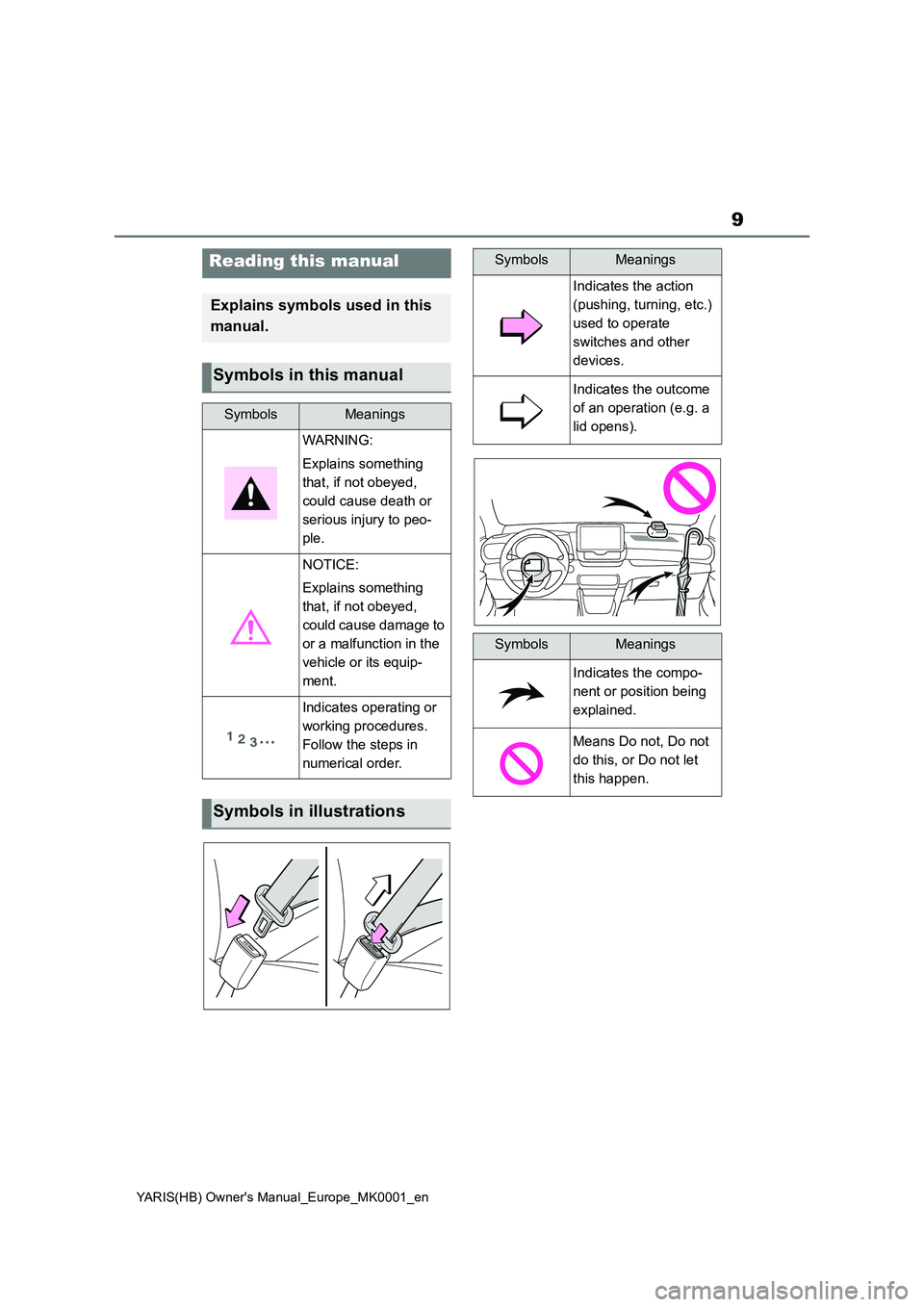
Reading this manual
Explains symbols used in this
manual.
Symbols in this manual
SymbolsMeanings
WARNING:
Explains something
that, if not obeyed,
could cause death or
serious injury to peo-
ple.
NOTICE:
Explains something
that, if not obeyed,
could cause damage to
or a malfunction in the
vehicle or its equip-
ment.
Indicates operating or
working procedures.
Follow the steps in
numerical order.
Symbols in illustrations
SymbolsMeanings
Indicates the action
(pushing, turning, etc.)
used to operate
switches and other
devices.
Indicates the outcome
of an operation (e.g. a
lid opens).
SymbolsMeanings
Indicates the compo-
nent or position being
explained.
Means Do not, Do not
do this, or Do not let
this happen.
Page 16 of 568
16
YARIS(HB) Owner's Manual_Europe_MK0001_en
Pictorial index
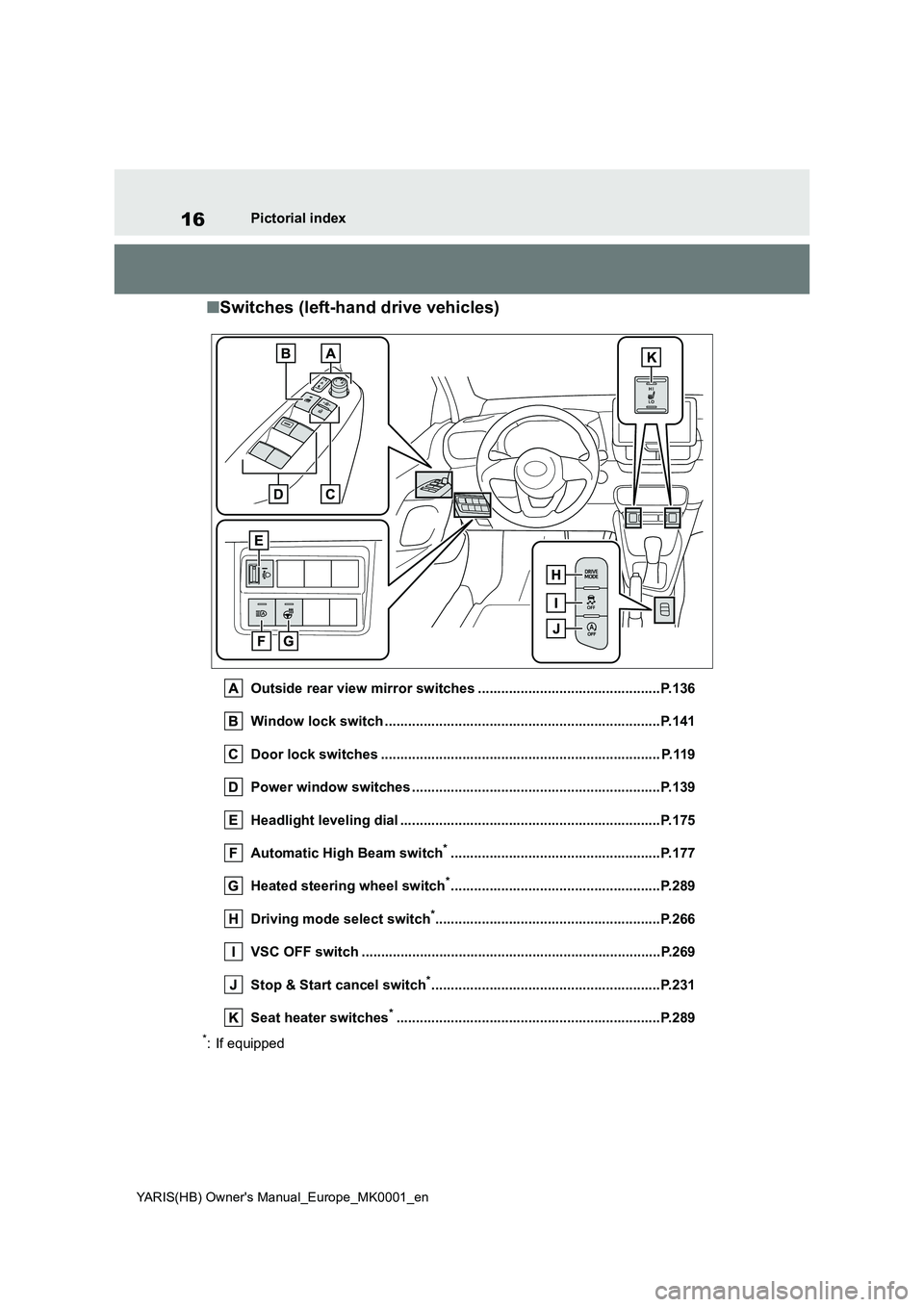
■Switches (left-hand drive vehicles)
Outside rear view mirror switches ...............................................P.136
Window lock switch .......................................................................P.141
Door lock switches ........................................................................ P.119
Power window switches ................................................................P.139
Headlight leveling dial ...................................................................P.175
Automatic High Beam switch
*......................................................P.177
Heated steering wheel switch
*......................................................P.289
Driving mode select switch
*..........................................................P.266
VSC OFF switch .............................................................................P.269
Stop & Start cancel switch
*...........................................................P.231
Seat heater switches
*....................................................................P.289
*: If equipped
Page 17 of 568
17
YARIS(HB) Owner's Manual_Europe_MK0001_en
Pictorial index
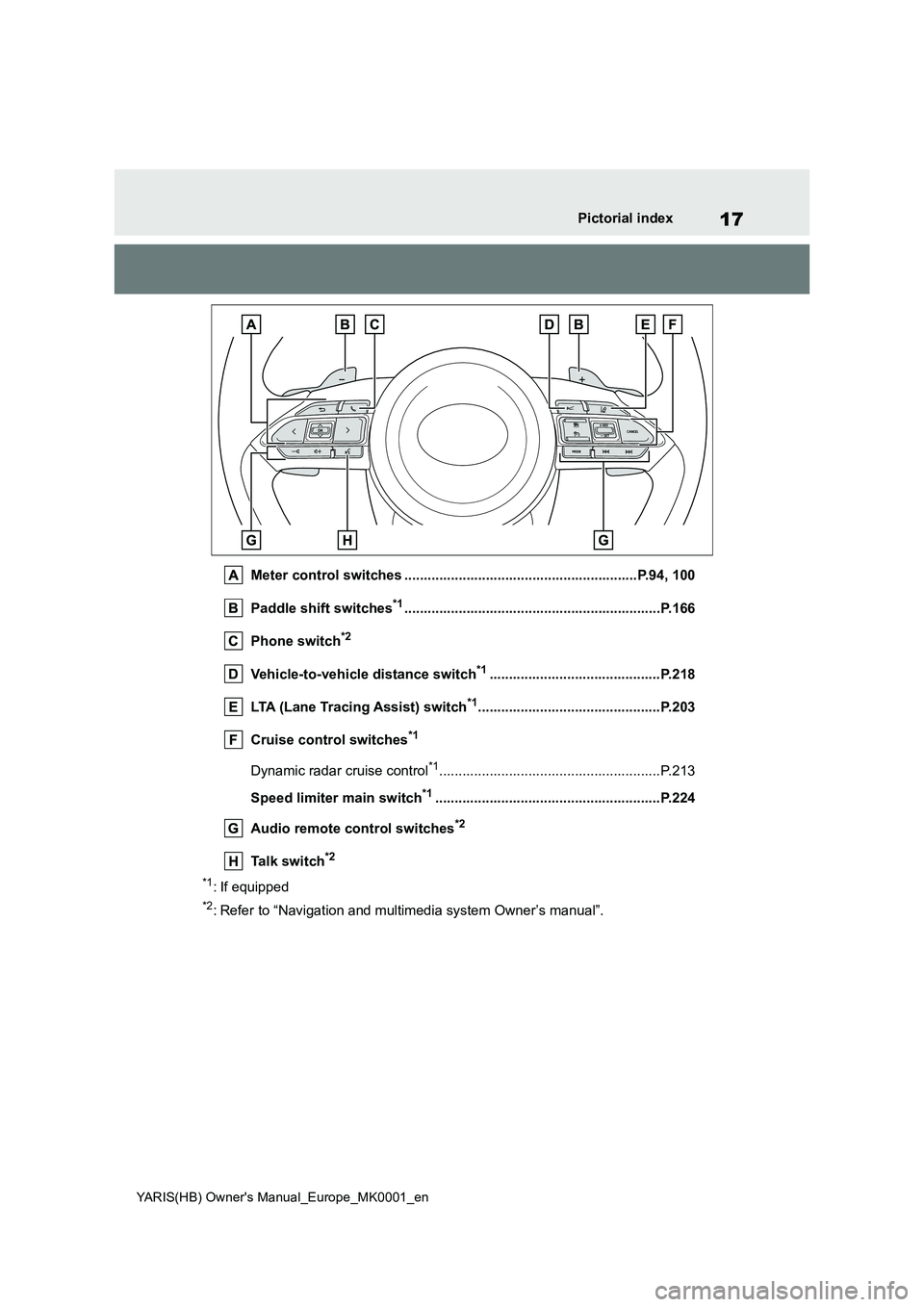
Meter control switches ............................................................P.94, 100
Paddle shift switches*1..................................................................P.166
Phone switch*2
Vehicle-to-vehicle distance switch*1............................................P.218
LTA (Lane Tracing Assist) switch*1...............................................P.203
Cruise control switches*1
Dynamic radar cruise control*1.........................................................P.213
Speed limiter main switch*1..........................................................P.224
Audio remote control switches*2
Talk switch*2
*1: If equipped
*2: Refer to “Navigation and multimedia system Owner’s manual”.
Page 23 of 568
23
YARIS(HB) Owner's Manual_Europe_MK0001_en
Pictorial index
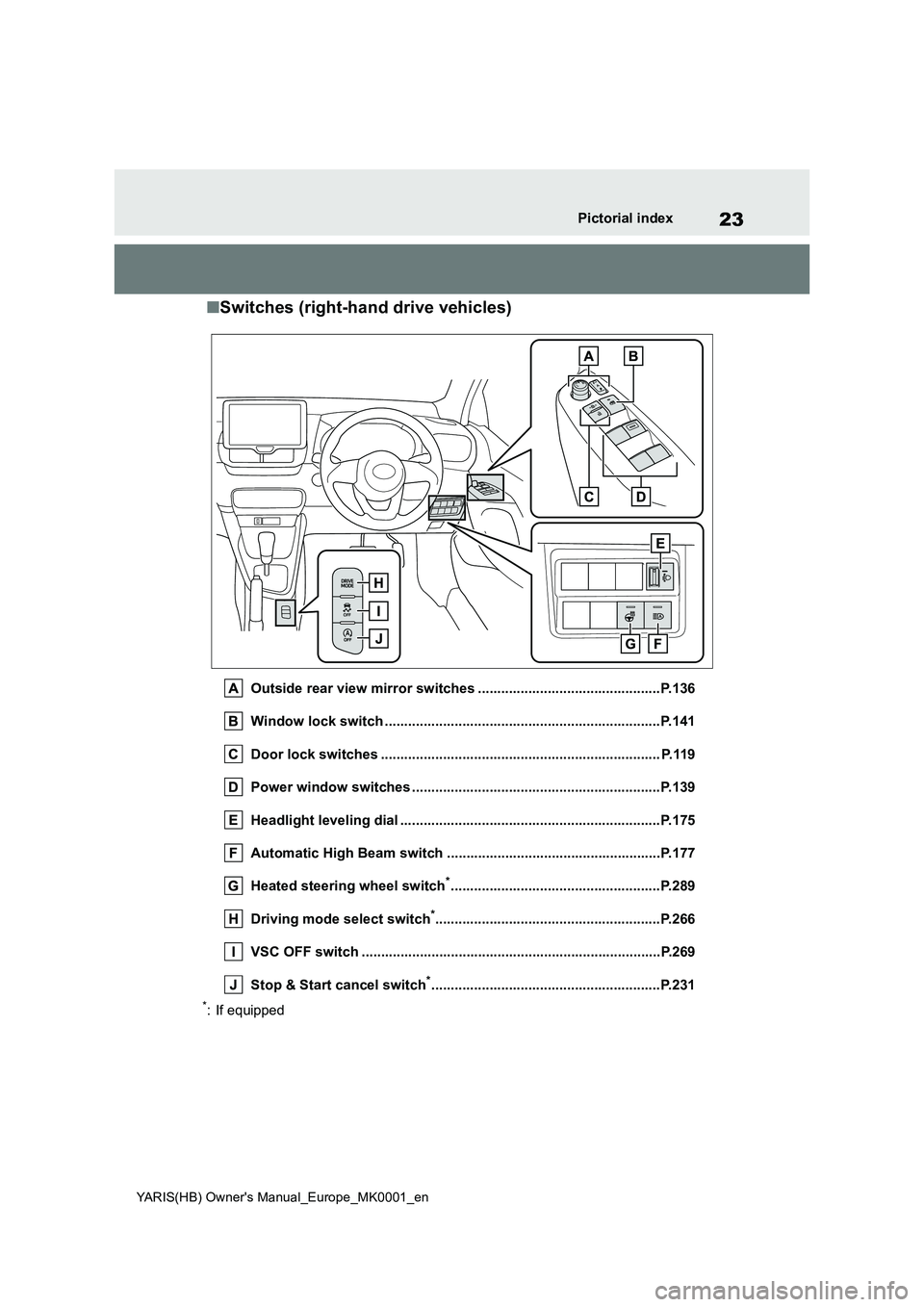
■Switches (right-hand drive vehicles)
Outside rear view mirror switches ...............................................P.136
Window lock switch .......................................................................P.141
Door lock switches ........................................................................ P.119
Power window switches ................................................................P.139
Headlight leveling dial ...................................................................P.175
Automatic High Beam switch .......................................................P.177
Heated steering wheel switch
*......................................................P.289
Driving mode select switch
*..........................................................P.266
VSC OFF switch .............................................................................P.269
Stop & Start cancel switch
*...........................................................P.231
*: If equipped
Page 24 of 568
24
YARIS(HB) Owner's Manual_Europe_MK0001_en
Pictorial index
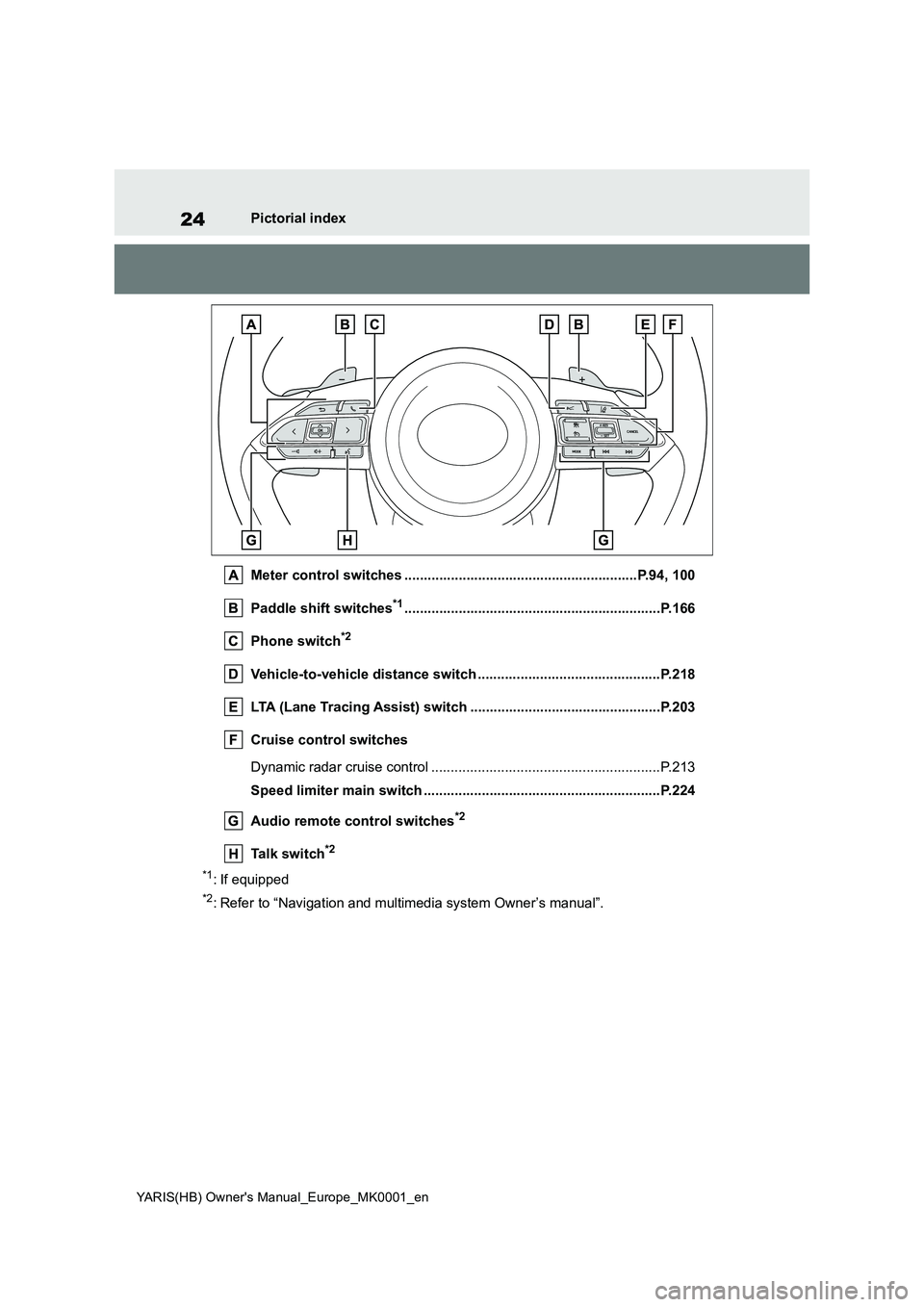
Meter control switches ............................................................P.94, 100
Paddle shift switches*1..................................................................P.166
Phone switch*2
Vehicle-to-vehicle distance switch ...............................................P.218
LTA (Lane Tracing Assist) switch .................................................P.203
Cruise control switches
Dynamic radar cruise control ...........................................................P.213
Speed limiter main switch .............................................................P.224
Audio remote control switches*2
Talk switch*2
*1: If equipped
*2: Refer to “Navigation and multimedia system Owner’s manual”.
Page 94 of 568
94
YARIS(HB) Owner's Manual_Europe_MK0001_en
2-1. Instrument cluster
control switch.
■Liquid crystal display
Small spots or light spots may appear on the display. This phenomenon is
characteristic of liquid crystal displays, and there is no problem continuing to use the display.
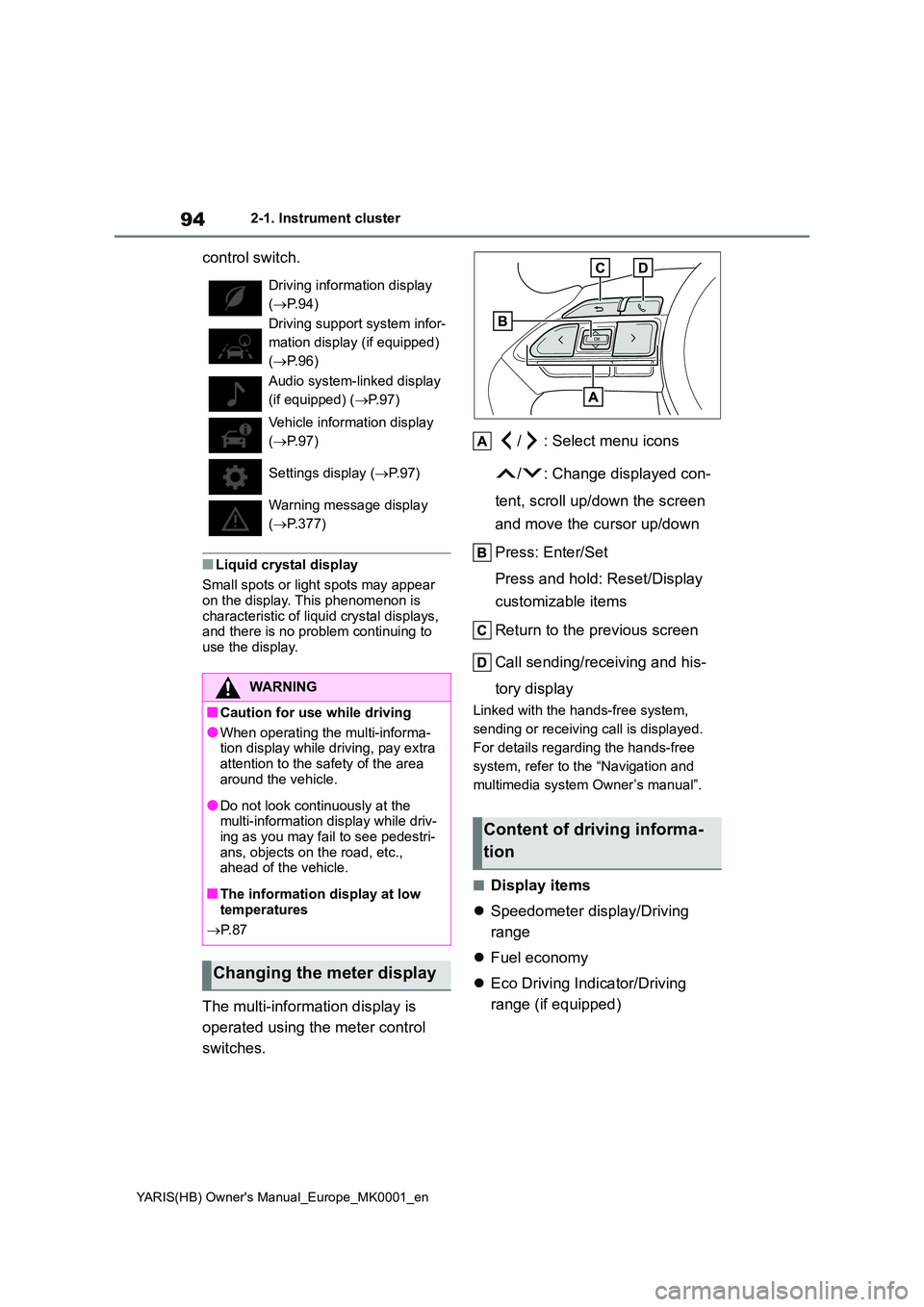
The multi-information display is
operated using the meter control
switches.
/ : Select menu icons
/ : Change displayed con-
tent, scroll up/down the screen
and move the cursor up/down
Press: Enter/Set
Press and hold: Reset/Display
customizable items
Return to the previous screen
Call sending/receiving and his-
tory display
Linked with the hands-free system,
sending or receiving call is displayed.
For details regarding the hands-free
system, refer to the “Navigation and
multimedia system Owner’s manual”.
■Display items
z Speedometer display/Driving
range
z Fuel economy
z Eco Driving Indicator/Driving
range (if equipped)
Driving information display
( →P.94)
Driving support system infor-
mation display (if equipped)
( →P.96)
Audio system-linked display
(if equipped) ( →P.97)
Vehicle information display
( →P.97)
Settings display ( →P. 9 7 )
Warning message display
( →P.377)
WARNING
■Caution for use while driving
●When operating the multi-informa- tion display while driving, pay extra
attention to the safety of the area around the vehicle.
●Do not look continuously at the multi-information display while driv-ing as you may fail to see pedestri-
ans, objects on the road, etc., ahead of the vehicle.
■The information display at low temperatures
→ P. 8 7
Changing the meter display
Content of driving informa-
tion
Page 97 of 568
97
2
YARIS(HB) Owner's Manual_Europe_MK0001_en
2-1. Instrument cluster
Vehicle status information and indicators
zCompass display (heading-up
display)
■Route guidance to destination dis-
play
When the route guidance to destination
display is enabled on the head-up dis-
play, it will not be displayed on the multi-
information display. (→P.105)
Select to enable selection of an
audio source or track on the meter
using the meter control switches.
This menu icon can be set to be dis-
played/not displayed in .
■Drive information
2 items that are selected using the
“Drive Info Items” setting (average
speed, distance and total time) can
be displayed vertically.
The displayed information changes
according to the “Drive Info Type”
setting (since the system was
started or between resets). (→P. 9 7 )
Use the displayed information as a ref-
erence only.
Following items will be displayed.
z“Trip”
• “Average Speed”: Displays the aver-
age vehicle speed since engine start*
• “Distance”: Displays the distance
driven since engine start*
• “Total Time”: Displays the elapsed time since engine start
*
*
: These items are reset each time the
engine stops.
z“Total”
• “Average Speed”: Displays the aver-
age vehicle speed since the display
was reset
*
• “Distance”: Displays the distance
driven since the display was reset*
• “Total Time”: Displays the elapsed
time since the display was reset*
*
: To reset, display the desired item and
press and hold the meter control
switch.
■Meter display settings that can
be changed
zClock setting (vehicles without
navigation/multimedia system)
→P. 8 8
zLanguage
Select to change the language dis-
played.
zUnits
Select to change the units of measure
displayed.
zEco Driving Indicator Light (if
equipped)
Select to enable/disable the Eco Driv-
ing Indicator Light.
z
• Fuel economy display
Select to change the average fuel con-
sumption display between after
Audio system-linked dis-
play (if equipped)
Vehicle information display
Settings display
Page 98 of 568
98
YARIS(HB) Owner's Manual_Europe_MK0001_en
2-1. Instrument cluster
start/after reset/after refuel. ( →P.95)
z (if equipped)
Select to display/not display the audio
system linked display.
z
Select to change the displayed content
of the following:
• Drive information type
Select to change the drive information
type display between after start/after
reset.
• Drive information items
Select to set the first and second items
of the drive information display to any of
the following: average vehicle
speed/distance/elapsed time.
z Pop-up display
Select to enable/disable pop-up dis-
plays for each relevant system.
z Multi-information display off
Select to turn the multi-information dis-
play off.
To turn the multi-information display on
again, press any of the following meter
control switches
//// /.
z Default setting
Select to reset the meter display set-
tings to the default setting.
■Vehicle functions and settings
that can be changed
→ P. 4 2 2
■Suspension of the settings display
●Some settings cannot be changed while driving. When changing set-
tings, park the vehicle in a safe place.
●If a warning message is displayed, operation of the settings display will
be suspended.
z Stop & Start system operation
time (after start)/status notifica-
tion
Displays the current amount of time the
engine has been stopped by the opera-
tion of the Stop & Start system.
Also shows the status of the Stop &
Start system with a pop-up display.
( →P.234)
zStop & Start system settings
The length of time of the Stop & Start
system will operate when the “A/C”
switch of the air conditioning system is
on can be set to 2 different levels in
of the multi-information display.
WARNING
■Cautions during setting up the display
If the engine is running when chang- ing the display settings, ensure that the vehicle is parked in a place with
adequate ventilation. In a closed area such as a garage, exhaust gases including harmful carbon monoxide
(CO) may collect and enter the vehi- cle. This may lead to death or a seri-ous health hazard.
NOTICE
■During setting up the display
To prevent battery discharge, ensure
that the engine is running while set- ting up the display features.
Stop & Start system infor-
mation (if equipped)
Page 100 of 568
100
YARIS(HB) Owner's Manual_Europe_MK0001_en
2-1. Instrument cluster
control switch.
■Liquid crystal display
Small spots or light spots may appear on the display. This phenomenon is
characteristic of liquid crystal displays, and there is no problem continuing to use the display.
The multi-information display is
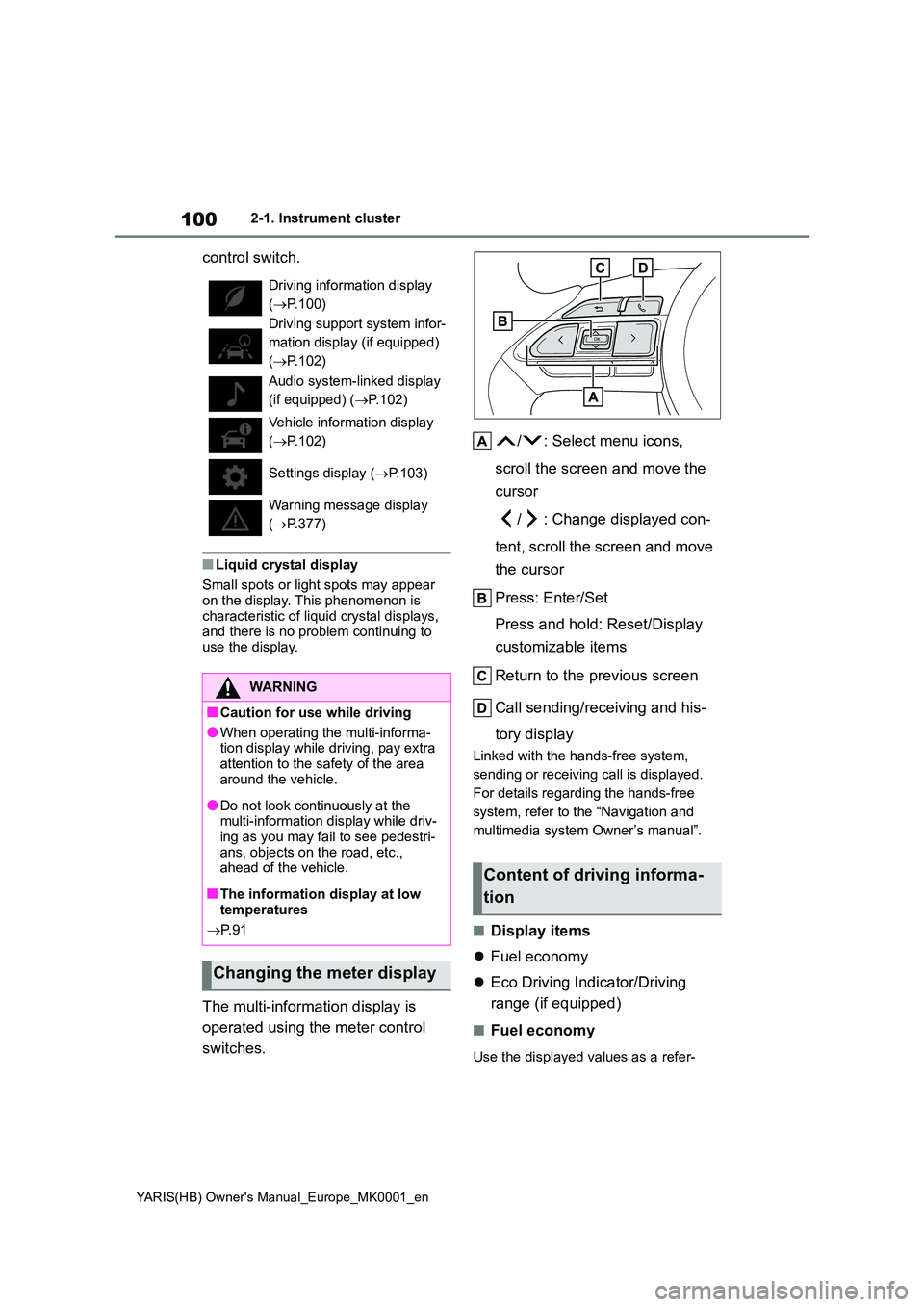
operated using the meter control
switches.
/ : Select menu icons,
scroll the screen and move the
cursor
/ : Change displayed con-
tent, scroll the screen and move
the cursor
Press: Enter/Set
Press and hold: Reset/Display
customizable items
Return to the previous screen
Call sending/receiving and his-
tory display
Linked with the hands-free system,
sending or receiving call is displayed.
For details regarding the hands-free
system, refer to the “Navigation and
multimedia system Owner’s manual”.
■Display items
z Fuel economy
z Eco Driving Indicator/Driving
range (if equipped)
■Fuel economy
Use the displayed values as a refer-
Driving information display
( →P.100)
Driving support system infor-
mation display (if equipped)
( →P.102)
Audio system-linked display
(if equipped) ( →P.102)
Vehicle information display
( →P.102)
Settings display ( →P.103)
Warning message display
( →P.377)
WARNING
■Caution for use while driving
●When operating the multi-informa- tion display while driving, pay extra
attention to the safety of the area around the vehicle.
●Do not look continuously at the multi-information display while driv-ing as you may fail to see pedestri-
ans, objects on the road, etc., ahead of the vehicle.
■The information display at low temperatures
→ P. 9 1
Changing the meter display
Content of driving informa-
tion
Page 102 of 568
102
YARIS(HB) Owner's Manual_Europe_MK0001_en
2-1. Instrument cluster
minate.
At this time, the Eco Driving Indicator
Light will turn off.
Zone of Eco driving
zDriving range
Displays driving range with remaining
fuel. Use the displayed values as a ref-
erence only.
This distance is computed based on
your average fuel consumption. As a
result, the actual distance that can be
driven may differ from that displayed.
When only a small amount of fuel is
added to the tank, the display may not
be updated.
When refueling, turn the engine switch
off. If the vehicle is refueled without
turning the engine switch off, the dis-
play may not be updated.
■Eco Driving Indicator
Eco Driving Indicator will not operate
under the following conditions:
●The shift lever is in any position other
than D.
●A paddle shift switch is operated. (If
equipped)
●The driving mode is set to power
mode.
●The vehicle speed is approximately
130 km/h (80 mph) or higher.
■Driving support system infor-
mation
Select to display the operational
status of the following systems:
zLTA (Lane Tracing Assist) (if equipped) (→P.203)
zDynamic radar cruise control (if
equipped) (→P.213)
■Navigation system-linked dis-
play (if equipped)
Select to display the following navi-
gation system-linked information:
zRoute guidance to destination
zCompass display (heading-up
display)
■Route guidance to destination dis-
play
When the route guidance to destination
display is enabled on the head-up dis-
play, it will not be displayed on the multi-
information display. (→P.105)
Select to enable selection of an
audio source or track on the meter
using the meter control switches.
This menu icon can be set to be dis-
played/not displayed in .
■Drive information
2 items that are selected using the
“Drive Info Items” setting (average
speed, distance and total time) can
be displayed vertically.
The displayed information changes
according to the “Drive Info Type”
setting (since the system was
started or between resets).
Driving support system
information display
Audio system-linked dis-
play (if equipped)
Vehicle information display