locking TOYOTA YARIS 2022 Owner's Manual
[x] Cancel search | Manufacturer: TOYOTA, Model Year: 2022, Model line: YARIS, Model: TOYOTA YARIS 2022Pages: 590, PDF Size: 128.6 MB
Page 145 of 590
143
3
HV Owner's Manual_Europe_M52N30_en
3-2. Opening, closing and locking the doors
Before driving
switch modes are changed.
●Do not leave the electronic key on top of the instrument panel or near the
door pockets when exiting the vehicle. Depending on the radio wave recep-tion conditions, it may be detected by
the antenna outside the cabin and the door will become lockable from the outside, possibly trapping the elec-
tronic key inside the vehicle.
●As long as the electronic key is within
the effective range, the doors may be locked or unlocked by anyone. How-ever, only the doors detecting the
electronic key can be used to unlock the vehicle.
●Even if the electronic key is not inside the vehicle, it may be possible to start the hybrid system if the electronic key
is near the window.
●The doors may unlock or lock if a
large amount of water splashes on the door handle, such as in the rain or in a car wash when the electronic key is
within the effective range. (The doors will automatically be locked after approximately 30 seconds if the doors
are not opened and closed.)
●If the wireless remote control is used
to lock the doors when the electronic key is near the vehicle, there is a pos-sibility that the door may not be
unlocked by the entry function. (Use the wireless remote control to unlock the doors.)
●Touching the door lock or unlock sen-sor while wearing gloves may prevent
lock or unlock operation.
●When the lock operation is performed
using the lock sensor, recognition sig- nals will be shown up to two consecu-tive times. After this, no recognition
signals will be given.
●If the door handle becomes wet while
the electronic key is within the effec- tive range, the door may lock and unlock repeatedly. In that case, follow
the following correction procedures to wash the vehicle:
• Place the electronic key in a location 2
m (6 ft.) or more away from the vehi- cle. (Take care to ensure that the key is not stolen.)
• Set the electronic key to battery-sav- ing mode to disable the smart entry & start system. ( P.141)
●If the electronic key is inside the vehi- cle and a door handle becomes wet
during a car wash, a message may be shown on the multi-information dis-play and a buzzer will sound outside
the vehicle. To turn off the alarm, lock all the doors.
●The lock sensor may not work prop-erly if it comes into contact with ice, snow, mud, etc. Clean the lock sensor
and attempt to operate it again.
●A sudden handle operation or a han-
dle operation immediately after enter- ing the effective range may prevent the doors from being unlocked. Touch
the door unlock sensor and check that the doors are unlocked before pulling the door handle again.
●If there is another electronic key in the detection area, it may take slightly lon-
ger to unlock the doors after the door handle is gripped.
■When the vehicle is not driven for extended periods
●To prevent theft of the vehicle, do not leave the electronic key within 2 m (6
ft.) of the vehicle.
●The smart entry & start system can be
deactivated in advance. ( P.431)
●Setting the electronic key to battery-
saving mode helps to reduce key bat- tery depletion. ( P.141)
■To operate the system properly
Make sure to carry the electronic key
when operating the system. Do not get the electronic key too close to the vehi-cle when operating the system from the
outside of the vehicle. Depending on the position and holding condition of the electronic key, the key
may not be detected correctly and the system may not operate properly. (The
Page 146 of 590
144
HV Owner's Manual_Europe_M52N30_en
3-2. Opening, closing and locking the doors
alarm may go off accidentally, or the
door lock prevention function may not operate.)
■If the smart entry & start system does not operate properly
●Locking and unlocking the doors: P. 4 0 8
●Starting the hybrid system: P.408
■Customization
Some functions can be customized.
( P.431)
■If the smart entry & start system has been deactivated in a custom-ized setting
●Locking and unlocking the doors: Use the wireless remote control or
mechanical key. ( P.133, 408)
●Starting the hybrid system and chang-
ing power switch modes: P. 4 0 8
●Stopping the hybrid system: P. 1 7 7
■Certification for the smart entry &
start system
P. 4 9 8
WARNING
■Caution regarding interference
with electronic devices
●People with implantable cardiac pacemakers, cardiac resynchroni-
zation therapy-pacemakers or implantable cardioverter defibrilla-tors should maintain a reasonable
distance between themselves and the smart entry & start system antennas. ( P.140)
The radio waves may affect the operation of such devices. If neces-sary, the entry function can be dis-
abled. Ask any authorized Toyota retailer or Toyota authorized repairer, or any reliable repairer for
details, such as the frequency of radio waves and timing of the emit-ted radio waves. Then, consult your
doctor to see if you should disable the entry function.
●Users of any electrical medical device other than implantable car-diac pacemakers, cardiac resyn-
chronization therapy-pacemakers or implantable cardioverter defibril-lators should consult the manufac-
turer of the device for information about its operation under the influ-ence of radio waves.
Radio waves could have unex- pected effects on the operation of such medical devices.
Ask any authorized Toyota retailer or Toyota authorized repairer, or any reli-
able repairer for details on disabling the entry function.
Page 156 of 590
154
HV Owner's Manual_Europe_M52N30_en
3-4. Adjusting the steering wheel and mirrors
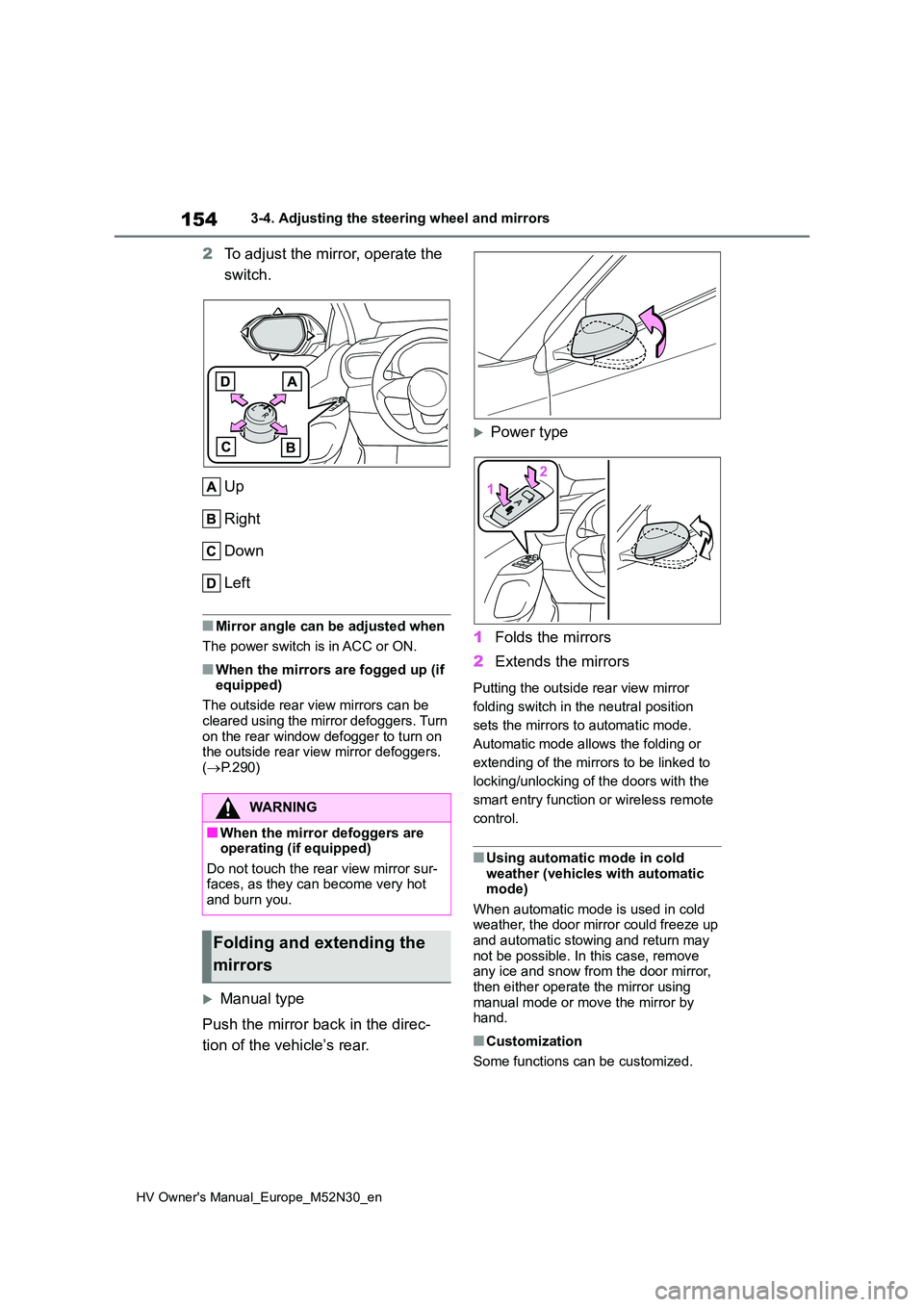
2To adjust the mirror, operate the
switch.
Up
Right
Down
Left
■Mirror angle can be adjusted when
The power switch is in ACC or ON.
■When the mirrors are fogged up (if equipped)
The outside rear view mirrors can be
cleared using the mirror defoggers. Turn on the rear window defogger to turn on the outside rear view mirror defoggers.
( P.290)
Manual type
Push the mirror back in the direc-
tion of the vehicle’s rear.
Power type
1 Folds the mirrors
2 Extends the mirrors
Putting the outside rear view mirror
folding switch in the neutral position
sets the mirrors to automatic mode.
Automatic mode allows the folding or
extending of the mirrors to be linked to
locking/unlocking of the doors with the
smart entry function or wireless remote
control.
■Using automatic mode in cold weather (vehicles with automatic mode)
When automatic mode is used in cold weather, the door mirror could freeze up and automatic stowing and return may
not be possible. In this case, remove any ice and snow from the door mirror, then either operate the mirror using
manual mode or move the mirror by hand.
■Customization
Some functions can be customized.
WARNING
■When the mirror defoggers are operating (if equipped)
Do not touch the rear view mirror sur- faces, as they can become very hot and burn you.
Folding and extending the
mirrors
Page 220 of 590
218
HV Owner's Manual_Europe_M52N30_en
4-5. Using the driving support systems
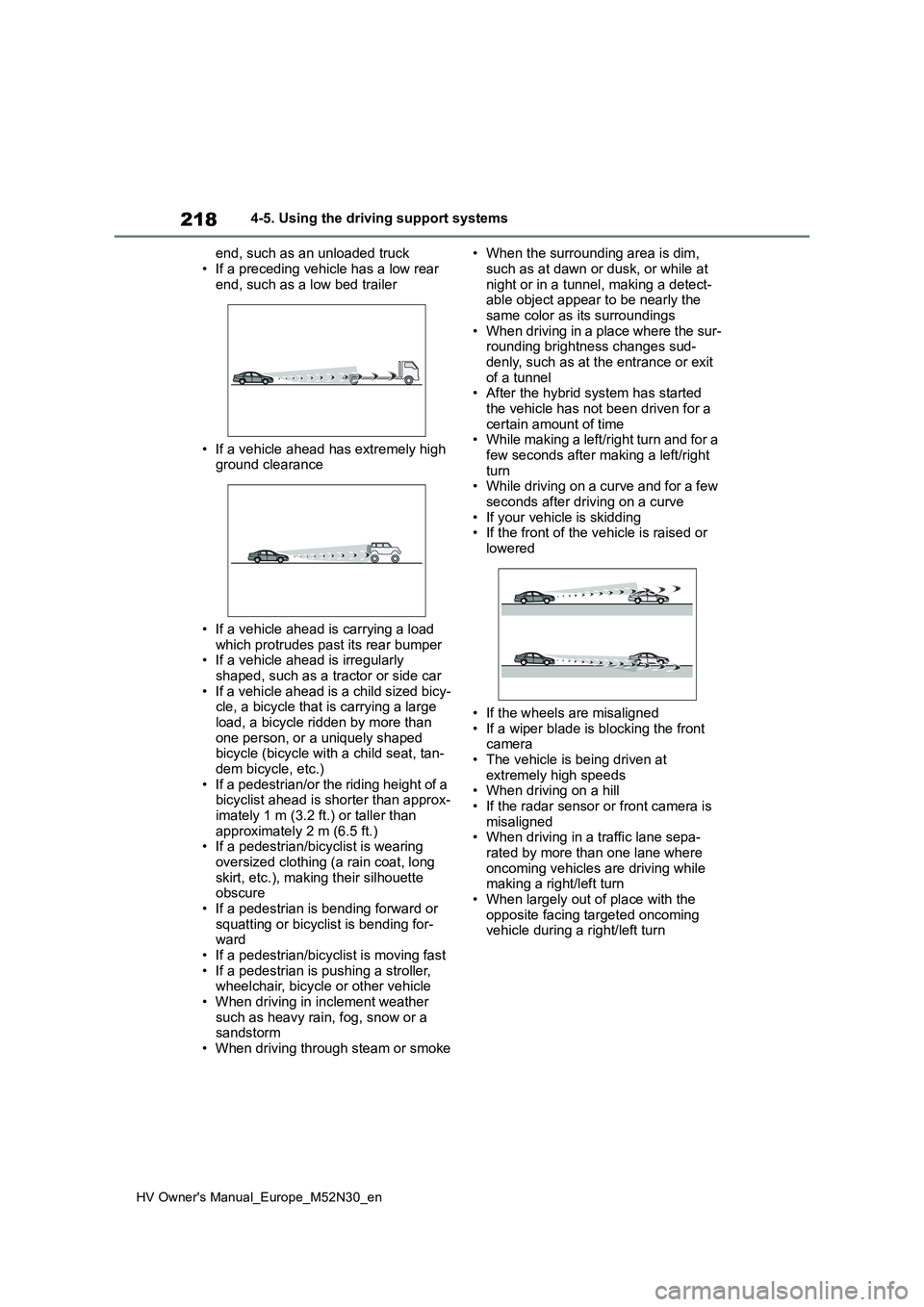
end, such as an unloaded truck
• If a preceding vehicle has a low rear end, such as a low bed trailer
• If a vehicle ahead has extremely high ground clearance
• If a vehicle ahead is carrying a load which protrudes past its rear bumper• If a vehicle ahead is irregularly
shaped, such as a tractor or side car • If a vehicle ahead is a child sized bicy-cle, a bicycle that is carrying a large
load, a bicycle ridden by more than one person, or a uniquely shaped bicycle (bicycle with a child seat, tan-
dem bicycle, etc.) • If a pedestrian/or the riding height of a bicyclist ahead is shorter than approx-
imately 1 m (3.2 ft.) or taller than approximately 2 m (6.5 ft.)• If a pedestrian/bicyclist is wearing
oversized clothing (a rain coat, long skirt, etc.), making their silhouette obscure
• If a pedestrian is bending forward or squatting or bicyclist is bending for-ward
• If a pedestrian/bicyclist is moving fast • If a pedestrian is pushing a stroller, wheelchair, bicycle or other vehicle
• When driving in inclement weather such as heavy rain, fog, snow or a sandstorm
• When driving through steam or smoke
• When the surrounding area is dim,
such as at dawn or dusk, or while at night or in a tunnel, making a detect-able object appear to be nearly the
same color as its surroundings • When driving in a place where the sur-rounding brightness changes sud-
denly, such as at the entrance or exit of a tunnel• After the hybrid system has started
the vehicle has not been driven for a certain amount of time• While making a left/right turn and for a
few seconds after making a left/right turn• While driving on a curve and for a few
seconds after driving on a curve • If your vehicle is skidding• If the front of the vehicle is raised or
lowered
• If the wheels are misaligned
• If a wiper blade is blocking the front camera• The vehicle is being driven at
extremely high speeds • When driving on a hill• If the radar sensor or front camera is
misaligned • When driving in a traffic lane sepa-rated by more than one lane where
oncoming vehicles are driving while making a right/left turn• When largely out of place with the
opposite facing targeted oncoming vehicle during a right/left turn
Page 293 of 590
291
5
HV Owner's Manual_Europe_M52N30_en
5-1. Using the air conditioning system and defogger
Interior features
windshield effectively.
●If you turn “A/C” off, the windows may fog up more easily.
●The windows may fog up if the recir-culated air mode is used.
■When driving on dusty roads
Close all windows. If dust thrown up by the vehicle is still drawn into the vehicle after closing the windows, it is recom-
mended that the air intake mode be set to outside air mode and the fan speed to any setting except off.
■Outside/recirculated air mode
●Setting to the recirculated air mode temporarily is recommended in pre-
venting dirty air from entering the vehicle interior and helping to cool the vehicle when the outside air tempera-
ture is high.
●Outside/recirculated air mode may
automatically switch depending on the temperature setting or the inside tem-perature.
■Operation of the air conditioning
system in Eco drive mode
●In Eco drive mode, the air conditioning
system is controlled as follows to pri- oritize fuel efficiency:• Engine speed and compressor opera-
tion controlled to restrict heating/cool- ing capacity• Fan speed restricted when automatic
mode is selected
●To improve air conditioning perfor-
mance, perform the following opera- tions:• Adjust the fan speed
• Turn off Eco drive mode ( P.275)
●Even when the drive mode is set to
Eco drive mode, the air conditioning eco mode can be turned off by press-ing the “FAST/ECO” switch. ( P.290)
■When the outside temperature falls
to nearly 0°C (32°F)
The dehumidification function may not operate even when “A/C” switch is
pressed.
■Ventilation and air conditioning
odors
●To let fresh air in, set the air condition-
ing system to the outside air mode.
●During use, various odors from inside
and outside the vehicle may enter into and accumulate in the air conditioning system. This may then cause odor to
be emitted from the vents.
●To reduce potential odors from occur-
ring: • It is recommended that the air condi-tioning system be set to outside air
mode prior to turning the vehicle off. • The start timing of the blower may be delayed for a short period of time
immediately after the air conditioning system is started in automatic mode.
●When parking, the system automati-cally switches to outside air mode to encourage better air circulation
throughout the vehicle, helping to reduce odors that occur when starting the vehicle.
■Air conditioning filter
P. 3 4 6
■Customization
Some functions can be customized. ( P.431)
WARNING
■To prevent the windshield from fogging up
Do not use the windshield defogger
switch during cool air operation in extremely humid weather. The differ-ence between the temperature of the
outside air and that of the windshield can cause the outer surface of the windshield to fog up, blocking your
vision.
■When the outside rear view mir-
ror defoggers are operating
Do not touch the outside rear view mirror surfaces, as they can become
very hot and burn you.
Page 332 of 590
330
HV Owner's Manual_Europe_M52N30_en
6-3. Do-it-yourself maintenance
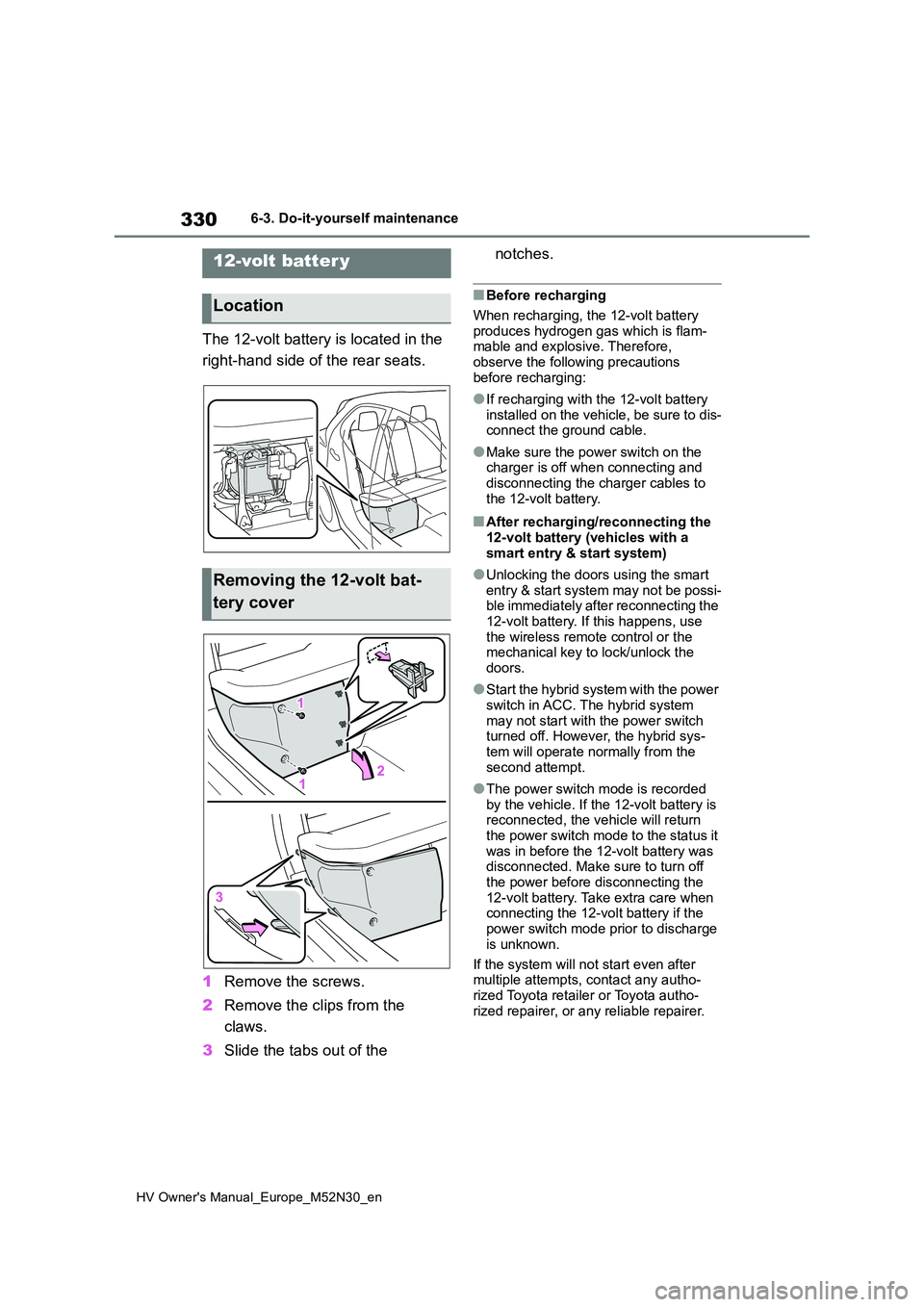
The 12-volt battery is located in the
right-hand side of the rear seats.
1 Remove the screws.
2 Remove the clips from the
claws.
3 Slide the tabs out of the
notches.
■Before recharging
When recharging, the 12-volt battery produces hydrogen gas which is flam-mable and explosive. Therefore,
observe the following precautions before recharging:
●If recharging with the 12-volt battery installed on the vehicle, be sure to dis-connect the ground cable.
●Make sure the power switch on the charger is off when connecting and
disconnecting the charger cables to the 12-volt battery.
■After recharging/reconnecting the 12-volt battery (vehicles with a
smart entry & start system)
●Unlocking the doors using the smart
entry & start system may not be possi- ble immediately after reconnecting the 12-volt battery. If this happens, use
the wireless remote control or the mechanical key to lock/unlock the doors.
●Start the hybrid system with the power switch in ACC. The hybrid system
may not start with the power switch turned off. However, the hybrid sys-tem will operate normally from the
second attempt.
●The power switch mode is recorded
by the vehicle. If the 12-volt battery is reconnected, the vehicle will return the power switch mode to the status it
was in before the 12-volt battery was disconnected. Make sure to turn off the power before disconnecting the
12-volt battery. Take extra care when connecting the 12-volt battery if the power switch mode prior to discharge
is unknown.
If the system will not start even after multiple attempts, contact any autho-
rized Toyota retailer or Toyota autho- rized repairer, or any reliable repairer.
12-volt batter y
Location
Removing the 12-volt bat-
tery cover
Page 410 of 590
408
HV Owner's Manual_Europe_M52N30_en
7-2. Steps to take in an emergency
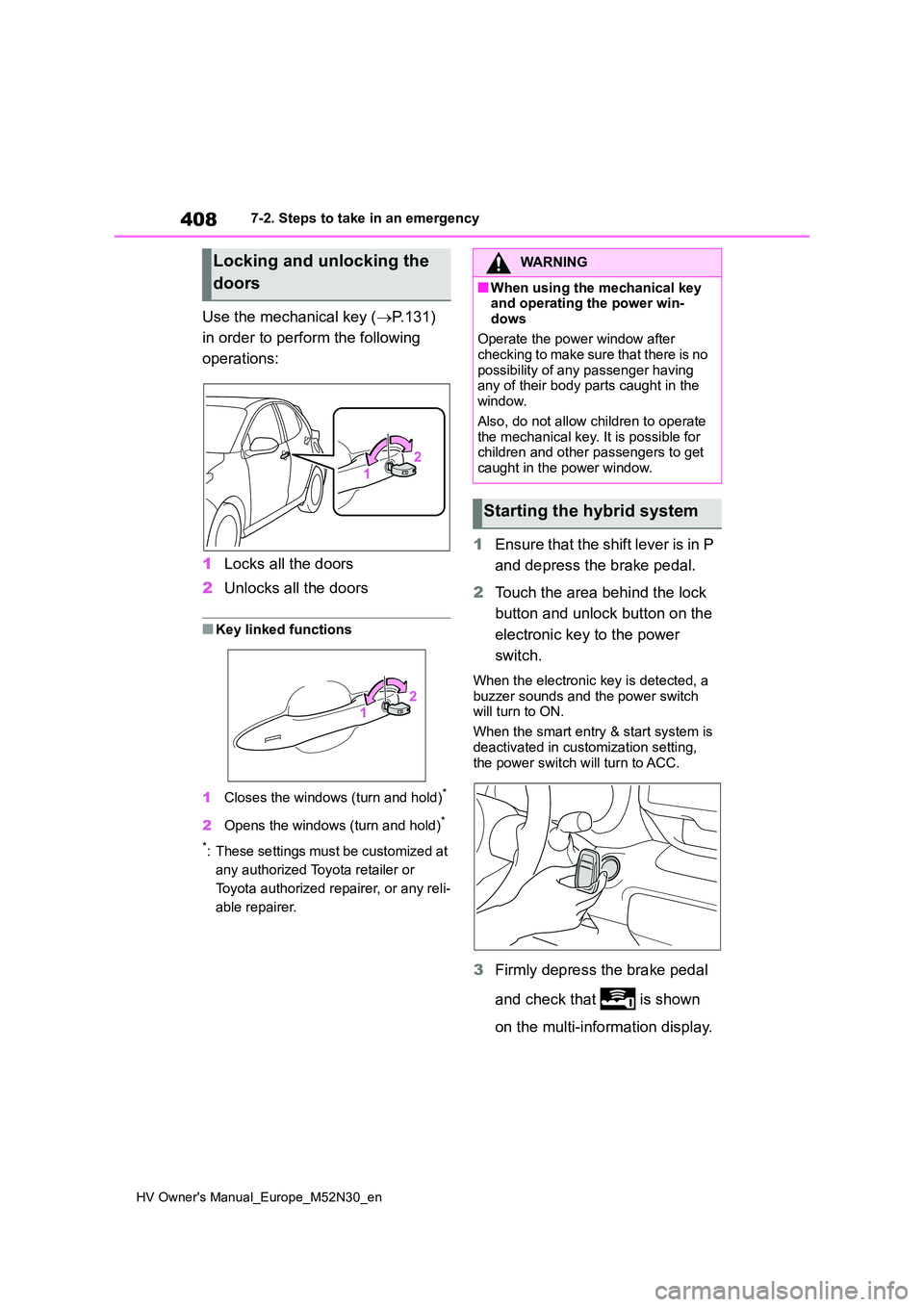
Use the mechanical key (P.131)
in order to perform the following
operations:
1 Locks all the doors
2 Unlocks all the doors
■Key linked functions
1 Closes the windows (turn and hold)*
2Opens the windows (turn and hold)*
*: These settings must be customized at
any authorized Toyota retailer or
Toyota authorized repairer, or any reli-
able repairer.
1 Ensure that the shift lever is in P
and depress the brake pedal.
2 Touch the area behind the lock
button and unlock button on the
electronic key to the power
switch.
When the electronic key is detected, a
buzzer sounds and the power switch will turn to ON.
When the smart entry & start system is
deactivated in customization setting, the power switch will turn to ACC.
3 Firmly depress the brake pedal
and check that is shown
on the multi-information display.
Locking and unlocking the
doors
WARNING
■When using the mechanical key and operating the power win-
dows
Operate the power window after checking to make sure that there is no
possibility of any passenger having any of their body parts caught in the window.
Also, do not allow children to operate the mechanical key. It is possible for children and other passengers to get
caught in the power window.
Starting the hybrid system
Page 437 of 590

435
8
HV Owner's Manual_Europe_M52N30_en
8-2. Customization
Vehicle specifications
■Outside rear view mirrors (P.153)
*: If equipped
■Power windows (P.156)
*: If equipped
■Automatic light control system (P.190)
■Lights (P.191)
*: If equipped
FunctionDefault settingCustomized setting
Automatic mirror folding
and extending operation*
Linked to the
locking/ unlock-
ing of the doors
Off
——OLinked to operation of
the power switch
FunctionDefault settingCustomized setting
Key (include mechanical
key*) linked operationOffOn——O
Wireless remote control
linked operationOffOn——O
Wireless remote control
linked operation signal
(buzzer)*OnOff——O
FunctionDefault settingCustomized setting
Light sensor sensitivityStandard-2 to 2O—O
Headlamp temporary light-
ing function (Time elapsed
before headlights automati-
cally turn off)
30 seconds
60 seconds
——O90 seconds
120 seconds
FunctionDefault settingCustomized setting
Welcome lamp*OnOff——O
Page 441 of 590
439
8
HV Owner's Manual_Europe_M52N30_en
8-2. Customization
Vehicle specifications
*: If equipped
■Vehicle customization
When the smart entry & start system is off, Smart door unlocking cannot be cus-
tomized.
■In the following situations, custom- ize mode in which the settings can be changed through the multi-infor-
mation display will automatically be turned off
●A warning message appears after the customize mode screen is displayed
●The power switch is turned off.
●The vehicle begins to move while the
customize mode screen is displayed.
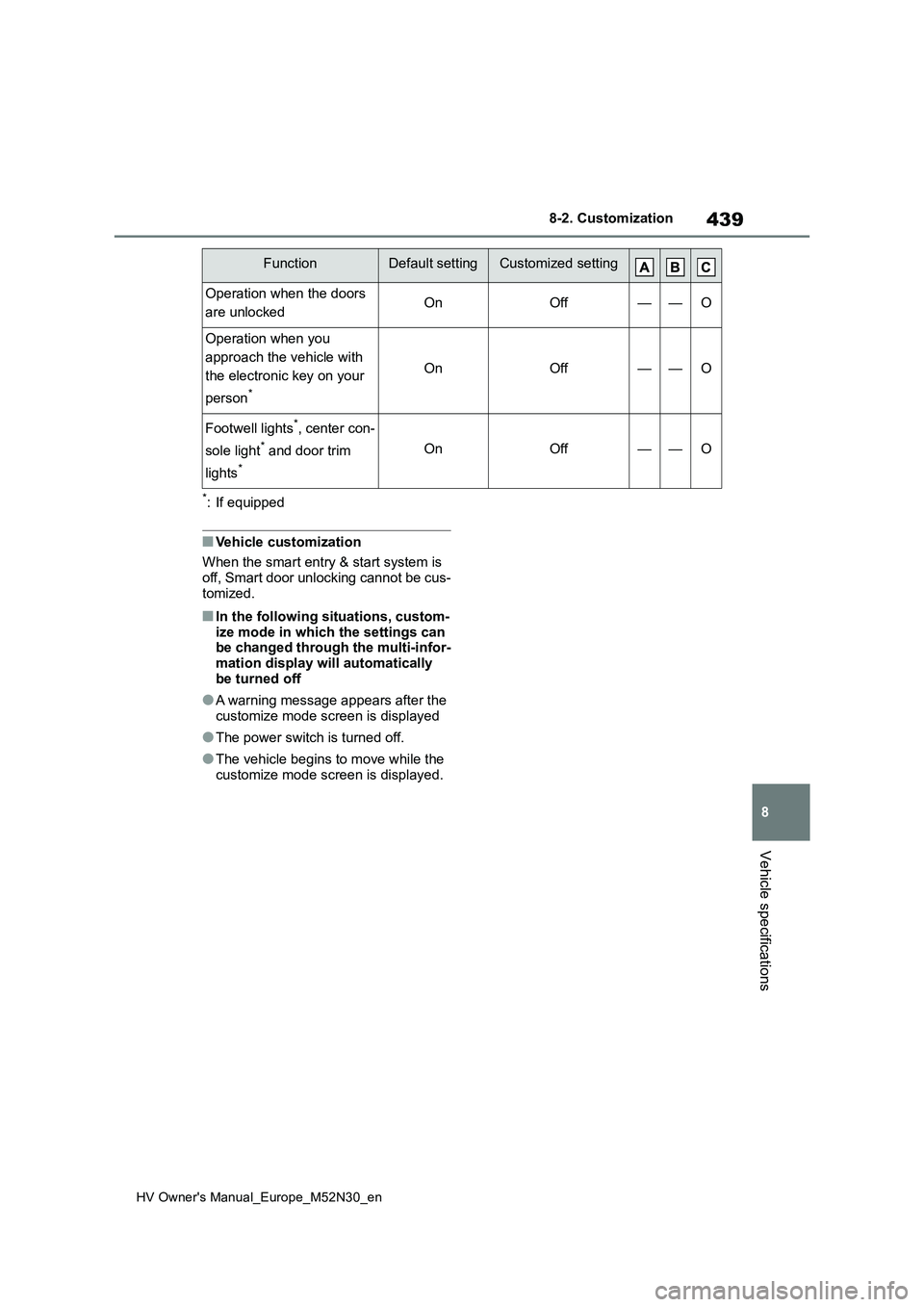
Operation when the doors
are unlockedOnOff——O
Operation when you
approach the vehicle with
the electronic key on your
person*
OnOff——O
Footwell lights*, center con-
sole light* and door trim
lights*
OnOff——O
FunctionDefault settingCustomized setting
Page 574 of 590

572
HV Owner's Manual_Europe_M52N30_en
What to do if... (Troubleshooting)
1-1.What to d o if... (Tro ublesho oting)What to do if... (Troubleshooting)
If you lose your keys or mechani-
cal keys, new genuine keys or
mechanical keys can be made
by any authorized Toyota retailer
or Toyota authorized repairer, or
any reliable repairer. ( P.407)
Vehicles with smart entry & start
system: If you lose your elec-
tronic keys, the risk of vehicle
theft increases significantly. Con-
tact any authorized Toyota
retailer or Toyota authorized
repairer, or any reliable repairer
immediately. ( P.407)
Is the key battery weak or
depleted? ( P.351)
Vehicles with a smart entry &
start system: Is the power switch
in ON?
When locking the doors, turn the power
switch off. ( P. 1 7 7)
Vehicles with a smart entry &
start system: Is the electronic
key left inside the vehicle?
When locking the doors, make sure that
you have the electronic key on your
person.
The function may not operate
properly due to the condition of
the radio wave. ( P.131,142)
Is the child-protector lock set?
The rear door cannot be opened from
inside the vehicle when the lock is set.
Open the rear door from outside and
then unlock the child-protector lock.
( P.137)
Is the shift lever in P? (P.173)
Is the steering wheel unlocked?
( P.173)
Is the 12-volt battery dis-
charged? ( P.409)
Did you press the power switch
If you have a problem, check
the following before contacting
any authorized Toyota retailer
or Toyota authorized repairer,
or any reliable repairer.
The doors cannot be locked,
unlocked, opened or closed
You lose your keys
The doors cannot be locked
or unlocked
The rear door cannot be
opened
If you think something is
wrong
The hybrid system does not
start (vehicles without a
smart entry & start system)
The hybrid system does not
start (vehicles with a smart
entry & start system)