remote control TOYOTA YARIS 2022 Owner's Manual
[x] Cancel search | Manufacturer: TOYOTA, Model Year: 2022, Model line: YARIS, Model: TOYOTA YARIS 2022Pages: 590, PDF Size: 128.6 MB
Page 156 of 590
154
HV Owner's Manual_Europe_M52N30_en
3-4. Adjusting the steering wheel and mirrors
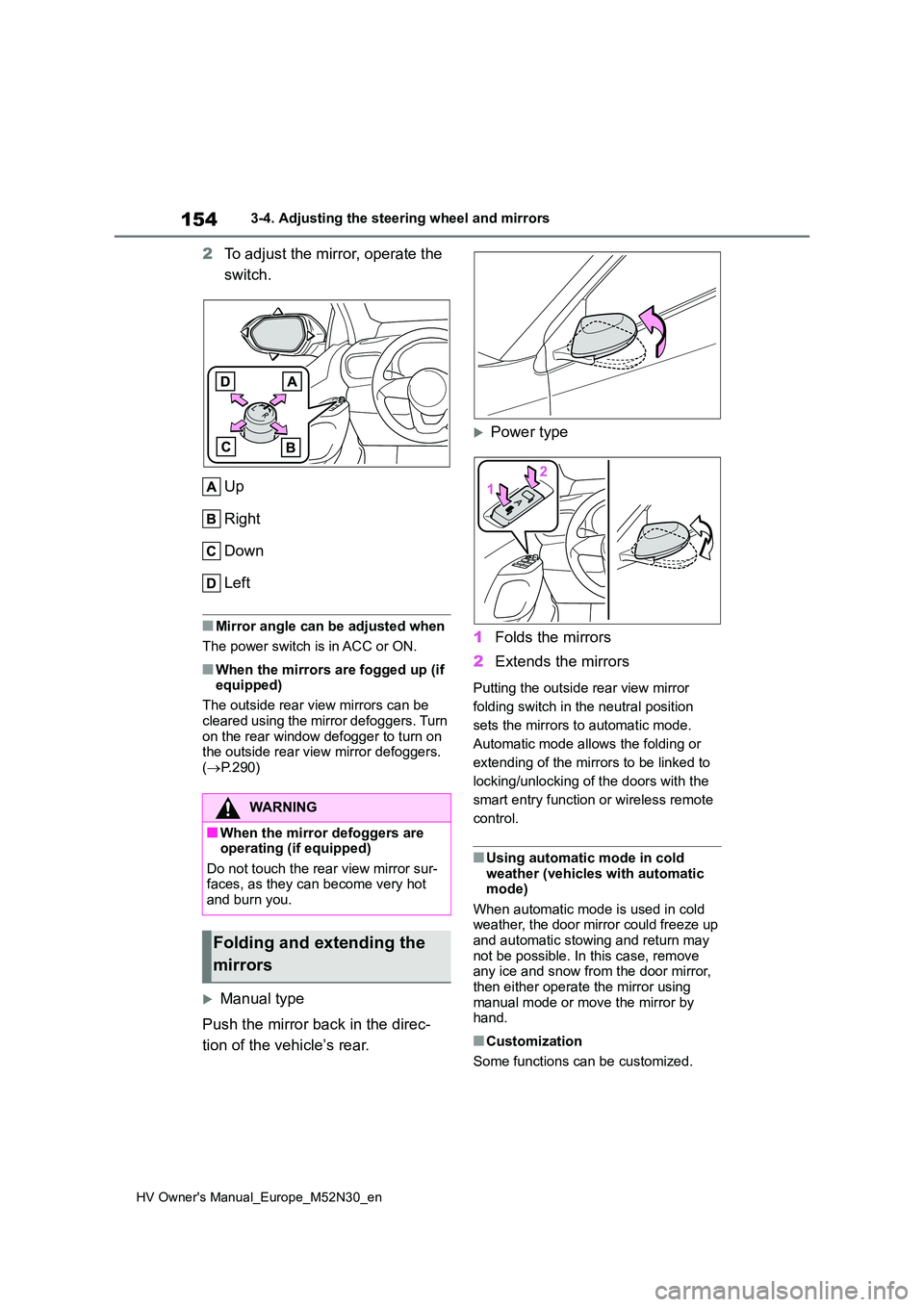
2To adjust the mirror, operate the
switch.
Up
Right
Down
Left
■Mirror angle can be adjusted when
The power switch is in ACC or ON.
■When the mirrors are fogged up (if equipped)
The outside rear view mirrors can be
cleared using the mirror defoggers. Turn on the rear window defogger to turn on the outside rear view mirror defoggers.
( P.290)
Manual type
Push the mirror back in the direc-
tion of the vehicle’s rear.
Power type
1 Folds the mirrors
2 Extends the mirrors
Putting the outside rear view mirror
folding switch in the neutral position
sets the mirrors to automatic mode.
Automatic mode allows the folding or
extending of the mirrors to be linked to
locking/unlocking of the doors with the
smart entry function or wireless remote
control.
■Using automatic mode in cold weather (vehicles with automatic mode)
When automatic mode is used in cold weather, the door mirror could freeze up and automatic stowing and return may
not be possible. In this case, remove any ice and snow from the door mirror, then either operate the mirror using
manual mode or move the mirror by hand.
■Customization
Some functions can be customized.
WARNING
■When the mirror defoggers are operating (if equipped)
Do not touch the rear view mirror sur- faces, as they can become very hot and burn you.
Folding and extending the
mirrors
Page 159 of 590
157
3
HV Owner's Manual_Europe_M52N30_en
3-5. Opening and closing the windows
Before driving
direction, and hold it there for
approximately 4 seconds or more.
6 Pull and hold the power window switch in the one-touch closing direction again. After the side win-
dow is completely closed, continue holding the switch for a further 1 sec-ond or more.
If you release the switch while the win- dow is moving, start again from the beginning.
If the window reverses and cannot be fully closed or opened, have the vehicle inspected by any authorized Toyota
retailer or Toyota authorized repairer, or any reliable repairer.
■Door lock linked window operation
●The power windows can be opened
and closed using the key (vehicles without a smart entry & start system)
or mechanical key (vehicles with a
sm ar t e n tr y & st a r t sy st em ) .* ( P.134, 408)
●The power windows can be opened
and closed using the wireless remote
control.* ( P.133)*: These settings must be customized at
any authorized Toyota retailer or
Toyota authorized repairer, or any reli-
able repairer.
■Customization
Some functions can be customized.
( P.431)
WARNING
Observe the following precautions. Failure to do so may result in death or
serious injury.
■Closing the windows
●The driver is responsible for all the power window operations, including
the operation for the passengers. In order to prevent accidental opera-tion, especially by a child, do not let
a child operate the power windows. It is possible for children and other passengers to have body parts
caught in the power window. Also, when riding with a child, it is recom-mended to use the window lock
switch. ( P.158)
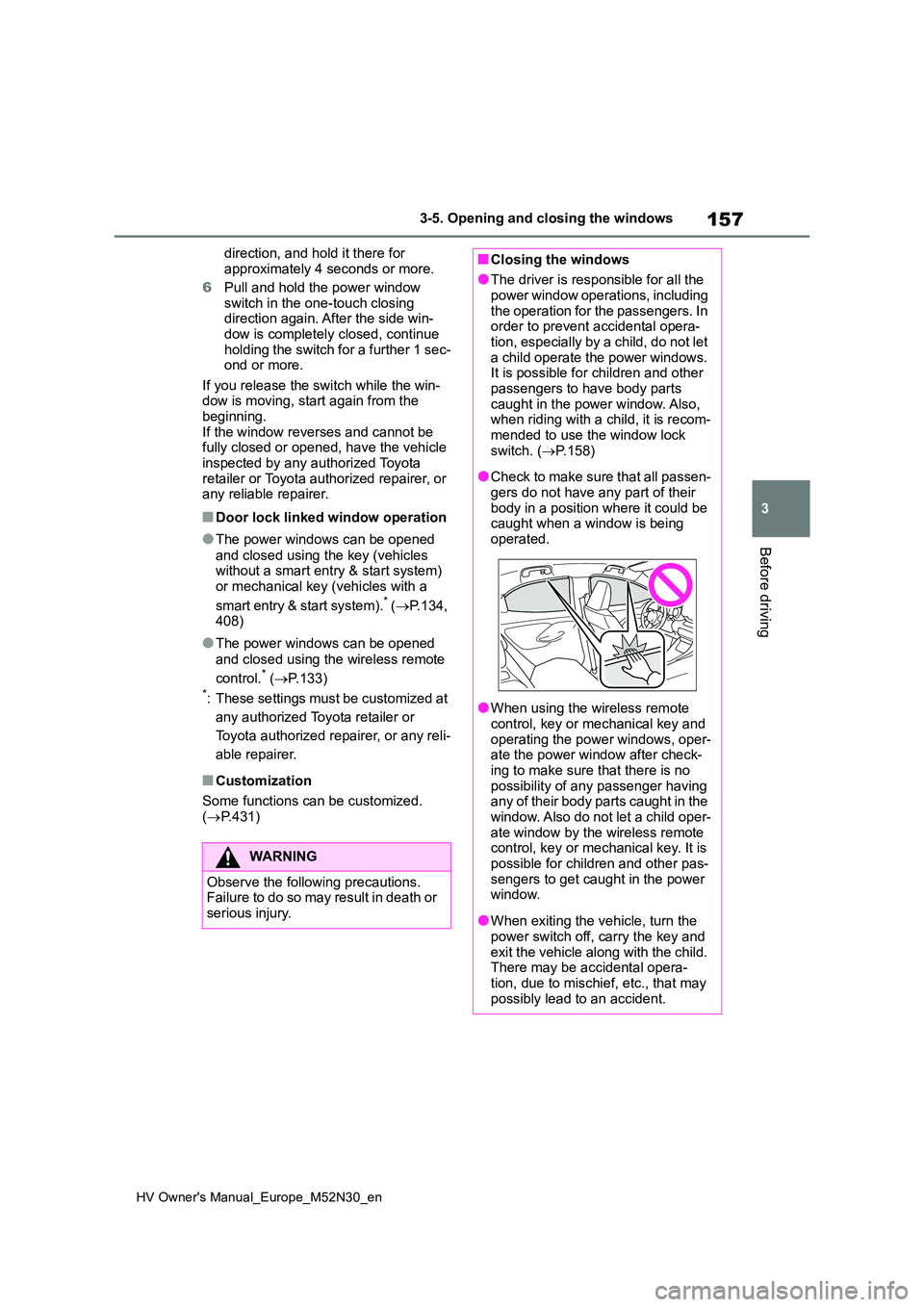
●Check to make sure that all passen-
gers do not have any part of their body in a position where it could be caught when a window is being
operated.
●When using the wireless remote
control, key or mechanical key and operating the power windows, oper-ate the power window after check-
ing to make sure that there is no possibility of any passenger having any of their body parts caught in the
window. Also do not let a child oper- ate window by the wireless remote control, key or mechanical key. It is
possible for children and other pas- sengers to get caught in the power window.
●When exiting the vehicle, turn the power switch off, carry the key and
exit the vehicle along with the child. There may be accidental opera-tion, due to mischief, etc., that may
possibly lead to an accident.
Page 193 of 590
191
4
HV Owner's Manual_Europe_M52N30_en
4-3. Operating the lights and wipers
Driving
the headlight switch in the or
position. (LED type headlights only: Illu-
minate brighter than the front position
lights.) Daytime running lights are not
designed for use at night.
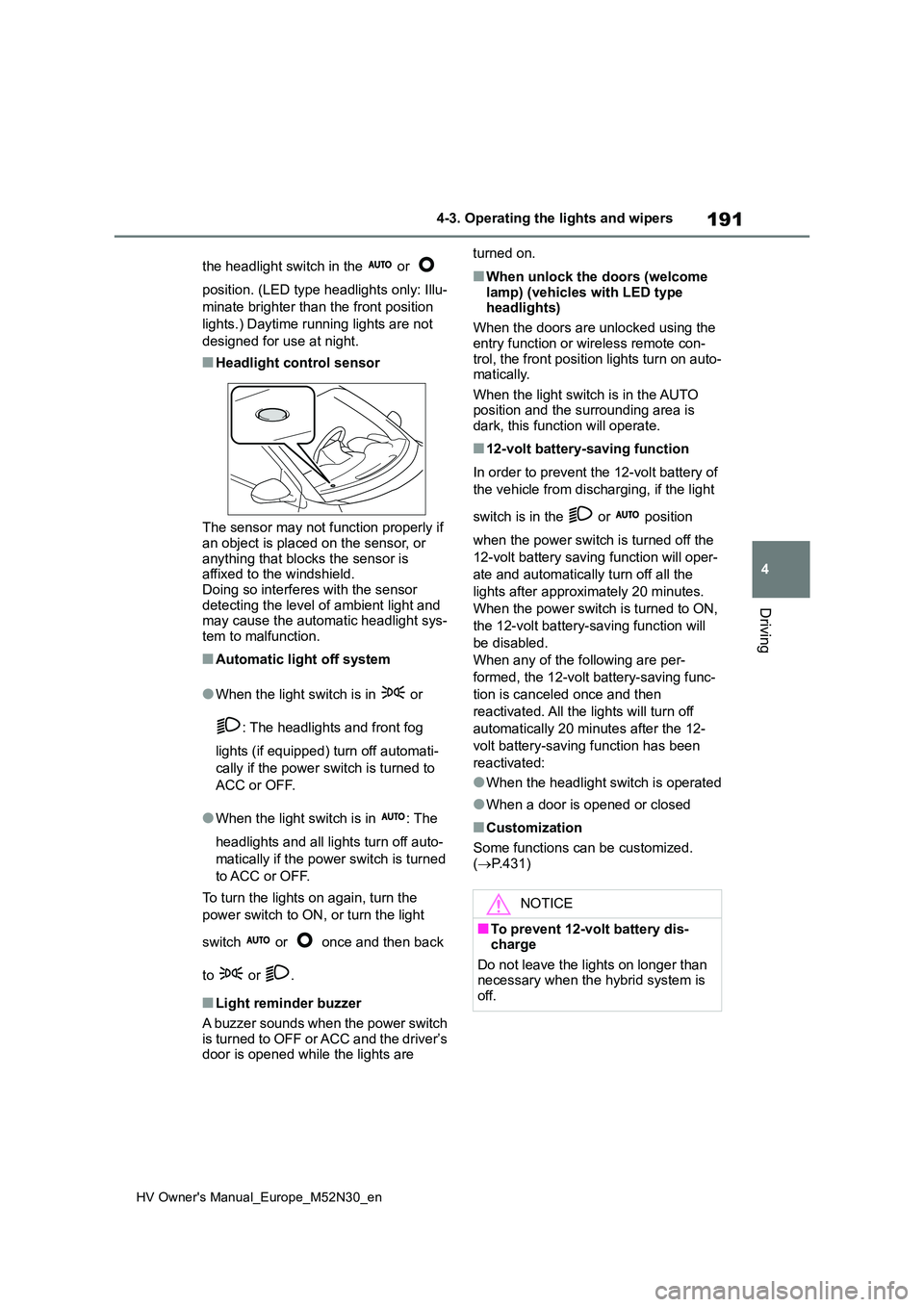
■Headlight control sensor
The sensor may not function properly if an object is placed on the sensor, or
anything that blocks the sensor is affixed to the windshield.Doing so interferes with the sensor
detecting the level of ambient light and may cause the automatic headlight sys-tem to malfunction.
■Automatic light off system
●When the light switch is in or
: The headlights and front fog
lights (if equipped) turn off automati-
cally if the power switch is turned to
ACC or OFF.
●When the light switch is in : The
headlights and all lights turn off auto-
matically if the power switch is turned
to ACC or OFF.
To turn the lights on again, turn the
power switch to ON, or turn the light
switch or once and then back
to or .
■Light reminder buzzer
A buzzer sounds when the power switch
is turned to OFF or ACC and the driver’s door is opened while the lights are
turned on.
■When unlock the doors (welcome
lamp) (vehicles with LED type headlights)
When the doors are unlocked using the
entry function or wireless remote con- trol, the front position lights turn on auto-matically.
When the light switch is in the AUTO position and the surrounding area is dark, this function will operate.
■12-volt battery-saving function
In order to prevent the 12-volt battery of
the vehicle from discharging, if the light
switch is in the or position
when the power switch is turned off the
12-volt battery saving function will oper-
ate and automatically turn off all the
lights after approximately 20 minutes.
When the power switch is turned to ON,
the 12-volt battery-saving function will
be disabled.
When any of the following are per-
formed, the 12-volt battery-saving func-
tion is canceled once and then
reactivated. All the lights will turn off
automatically 20 minutes after the 12-
volt battery-saving function has been
reactivated:
●When the headlight switch is operated
●When a door is opened or closed
■Customization
Some functions can be customized.
( P.431)
NOTICE
■To prevent 12-volt battery dis- charge
Do not leave the lights on longer than necessary when the hybrid system is off.
Page 313 of 590
6
311
HV Owner's Manual_Europe_M52N30_en
6
Maintenance and care
Maintenance and care
6-1. Maintenance and care
Cleaning and protecting the
vehicle exterior ............... 312
Cleaning and protecting the
vehicle interior ................ 315
6-2. Maintenance
Maintenance requirements 318
6-3. Do-it-yourself maintenance
Do-it-yourself service precau-
tions ................................ 320
Hood ................................. 322
Positioning a floor jack...... 323
Engine compartment ........ 325
12-volt battery ................... 330
Tires .................................. 332
Tire inflation pressure ....... 342
Wheels.............................. 344
Air conditioning filter ......... 346
Cleaning the hybrid battery
(traction battery) air intake
vent and filter .................. 348
Wireless remote control/elec-
tronic key battery ............ 351
Checking and replacing fuses
....................................... 354
Light bulbs ........................ 357
Page 332 of 590
330
HV Owner's Manual_Europe_M52N30_en
6-3. Do-it-yourself maintenance
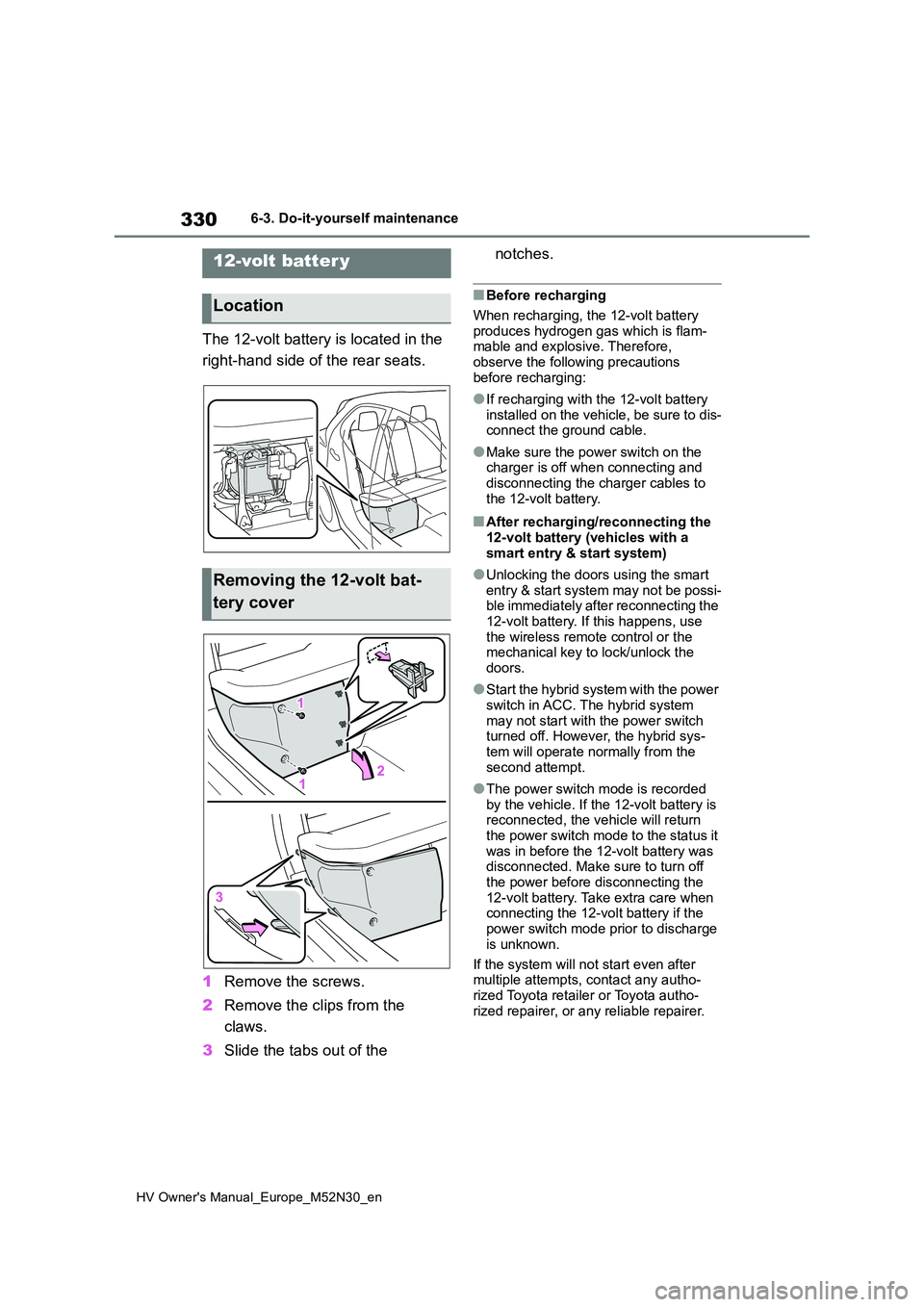
The 12-volt battery is located in the
right-hand side of the rear seats.
1 Remove the screws.
2 Remove the clips from the
claws.
3 Slide the tabs out of the
notches.
■Before recharging
When recharging, the 12-volt battery produces hydrogen gas which is flam-mable and explosive. Therefore,
observe the following precautions before recharging:
●If recharging with the 12-volt battery installed on the vehicle, be sure to dis-connect the ground cable.
●Make sure the power switch on the charger is off when connecting and
disconnecting the charger cables to the 12-volt battery.
■After recharging/reconnecting the 12-volt battery (vehicles with a
smart entry & start system)
●Unlocking the doors using the smart
entry & start system may not be possi- ble immediately after reconnecting the 12-volt battery. If this happens, use
the wireless remote control or the mechanical key to lock/unlock the doors.
●Start the hybrid system with the power switch in ACC. The hybrid system
may not start with the power switch turned off. However, the hybrid sys-tem will operate normally from the
second attempt.
●The power switch mode is recorded
by the vehicle. If the 12-volt battery is reconnected, the vehicle will return the power switch mode to the status it
was in before the 12-volt battery was disconnected. Make sure to turn off the power before disconnecting the
12-volt battery. Take extra care when connecting the 12-volt battery if the power switch mode prior to discharge
is unknown.
If the system will not start even after multiple attempts, contact any autho-
rized Toyota retailer or Toyota autho- rized repairer, or any reliable repairer.
12-volt batter y
Location
Removing the 12-volt bat-
tery cover
Page 353 of 590
351
6
HV Owner's Manual_Europe_M52N30_en
6-3. Do-it-yourself maintenance
Maintenance and care
■If the electronic key battery is depleted
The following symptoms may occur:
●The smart entry & start system (if equipped) and wireless remote control
will not function properly.
●The operational range will be reduced.
Flathead screwdriver
Small flathead screwdriver
Lithium battery CR2032 (vehi-
cles without a smart entry & start
system), or CR2450 (vehicles
with a smart entry & start sys-
tem)
■Use a CR2032 (vehicles without a
smart entry & start system) or CR2450 (vehicles with a smart entry & start system) lithium bat-
tery
●Batteries can be purchased at any
authorized Toyota retailer or Toyota authorized repairer, or any reliable
NOTICE
●Do not install anything to the air intake vent other than the exclusive
filter for this vehicle or use the vehi- cle without the filter installed.
■If “Maintenance Required for Traction Battery Cooling Parts See Owner’s Manual” is dis-
played on the multi-information display
If the vehicle is continuously driven
with the warning message (indicating that charging/discharging of the hybrid battery [traction battery] may
become limited) displayed, the hybrid battery (traction battery) may mal-function. If the warning message is
displayed, clean the air intake vent immediately.
Wireless remote con-
trol/electronic key bat-
ter y
Replace the battery with a new
one if it is depleted.
As the key may be damaged if
the following procedure is not
performed properly, it is rec-
ommended that key battery
replacement be performed by
any authorized Toyota retailer
or Toyota authorized repairer,
or any reliable repairer.
Items to prepare
Page 409 of 590
407
7
HV Owner's Manual_Europe_M52N30_en
7-2. Steps to take in an emergency
When trouble arises
■When the electronic key does not work properly
●Make sure that the smart entry & start system has not been deactivated in
the customization setting. If it is off, turn the function on. (Customizable features: P.431)
●Check if battery-saving mode is set. If it is set, cancel the function. ( P.141)
If you lose your keys
New genuine keys can be
made by any authorized Toyota
retailer or Toyota authorized
repairer, or any reliable
repairer using the other key
(vehicles without a smart entry
& start system) or mechanical
key (vehicles with a smart
entry & start system) and the
key number stamped on your
key number plate.
Keep the plate in a safe place
such as your wallet, not in the
vehicle.
NOTICE
■When an electronic key is lost (vehicles with a smart entry &
start system)
If the electronic key remains lost, the risk of vehicle theft increases signifi-
cantly. Visit any authorized Toyota retailer or Toyota authorized repairer, or any reliable repairer immediately
with all remaining electronic keys that were provided with your vehicle.
If the electronic key
does not operate prop-
erly (vehicles with a
smar t entr y & start sys-
tem)
If communication between the
electronic key and vehicle is
interrupted ( P.142) or the
electronic key cannot be used
because the battery is
depleted, the smart entry &
start system and wireless
remote control cannot be used.
In such cases, the doors can
be opened and the hybrid sys-
tem can be started by following
the procedure below.
NOTICE
■In case of a smart entry & start system malfunction or other key-related problems
Take your vehicle with all the elec- tronic keys provided with your vehicle to any authorized Toyota retailer or
Toyota authorized repairer, or any reli- able repairer.
Page 413 of 590
411
7
HV Owner's Manual_Europe_M52N30_en
7-2. Steps to take in an emergency
When trouble arises
minutes to recharge the 12-volt
battery of your vehicle.
6 Vehicles with a smart entry &
start system: Open and close
any of the doors of your vehicle
with the power switch OFF.
7 Maintain the engine speed of
the second vehicle and start the
hybrid system of your vehicle by
turning the power switch to ON.
8 Make sure the “READY” indica-
tor comes on. If the indicator
does not come on, contact any
authorized Toyota retailer or
Toyota authorized repairer, or
any reliable repairer.
9 Once the hybrid system has
started, remove the jumper
cables in the exact reverse
order from which they were con-
nected.
10 Close the exclusive jump start-
ing terminal cover and install the
fuse box cover to its original
position.
Once the hybrid system starts,
have the vehicle inspected at any
authorized Toyota retailer or Toyota
authorized repairer, or any reliable
repairer as soon as possible.
■Starting the hybrid system when the 12-volt battery is discharged
The hybrid system cannot be started by push-starting.
■To prevent 12-volt battery dis-charge
●Turn off the headlights and the audio
system while the hybrid system is off.
●Turn off any unnecessary electrical components when the vehicle is run-
ning at a low speed for an extended period, such as in heavy traffic.
■When the 12-volt battery is removed or discharged
●Information stored in the ECU is cleared. When the 12-volt battery is
depleted, have the vehicle inspected at any authorized Toyota retailer or Toyota authorized repairer, or any reli-
able repairer.
●Some systems may require initializa-
tion. ( P.440)
■When removing the 12-volt battery terminals
When the 12-volt battery terminals are
removed, the information stored in the ECU is cleared. Before removing the 12-volt battery terminals, contact any
authorized Toyota retailer or Toyota authorized repairer, or any reliable repairer.
■Charging the 12-volt battery
The electricity stored in the 12-volt bat- tery will discharge gradually even when the vehicle is not in use, due to natural
discharge and the draining effects of certain electrical appliances. If the vehi-cle is left for a long time, the 12-volt bat-
tery may discharge, and the hybrid system may be unable to start. (The 12-volt battery recharges automatically
while the hybrid system is operating.)
■When recharging or replacing the 12-volt battery (vehicles with a smart entry & start system)
●In some cases, it may not be possible to unlock the doors using the smart
entry & start system when the 12-volt battery is discharged. Use the wire-less remote control or the mechanical
key to lock or unlock the doors.
●The hybrid system may not start on
the first attempt after the 12-volt bat- tery has recharged but will start nor-mally after the second attempt. This is
Page 436 of 590
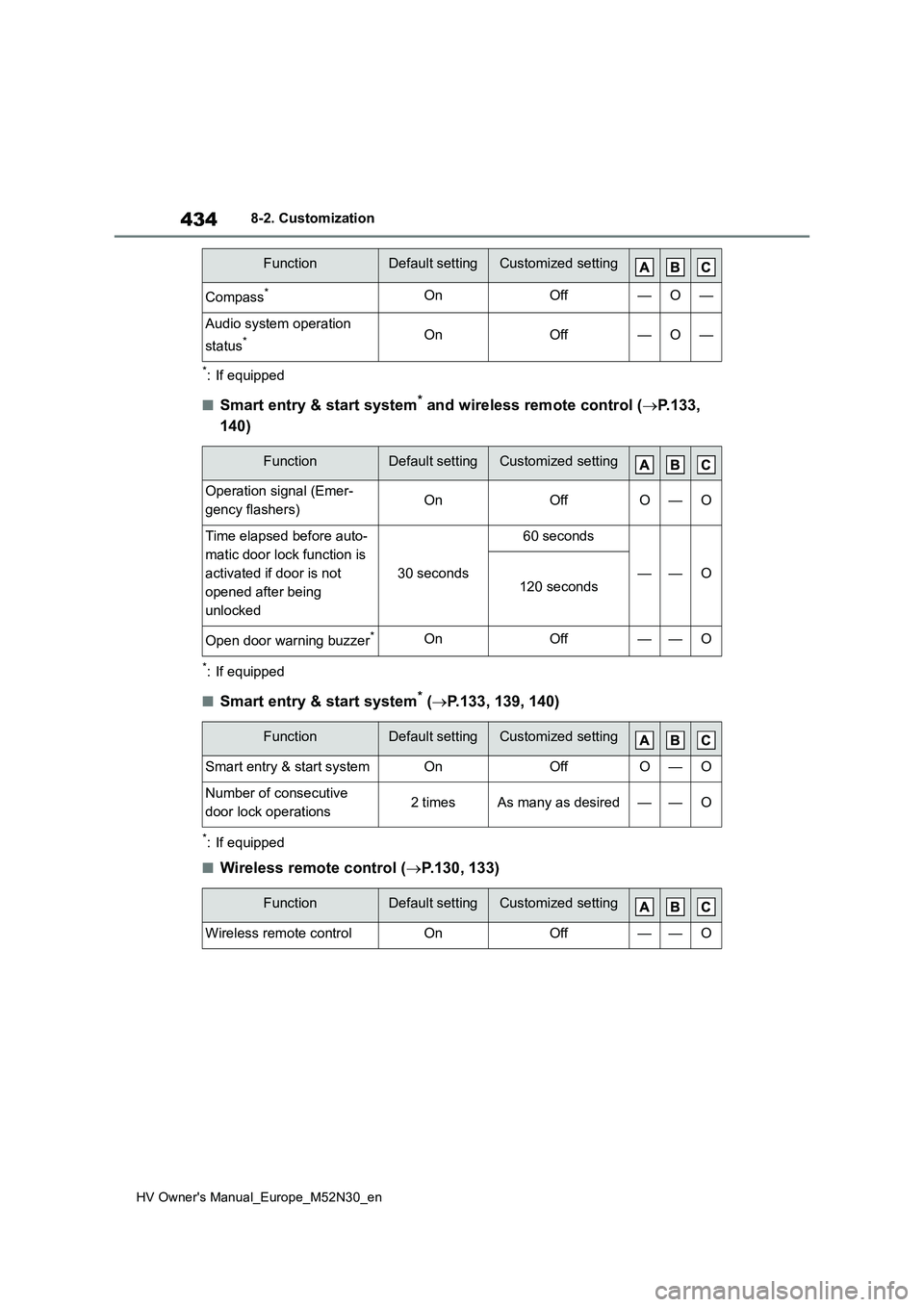
434
HV Owner's Manual_Europe_M52N30_en
8-2. Customization
*: If equipped
■Smart entry & start system* and wireless remote control (P.133,
140)
*: If equipped
■Smart entry & start system* ( P.133, 139, 140)
*: If equipped
■Wireless remote control (P.130, 133)
Compass*OnOff—O—
Audio system operation
status*OnOff—O—
FunctionDefault settingCustomized setting
Operation signal (Emer-
gency flashers)OnOffO—O
Time elapsed before auto-
matic door lock function is
activated if door is not
opened after being
unlocked
30 seconds
60 seconds
——O120 seconds
Open door warning buzzer*OnOff——O
FunctionDefault settingCustomized setting
Smart entry & start systemOnOffO—O
Number of consecutive
door lock operations2 timesAs many as desired——O
FunctionDefault settingCustomized setting
Wireless remote controlOnOff——O
FunctionDefault settingCustomized setting
Page 437 of 590

435
8
HV Owner's Manual_Europe_M52N30_en
8-2. Customization
Vehicle specifications
■Outside rear view mirrors (P.153)
*: If equipped
■Power windows (P.156)
*: If equipped
■Automatic light control system (P.190)
■Lights (P.191)
*: If equipped
FunctionDefault settingCustomized setting
Automatic mirror folding
and extending operation*
Linked to the
locking/ unlock-
ing of the doors
Off
——OLinked to operation of
the power switch
FunctionDefault settingCustomized setting
Key (include mechanical
key*) linked operationOffOn——O
Wireless remote control
linked operationOffOn——O
Wireless remote control
linked operation signal
(buzzer)*OnOff——O
FunctionDefault settingCustomized setting
Light sensor sensitivityStandard-2 to 2O—O
Headlamp temporary light-
ing function (Time elapsed
before headlights automati-
cally turn off)
30 seconds
60 seconds
——O90 seconds
120 seconds
FunctionDefault settingCustomized setting
Welcome lamp*OnOff——O