ECO mode TOYOTA YARIS 2022 Owners Manual
[x] Cancel search | Manufacturer: TOYOTA, Model Year: 2022, Model line: YARIS, Model: TOYOTA YARIS 2022Pages: 590, PDF Size: 128.6 MB
Page 8 of 590
6
HV Owner's Manual_Europe_M52N30_en
Please note that this manual
applies to all models and explains
all equipment, including options.
Therefore, you may find some
explanations for equipment not
installed on your vehicle.
All specifications provided in this
manual are current at the time of
printing. However, because of the
Toyota policy of continual product
improvement, we reserve the right
to make changes at any time with-
out notice.
Depending on specifications, the
vehicle shown in the illustrations
may differ from your vehicle in
terms of equipment.
Both genuine Toyota and a wide
variety of other spare parts and
accessories for Toyota vehicles are
currently available on the market.
Should it be determined that any of
the genuine Toyota parts or acces-
sories supplied with the vehicle
need to be replaced, Toyota recom-
mends that genuine Toyota parts or
accessories, be used to replace
them. Other parts or accessories of
matching quality can also be used.
Toyota cannot accept any liability or
guarantee spare parts and acces-
sories which are not genuine
Toyota products, nor for replace-
ment or installation involving such
parts. In addition, damage or per-
formance problems resulting from
the use of non-genuine Toyota
spare parts or accessories may not
be covered under warranty.
Also, remodeling like this will have
an effect on advanced safety equip-
ment such as Toyota Safety Sense
and there is a danger that it will not
work properly or the danger that it
may work in situations where it
should not be working.
The installation of an RF-transmit-
ter system in your vehicle could
affect electronic systems such as:
Hybrid system
Multiport fuel injection sys-
tem/sequential multiport fuel
injection system
Toyota Safety Sense (if
equipped)
Dynamic radar cruise control
with full-speed range (if
equipped)
Anti-lock brake system
SRS airbag system
Seat belt pretensioner system
Be sure to check with any autho-
rized Toyota retailer or Toyota
For your information
Main Owner’s Manual
Accessories, spare parts
and modification of your
To y o t a
Installation of an RF-trans-
mitter system
Page 32 of 590
30
HV Owner's Manual_Europe_M52N30_en
1-1. For safe use
1-1.For s afe us e
Use only floor mats designed spe-
cifically for vehicles of the same
model and model year as your vehi-
cle. Fix them securely in place onto
the carpet.
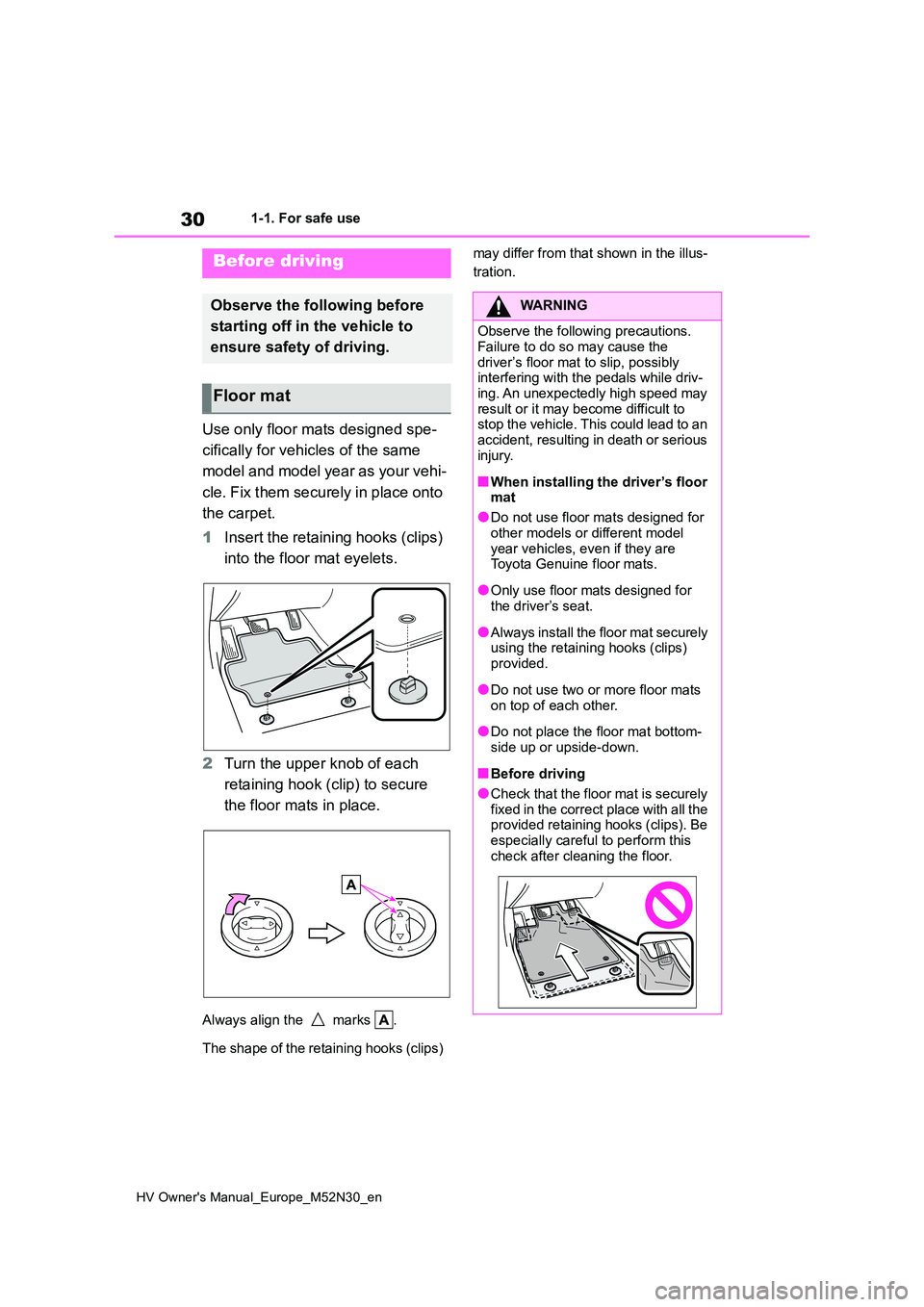
1 Insert the retaining hooks (clips)
into the floor mat eyelets.
2 Turn the upper knob of each
retaining hook (clip) to secure
the floor mats in place.
Always align the marks .
The shape of the retaining hooks (clips)
may differ from that shown in the illus-
tration.Before driving
Observe the following before
starting off in t he vehicle to
ensure safety of driving.
Floor mat
WARNING
Observe the following precautions.
Failure to do so may cause the driver’s floor mat to slip, possibly interfering with the pedals while driv-
ing. An unexpectedly high speed may result or it may become difficult to stop the vehicle. This could lead to an
accident, resulting in death or serious injury.
■When installing the driver’s floor mat
●Do not use floor mats designed for
other models or different model year vehicles, even if they are Toyota Genuine floor mats.
●Only use floor mats designed for the driver’s seat.
●Always install the floor mat securely using the retaining hooks (clips)
provided.
●Do not use two or more floor mats
on top of each other.
●Do not place the floor mat bottom-
side up or upside-down.
■Before driving
●Check that the floor mat is securely fixed in the correct place with all the provided retaining hooks (clips). Be
especially careful to perform this check after cleaning the floor.
Page 82 of 590
80
HV Owner's Manual_Europe_M52N30_en
1-4. Hybrid system
■Running out of fuel
When the vehicle has run out of fuel and
the hybrid system cannot be started, refuel the vehicle with at least enough gasoline to make the low fuel level warn-
ing light ( P.377) go off. If there is only a small amount of fuel, the hybrid sys-tem may not be able to start. (The stan-
dard amount of fuel is about 5.8 L [1.6 gal., 1.3 Imp. gal.] [vehicles without rear wiper] or 6.3 L [1.7 gal., 1.4 Imp. gal.]
[vehicles with rear wiper] when the vehi- cle is on a level surface. This value may vary when the vehicle is on a slope. Add
extra fuel when the vehicle is inclined.)
■Electromagnetic waves
●High voltage parts and cables on
hybrid vehicles incorporate electro- magnetic shielding, and therefore emit approximately the same amount of
electromagnetic waves as conven- tional gasoline powered vehicles or home electronic appliances.
●Your vehicle may cause sound inter-ference in some third party-produced
radio parts.
■Hybrid battery (traction battery)
The hybrid battery (traction battery) has a limited service life. The lifespan of the
hybrid battery (traction battery) can change in accordance with driving style
and driving conditions.
■Starting the hybrid system in an extremely cold environment
When the hybrid battery (traction bat-
tery) is extremely cold (below approxi- mately -30°C [-22°F]) under the influence of the outside temperature, it
may not be possible to start the hybrid system. In this case, try to start the hybrid system again after the tempera-
ture of the hybrid battery increases due to the outside temperature increase etc.
■Declaration of conformity
This model conforms to hydrogen emis-
sions according to regulation ECE100 (Battery electric vehicle safety).
WARNING
■High voltage precautions
This vehicle has high voltage DC and
AC systems as well as a 12-volt sys- tem. DC and AC high voltage is very dangerous and can cause severe
burns and electric shock that may result in death or serious injury.
●Never touch, disassemble, remove or replace the high voltage parts, cables or their connectors.
●The hybrid system will become hot after starting as the system uses
high voltage. Be careful of both the high voltage and the high tempera-ture, and always obey the warning
labels attached to the vehicle.
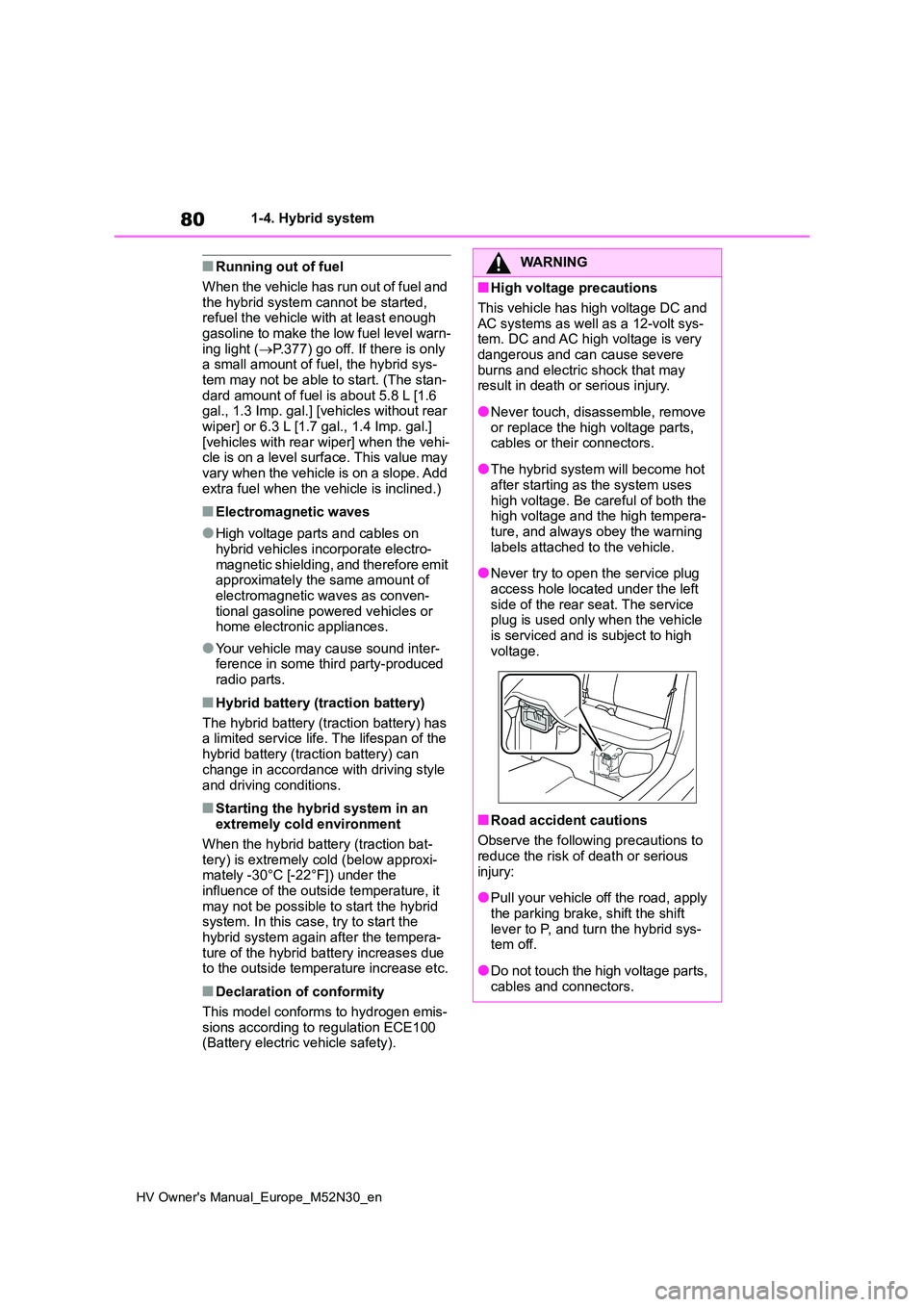
●Never try to open the service plug
access hole located under the left side of the rear seat. The service plug is used only when the vehicle
is serviced and is subject to high voltage.
■Road accident cautions
Observe the following precautions to reduce the risk of death or serious
injury:
●Pull your vehicle off the road, apply
the parking brake, shift the shift lever to P, and turn the hybrid sys-tem off.
●Do not touch the high voltage parts, cables and connectors.
Page 95 of 590
93
2
HV Owner's Manual_Europe_M52N30_en
2-1. Instrument cluster
Vehicle status information and indicators
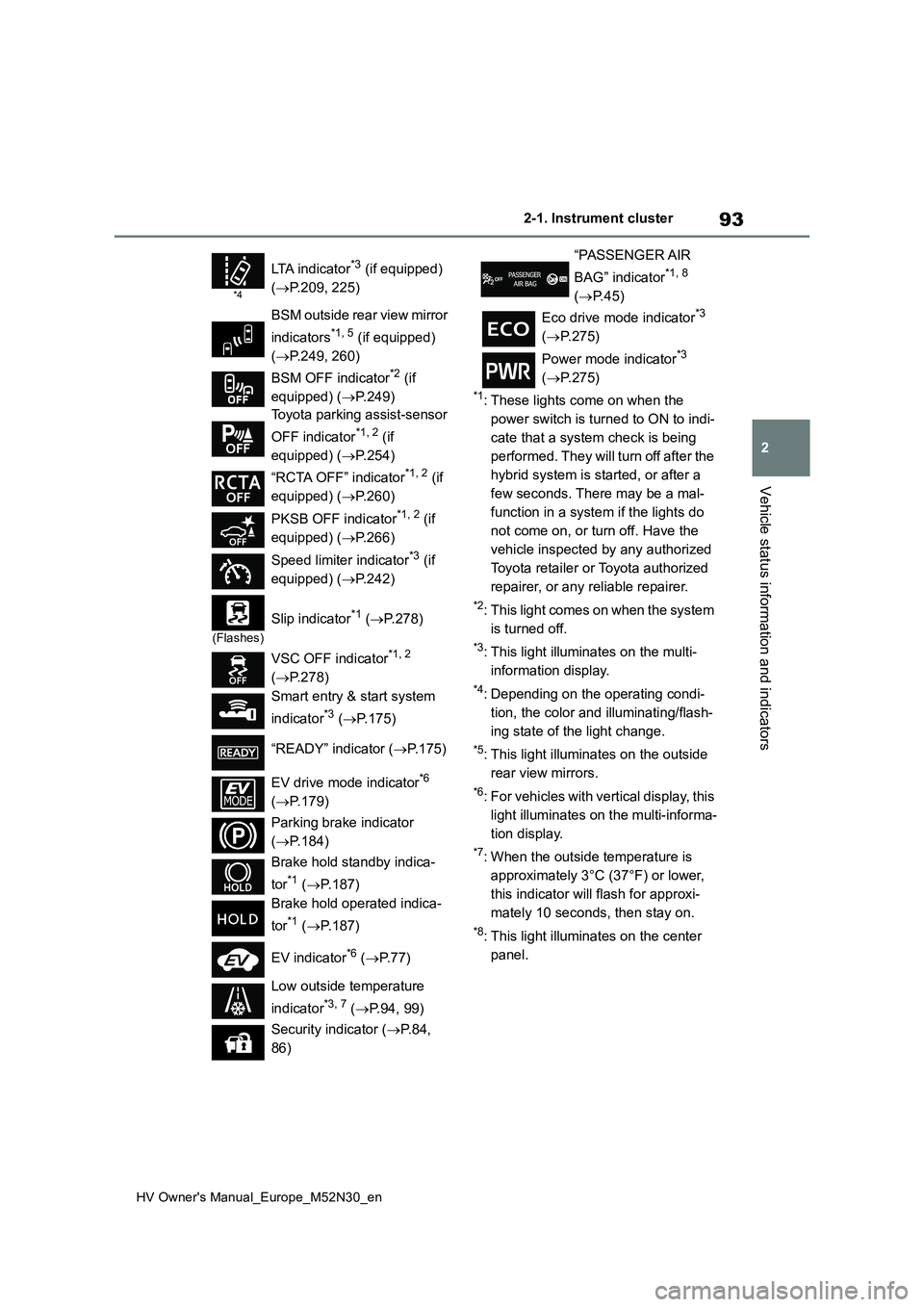
*1: These lights come on when the
power switch is turned to ON to indi-
cate that a system check is being
performed. They will turn off after the
hybrid system is started, or after a
few seconds. There may be a mal-
function in a system if the lights do
not come on, or turn off. Have the
vehicle inspected by any authorized
Toyota retailer or Toyota authorized
repairer, or any reliable repairer.
*2: This light comes on when the system
is turned off.
*3: This light illuminates on the multi-
information display.
*4: Depending on the operating condi-
tion, the color and illuminating/flash-
ing state of the light change.
*5: This light illuminates on the outside
rear view mirrors.
*6: For vehicles with vertical display, this
light illuminates on the multi-informa-
tion display.
*7: When the outside temperature is
approximately 3°C (37°F) or lower,
this indicator will flash for approxi-
mately 10 seconds, then stay on.
*8: This light illuminates on the center
panel.
*4
LTA indicator*3 (if equipped)
( P.209, 225)
BSM outside rear view mirror
indicators*1, 5 (if equipped)
( P.249, 260)
BSM OFF indicator*2 (if
equipped) ( P.249)
Toyota parking assist-sensor
OFF indicator*1, 2 (if
equipped) ( P.254)
“RCTA OFF” indicator*1, 2 (if
equipped) ( P.260)
PKSB OFF indicator*1, 2 (if
equipped) ( P.266)
Speed limiter indicator*3 (if
equipped) ( P.242)
(Flashes)
Slip indicator*1 (P.278)
VSC OFF indicator*1, 2
( P.278)
Smart entry & start system
indicator*3 ( P.175)
“READY” indicator ( P.175)
EV drive mode indicator*6
( P.179)
Parking brake indicator
( P.184)
Brake hold standby indica-
tor*1 ( P.187)
Brake hold operated indica-
tor*1 ( P.187)
EV indicator*6 ( P. 7 7 )
Low outside temperature
indicator*3, 7 ( P.94, 99)
Security indicator ( P. 8 4 ,
86)
“PASSENGER AIR
BAG” indicator*1, 8
( P.45)
Eco drive mode indicator*3
( P.275)
Power mode indicator*3
( P.275)
Page 123 of 590
121
2
HV Owner's Manual_Europe_M52N30_en
2-1. Instrument cluster
Vehicle status information and indicators
meter control switches on the steer-
ing wheel and select , press
/ (vertical display) or /
(horizontal display) of the meter
control switches and select the
energy monitor.
7-inch/8-inch display multimedia
system
1 Press the “MENU” button.
2 Select “Info” on the “Menu”
screen.
3 Select “ECO” on the “Informa-
tion” screen.*
*: Models with navigation function only
If a screen other than “Energy monitor” is displayed, select “Energy”.
9-inch display multimedia system
1 Press the “HOME” button.
2 Select “Vehicle” on the “Home”
screen.
If a screen other than “Energy monitor” is displayed, select “Energy flow”.
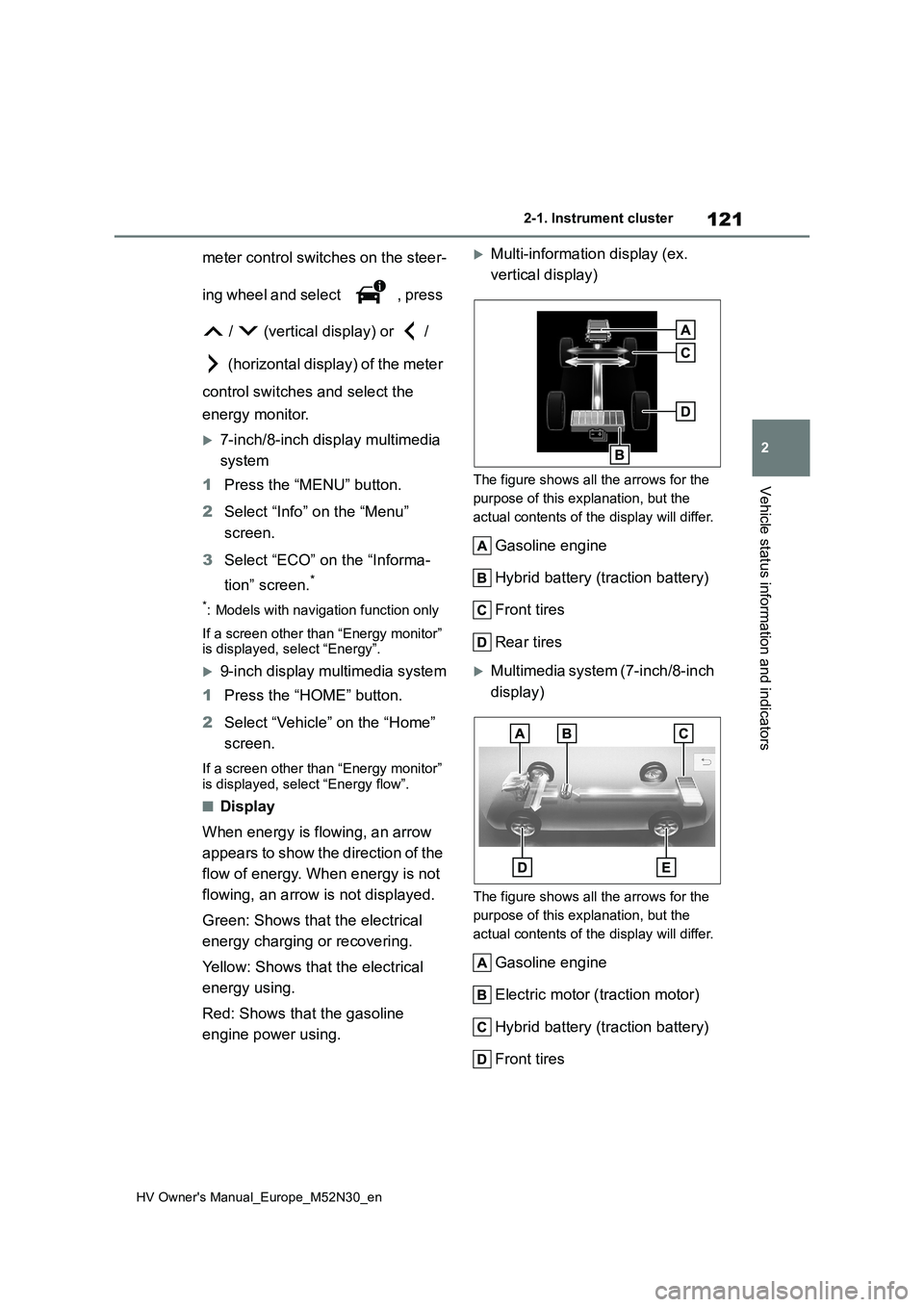
■Display
When energy is flowing, an arrow
appears to show the direction of the
flow of energy. When energy is not
flowing, an arrow is not displayed.
Green: Shows that the electrical
energy charging or recovering.
Yellow: Shows that the electrical
energy using.
Red: Shows that the gasoline
engine power using.
Multi-information display (ex.
vertical display)
The figure shows all the arrows for the
purpose of this explanation, but the
actual contents of the display will differ.
Gasoline engine
Hybrid battery (traction battery)
Front tires
Rear tires
Multimedia system (7-inch/8-inch
display)
The figure shows all the arrows for the
purpose of this explanation, but the
actual contents of the display will differ.
Gasoline engine
Electric motor ( traction motor)
Hybrid battery (traction battery)
Front tires
Page 126 of 590
124
HV Owner's Manual_Europe_M52N30_en
2-1. Instrument cluster
deleted by selecting “Clear”.
■Cruising range
Displays the estimated maximum dis- tance that can be driven with the quan-tity of fuel remaining.
This distance is computed based on your average fuel consumption. As a result, the actual distance that can
be driven may differ from that displayed.
■“Home” screen
The average fuel consumption and dis- tance to empty can be displayed on the
“Home” screen of the multimedia dis- play.
For details of the “Home” screen, refer
to the separate “Navigation and multi- media system Owner’s manual”.
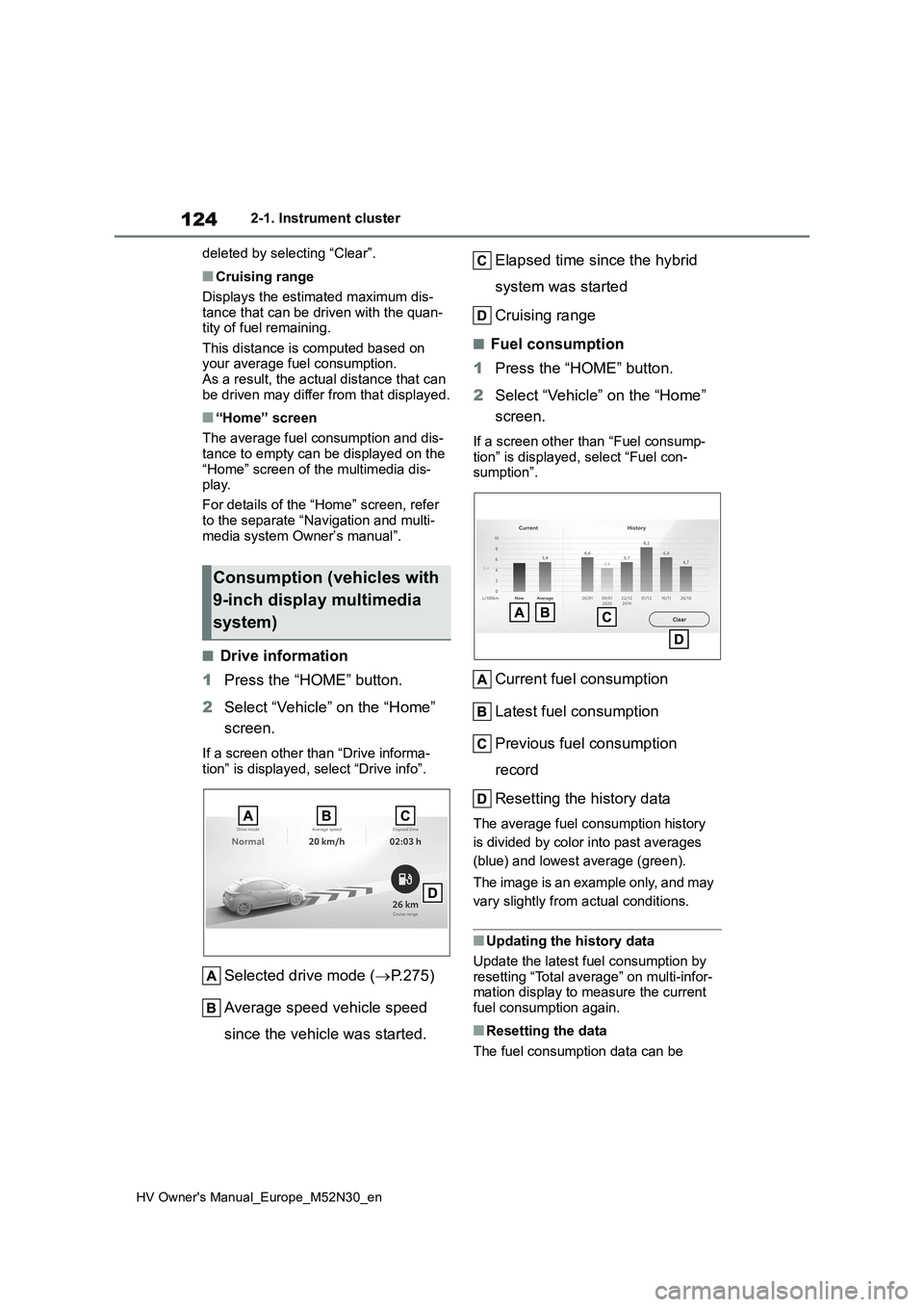
■Drive information
1 Press the “HOME” button.
2 Select “Vehicle” on the “Home”
screen.
If a screen other than “Drive informa- tion” is displayed, select “Drive info”.
Selected drive mode ( P.275)
Average speed vehicle speed
since the vehicle was started.
Elapsed time since the hybrid
system was started
Cruising range
■Fuel consumption
1 Press the “HOME” button.
2 Select “Vehicle” on the “Home”
screen.
If a screen other than “Fuel consump-
tion” is displayed, select “Fuel con- sumption”.
Current fuel consumption
Latest fuel consumption
Previous fuel consumption
record
Resetting the history data
The average fuel consumption history
is divided by color into past averages
(blue) and lowest average (green).
The image is an example only, and may
vary slightly from actual conditions.
■Updating the history data
Update the latest fuel consumption by
resetting “Total average” on multi-infor- mation display to measure the current fuel consumption again.
■Resetting the data
The fuel consumption data can be
Consumption (vehicles with
9-inch display multimedia
system)
Page 131 of 590
129
3
HV Owner's Manual_Europe_M52N30_en
3-1. Key information
Before driving
battery may be depleted. Replace the
battery when necessary. ( P.351) • The wireless remote control does not operate.
• The detection area becomes smaller.
■Key battery depletion (vehicles with a smart entry & start system)
●The standard battery life is 1 to 2 years.
●If the battery becomes low, an alarm will sound in the cabin and a message will be shown on the multi-information
display when the hybrid system is stopped.
●To reduce key battery depletion when the electronic key is to not be used for long periods of time, set the electronic
key to the battery-saving mode. ( P.141)
●As the electronic key always receives radio waves, the battery will become depleted even if the electronic key is
not used. The following symptoms indicate that the electronic key battery may be depleted. Replace the battery
when necessary. ( P.351) • The smart entry & start system or the wireless remote control does not oper-
ate. • The detection area becomes smaller.• The LED indicator on the key surface
does not turn on.
●To avoid serious deterioration, do not
leave the electronic key within 1 m (3 ft.) of the following electrical appli-ances that produce a magnetic field:
•TVs • Personal computers• Cellular phones, cordless phones and
battery chargers • Recharging cellular phones or cord-less phones
• Table lamps • Induction cookers
●If the electronic key is near the vehicle for longer than necessary, even if the smart entry & start system is not oper-
ated, the key battery may become depleted faster than normal.
■Replacing the battery
P. 3 5 1
■If “A New Key has been Registered Contact Your Dealer for Details” is shown on the multi-information
display (vehicles with a smart entry & start system)
This message will be displayed each
time the driver’s door is opened when the doors are unlocked from the outside for approximately 10 days after a new
electronic key has been registered. If this message is displayed but you have not had a new electronic key regis-
tered, ask any authorized Toyota retailer or Toyota authorized repairer, or any reli-able repairer to check if an unknown
electronic key (other than those in your possession) has been registered.
■If a wrong key is used
The key cylinder rotates freely, isolated
from the internal mechanism.
NOTICE
■To prevent key damage
●Do not drop the keys, subject them
to strong shocks, or bend them.
●Do not expose the keys to high
temperatures for long periods of time.
●Do not get the keys wet or wash them in an ultrasonic washer, etc.
●Vehicles with a smart entry & start system: Do not attach metallic or magnetic materials to the keys or
place the keys close to such materi- als.
●Do not disassemble the keys.
●Do not attach a sticker or anything
else to the surface of the key.
Page 143 of 590
141
3
HV Owner's Manual_Europe_M52N30_en
3-2. Opening, closing and locking the doors
Before driving
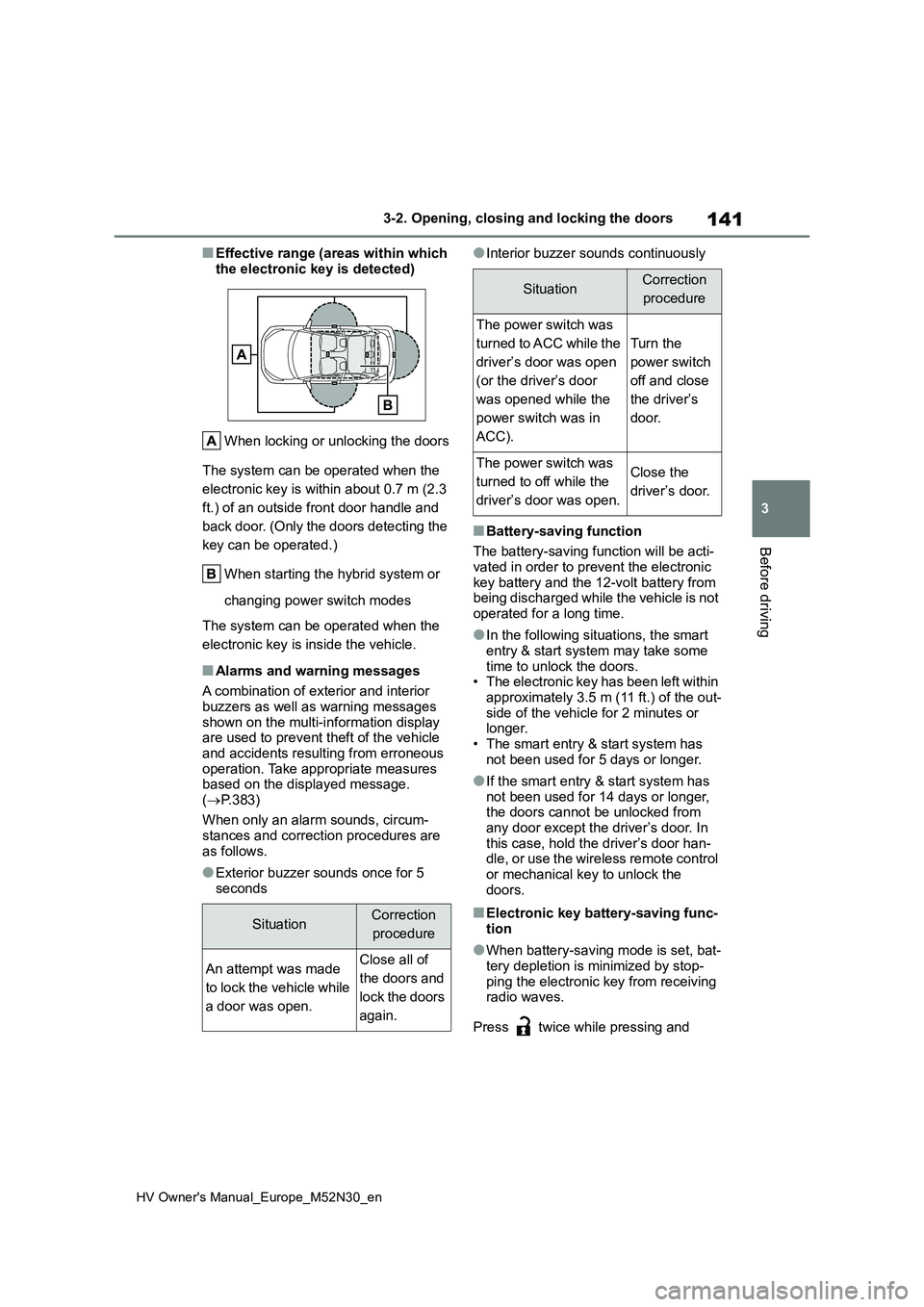
■Effective range (areas within which
the electronic key is detected)
When locking or unlocking the doors
The system can be operated when the
electronic key is within about 0.7 m (2.3
ft.) of an outside front door handle and
back door. (Only the doors detecting the
key can be operated.)
When starting the hybrid system or
changing power switch modes
The system can be operated when the
electronic key is inside the vehicle.
■Alarms and warning messages
A combination of exterior and interior
buzzers as well as warning messages shown on the multi-information display are used to prevent theft of the vehicle
and accidents resulting from erroneous operation. Take appropriate measures based on the displayed message.
( P.383)
When only an alarm sounds, circum-
stances and correction procedures are as follows.
●Exterior buzzer sounds once for 5 seconds
●Interior buzzer sounds continuously
■Battery-saving function
The battery-saving function will be acti-
vated in order to prevent the electronic key battery and the 12-volt battery from being discharged while the vehicle is not
operated for a long time.
●In the following situations, the smart
entry & start system may take some time to unlock the doors.• The electronic key has been left within
approximately 3.5 m (11 ft.) of the out- side of the vehicle for 2 minutes or longer.
• The smart entry & start system has not been used for 5 days or longer.
●If the smart entry & start system has not been used for 14 days or longer, the doors cannot be unlocked from
any door except the driver’s door. In this case, hold the driver’s door han-dle, or use the wireless remote control
or mechanical key to unlock the doors.
■Electronic key battery-saving func-tion
●When battery-saving mode is set, bat-tery depletion is minimized by stop-
ping the electronic key from receiving radio waves.
Press twice while pressing and
SituationCorrection
procedure
An attempt was made
to lock the vehicle while
a door was open.
Close all of
the doors and
lock the doors
again.
SituationCorrection
procedure
The power switch was
turned to ACC while the
driver’s door was open
(or the driver’s door
was opened while the
power switch was in
ACC).
Turn the
power switch
off and close
the driver’s
door.
The power switch was
turned to off while the
driver’s door was open.
Close the
driver’s door.
Page 145 of 590
143
3
HV Owner's Manual_Europe_M52N30_en
3-2. Opening, closing and locking the doors
Before driving
switch modes are changed.
●Do not leave the electronic key on top of the instrument panel or near the
door pockets when exiting the vehicle. Depending on the radio wave recep-tion conditions, it may be detected by
the antenna outside the cabin and the door will become lockable from the outside, possibly trapping the elec-
tronic key inside the vehicle.
●As long as the electronic key is within
the effective range, the doors may be locked or unlocked by anyone. How-ever, only the doors detecting the
electronic key can be used to unlock the vehicle.
●Even if the electronic key is not inside the vehicle, it may be possible to start the hybrid system if the electronic key
is near the window.
●The doors may unlock or lock if a
large amount of water splashes on the door handle, such as in the rain or in a car wash when the electronic key is
within the effective range. (The doors will automatically be locked after approximately 30 seconds if the doors
are not opened and closed.)
●If the wireless remote control is used
to lock the doors when the electronic key is near the vehicle, there is a pos-sibility that the door may not be
unlocked by the entry function. (Use the wireless remote control to unlock the doors.)
●Touching the door lock or unlock sen-sor while wearing gloves may prevent
lock or unlock operation.
●When the lock operation is performed
using the lock sensor, recognition sig- nals will be shown up to two consecu-tive times. After this, no recognition
signals will be given.
●If the door handle becomes wet while
the electronic key is within the effec- tive range, the door may lock and unlock repeatedly. In that case, follow
the following correction procedures to wash the vehicle:
• Place the electronic key in a location 2
m (6 ft.) or more away from the vehi- cle. (Take care to ensure that the key is not stolen.)
• Set the electronic key to battery-sav- ing mode to disable the smart entry & start system. ( P.141)
●If the electronic key is inside the vehi- cle and a door handle becomes wet
during a car wash, a message may be shown on the multi-information dis-play and a buzzer will sound outside
the vehicle. To turn off the alarm, lock all the doors.
●The lock sensor may not work prop-erly if it comes into contact with ice, snow, mud, etc. Clean the lock sensor
and attempt to operate it again.
●A sudden handle operation or a han-
dle operation immediately after enter- ing the effective range may prevent the doors from being unlocked. Touch
the door unlock sensor and check that the doors are unlocked before pulling the door handle again.
●If there is another electronic key in the detection area, it may take slightly lon-
ger to unlock the doors after the door handle is gripped.
■When the vehicle is not driven for extended periods
●To prevent theft of the vehicle, do not leave the electronic key within 2 m (6
ft.) of the vehicle.
●The smart entry & start system can be
deactivated in advance. ( P.431)
●Setting the electronic key to battery-
saving mode helps to reduce key bat- tery depletion. ( P.141)
■To operate the system properly
Make sure to carry the electronic key
when operating the system. Do not get the electronic key too close to the vehi-cle when operating the system from the
outside of the vehicle. Depending on the position and holding condition of the electronic key, the key
may not be detected correctly and the system may not operate properly. (The
Page 156 of 590
154
HV Owner's Manual_Europe_M52N30_en
3-4. Adjusting the steering wheel and mirrors
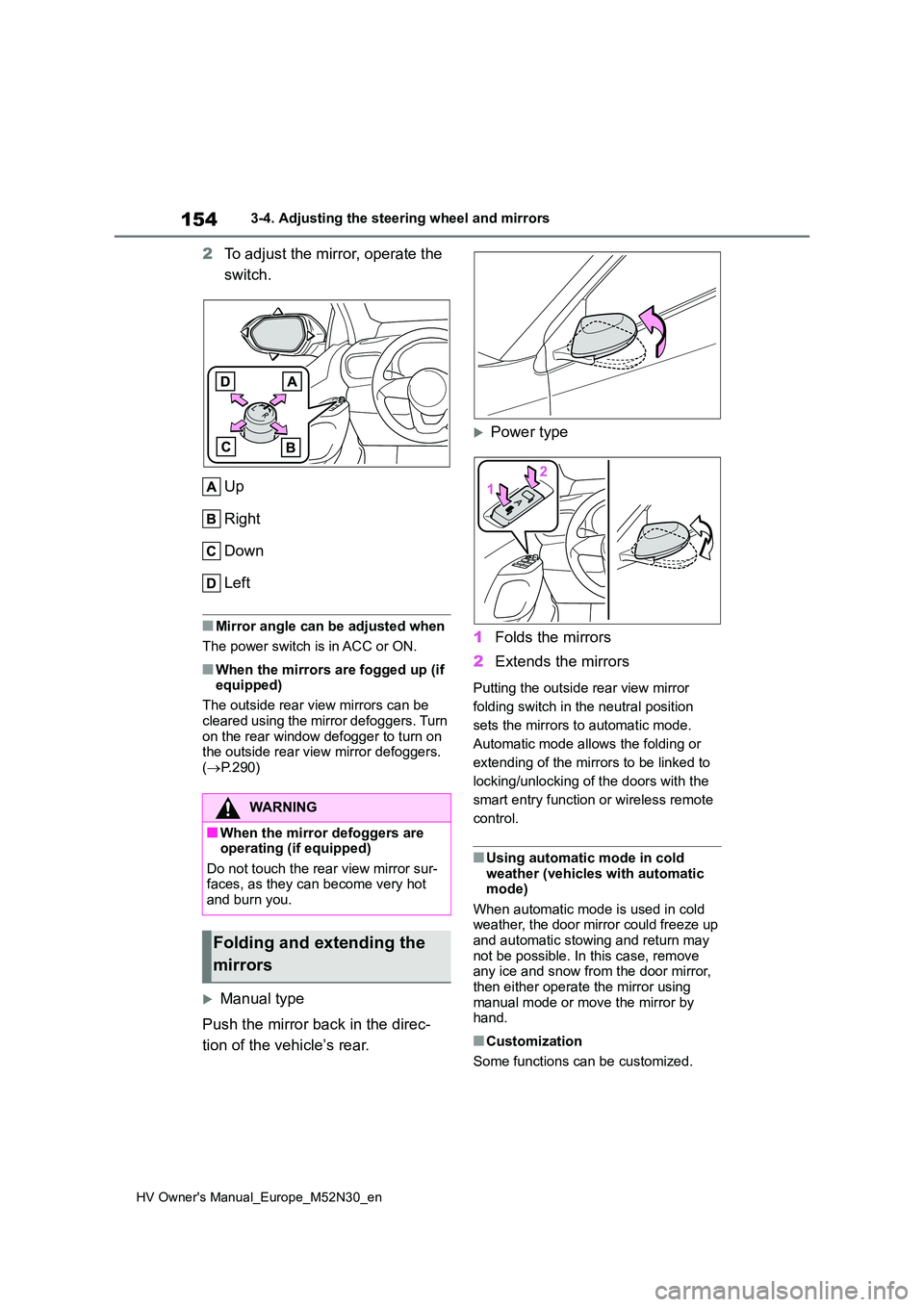
2To adjust the mirror, operate the
switch.
Up
Right
Down
Left
■Mirror angle can be adjusted when
The power switch is in ACC or ON.
■When the mirrors are fogged up (if equipped)
The outside rear view mirrors can be
cleared using the mirror defoggers. Turn on the rear window defogger to turn on the outside rear view mirror defoggers.
( P.290)
Manual type
Push the mirror back in the direc-
tion of the vehicle’s rear.
Power type
1 Folds the mirrors
2 Extends the mirrors
Putting the outside rear view mirror
folding switch in the neutral position
sets the mirrors to automatic mode.
Automatic mode allows the folding or
extending of the mirrors to be linked to
locking/unlocking of the doors with the
smart entry function or wireless remote
control.
■Using automatic mode in cold weather (vehicles with automatic mode)
When automatic mode is used in cold weather, the door mirror could freeze up and automatic stowing and return may
not be possible. In this case, remove any ice and snow from the door mirror, then either operate the mirror using
manual mode or move the mirror by hand.
■Customization
Some functions can be customized.
WARNING
■When the mirror defoggers are operating (if equipped)
Do not touch the rear view mirror sur- faces, as they can become very hot and burn you.
Folding and extending the
mirrors