Windows TOYOTA YARIS CROSS 2021 User Guide
[x] Cancel search | Manufacturer: TOYOTA, Model Year: 2021, Model line: YARIS CROSS, Model: TOYOTA YARIS CROSS 2021Pages: 650, PDF Size: 132.86 MB
Page 137 of 650
135
3
YARIS CROSS Owner's Manual_Europe_M52K60_en
3-2. Opening, closing and locking the doors
Before driving
3-2.Opening, closing and lo cking th e d oors
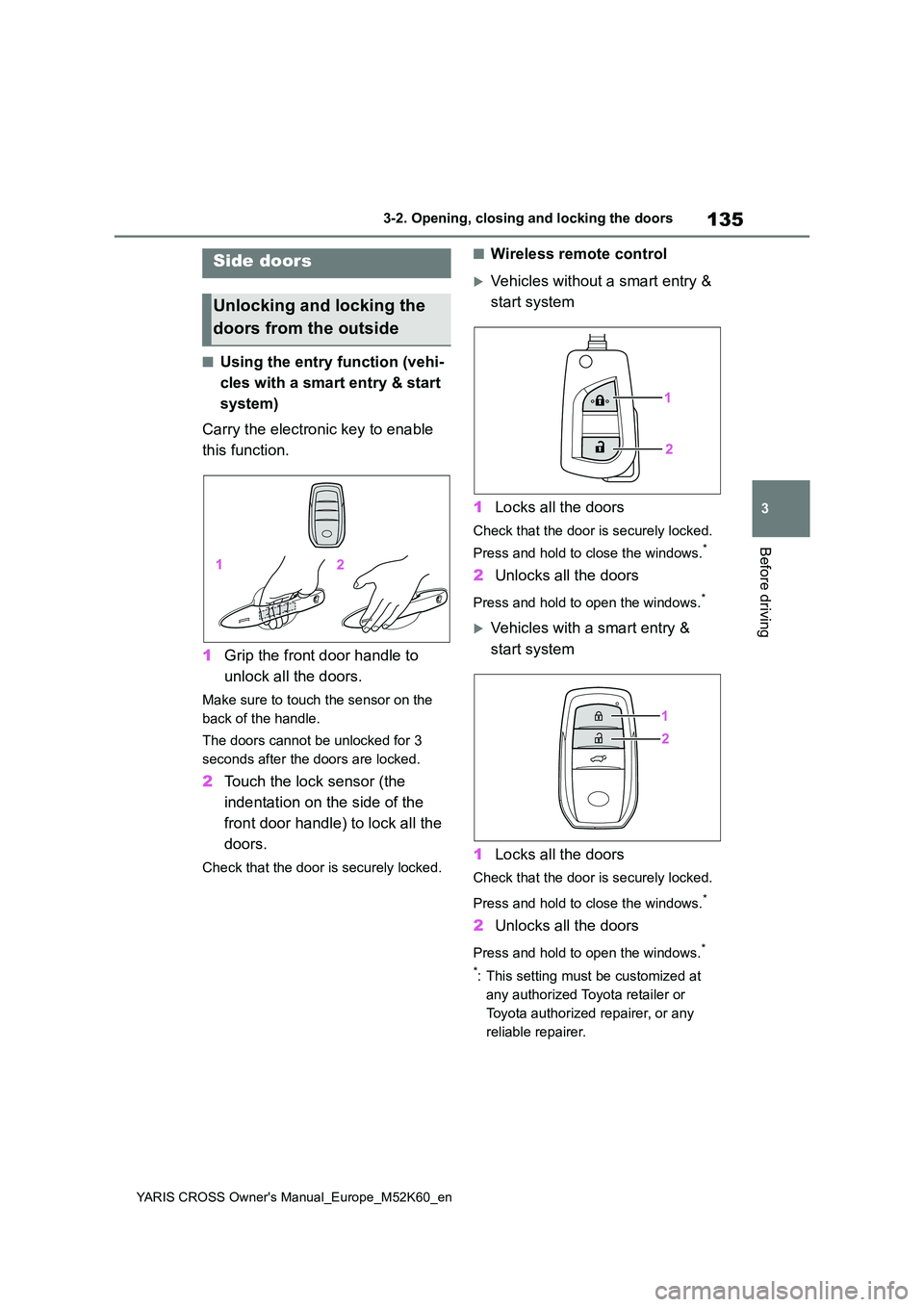
■Using the entry function (vehi-
cles with a smart entry & start
system)
Carry the electronic key to enable
this function.
1 Grip the front door handle to
unlock all the doors.
Make sure to touch the sensor on the
back of the handle.
The doors cannot be unlocked for 3
seconds after the doors are locked.
2 Touch the lock sensor (the
indentation on the side of the
front door handle) to lock all the
doors.
Check that the door is securely locked.
■Wireless remote control
Vehicles without a smart entry &
start system
1 Locks all the doors
Check that the door is securely locked.
Press and hold to close the windows.*
2 Unlocks all the doors
Press and hold to open the windows.*
Vehicles with a smart entry &
start system
1 Locks all the doors
Check that the door is securely locked.
Press and hold to close the windows.*
2 Unlocks all the doors
Press and hold to open the windows.*
*: This setting must be customized at
any authorized Toyota retailer or
Toyota authorized repairer, or any
reliable repairer.
Side doors
Unlocking and locking the
doors from the outside
Page 138 of 650
136
YARIS CROSS Owner's Manual_Europe_M52K60_en
3-2. Opening, closing and locking the doors
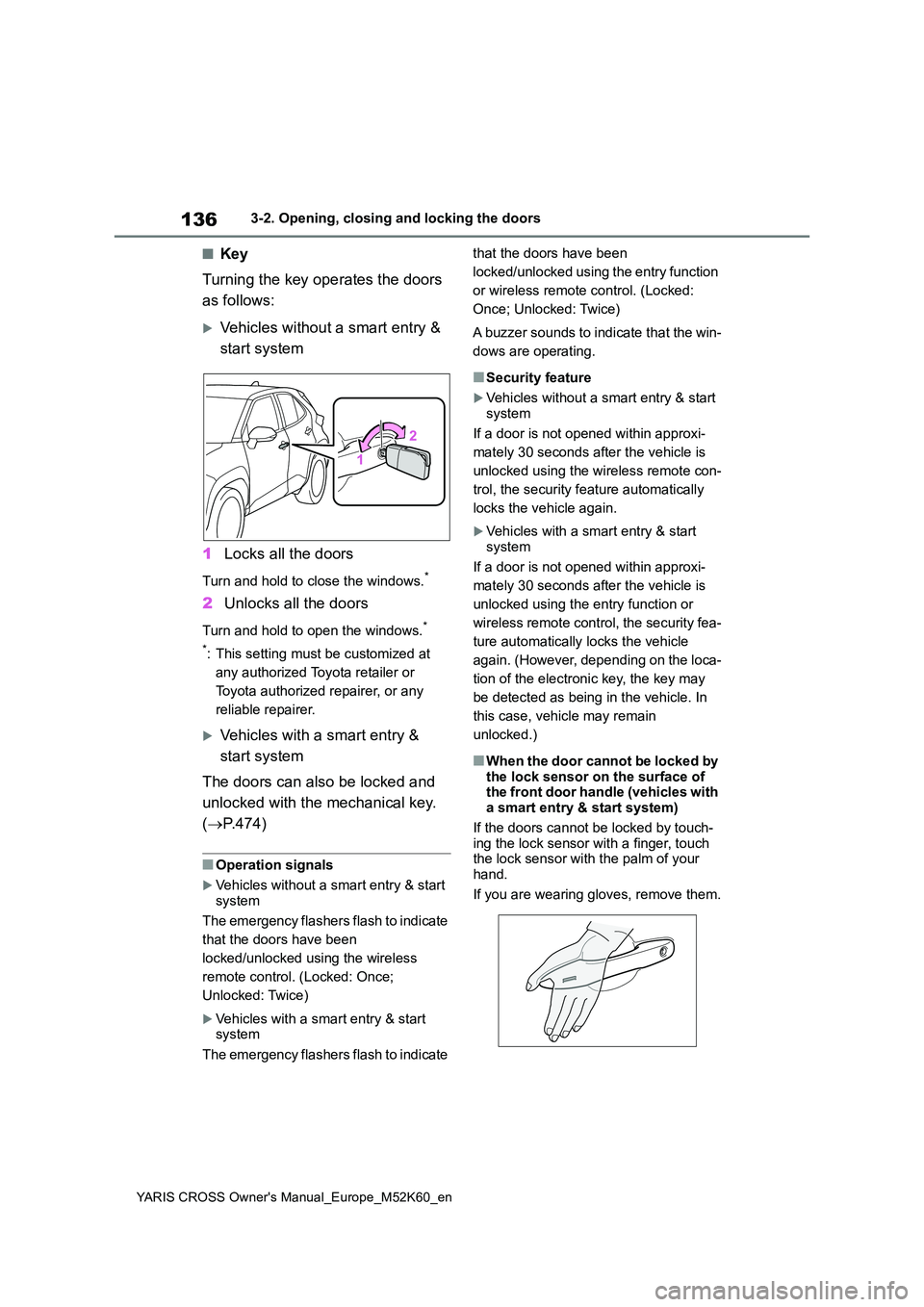
■Key
Turning the key operates the doors
as follows:
Vehicles without a smart entry &
start system
1 Locks all the doors
Turn and hold to close the windows.*
2Unlocks all the doors
Turn and hold to open the windows.*
*: This setting must be customized at
any authorized Toyota retailer or
Toyota authorized repairer, or any
reliable repairer.
Vehicles with a smart entry &
start system
The doors can also be locked and
unlocked with the mechanical key.
( P.474)
■Operation signals
Vehicles without a smart entry & start system
The emergency flashers flash to indicate
that the doors have been
locked/unlocked using the wireless
remote control. (Locked: Once;
Unlocked: Twice)
Vehicles with a smart entry & start system
The emergency flashers flash to indicate
that the doors have been
locked/unlocked using the entry function
or wireless remote control. (Locked:
Once; Unlocked: Twice)
A buzzer sounds to indicate that the win-
dows are operating.
■Security feature
Vehicles without a smart entry & start
system
If a door is not opened within approxi-
mately 30 seconds after the vehicle is
unlocked using the wireless remote con-
trol, the security feature automatically
locks the vehicle again.
Vehicles with a smart entry & start system
If a door is not opened within approxi-
mately 30 seconds after the vehicle is
unlocked using the entry function or
wireless remote control, the security fea-
ture automatically locks the vehicle
again. (However, depending on the loca-
tion of the electronic key, the key may
be detected as being in the vehicle. In
this case, vehicle may remain
unlocked.)
■When the door cannot be locked by
the lock sensor on the surface of the front door handle (vehicles with a smart entry & start system)
If the doors cannot be locked by touch- ing the lock sensor with a finger, touch the lock sensor with the palm of your
hand.
If you are wearing gloves, remove them.
Page 140 of 650
138
YARIS CROSS Owner's Manual_Europe_M52K60_en
3-2. Opening, closing and locking the doors
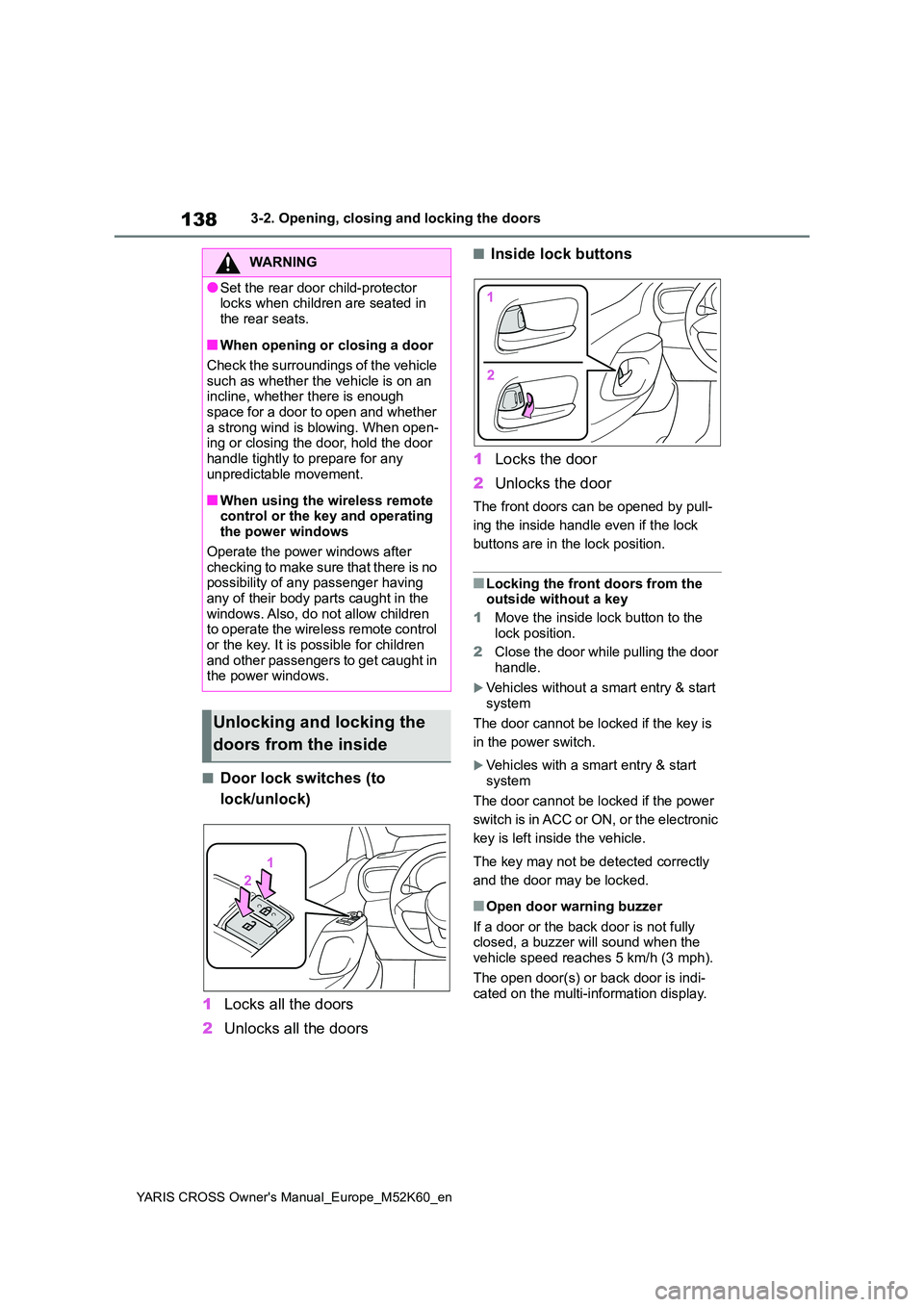
■Door lock switches (to
lock/unlock)
1 Locks all the doors
2 Unlocks all the doors
■Inside lock buttons
1 Locks the door
2 Unlocks the door
The front doors can be opened by pull-
ing the inside handle even if the lock
buttons are in the lock position.
■Locking the front doors from the outside without a key
1 Move the inside lock button to the
lock position.
2 Close the door while pulling the door handle.
Vehicles without a smart entry & start
system
The door cannot be locked if the key is
in the power switch.
Vehicles with a smart entry & start system
The door cannot be locked if the power
switch is in ACC or ON, or the electronic
key is left inside the vehicle.
The key may not be detected correctly
and the door may be locked.
■Open door warning buzzer
If a door or the back door is not fully closed, a buzzer will sound when the vehicle speed reaches 5 km/h (3 mph).
The open door(s) or back door is indi- cated on the multi-information display.
WARNING
●Set the rear door child-protector locks when children are seated in
the rear seats.
■When opening or closing a door
Check the surroundings of the vehicle such as whether the vehicle is on an incline, whether there is enough
space for a door to open and whether a strong wind is blowing. When open-ing or closing the door, hold the door
handle tightly to prepare for any unpredictable movement.
■When using the wireless remote control or the key and operating the power windows
Operate the power windows after checking to make sure that there is no possibility of any passenger having
any of their body parts caught in the windows. Also, do not allow children to operate the wireless remote control
or the key. It is possible for children and other passengers to get caught in the power windows.
Unlocking and locking the
doors from the inside
Page 171 of 650
169
3
YARIS CROSS Owner's Manual_Europe_M52K60_en
3-5. Opening and closing the windows
Before driving
3-5.Opening and c los ing the win dows
*: If equipped
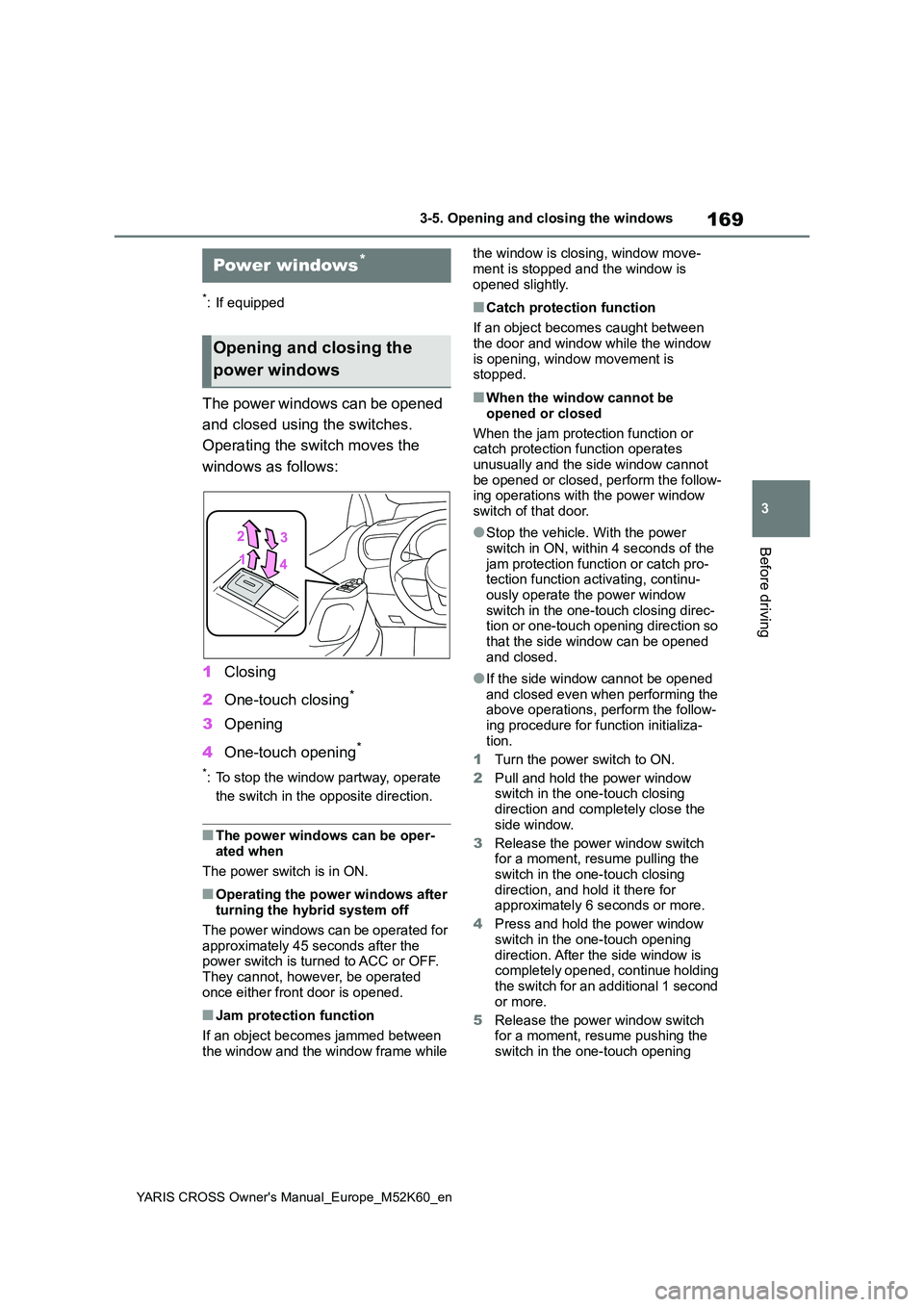
The power windows can be opened
and closed using the switches.
Operating the switch moves the
windows as follows:
1 Closing
2 One-touch closing*
3Opening
4 One-touch opening*
*: To stop the window partway, operate
the switch in the opposite direction.
■The power windows can be oper-
ated when
The power switch is in ON.
■Operating the power windows after turning the hybrid system off
The power windows can be operated for approximately 45 seconds after the power switch is turned to ACC or OFF.
They cannot, however, be operated once either front door is opened.
■Jam protection function
If an object becomes jammed between
the window and the window frame while
the window is closing, window move-
ment is stopped and the window is opened slightly.
■Catch protection function
If an object becomes caught between
the door and window while the window is opening, window movement is stopped.
■When the window cannot be
opened or closed
When the jam protection function or catch protection function operates
unusually and the side window cannot be opened or closed, perform the follow-ing operations with the power window
switch of that door.
●Stop the vehicle. With the power
switch in ON, within 4 seconds of the jam protection function or catch pro-tection function activating, continu-
ously operate the power window switch in the one-touch closing direc-tion or one-touch opening direction so
that the side window can be opened and closed.
●If the side window cannot be opened and closed even when performing the above operations, perform the follow-
ing procedure for function initializa- tion.
1 Turn the power switch to ON.
2 Pull and hold the power window switch in the one-touch closing
direction and completely close the side window.
3 Release the power window switch for a moment, resume pulling the
switch in the one-touch closing direction, and hold it there for approximately 6 seconds or more.
4 Press and hold the power window
switch in the one-touch opening direction. After the side window is completely opened, continue holding
the switch for an additional 1 second or more.
5 Release the power window switch for a moment, resume pushing the
switch in the one-touch opening
Power windows*
Opening and closing the
power windows
Page 172 of 650
170
YARIS CROSS Owner's Manual_Europe_M52K60_en
3-5. Opening and closing the windows
direction, and hold it there for
approximately 4 seconds or more.
6 Pull and hold the power window switch in the one-touch closing direction again. After the side win-
dow is completely closed, continue holding the switch for a further 1 sec-ond or more.
If you release the switch while the win- dow is moving, start again from the beginning.
If the window reverses and cannot be fully closed or opened, have the vehicle inspected by any authorized Toyota
retailer or Toyota authorized repairer, or any reliable repairer.
■Door lock linked window operation
●The power windows can be opened
and closed using the key (vehicles without a smart entry & start system)
or mechanical key (vehicles with a
sm ar t e n tr y & st a r t sy st em ) .* ( P.136, 474)
●The power windows can be opened
and closed using the wireless remote
control.* ( P.135)*: These settings must be customized at
any authorized Toyota retailer or
Toyota authorized repairer, or any reli-
able repairer.
■Customization
Some functions can be customized.
( P.498)
WARNING
Observe the following precautions. Failure to do so may result in death or
serious injury.
■Closing the windows
●The driver is responsible for all the power window operations, including
the operation for the passengers. In order to prevent accidental opera-tion, especially by a child, do not let
a child operate the power windows. It is possible for children and other passengers to have body parts
caught in the power window. Also, when riding with a child, it is recom-mended to use the window lock
switch. ( P.171)
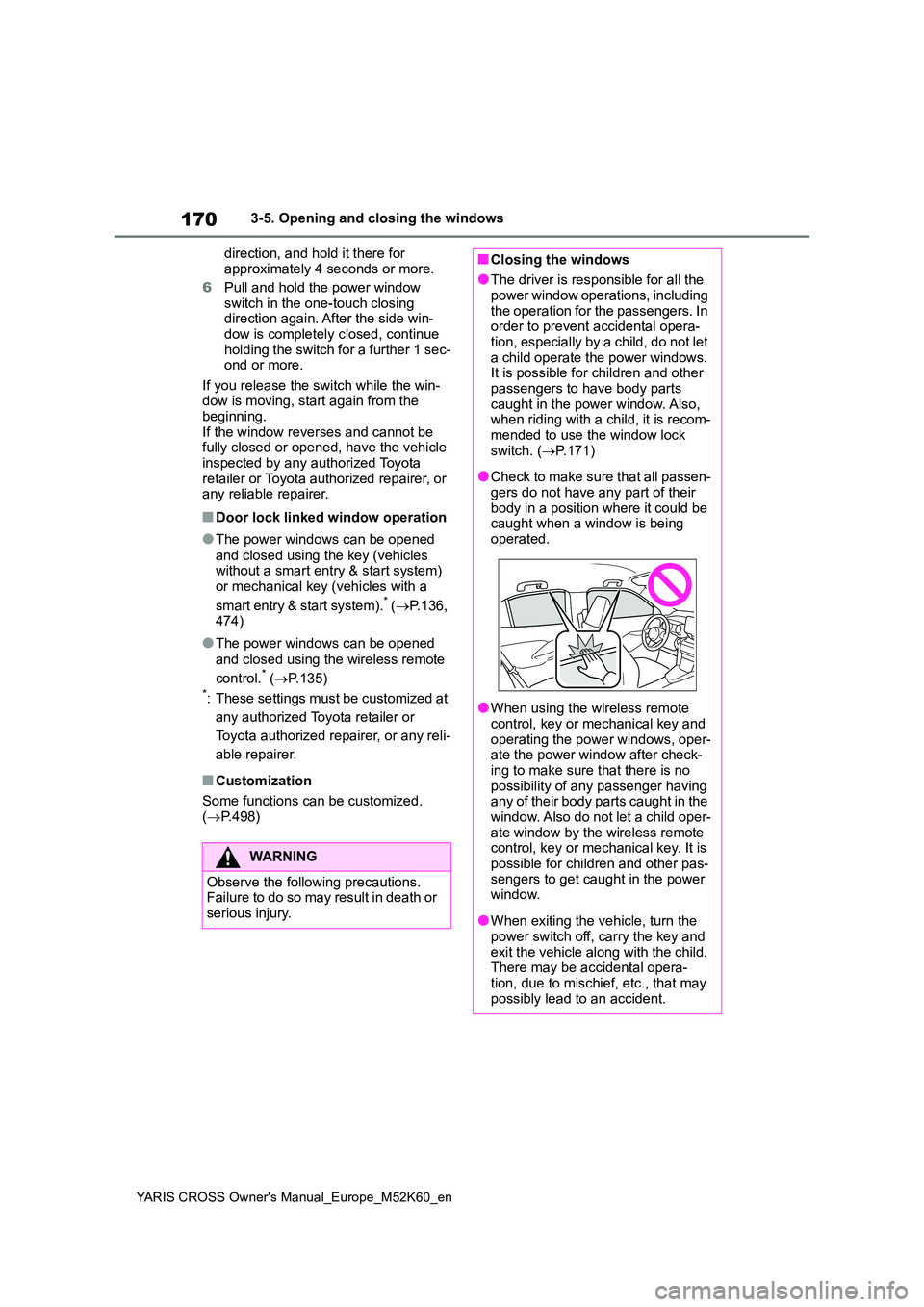
●Check to make sure that all passen-
gers do not have any part of their body in a position where it could be caught when a window is being
operated.
●When using the wireless remote
control, key or mechanical key and operating the power windows, oper-ate the power window after check-
ing to make sure that there is no possibility of any passenger having any of their body parts caught in the
window. Also do not let a child oper- ate window by the wireless remote control, key or mechanical key. It is
possible for children and other pas- sengers to get caught in the power window.
●When exiting the vehicle, turn the power switch off, carry the key and
exit the vehicle along with the child. There may be accidental opera-tion, due to mischief, etc., that may
possibly lead to an accident.
Page 173 of 650
171
3
YARIS CROSS Owner's Manual_Europe_M52K60_en
3-5. Opening and closing the windows
Before driving
This function can be used to pre-
vent children from accidentally
opening or closing a passenger
window.
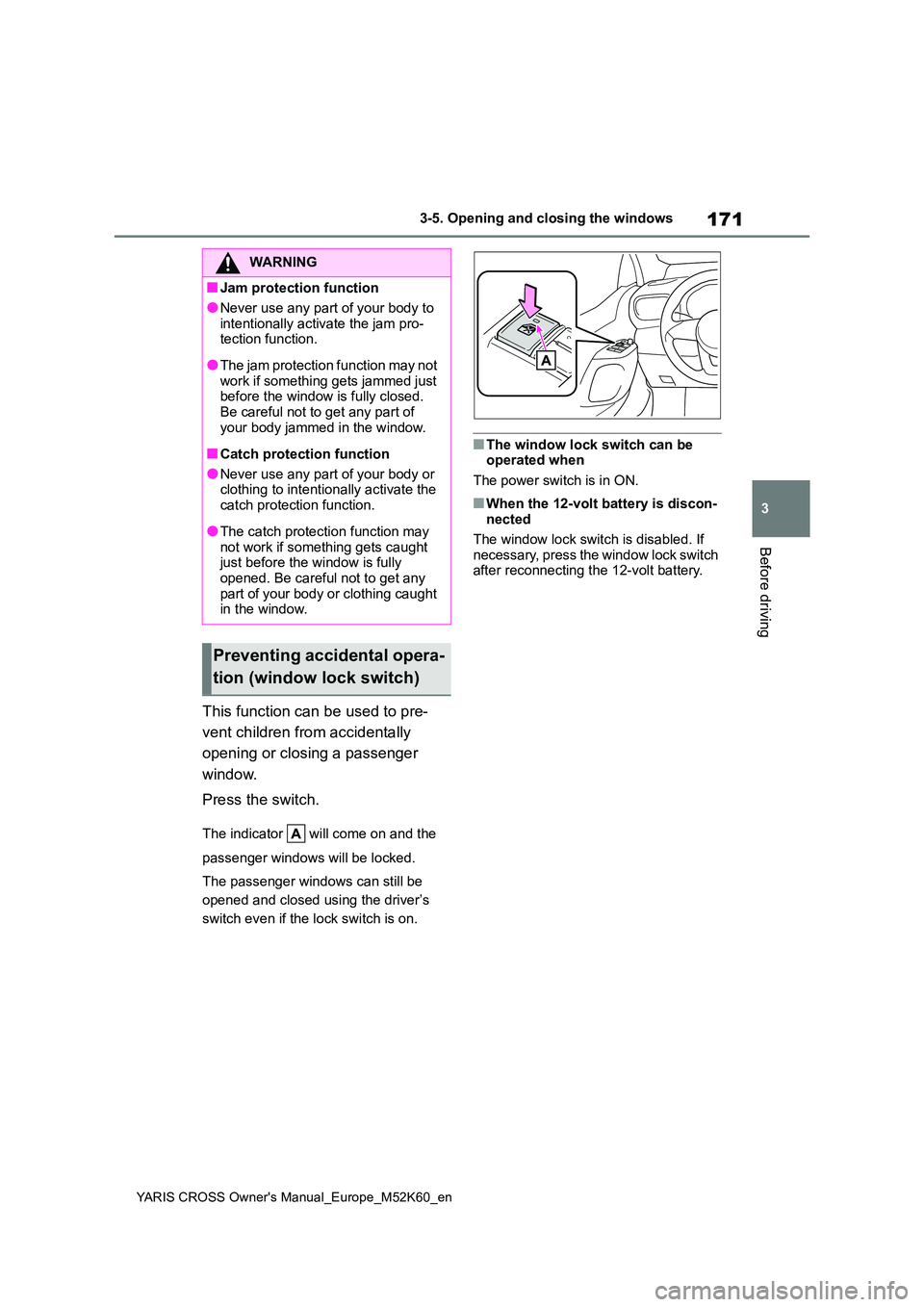
Press the switch.
The indicator will come on and the
passenger windows will be locked.
The passenger windows can still be
opened and closed using the driver’s
switch even if the lock switch is on.
■The window lock switch can be operated when
The power switch is in ON.
■When the 12-volt battery is discon- nected
The window lock switch is disabled. If
necessary, press the window lock switch after reconnecting the 12-volt battery.
WARNING
■Jam protection function
●Never use any part of your body to
intentionally activate the jam pro- tection function.
●The jam protection function may not work if something gets jammed just before the window is fully closed.
Be careful not to get any part of your body jammed in the window.
■Catch protection function
●Never use any part of your body or clothing to intentionally activate the
catch protection function.
●The catch protection function may
not work if something gets caught just before the window is fully opened. Be careful not to get any
part of your body or clothing caught in the window.
Preventing accidental opera-
tion (window lock switch)
Page 174 of 650
172
YARIS CROSS Owner's Manual_Europe_M52K60_en
3-5. Opening and closing the windows
Page 177 of 650
175
4
YARIS CROSS Owner's Manual_Europe_M52K60_en
4-1. Before driving
Driving
4-1.Before driv in g
■Starting the hybrid system
P.189, 191
■Driving
1 With the brake pedal depressed,
shift the shift lever to D.
( P.197)
2 If the parking brake is in manual
mode, release the parking
brake. ( P.200)
If the parking brake is in automatic mode, the parking brake is release automatically when shifting the shift
lever to any position other than P. ( P.201)
3Gradually release the brake
pedal and gently depress the
accelerator pedal to accelerate
the vehicle.
■Stopping
1 With the shift lever in D, depress
the brake pedal.
2 If necessary, set the parking
brake.
If the vehicle is to be stopped for an extended period of time, shift the shift lever to P. ( P.197)
■Parking the vehicle
1 With the shift lever in D, depress
the brake pedal to stop the vehi-
cle completely.
2 Set the parking brake (P.200),
and shift the shift lever to P.
( P.197)
Check the parking brake indicator is illuminated.
3 Turn the power switch to OFF to
stop the hybrid system.
4 Slowly release the brake pedal.
5 Lock the door, making sure that
you have the key on your per-
son.
If parking on a hill, block the wheels as
needed.
■Starting off on a steep uphill
1 With the brake pedal depressed,
shift the shift lever to D.
2 Pull the parking brake switch
and parking brake is set manu-
ally. ( P.200)
3 Release the brake pedal and
gently depress the accelerator
pedal to accelerate the vehicle.
4 Press the parking brake switch
and parking brake is released
manually. ( P. 2 0 0 )
Parking brake automatic release func- tion. ( P.201)
■For fuel-efficient driving
Keep in mind that hybrid vehicles are similar to conventional vehicles, and it is necessary to refrain from activities such
as sudden acceleration. ( P.343)
■Driving in the rain
●Drive carefully when it is raining,
because visibility will be reduced, the windows may become fogged-up, and the road will be slippery.
●Drive carefully when it starts to rain,
Driving the vehicle
The following procedures
should be observed to ensure
safe driving:
Driving procedure
Page 226 of 650
224
YARIS CROSS Owner's Manual_Europe_M52K60_en
4-4. Refueling
4-4.Refuelin g
Turn the power switch off and
ensure that all the doors and
windows are closed.
Confirm the type of fuel.
■Fuel types
P. 4 9 7
■Fuel tank opening for unleaded gasoline
To help prevent incorrect fueling, your vehicle has a fuel tank opening that only accommodates the special nozzle on
unleaded fuel pumps.
Opening the fuel tank
cap
Perform the following steps to
open the fuel tank cap:
Before refueling the vehicle
WARNING
■When refueling the vehicle
Observe the following precautions
while refueling the vehicle. Failure to do so may result in death or serious injury.
●After exiting the vehicle and before opening the fuel door, touch an
unpainted metal surface to dis- charge any static electricity. It is important to discharge static elec-
tricity before refueling because sparks resulting from static electric-ity can cause fuel vapors to ignite
while refueling.
●Always hold the grips on the fuel tank cap and turn it slowly to remove it.
A whooshing sound may be heard when the fuel tank cap is loosened. Wait until the sound cannot be
heard before fully removing the cap. In hot weather, pressurized fuel may spray out the filler neck
and cause injury.
●Do not allow anyone that has not
discharged static electricity from their body to come close to an open fuel tank.
●Do not inhale vaporized fuel.Fuel contains substances that are
harmful if inhaled.
●Do not smoke while refueling the
vehicle. Doing so may cause the fuel to ignite and cause a fire.
●Do not return to the vehicle or touch any person or object that is stati-
cally charged. This may cause static electricity to build up, resulting in a possible igni-
tion hazard.
■When refueling
Observe the following precautions to prevent fuel overflowing from the fuel tank:
●Securely insert the fuel nozzle into the fuel filler neck.
●Stop filling the tank after the fuel nozzle automatically clicks off.
●Do not top off the fuel tank.
Page 354 of 650
352
YARIS CROSS Owner's Manual_Europe_M52K60_en
5-1. Using the air conditioning system and defogger
■Switching between outside air
and recirculated air modes
To change to recirculated air
mode, press the recirculated air
mode switch.
The indicator illuminates on the recircu-
lated air mode switch.
To change to outside air mode,
press the outside air mode
switch.
The indicator illuminates on the outside
air mode switch.
■Set cooling and dehumidifica-
tion function
Press the “A/C” switch.
When the function is on, the indicator
illuminates on the “A/C” switch.
■Defogging the windshield
Defoggers are used to defog the
windshield and front side windows.
Press the windshield defogger
switch.
Set the outside/recirculated air mode
switch to outside air mode if the recircu-
lated air mode is used. (It may switch
automatically.)
To defog the windshield and the side
windows quickly, turn the air flow and
temperature up.
To return to the previous mode, press
the windshield defogger switch again
when the windshield is defogged.
When the windshield defogger switch is
on, the indicator illuminates on the
windshield defogger switch.
■Defogging the rear window
and outside rear view mirrors
Defoggers are used to defog the
rear window, and to remove rain-
drops, dew and frost from the out-
side rear view mirrors.
Press the rear window and outside
rear view mirror defoggers switch.
The defoggers will automatically turn off
after a while.
When the rear window and outside rear
view mirror defoggers switch is on, the
indicator illuminates on the rear window
and outside rear view mirror defoggers
switch.
■Using the Climate Preference
1 Press the automatic mode
switch.
2 Press the “FAST/ECO” switch.
Each time the “FAST/ECO” switch
is pressed, the fan speed setting
mode toggles as follows.
Normal “ECO” “FAST” Nor-
mal
When “ECO” is displayed on the air
conditioning screen, the air condi-
tioning is controlled with low fuel
consumption prioritized such as
reducing fan speed, etc.
When “FAST” is displayed on the
screen, fan speed will be
increased.
■Fogging up of the windows
●The windows will easily fog up when
the humidity in the vehicle is high. Turning “A/C” on will dehumidify the air from the outlets and defog the