shift TOYOTA YARIS CROSS 2021 Service Manual
[x] Cancel search | Manufacturer: TOYOTA, Model Year: 2021, Model line: YARIS CROSS, Model: TOYOTA YARIS CROSS 2021Pages: 650, PDF Size: 132.86 MB
Page 263 of 650
261
4
YARIS CROSS Owner's Manual_Europe_M52K60_en
4-5. Using the driving support systems
Driving
Press and hold the “-SET” switch.
Dynamic Radar Cruise Control with
Road Sign Assist can be
enabled/disabled in on the
multi-information display. ( P.498)
When the Dynamic Radar Cruise
Control with Road Sign Assist is
operating, while driving down a hill,
the vehicle speed may exceed the
set speed.
In this case, the displayed set vehi-
cle speed will be highlighted and a
buzzer will sound to alert the driver.
■Dynamic radar cruise control with full-speed range can be set when
●The shift lever is in D.
●The desired set speed can be set when the vehicle speed is approxi-mately 30 km/h (20 mph) or more.
(However, when the vehicle speed is set while driving at below approxi-mately 30 km/h [20 mph], the set
speed will be set to approximately 30 km/h [20 mph].)
■Accelerating after setting the vehi-cle speed
The vehicle can accelerate by operating the accelerator pedal. After accelerat-ing, the set speed resumes. However,
during vehicle-to-vehicle distance con- trol mode, the vehicle speed may decrease below the set speed in order
to maintain the distance to the preceding vehicle.
■When the vehicle stops while fol-
low-up cruising
●Pressing the “+RES” switch while the
vehicle ahead stops will resume fol- low-up cruising if the vehicle ahead starts off within approximately 3 sec-
onds after the switch is pressed.
●If the vehicle ahead starts off within 3
seconds after your vehicle stops, fol- low-up cruising will be resumed.
■Automatic cancelation of vehicle-to-vehicle distance control mode
Vehicle-to-vehicle distance control mode is automatically canceled in the follow-ing situations.
●VSC is activated.
●TRC is activated for a period of time.
●When the VSC or TRC system is
turned off.
●When snow mode is set.
●The sensor cannot detect correctly because it is covered in some way.
●When the brake control or output restriction control of a driving support
system operates. (For example: Pre-Collision System, Drive-Start Control)
●The parking brake is operated.
●The vehicle is stopped by system con-trol on a steep incline.
●The following are detected when the vehicle has been stopped by system control:
• The driver is not wearing a seat belt. • The driver’s door is opened.• The vehicle has been stopped for
about 3 minutes
If vehicle-to-vehicle distance control mode is automatically canceled for any
reasons other than the above, there may be a malfunction in the system. Contact any authorized Toyota retailer
or Toyota authorized repairer, or any reli- able repairer.
Enabling/Disabling the
Dynamic Radar Cruise Con-
trol with Road Sign Assist (if
equipped)
Page 276 of 650
274
YARIS CROSS Owner's Manual_Europe_M52K60_en
4-5. Using the driving support systems
Approximately 3 m (9.8 ft.) to 60 m (197 ft.) from the rear bumper*2
*1: The area between the side of the vehicle and 0.5 m (1.6 ft.) from the side of the
vehicle cannot be detected.
*2: The greater the difference in speed between your vehicle and t he detected vehi-
cle is, the farther away the vehicle will be detected, causing the outside rear view
mirror indicator to illuminate or flash.
■The Blind Spot Monitor is opera- tional when
The Blind Spot Monitor is operational when all of the following conditions are met:
●The Blind Spot Monitor is on.
●The shift lever is in a position other than R.
●The vehicle speed is greater than approximately 16 km/h (10 mph).
■The Blind Spot Monitor will detect a vehicle when
The Blind Spot Monitor will detect a vehicle present in the detection area in the following situations:
●A vehicle in an adjacent lane over-takes your vehicle.
●You overtake a vehicle in adjacent lane slowly.
●Another vehicle enters the detection area when it changes lanes.
■Conditions under which the system
will not detect a vehicle
The Blind Spot Monitor is not designed to detect the following types of vehicles
and/or objects:
●Small motorcycles, bicycles, pedestri-
ans, etc.*
●Vehicles traveling in the opposite
direction
●Guardrails, walls, signs, parked vehi-
cles and similar stationary objects*
●Following vehicles that are in the
same lane*
●Vehicles traveling 2 lanes away from
your vehicle*
●Vehicles which are being overtaken
rapidly by your vehicle*
*: Depending on the conditions, detec-
tion of a vehicle and/or object may
occur.
■Conditions under which the system
may not function correctly
●The Blind Spot Monitor may not detect
vehicles correctly in the following situ- ations:• When the sensor is misaligned due to
a strong impact to the sensor or its surrounding area• When mud, snow, ice, a sticker, etc.,
is covering the sensor or surrounding area on the rear bumper• When driving on a road surface that is
wet with standing water during bad weather, such as heavy rain, snow, or fog
• When multiple vehicles are approach- ing with only a small gap between each vehicle
• When the distance between your vehi- cle and a following vehicle is short• When there is a significant difference
in speed between your vehicle and the vehicle that enters the detection area
• When the difference in speed between your vehicle and another vehicle is changing
• When a vehicle enters a detection area traveling at about the same speed as your vehicle
• As your vehicle starts from a stop, a vehicle remains in the detection area• When driving up and down consecu-
tive steep inclines, such as hills, dips in the road, etc.
Page 280 of 650
278
YARIS CROSS Owner's Manual_Europe_M52K60_en
4-5. Using the driving support systems
■The system can be operated when
●The power switch is in ON.
●Toyota parking assist-sensor function
is on.
●The vehicle speed is less than about
10 km/h (6 mph).
●The shift lever is in other than P.
■If “Clean Parking Assist Sensor” is
displayed on the multi-information display
A sensor may be covered with water
drops, ice, snow, dirt, etc. Remove the water drops, ice, snow, dirt, etc., from the sensor to return the system to nor-
mal.
Also, due to ice forming on a sensor at low temperatures, a warning message
may be displayed or the sensor may not be able to detect an object. Once the ice melts, the system will return to normal.
If a warning message is displayed even if the sensor is clean, there may be a sensor malfunction. Have the vehicle
inspected by any authorized Toyota retailer or Toyota authorized repairer, or any reliable repairer.
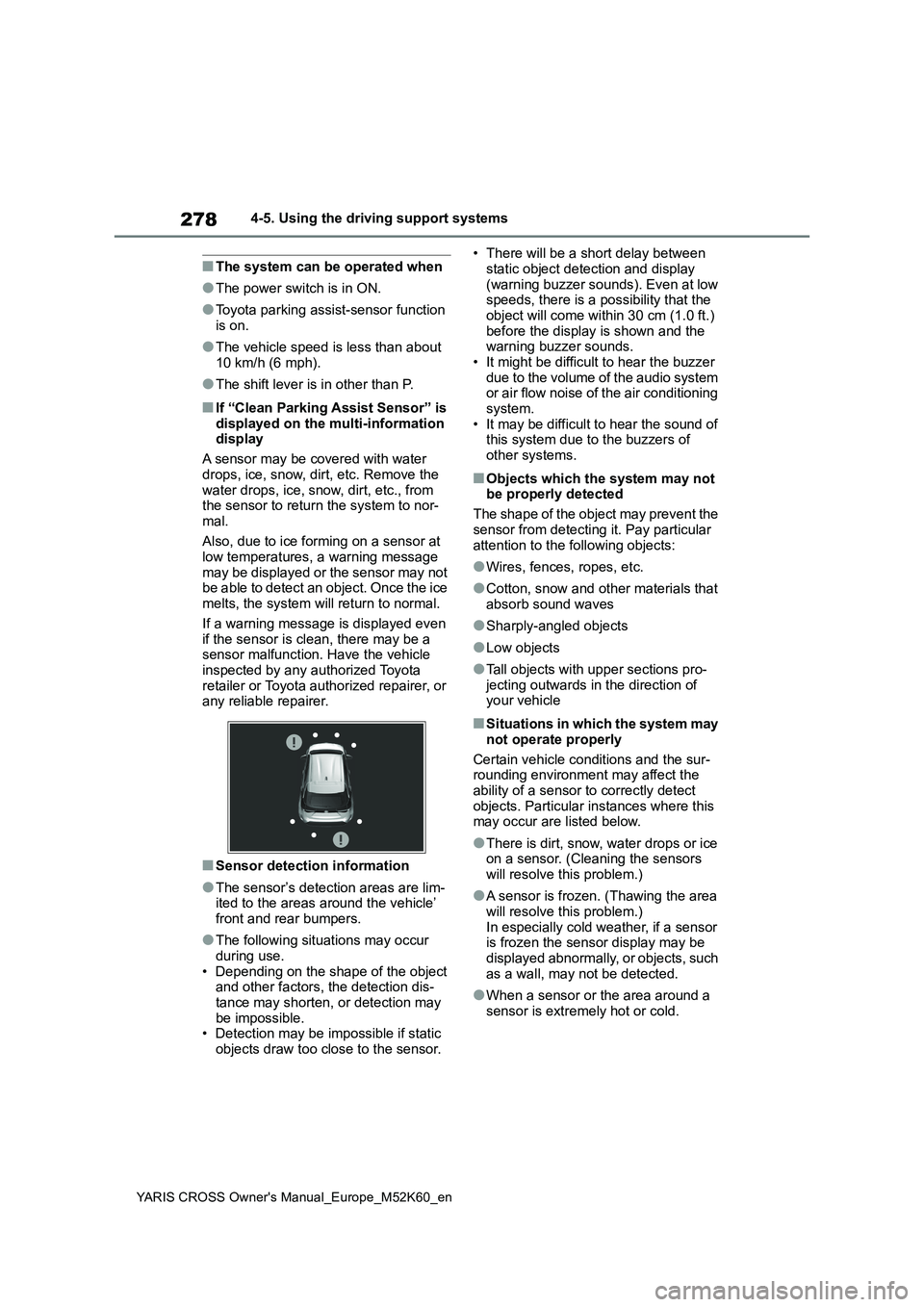
■Sensor detection information
●The sensor’s detection areas are lim-ited to the areas around the vehicle’
front and rear bumpers.
●The following situations may occur
during use. • Depending on the shape of the object and other factors, the detection dis-
tance may shorten, or detection may be impossible.• Detection may be impossible if static
objects draw too close to the sensor.
• There will be a short delay between
static object detection and display (warning buzzer sounds). Even at low speeds, there is a possibility that the
object will come within 30 cm (1.0 ft.) before the display is shown and the warning buzzer sounds.
• It might be difficult to hear the buzzer due to the volume of the audio system or air flow noise of the air conditioning
system. • It may be difficult to hear the sound of this system due to the buzzers of
other systems.
■Objects which the system may not be properly detected
The shape of the object may prevent the
sensor from detecting it. Pay particular attention to the following objects:
●Wires, fences, ropes, etc.
●Cotton, snow and other materials that
absorb sound waves
●Sharply-angled objects
●Low objects
●Tall objects with upper sections pro- jecting outwards in the direction of your vehicle
■Situations in which the system may
not operate properly
Certain vehicle conditions and the sur- rounding environment may affect the
ability of a sensor to correctly detect objects. Particular instances where this may occur are listed below.
●There is dirt, snow, water drops or ice on a sensor. (Cleaning the sensors
will resolve this problem.)
●A sensor is frozen. (Thawing the area
will resolve this problem.) In especially cold weather, if a sensor is frozen the sensor display may be
displayed abnormally, or objects, such as a wall, may not be detected.
●When a sensor or the area around a sensor is extremely hot or cold.
Page 285 of 650
283
4
YARIS CROSS Owner's Manual_Europe_M52K60_en
4-5. Using the driving support systems
Driving
1Press / (4.2-inch display)
or / (7-inch display) of
the meter control switch to
select .
2 Press / (4.2-inch display)
or / (7-inch display) of
the meter control switch to
select and then press and
hold .
3 Select the volume and then
press .
Each time the switch is pressed, the volume level will change between 1, 2,
and 3.
■Muting a buzzer
A mute button will be displayed on
the multi-information display when
an object is detected. To mute the
buzzer, press .
The buzzers for the Toyota parking
assist-sensor and RCTA function (if
equipped) will be muted simultane-
ously.
Mute will be canceled automatically
in the following situations:
When the shift lever is changed.
When the vehicle speed exceeds
a certain speed.
When there is a malfunction in a
sensor or the system is tempo-
rarily unavailable.
When the operating function is
disabled manually.
When the power switch is turned
off.
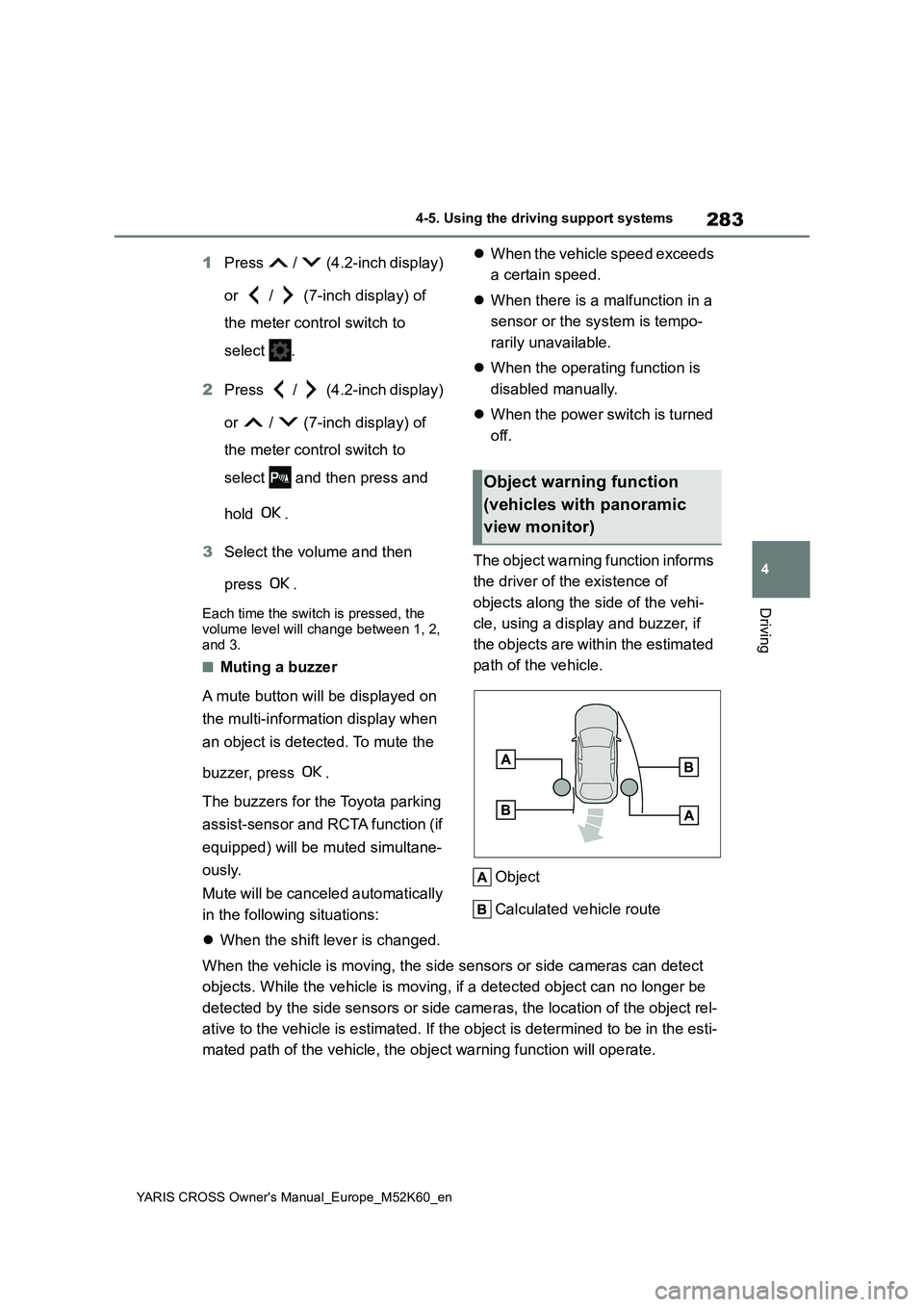
The object warning function informs
the driver of the existence of
objects along the side of the vehi-
cle, using a display and buzzer, if
the objects are within the estimated
path of the vehicle.
Object
Calculated vehicle route
When the vehicle is moving, the side sensors or side cameras ca n detect
objects. While the vehicle is moving, if a detected object can no longer be
detected by the side sensors or side cameras, the location of t he object rel-
ative to the vehicle is estimated. If the object is determined to be in the esti-
mated path of the vehicle, the object warning function will ope rate.
Object warning function
(vehicles with panoramic
view monitor)
Page 286 of 650
284
YARIS CROSS Owner's Manual_Europe_M52K60_en
4-5. Using the driving support systems
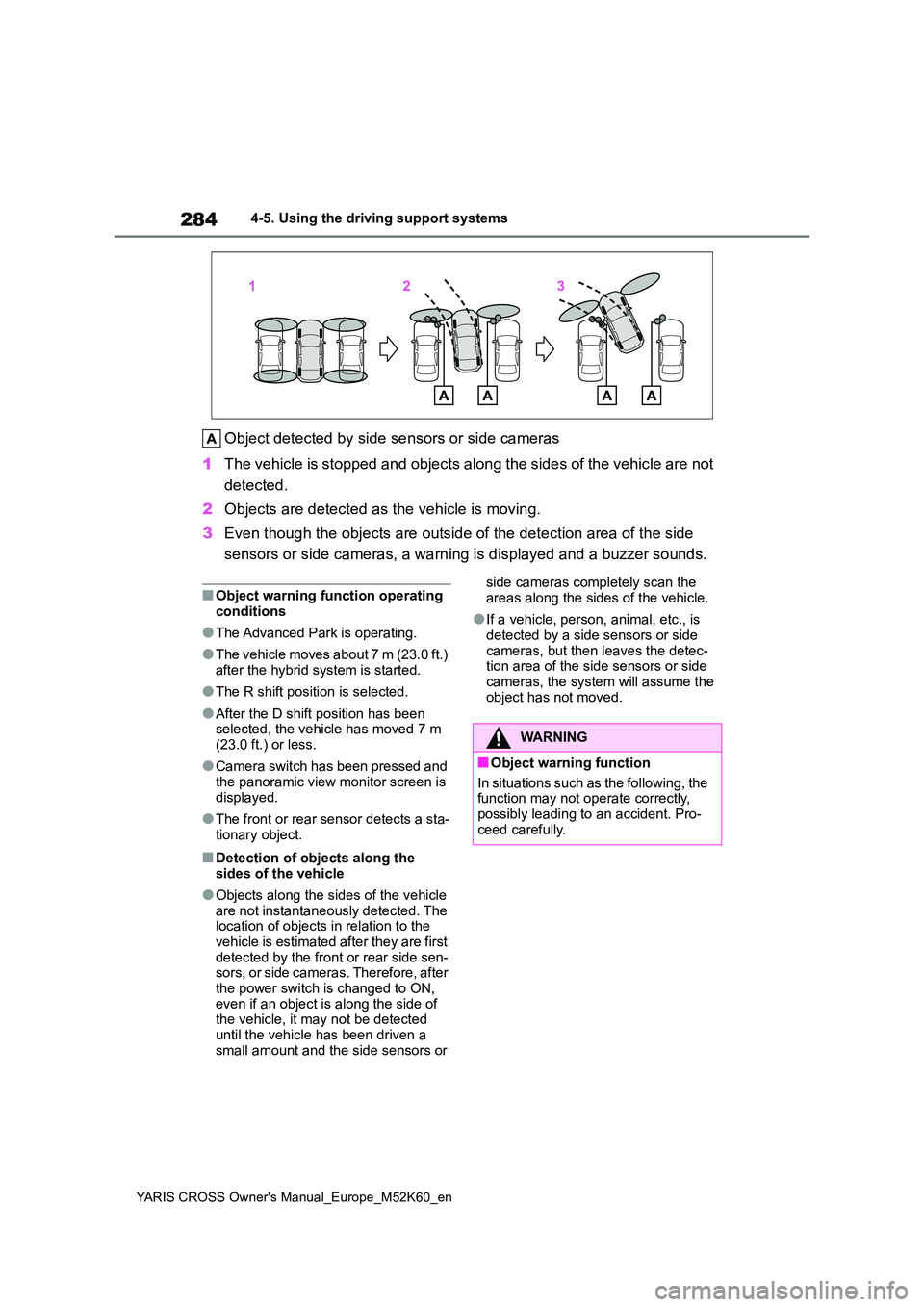
Object detected by side sensors or side cameras
1 The vehicle is stopped and objects along the sides of the vehicle are not
detected.
2 Objects are detected as the vehicle is moving.
3 Even though the objects are outside of the detection area of the side
sensors or side cameras, a warning is displayed and a buzzer so unds.
■Object warning function operating
conditions
●The Advanced Park is operating.
●The vehicle moves about 7 m (23.0 ft.) after the hybrid system is started.
●The R shift position is selected.
●After the D shift position has been selected, the vehicle has moved 7 m (23.0 ft.) or less.
●Camera switch has been pressed and the panoramic view monitor screen is
displayed.
●The front or rear sensor detects a sta-
tionary object.
■Detection of objects along the sides of the vehicle
●Objects along the sides of the vehicle are not instantaneously detected. The location of objects in relation to the
vehicle is estimated after they are first detected by the front or rear side sen-sors, or side cameras. Therefore, after
the power switch is changed to ON, even if an object is along the side of the vehicle, it may not be detected
until the vehicle has been driven a small amount and the side sensors or
side cameras completely scan the
areas along the sides of the vehicle.
●If a vehicle, person, animal, etc., is
detected by a side sensors or side cameras, but then leaves the detec-tion area of the side sensors or side
cameras, the system will assume the object has not moved.
WARNING
■Object warning function
In situations such as the following, the function may not operate correctly,
possibly leading to an accident. Pro- ceed carefully.
Page 289 of 650
287
4
YARIS CROSS Owner's Manual_Europe_M52K60_en
4-5. Using the driving support systems
Driving
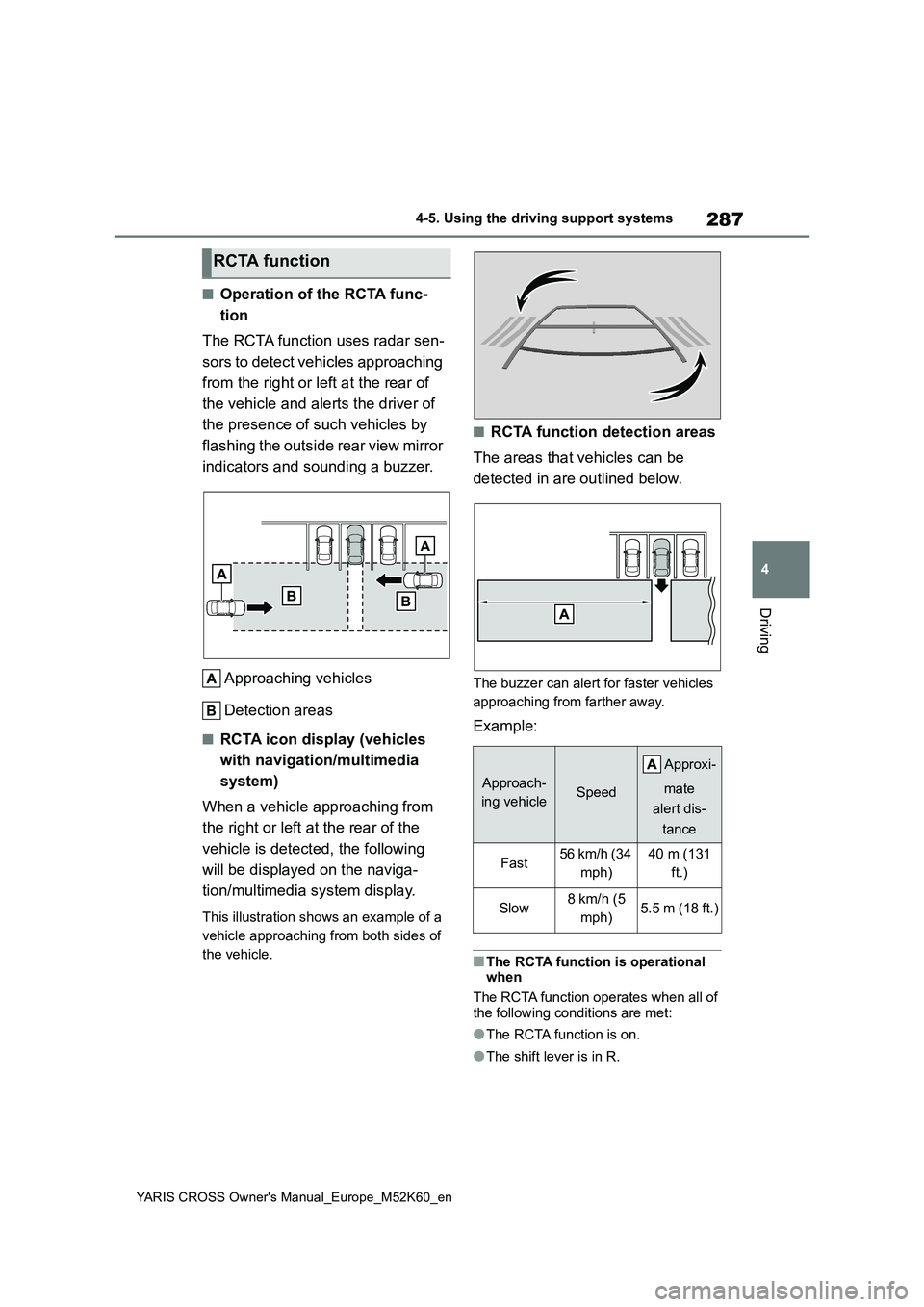
■Operation of the RCTA func-
tion
The RCTA function uses radar sen-
sors to detect vehicles approaching
from the right or left at the rear of
the vehicle and alerts the driver of
the presence of such vehicles by
flashing the outside rear view mirror
indicators and sounding a buzzer.
Approaching vehicles
Detection areas
■RCTA icon display (vehicles
with navigation/multimedia
system)
When a vehicle approaching from
the right or left at the rear of the
vehicle is detected, the following
will be displayed on the naviga-
tion/multimedia system display.
This illustration shows an example of a
vehicle approaching from both sides of
the vehicle.
■RCTA function detection areas
The areas that vehicles can be
detected in are outlined below.
The buzzer can alert for faster vehicles
approaching from farther away.
Example:
■The RCTA function is operational when
The RCTA function operates when all of
the following conditions are met:
●The RCTA function is on.
●The shift lever is in R.
RCTA function
Approach-
ing vehicleSpeed
A pp r ox i -
mate
alert dis-
tance
Fast56 km/h (34
mph)
40 m (131
ft.)
Slow8 km/h (5
mph)5.5 m (18 ft.)
Page 290 of 650
288
YARIS CROSS Owner's Manual_Europe_M52K60_en
4-5. Using the driving support systems
●The vehicle speed is less than
approximately 15 km/h (9 mph).
●The approaching vehicle speed is
between approximately 8 km/h (5 mph) and 56 km/h (34 mph).
■Adjusting the buzzer volume
The buzzer volume can be adjusted on
the multi-information display.
Use the meter control switches to change settings. ( P.107, 113)
1 Press / (4.2-inch display) or
/ (7-inch display) of the
meter control switch to select .
2 Press / (4.2-inch display) or
/ (7-inch display) of the
meter control switch to select
“RCTA” and then press and hold
.
3 Press to select the volume.
Each time the switch is pressed, the vol-
ume level will change between 1, 2, and 3.
When the buzzer volume adjustment is
completed, press to return to the
previous screen.
■Muting a buzzer temporarily
A mute button will be displayed on the
multi-information display when a vehi-
cles or an object is detected. To mute
the buzzer, press .
The buzzers for the RCTA function and
Toyota parking assist-sensor will be
muted simultaneously.
Mute will be canceled automatically in the following situations:
●When the shift lever is changed.
●When the vehicle speed exceeds a certain speed.
●When there is a malfunction in a sen-
sor or the system is temporarily unavailable.
●When the operating function is dis-abled manually.
●When the power switch is turned off.
■Conditions under which the system will not detect a vehicle
The RCTA function is not designed to
detect the following types of vehicles and/or objects.
●Vehicles approaching from directly behind
●Vehicles backing up in a parking space next to your vehicle
●Vehicles that the sensors cannot detect due to obstructions
●Guardrails, walls, signs, parked vehi-
cles and similar stationary objects*
●Small motorcycles, bicycles, pedestri-
ans, etc.*
●Vehicles moving away from your vehi- cle
●Vehicles approaching from the park-
ing spaces next to your vehicle*
●The distance between the sensor and approaching vehicle gets too close*: Depending on conditions, detection of
a vehicle and/or object may occur.
■Situations in which the system may
not operate properly
The RCTA function may not detect vehi-
cles correctly in the following situations:
●When the sensor is misaligned due to
a strong impact to the sensor or its surrounding area
Page 298 of 650
296
YARIS CROSS Owner's Manual_Europe_M52K60_en
4-5. Using the driving support systems
*: If equipped
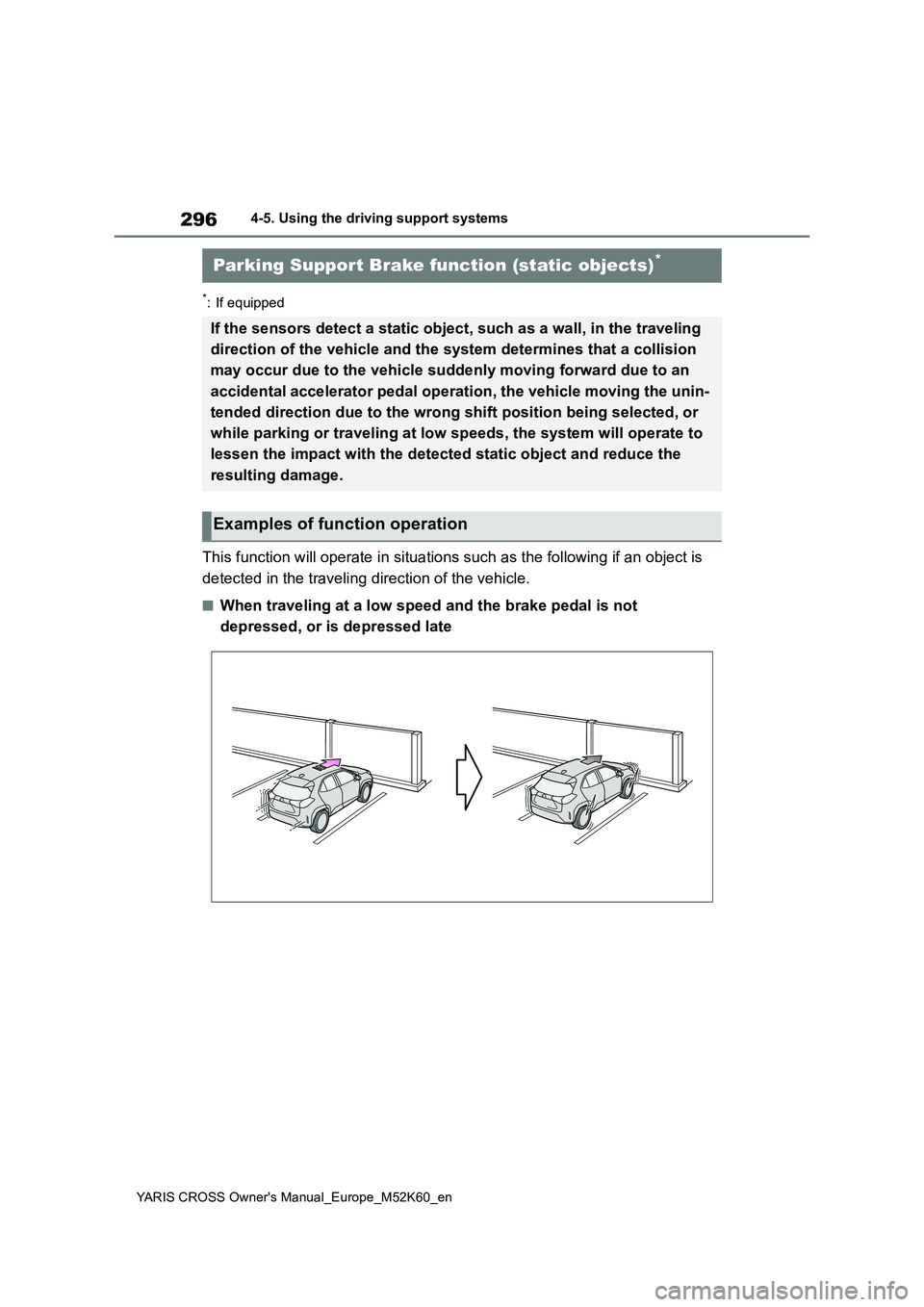
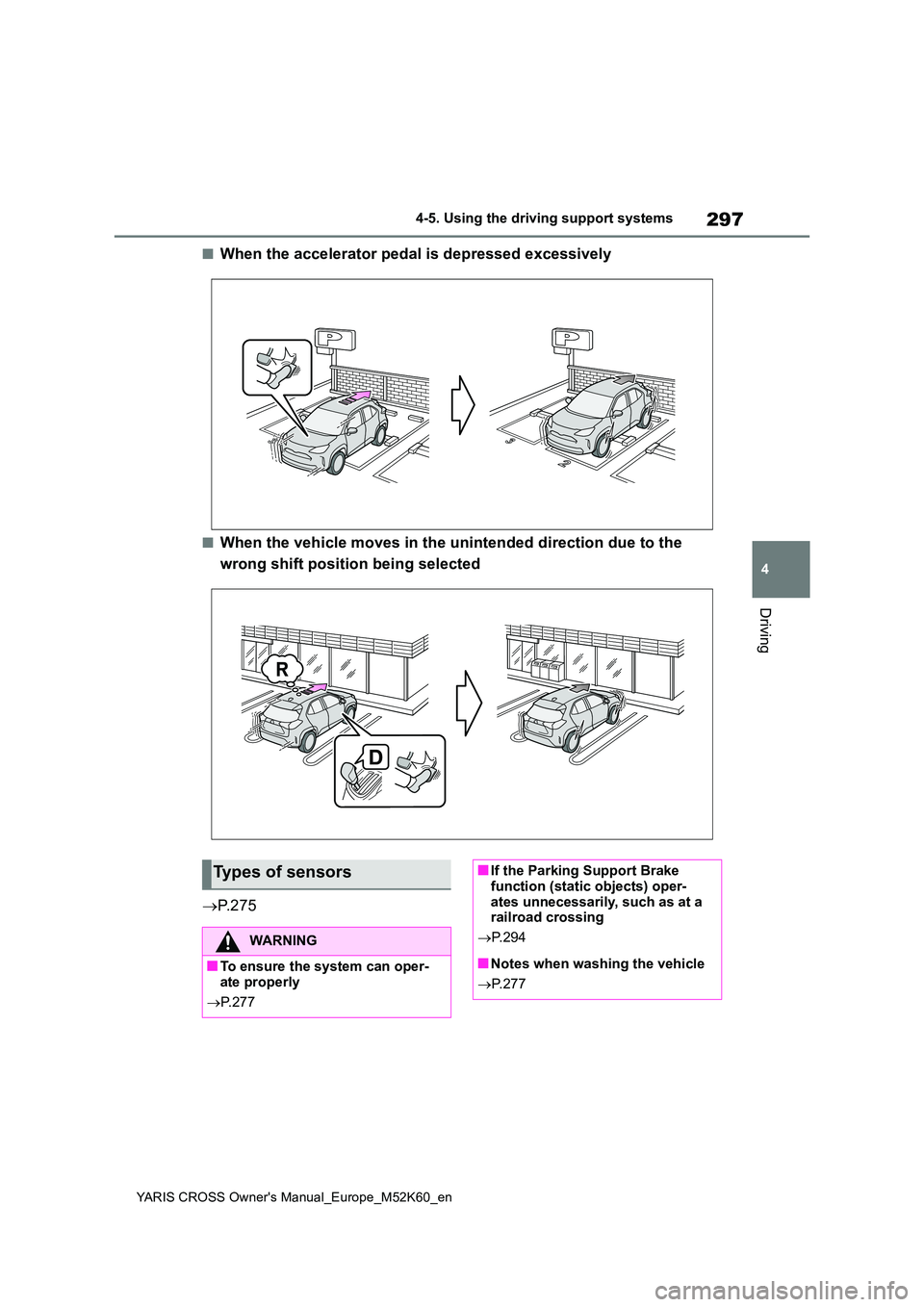
This function will operate in situations such as the following if an object is
detected in the traveling direction of the vehicle.
■When traveling at a low speed and the brake pedal is not
depressed, or is depressed late
Parking Support Brake function (static objects)*
If the sensors detect a static object, such as a wall, in the traveling
direction of the vehicle and the system determines that a colli sion
may occur due to the vehicle suddenly moving forward due to an
accidental accelerator pedal operation, the vehicle moving the unin-
tended direction due to the wrong shift position being selected, or
while parking or traveling at low speeds, the system will opera te to
lessen the impact with the detected static object and reduce th e
resulting damage.
Examples of function operation
Page 299 of 650
297
4
YARIS CROSS Owner's Manual_Europe_M52K60_en
4-5. Using the driving support systems
Driving
■When the accelerator pedal is depressed excessively
■When the vehicle moves in the unintended direction due to the
wrong shift position being selected
P. 2 7 5
Types of sensors
WARNING
■To ensure the system can oper- ate properly
P. 2 7 7
■If the Parking Support Brake function (static objects) oper-
ates unnecessarily, such as at a railroad crossing
P. 2 9 4
■Notes when washing the vehicle
P. 2 7 7
Page 302 of 650
300
YARIS CROSS Owner's Manual_Europe_M52K60_en
4-5. Using the driving support systems
enabled.
• The vehicle speed is approximately 15 km/h (9 mph) or less.• Vehicles which are approaching from
the right or left at the rear of the vehi- cle at a traveling speed of approxi-mately 8 km/h (5 mph) or more.
• The shift lever is in R. • The Parking Support Brake deter-mines that a stronger than normal
brake operation is necessary to avoid a collision with an approaching vehi-cle.
●Brake control• Hybrid system output restriction con-
trol is operating. • The Parking Support Brake deter-mines that an emergency brake oper-
ation is necessary to avoid a collision with an approaching vehicle.
■The Parking Support Brake func-tion (rear-crossing vehicles) will
stop operating when
The function will stop operating if any of the following conditions are met:
●Hybrid system output restriction con-trol
• The Parking Support Brake is dis- abled.• The collision becomes avoidable with
normal brake operation. • A vehicle is no longer approaching from the right or left at the rear of the
vehicle.
●Brake control
• The Parking Support Brake is dis- abled.• Approximately 2 seconds have
elapsed since the vehicle was stopped by brake control.• The brake pedal is depressed after
the vehicle is stopped by brake con- trol.• A vehicle is no longer approaching
from the right or left at the rear of the vehicle.
■Re-enabling the Parking Support Brake function (rear-crossing vehi-
cles)
P. 2 9 5
■Detection area of the Parking Sup-
port Brake function (rear-crossing vehicles)
The detection area of the Parking Sup-
port Brake function (rear-crossing vehi- cles) differs from the detection area of the RCTA function ( P.287). Therefore,
even if the RCTA function detects a vehicle and provides an alert, the Park-ing Support Brake function (rear-cross-
ing vehicles) may not start operating.
■Conditions under which the system will not detect a vehicle
P. 2 8 8
■RCTA buzzer
Regardless of whether the RCTA func- tion is enabled or not ( P.286), if the Parking Support Brake function is
enabled ( P.292) and brake control is performed, a buzzer will sound to notify the driver.
■Situations in which the system may
not operate properly
P. 2 8 8
■Situations in which the system may operate even if there is no possibil-
ity of a collision
P. 2 8 9