Time TOYOTA YARIS CROSS 2021 Repair Manual
[x] Cancel search | Manufacturer: TOYOTA, Model Year: 2021, Model line: YARIS CROSS, Model: TOYOTA YARIS CROSS 2021Pages: 650, PDF Size: 132.86 MB
Page 202 of 650
200
YARIS CROSS Owner's Manual_Europe_M52K60_en
4-2. Driving procedures
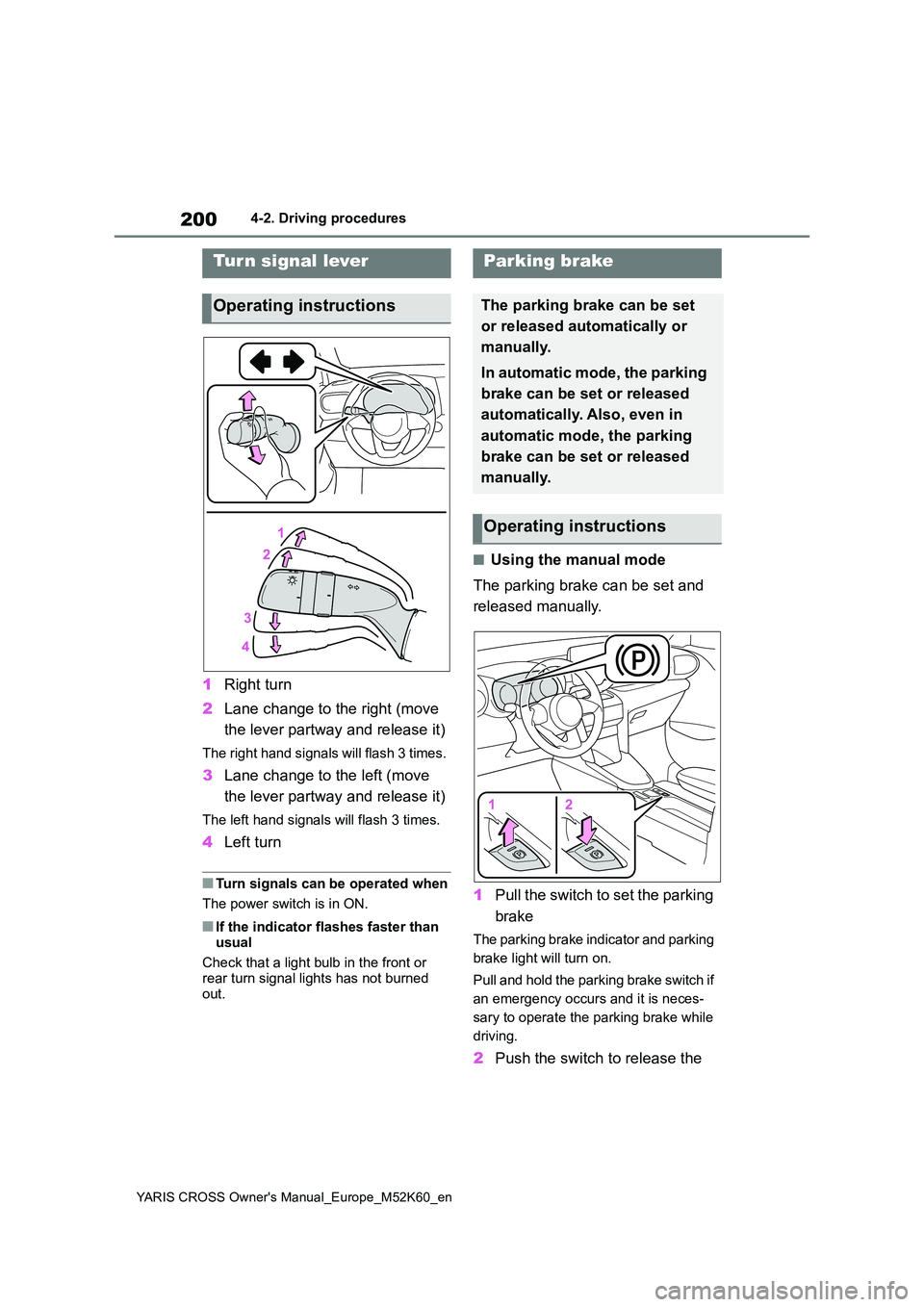
1Right turn
2 Lane change to the right (move
the lever partway and release it)
The right hand signals will flash 3 times.
3 Lane change to the left (move
the lever partway and release it)
The left hand signals will flash 3 times.
4 Left turn
■Turn signals can be operated when
The power switch is in ON.
■If the indicator flashes faster than
usual
Check that a light bulb in the front or rear turn signal lights has not burned
out.
■Using the manual mode
The parking brake can be set and
released manually.
1 Pull the switch to set the parking
brake
The parking brake indicator and parking
brake light will turn on.
Pull and hold the parking brake switch if
an emergency occurs and it is neces-
sary to operate the parking brake while
driving.
2 Push the switch to release the
Tur n signal lever
Operating instructions
Parking brake
The parking brake can be set
or released automatically or
manually.
In automatic mode, the parking
brake can be set or released
automatically. Also, even in
automatic mode, the parking
brake can be set or released
manually.
Operating instructions
Page 204 of 650
202
YARIS CROSS Owner's Manual_Europe_M52K60_en
4-2. Driving procedures
●The driver’s door is closed
●The driver is wearing the seat belt
●The shift lever is a forward or reverse position.
●The malfunction indicator lamp or brake system warning light is not illu-minated.
If the automatic release function does not operate, manually release the park-ing brake.
■Parking brake automatic lock func-
tion
The parking brake will be set automati- cally under the following conditions:
●The driver does not operate the brake pedal.
●The driver’s door is not closed.
●The driver is not wearing the seat belt.
●The shift lever position is not in P or N.
●The malfunction indicator lamp or brake system warning light is not illu-
minated.
■If “Parking Brake Temporarily Unavailable” is displayed on the multi-information display
If the parking brake is operated repeat- edly over a short period of time, the sys-tem may restrict operation to prevent
overheating. If this happens, refrain from operating the parking brake. Normal operation will return after about 1 min-
ute.
■If “Parking Brake Unavailable” is displayed on the multi-information display
Operate the parking brake switch. If the message does not disappear after oper-ating the switch several times, the sys-
tem may be malfunctioning. Have the vehicle inspected by any authorized Toyota retailer or Toyota authorized
repairer, or any reliable repairer.
■Parking brake operation sound
When the parking brake operates, a motor sound (whirring sound) may be
heard. This does not indicate a malfunc-
tion.
■Parking brake operation
●Depending on the power switch mode, the parking brake indicator and park-
ing brake light will turn on and stay on as described below:ON: Comes on until the parking brake
is released. Not in ON: Stays on for approximately 15 seconds.
●When the power switch is turned off with the parking brake set, the parking
brake indicator and parking brake light will stay on for about 15 seconds. This does not indicate a malfunction.
■When the parking brake switch
malfunctions
Automatic mode (automatic brake set- ting and releasing) will be turned on
automatically.
■Parking the vehicle
P. 1 7 5
■Parking brake engaged warning buzzer
A buzzer will sound if the vehicle is driven with the parking brake engaged. “Parking Brake ON” is displayed on the
multi-information display. (with the vehi- cle reached a speed of 5 km/h [3 mph])
■If the brake system warning light comes on
P. 4 3 9
■Usage in winter time
P. 3 4 6
WARNING
■When parking the vehicle
Do not leave a child in the vehicle alone. The parking brake may be released unintentionally and there is
the danger of the vehicle moving that may lead to an accident resulting in death or serious injury.
Page 207 of 650
205
4
YARIS CROSS Owner's Manual_Europe_M52K60_en
4-2. Driving procedures
Driving
WARNING
■When stopped on a slippery road
The system cannot stop the vehicle
when the gripping ability of the tires has been exceeded. Do not use the system when stopped on a slippery
road.
NOTICE
■When parking the vehicle
The brake hold system is not
designed for use when parking the vehicle for a long period of time. Turn-ing the power switch off while the sys-
tem is holding the brake may release the brake, which would cause the vehicle to move. When operating the
power switch, depress the brake pedal, shift the shift lever to P and set the parking brake.
Page 208 of 650
206
YARIS CROSS Owner's Manual_Europe_M52K60_en
4-3. Operating the lights and wipers
4-3.Operating the lights and wipers
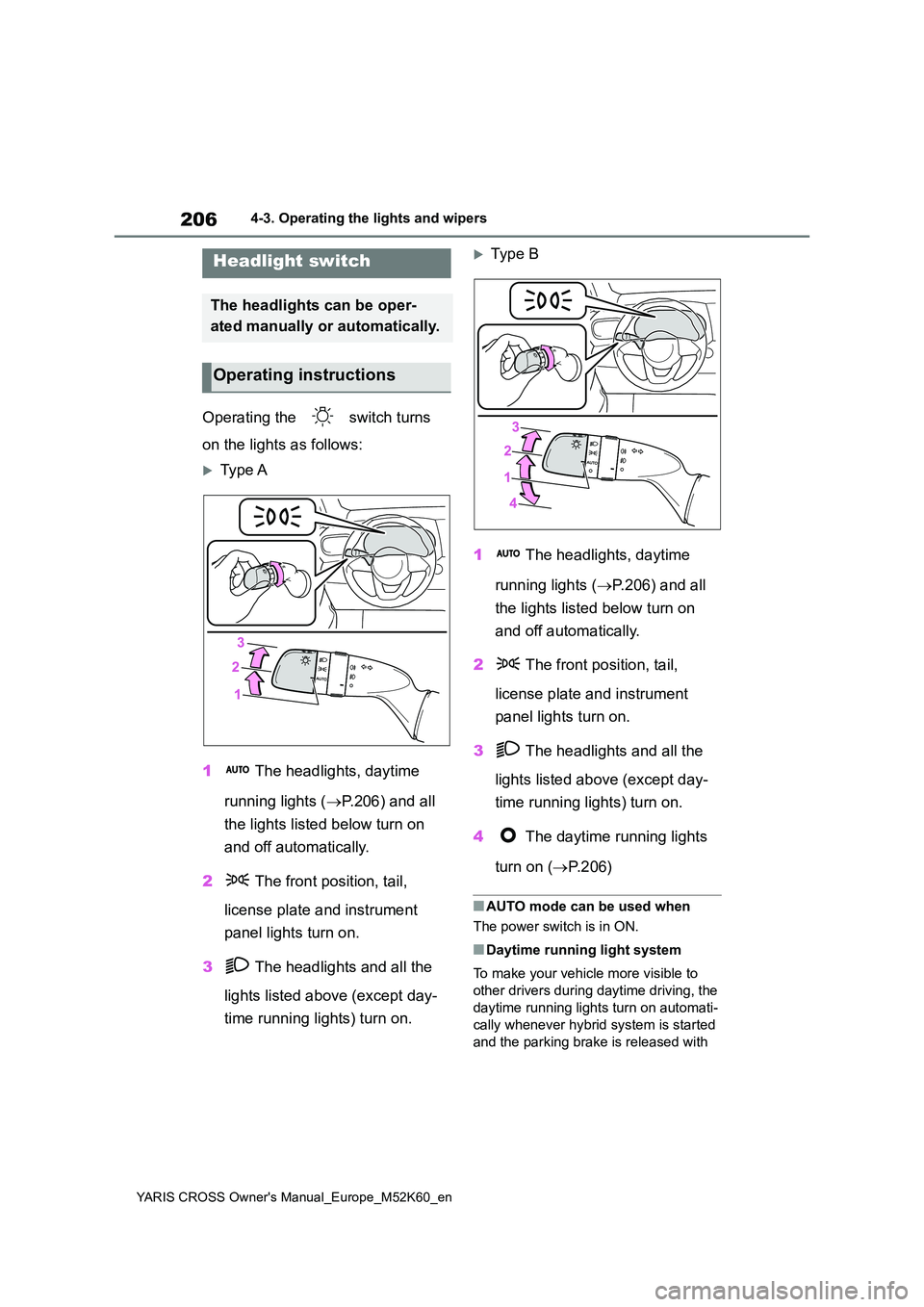
Operating the switch turns
on the lights as follows:
Type A
1 The headlights, daytime
running lights ( P.206) and all
the lights listed below turn on
and off automatically.
2 The front position, tail,
license plate and instrument
panel lights turn on.
3 The headlights and all the
lights listed above (except day-
time running lights) turn on.
Typ e B
1 The headlights, daytime
running lights ( P.206) and all
the lights listed below turn on
and off automatically.
2 The front position, tail,
license plate and instrument
panel lights turn on.
3 The headlights and all the
lights listed above (except day-
time running lights) turn on.
4 The daytime running lights
turn on ( P. 2 0 6 )
■AUTO mode can be used when
The power switch is in ON.
■Daytime running light system
To make your vehicle more visible to
other drivers during daytime driving, the
daytime running lights turn on automati-
cally whenever hybrid system is started
and the parking brake is released with
Headlight switch
The headlights can be oper-
ated manually or automatically.
Operating instructions
Page 209 of 650
207
4
YARIS CROSS Owner's Manual_Europe_M52K60_en
4-3. Operating the lights and wipers
Driving
the headlight switch in the or
position. Daytime running lights are not
designed for use at night.
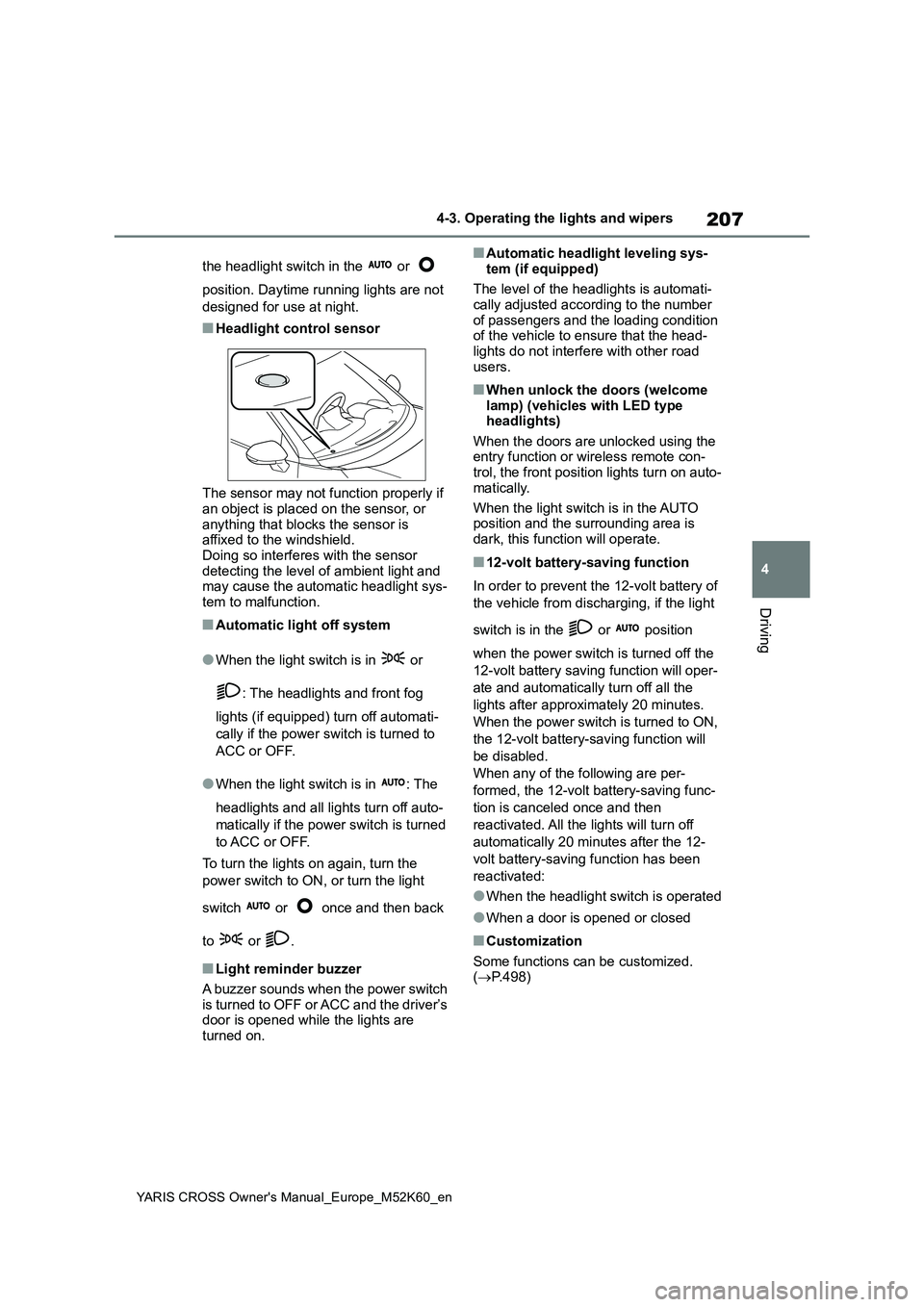
■Headlight control sensor
The sensor may not function properly if an object is placed on the sensor, or
anything that blocks the sensor is affixed to the windshield.Doing so interferes with the sensor
detecting the level of ambient light and may cause the automatic headlight sys-tem to malfunction.
■Automatic light off system
●When the light switch is in or
: The headlights and front fog
lights (if equipped) turn off automati-
cally if the power switch is turned to
ACC or OFF.
●When the light switch is in : The
headlights and all lights turn off auto-
matically if the power switch is turned
to ACC or OFF.
To turn the lights on again, turn the
power switch to ON, or turn the light
switch or once and then back
to or .
■Light reminder buzzer
A buzzer sounds when the power switch
is turned to OFF or ACC and the driver’s door is opened while the lights are turned on.
■Automatic headlight leveling sys-
tem (if equipped)
The level of the headlights is automati- cally adjusted according to the number
of passengers and the loading condition of the vehicle to ensure that the head-lights do not interfere with other road
users.
■When unlock the doors (welcome lamp) (vehicles with LED type headlights)
When the doors are unlocked using the entry function or wireless remote con-trol, the front position lights turn on auto-
matically.
When the light switch is in the AUTO position and the surrounding area is
dark, this function will operate.
■12-volt battery-saving function
In order to prevent the 12-volt battery of
the vehicle from discharging, if the light
switch is in the or position
when the power switch is turned off the
12-volt battery saving function will oper-
ate and automatically turn off all the
lights after approximately 20 minutes.
When the power switch is turned to ON,
the 12-volt battery-saving function will
be disabled.
When any of the following are per-
formed, the 12-volt battery-saving func-
tion is canceled once and then
reactivated. All the lights will turn off
automatically 20 minutes after the 12-
volt battery-saving function has been
reactivated:
●When the headlight switch is operated
●When a door is opened or closed
■Customization
Some functions can be customized. ( P.498)
Page 215 of 650
213
4
YARIS CROSS Owner's Manual_Europe_M52K60_en
4-3. Operating the lights and wipers
Driving
beams are projected will be adjusted
automatically, depending on the loca- tion of vehicles ahead:• The vehicle speed is approximately 15
km/h (10 mph) or more. • The area ahead of the vehicle is dark.• There are vehicles ahead with head-
lights or tail lights turned on.
●If any of the following conditions are
met, the high beams or shaded high beams will be changed to the low beams automatically:
• The vehicle speed is below approxi- mately 15 km/h (10 mph).• The area ahead of the vehicle is not
dark. • There are many vehicles ahead.• Vehicles ahead are moving quickly
and the high beams may blind the drivers of the other vehicles.
■Front camera detection information
●The high beams may not be automati-cally changed to the shaded high beams in the following situations:
• When vehicles ahead suddenly appear from a curve• When the vehicle is cut in front of by
another vehicle • When vehicles ahead are hidden from sight due to repeated curves, road
dividers or roadside trees • When vehicles ahead appear from the faraway lane on wide road
• When vehicles ahead have no lights
●The high beams may be changed to
the shaded high beams if a vehicle ahead that is using fog lights without its headlights turned on is detected.
●House lights, street lights, traffic sig-nals, and illuminated billboards or
signs and other reflective objects may cause the high beams to change to the shaded high beams, cause the
high beams not to change to the shaded high beams, or change the area that is not illuminated.
●The following factors may affect the amount of time taken to turn the high
beam on or off, or the speed by which the areas not illuminated change:
• The brightness of headlights, fog
lights, and tail lights of vehicles ahead • The movement and direction of vehi-cles ahead
• When a vehicle ahead only has oper- ational lights on one side• When a vehicle ahead is a two-
wheeled vehicle • The condition of the road (gradient, curve, condition of the road surface,
etc.) • The number of passengers and amount of luggage
●The light distribution control of the headlights may change unexpectedly.
●Bicycles or similar objects may not be detected.
●In the following situations the system may not be able to correctly detect the
surrounding brightness level. This may cause the low beams to remain on or the high beams to flash or daz-
zle pedestrians or vehicles ahead. In such a case, it is necessary to manu-ally switch between the high and low
beams. • When driving in inclement weather (heavy rain, snow, fog, sandstorms,
etc.) • When the windshield is obscured by fog, mist, ice, dirt, etc.
• When the windshield is cracked or damaged• When the front camera is deformed or
dirty • When the temperature of the front camera is extremely high
• When the surrounding brightness level is equal to that of headlights, tail lights or fog lights
• When headlights or tail lights of vehi- cles ahead are turned off, dirty, chang-ing color, or not aimed properly
• When the vehicle is hit by water, snow, dust, etc., from a preceding vehicle
• When driving through an area of inter- mittently changing brightness and darkness
• When frequently and repeatedly driv- ing ascending/descending roads, or
Page 216 of 650
214
YARIS CROSS Owner's Manual_Europe_M52K60_en
4-3. Operating the lights and wipers
roads with rough, bumpy or uneven
surfaces (such as stone-paved roads, gravel roads, etc.)• When frequently and repeatedly tak-
ing curves or driving on a winding road• When there is a highly reflective
object ahead of the vehicle, such as a sign or mirror• When the back of a preceding vehicle
is highly reflective, such as a con- tainer on a truck• When the vehicle’s headlights are
damaged or dirty, or are not aimed properly• When the vehicle is listing or tilting
due to a flat tire, a trailer being towed, etc.• When the headlights are changed
between the high beams and low beams repeatedly in an abnormal manner
• When the driver believes that the high beams may be flashing or dazzling pedestrians or other drivers
• When the vehicle is used in an area in which vehicles travel on the opposite side of the road of the country for
which the vehicle was designed, for example using a vehicle designed for right-hand traffic in a left-hand traffic
area, or vice versa
■Customization
Some functions can be customized. ( P.498)
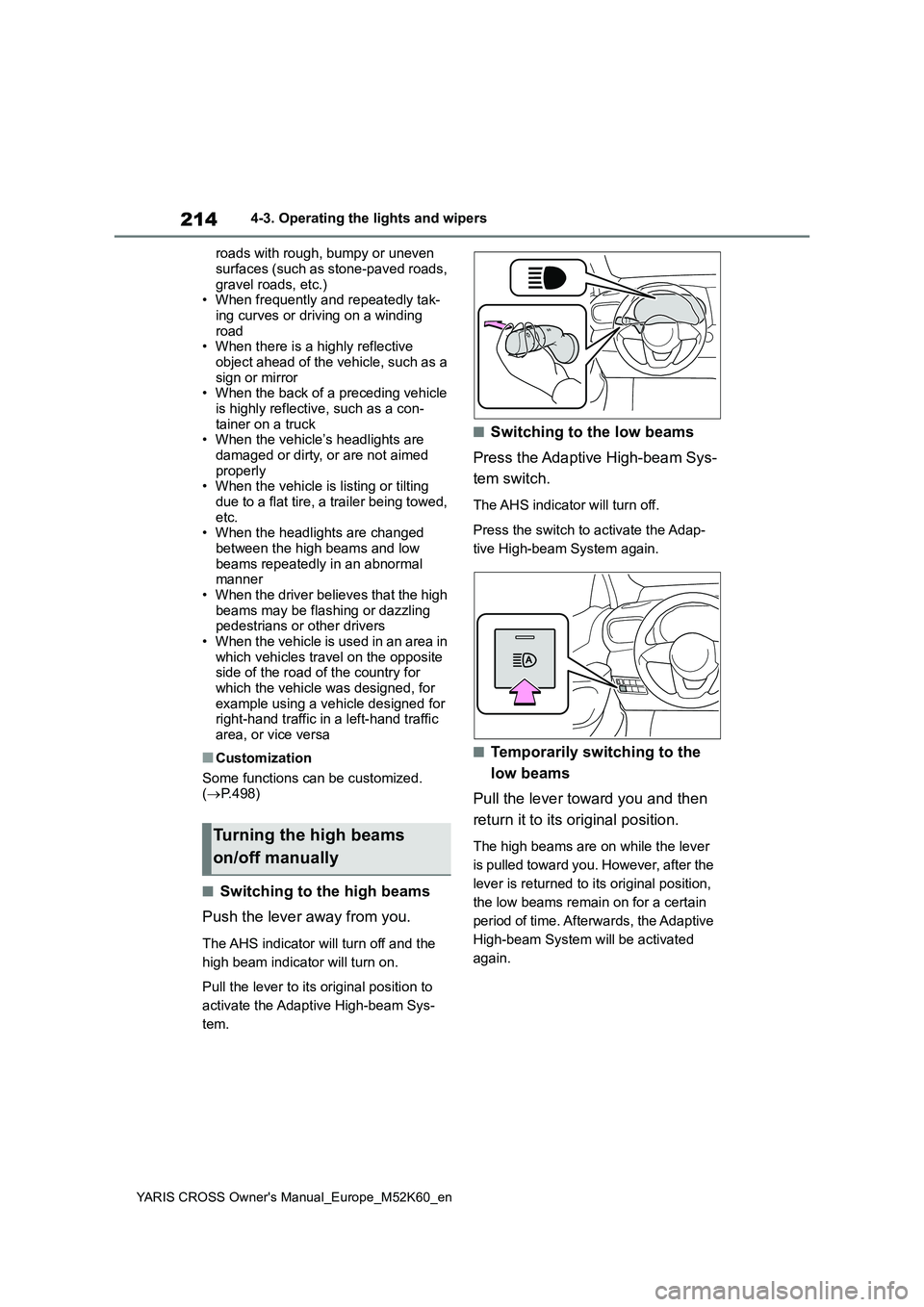
■Switching to the high beams
Push the lever away from you.
The AHS indicator will turn off and the
high beam indicator will turn on.
Pull the lever to its original position to
activate the Adaptive High-beam Sys-
tem.
■Switching to the low beams
Press the Adaptive High-beam Sys-
tem switch.
The AHS indicator will turn off.
Press the switch to activate the Adap-
tive High-beam System again.
■Temporarily switching to the
low beams
Pull the lever toward you and then
return it to its original position.
The high beams are on while the lever
is pulled toward you. However, after the
lever is returned to its original position,
the low beams remain on for a certain
period of time. Afterwards, the Adaptive
High-beam System will be activated
again.
Turning the high beams
on/off manually
Page 218 of 650
216
YARIS CROSS Owner's Manual_Europe_M52K60_en
4-3. Operating the lights and wipers
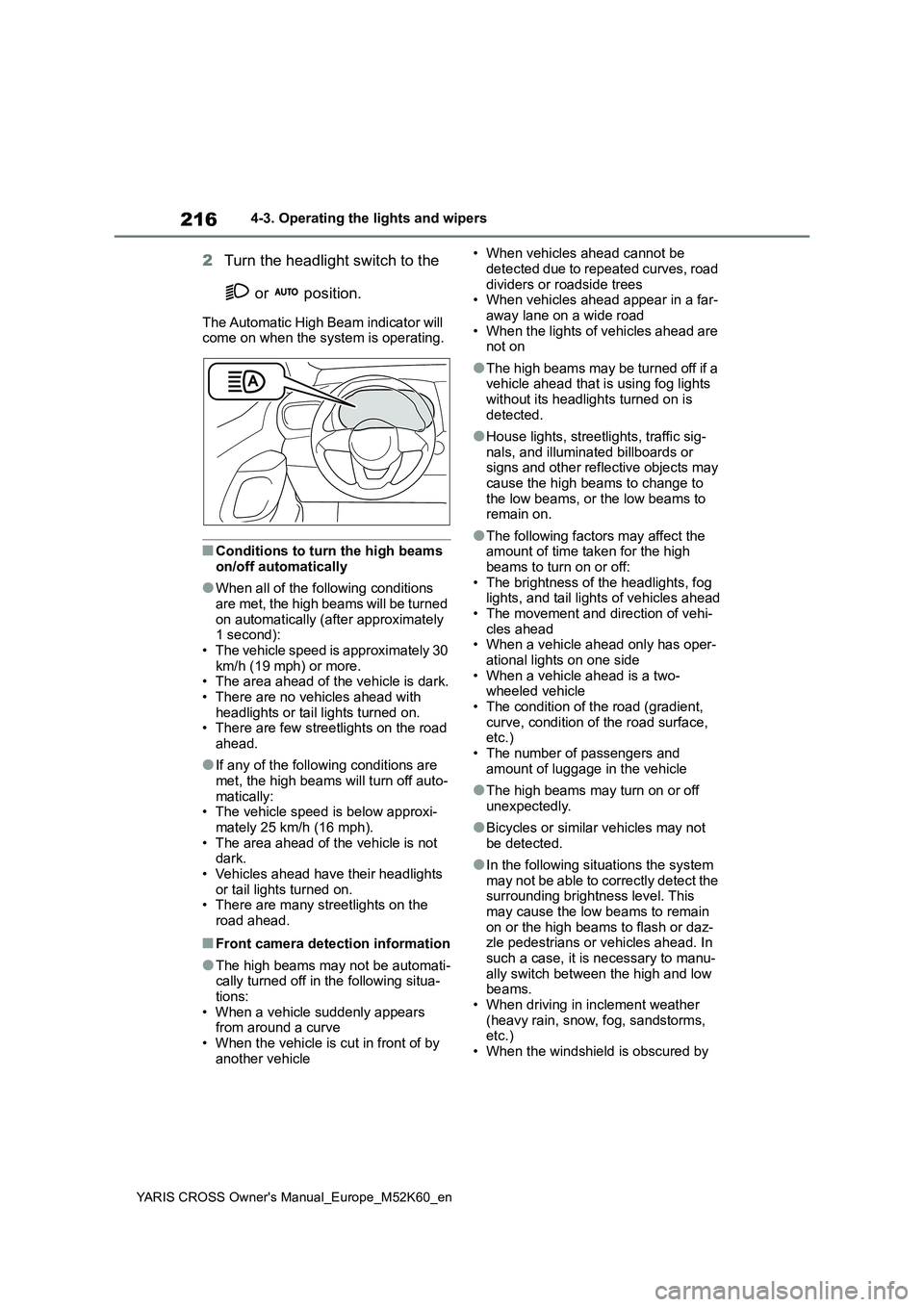
2Turn the headlight switch to the
or position.
The Automatic High Beam indicator will come on when the system is operating.
■Conditions to turn the high beams on/off automatically
●When all of the following conditions are met, the high beams will be turned
on automatically (after approximately 1 second):• The vehicle speed is approximately 30
km/h (19 mph) or more. • The area ahead of the vehicle is dark.• There are no vehicles ahead with
headlights or tail lights turned on. • There are few streetlights on the road ahead.
●If any of the following conditions are met, the high beams will turn off auto-
matically: • The vehicle speed is below approxi-mately 25 km/h (16 mph).
• The area ahead of the vehicle is not dark.• Vehicles ahead have their headlights
or tail lights turned on. • There are many streetlights on the road ahead.
■Front camera detection information
●The high beams may not be automati-cally turned off in the following situa-
tions: • When a vehicle suddenly appears from around a curve
• When the vehicle is cut in front of by another vehicle
• When vehicles ahead cannot be
detected due to repeated curves, road dividers or roadside trees• When vehicles ahead appear in a far-
away lane on a wide road • When the lights of vehicles ahead are not on
●The high beams may be turned off if a vehicle ahead that is using fog lights
without its headlights turned on is detected.
●House lights, streetlights, traffic sig-nals, and illuminated billboards or signs and other reflective objects may
cause the high beams to change to the low beams, or the low beams to remain on.
●The following factors may affect the amount of time taken for the high
beams to turn on or off: • The brightness of the headlights, fog lights, and tail lights of vehicles ahead
• The movement and direction of vehi- cles ahead• When a vehicle ahead only has oper-
ational lights on one side • When a vehicle ahead is a two-wheeled vehicle
• The condition of the road (gradient, curve, condition of the road surface, etc.)
• The number of passengers and amount of luggage in the vehicle
●The high beams may turn on or off unexpectedly.
●Bicycles or similar vehicles may not be detected.
●In the following situations the system may not be able to correctly detect the surrounding brightness level. This
may cause the low beams to remain on or the high beams to flash or daz-zle pedestrians or vehicles ahead. In
such a case, it is necessary to manu- ally switch between the high and low beams.
• When driving in inclement weather (heavy rain, snow, fog, sandstorms, etc.)
• When the windshield is obscured by
Page 220 of 650
218
YARIS CROSS Owner's Manual_Europe_M52K60_en
4-3. Operating the lights and wipers
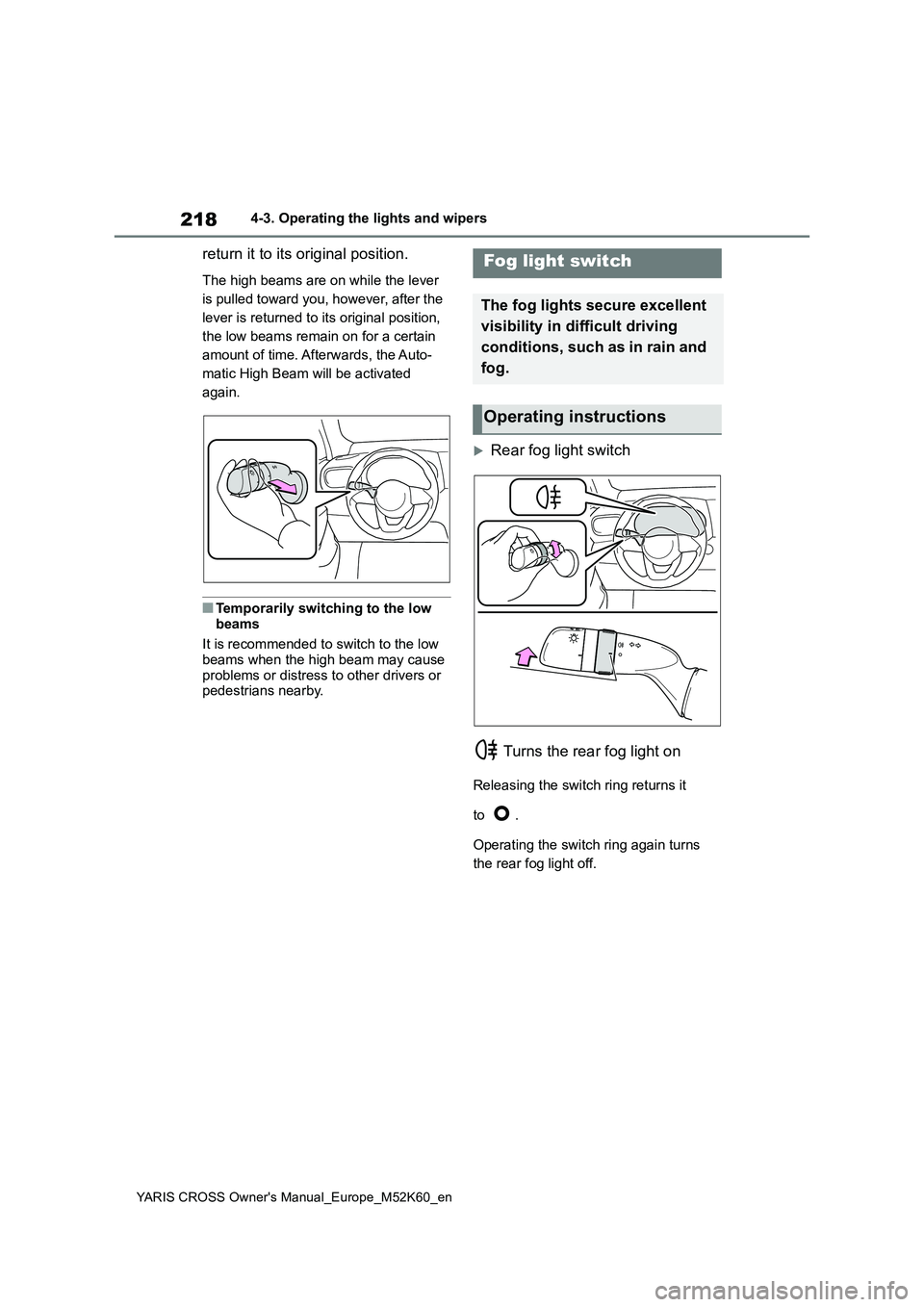
return it to its original position.
The high beams are on while the lever
is pulled toward you, however, after the
lever is returned to its original position,
the low beams remain on for a certain
amount of time. Afterwards, the Auto-
matic High Beam will be activated
again.
■Temporarily switching to the low
beams
It is recommended to switch to the low beams when the high beam may cause
problems or distress to other drivers or pedestrians nearby.
Rear fog light switch
Turns the rear fog light on
Releasing the switch ring returns it
to .
Operating the switch ring again turns
the rear fog light off.
Fog light switch
The fog lights secure excellent
visibility in di fficult driving
conditions, such as in rain and
fog.
Operating instructions
Page 222 of 650
220
YARIS CROSS Owner's Manual_Europe_M52K60_en
4-3. Operating the lights and wipers
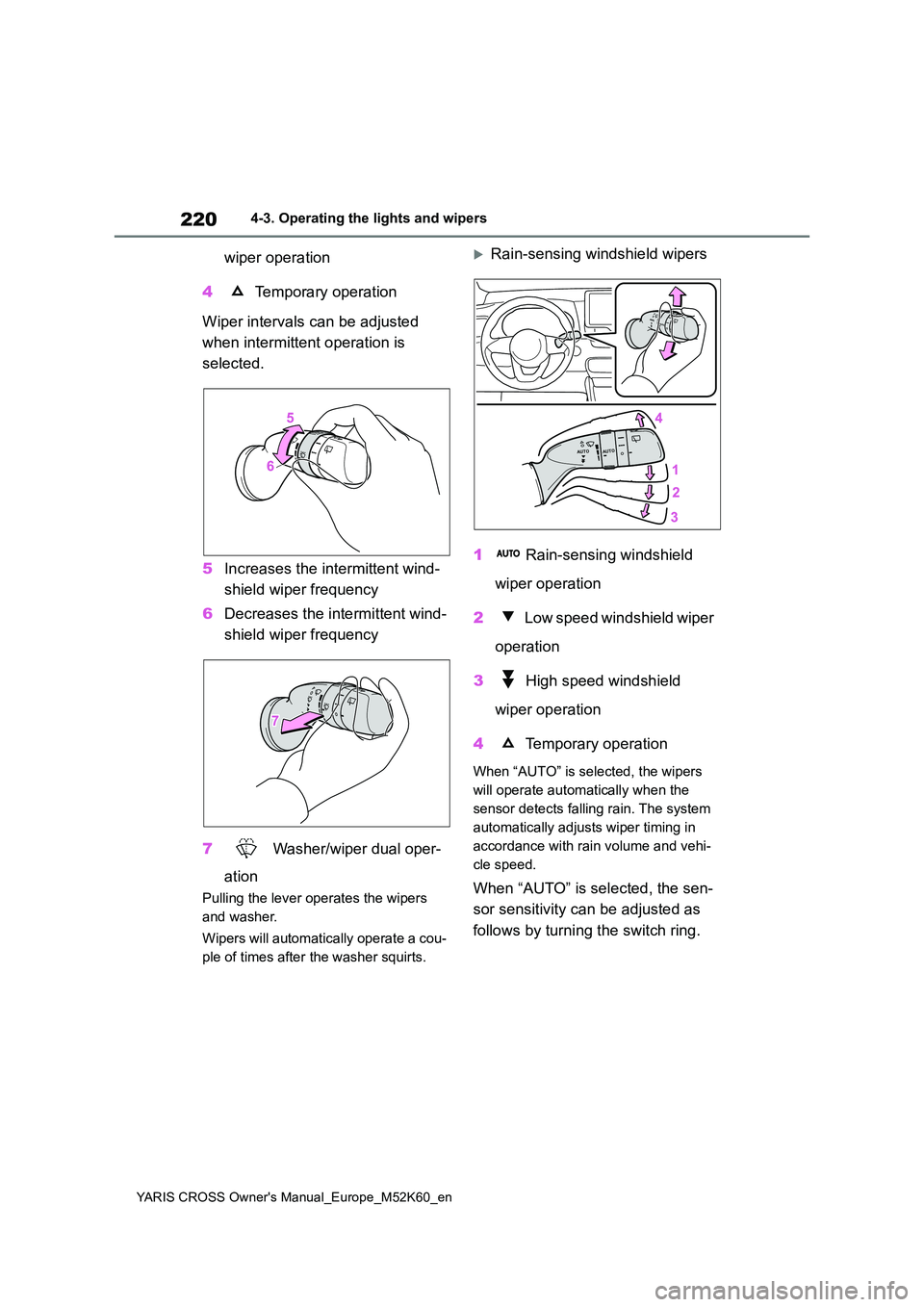
wiper operation
4 Temporary operation
Wiper intervals can be adjusted
when intermittent operation is
selected.
5 Increases the intermittent wind-
shield wiper frequency
6 Decreases the intermittent wind-
shield wiper frequency
7 Washer/wiper dual oper-
ation
Pulling the lever operates the wipers
and washer.
Wipers will automatically operate a cou-
ple of times after the washer squirts.
Rain-sensing windshield wipers
1 Rain-sensing windshield
wiper operation
2 Low speed windshield wiper
operation
3 High speed windshield
wiper operation
4 Temporary operation
When “AUTO” is selected, the wipers
will operate automatically when the
sensor detects falling rain. The system
automatically adjusts wiper timing in
accordance with rain volume and vehi-
cle speed.
When “AUTO” is selected, the sen-
sor sensitivity can be adjusted as
follows by turning the switch ring.