Time TOYOTA YARIS CROSS 2021 Manual PDF
[x] Cancel search | Manufacturer: TOYOTA, Model Year: 2021, Model line: YARIS CROSS, Model: TOYOTA YARIS CROSS 2021Pages: 650, PDF Size: 132.86 MB
Page 223 of 650
221
4
YARIS CROSS Owner's Manual_Europe_M52K60_en
4-3. Operating the lights and wipers
Driving
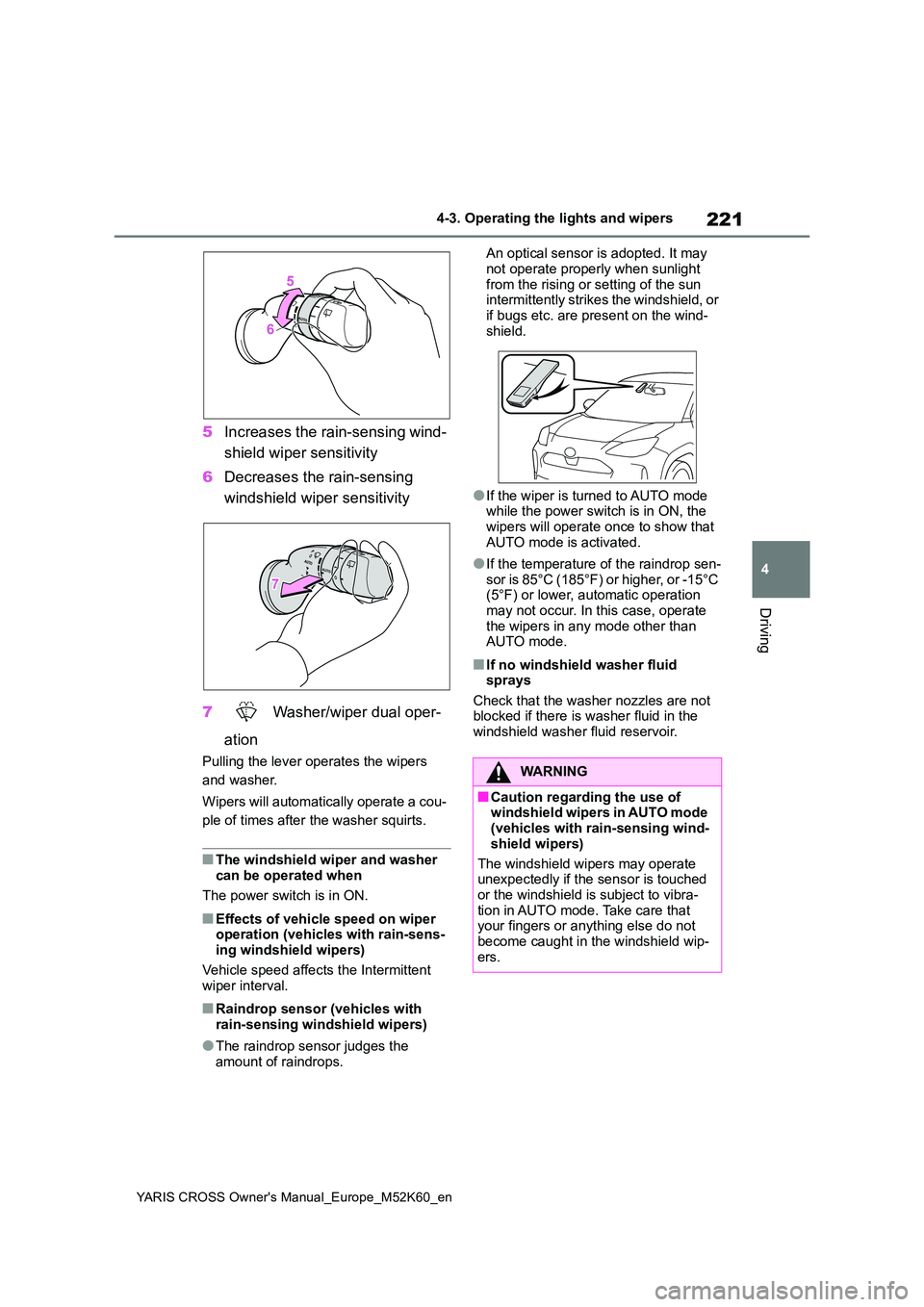
5Increases the rain-sensing wind-
shield wiper sensitivity
6 Decreases the rain-sensing
windshield wiper sensitivity
7 Washer/wiper dual oper-
ation
Pulling the lever operates the wipers
and washer.
Wipers will automatically operate a cou-
ple of times after the washer squirts.
■The windshield wiper and washer can be operated when
The power switch is in ON.
■Effects of vehicle speed on wiper operation (vehicles with rain-sens-ing windshield wipers)
Vehicle speed affects the Intermittent wiper interval.
■Raindrop sensor (vehicles with rain-sensing windshield wipers)
●The raindrop sensor judges the amount of raindrops.
An optical sensor is adopted. It may
not operate properly when sunlight from the rising or setting of the sun intermittently strikes the windshield, or
if bugs etc. are present on the wind- shield.
●If the wiper is turned to AUTO mode while the power switch is in ON, the wipers will operate once to show that
AUTO mode is activated.
●If the temperature of the raindrop sen-
sor is 85°C (185°F) or higher, or -15°C (5°F) or lower, automatic operation may not occur. In this case, operate
the wipers in any mode other than AUTO mode.
■If no windshield washer fluid sprays
Check that the washer nozzles are not blocked if there is washer fluid in the windshield washer fluid reservoir.
WARNING
■Caution regarding the use of windshield wipers in AUTO mode (vehicles with rain-sensing wind-
shield wipers)
The windshield wipers may operate unexpectedly if the sensor is touched
or the windshield is subject to vibra- tion in AUTO mode. Take care that your fingers or anything else do not
become caught in the windshield wip- ers.
Page 225 of 650
223
4
YARIS CROSS Owner's Manual_Europe_M52K60_en
4-3. Operating the lights and wipers
Driving
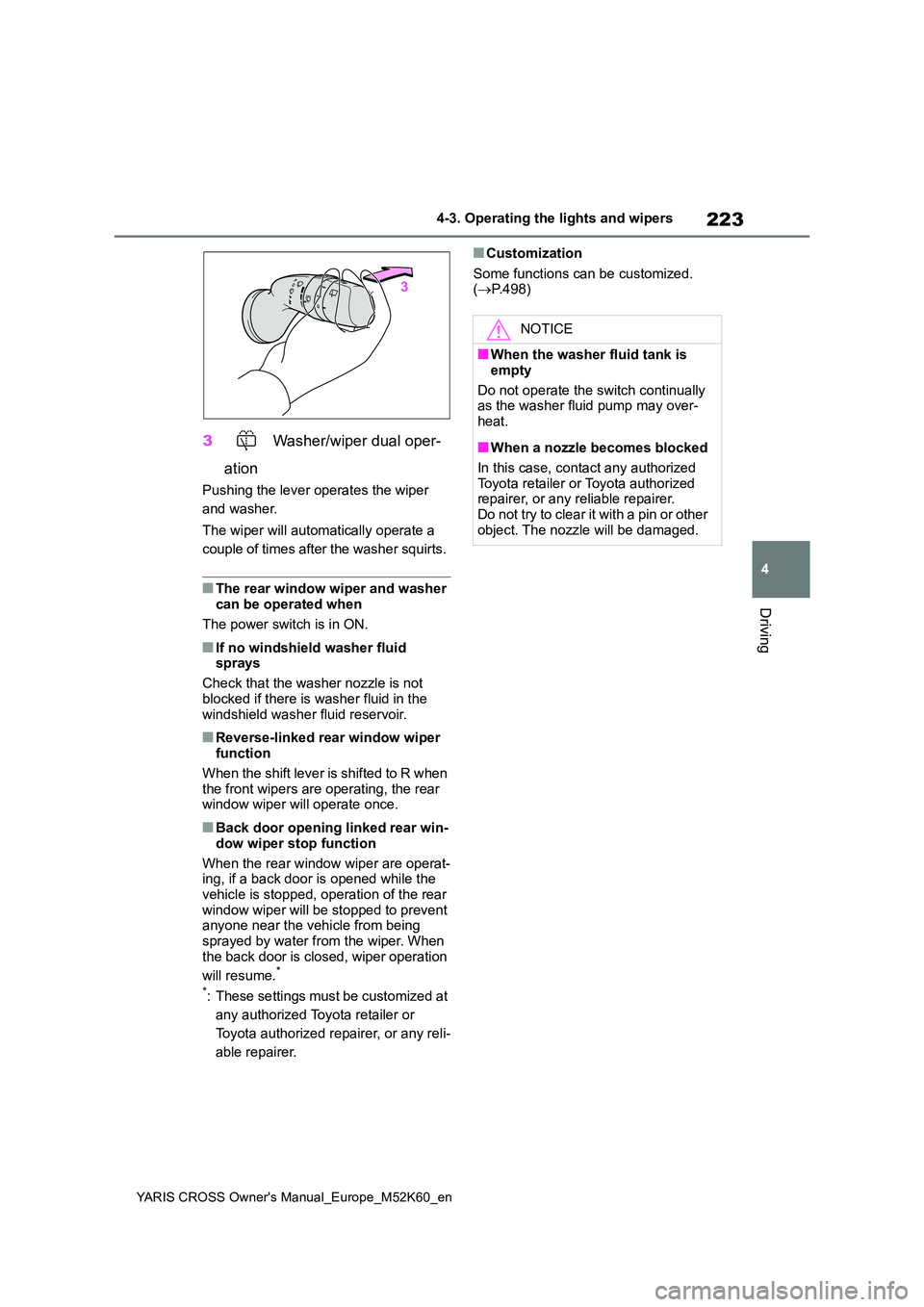
3 Washer/wiper dual oper-
ation
Pushing the lever operates the wiper
and washer.
The wiper will automatically operate a
couple of times after the washer squirts.
■The rear window wiper and washer can be operated when
The power switch is in ON.
■If no windshield washer fluid sprays
Check that the washer nozzle is not
blocked if there is washer fluid in the windshield washer fluid reservoir.
■Reverse-linked rear window wiper function
When the shift lever is shifted to R when the front wipers are operating, the rear window wiper will operate once.
■Back door opening linked rear win-
dow wiper stop function
When the rear window wiper are operat- ing, if a back door is opened while the
vehicle is stopped, operation of the rear window wiper will be stopped to prevent anyone near the vehicle from being
sprayed by water from the wiper. When the back door is closed, wiper operation
will resume.*
*: These settings must be customized at
any authorized Toyota retailer or
Toyota authorized repairer, or any reli-
able repairer.
■Customization
Some functions can be customized. ( P.498)
NOTICE
■When the washer fluid tank is
empty
Do not operate the switch continually as the washer fluid pump may over-
heat.
■When a nozzle becomes blocked
In this case, contact any authorized Toyota retailer or Toyota authorized repairer, or any reliable repairer.
Do not try to clear it with a pin or other object. The nozzle will be damaged.
Page 229 of 650
227
4
YARIS CROSS Owner's Manual_Europe_M52K60_en
4-5. Using the driving support systems
Driving
WARNING
■To avoid malfunction of the radar sensor
Observe the following precautions. Otherwise, the radar sensor may not operate properly, possibly leading to
an accident resulting in death or seri- ous injury.
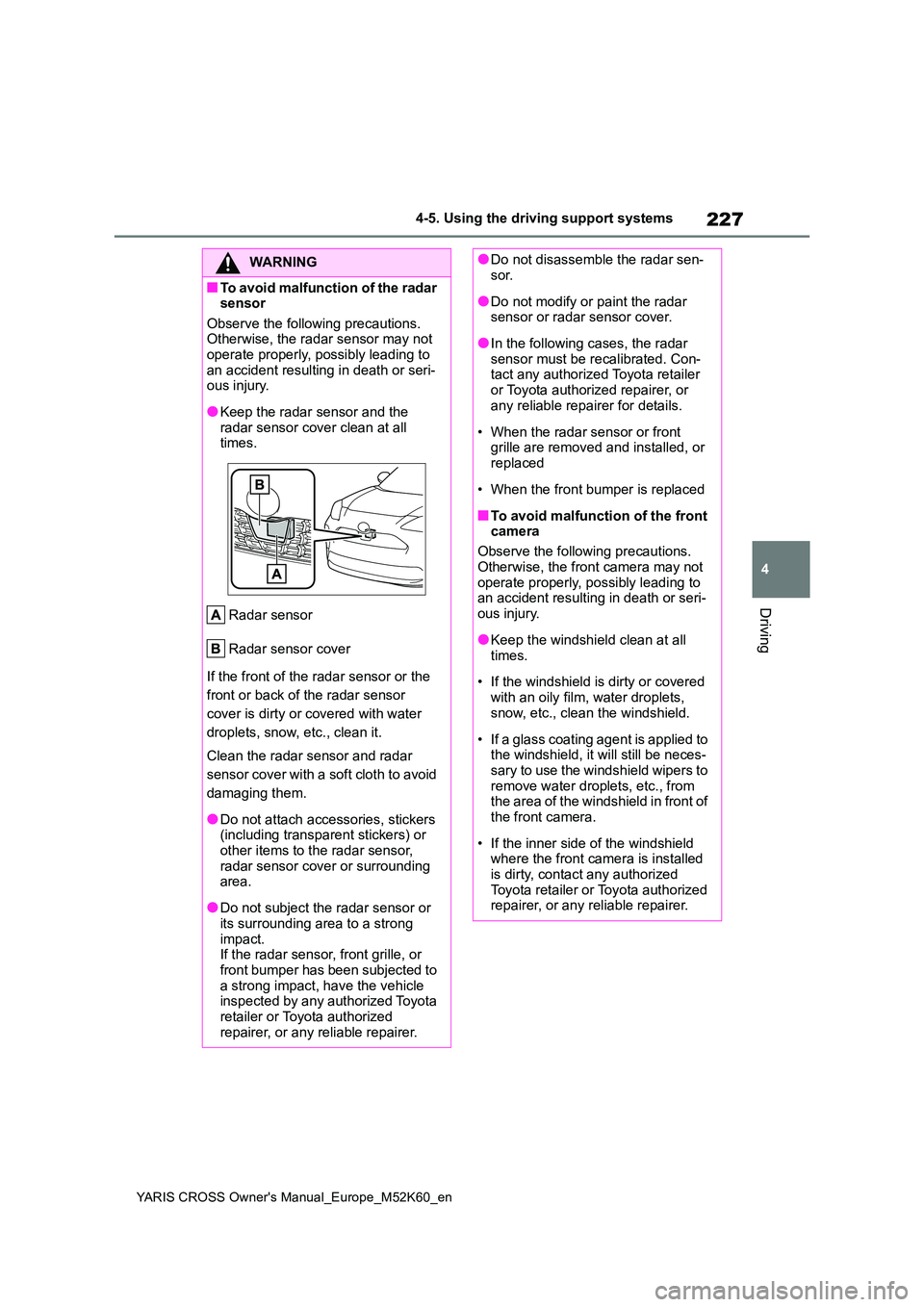
●Keep the radar sensor and the radar sensor cover clean at all times.
Radar sensor
Radar sensor cover
If the front of the radar sensor or the
front or back of the radar sensor
cover is dirty or covered with water
droplets, snow, etc., clean it.
Clean the radar sensor and radar
sensor cover with a soft cloth to avoid
damaging them.
●Do not attach accessories, stickers (including transparent stickers) or
other items to the radar sensor, radar sensor cover or surrounding area.
●Do not subject the radar sensor or its surrounding area to a strong
impact. If the radar sensor, front grille, or front bumper has been subjected to
a strong impact, have the vehicle inspected by any authorized Toyota retailer or Toyota authorized
repairer, or any reliable repairer.
●Do not disassemble the radar sen- sor.
●Do not modify or paint the radar sensor or radar sensor cover.
●In the following cases, the radar sensor must be recalibrated. Con-tact any authorized Toyota retailer
or Toyota authorized repairer, or any reliable repairer for details.
• When the radar sensor or front grille are removed and installed, or replaced
• When the front bumper is replaced
■To avoid malfunction of the front camera
Observe the following precautions.
Otherwise, the front camera may not operate properly, possibly leading to an accident resulting in death or seri-
ous injury.
●Keep the windshield clean at all
times.
• If the windshield is dirty or covered
with an oily film, water droplets, snow, etc., clean the windshield.
• If a glass coating agent is applied to the windshield, it will still be neces-sary to use the windshield wipers to
remove water droplets, etc., from the area of the windshield in front of the front camera.
• If the inner side of the windshield where the front camera is installed
is dirty, contact any authorized Toyota retailer or Toyota authorized repairer, or any reliable repairer.
Page 231 of 650
229
4
YARIS CROSS Owner's Manual_Europe_M52K60_en
4-5. Using the driving support systems
Driving
■If a warning message is displayed on the multi-information display
A system may be temporarily unavailable or there may be a malfu nction in the sys-
tem.
●In the following situations, perform the actions specified in t he table. When the nor-
mal operating conditions are detected, the message will disappe ar and the system will become operational.
If the message does not disappear, contact any authorized Toyot a retailer or Toyota
authorized repairer, or any reliable repairer.
●In the following situations, if the situation has changed (or t he vehicle has been
driven for some time) and the normal operating conditions are d etected, the mes- sage will disappear and the system will become operational.
SituationActions
When the area around a camera is cov-
ered with dirt, moisture (fogged up, cov-
ered with condensation, ice, etc.), or
other foreign matter
Using the wiper and A/C function,
remove the dirt and other attached mat-
ter. ( P.352).
When the temperature around the front
camera is outside of the operational
range, such as when the vehicle is in the
sun or in an extremely cold environment
If the front camera is hot, such as after
the vehicle had been parked in the sun,
use the air conditioning system to
decrease the temperature around the
front camera.
If a sunshade was used when the vehicle
was parked, depending on its type, the
sunlight reflected from the surface of the
sunshade may cause the temperature of
the front camera to become excessively
high.
If the front camera is cold, such after the
vehicle is parked in an extremely cold
environment, use the air conditioning
system to increase the temperature
around the front camera.
The area in front of the front camera is
obstructed, such as when the hood is
open or a sticker is attached to the part of
the windshield in front of the front cam-
era.
Close the hood, remove the sticker, etc.,
to clear the obstruction.
When “Pre-Collision System Radar In
Self Calibration Unavailable See
Owner’s Manual” is displayed.
Check whether there is attached materi-
als on the radar sensor and radar sensor
cover, and if there is, remove it.
Page 237 of 650
235
4
YARIS CROSS Owner's Manual_Europe_M52K60_en
4-5. Using the driving support systems
Driving
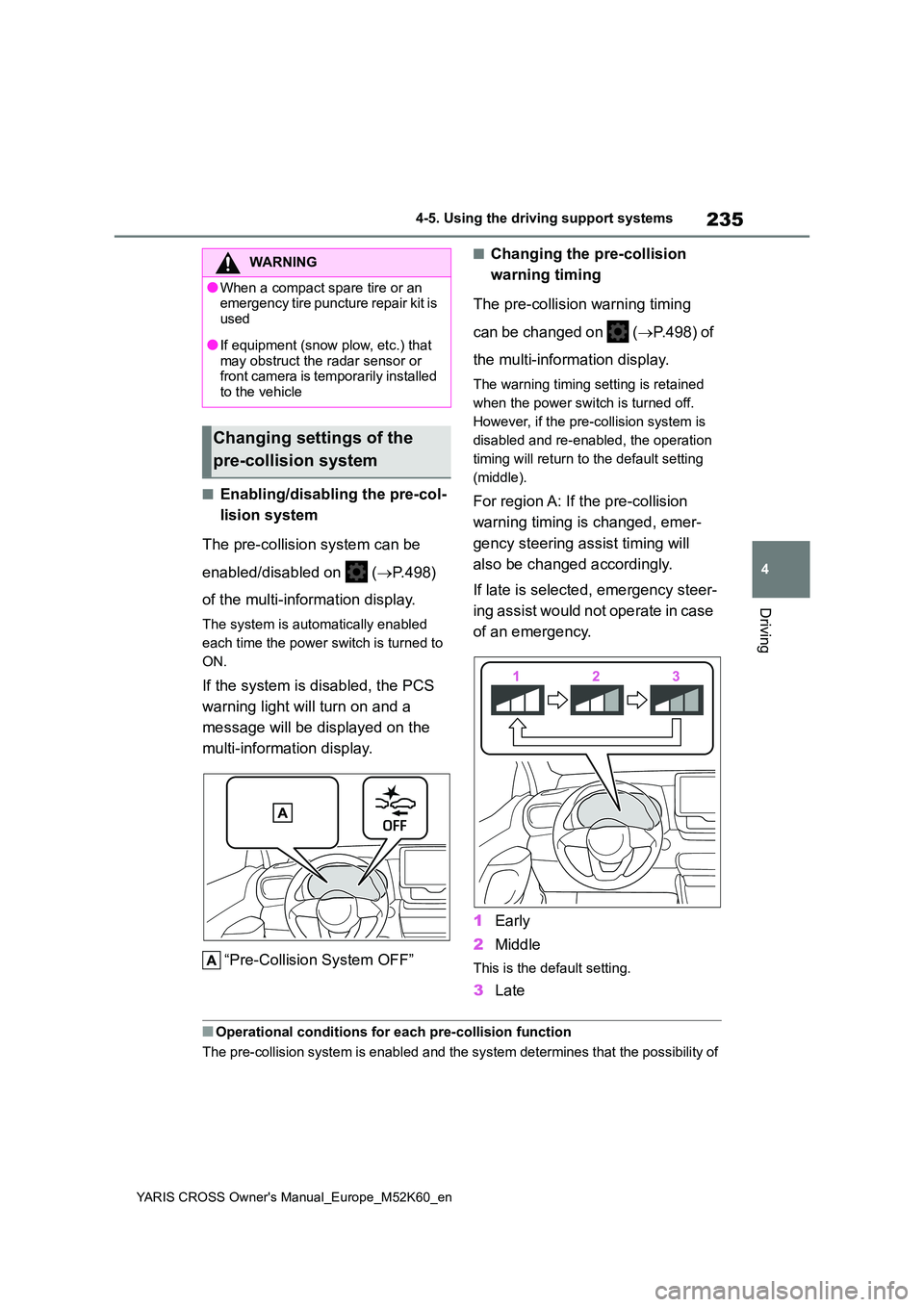
■Enabling/disabling the pre-col-
lision system
The pre-collision system can be
enabled/disabled on ( P.498)
of the multi-information display.
The system is automatically enabled
each time the power switch is turned to
ON.
If the system is disabled, the PCS
warning light will turn on and a
message will be displayed on the
multi-information display.
“Pre-Collision System OFF”
■Changing the pre-collision
warning timing
The pre-collision warning timing
can be changed on ( P.498) of
the multi-information display.
The warning timing setting is retained
when the power switch is turned off.
However, if the pre-collision system is
disabled and re-enabled, the operation
timing will return to the default setting
(middle).
For region A: If the pre-collision
warning timing is changed, emer-
gency steering assist timing will
also be changed accordingly.
If late is selected, emergency steer-
ing assist would not operate in case
of an emergency.
1 Early
2 Middle
This is the default setting.
3Late
■Operational conditions for each pre-collision function
The pre-collision system is enabled and the system determines t hat the possibility of
WARNING
●When a compact spare tire or an emergency tire puncture repair kit is
used
●If equipment (snow plow, etc.) that
may obstruct the radar sensor or front camera is temporarily installed to the vehicle
Changing settings of the
pre-collision system
Page 238 of 650
236
YARIS CROSS Owner's Manual_Europe_M52K60_en
4-5. Using the driving support systems
a frontal collision with a detected object is high.
The system may not operate in the following situations:
• If a 12-volt battery terminal has been disconnected and reconn ected and then the
vehicle has not been driven for a certain amount of time
• If the shift lever is in R
• When the VSC OFF indicator is illuminated (only the pre-collis ion warning function will be operational)
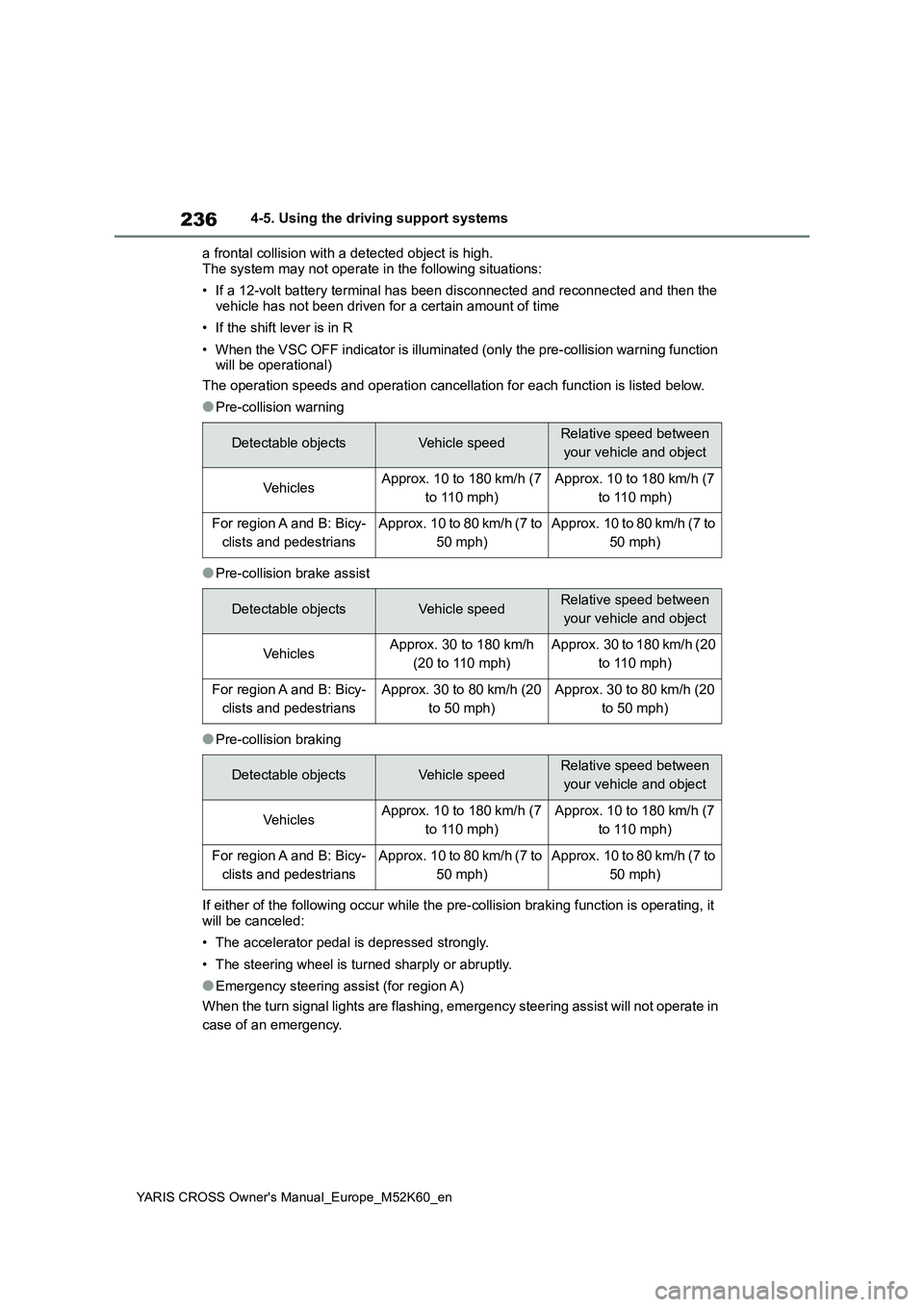
The operation speeds and operation cancellation for each functi on is listed below.
●Pre-collision warning
●Pre-collision brake assist
●Pre-collision braking
If either of the following occur while the pre-collision brakin g function is operating, it
will be canceled:
• The accelerator pedal is depressed strongly.
• The steering wheel is turned sharply or abruptly.
●Emergency steering assist (for region A)
When the turn signal lights are flashing, emergency steering as sist will not operate in
case of an emergency.
Detectable objectsVehicle speedRelative speed between
your vehicle and object
Ve hi cl e sApprox. 10 to 180 km/h (7
to 110 mph)
Approx. 10 to 180 km/h (7
to 110 mph)
For region A and B: Bicy-
clists and pedestrians
Approx. 10 to 80 km/h (7 to
50 mph)
Approx. 10 to 80 km/h (7 to
50 mph)
Detectable objectsVehicle speedRelative speed between
your vehicle and object
Ve hi cl e sApprox. 30 to 180 km/h
(20 to 110 mph)
Approx. 30 to 180 km/h (20
to 110 mph)
For region A and B: Bicy-
clists and pedestrians
Approx. 30 to 80 km/h (20
to 50 mph)
Approx. 30 to 80 km/h (20
to 50 mph)
Detectable objectsVehicle speedRelative speed between
your vehicle and object
Ve hi cl e sApprox. 10 to 180 km/h (7
to 110 mph)
Approx. 10 to 180 km/h (7
to 110 mph)
For region A and B: Bicy-
clists and pedestrians
Approx. 10 to 80 km/h (7 to
50 mph)
Approx. 10 to 80 km/h (7 to
50 mph)
Page 242 of 650
240
YARIS CROSS Owner's Manual_Europe_M52K60_en
4-5. Using the driving support systems
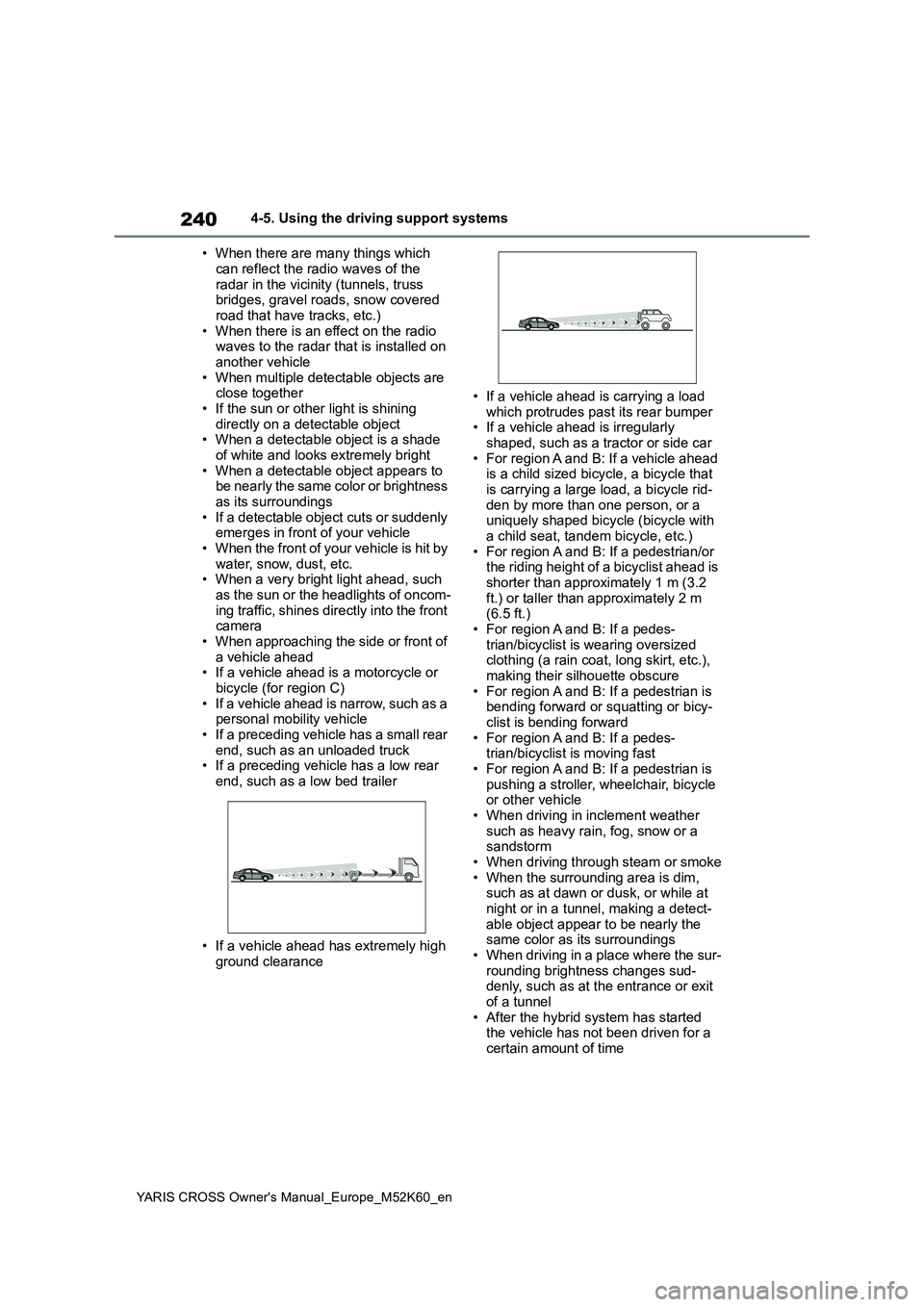
• When there are many things which
can reflect the radio waves of the radar in the vicinity (tunnels, truss bridges, gravel roads, snow covered
road that have tracks, etc.) • When there is an effect on the radio waves to the radar that is installed on
another vehicle • When multiple detectable objects are close together
• If the sun or other light is shining directly on a detectable object• When a detectable object is a shade
of white and looks extremely bright • When a detectable object appears to be nearly the same color or brightness
as its surroundings • If a detectable object cuts or suddenly emerges in front of your vehicle
• When the front of your vehicle is hit by water, snow, dust, etc.• When a very bright light ahead, such
as the sun or the headlights of oncom- ing traffic, shines directly into the front camera
• When approaching the side or front of a vehicle ahead• If a vehicle ahead is a motorcycle or
bicycle (for region C) • If a vehicle ahead is narrow, such as a personal mobility vehicle
• If a preceding vehicle has a small rear end, such as an unloaded truck• If a preceding vehicle has a low rear
end, such as a low bed trailer
• If a vehicle ahead has extremely high
ground clearance
• If a vehicle ahead is carrying a load
which protrudes past its rear bumper • If a vehicle ahead is irregularly shaped, such as a tractor or side car
• For region A and B: If a vehicle ahead is a child sized bicycle, a bicycle that is carrying a large load, a bicycle rid-
den by more than one person, or a uniquely shaped bicycle (bicycle with a child seat, tandem bicycle, etc.)
• For region A and B: If a pedestrian/or the riding height of a bicyclist ahead is shorter than approximately 1 m (3.2
ft.) or taller than approximately 2 m (6.5 ft.)• For region A and B: If a pedes-
trian/bicyclist is wearing oversized clothing (a rain coat, long skirt, etc.), making their silhouette obscure
• For region A and B: If a pedestrian is bending forward or squatting or bicy-clist is bending forward
• For region A and B: If a pedes- trian/bicyclist is moving fast• For region A and B: If a pedestrian is
pushing a stroller, wheelchair, bicycle or other vehicle• When driving in inclement weather
such as heavy rain, fog, snow or a sandstorm• When driving through steam or smoke
• When the surrounding area is dim, such as at dawn or dusk, or while at night or in a tunnel, making a detect-
able object appear to be nearly the same color as its surroundings• When driving in a place where the sur-
rounding brightness changes sud- denly, such as at the entrance or exit of a tunnel
• After the hybrid system has started the vehicle has not been driven for a certain amount of time
Page 245 of 650
243
4
YARIS CROSS Owner's Manual_Europe_M52K60_en
4-5. Using the driving support systems
Driving
WARNING
■Before using LTA system
●Do not rely solely upon the LTA sys-
tem. The LTA system does not automatically drive the vehicle or reduce the amount of attention that
must be paid to the area in front of the vehicle. The driver must always assume full responsibility for driving
safely by paying careful attention to the surrounding conditions and operating the steering wheel to cor-
rect the path of the vehicle. Also, the driver must take adequate breaks when fatigued, such as from
driving for a long period of time.
●Failure to perform appropriate driv-
ing operations and pay careful attention may lead to an accident, resulting in death or serious injury.
■Situations unsuitable for LTA system
In the following situations, use the LTA switch to turn the system off. Fail-ure to do so may lead to an accident,
resulting in death or serious injury.
●Vehicle is driven on a road surface
which is slippery due to rainy weather, fallen snow, freezing, etc.
●Vehicle is driven on a snow-cov-ered road.
●White (yellow) lines are difficult to see due to rain, snow, fog, dust, etc.
●Vehicle is driven in a temporary lane or restricted lane due to con-
struction work.
●Vehicle is driven in a construction
zone.
●A spare tire, tire chains, etc., are
equipped.
●When the tires have been exces-
sively worn, or when the tire infla- tion pressure is low.
●When your vehicle is towing a trailer or during emergency towing.
■Preventing LTA system malfunc-tions and operations performed by mistake
●Do not modify the headlights or place stickers, etc., on the surface of the lights.
●Do not modify the suspension, etc. If the suspension, etc., needs to be
replaced, contact any authorized Toyota retailer or Toyota authorized repairer, or any reliable repairer.
●Do not install or place anything on the hood or grille. Also, do not
install a grille guard (bull bars, kan- garoo bar, etc.).
●If your windshield needs repairs, contact any authorized Toyota retailer or Toyota authorized
repairer, or any reliable repairer.
■Conditions in which functions
may not operate properly
In the following situations, the func- tions may not operate properly and
the vehicle may depart from its lane. Drive safely by always paying careful attention to your surroundings and
operate the steering wheel to correct the path of the vehicle without relying solely on the functions.
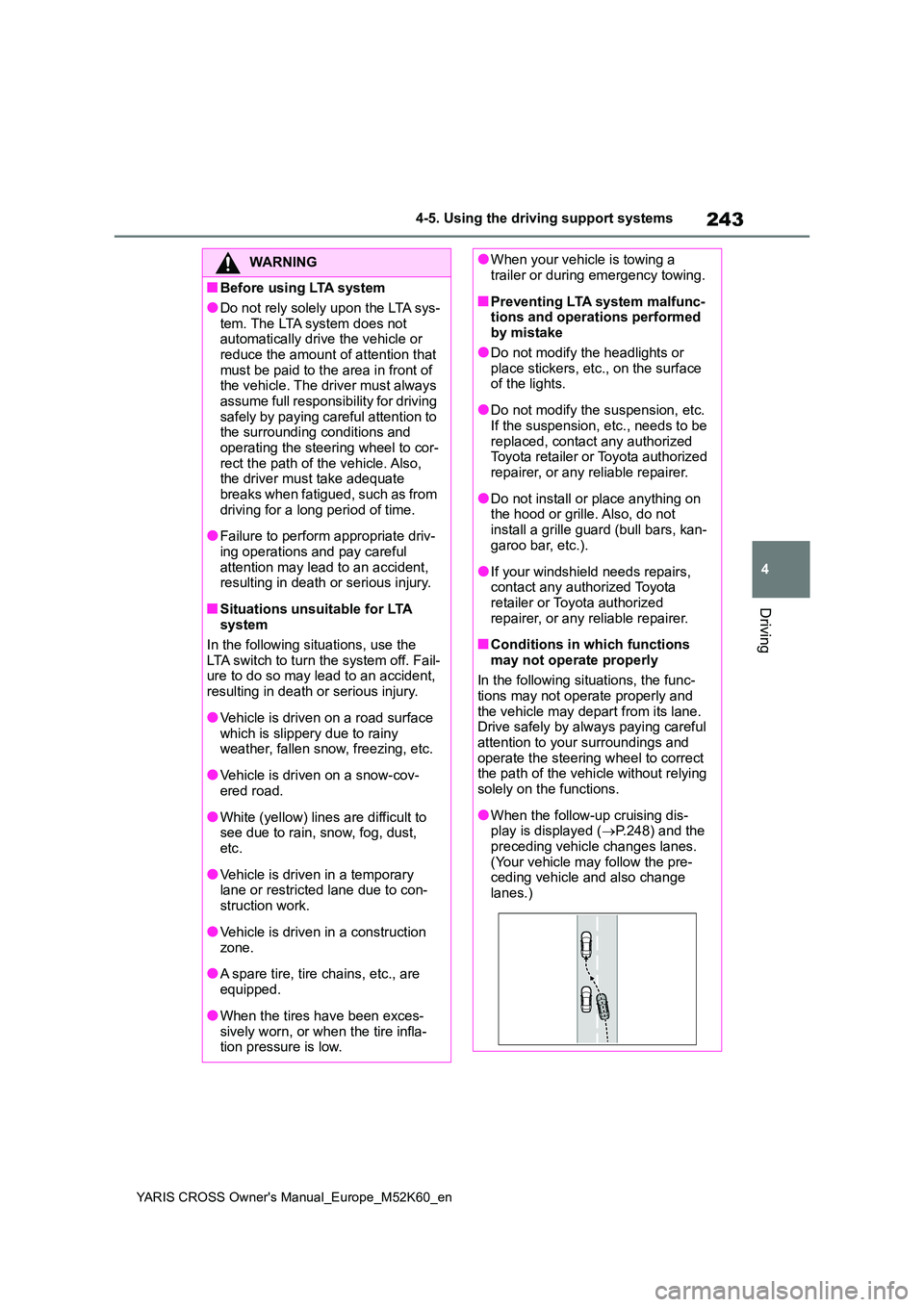
●When the follow-up cruising dis-play is displayed ( P.248) and the
preceding vehicle changes lanes. (Your vehicle may follow the pre-ceding vehicle and also change
lanes.)
Page 248 of 650
246
YARIS CROSS Owner's Manual_Europe_M52K60_en
4-5. Using the driving support systems
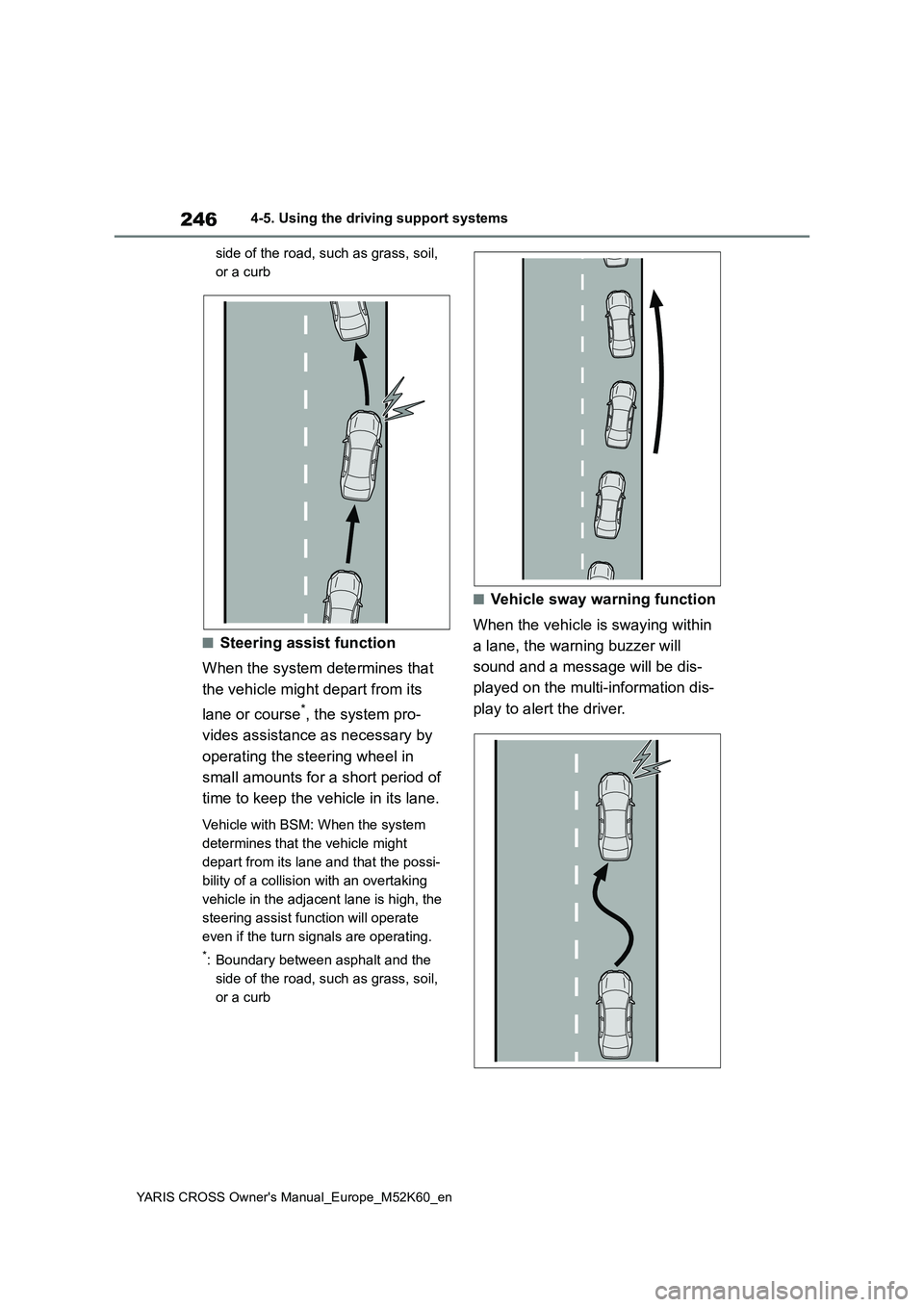
side of the road, such as grass, soil,
or a curb
■Steering assist function
When the system determines that
the vehicle might depart from its
lane or course*, the system pro-
vides assistance as necessary by
operating the steering wheel in
small amounts for a short period of
time to keep the vehicle in its lane.
Vehicle with BSM: When the system
determines that the vehicle might
depart from its lane and that the possi-
bility of a collision with an overtaking
vehicle in the adjacent lane is high, the
steering assist function will operate
even if the turn signals are operating.
*: Boundary between asphalt and the
side of the road, such as grass, soil,
or a curb
■Vehicle sway warning function
When the vehicle is swaying within
a lane, the warning buzzer will
sound and a message will be dis-
played on the multi-information dis-
play to alert the driver.
Page 249 of 650
247
4
YARIS CROSS Owner's Manual_Europe_M52K60_en
4-5. Using the driving support systems
Driving
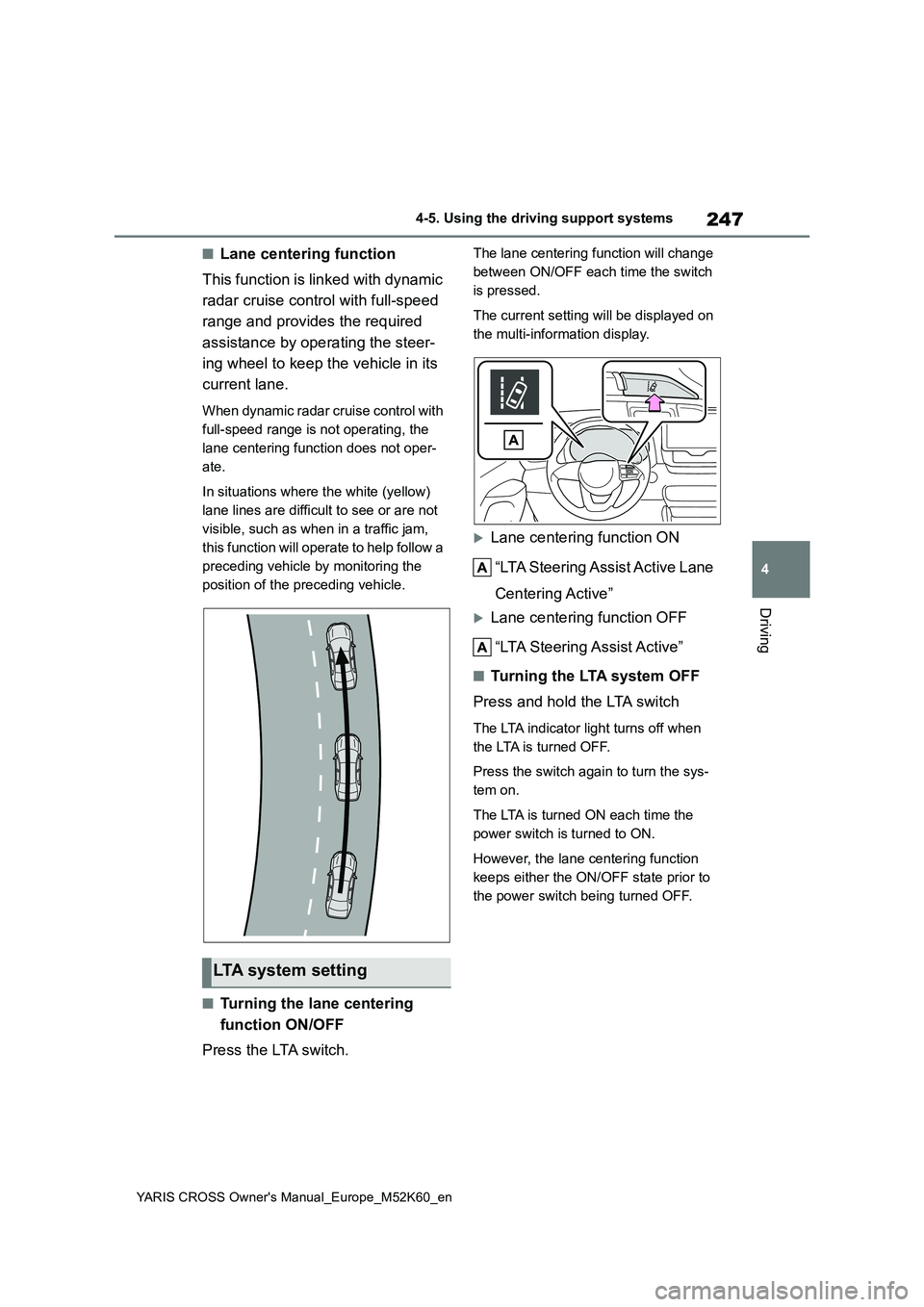
■Lane centering function
This function is linked with dynamic
radar cruise control with full-speed
range and provides the required
assistance by operating the steer-
ing wheel to keep the vehicle in its
current lane.
When dynamic radar cruise control with
full-speed range is not operating, the
lane centering function does not oper-
ate.
In situations where the white (yellow)
lane lines are difficult to see or are not
visible, such as when in a traffic jam,
this function will operate to help follow a
preceding vehicle by monitoring the
position of the preceding vehicle.
■Turning the lane centering
function ON/OFF
Press the LTA switch.
The lane centering function will change
between ON/OFF each time the switch
is pressed.
The current setting will be displayed on
the multi-information display.
Lane centering function ON
“LTA Steering Assist Active Lane
Centering Active”
Lane centering function OFF
“LTA Steering Assist Active”
■Tu r n i n g t h e LTA s y s t e m O F F
Press and hold the LTA switch
The LTA indicator light turns off when
the LTA is turned OFF.
Press the switch again to turn the sys-
tem on.
The LTA is turned ON each time the
power switch is turned to ON.
However, the lane centering function
keeps either the ON/OFF state prior to
the power switch being turned OFF.
LTA system setting