steering wheel TOYOTA YARIS CROSS 2022 Owner's Manual
[x] Cancel search | Manufacturer: TOYOTA, Model Year: 2022, Model line: YARIS CROSS, Model: TOYOTA YARIS CROSS 2022Pages: 618, PDF Size: 130.77 MB
Page 171 of 618
169
4
CV Owner's Manual_Europe_M52N20_en
4-1. Before driving
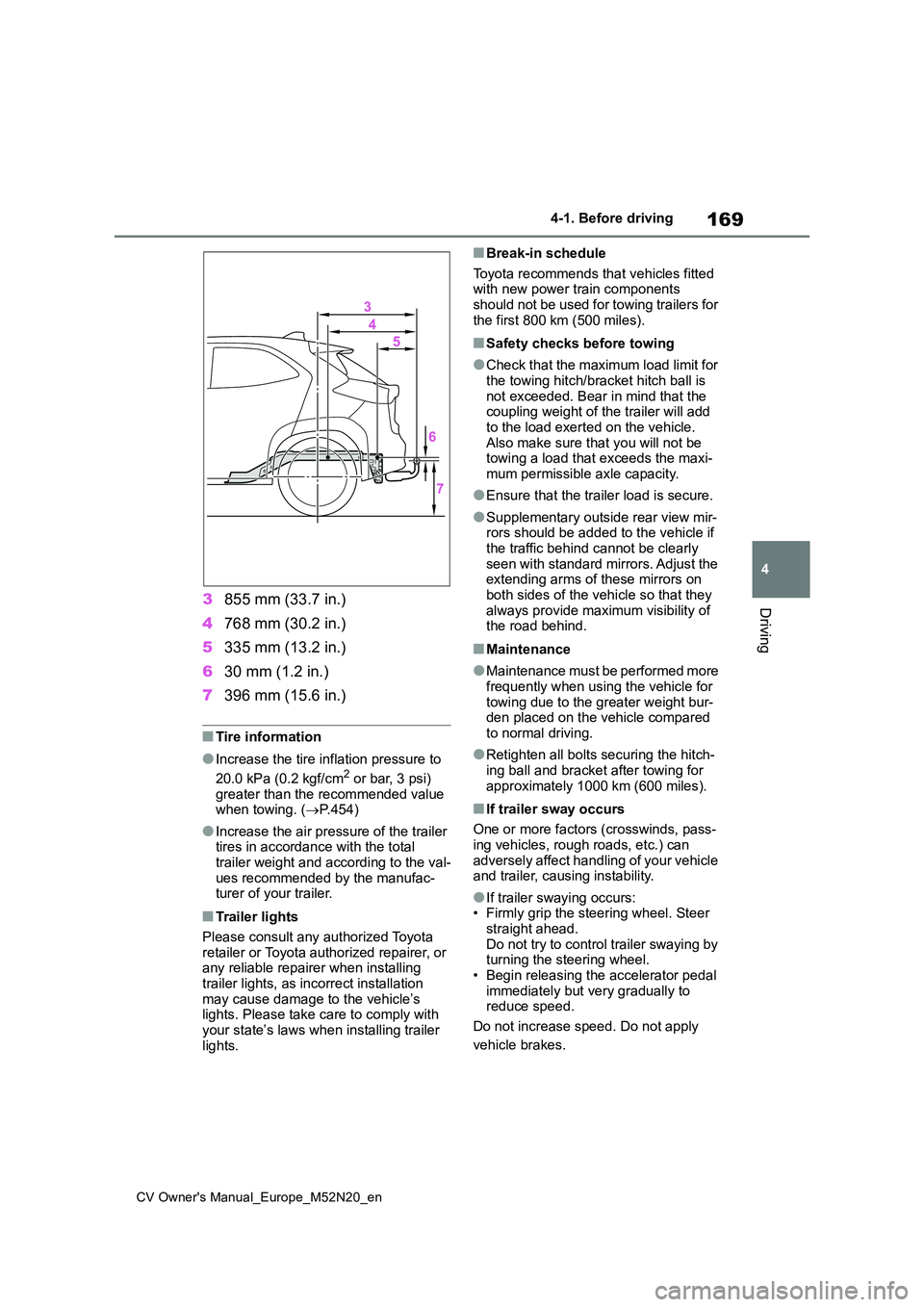
Driving3855 mm (33.7 in.)
4 768 mm (30.2 in.)
5 335 mm (13.2 in.)
6 30 mm (1.2 in.)
7 396 mm (15.6 in.)
■Tire information
●Increase the tire inflation pressure to
20.0 kPa (0.2 kgf/cm2 or bar, 3 psi) greater than the recommended value when towing. ( P.454)
●Increase the air pressure of the trailer tires in accordance with the total
trailer weight and according to the val- ues recommended by the manufac-turer of your trailer.
■Trailer lights
Please consult any authorized Toyota retailer or Toyota authorized repairer, or any reliable repairer when installing
trailer lights, as incorrect installation may cause damage to the vehicle’s lights. Please take care to comply with
your state’s laws when installing trailer lights.
■Break-in schedule
Toyota recommends that vehicles fitted with new power train components should not be used for towing trailers for
the first 800 km (500 miles).
■Safety checks before towing
●Check that the maximum load limit for
the towing hitch/bracket hitch ball is not exceeded. Bear in mind that the coupling weight of the trailer will add
to the load exerted on the vehicle. Also make sure that you will not be towing a load that exceeds the maxi-
mum permissible axle capacity.
●Ensure that the trailer load is secure.
●Supplementary outside rear view mir- rors should be added to the vehicle if
the traffic behind cannot be clearly seen with standard mirrors. Adjust the extending arms of these mirrors on
both sides of the vehicle so that they always provide maximum visibility of the road behind.
■Maintenance
●Maintenance must be performed more frequently when using the vehicle for
towing due to the greater weight bur- den placed on the vehicle compared to normal driving.
●Retighten all bolts securing the hitch-ing ball and bracket after towing for
approximately 1000 km (600 miles).
■If trailer sway occurs
One or more factors (crosswinds, pass- ing vehicles, rough roads, etc.) can
adversely affect handling of your vehicle and trailer, causing instability.
●If trailer swaying occurs:• Firmly grip the steering wheel. Steer straight ahead.
Do not try to control trailer swaying by turning the steering wheel.• Begin releasing the accelerator pedal
immediately but very gradually to reduce speed.
Do not increase speed. Do not apply
vehicle brakes.
Page 172 of 618
170
CV Owner's Manual_Europe_M52N20_en
4-1. Before driving
If you make no extreme correction with
the steering or brakes, your vehicle and
trailer should stabilize (if enabled, Trailer
Sway Control can also help to stabilize
the vehicle and trailer.).
●After the trailer swaying has stopped: • Stop in a safe place. Get all occupants out of the vehicle.
• Check the tires of the vehicle and the trailer.• Check the load in the trailer.
Make sure the load has not shifted. Make sure the tongue weight is appro-priate, if possible.
• Check the load in the vehicle. Make sure the vehicle is not over-loaded after occupants get in.
If you cannot find any problems, the
speed at which trailer swaying occurred
is beyond the limit of your particular
vehicle-trailer combination. Drive at a
lower speed to prevent instability.
Remember that swaying of the towing
vehicle-trailer increases as speed
increases.
Your vehicle will handle differently
when towing a trailer. In order to
avoid accident, death or serious
injury, keep the following in mind
when towing:
■Checking connections
between trailer and lights
Stop the vehicle and check the
operation of the connection
between the trailer and lights after
driving for a brief period as well as
before starting off.
■Practicing driving with a cou-
pled trailer
Get the feel for turning, stopping
and reversing with the trailer
coupled by practicing in an area
with no or light traffic.
When reversing with a coupled
trailer, hold the section of the
steering wheel nearest to you
and rotate clockwise to turn the
trailer left or counterclockwise to
turn it right. Always rotate a little
at a time to prevent steering
error. Have someone guide you
when reversing to lessen the risk
of an accident.
■Increasing vehicle-to-vehicle
distance
At a speed of 10 km/h (6 mph), the
distance to the vehicle running
ahead of you should be equivalent
to or greater than the combined
length of your vehicle and trailer.
Avoid sudden braking that may
cause skidding. Otherwise, the
vehicle may spin out of control. This
is especially true when driving on
wet or slippery road surfaces.
NOTICE
■When the rear bumper strength- ening material is aluminum
Ensure the steel bracket part does not
come directly in contact with that area.When steel and aluminum come into
contact, there is a reaction similar to corrosion, which will weaken the sec-tion concerned and may result in
damage. Apply a rust inhibitor to parts that will come in contact when attach-ing a steel bracket.
Guidance
Page 173 of 618
171
4
CV Owner's Manual_Europe_M52N20_en
4-1. Before driving
Driving
■Sudden acceleration/steering
input/cornering
Executing sharp turns when towing
may result in the trailer colliding
with your vehicle. Decelerate well in
advance when approaching turns
and take them slowly and carefully
to avoid sudden braking.
■Important points regarding
turning
The wheels of the trailer will travel
closer to the inside of the curve
than the wheels of the vehicle. To
make allowance for this, take the
turns wider than you would nor-
mally do.
■Important points regarding
stability
Vehicle movement resulting from
uneven road surfaces and strong
crosswinds will affect handling. The
vehicle may also be rocked by
passing buses or large trucks. Fre-
quently check behind when moving
alongside such vehicles. As soon
as such vehicle movement occurs,
immediately start to decelerate
smoothly by slowly applying the
brakes. Always steer the vehicle
straight ahead while braking.
■Passing other vehicles
Consider the total combined length
of your vehicle and trailer and
ensure that the vehicle-to-vehicle
distance is sufficient before execut-
ing lane changes.
■Transmission information
Multidrive
To maintain engine braking effi-
ciency and charging system perfor-
mance when using engine braking,
do not use the transmission in D,
must be in M and select gear step 4
or lower. ( P.179)
Manual transmission
Refrain from driving in 6th gear to
maintain the effectiveness of
engine braking and to maintain
charging system performance.
■If the engine overheats
Towing a loaded trailer up a long,
steep incline in temperatures
exceeding 30°C (85°F) may result
in the engine overheating. If the
engine coolant temperature gauge
indicates that the engine is over-
heating, turn the air conditioning off
immediately, leave the road and
stop the vehicle in a safe place.
( P.442)
■When parking the vehicle
Always place wheel chocks under
the wheels of both the vehicle and
trailer. Firmly set the parking brake
and shift the shift lever to P (Multid-
rive) and 1 or R (manual transmis-
sion).
WARNING
F o l l o w a l l t h e i n s t r u c t i o n s d e s c r i b e d i n
this section. Failure to do so could cause an accident resulting in death or serious injury.
Page 175 of 618
173
4
CV Owner's Manual_Europe_M52N20_en
4-2. Driving procedures
Driving
4-2.Driving pro cedu res
1Pull the parking brake switch to
check that the parking brake is
set. ( P.186)
The parking brake indicator will come on.
2 Check that the shift lever is in P
(Multidrive) or N (manual trans-
mission).
3 Firmly depress the brake pedal
(Multidrive) or clutch pedal
(manual transmission).
4 Turn the engine switch to
START to start the engine.
■If the engine does not start
The engine immobilizer system may not have been deactivated. ( P.75) Contact any authorized Toyota retailer or Toyota
authorized repairer, or any reliable repairer.
■When the steering lock cannot be released
When starting the engine, the engine switch may seem stuck in OFF. To free it, turn the key while turning the steering
wheel slightly left and right.
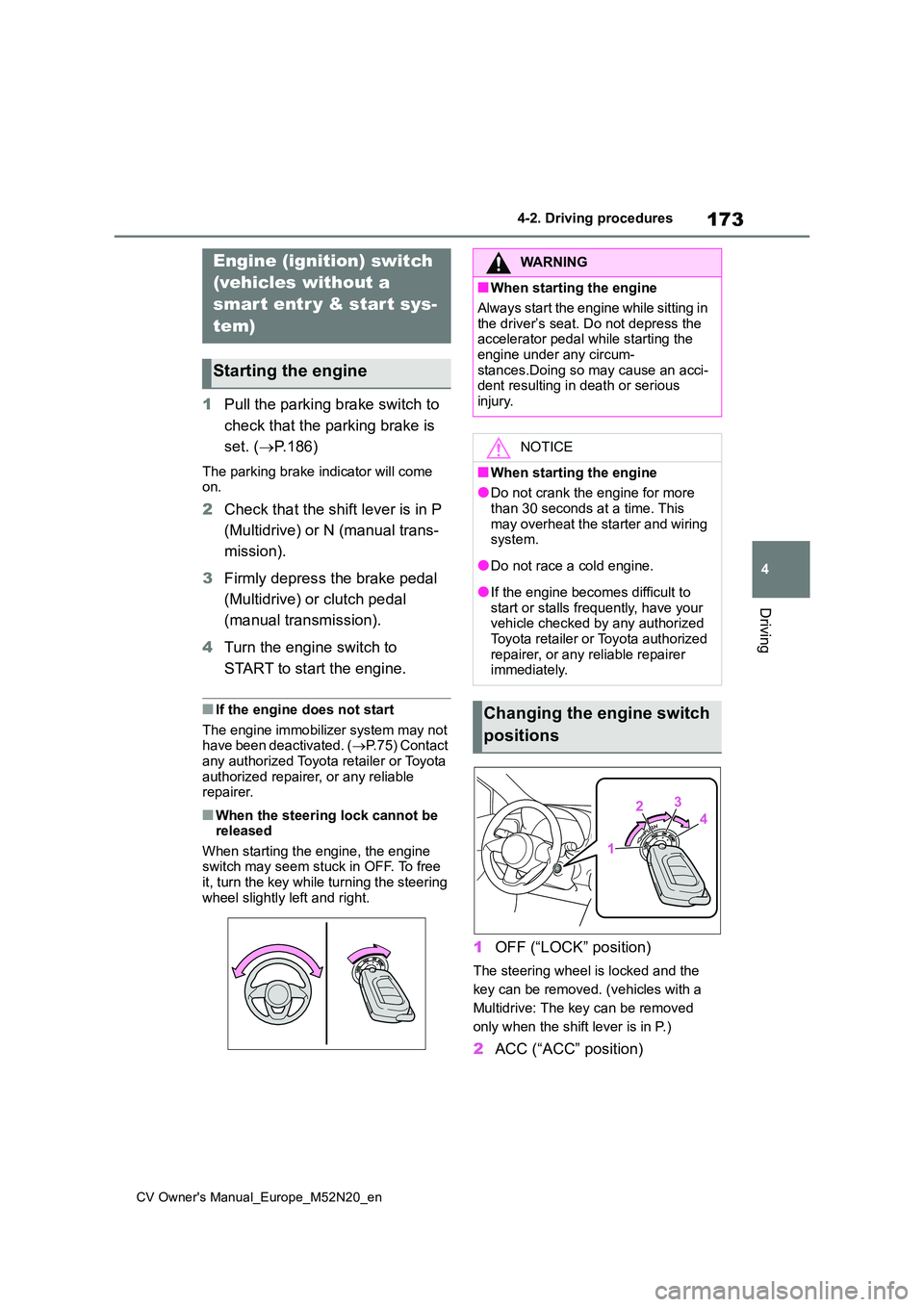
1 OFF (“LOCK” position)
The steering wheel is locked and the
key can be removed. (vehicles with a
Multidrive: The key can be removed
only when the shift lever is in P.)
2 ACC (“ACC” position)
Engine (ignition) switch
(vehicles without a
smart entr y & start sys-
tem)
Starting the engine
WARNING
■When starting the engine
Always start the engine while sitting in
the driver’s seat. Do not depress the accelerator pedal while starting the engine under any circum-
stances.Doing so may cause an acci- dent resulting in death or serious injury.
NOTICE
■When starting the engine
●Do not crank the engine for more
than 30 seconds at a time. This may overheat the starter and wiring system.
●Do not race a cold engine.
●If the engine becomes difficult to start or stalls frequently, have your vehicle checked by any authorized
Toyota retailer or Toyota authorized repairer, or any reliable repairer immediately.
Changing the engine switch
positions
Page 177 of 618
175
4
CV Owner's Manual_Europe_M52N20_en
4-2. Driving procedures
Driving
engine switch mode.
■Engine switch illumination
In the following situations, the engine switch is illuminated.
●When the driver’s or passenger’s door is opened.
●When the engine switch is in ACC or ON.
●When the engine switch mode is changed from ACC or ON to off.
Also, in the following situation, the engine switch flashes.
●When depressing the brake pedal while carrying the electronic key.
■If the engine does not start
●The engine immobilizer system may not have been deactivated. ( P.75) Contact any authorized Toyota retailer
or Toyota authorized repairer, or any reliable repairer.
●If a message related to start-up is shown on the multi-information dis-play, read the message and follow the
instructions.
■If the battery is discharged
The engine cannot be started using the
smart entry & start system. Refer to P.439 to restart the engine.
■Electronic key battery depletion
P. 1 1 5
■Conditions affecting operation
P. 1 3 8
■Notes for the entry function
P. 1 3 8
■Steering lock function
●After turning the engine switch off and
opening and closing the doors, the steering wheel will be locked due to the steering lock function. Operating
the engine switch again automatically cancels the steering lock.
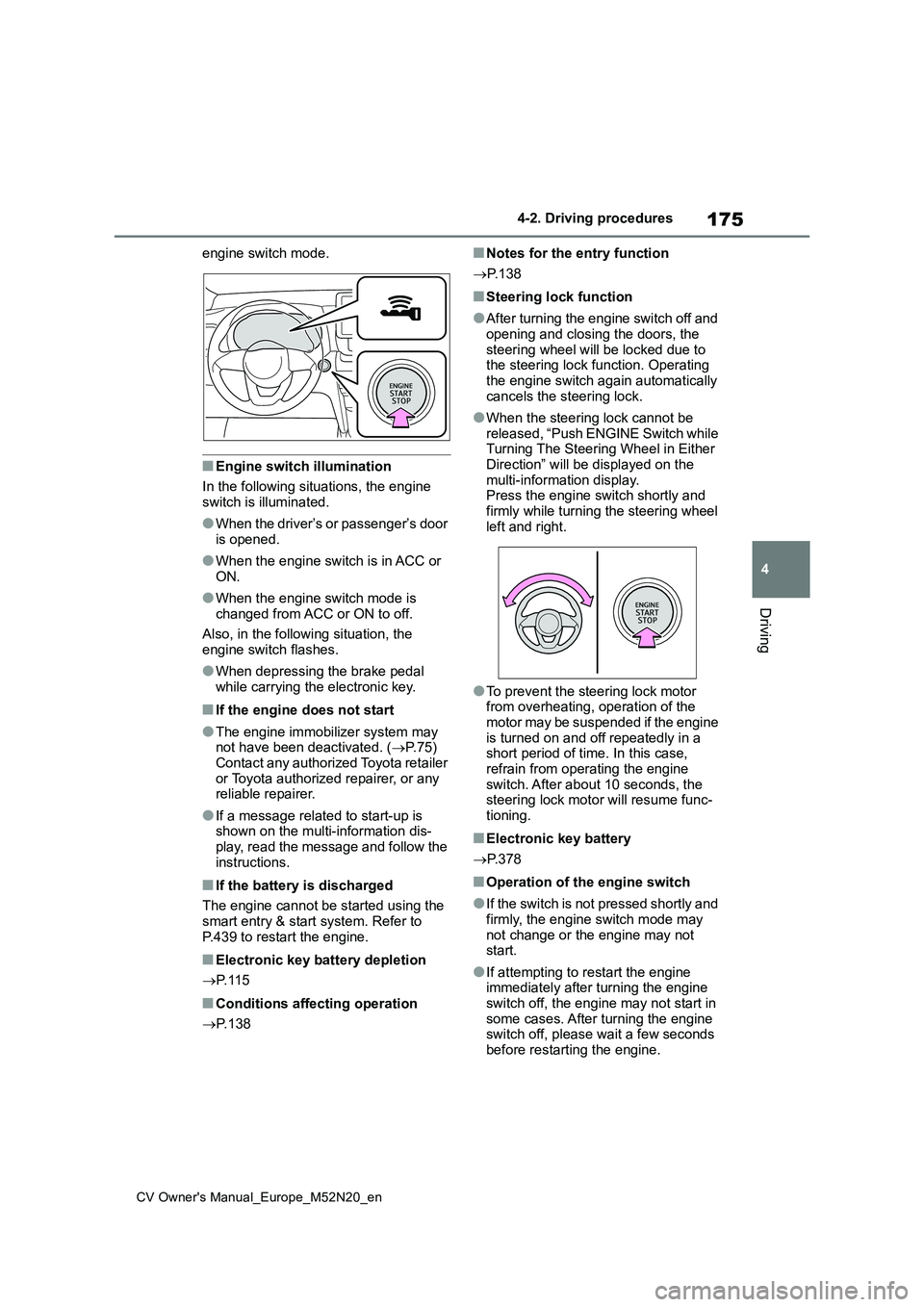
●When the steering lock cannot be released, “Push ENGINE Switch while Turning The Steering Wheel in Either
Direction” will be displayed on the multi-information display.Press the engine switch shortly and
firmly while turning the steering wheel left and right.
●To prevent the steering lock motor from overheating, operation of the motor may be suspended if the engine
is turned on and off repeatedly in a short period of time. In this case, refrain from operating the engine
switch. After about 10 seconds, the steering lock motor will resume func-tioning.
■Electronic key battery
P. 3 7 8
■Operation of the engine switch
●If the switch is not pressed shortly and
firmly, the engine switch mode may not change or the engine may not start.
●If attempting to restart the engine immediately after turning the engine
switch off, the engine may not start in some cases. After turning the engine switch off, please wait a few seconds
before restarting the engine.
Page 221 of 618
219
4
CV Owner's Manual_Europe_M52N20_en
4-5. Using the driving support systems
Driving
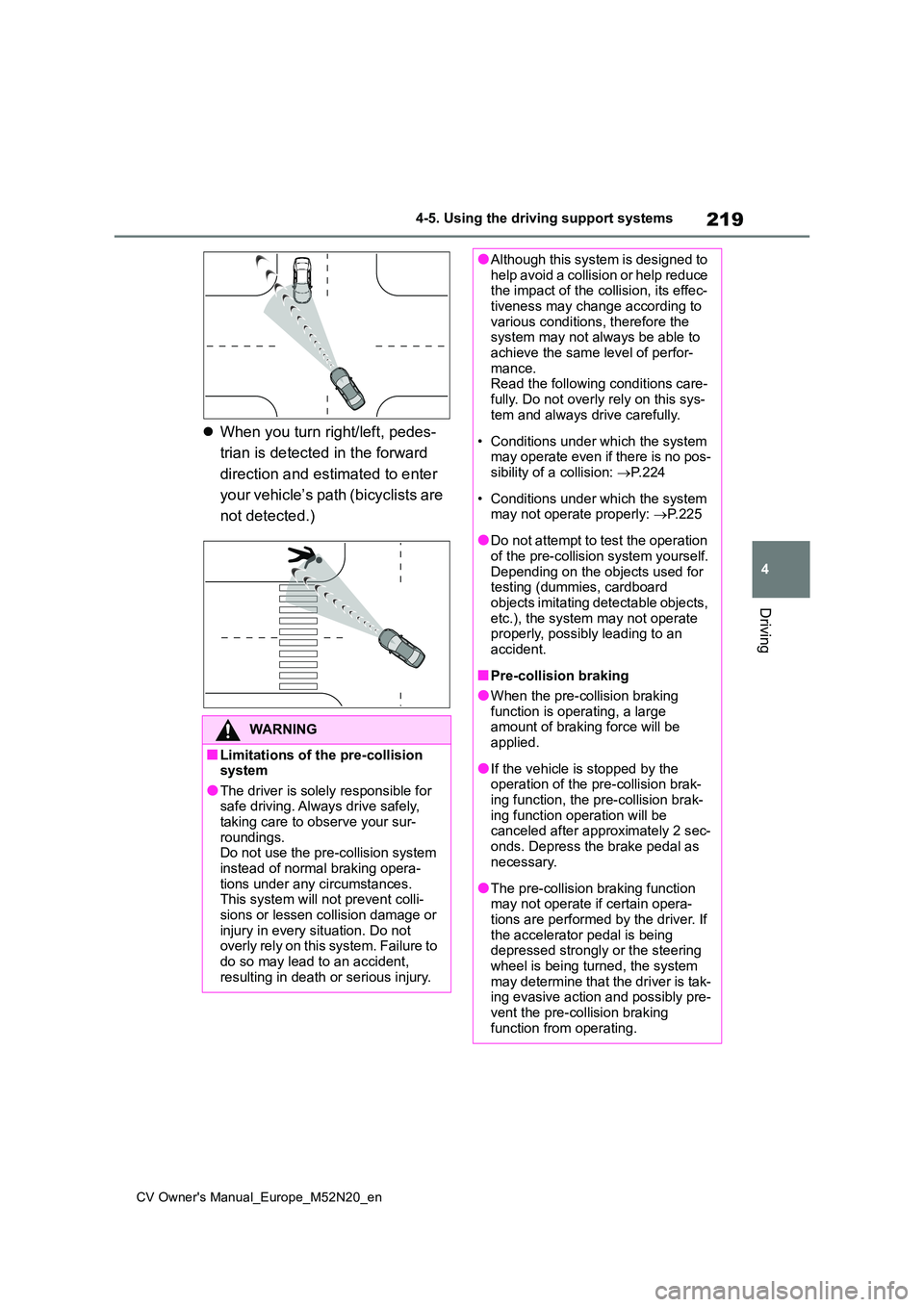
When you turn right/left, pedes-
trian is detected in the forward
direction and estimated to enter
your vehicle’s path (bicyclists are
not detected.)
WARNING
■Limitations of the pre-collision system
●The driver is solely responsible for safe driving. Always drive safely, taking care to observe your sur-
roundings. Do not use the pre-collision system instead of normal braking opera-
tions under any circumstances. This system will not prevent colli-sions or lessen collision damage or
injury in every situation. Do not overly rely on this system. Failure to do so may lead to an accident,
resulting in death or serious injury.
●Although this system is designed to help avoid a collision or help reduce the impact of the collision, its effec-
tiveness may change according to various conditions, therefore the system may not always be able to
achieve the same level of perfor- mance.Read the following conditions care-
fully. Do not overly rely on this sys- tem and always drive carefully.
• Conditions under which the system may operate even if there is no pos-sibility of a collision: P. 2 2 4
• Conditions under which the system may not operate properly: P. 2 2 5
●Do not attempt to test the operation of the pre-collision system yourself.
Depending on the objects used for testing (dummies, cardboard objects imitating detectable objects,
etc.), the system may not operate properly, possibly leading to an accident.
■Pre-collision braking
●When the pre-collision braking
function is operating, a large amount of braking force will be applied.
●If the vehicle is stopped by the operation of the pre-collision brak-
ing function, the pre-collision brak- ing function operation will be canceled after approximately 2 sec-
onds. Depress the brake pedal as necessary.
●The pre-collision braking function may not operate if certain opera-tions are performed by the driver. If
the accelerator pedal is being depressed strongly or the steering wheel is being turned, the system
may determine that the driver is tak- ing evasive action and possibly pre-vent the pre-collision braking
function from operating.
Page 222 of 618
220
CV Owner's Manual_Europe_M52N20_en
4-5. Using the driving support systems
WARNING
●In some situations, while the pre- collision braking function is operat-
ing, operation of the function may be canceled if the accelerator pedal is depressed strongly or the steer-
ing wheel is turned and the system determines that the driver is taking evasive action.
●If the brake pedal is being depressed, the system may deter-
mine that the driver is taking eva- sive action and possibly delay the operation timing of the pre-collision
braking function.
■Emergency steering assist (for
region A)
●As emergency steering assist oper- ation will be canceled when the sys-
tem determines that lane departure prevention function has been com-pleted.
●Emergency steering assist may not operate or may be cancel in the fol-
lowing cases as the system may determine the driver is taking actions.
• If the accelerator pedal is being depressed strongly, the steering
wheel is being operated sharply, the brake pedal is being depressed or the turn signal lever is being
operated. In this case, the system may determine that the driver is tak-ing evasive action and the emer-
gency steering assist may not operate.
• In some situations, while the emer- gency steering assist is operating, operation of the function may be
canceled if the accelerator pedal is depressed strongly, the steering wheel is operated sharply or the
brake pedal is being depressed and the system determines that the driver is taking evasive action.
• When the emergency steering assist is operating, if the steering wheel is held firmly or is operated in
the opposite direction to that which the system is generating torque, the function may be canceled.
■When to disable the pre-colli-sion system
In the following situations, disable the system, as it may not operate prop-erly, possibly leading to an accident
resulting in death or serious injury:
●When the vehicle is being towed
●When your vehicle is towing another vehicle
●When transporting the vehicle via truck, boat, train or similar means of
transportation
●When the vehicle is raised on a lift
with the engine running and the tires are allowed to rotate freely
●When inspecting the vehicle using a drum tester such as a chassis dynamometer or speedometer tes-
ter, or when using an on vehicle wheel balancer
●When a strong impact is applied to the front bumper or front grille, due to an accident or other reasons
●If the vehicle cannot be driven in a stable manner, such as when the
vehicle has been in an accident or is malfunctioning
●When the vehicle is driven in a sporty manner or off-road
●When the tires are not properly inflated
●When the tires are very worn
●When tires of a size other than
specified are installed
●When tire chains are installed
Page 224 of 618
222
CV Owner's Manual_Europe_M52N20_en
4-5. Using the driving support systems
The system may not operate in the following situations:
• If a battery terminal has been disconnected and reconnected an d then the vehicle has not been driven for a certain amount of time
• If the shift lever is in R
• When the VSC OFF indicator is illuminated (only the pre-collis ion warning function will be operational)
The operation speeds and operation cancellation for each functi on is listed below.
●Pre-collision warning
●Pre-collision brake assist
●Pre-collision braking
If either of the following occur while the pre-collision brakin g function is operating, it will be canceled:
• The accelerator pedal is depressed strongly.
• The steering wheel is turned sharply or abruptly.
Detectable objectsVehicle speedRelative speed between
your vehicle and object
Ve hi cl e sApprox. 10 to 180 km/h (7
to 110 mph)
Approx. 10 to 180 km/h (7
to 110 mph)
For region A and B: Bicy-
clists and pedestrians
Approx. 10 to 80 km/h (7 to
50 mph)
Approx. 10 to 80 km/h (7 to
50 mph)
Detectable objectsVehicle speedRelative speed between
your vehicle and object
Ve hi cl e sApprox. 30 to 180 km/h
(20 to 110 mph)
Approx. 30 to 180 km/h (20
to 110 mph)
For region A and B: Bicy-
clists and pedestrians
Approx. 30 to 80 km/h (20
to 50 mph)
Approx. 30 to 80 km/h (20
to 50 mph)
Detectable objectsVehicle speedRelative speed between
your vehicle and object
Ve hi cl e sApprox. 10 to 180 km/h (7
to 110 mph)
Approx. 10 to 180 km/h (7
to 110 mph)
For region A and B: Bicy-
clists and pedestrians
Approx. 10 to 80 km/h (7 to
50 mph)
Approx. 10 to 80 km/h (7 to
50 mph)
Page 225 of 618
223
4
CV Owner's Manual_Europe_M52N20_en
4-5. Using the driving support systems
Driving
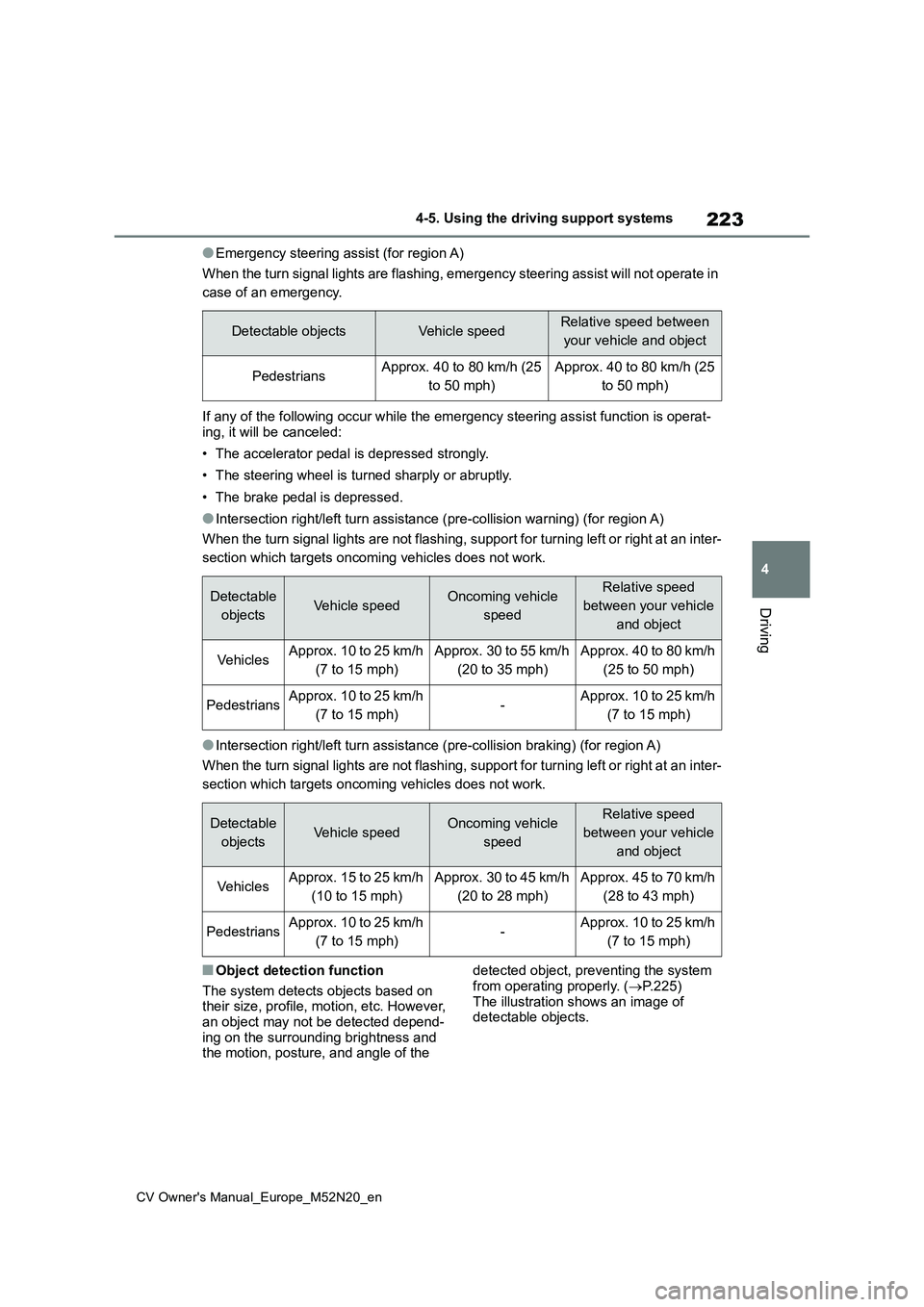
●Emergency steering assist (for region A)
When the turn signal lights are flashing, emergency steering as sist will not operate in
case of an emergency.
If any of the following occur while the emergency steering assi st function is operat-
ing, it will be canceled:
• The accelerator pedal is depressed strongly.
• The steering wheel is turned sharply or abruptly.
• The brake pedal is depressed.
●Intersection right/left turn assistance (pre-collision warning) (for region A)
When the turn signal lights are not flashing, support for turni ng left or right at an inter-
section which targets oncoming vehicles does not work.
●Intersection right/left turn assistance (pre-collision braking) (for region A)
When the turn signal lights are not flashing, support for turni ng left or right at an inter-
section which targets oncoming vehicles does not work.
■Object detection function
The system detects objects based on their size, profile, motion, etc. However, an object may not be detected depend-
ing on the surrounding brightness and the motion, posture, and angle of the
detected object, preventing the system
from operating properly. ( P.225) The illustration shows an image of detectable objects.
Detectable objectsVehicle speedRelative speed between
your vehicle and object
PedestriansApprox. 40 to 80 km/h (25
to 50 mph)
Approx. 40 to 80 km/h (25
to 50 mph)
Detectable
objectsVehicle speedOncoming vehicle
speed
Relative speed
between your vehicle
and object
Ve hi cl e sApprox. 10 to 25 km/h
(7 to 15 mph)
Approx. 30 to 55 km/h
(20 to 35 mph)
Approx. 40 to 80 km/h
(25 to 50 mph)
PedestriansApprox. 10 to 25 km/h
(7 to 15 mph)-Approx. 10 to 25 km/h
(7 to 15 mph)
Detectable
objectsVehicle speedOncoming vehicle
speed
Relative speed
between your vehicle
and object
Ve hi cl e sApprox. 15 to 25 km/h
(10 to 15 mph)
Approx. 30 to 45 km/h
(20 to 28 mph)
Approx. 45 to 70 km/h
(28 to 43 mph)
PedestriansApprox. 10 to 25 km/h
(7 to 15 mph)-Approx. 10 to 25 km/h
(7 to 15 mph)
Page 229 of 618
227
4
CV Owner's Manual_Europe_M52N20_en
4-5. Using the driving support systems
Driving
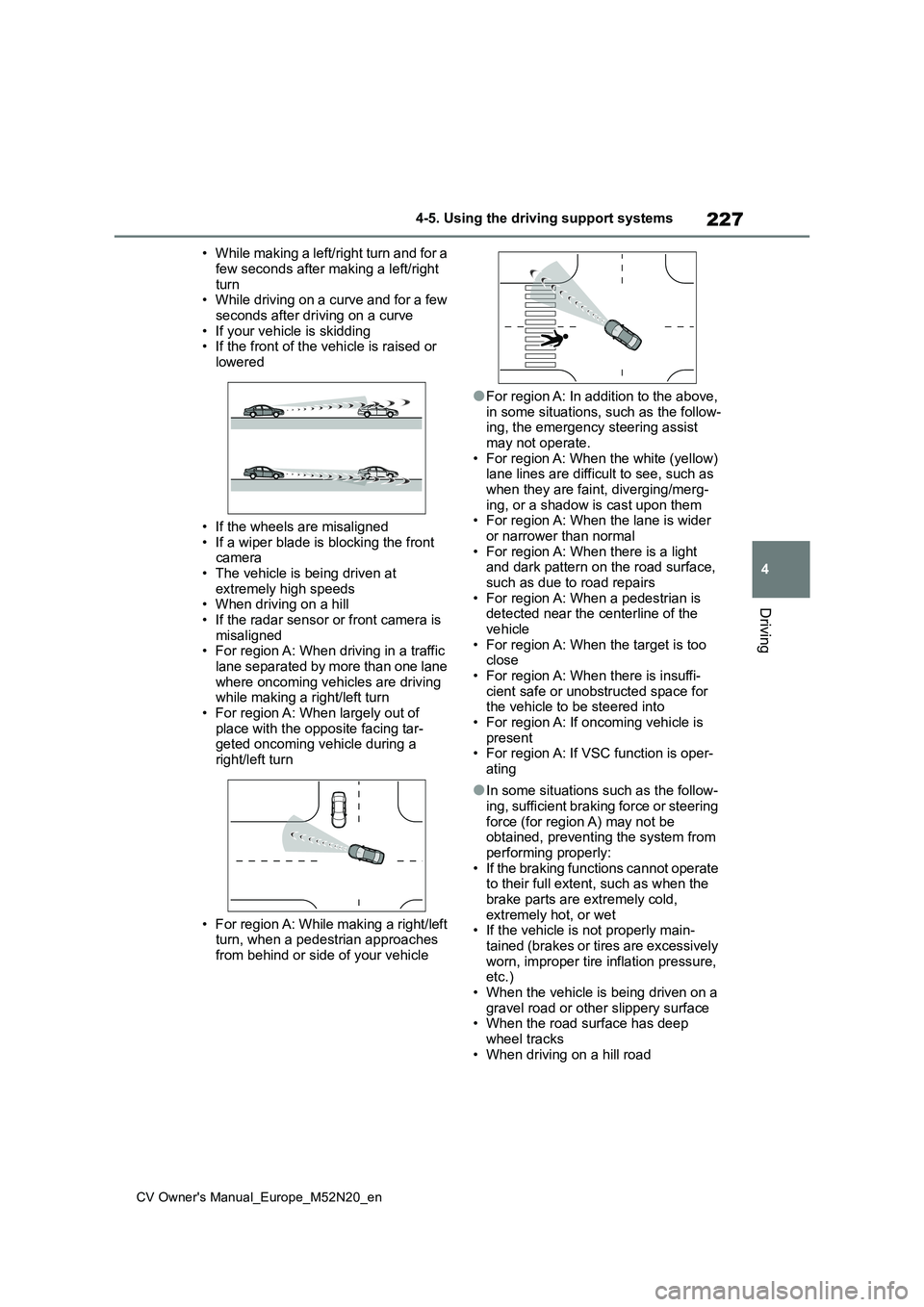
• While making a left/right turn and for a
few seconds after making a left/right turn• While driving on a curve and for a few
seconds after driving on a curve • If your vehicle is skidding• If the front of the vehicle is raised or
lowered
• If the wheels are misaligned
• If a wiper blade is blocking the front camera• The vehicle is being driven at
extremely high speeds • When driving on a hill• If the radar sensor or front camera is
misaligned • For region A: When driving in a traffic lane separated by more than one lane
where oncoming vehicles are driving while making a right/left turn• For region A: When largely out of
place with the opposite facing tar- geted oncoming vehicle during a right/left turn
• For region A: While making a right/left turn, when a pedestrian approaches
from behind or side of your vehicle
●For region A: In addition to the above,
in some situations, such as the follow- ing, the emergency steering assist may not operate.
• For region A: When the white (yellow) lane lines are difficult to see, such as when they are faint, diverging/merg-
ing, or a shadow is cast upon them • For region A: When the lane is wider or narrower than normal
• For region A: When there is a light and dark pattern on the road surface, such as due to road repairs
• For region A: When a pedestrian is detected near the centerline of the vehicle
• For region A: When the target is too close• For region A: When there is insuffi-
cient safe or unobstructed space for the vehicle to be steered into• For region A: If oncoming vehicle is
present • For region A: If VSC function is oper-ating
●In some situations such as the follow-ing, sufficient braking force or steering
force (for region A) may not be obtained, preventing the system from performing properly:
• If the braking functions cannot operate to their full extent, such as when the brake parts are extremely cold,
extremely hot, or wet • If the vehicle is not properly main-tained (brakes or tires are excessively
worn, improper tire inflation pressure, etc.)• When the vehicle is being driven on a
gravel road or other slippery surface • When the road surface has deep wheel tracks
• When driving on a hill road