shift lever TOYOTA YARIS CROSS 2022 Service Manual
[x] Cancel search | Manufacturer: TOYOTA, Model Year: 2022, Model line: YARIS CROSS, Model: TOYOTA YARIS CROSS 2022Pages: 618, PDF Size: 130.77 MB
Page 273 of 618
271
4
CV Owner's Manual_Europe_M52N20_en
4-5. Using the driving support systems
Driving
“Shift to N and depress clutch”
When the engine is stopped by the
Stop & Start system, the shift lever was
moved to a position other than N without
depressing the clutch pedal.
■The Stop & Start system protection function
●When the volume of the audio system is excessively high, sound output from
the audio system may suddenly be cut off in order to reduce battery con-sumption. To prevent the audio sys-
tem from being cut off, keep the volume of audio system at a moderate level. If the audio system has been cut
off, turn the engine switch off, wait for 3 seconds or more and then turn it to ACC or ON to re-enable the audio
system.
●The audio system may not be acti-
vated if the battery terminals are dis- connected and then reconnected. If this occurs, turn the engine switch off
and then repeat the following opera- tion twice to activate the audio system normally.
• Turn the engine switch to ON and then to off.
■Replacing the battery
P. 4 4 1
■If the Stop & Start cancel indicator
flashes continuously
The system may be malfunctioning. Have the vehicle inspected by any
authorized Toyota retailer or Toyota authorized repairer, or any reliable repairer.
■If “Stop & Start System Malfunction
Visit Your Dealer” is displayed on the multi-information display
The system may be malfunctioning.
Have the vehicle inspected by any authorized Toyota retailer or Toyota authorized repairer, or any reliable
repairer.
WARNING
■When the Stop & Start system is operating
Make sure to disable the Stop & Start system while the vehicle is in a poorly ventilated area.
If not disabled, the engine may be automatically restarted unexpectedly, causing exhaust gases to collect and
enter the vehicle, possibly resulting in death or a serious health hazard.
●Do not leave the vehicle while the
engine is stopped by the Stop & Start system (while the Stop & Start indicator is on). An accident may
occur due to the automatic engine start function.
●Depress the brake pedal and apply the parking brake when necessary while the engine is stopped by the
Stop & Start system (while the Stop & Start indicator is on).
NOTICE
■To ensure the system operates correctly
If any of the following situations occur, the Stop & Start system may not oper-ate correctly. Have your vehicle
inspected by any authorized Toyota retailer or Toyota authorized repairer, or any reliable repairer.
●While the driver’s seat belt is fas-tened, the driver’s and front pas-senger’s seat belt reminder light
flashes.
●Even though the driver’s seat belt is
not fastened, the driver’s and front passenger’s seat belt reminder light does not illuminate.
●Even though the driver’s door is closed, the open door warning light
is illuminated or the interior light is illuminated when the interior light switch is in the door position.
Page 278 of 618
276
CV Owner's Manual_Europe_M52N20_en
4-5. Using the driving support systems
Approximately 1 m (3.3 ft.) forward of the rear bumper
Approximately 3 m (9.8 ft.) from the rear bumper
Approximately 3 m (9.8 ft.) to 60 m (197 ft.) from the rear bumper*2
*1: The area between the side of the vehicle and 0.5 m (1.6 ft.) from the side of the
vehicle cannot be detected.
*2: The greater the difference in speed between your vehicle and t he detected vehi-
cle is, the farther away the vehicle will be detected, causing the outside rear view
mirror indicator to illuminate or flash.
■The Blind Spot Monitor is opera-
tional when
The Blind Spot Monitor is operational when all of the following conditions are
met:
●The Blind Spot Monitor is on.
●The shift lever is in a position other than R.
●The vehicle speed is greater than approximately 16 km/h (10 mph).
■The Blind Spot Monitor will detect a
vehicle when
The Blind Spot Monitor will detect a vehicle present in the detection area in
the following situations:
●A vehicle in an adjacent lane over-
takes your vehicle.
●You overtake a vehicle in adjacent
lane slowly.
●Another vehicle enters the detection
area when it changes lanes.
■Conditions under which the system will not detect a vehicle
The Blind Spot Monitor is not designed
to detect the following types of vehicles and/or objects:
●Small motorcycles, bicycles, pedestri-
ans, etc.*
●Vehicles traveling in the opposite direction
●Guardrails, walls, signs, parked vehi-
cles and similar stationary objects*
●Following vehicles that are in the
same lane*
●Vehicles traveling 2 lanes away from
your vehicle*
●Vehicles which are being overtaken
rapidly by your vehicle*
*: Depending on the conditions, detec-
tion of a vehicle and/or object may
occur.
■Conditions under which the system
may not function correctly
●The Blind Spot Monitor may not detect
vehicles correctly in the following situ- ations:• When the sensor is misaligned due to
a strong impact to the sensor or its surrounding area• When mud, snow, ice, a sticker, etc.,
is covering the sensor or surrounding area on the rear bumper• When driving on a road surface that is
wet with standing water during bad weather, such as heavy rain, snow, or fog
• When multiple vehicles are approach- ing with only a small gap between each vehicle
• When the distance between your vehi- cle and a following vehicle is short• When there is a significant difference
in speed between your vehicle and the vehicle that enters the detection area
• When the difference in speed between your vehicle and another vehicle is changing
Page 281 of 618
279
4
CV Owner's Manual_Europe_M52N20_en
4-5. Using the driving support systems
Driving
■The system can be operated when
●The engine switch is in ON.
●Toyota parking assist-sensor function
is on.
●The vehicle speed is less than about
10 km/h (6 mph).
●The shift lever is in other than P.
■If “Clean Parking Assist Sensor” is
displayed on the multi-information display
A sensor may be covered with water
drops, ice, snow, dirt, etc. Remove the water drops, ice, snow, dirt, etc., from
the sensor to return the system to nor- mal.
Also, due to ice forming on a sensor at
low temperatures, a warning message may be displayed or the sensor may not be able to detect an object. Once the ice
melts, the system will return to normal.
If a warning message is displayed even if the sensor is clean, there may be a
sensor malfunction. Have the vehicle inspected by any authorized Toyota retailer or Toyota authorized repairer, or
any reliable repairer.
■Sensor detection information
●The sensor’s detection areas are lim-
ited to the areas around the vehicle’ front and rear bumpers.
WARNING
■To ensure the system can oper-ate properly
Observe the following precautions. Failing to do so may result in the vehi-cle being unable to be driven safely
and possibly cause an accident.
●Do not damage the sensors, and
always keep them clean.
●Do not a sticker or an electronic
component, such as a backlit license plate (especially fluorescent type), fog lights, fender pole or wire-
less antenna is installed near a radar sensor.
●Do not subject the radar sensor or its surrounding area to a strong impact. If the radar sensor, front
grille, or front bumper has been subjected to a strong impact, have the vehicle inspected by any autho-
rized Toyota retailer or Toyota authorized repairer, or any reliable repairer. If a sensor or the rear
bumper needs to be removed/installed or replaced, con-tact any authorized Toyota retailer
or Toyota authorized repairer, or any reliable repairer.
●Do not modify, disassemble or paint the sensors.
●Do not attach a license plate cover.
●Keep your tires properly inflated.
■When to disable the function
In the following situations, disable the
function as it may operate even though there is no possibility of a colli-sion.
●Failing to observe the warnings above.
●A non-genuine Toyota suspension (lowered suspension, etc.) is
installed.
■Notes when washing the vehicle
Do not apply intensive bursts of water or steam to the sensor area.
Doing so may result in the sensor malfunctioning.
●When using a high pressure washer to wash the vehicle, do not spray the sensors directly, as doing
so may cause a sensor to malfunc- tion.
●When using steam to clean the vehicle, do not direct steam too close to the sensors as doing so
may cause a sensor to malfunction.
Page 285 of 618
283
4
CV Owner's Manual_Europe_M52N20_en
4-5. Using the driving support systems
Driving
Even when the sensors are oper-
ating, the buzzer will be muted in
some situations. (automatic
buzzer mute function)
■Adjusting the buzzer volume
The buzzer volume can be adjusted
on the multi-information display.
Use the meter control switches to
change settings. ( P.95, 101)
1 Press / (4.2-inch display)
or / (7-inch display) of
the meter control switch to
select .
2 Press / (4.2-inch display)
or / (7-inch display) of
the meter control switch to
select and then press and
hold .
3 Select the volume and then
press .
Each time the switch is pressed, the volume level will change between 1, 2, and 3.
■Muting a buzzer
A mute button will be displayed on
the multi-information display when
an object is detected. To mute the
buzzer, press .
The buzzers for the Toyota parking
assist-sensor and RCTA function (if
equipped) will be muted simultane-
ously.
Mute will be canceled automatically
in the following situations:
When the shift lever is changed.
When the vehicle speed exceeds
a certain speed.
When there is a malfunction in a
sensor or the system is tempo-
rarily unavailable.
When the operating function is
disabled manually.
When the engine switch is turned
off.
Page 288 of 618
286
CV Owner's Manual_Europe_M52N20_en
4-5. Using the driving support systems
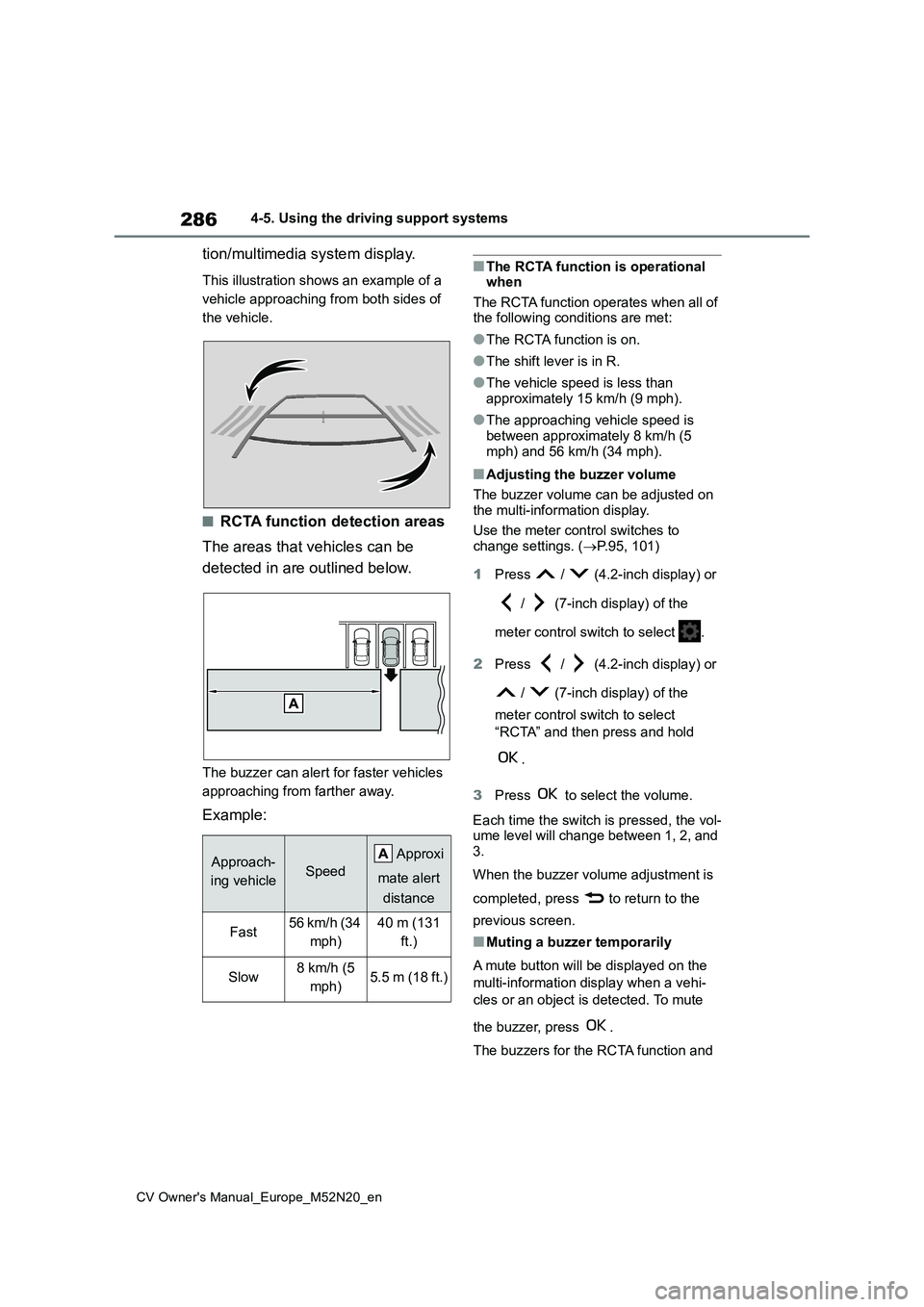
tion/multimedia system display.
This illustration shows an example of a
vehicle approaching from both sides of
the vehicle.
■RCTA function detection areas
The areas that vehicles can be
detected in are outlined below.
The buzzer can alert for faster vehicles
approaching from farther away.
Example:
■The RCTA function is operational when
The RCTA function operates when all of the following conditions are met:
●The RCTA function is on.
●The shift lever is in R.
●The vehicle speed is less than approximately 15 km/h (9 mph).
●The approaching vehicle speed is between approximately 8 km/h (5
mph) and 56 km/h (34 mph).
■Adjusting the buzzer volume
The buzzer volume can be adjusted on the multi-information display.
Use the meter control switches to change settings. ( P.95, 101)
1 Press / (4.2-inch display) or
/ (7-inch display) of the
meter control switch to select .
2 Press / (4.2-inch display) or
/ (7-inch display) of the
meter control switch to select
“RCTA” and then press and hold
.
3 Press to select the volume.
Each time the switch is pressed, the vol- ume level will change between 1, 2, and
3.
When the buzzer volume adjustment is
completed, press to return to the
previous screen.
■Muting a buzzer temporarily
A mute button will be displayed on the
multi-information display when a vehi-
cles or an object is detected. To mute
the buzzer, press .
The buzzers for the RCTA function and
Approach-
ing vehicleSpeed
Approxi
mate alert
distance
Fast56 km/h (34
mph)
40 m (131
ft.)
Slow8 km/h (5
mph)5.5 m (18 ft.)
Page 289 of 618
287
4
CV Owner's Manual_Europe_M52N20_en
4-5. Using the driving support systems
Driving
Toyota parking assist-sensor will be
muted simultaneously.
Mute will be canceled automatically in
the following situations:
●When the shift lever is changed.
●When the vehicle speed exceeds a certain speed.
●When there is a malfunction in a sen-sor or the system is temporarily
unavailable.
●When the operating function is dis-
abled manually.
●When the engine switch is turned off.
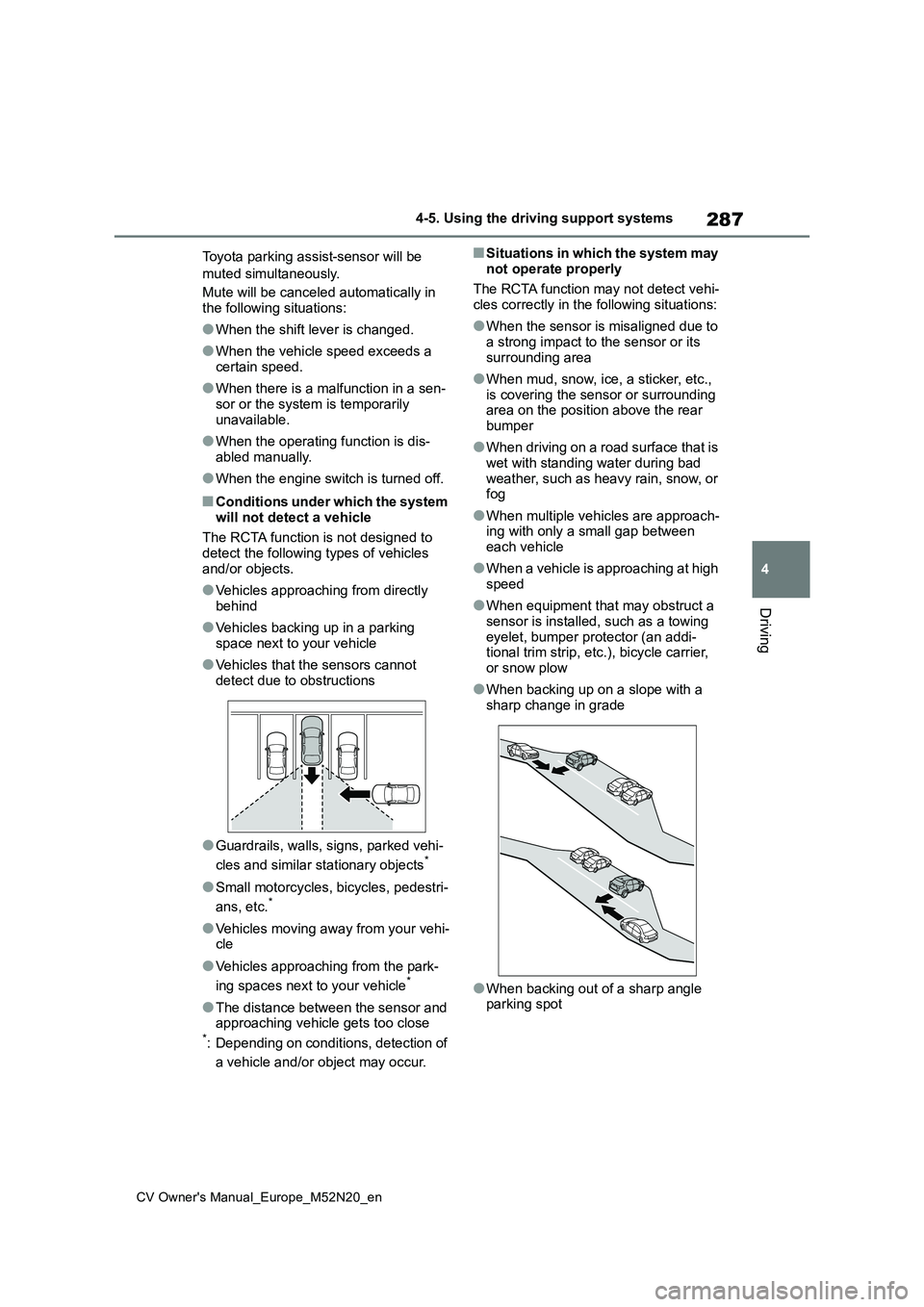
■Conditions under which the system
will not detect a vehicle
The RCTA function is not designed to detect the following types of vehicles
and/or objects.
●Vehicles approaching from directly
behind
●Vehicles backing up in a parking
space next to your vehicle
●Vehicles that the sensors cannot
detect due to obstructions
●Guardrails, walls, signs, parked vehi-
cles and similar stationary objects*
●Small motorcycles, bicycles, pedestri-
ans, etc.*
●Vehicles moving away from your vehi- cle
●Vehicles approaching from the park-
ing spaces next to your vehicle*
●The distance between the sensor and approaching vehicle gets too close*: Depending on conditions, detection of
a vehicle and/or object may occur.
■Situations in which the system may
not operate properly
The RCTA function may not detect vehi- cles correctly in the following situations:
●When the sensor is misaligned due to a strong impact to the sensor or its
surrounding area
●When mud, snow, ice, a sticker, etc.,
is covering the sensor or surrounding area on the position above the rear bumper
●When driving on a road surface that is wet with standing water during bad
weather, such as heavy rain, snow, or fog
●When multiple vehicles are approach-ing with only a small gap between each vehicle
●When a vehicle is approaching at high speed
●When equipment that may obstruct a sensor is installed, such as a towing
eyelet, bumper protector (an addi- tional trim strip, etc.), bicycle carrier, or snow plow
●When backing up on a slope with a sharp change in grade
●When backing out of a sharp angle parking spot
Page 300 of 618
298
CV Owner's Manual_Europe_M52N20_en
4-5. Using the driving support systems
• The vehicle speed is approximately 15
km/h (9 mph) or less. • Vehicles which are approaching from the right or left at the rear of the vehi-
cle at a traveling speed of approxi- mately 8 km/h (5 mph) or more.• The shift lever is in R.
• The Parking Support Brake deter- mines that a stronger than normal brake operation is necessary to avoid
a collision with an approaching vehi- cle.
●Brake control• Engine output restriction control is operating.
• The Parking Support Brake deter- mines that an emergency brake oper-ation is necessary to avoid a collision
with an approaching vehicle.
■The Parking Support Brake func- tion (rear-crossing vehicles) will stop operating when
The function will stop operating if any of the following conditions are met:
●Engine output restriction control• The Parking Support Brake is dis-abled.
• The collision becomes avoidable with normal brake operation.• A vehicle is no longer approaching
from the right or left at the rear of the vehicle.
●Brake control• The Parking Support Brake is dis-abled.
• Approximately 2 seconds have elapsed since the vehicle was stopped by brake control.
• The brake pedal is depressed after the vehicle is stopped by brake con-trol.
• A vehicle is no longer approaching from the right or left at the rear of the vehicle.
■Re-enabling the Parking Support
Brake function (rear-crossing vehi- cles)
P. 2 9 3
■Detection area of the Parking Sup-
port Brake function (rear-crossing vehicles)
The detection area of the Parking Sup-
port Brake function (rear-crossing vehi- cles) differs from the detection area of the RCTA function ( P.286). Therefore,
even if the RCTA function detects a vehicle and provides an alert, the Park-ing Support Brake function (rear-cross-
ing vehicles) may not start operating.
■Conditions under which the system will not detect a vehicle
P. 2 8 7
■RCTA buzzer
Regardless of whether the RCTA func- tion is enabled or not ( P.284), if the Parking Support Brake function is
enabled ( P.291) and brake control is performed, a buzzer will sound to notify the driver.
■Situations in which the system may
not operate properly
P. 2 8 7
■Situations in which the system may operate even if there is no possibil-
ity of a collision
P. 2 8 8
Page 304 of 618
302
CV Owner's Manual_Europe_M52N20_en
4-5. Using the driving support systems
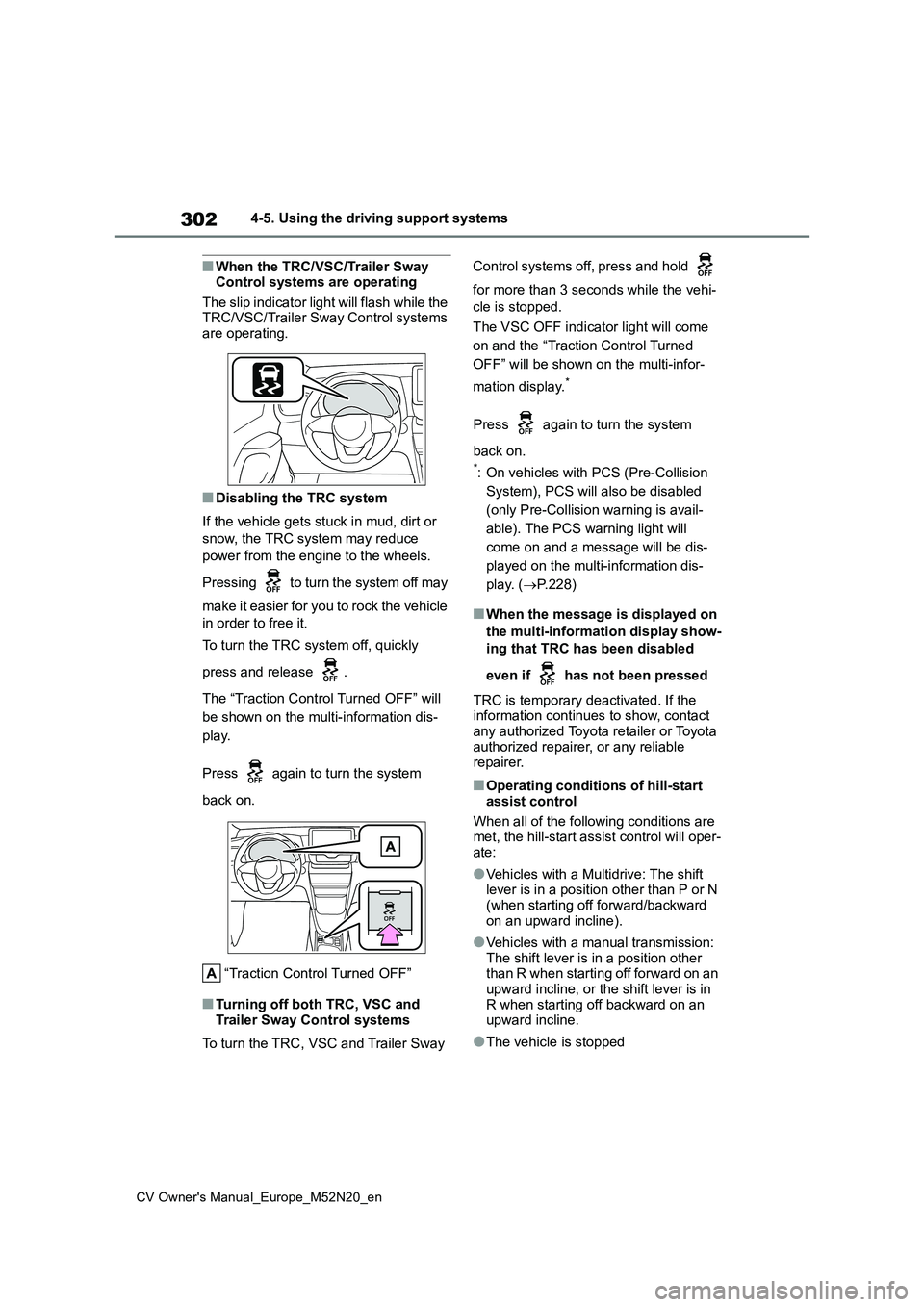
■When the TRC/VSC/Trailer Sway Control systems are operating
The slip indicator light will flash while the TRC/VSC/Trailer Sway Control systems are operating.
■Disabling the TRC system
If the vehicle gets stuck in mud, dirt or
snow, the TRC system may reduce
power from the engine to the wheels.
Pressing to turn the system off may
make it easier for you to rock the vehicle
in order to free it.
To turn the TRC system off, quickly
press and release .
The “Traction Control Turned OFF” will
be shown on the multi-information dis-
play.
Press again to turn the system
back on.
“Traction Control Turned OFF”
■Turning off both TRC, VSC and Trailer Sway Control systems
To turn the TRC, VSC and Trailer Sway
Control systems off, press and hold
for more than 3 seconds while the vehi-
cle is stopped.
The VSC OFF indicator light will come
on and the “Traction Control Turned
OFF” will be shown on the multi-infor-
mation display.*
Press again to turn the system
back on.
*: On vehicles with PCS (Pre-Collision
System), PCS will also be disabled
(only Pre-Collision warning is avail-
able). The PCS warning light will
come on and a message will be dis-
played on the multi-information dis-
play. ( P.228)
■When the message is displayed on
the multi-information display show-
ing that TRC has been disabled
even if has not been pressed
TRC is temporary deactivated. If the information continues to show, contact
any authorized Toyota retailer or Toyota authorized repairer, or any reliable repairer.
■Operating conditions of hill-start
assist control
When all of the following conditions are met, the hill-start assist control will oper-
ate:
●Vehicles with a Multidrive: The shift lever is in a position other than P or N (when starting off forward/backward
on an upward incline).
●Vehicles with a manual transmission:
The shift lever is in a position other than R when starting off forward on an upward incline, or the shift lever is in
R when starting off backward on an upward incline.
●The vehicle is stopped
Page 305 of 618
303
4
CV Owner's Manual_Europe_M52N20_en
4-5. Using the driving support systems
Driving
●The accelerator pedal is not
depressed
●The parking brake is not engaged
●Engine switch is turned to ON
■Automatic system cancelation of hill-start assist control
The hill-start assist control will turn off in any of the following situations:
●Vehicles with a Multidrive: The shift lever is shifted to P or N.
●Vehicles with a manual transmission: The shift lever is shifted to R when starting off forward on an upward
incline, or the shift lever is shifted to other than R when starting off back-ward on an upward incline.
●The accelerator pedal is depressed
●The parking brake is engaged
●2 seconds at maximum elapsed after
the brake pedal is released
●Engine switch is turned to OFF
■Sounds and vibrations caused by
the ABS, brake assist, VSC, Trailer Sway Control, TRC and hill-start assist control systems
●A sound may be heard from the engine compartment when the brake
pedal is depressed repeatedly, when the engine is started or just after the vehicle begins to move. This sound
does not indicate that a malfunction has occurred in any of these systems.
●Any of the following conditions may occur when the above systems are operating. None of these indicates
that a malfunction has occurred. • Vibrations may be felt through the vehicle body and steering.
• A motor sound may be heard also after the vehicle comes to a stop.• The brake pedal may pulsate slightly
after the ABS is activated. • The brake pedal may move down slightly after the ABS is activated.
■Active Cornering Assist operation
sounds and vibrations
When the Active Cornering Assist is
operated, operation sounds and vibra-
tions may be generated from the brake system, but this is not a malfunction.
■EPS operation sound
When the steering wheel is operated, a
motor sound (whirring sound) may be heard. This does not indicate a malfunc-tion.
■Automatic reactivation of TRC,
Trailer Sway Control and VSC sys- tems
After turning the TRC, Trailer Sway Con-
trol and VSC systems off, the systems will be automatically re-enabled in the following situations:
●When the engine switch is turned off
●If only the TRC system is turned off, the TRC will turn on when vehicle speed increases.
If both the TRC and VSC systems are turned off, automatic re-enabling will not occur when vehicle speed
increases.
■Operating conditions of Active Cor- nering Assist
The system operates when the following
occurs.
●TRC/VSC can operate
●The driver is attempting to accelerate while turning
●The system detects that the vehicle is drifting to the outer side
●The brake pedal is released
■Reduced effectiveness of the EPS system
The effectiveness of the EPS system is reduced to prevent the system from overheating when there is frequent
steering input over an extended period of time. The steering wheel may feel heavy as a result. Should this occur,
refrain from excessive steering input or stop the vehicle and turn the engine off. The EPS system should return to nor-
mal within 10 minutes.
Page 310 of 618
308
CV Owner's Manual_Europe_M52N20_en
4-6. Driving tips
Perform the following according to
the driving conditions:
Do not try to forcibly open a win-
dow or move a wiper that is fro-
zen. Pour warm water over the
frozen area to melt the ice. Wipe
away the water immediately to
prevent it from freezing.
To ensure proper operation of
the climate control system fan,
remove any snow that has accu-
mulated on the air inlet vents in
front of the windshield.
Check for and remove any
excess ice or snow that may
have accumulated on the exte-
rior lights, vehicle’s roof, chassis,
around the tires or on the brakes.
Remove any snow or mud from
the bottom of your shoes before
getting in the vehicle.
Accelerate the vehicle slowly, keep
a safe distance between you and
the vehicle ahead, and drive at a
reduced speed suitable to road
conditions.
Park the vehicle and shift the
shift lever to P (Multidrive), or 1
or R (manual transmission) with-
out setting the parking brake.
The parking brake may freeze
up, preventing it from being
released. If the vehicle is parked
without setting the parking brake,
make sure to block the wheels.
Failure to do so may be danger-
ous because it may cause the
vehicle to move unexpectedly,
possibly leading to an accident.
Vehicles with a Multidrive: If the
vehicle is parked without setting
the parking brake, confirm that
the shift lever cannot be moved
out of P*.
*: The shift lever will be locked if it is
attempted to be shifted from P to any
other position without depressing the
brake pedal. If the shift lever can be
shifted from P, there may be a prob-
lem with the shift lock system. Have
the vehicle inspected by any autho-
rized Toyota retailer or Toyota autho-
rized repairer, or any reliable repairer
or legitimate tire retailers immedi-
ately.
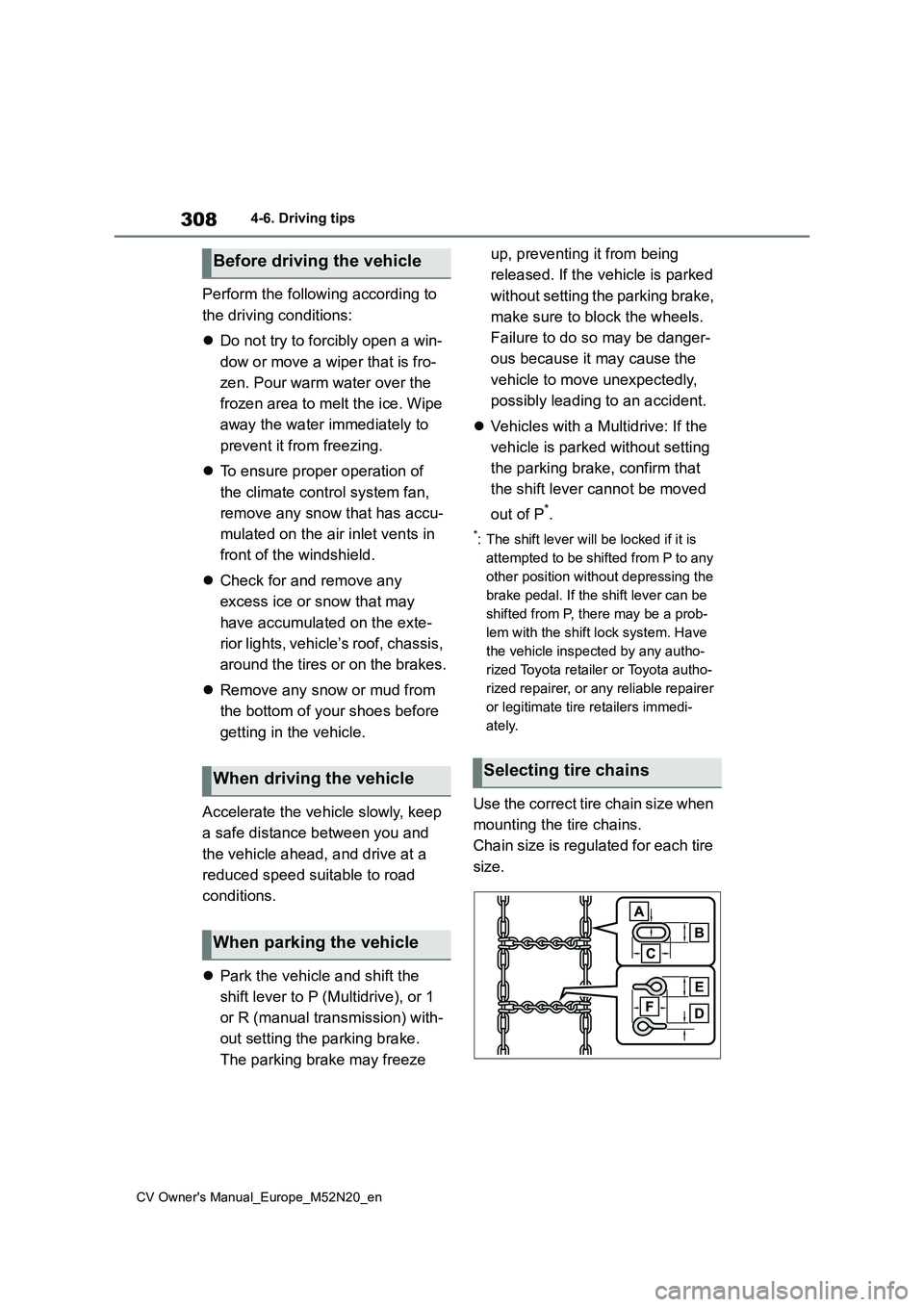
Use the correct tire chain size when
mounting the tire chains.
Chain size is regulated for each tire
size.
Before driving the vehicle
When driving the vehicle
When parking the vehicle
Selecting tire chains