tow TOYOTA YARIS CROSS 2022 Service Manual
[x] Cancel search | Manufacturer: TOYOTA, Model Year: 2022, Model line: YARIS CROSS, Model: TOYOTA YARIS CROSS 2022Pages: 618, PDF Size: 130.77 MB
Page 290 of 618
288
CV Owner's Manual_Europe_M52N20_en
4-5. Using the driving support systems
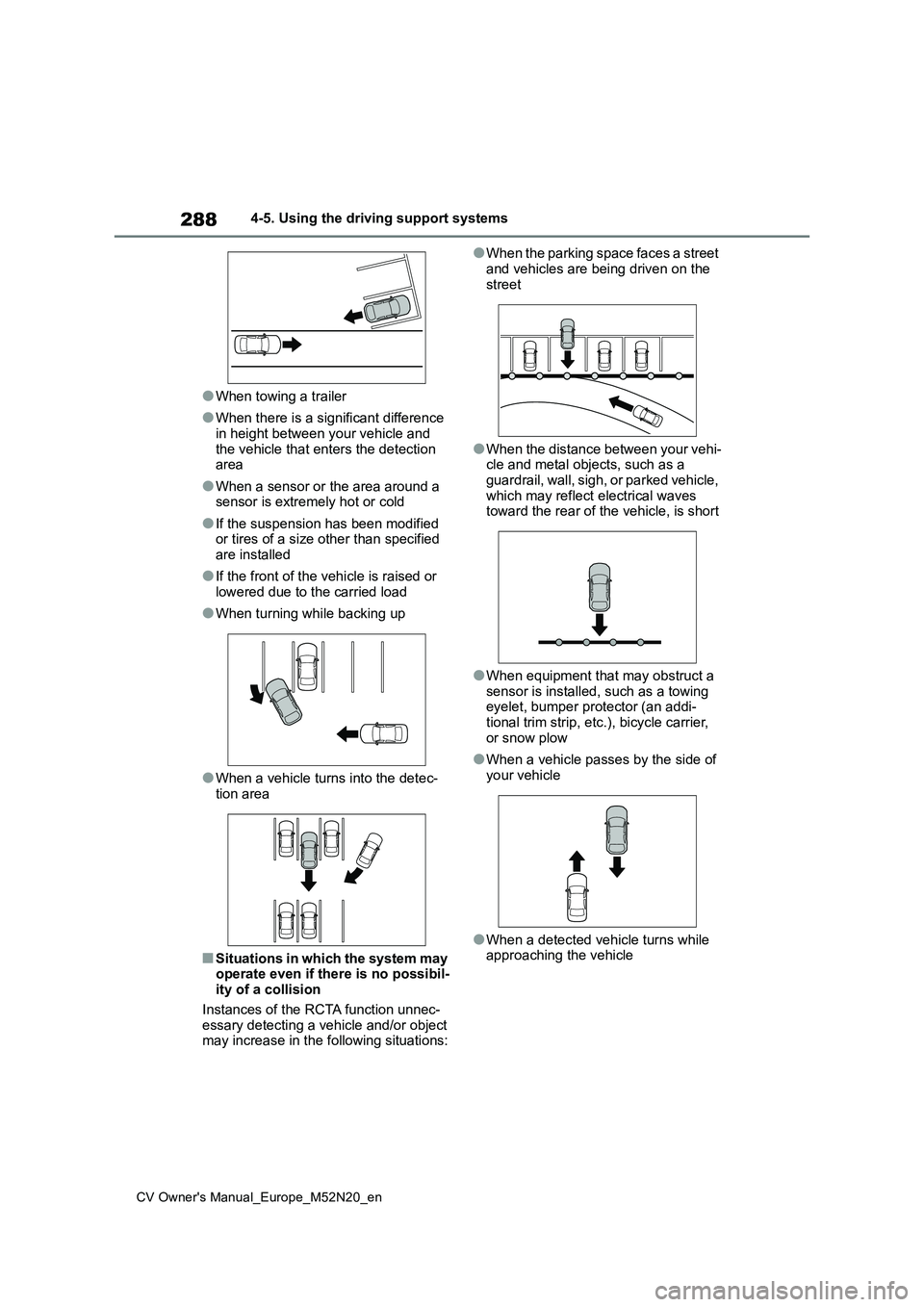
●When towing a trailer
●When there is a significant difference in height between your vehicle and
the vehicle that enters the detection area
●When a sensor or the area around a sensor is extremely hot or cold
●If the suspension has been modified or tires of a size other than specified are installed
●If the front of the vehicle is raised or lowered due to the carried load
●When turning while backing up
●When a vehicle turns into the detec-tion area
■Situations in which the system may operate even if there is no possibil-ity of a collision
Instances of the RCTA function unnec- essary detecting a vehicle and/or object may increase in the following situations:
●When the parking space faces a street
and vehicles are being driven on the street
●When the distance between your vehi-cle and metal objects, such as a guardrail, wall, sigh, or parked vehicle,
which may reflect electrical waves toward the rear of the vehicle, is short
●When equipment that may obstruct a sensor is installed, such as a towing eyelet, bumper protector (an addi-
tional trim strip, etc.), bicycle carrier, or snow plow
●When a vehicle passes by the side of your vehicle
●When a detected vehicle turns while approaching the vehicle
Page 291 of 618
289
4
CV Owner's Manual_Europe_M52N20_en
4-5. Using the driving support systems
Driving
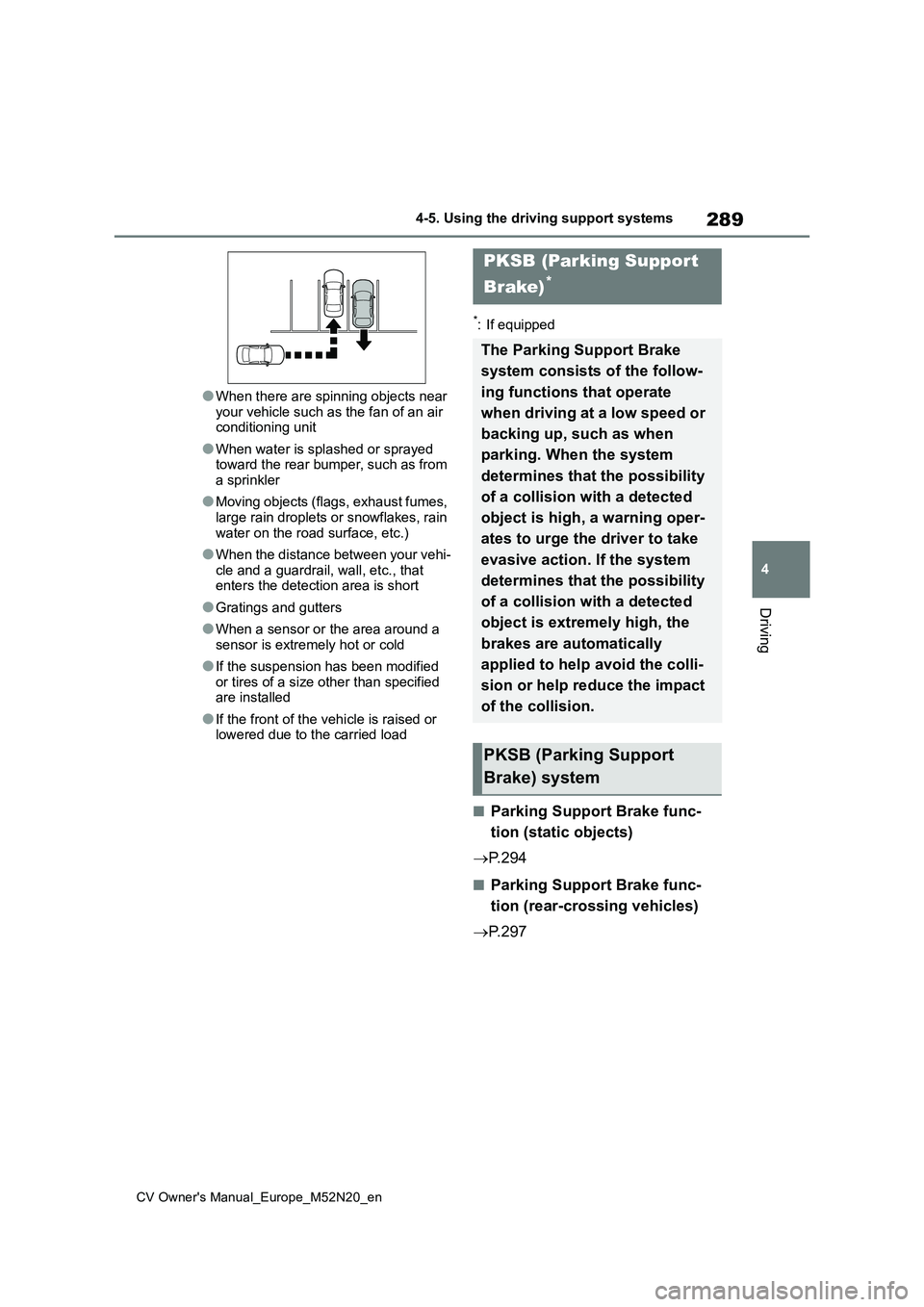
●When there are spinning objects near
your vehicle such as the fan of an air conditioning unit
●When water is splashed or sprayed toward the rear bumper, such as from a sprinkler
●Moving objects (flags, exhaust fumes, large rain droplets or snowflakes, rain
water on the road surface, etc.)
●When the distance between your vehi-
cle and a guardrail, wall, etc., that enters the detection area is short
●Gratings and gutters
●When a sensor or the area around a
sensor is extremely hot or cold
●If the suspension has been modified
or tires of a size other than specified are installed
●If the front of the vehicle is raised or lowered due to the carried load
*: If equipped
■Parking Support Brake func-
tion (static objects)
P. 2 9 4
■Parking Support Brake func-
tion (rear-crossing vehicles)
P. 2 9 7
PKSB (Parking Support
Brake)*
The Parking Support Brake
system consists of the follow-
ing functions that operate
when driving at a low speed or
backing up, such as when
parking. When the system
determines that the possibility
of a collision with a detected
object is high, a warning oper-
ates to urge the driver to take
evasive action. If the system
determines that the possibility
of a collision with a detected
object is extremely high, the
brakes are automatically
applied to help avoid the colli-
sion or help reduce the impact
of the collision.
PKSB (Parking Support
Brake) system
Page 292 of 618
290
CV Owner's Manual_Europe_M52N20_en
4-5. Using the driving support systems
WARNING
■Cautions regarding the use of the system
Do not overly rely on the system, as doing so may lead to an accident.
Always drive while checking the
safety of the surroundings of the vehi- cle.
Depending on the vehicle and road
conditions, weather, etc., the system may not operate.
The detection capabilities of sensors
and radars are limited. Always drive while checking the safety of the sur-roundings of the vehicle.
●The driver is solely responsible for safe driving. Always drive carefully,
taking care to observe your sur- roundings. The Parking Support Brake system is designed to pro-
vide support to lessen the severity of collisions. However, it may not operate in some situations.
●The Parking Support Brake system is not designed to stop the vehicle
completely. Additionally, even if the system has stopped the vehicle, it is necessary to depress the brake
pedal immediately as brake control will be canceled after approximately 2 seconds.
●It is extremely dangerous to check the system operations by intention-
ally driving the vehicle into the direction of a wall, etc. Never attempt such actions.
■When to disable the Parking Sup-port Brake
In the following situations, disable the Parking Support Brake as the system may operate even though there is no
possibility of a collision.
●When inspecting the vehicle using
a chassis roller, chassis dynamo or free roller
●When loading the vehicle onto a boat, truck or other transport vessel
●If the suspension has been modi-fied or tires of a size other than specified are installed
●If the front of the vehicle is raised or lowered due to the carried load
●When equipment that may obstruct a sensor is installed, such as a tow-
ing eyelet, bumper protector (an additional trim strip, etc.), bicycle carrier, or snow plow
●When using automatic car washing devices
●If the vehicle cannot be driven in a stable manner, such as when the
vehicle has been in an accident or is malfunctioning
●When the vehicle is driven in a sporty manner or off-road
●When the tires are not properly inflated
●When the tires are very worn
●When a tire chains, compact spare
tire or an emergency tire puncture repair kit is used
NOTICE
■If “PKSB Unavailable” is dis-
played on the multi-information display and the PKSB OFF indi-cator is on
If this message is displayed immedi- ately after the engine switch is changed to ON, operate the vehicle
carefully, paying attention to your sur- roundings. It may be necessary to drive the vehicle for a certain amount
of time before the system returns to normal. (If the system is not return to normal after driving for a while, clean
the sensors and their surrounding area on the bumpers.)
Page 307 of 618
305
4
CV Owner's Manual_Europe_M52N20_en
4-5. Using the driving support systems
Driving
WARNING
■Hill-start assist control does not operate effectively when
●Do not overly rely on hill-start assist control. Hill-start assist control may not operate effectively on steep
inclines and roads covered with ice.
●Unlike the parking brake, hill-start
assist control is not intended to hold the vehicle stationary for an extended period of time. Do not
attempt to use hill-start assist con- trol to hold the vehicle on an incline, as doing so may lead to an acci-
dent.
■When the TRC/VSC/Trailer Sway
Control is activated
The slip indicator light flashes. Always drive carefully. Reckless driving may
cause an accident. Exercise particular care when the indicator light flashes.
■When the TRC/VSC/Trailer Sway Control systems are turned off
Be especially careful and drive at a
speed appropriate to the road condi- tions. As these are the systems to help ensure vehicle stability and driv-
ing force, do not turn the TRC/VSC/Trailer Sway Control sys-tems off unless necessary.
Trailer Sway Control is part of the VSC system and will not operate if VSC is turned off or experiences a
malfunction.
■Replacing tires
Make sure that all tires are of the specified size, brand, tread pattern
and total load capacity. In addition, make sure that the tires are inflated to the recommended tire inflation pres-
sure level. The ABS, TRC Trailer Sway Control and VSC systems will not function
correctly if different tires are installed on the vehicle.Contact any authorized Toyota retailer
or Toyota authorized repairer, or any reliable repairer for further information when replacing tires or wheels.
■Handling of tires and the suspen-sion
Using tires with any kind of problem or modifying the suspension will affect the driving assist systems, and may
cause a system to malfunction.
■Trailer Sway Control precaution
The Trailer Sway Control system is not able to reduce trailer sway in all situations. Depending on many fac-
tors such as the conditions of the vehicle, trailer, road surface and driv-ing environment, the Trailer Sway
Control system may not be effective. Refer to your trailer owner’s manual for information on how to tow your
trailer properly.
■If trailer sway occurs
Observe the following precautions. Failing to do so may cause death or serious injury.
●Firmly grip the steering wheel. Steer straight ahead. Do not try to
control trailer sway by turning the steering wheel.
●Begin releasing the accelerator pedal immediately but very gradu-ally to reduce speed.
Page 333 of 618
331
5
CV Owner's Manual_Europe_M52N20_en
5-3. Using the storage features
Interior features
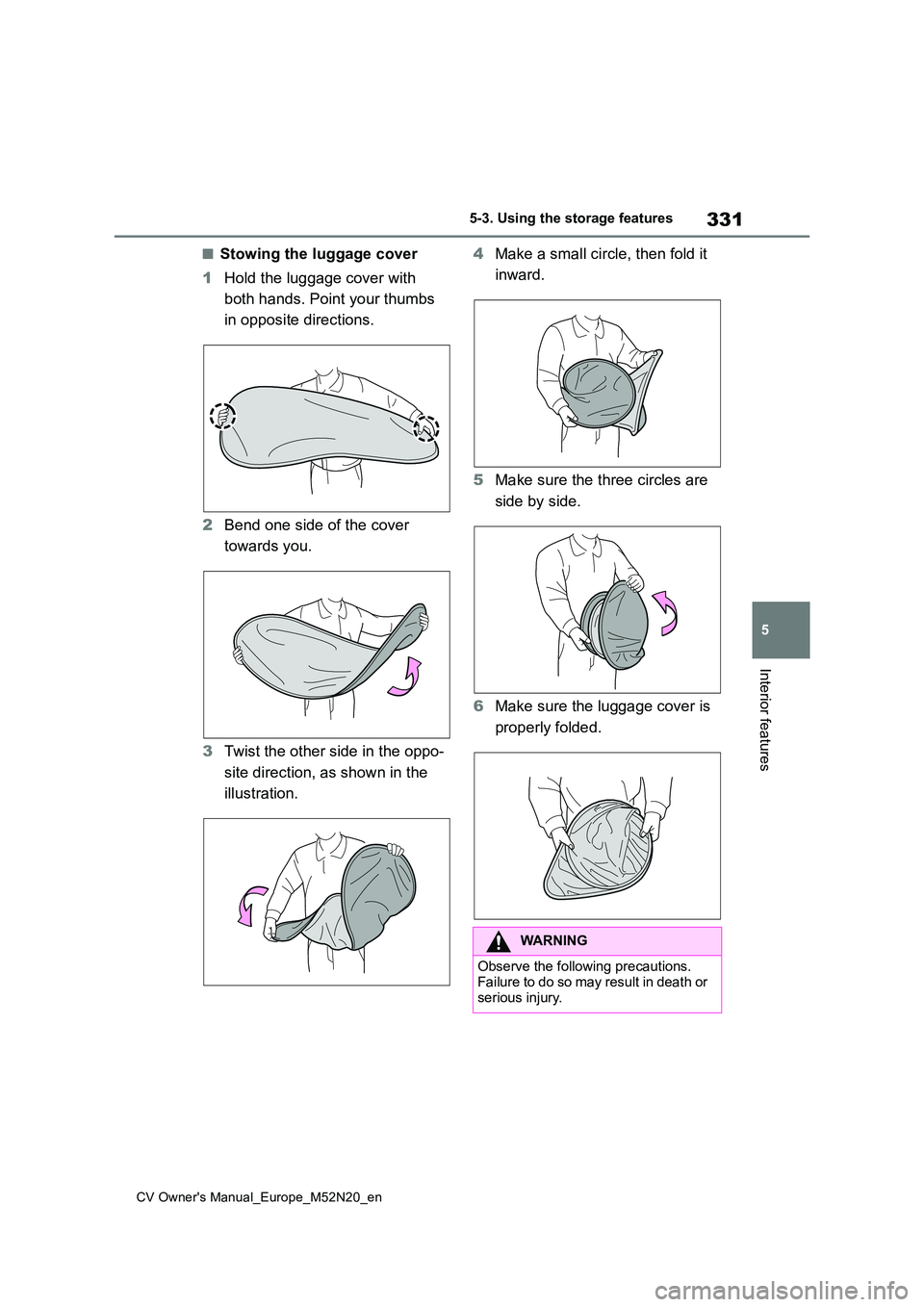
■Stowing the luggage cover
1 Hold the luggage cover with
both hands. Point your thumbs
in opposite directions.
2 Bend one side of the cover
towards you.
3 Twist the other side in the oppo-
site direction, as shown in the
illustration.
4 Make a small circle, then fold it
inward.
5 Make sure the three circles are
side by side.
6 Make sure the luggage cover is
properly folded.
WARNING
Observe the following precautions. Failure to do so may result in death or
serious injury.
Page 337 of 618
335
5
CV Owner's Manual_Europe_M52N20_en
5-4. Other interior features
Interior features
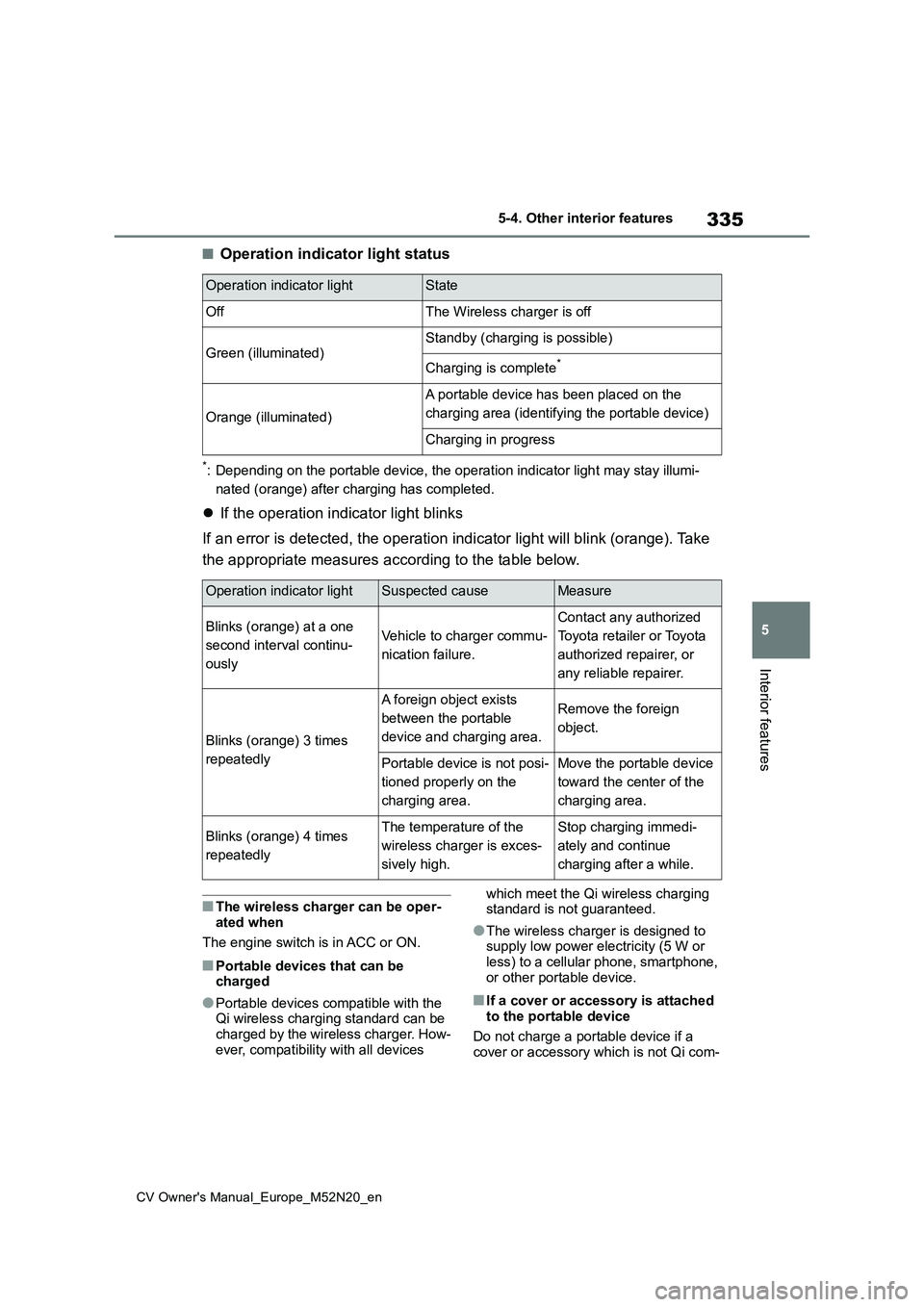
■Operation indicator light status
*: Depending on the portable device, the operation indicator light may stay illumi-
nated (orange) after charging has completed.
If the operation indicator light blinks
If an error is detected, the operation indicator light will bli nk (orange). Take
the appropriate measures according to the table below.
■The wireless charger can be oper- ated when
The engine switch is in ACC or ON.
■Portable devices that can be charged
●Portable devices compatible with the Qi wireless charging standard can be charged by the wireless charger. How-
ever, compatibility with all devices
which meet the Qi wireless charging standard is not guaranteed.
●The wireless charger is designed to supply low power electricity (5 W or
less) to a cellular phone, smartphone, or other portable device.
■If a cover or accessory is attached to the portable device
Do not charge a portable device if a cover or accessory which is not Qi com-
Operation indicator lightState
OffThe Wireless charger is off
Green (illuminated)Standby (charging is possible)
Charging is complete*
Orange (illuminated)
A portable device has been placed on the
charging area (identifying the portable device)
Charging in progress
Operation indicator lightSuspected causeMeasure
Blinks (orange) at a one
second interval continu-
ously
Vehicle to charger commu-
nication failure.
Contact any authorized
Toyota retailer or Toyota
authorized repairer, or
any reliable repairer.
Blinks (orange) 3 times
repeatedly
A foreign object exists
between the portable
device and charging area.
Remove the foreign
object.
Portable device is not posi-
tioned properly on the
charging area.
Move the portable device
toward the center of the
charging area.
Blinks (orange) 4 times
repeatedly
The temperature of the
wireless charger is exces-
sively high.
Stop charging immedi-
ately and continue
charging after a while.
Page 339 of 618
337
5
CV Owner's Manual_Europe_M52N20_en
5-4. Other interior features
Interior features
NOTICE
●When a portable device is fully charged
●When there is a foreign object between the charging area and por-
table device
●When a portable device becomes
hot while charging
●When a portable device is placed
on the wireless area with its charging surface facing up
●When a portable device is not cen-tered on the charging area
●When the vehicle is near a TV tower, electric power plant, gas sta-tion, radio station, large display, air-
port or other facility that generates strong radio waves or electrical noise
●When the portable device is in con-tact with, or is covered by any of the
following metallic objects:
• Cards to which aluminum foil is
attached
• Cigarette boxes that have alumi-
num foil inside
• Metallic wallets or bags
•Coins
• Metal hand warmers
• Media such as CDs and DVDs
●When wireless keys (that emit radio waves) other than those of your vehicle are being used nearby.
If in situations other than above the
wireless charger does not operate
properly or the operation indicator
light is blinking, the wireless charger
may be malfunctioning. Contact any
authorized Toyota retailer or Toyota
authorized repairer, or any reliable
repairer.
■To prevent failure or damage to
data
●Do not bring magnetic cards, such as a credit card, or magnetic
recording media, close to the wire- less charger while charging. Other-wise, data may be erased due to
the influence of magnetism. Additionally, do not bring precision instruments such as wrist watches,
close to the wireless charger, as such objects may malfunction.
●Do not leave portable devices in the cabin. The temperature inside the cabin may become high when
parked in the sun, and cause dam- age to the device.
■To prevent battery discharge
Do not use the wireless charger for a long period of time with the engine
stopped.
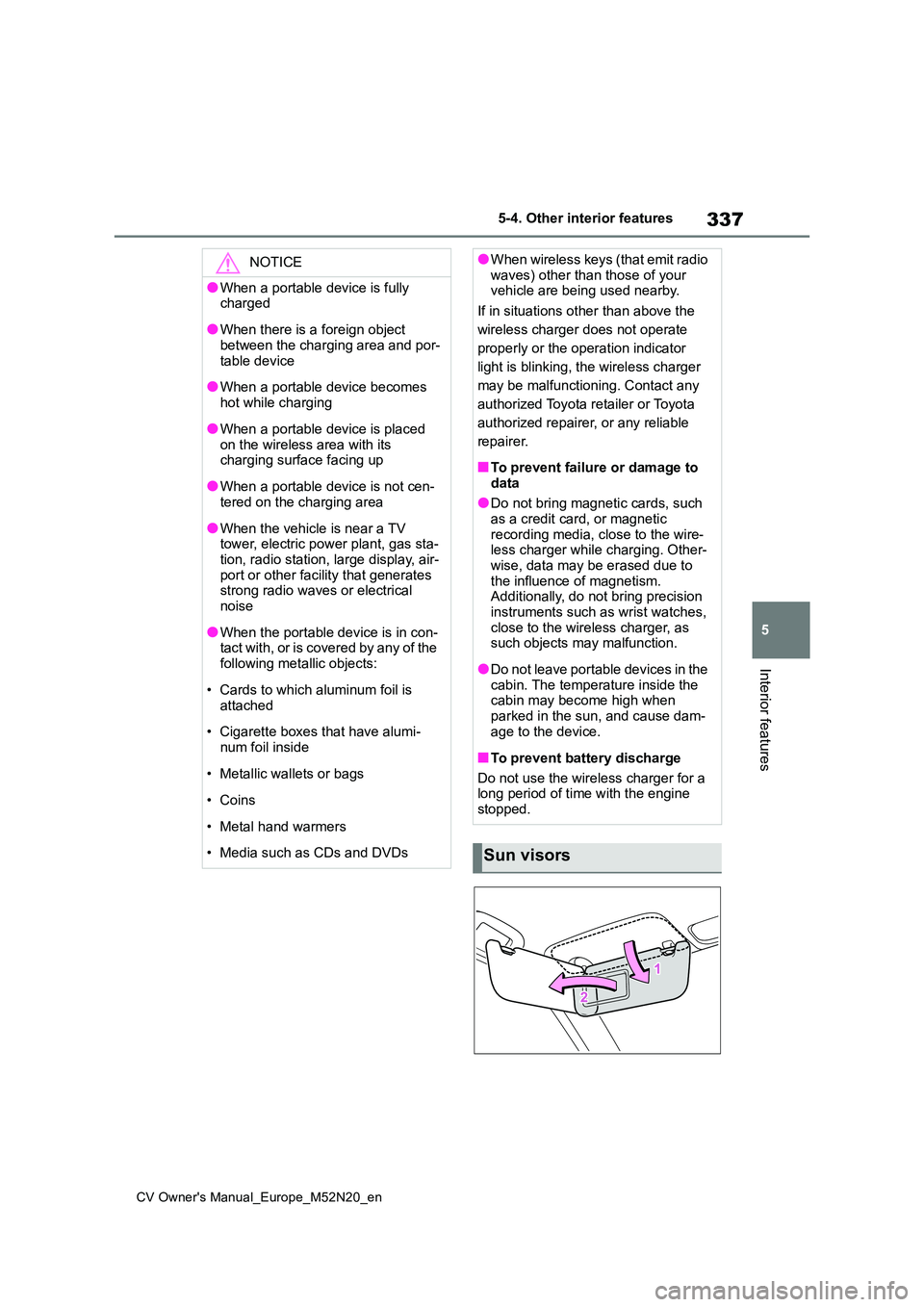
Sun visors
Page 352 of 618
350
CV Owner's Manual_Europe_M52N20_en
6-3. Do-it-yourself maintenance
6-3.Do-it-y ours elf main ten ance
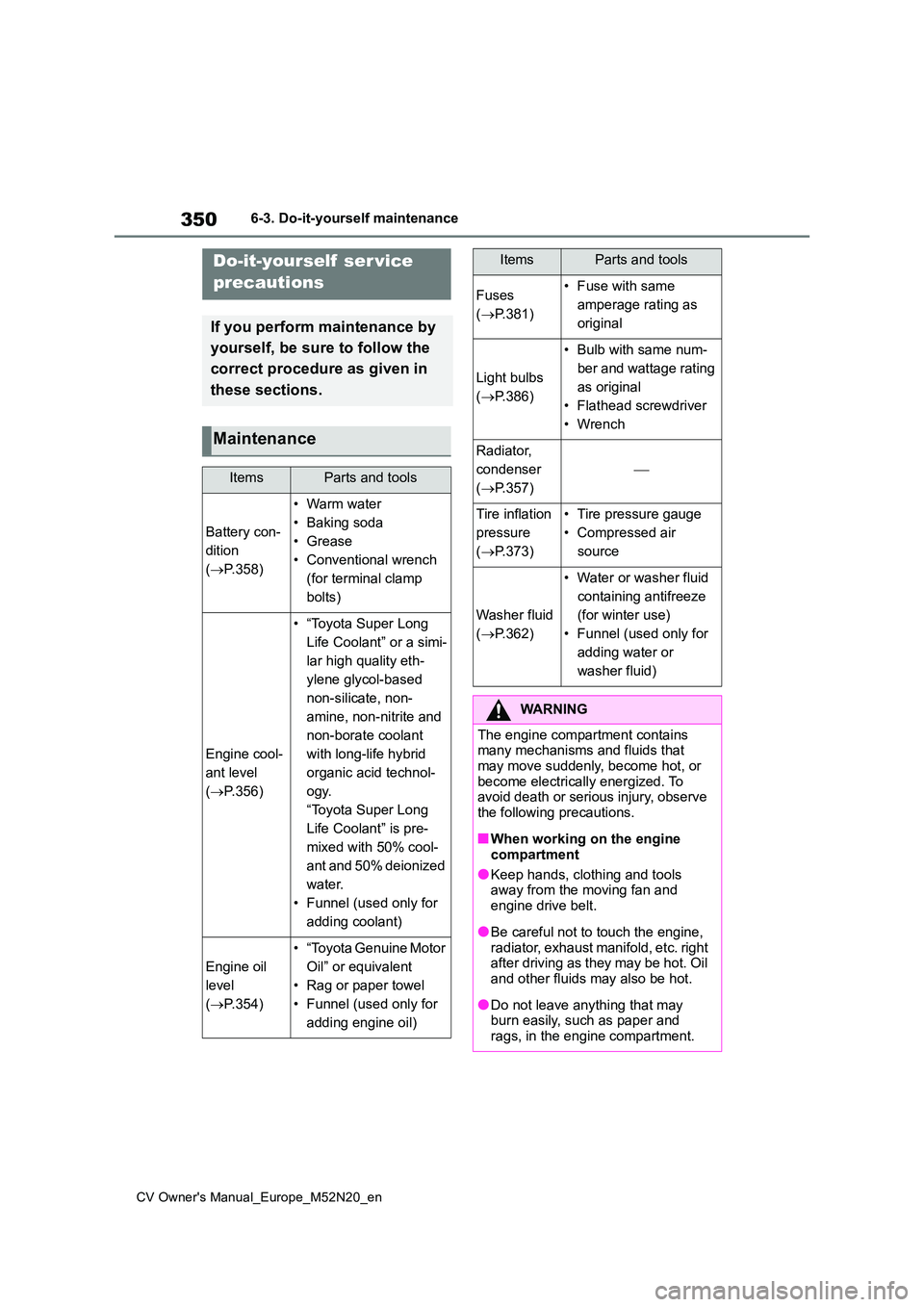
Do-it-yourself ser vice
precautions
If you perform maintenance by
yourself, be sure to follow the
correct procedure as given in
these sections.
Maintenance
ItemsParts and tools
Battery con-
dition
( P.358)
•Warm water
• Baking soda
• Grease
• Conventional wrench
(for terminal clamp
bolts)
Engine cool-
ant level
( P.356)
• “Toyota Super Long
Life Coolant” or a simi-
lar high quality eth-
ylene glycol-based
non-silicate, non-
amine, non-nitrite and
non-borate coolant
with long-life hybrid
organic acid technol-
ogy.
“Toyota Super Long
Life Coolant” is pre-
mixed with 50% cool-
ant and 50% deionized
water.
• Funnel (used only for
adding coolant)
Engine oil
level
( P.354)
• “Toyota Genuine Motor
Oil” or equivalent
• Rag or paper towel
• Funnel (used only for
adding engine oil)
Fuses
( P.381)
• Fuse with same
amperage rating as
original
Light bulbs
( P.386)
• Bulb with same num-
ber and wattage rating
as original
• Flathead screwdriver
•Wrench
Radiator,
condenser
( P.357)
Tire inflation
pressure
( P.373)
• Tire pressure gauge
• Compressed air
source
Washer fluid
( P.362)
• Water or washer fluid
containing antifreeze
(for winter use)
• Funnel (used only for
adding water or
washer fluid)
WARNING
The engine compartment contains many mechanisms and fluids that
may move suddenly, become hot, or become electrically energized. To avoid death or serious injury, observe
the following precautions.
■When working on the engine
compartment
●Keep hands, clothing and tools away from the moving fan and
engine drive belt.
●Be careful not to touch the engine,
radiator, exhaust manifold, etc. right after driving as they may be hot. Oil and other fluids may also be hot.
●Do not leave anything that may burn easily, such as paper and
rags, in the engine compartment.
ItemsParts and tools
Page 358 of 618
356
CV Owner's Manual_Europe_M52N20_en
6-3. Do-it-yourself maintenance
consumed while driving. In the following
situations, oil consumption may increase, and engine oil may need to be refilled in between oil maintenance inter-
vals.
●When the engine is new, for example
directly after purchasing the vehicle or after replacing the engine
●If low quality oil or oil of an inappropri-ate viscosity is used
●When driving at high engine speeds or with a heavy load, when towing (vehicles with towing packages), or
when driving while accelerating or decelerating frequently
●When leaving the engine idling for a long time, or when driving frequently through heavy traffic
■After changing the engine oil
The engine oil maintenance data should be reset. Perform the following proce-dures:
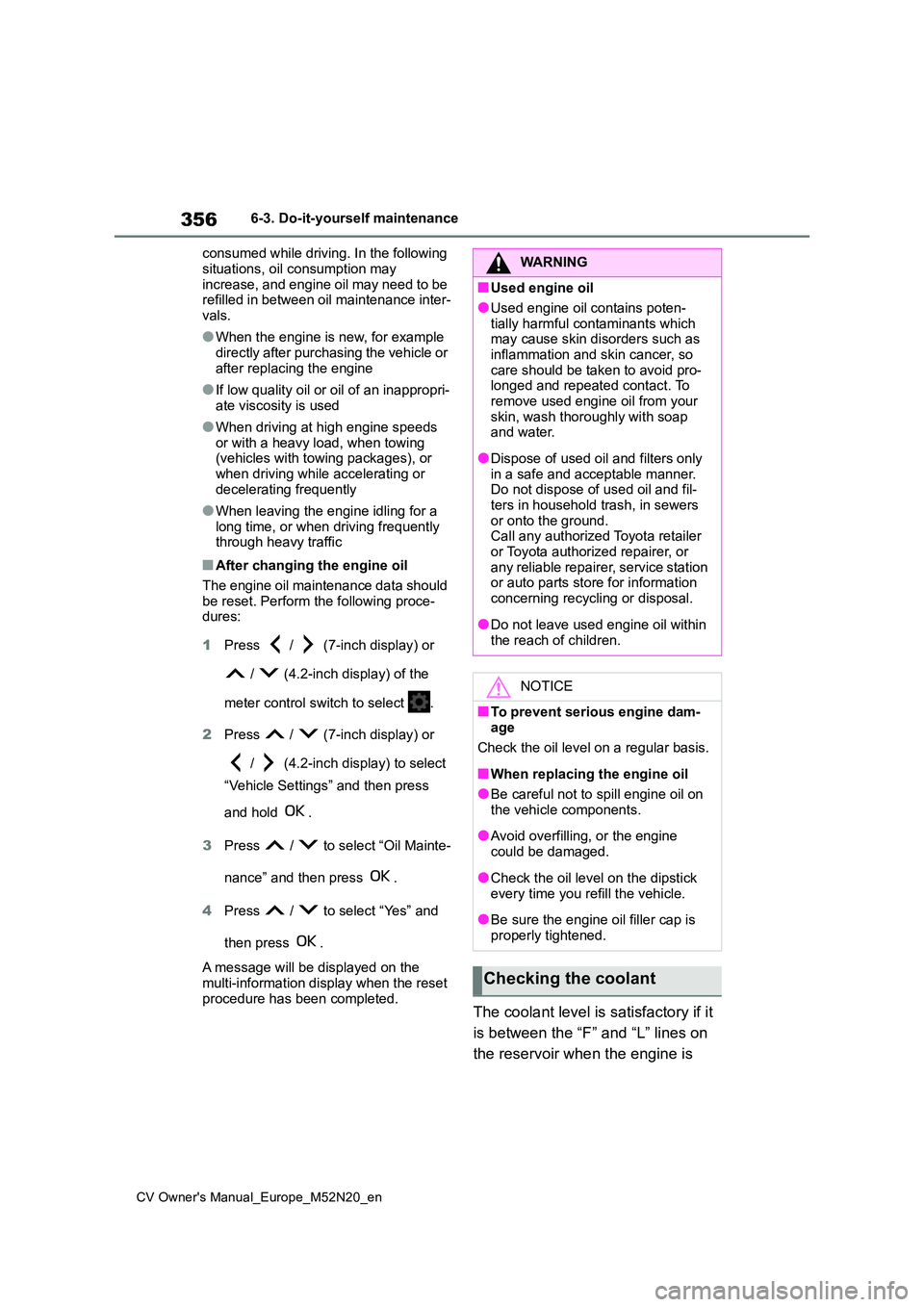
1 Press / (7-inch display) or
/ (4.2-inch display) of the
meter control switch to select .
2 Press / (7-inch display) or
/ (4.2-inch display) to select
“Vehicle Settings” and then press
and hold .
3 Press / to select “Oil Mainte-
nance” and then press .
4 Press / to select “Yes” and
then press .
A message will be displayed on the
multi-information display when the reset procedure has been completed.The coolant level is satisfactory if it
is between the “F” and “L” lines on
the reservoir when the engine is
WARNING
■Used engine oil
●Used engine oil contains poten-
tially harmful contaminants which may cause skin disorders such as inflammation and skin cancer, so
care should be taken to avoid pro- longed and repeated contact. To remove used engine oil from your
skin, wash thoroughly with soap and water.
●Dispose of used oil and filters only in a safe and acceptable manner. Do not dispose of used oil and fil-
ters in household trash, in sewers or onto the ground.Call any authorized Toyota retailer
or Toyota authorized repairer, or any reliable repairer, service station or auto parts store for information
concerning recycling or disposal.
●Do not leave used engine oil within
the reach of children.
NOTICE
■To prevent serious engine dam- age
Check the oil level on a regular basis.
■When replacing the engine oil
●Be careful not to spill engine oil on
the vehicle components.
●Avoid overfilling, or the engine
could be damaged.
●Check the oil level on the dipstick
every time you refill the vehicle.
●Be sure the engine oil filler cap is
properly tightened.
Checking the coolant
Page 362 of 618
360
CV Owner's Manual_Europe_M52N20_en
6-3. Do-it-yourself maintenance
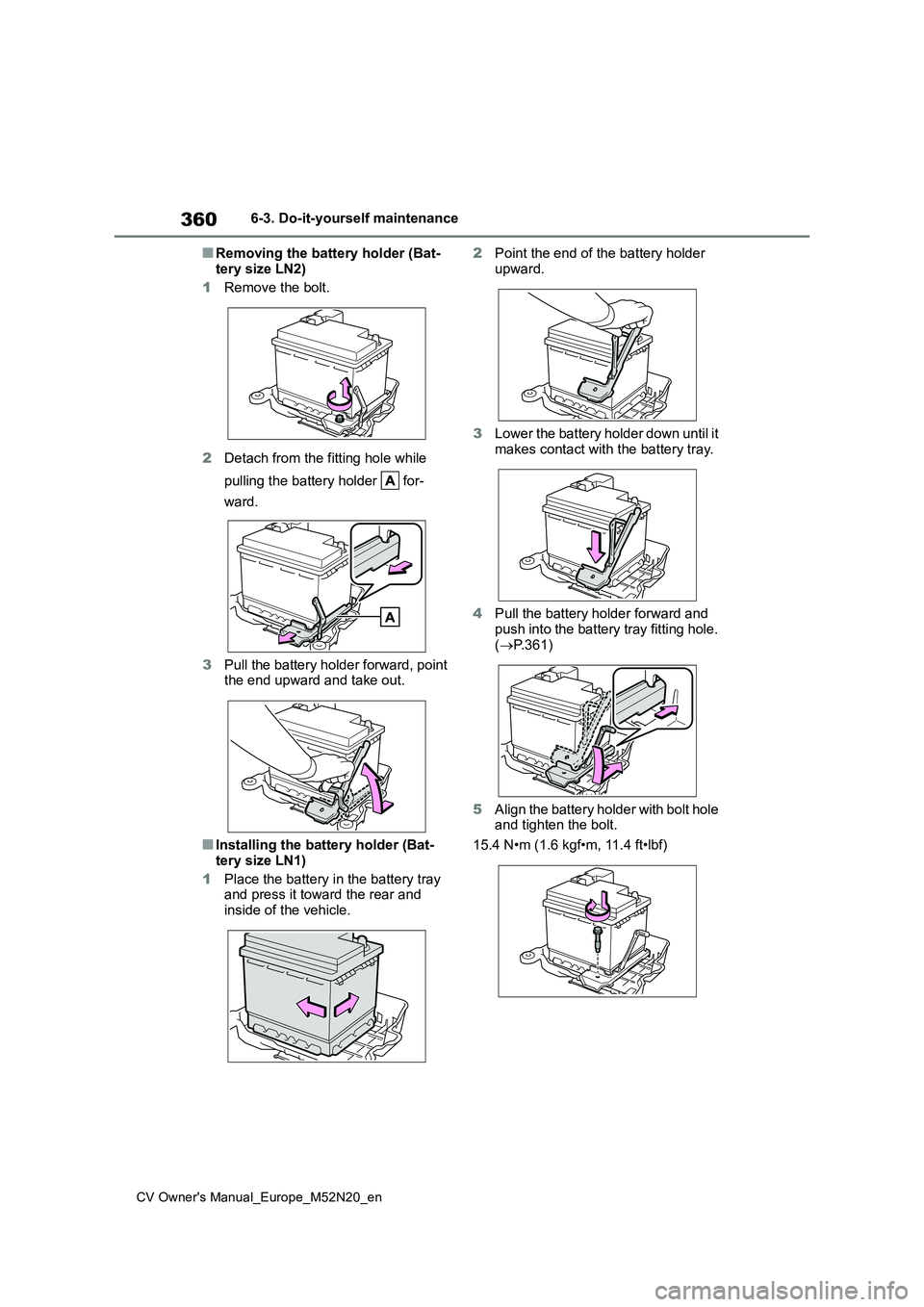
■Removing the battery holder (Bat-
tery size LN2)
1 Remove the bolt.
2 Detach from the fitting hole while
pulling the battery holder for-
ward.
3 Pull the battery holder forward, point the end upward and take out.
■Installing the battery holder (Bat-tery size LN1)
1 Place the battery in the battery tray and press it toward the rear and
inside of the vehicle.
2 Point the end of the battery holder
upward.
3 Lower the battery holder down until it
makes contact with the battery tray.
4 Pull the battery holder forward and
push into the battery tray fitting hole. ( P.361)
5 Align the battery holder with bolt hole and tighten the bolt.
15.4 N•m (1.6 kgf•m, 11.4 ft•lbf)