lock TOYOTA YARIS GRMN 2017 Owners Manual
[x] Cancel search | Manufacturer: TOYOTA, Model Year: 2017, Model line: YARIS GRMN, Model: TOYOTA YARIS GRMN 2017Pages: 404, PDF Size: 54.2 MB
Page 343 of 404
3437-2. Steps to take in an emergency
YARIS_GRMN_OM_Europe_OM52J40E
7
When trouble arises
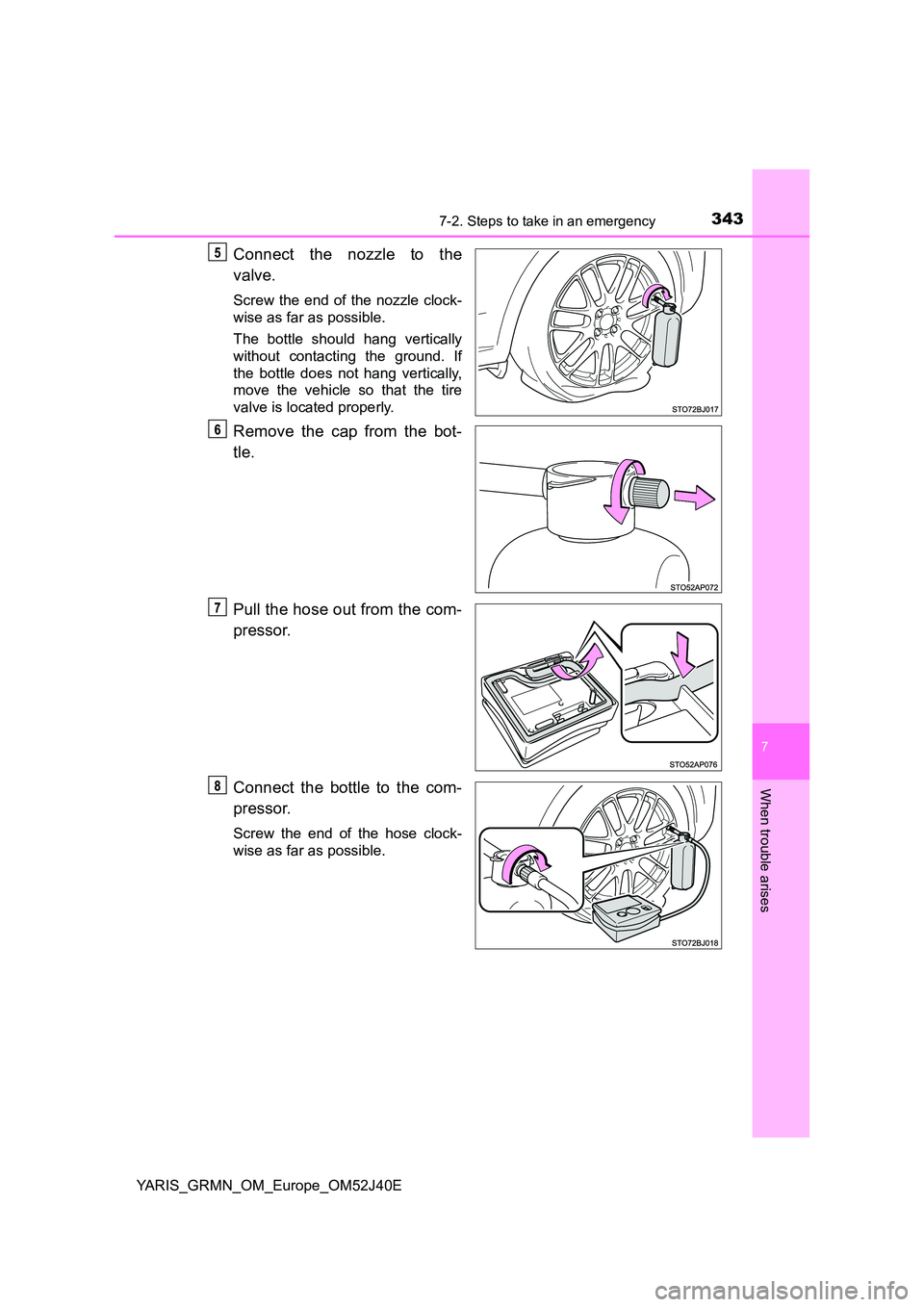
Connect the nozzle to the
valve.
Screw the end of the nozzle clock-
wise as far as possible.
The bottle should hang vertically
without contacting the ground. If
the bottle does not hang vertically,
move the vehicle so that the tire
valve is located properly.
Remove the cap from the bot-
tle.
Pull the hose out from the com-
pressor.
Connect the bottle to the com-
pressor.
Screw the end of the hose clock-
wise as far as possible.
Page 355 of 404
3557-2. Steps to take in an emergency
YARIS_GRMN_OM_Europe_OM52J40E
7
When trouble arises
One of the following may be the cause of the problem:
● One or both of the battery terminals may be disconnected.
● The battery may be discharged. (P. 359)
● There may be a malfunction in the steering lock system.
Contact any authorized Toyota retailer or Toyota authorized repairer, or any
reliable repairer if the problem cannot be repaired, or if repair procedures
are unknown.
When the engine does not start, the following steps can be used as an
interim measure to start the engine if the engine switch is functioning
normally:
Set the parking brake.
Shift the shift lever to N.
Turn the engine switch to ACCESSORY mode.
Press and hold the engine switch for about 15 seconds while
depressing the brake pedal and clutch pedal firmly.
Even if the engine can be started using the above steps, the system
may be malfunctioning. Have the vehicle inspected by any authorized
Toyota retailer or Toyota authorized repairer, or any reliable repairer.
The starter motor does not turn over, the interior lights and head-
lights do not turn on, or the horn does not sound.
Emergency start function
Page 356 of 404
3567-2. Steps to take in an emergency
YARIS_GRMN_OM_Europe_OM52J40E
If the electronic key does not operate
properly
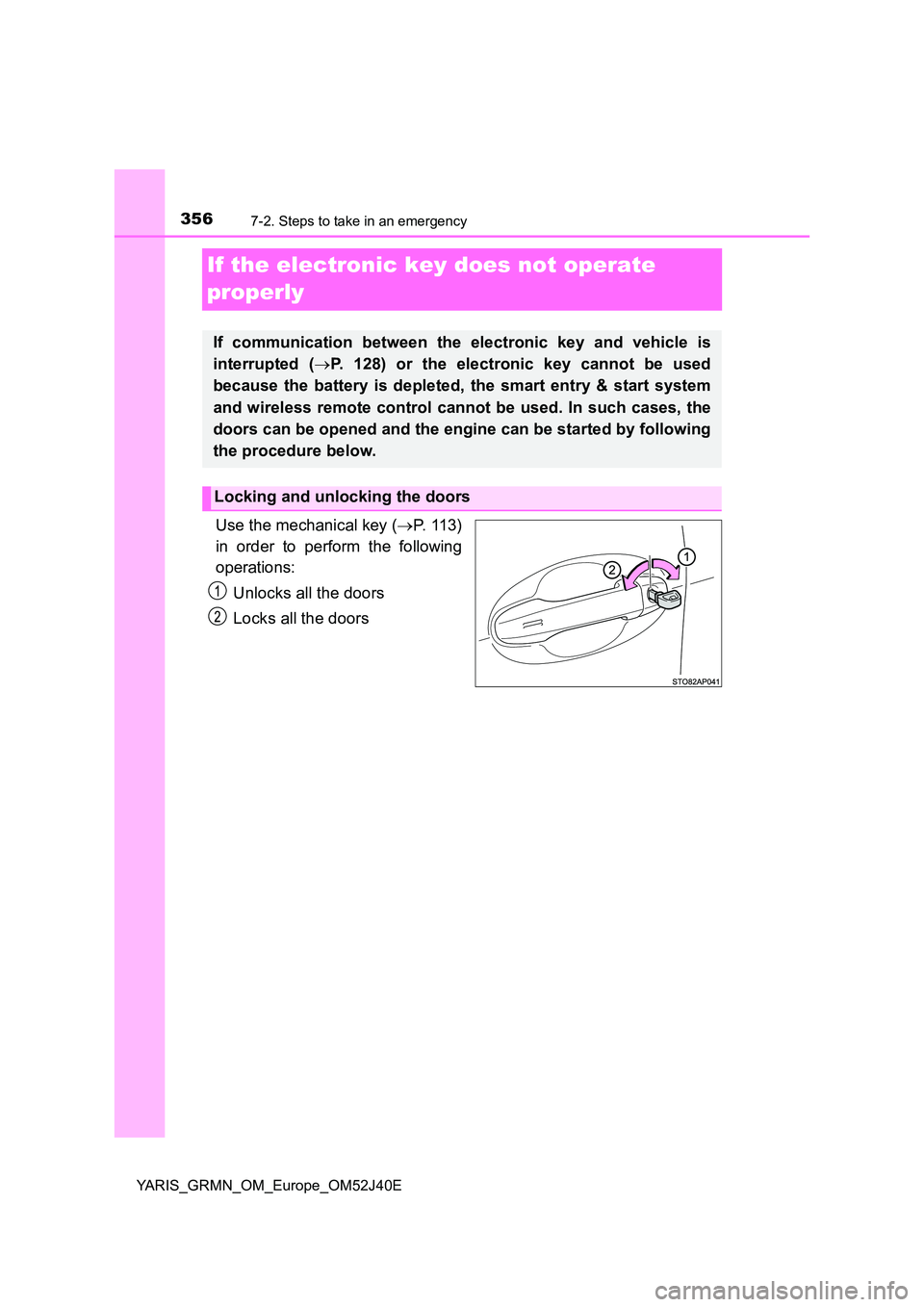
Use the mechanical key ( P. 113)
in order to perform the following
operations:
Unlocks all the doors
Locks all the doors
If communication between the electronic key and vehicle is
interrupted ( P. 128) or the electronic key cannot be used
because the battery is depleted, the smart entry & start system
and wireless remote control cannot be used. In such cases, the
doors can be opened and the engine can be started by following
the procedure below.
Locking and unlocking the doors
Page 360 of 404
3607-2. Steps to take in an emergency
YARIS_GRMN_OM_Europe_OM52J40E
Start the engine of the second vehicle. Increase the engine speed
slightly and maintain it at that level for approximately 5 minutes to
recharge the battery of your vehicle.
Open and close any of the doors of your vehicle with the engine
switch off.
Maintain the engine speed of the second vehicle and turn the
engine switch to IGNITION ON mode, then start the vehicle’s
engine.
Once the vehicle’s engine has started, remove the jumper cables in
the exact reverse order from which they were connected.
Once the engine starts, have the vehicle inspected at any authorized
Toyota retailer or Toyota authorized repairer, or any reliable repairer
as soon as possible.
■ To prevent battery discharge
● Turn off the headlights and the audio system while the engine is stopped.
● Turn off any unnecessary electrical components when the vehicle is running
at a low speed for an extended period, such as in heavy traffic.
■ Charging the battery
The electricity stored in the battery will discharge gradually even when the
vehicle is not in use, due to natural discharge and the draining effects of cer-
tain electrical appliances. If the vehicle is left for a long time, the battery may
discharge, and the engine may be unable to start. (The battery recharges
automatically during driving.)
■ Precautions when the battery is discharged
● In some cases, it may not be possible to unlock the doors using the smart
entry & start system when the battery is discharged. Use the wireless
remote control or the mechanical key to lock or unlock the doors.
● The engine may not start on the first attempt after the battery has recharged
but will start normally after the second attempt. This is not a malfunction.
● The engine switch mode is memorized by the vehicle. When the battery is
reconnected, the system will return to the mode it was in before the battery
was discharged. Before disconnecting the battery, turn the engine switch off.
If you are unsure what mode the engine switch was in before the battery dis-
charged, be especially careful when reconnecting the battery.
Page 371 of 404
3718-1. Specifications
8
Vehicle specifications
YARIS_GRMN_OM_Europe_OM52J40E
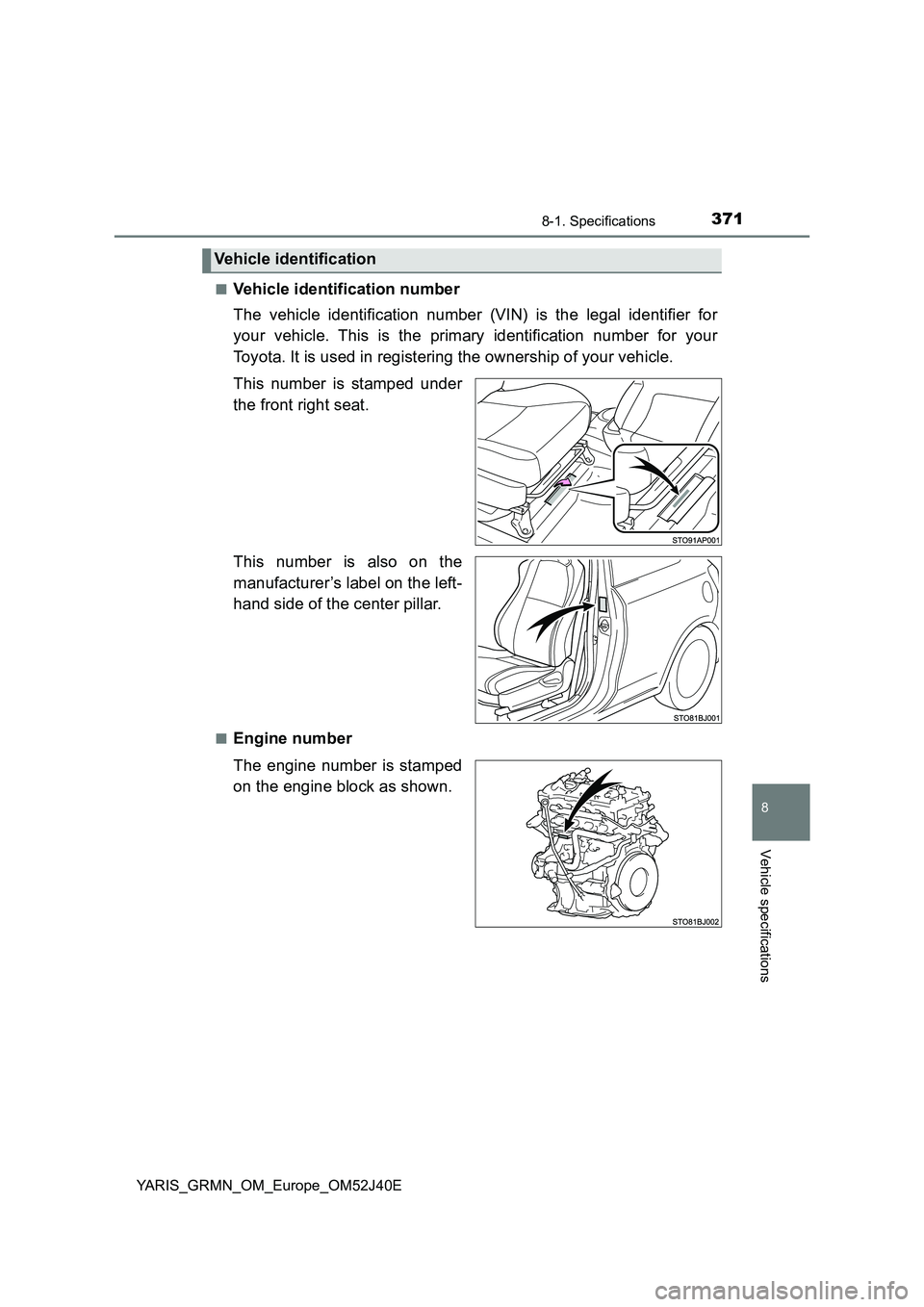
■Vehicle identification number
The vehicle identification number (VIN) is the legal identifier for
your vehicle. This is the primary identification number for your
Toyota. It is used in registering the ownership of your vehicle.
This number is stamped under
the front right seat.
This number is also on the
manufacturer’s label on the left-
hand side of the center pillar.
■Engine number
The engine number is stamped
on the engine block as shown.
Vehicle identification
Page 382 of 404
3828-2. Customization
YARIS_GRMN_OM_Europe_OM52J40E
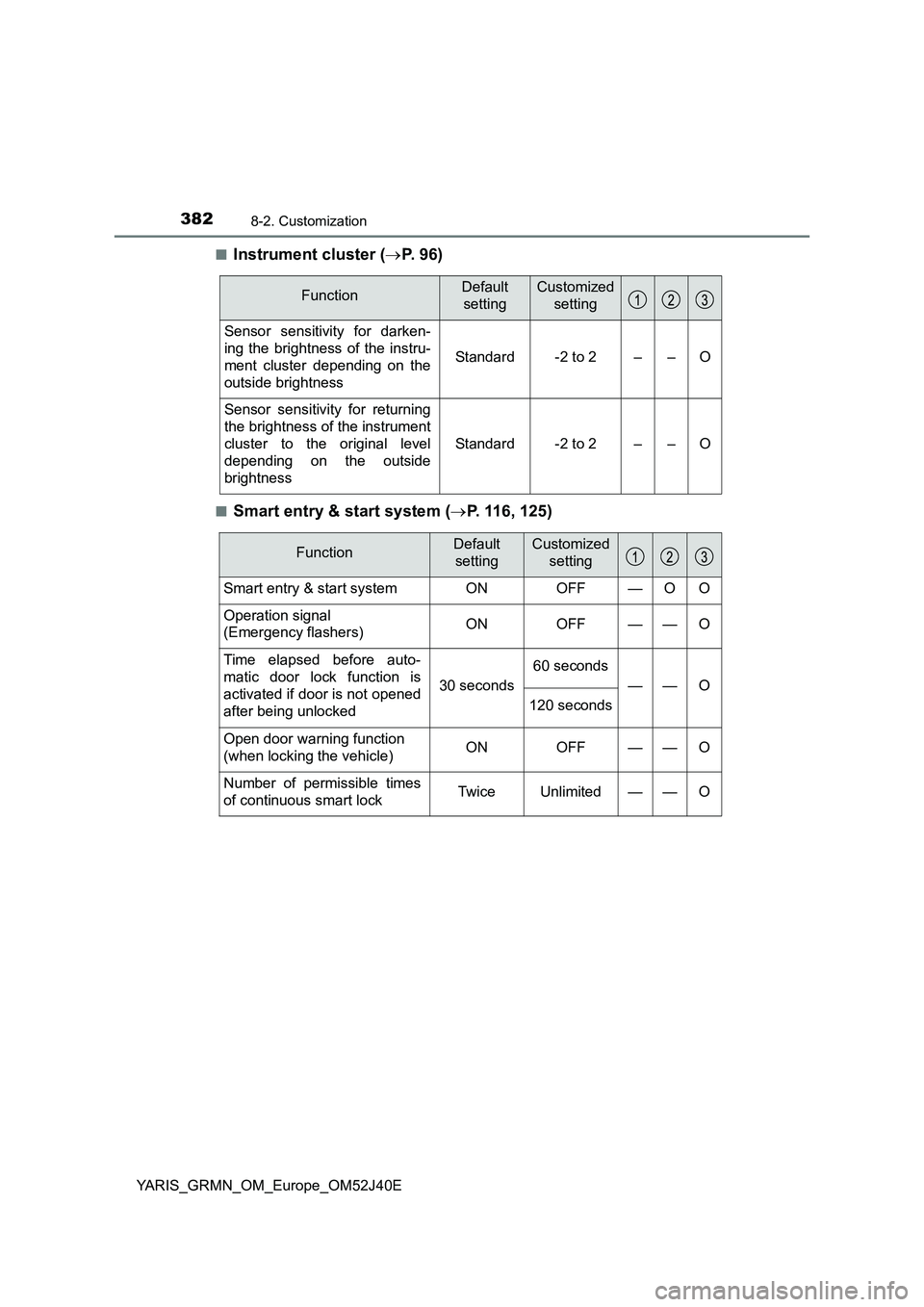
■Instrument cluster ( P. 9 6 )
■Smart entry & start system (P. 116, 125)
FunctionDefault
setting
Customized
setting
Sensor sensitivity for darken-
ing the brightness of the instru-
ment cluster depending on the
outside brightness
Standard-2 to 2––O
Sensor sensitivity for returning
the brightness of the instrument
cluster to the original level
depending on the outside
brightness
Standard-2 to 2––O
FunctionDefault
setting
Customized
setting
Smart entry & start system ON OFF — O O
Operation signal
(Emergency flashers) ON OFF — — O
Time elapsed before auto-
matic door lock function is
activated if door is not opened
after being unlocked
30 seconds
60 seconds
——O
120 seconds
Open door warning function
(when locking the vehicle) ON OFF — — O
Number of permissible times
of continuous smart lock Twice Unlimited — — O
Page 383 of 404
3838-2. Customization
YARIS_GRMN_OM_Europe_OM52J40E
8
Vehicle specifications
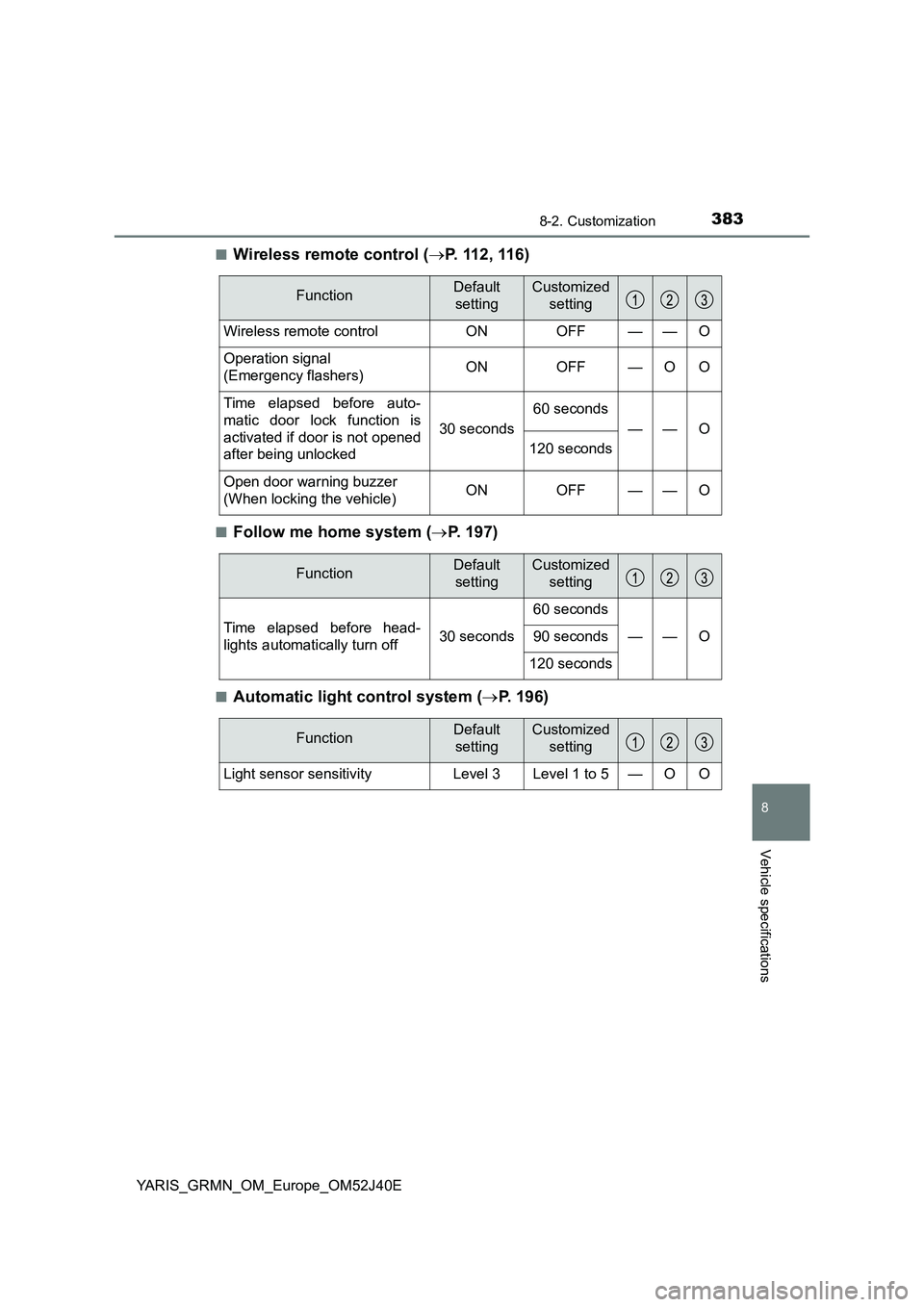
■Wireless remote control (P. 112, 116)
■Follow me home system (P. 197)
■Automatic light control system (P. 196)
FunctionDefault
setting
Customized
setting
Wireless remote control ON OFF — — O
Operation signal
(Emergency flashers) ON OFF — O O
Time elapsed before auto-
matic door lock function is
activated if door is not opened
after being unlocked
30 seconds
60 seconds
——O
120 seconds
Open door warning buzzer
(When locking the vehicle) ON OFF — — O
FunctionDefault
setting
Customized
setting
Time elapsed before head-
lights automatically turn off30 seconds
60 seconds
—— O90 seconds
120 seconds
FunctionDefault
setting
Customized
setting
Light sensor sensitivity Level 3 Level 1 to 5 — O O
Page 384 of 404
3848-2. Customization
YARIS_GRMN_OM_Europe_OM52J40E
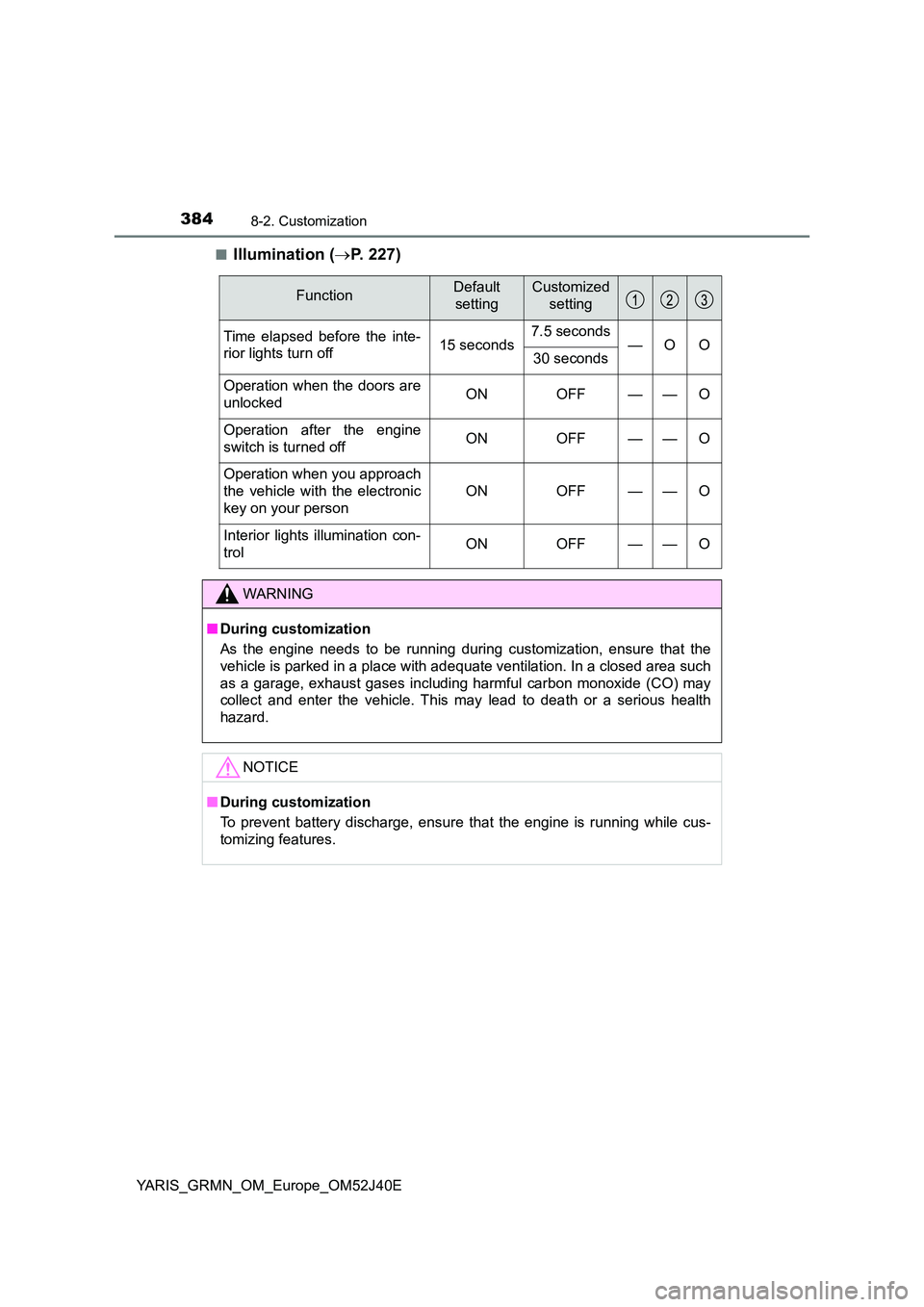
■Illumination ( P. 227)
FunctionDefault
setting
Customized
setting
Time elapsed before the inte-
rior lights turn off 15 seconds 7.5 seconds —O O 30 seconds
Operation when the doors are
unlocked ON OFF — — O
Operation after the engine
switch is turned off ON OFF — — O
Operation when you approach
the vehicle with the electronic
key on your person
ON OFF — — O
Interior lights illumination con-
trol ON OFF — — O
WARNING
■ During customization
As the engine needs to be running during customization, ensure that the
vehicle is parked in a place with adequate ventilation. In a closed area such
as a garage, exhaust gases including harmful carbon monoxide (CO) may
collect and enter the vehicle. This may lead to death or a serious health
hazard.
NOTICE
■ During customization
To prevent battery discharge, ensure that the engine is running while cus-
tomizing features.
Page 386 of 404
386What to do if... (Troubleshooting)
YARIS_GRMN_OM_Europe_OM52J40E
What to do if... (Troubleshooting)
●If you lose your keys, new genuine keys can be made by any authorized
Toyota retailer or Toyota authorized repairer, or any reliable repairer.
( P. 1 1 3 )
●If you lose your electronic keys, the risk of vehicle theft increases signifi-
cantly. Contact any authorized Toyota retailer or Toyota authorized
repairer, or any reliable repairer immediately. ( P. 115)
●Is the key battery weak or depleted? (P. 289)
●Is the engine switch in IGNITION ON mode?
When locking the doors, turn the engine switch off. ( P. 188)
●Is the electronic key left inside the vehicle?
When locking the doors, make sure that you have the electronic key on
your person.
●The function may not operate properly due to the condition of the radio
wave. ( P. 128)
If you have a problem, check the following before contacting any
authorized Toyota retailer or Toyota authorized repairer, or any
reliable repairer.
The doors cannot be locked, unlocked, opened or closed
You lose your keys
The doors cannot be locked or unlocked
Page 387 of 404
387What to do if... (Troubleshooting)
YARIS_GRMN_OM_Europe_OM52J40E
●Did you press the engine switch while firmly depressing the clutch pedal?
( P. 187)
●Is the electronic key anywhere detectable inside the vehicle? (P. 126)
●Is the steering wheel unlocked? (P. 189)
●Is the electronic key battery weak or depleted?
In this case, the engine can be started in a temporary way. ( P. 357)
●Is the battery discharged? (P. 359)
●It is locked automatically to prevent theft of the vehicle. (P. 189)
●Is the window lock switch pressed?
The power window except for the one at the driver’s seat cannot be oper-
ated if the window lock switch is pressed. ( P. 171)
●The auto power off function will be operated if the vehicle is left in ACCES-
SORY or IGNITION ON mode (the engine is not running) for a period of
time. ( P. 189)
If you think something is wrong
The engine does not start
The steering wheel cannot be turned after the engine is
stopped
The windows do not open or close by operating the power
window switches
The engine switch is turned off automatically