lights TOYOTA YARIS GRMN 2017 User Guide
[x] Cancel search | Manufacturer: TOYOTA, Model Year: 2017, Model line: YARIS GRMN, Model: TOYOTA YARIS GRMN 2017Pages: 404, PDF Size: 54.2 MB
Page 91 of 404
91
2Instrument cluster
YARIS_GRMN_OM_Europe_OM52J40E
2. Instrument cluster
Warning lights and
indicators ........................... 92
Gauges and meters ............. 96
Multi-information display .... 100
Fuel consumption
information ....................... 107
Page 92 of 404
922. Instrument cluster
YARIS_GRMN_OM_Europe_OM52J40E
Warning lights and indicators
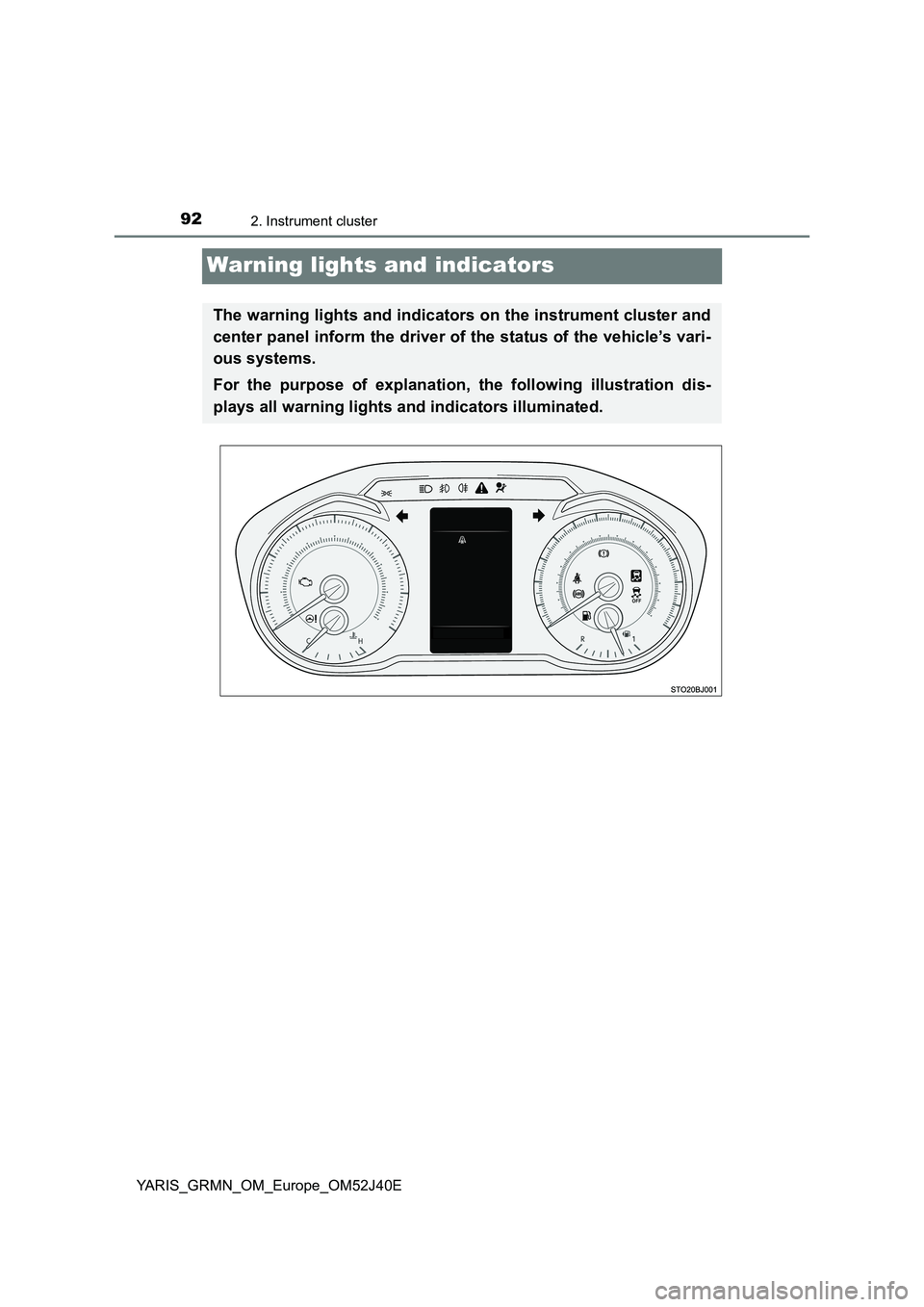
The warning lights and indicators on the instrument cluster and
center panel inform the driver of the status of the vehicle’s vari-
ous systems.
For the purpose of explanation, the following illustration dis-
plays all warning lights and indicators illuminated.
Page 93 of 404
932. Instrument cluster
2
Instrument cluster
YARIS_GRMN_OM_Europe_OM52J40E
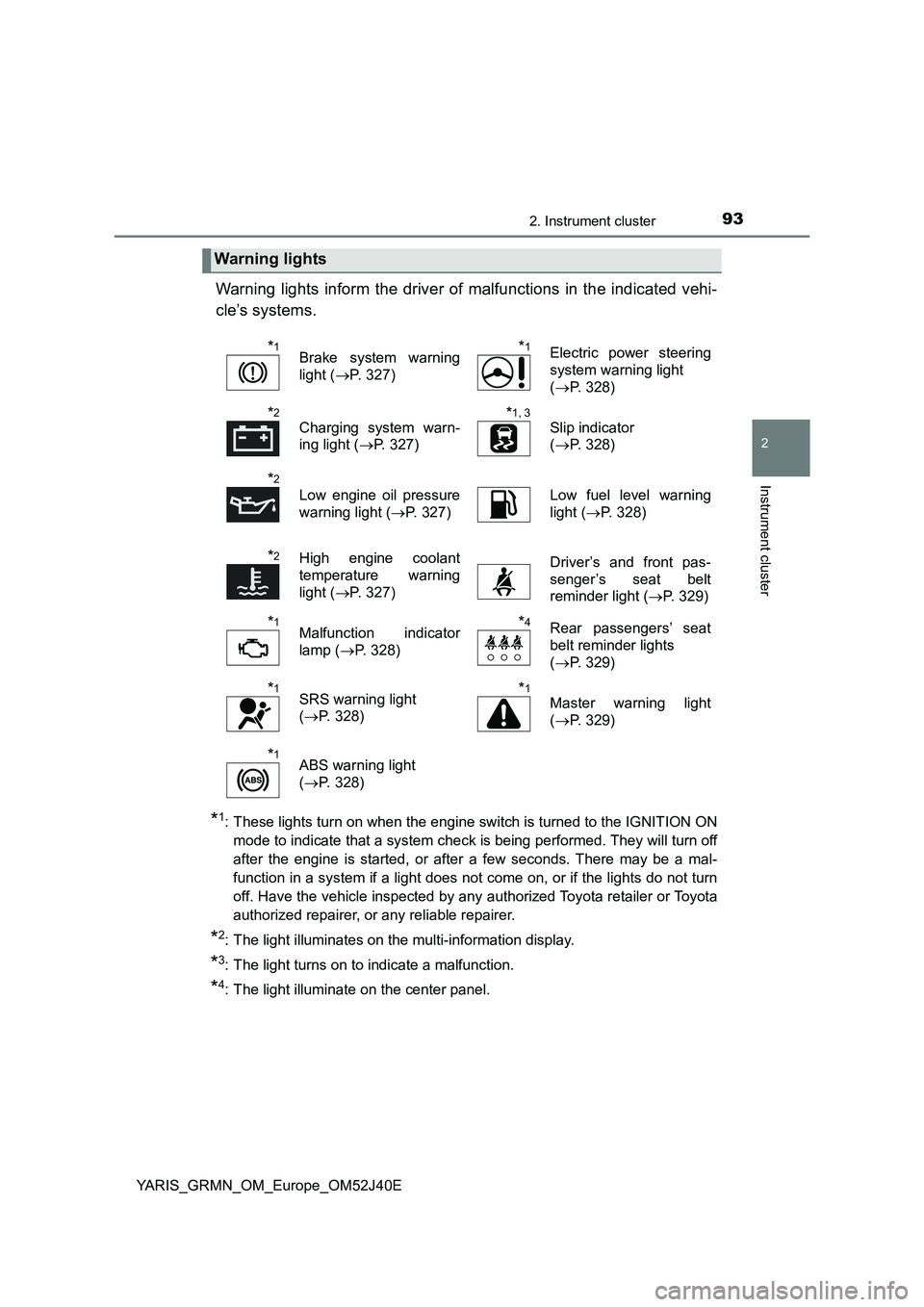
Warning lights inform the driver of malfunctions in the indicated vehi-
cle’s systems.
*1: These lights turn on when the engine switch is turned to the IGNITION ON
mode to indicate that a system check is being performed. They will turn off
after the engine is started, or after a few seconds. There may be a mal-
function in a system if a light does not come on, or if the lights do not turn
off. Have the vehicle inspected by any authorized Toyota retailer or Toyota
authorized repairer, or any reliable repairer.
*2: The light illuminates on the multi-information display.
*3: The light turns on to indicate a malfunction.
*4: The light illuminate on the center panel.
Warning lights
*1Brake system warning
light ( P. 327)
*1Electric power steering
system warning light
( P. 328)
*2
Charging system warn-
ing light ( P. 327)
*1, 3
Slip indicator
( P. 328)
*2
Low engine oil pressure
warning light ( P. 327)
Low fuel level warning
light ( P. 328)
*2High engine coolant
temperature warning
light ( P. 327)
Driver’s and front pas-
senger’s seat belt
reminder light ( P. 329)
*1Malfunction indicator
lamp ( P. 328)
*4Rear passengers’ seat
belt reminder lights
( P. 329)
*1SRS warning light
( P. 328)
*1
Master warning light
( P. 329)
*1ABS warning light
( P. 328)
Page 94 of 404
942. Instrument cluster
YARIS_GRMN_OM_Europe_OM52J40E
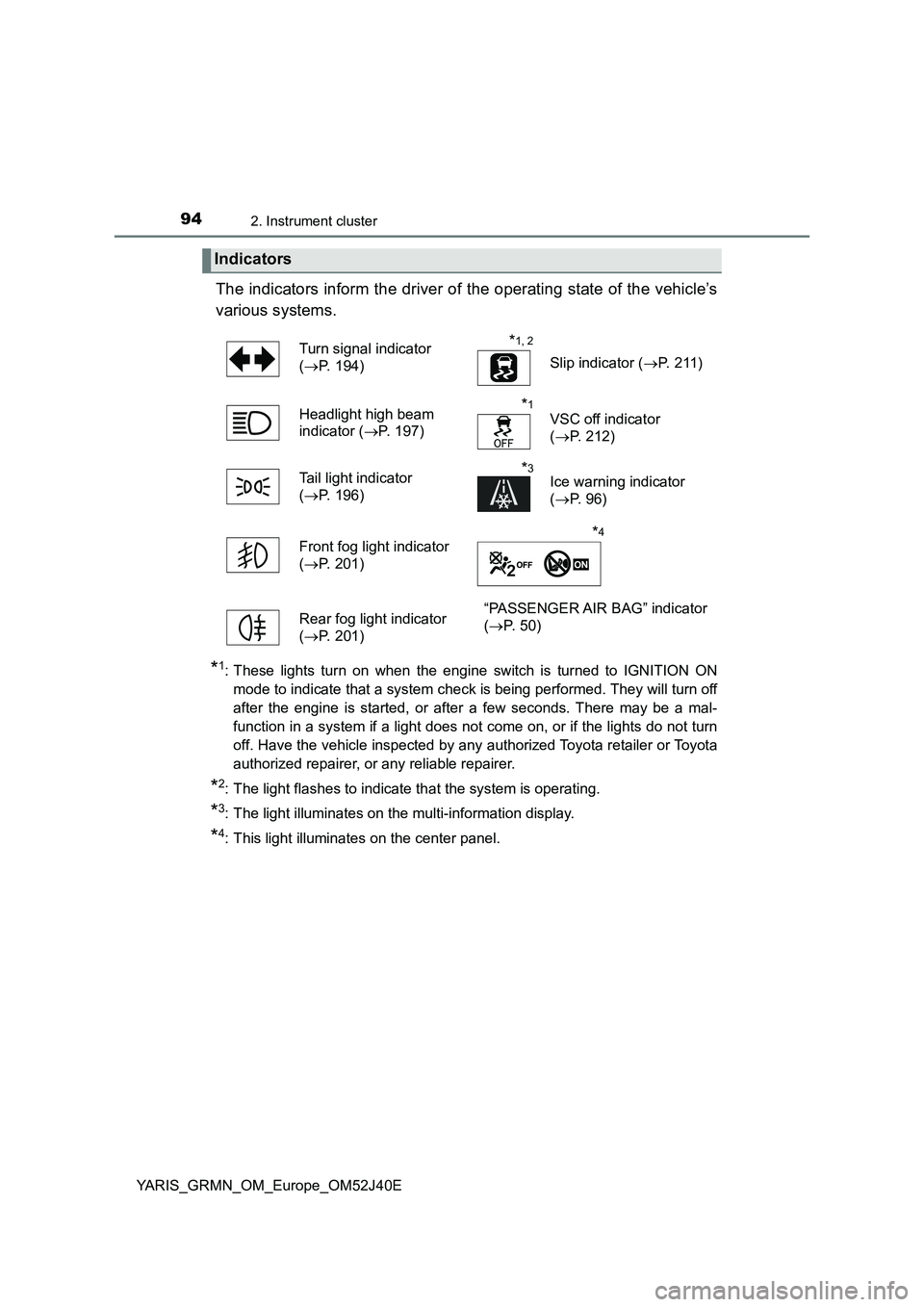
The indicators inform the driver of the operating state of the vehicle’s
various systems.
*1: These lights turn on when the engine switch is turned to IGNITION ON
mode to indicate that a system check is being performed. They will turn off
after the engine is started, or after a few seconds. There may be a mal-
function in a system if a light does not come on, or if the lights do not turn
off. Have the vehicle inspected by any authorized Toyota retailer or Toyota
authorized repairer, or any reliable repairer.
*2: The light flashes to indicate that the system is operating.
*3: The light illuminates on the multi-information display.
*4: This light illuminates on the center panel.
Indicators
Turn signal indicator
( P. 194)
*1, 2
Slip indicator (P. 2 11 )
Headlight high beam
indicator ( P. 197)
*1
VSC off indicator
( P. 212)
Tail light indicator
( P. 196)
*3Ice warning indicator
( P. 96)
Front fog light indicator
( P. 201)
*4
Rear fog light indicator
( P. 201)
“PASSENGER AIR BAG” indicator
( P. 5 0 )
Page 98 of 404
982. Instrument cluster
YARIS_GRMN_OM_Europe_OM52J40E
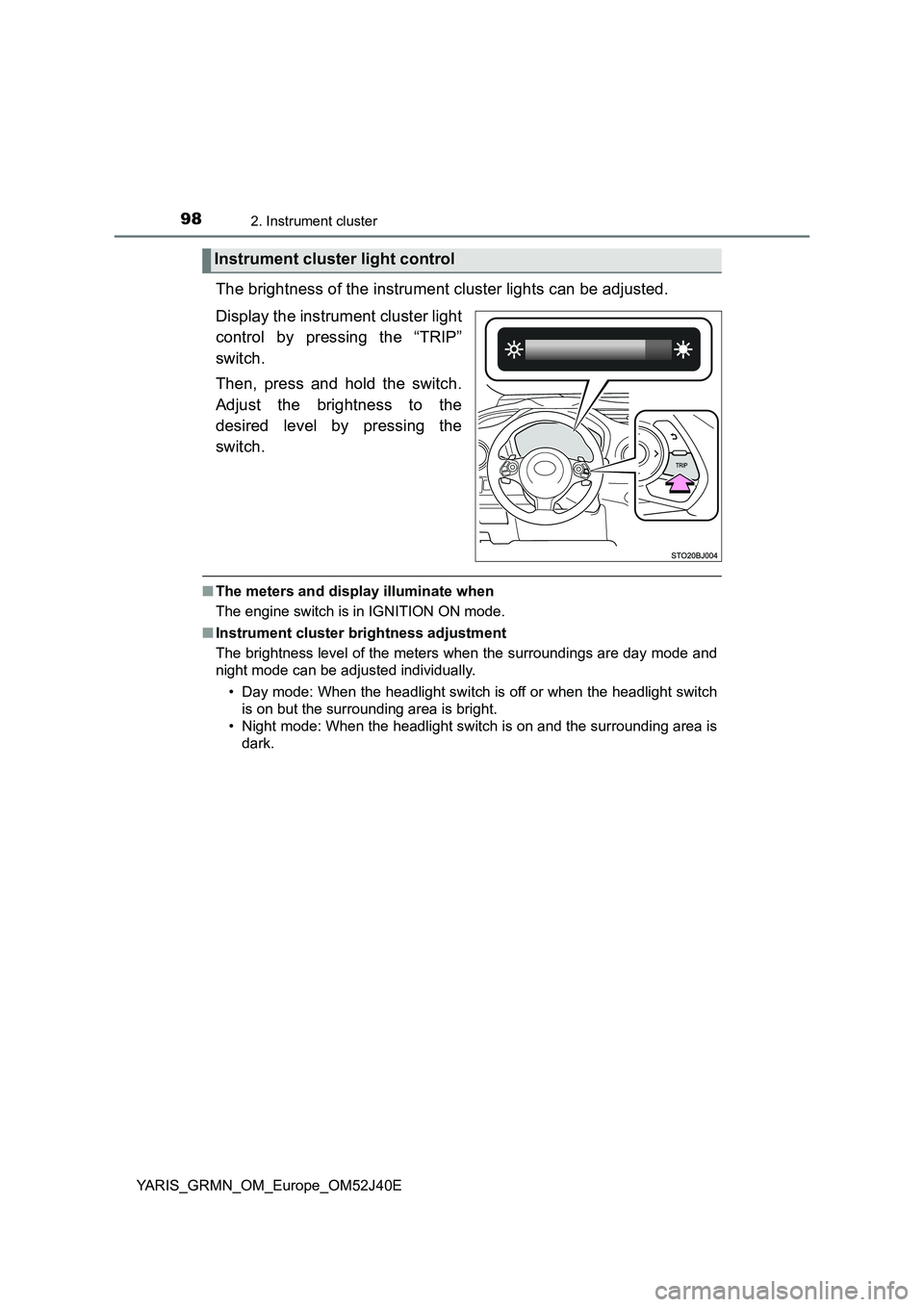
The brightness of the instrument cluster lights can be adjusted.
Display the instrument cluster light
control by pressing the “TRIP”
switch.
Then, press and hold the switch.
Adjust the brightness to the
desired level by pressing the
switch.
■ The meters and display illuminate when
The engine switch is in IGNITION ON mode.
■ Instrument cluster brightness adjustment
The brightness level of the meters when the surroundings are day mode and
night mode can be adjusted individually.
• Day mode: When the headlight switch is off or when the headlight switch
is on but the surrounding area is bright.
• Night mode: When the headlight switch is on and the surrounding area is
dark.
Instrument cluster light control
Page 121 of 404
1213-2. Opening, closing and locking the doors
3
Operation of each component
YARIS_GRMN_OM_Europe_OM52J40E
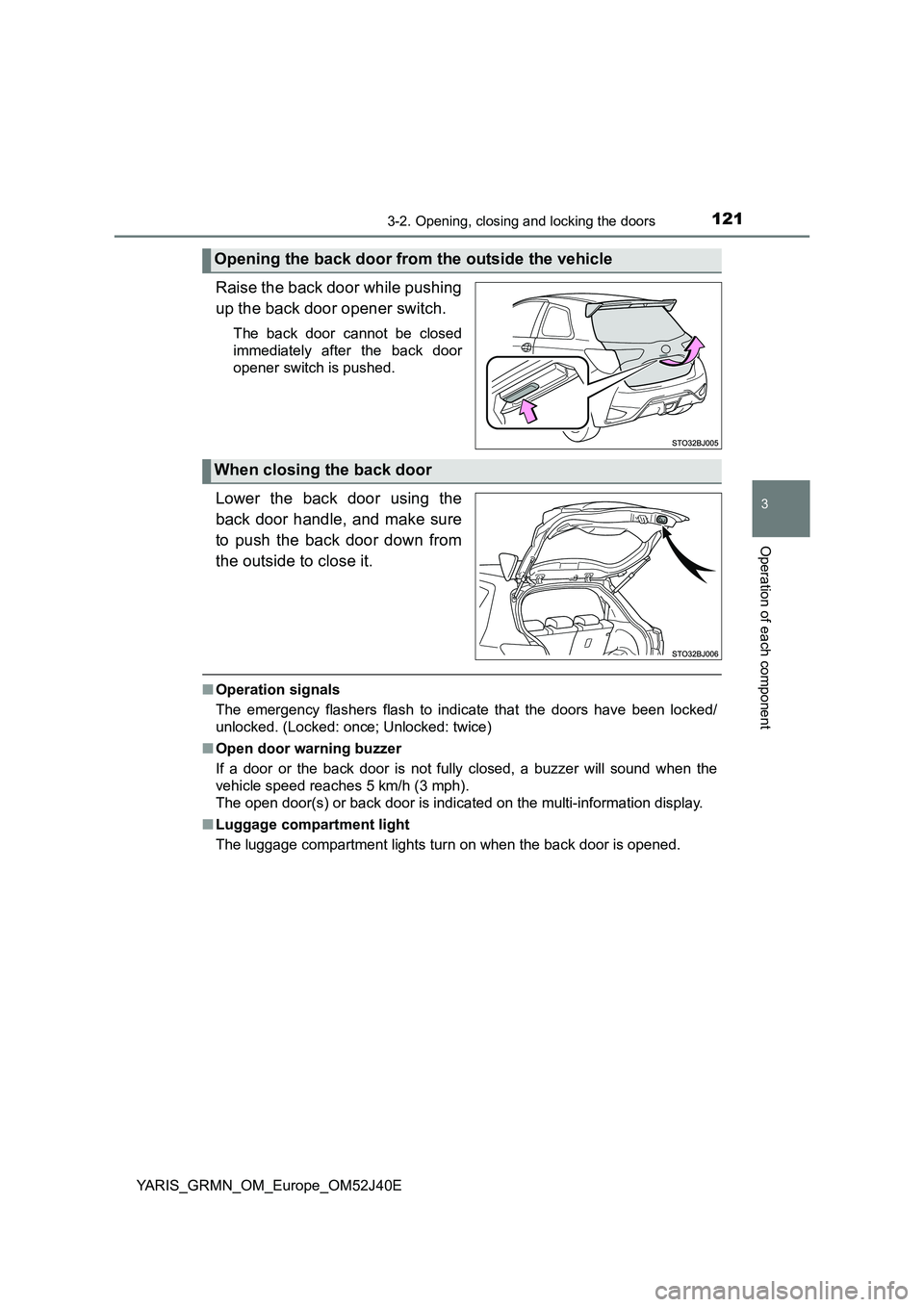
Raise the back door while pushing
up the back door opener switch.
The back door cannot be closed
immediately after the back door
opener switch is pushed.
Lower the back door using the
back door handle, and make sure
to push the back door down from
the outside to close it.
■ Operation signals
The emergency flashers flash to indicate that the doors have been locked/
unlocked. (Locked: once; Unlocked: twice)
■ Open door warning buzzer
If a door or the back door is not fully closed, a buzzer will sound when the
vehicle speed reaches 5 km/h (3 mph).
The open door(s) or back door is indicat ed on the multi-information display.
■ Luggage compartment light
The luggage compartment lights turn on when the back door is opened.
Opening the back door from the outside the vehicle
When closing the back door
Page 164 of 404
1643-4. Adjusting the steering wheel and mirrors
YARIS_GRMN_OM_Europe_OM52J40E
Inside rear view mirror
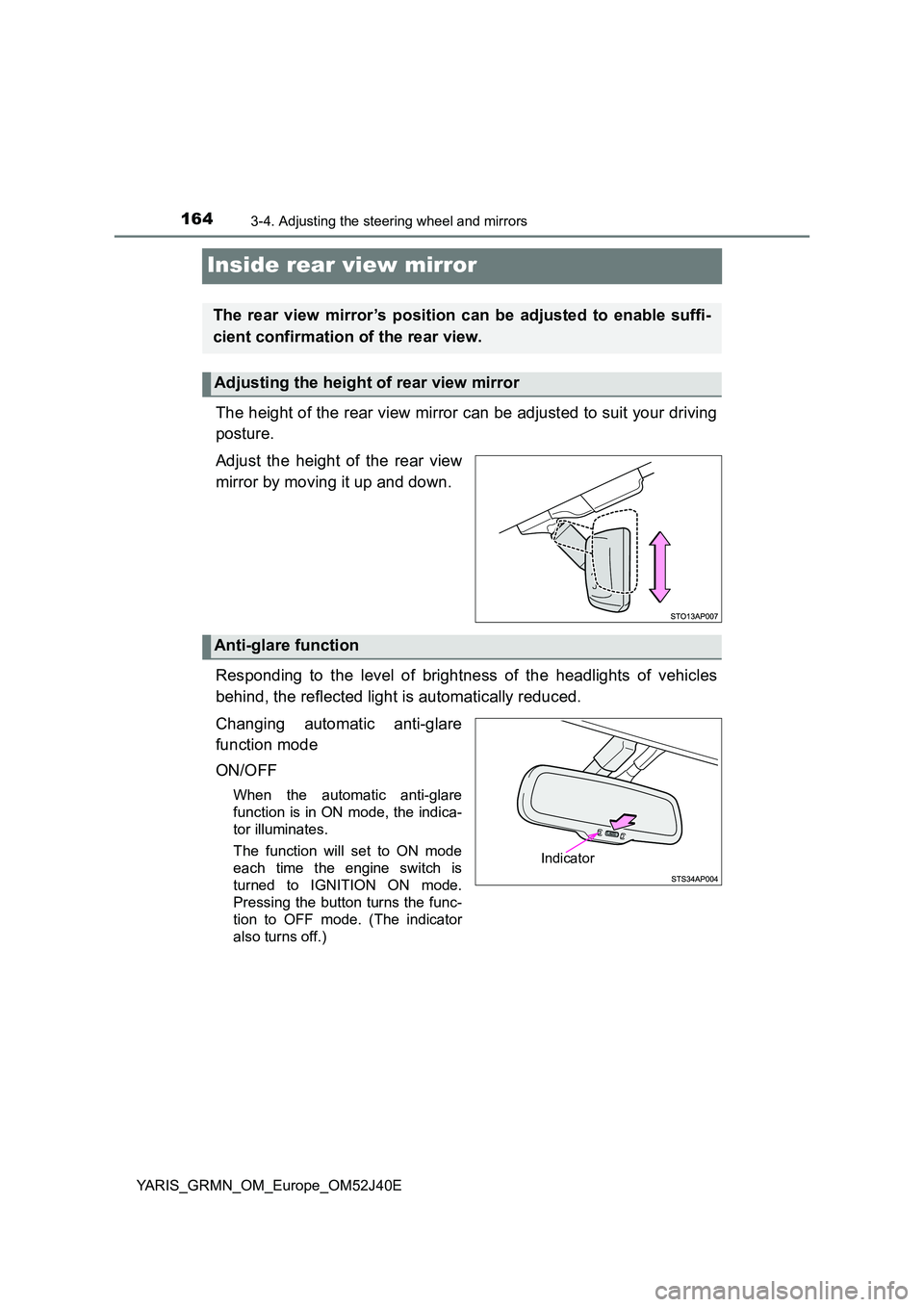
The height of the rear view mirror can be adjusted to suit your driving
posture.
Adjust the height of the rear view
mirror by moving it up and down.
Responding to the level of brightness of the headlights of vehicles
behind, the reflected light is automatically reduced.
Changing automatic anti-glare
function mode
ON/OFF
When the automatic anti-glare
function is in ON mode, the indica-
tor illuminates.
The function will set to ON mode
each time the engine switch is
turned to IGNITION ON mode.
Pressing the button turns the func-
tion to OFF mode. (The indicator
also turns off.)
The rear view mirror’s position can be adjusted to enable suffi-
cient confirmation of the rear view.
Adjusting the height of rear view mirror
Anti-glare function
Indicator
Page 175 of 404
175
4Driving
YARIS_GRMN_OM_Europe_OM52J40E
4-1. Before driving
Driving the vehicle ............. 176
Cargo and luggage ............ 184
Trailer towing ..................... 186
4-2. Driving procedures
Engine (ignition) switch...... 187
Manual transmission.......... 192
Turn signal lever ................ 194
Parking brake .................... 195
4-3. Operating the lights
and wipers
Headlight switch ................ 196
Fog light switch .................. 201
Windshield wiper and
washer ............................. 202
Rear window wiper and
washer ............................. 205
4-4. Refueling
Opening the fuel tank
cap ................................... 207
4-5. Using the driving support
systems
Driving assist systems ....... 210
4-6. Driving tips
Winter driving tips .............. 216
Page 194 of 404
1944-2. Driving procedures
YARIS_GRMN_OM_Europe_OM52J40E
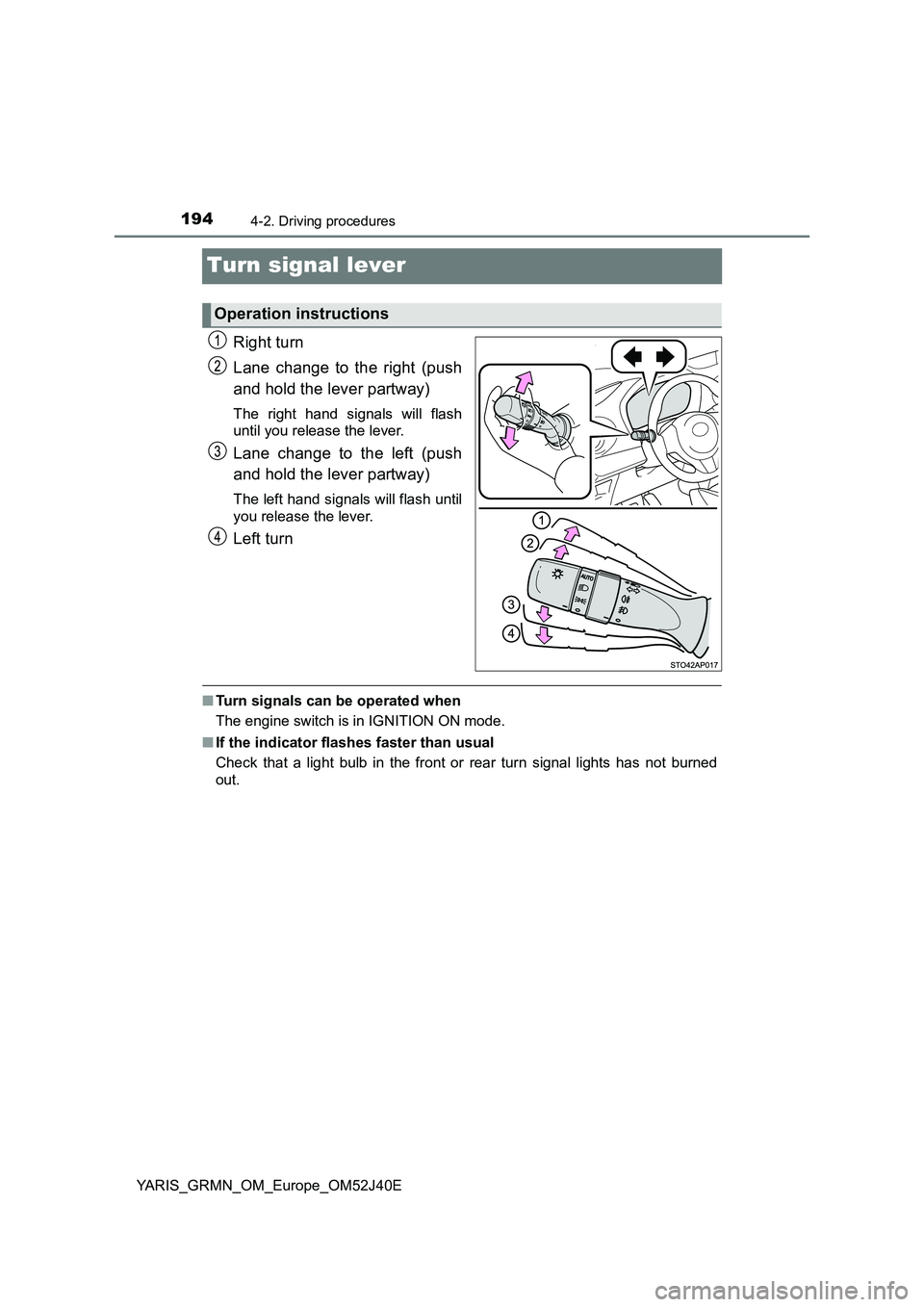
Turn signal lever
Right turn
Lane change to the right (push
and hold the lever partway)
The right hand signals will flash
until you release the lever.
Lane change to the left (push
and hold the lever partway)
The left hand signals will flash until
you release the lever.
Left turn
■ Turn signals can be operated when
The engine switch is in IGNITION ON mode.
■ If the indicator flashes faster than usual
Check that a light bulb in the front or rear turn signal lights has not burned
out.
Operation instructions
Page 196 of 404
1964-3. Operating the lights and wipers
YARIS_GRMN_OM_Europe_OM52J40E
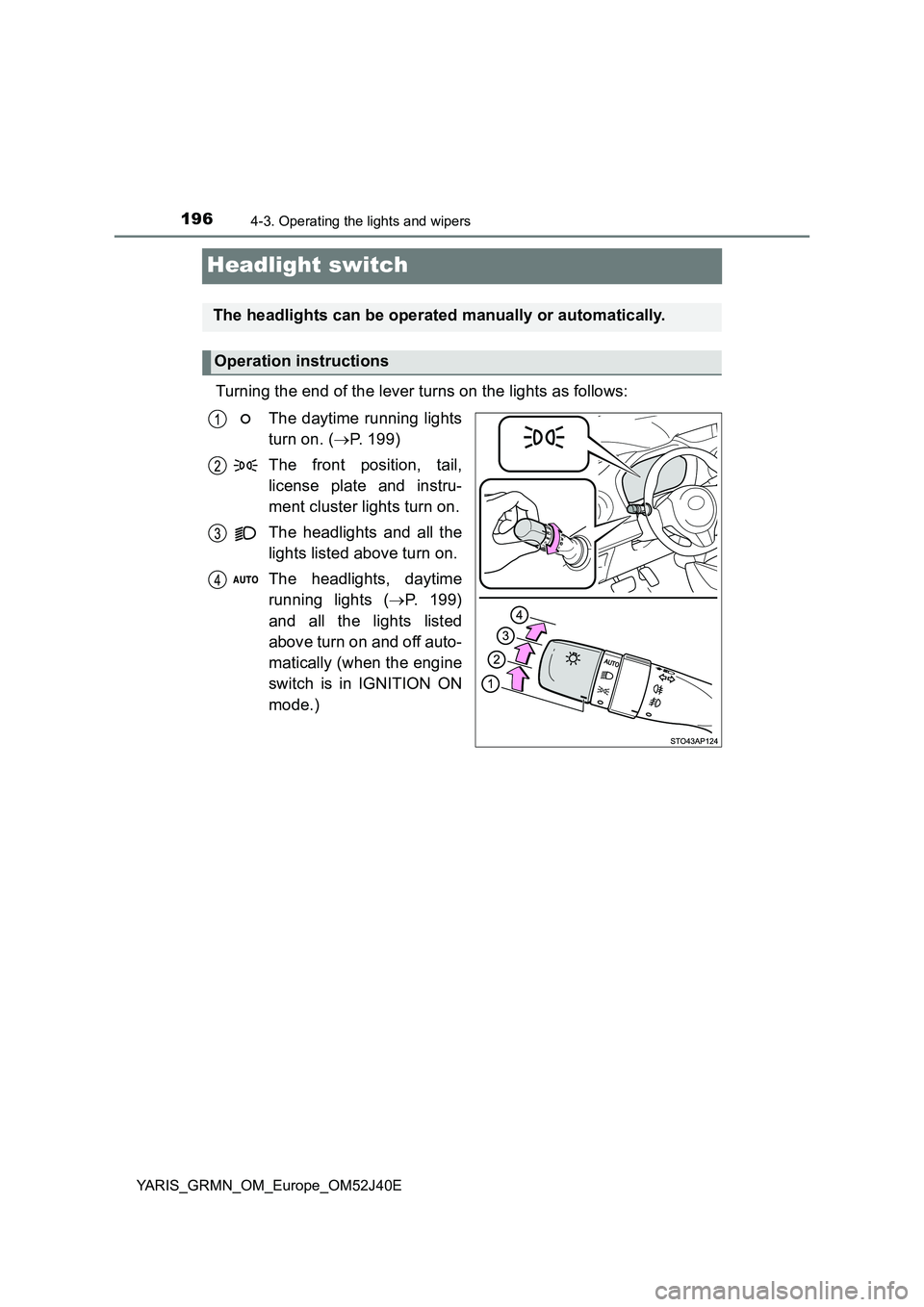
Headlight switch
Turning the end of the lever turns on the lights as follows:
The daytime running lights
turn on. ( P. 199)
The front position, tail,
license plate and instru-
ment cluster lights turn on.
The headlights and all the
lights listed above turn on.
The headlights, daytime
running lights ( P. 199)
and all the lights listed
above turn on and off auto-
matically (when the engine
switch is in IGNITION ON
mode.)
The headlights can be operated manually or automatically.
Operation instructions