acc TOYOTA YARIS GRMN 2017 Owner's Manual
[x] Cancel search | Manufacturer: TOYOTA, Model Year: 2017, Model line: YARIS GRMN, Model: TOYOTA YARIS GRMN 2017Pages: 404, PDF Size: 54.2 MB
Page 78 of 404
781-3. Theft deterrent system
YARIS_GRMN_OM_Europe_OM52J40E
Engine immobilizer system
The system begins operating after the engine switch has been turned
off. The system is canceled after the engine switch has been turned to
ACCESSORY or IGNITION ON mode.
■ System maintenance
The vehicle has a maintenance-free type engine immobilizer system.
■ Conditions that may cause the system to malfunction
● If the grip portion of the key is in contact with a metallic object
● If the key is in close proximity to or touching a key to the security system
(key with a built-in transponder chip) of another vehicle
The vehicle’s keys have built-in transponder chips that prevent
the engine from starting if a key has not been previously regis-
tered in the vehicle’s on-board computer.
Never leave the keys inside the vehicle when you leave the vehi-
cle.
This system is designed to help prevent vehicle theft but does
not guarantee absolute security against all vehicle thefts.
Page 95 of 404
952. Instrument cluster
2
Instrument cluster
YARIS_GRMN_OM_Europe_OM52J40E
WARNING
■If a safety system warning light does not come on
Should a safety system light such as the ABS and SRS warning light not
come on when you start the engine, this could mean that these systems are
not available to help protect you in an accident, which could result in death
or serious injury. Have the vehicle inspected by any authorized Toyota
retailer or Toyota authorized repairer, or any reliable repairer immediately if
this occurs.
Page 106 of 404
1062. Instrument cluster
YARIS_GRMN_OM_Europe_OM52J40E
WARNING
■Caution for use while driving
● When operating the multi-information display while driving, pay extra
attention to the safety of the area around the vehicle.
● Do not look continuously at the multi-information display while driving as
you may fail to see pedestrians, objects on the road, etc., ahead of the
vehicle.
■ The information display at low temperatures
Allow the interior of the vehicle to warm up before using the liquid crystal
information display. At extremely low temperatures, the display monitor may
respond slowly, and display changes may be delayed.
For example, there is a lag between the driver’s shifting and the new gear
number appearing on the display. This lag could cause the driver to down-
shift again, causing rapid and exce ssive engine braking and possibly an
accident resulting in death or injury.
■ Cautions during setting up the display
As the engine needs to be running during setting up the display, ensure that
the vehicle is parked in a place with adequate ventilation. In a closed area
such as a garage, exhaust gases including harmful carbon monoxide (CO)
may collect and enter the vehicle. This may lead to death or a serious
health hazard.
NOTICE
■ While setting up the display
To prevent battery discharge, ensure that the engine is running while setting
up the display features.
Page 113 of 404
1133-1. Key information
3
Operation of each component
YARIS_GRMN_OM_Europe_OM52J40E
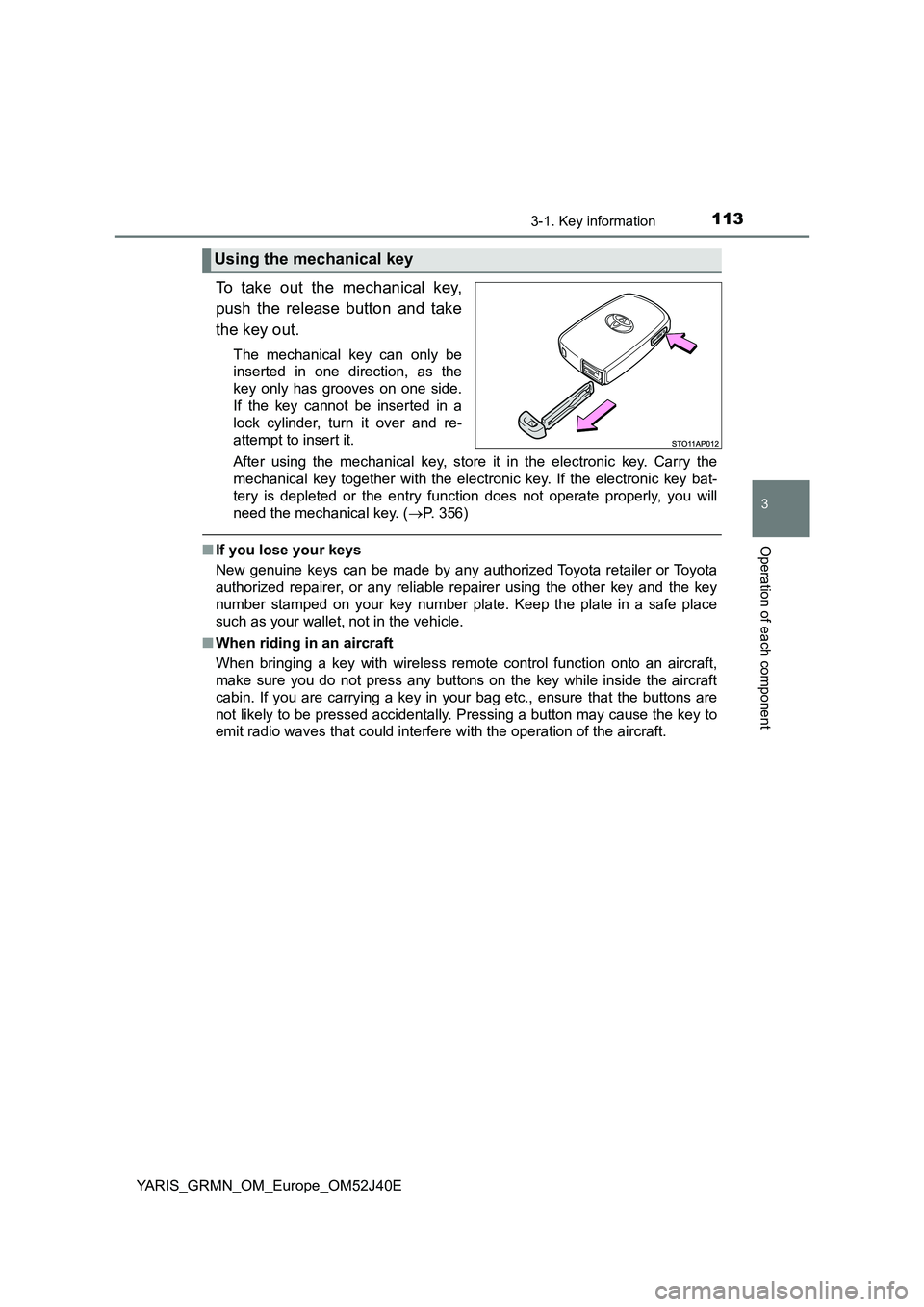
To take out the mechanical key,
push the release button and take
the key out.
The mechanical key can only be
inserted in one direction, as the
key only has grooves on one side.
If the key cannot be inserted in a
lock cylinder, turn it over and re-
attempt to insert it.
After using the mechanical key, store it in the electronic key. Carry the
mechanical key together with the electronic key. If the electronic key bat-
tery is depleted or the entry func tion does not operate properly, you will
need the mechanical key. ( P. 356)
■If you lose your keys
New genuine keys can be made by any authorized Toyota retailer or Toyota
authorized repairer, or any reliable repairer using the other key and the key
number stamped on your key number plate. Keep the plate in a safe place
such as your wallet, not in the vehicle.
■ When riding in an aircraft
When bringing a key with wireless remote control function onto an aircraft,
make sure you do not press any buttons on the key while inside the aircraft
cabin. If you are carrying a key in your bag etc., ensure that the buttons are
not likely to be pressed accidentally. Pressing a button may cause the key to
emit radio waves that could interfere with the operation of the aircraft.
Using the mechanical key
Page 118 of 404
1183-2. Opening, closing and locking the doors
YARIS_GRMN_OM_Europe_OM52J40E
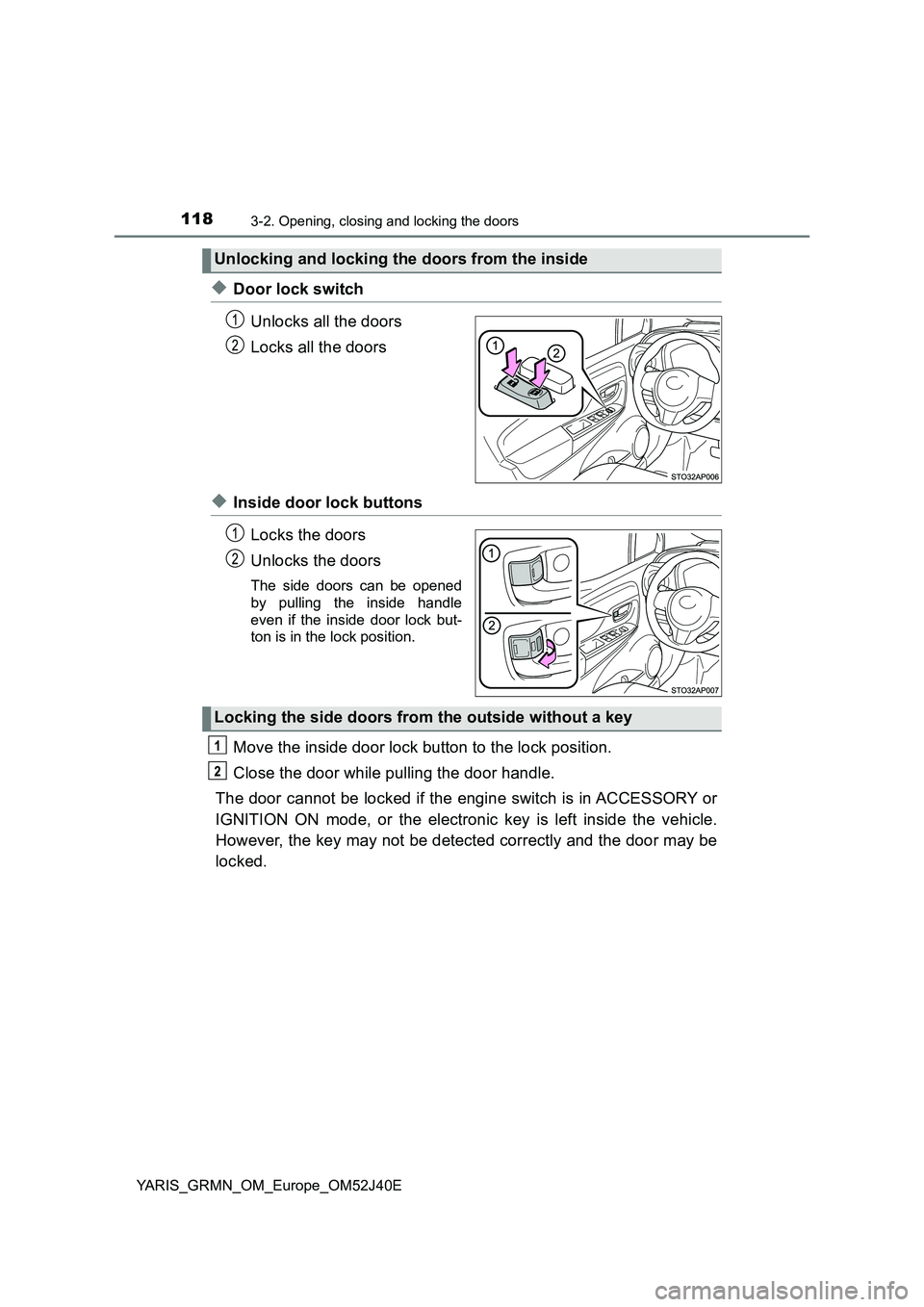
◆Door lock switch
Unlocks all the doors
Locks all the doors
◆Inside door lock buttons
Locks the doors
Unlocks the doors
The side doors can be opened
by pulling the inside handle
even if the inside door lock but-
ton is in the lock position.
Move the inside door lock button to the lock position.
Close the door while pulling the door handle.
The door cannot be locked if the engine switch is in ACCESSORY or
IGNITION ON mode, or the electronic key is left inside the vehicle.
However, the key may not be detected correctly and the door may be
locked.
Unlocking and locking the doors from the inside
Locking the side doors from the outside without a key
Page 119 of 404
1193-2. Opening, closing and locking the doors
3
Operation of each component
YARIS_GRMN_OM_Europe_OM52J40E
■Using the mechanical key
The doors can also be locked and unlocked with the mechanical key.
P. 356)
■ Open door warning buzzer
If a door or the back door is not fully closed, a buzzer will sound when the
vehicle speed reaches 5 km/h (3 mph).
The open door(s) or back door is indicat ed on the multi-information display.
■ Conditions affecting the operation of the smart entry & start system or
wireless remote control
P. 128
■ Customization
Settings (e.g. operation signal) can be changed.
(Customizable features: P. 380)
WARNING
■To prevent an accident
Observe the following precautions while driving the vehicle.
Failure to do so may result in a door opening and an occupant falling out,
resulting in death or serious injury.
● Ensure that all the doors are properly closed.
● Do not pull the inside handle of the doors while driving.
Be especially careful for the side doors, as the doors may be opened
even if the inside lock buttons are in locked position.
Page 122 of 404
1223-2. Opening, closing and locking the doors
YARIS_GRMN_OM_Europe_OM52J40E
WARNING
■Caution while driving
● Keep the back door closed while driving.
If the back door is left open, it may hit near-by objects while driving or lug-
gage may be unexpectedly thrown out, causing an accident.
In addition, exhaust gases may enter the vehicle, causing death or a seri-
ous health hazard. Make sure to close the back door before driving.
● Before driving the vehicle, make sure that the back door is fully closed. If
the back door is not fully closed, it may open unexpectedly while driving,
causing an accident.
● Never let anyone sit in the luggage compartment. In the event of sudden
braking or a collision, they are susceptible to death or serious injury.
■ When children are in the vehicle
Observe the following precautions.
Failure to do so may result in death or serious injury.
● Do not allow children to play in the luggage compartment.
If a child is accidentally locked in the luggage compartment, they could
have heat exhaustion or other injuries.
● Do not allow a child to open or close the back door.
Doing so may cause the back door to move unexpectedly, or cause the
child’s hands, head, or neck to be caught by the closing back door.
Page 123 of 404
1233-2. Opening, closing and locking the doors
3
Operation of each component
YARIS_GRMN_OM_Europe_OM52J40E
WARNING
■Operating the back door
Observe the following precautions.
Failure to do so may cause parts of the body to be caught, resulting in death
or serious injury.
● Remove any heavy loads, such as snow and ice, from the back door
before opening it. Failure to do so may cause the back door to suddenly
shut again after it is opened.
● When opening or closing the back door, thoroughly check to make sure
the surrounding area is safe.
● If anyone is in the vicinity, make sure they are safe and let them know that
the back door is about to open or close.
● Use caution when opening or closing the back door in windy weather as it
may move abruptly in strong wind.
● Do not pull on the back door damper stay to close the back door, and do
not hang on the back door damper stay.
Doing so may cause hands to be caught or the back door damper stay to
break, causing an accident.
● If a bicycle carrier or similar heavy object is attached to the back door, it
may suddenly shut again after being opened, causing someone’s hands,
head or neck to be caught and injured. When installing an accessory part
to the back door, using a genuine Toyota part is recommended.
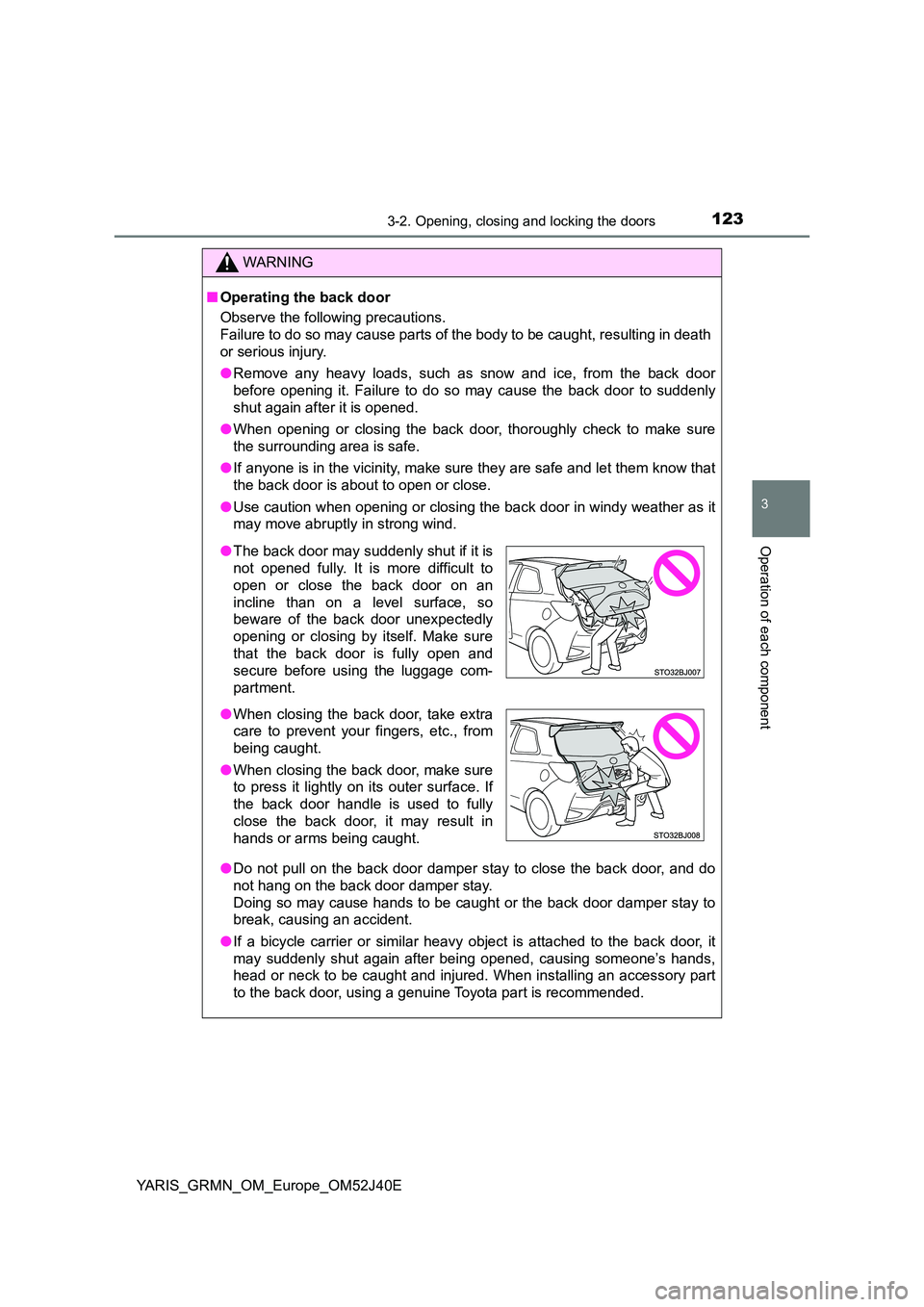
● The back door may suddenly shut if it is
not opened fully. It is more difficult to
open or close the back door on an
incline than on a level surface, so
beware of the back door unexpectedly
opening or closing by itself. Make sure
that the back door is fully open and
secure before using the luggage com-
partment.
● When closing the back door, take extra
care to prevent your fingers, etc., from
being caught.
● When closing the back door, make sure
to press it lightly on its outer surface. If
the back door handle is used to fully
close the back door, it may result in
hands or arms being caught.
Page 124 of 404
1243-2. Opening, closing and locking the doors
YARIS_GRMN_OM_Europe_OM52J40E
NOTICE
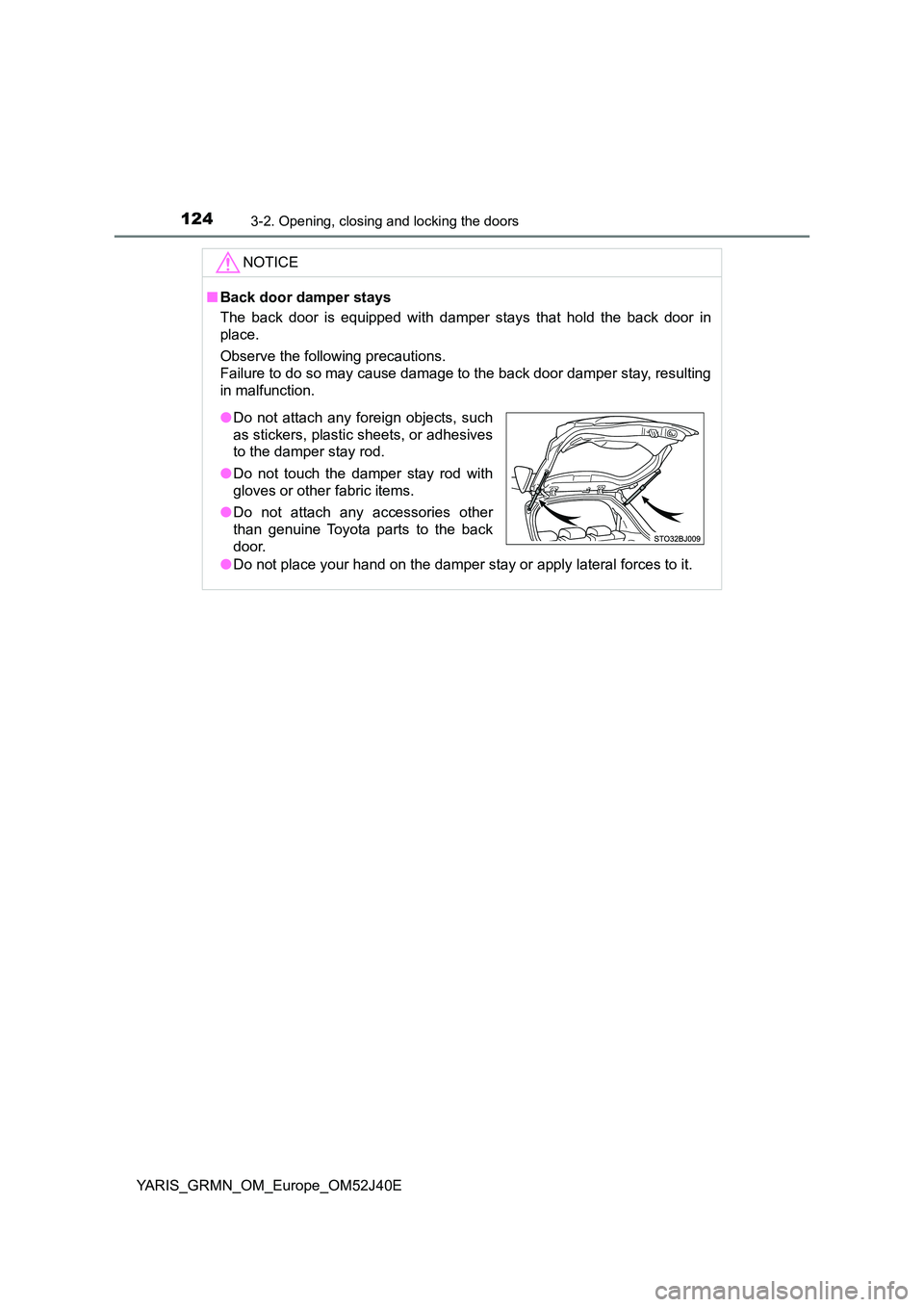
■Back door damper stays
The back door is equipped with damper stays that hold the back door in
place.
Observe the following precautions.
Failure to do so may cause damage to the back door damper stay, resulting
in malfunction.
● Do not place your hand on the damper stay or apply lateral forces to it.
●Do not attach any foreign objects, such
as stickers, plastic sheets, or adhesives
to the damper stay rod.
● Do not touch the damper stay rod with
gloves or other fabric items.
● Do not attach any accessories other
than genuine Toyota parts to the back
door.
Page 126 of 404
1263-2. Opening, closing and locking the doors
YARIS_GRMN_OM_Europe_OM52J40E
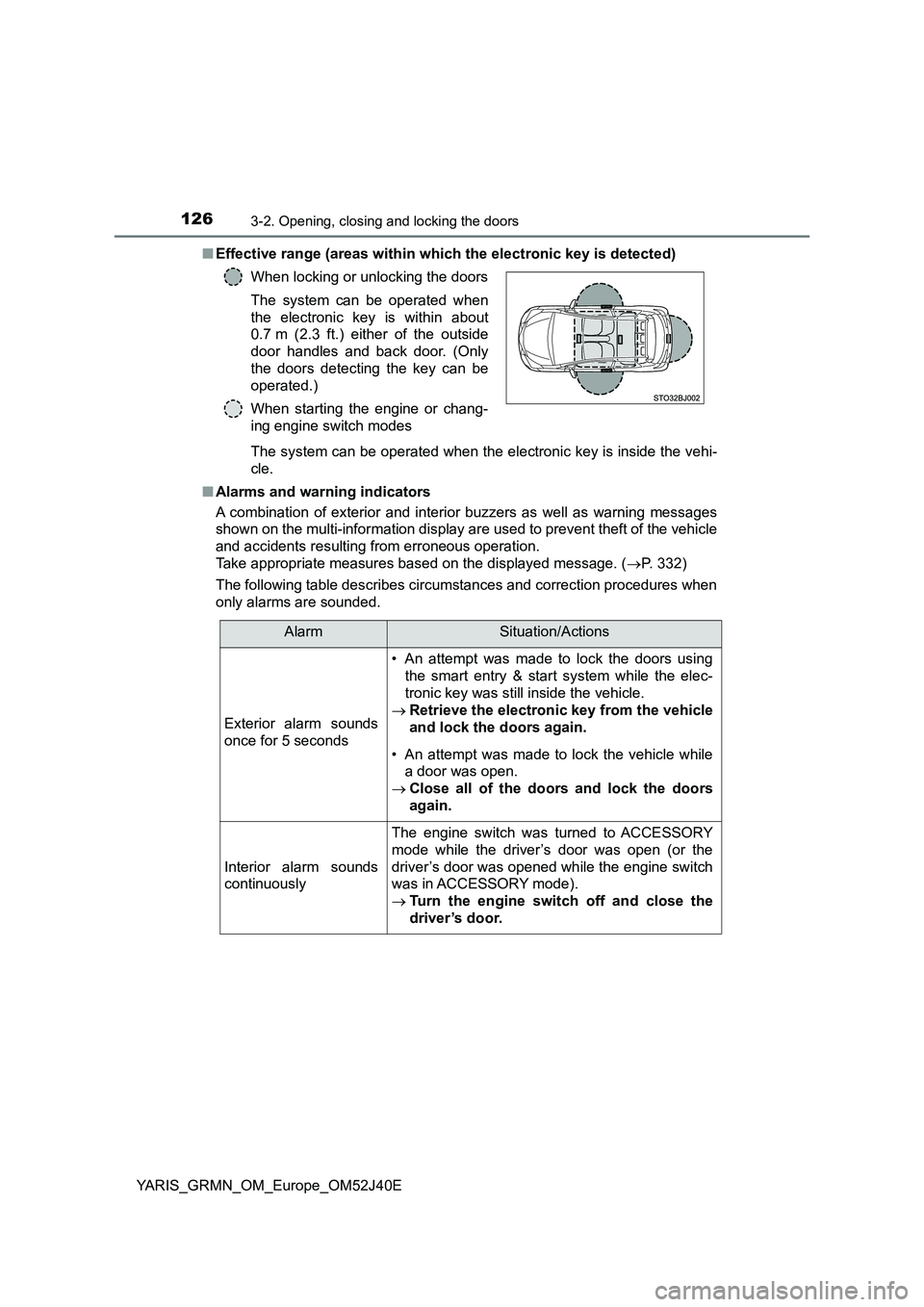
■ Effective range (areas within which the electronic key is detected)
The system can be operated when the electronic key is inside the vehi-
cle.
■ Alarms and warning indicators
A combination of exterior and interior buzzers as well as warning messages
shown on the multi-information display are used to prevent theft of the vehicle
and accidents resulting from erroneous operation.
Take appropriate measures based on the displayed message. ( P. 332)
The following table describes circumstances and correction procedures when
only alarms are sounded.
When locking or unlocking the doors
The system can be operated when
the electronic key is within about
0.7 m (2.3 ft.) either of the outside
door handles and back door. (Only
the doors detecting the key can be
operated.)
When starting the engine or chang-
ing engine switch modes
AlarmSituation/Actions
Exterior alarm sounds
once for 5 seconds
• An attempt was made to lock the doors using
the smart entry & start system while the elec-
tronic key was still inside the vehicle.
Retrieve the electronic key from the vehicle
and lock the doors again.
• An attempt was made to lock the vehicle while
a door was open.
Close all of the doors and lock the doors
again.
Interior alarm sounds
continuously
The engine switch was turned to ACCESSORY
mode while the driver’s door was open (or the
driver’s door was opened while the engine switch
was in ACCESSORY mode).
Turn the engine switch off and close the
driver’s door.