light TOYOTA YARIS HATCHBACK 2009 Workshop Manual
[x] Cancel search | Manufacturer: TOYOTA, Model Year: 2009, Model line: YARIS HATCHBACK, Model: TOYOTA YARIS HATCHBACK 2009Pages: 402, PDF Size: 7.61 MB
Page 156 of 402
143
2-2. Instrument cluster
2
When driving
n
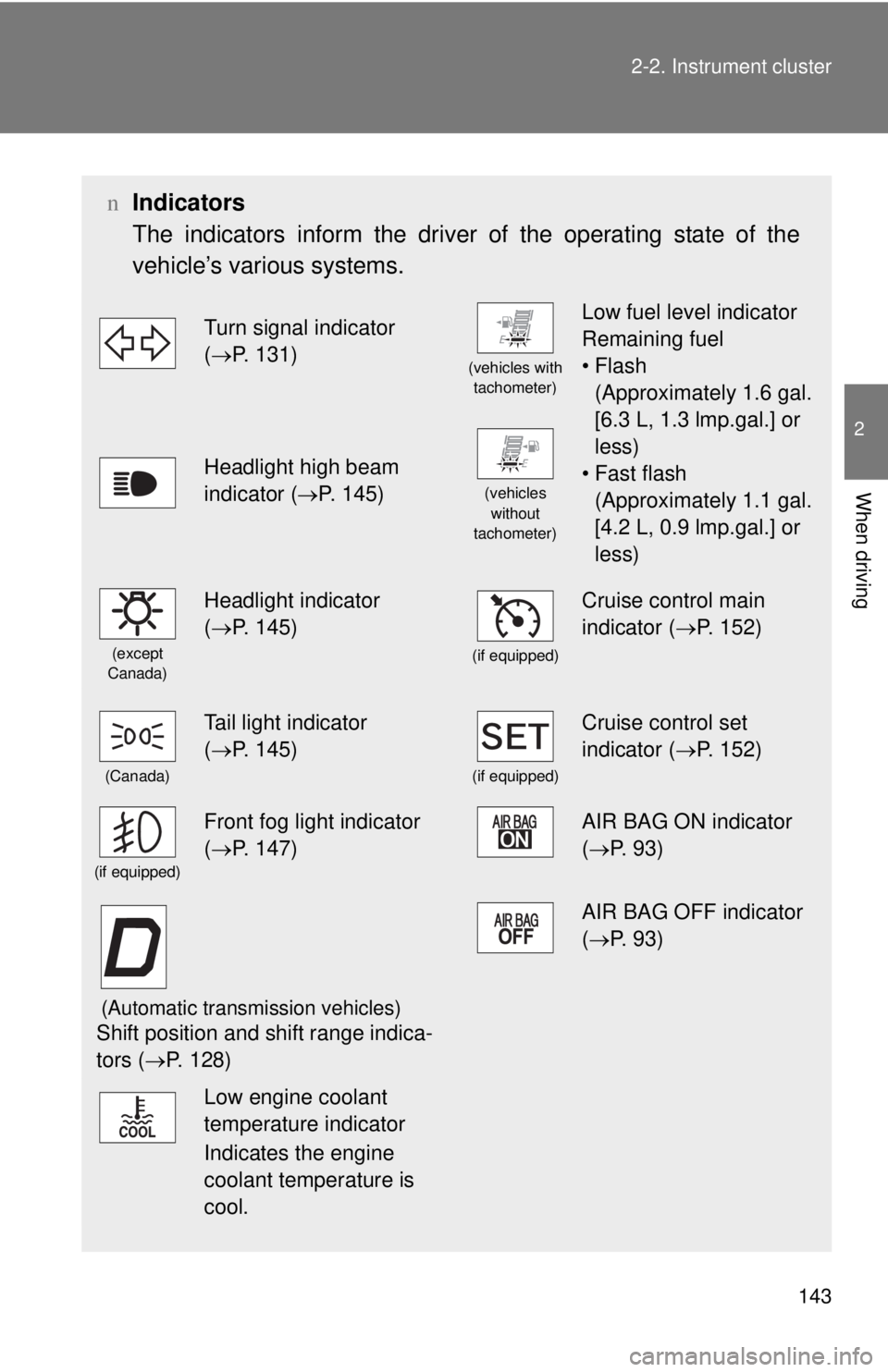
Indicators
The indicators inform the driver of the operating state of the
vehicle’s various systems.
Turn signal indicator
( →P. 131)
(vehicles with
tachometer)
Low fuel level indicator
Remaining fuel
•Flash
(Approximately 1.6 gal.
[6.3 L, 1.3 lmp.gal.] or
less)
• Fast flash
(Approximately 1.1 gal.
[4.2 L, 0.9 lmp.gal.] or
less)
Headlight high beam
indicator ( →P. 145)
(vehicles
without
tachometer)
(except
Canada)
Headlight indicator
( →P. 145)
(if equipped)
Cruise control main
indicator ( →P. 152)
(Canada)
Tail light indicator
( →P. 145)
(if equipped)
Cruise control set
indicator ( →P. 152)
(if equipped)
Front fog light indicator
( →P. 147)AIR BAG ON indicator
( →P. 93)
(Automatic transmission vehicles)
Shift position and shift range indica-
tors ( →P. 128)
AIR BAG OFF indicator
(→P. 93)
Low engine coolant
temperature indicator
Indicates the engine
coolant temperature is
cool.
Page 157 of 402
144 2-2. Instrument cluster
CAUTION
nIf a safety system warning light does not come on
Should a safety system light such as ABS and the SRS airbag warning light
not come on when you start the engine, this could mean that these systems
are not available to help protect you in an accident, which could result in
death or serious injury. Have the vehicle inspected by your Toyota dealer
immediately if this occurs.
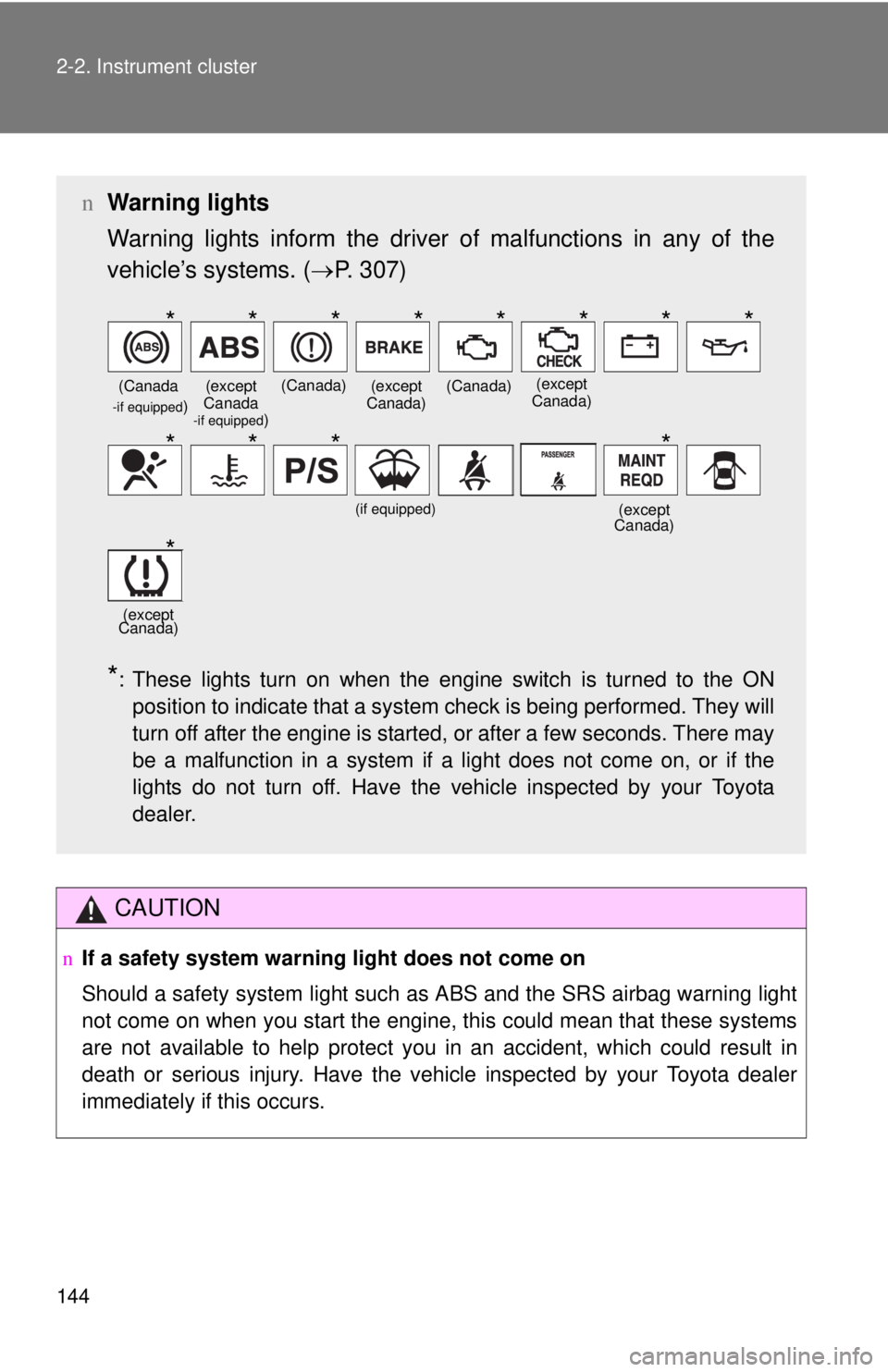
n Warning lights
Warning lights inform the driver of malfunctions in any of the
vehicle’s systems. ( →P. 3 0 7 )
*: These lights turn on when the engine switch is turned to the ON
position to indicate that a system check is being performed. They will
turn off after the engine is started, or after a few seconds. There may
be a malfunction in a system if a light does not come on, or if the
lights do not turn off. Have the vehicle inspected by your Toyota
dealer.
(Canada -if equipped)(except
Canada
-if equipped)
(Canada)(except
Canada)(Canada)(except
Canada)
(if equipped)(except
Canada)
(except
Canada)
********
****
*
Page 158 of 402
145
2
When driving
2-3. Operating the lights and wipers
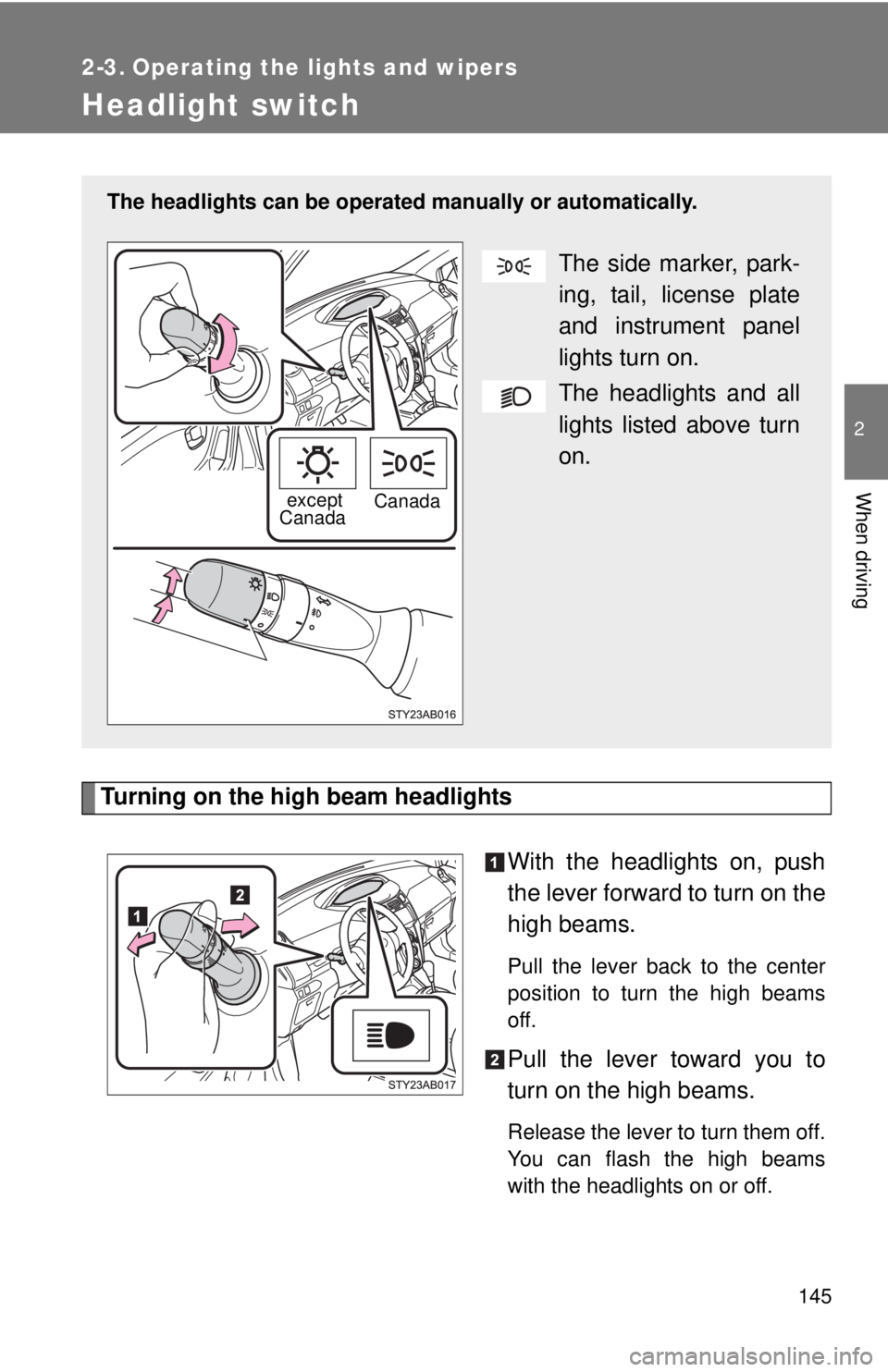
Headlight switch
Turning on the high beam headlights
With the headlights on, push
the lever forward to turn on the
h
igh beams.
Pull the lever back to the center
position to turn the high beams
off.
Pull the lever toward you to
turn on the high beams.
Release the lever to turn them off.
You can flash the high beams
with the headlights on or off.
The headlights can be operated manually or automatically.
The side marker, park-
ing, tail, license plate
an
d instrument panel
lights turn on.
The headlights and all
lights listed above turn
on
.
except
Canada Canada
Page 159 of 402

146 2-3. Operating the lights and wipers
nDaytime running light system (if equipped)
To make your vehicle more visible to other drivers, the headlights turn on
automatically (at a reduced intensity) whenever the engine is started and the
parking brake is released. Daytime r unning lights are not designed for use at
night.
n L
ight reminder buzzer
A buzzer sounds when the key is removed and the driver's door is opened
while the light
s are turned on.
NOTICE
nTo prevent battery discharge
Do not leave the lights on longer than necessary when the engine is not run-
ning.
Page 160 of 402
147
2-3. Operating the lights and wipers
2
When driving
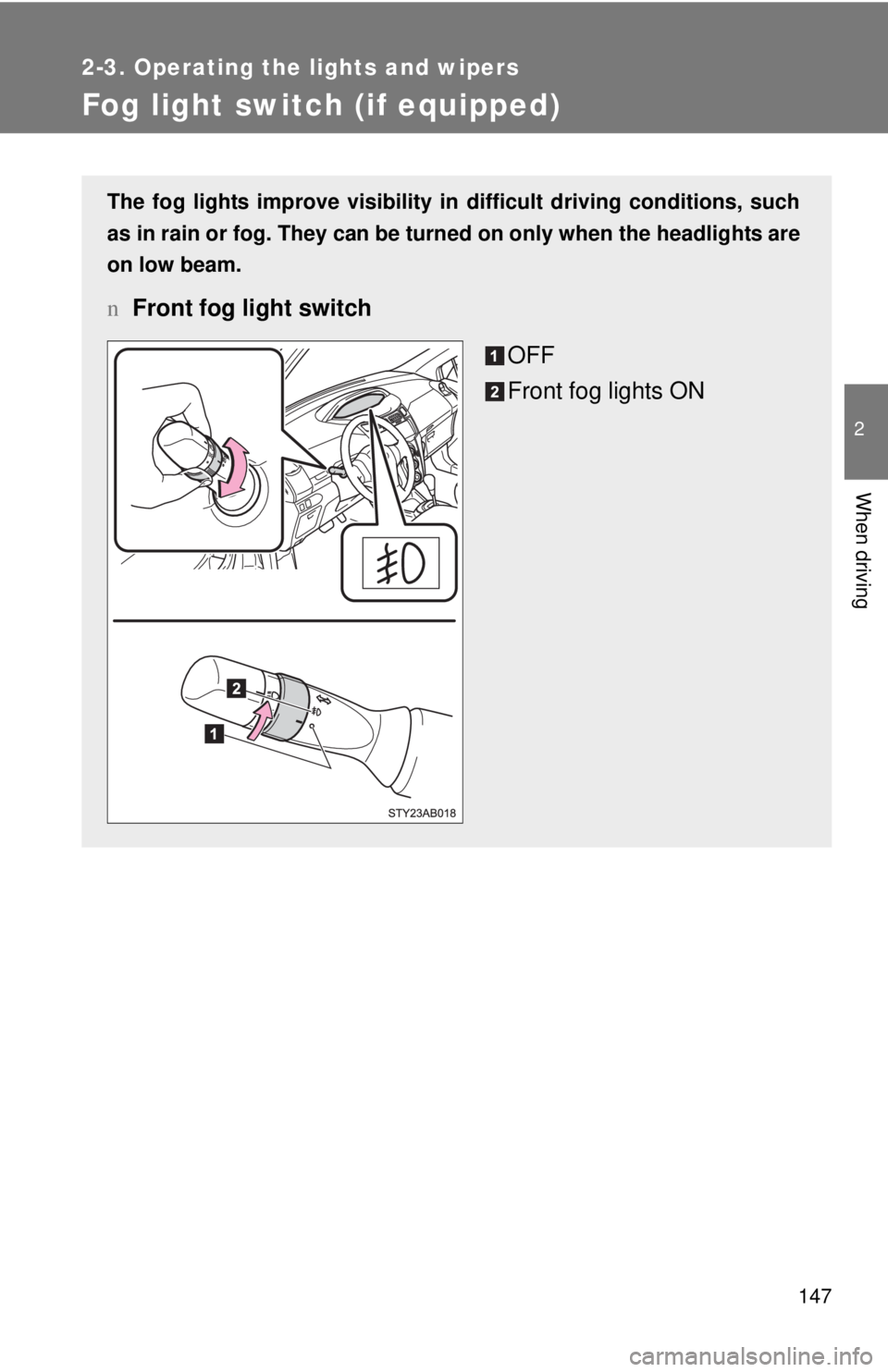
Fog light switch (if equipped)
The fog lights improve visibility in difficult driving conditions, such
as in rain or fog. They can be turned on only when the headlights are
on low beam.
n Front fog light switch
OFF
Front fog lights ON
Page 161 of 402
148
2-3. Operating the lights and wipers
Windshield wipers and washer
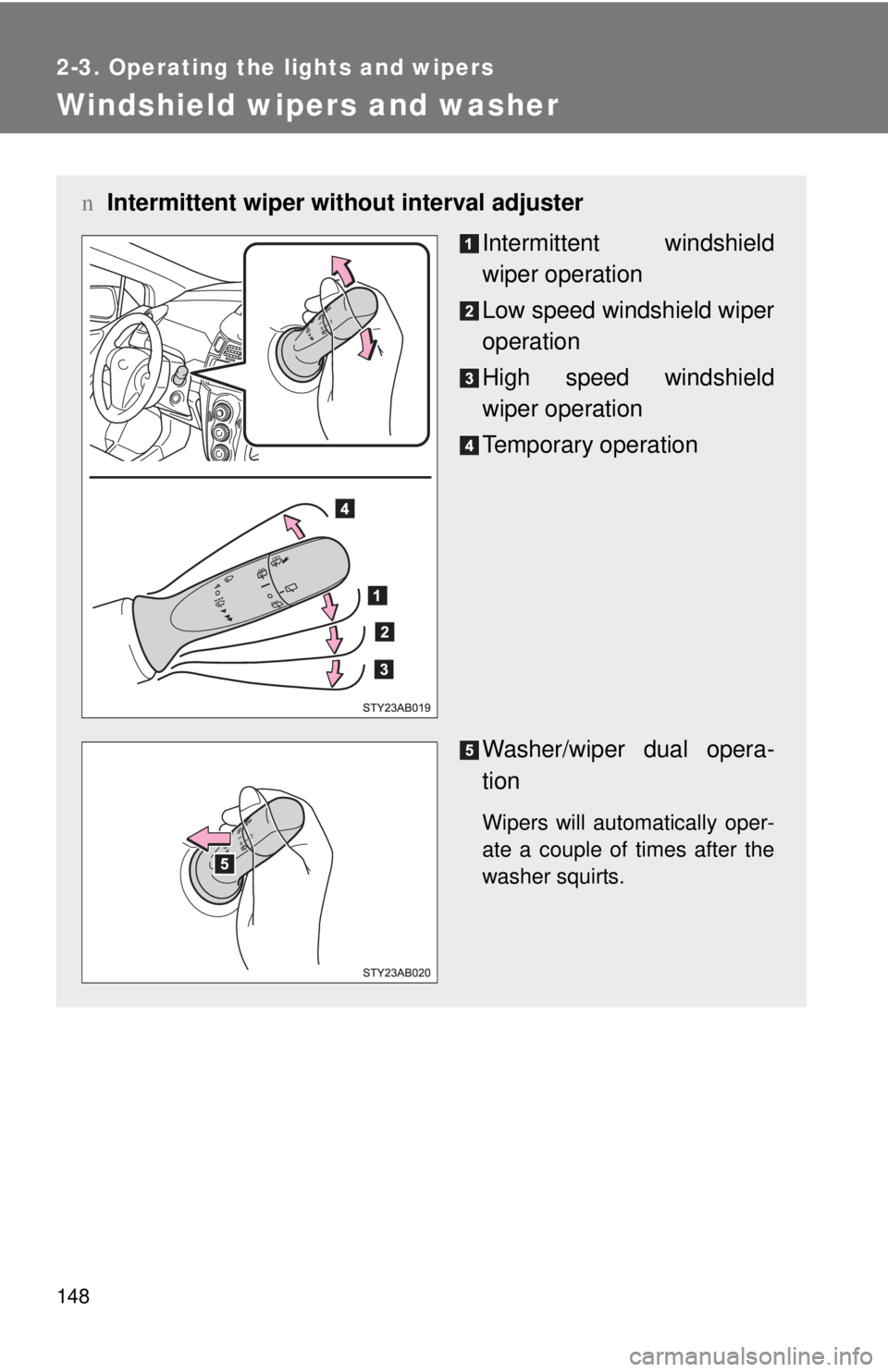
nIntermittent wiper wit hout interval adjuster
Intermittent windshield
wiper operation
Low speed windshield wiper
operation
High speed windshield
wiper operation
Temporary operation
Washer/wiper dual opera -
tion
Wipers will automatically oper -
ate a couple of times after the
washer squirt
s.
Page 162 of 402
149
2-3. Operating the lights and wipers
2
When driving
n
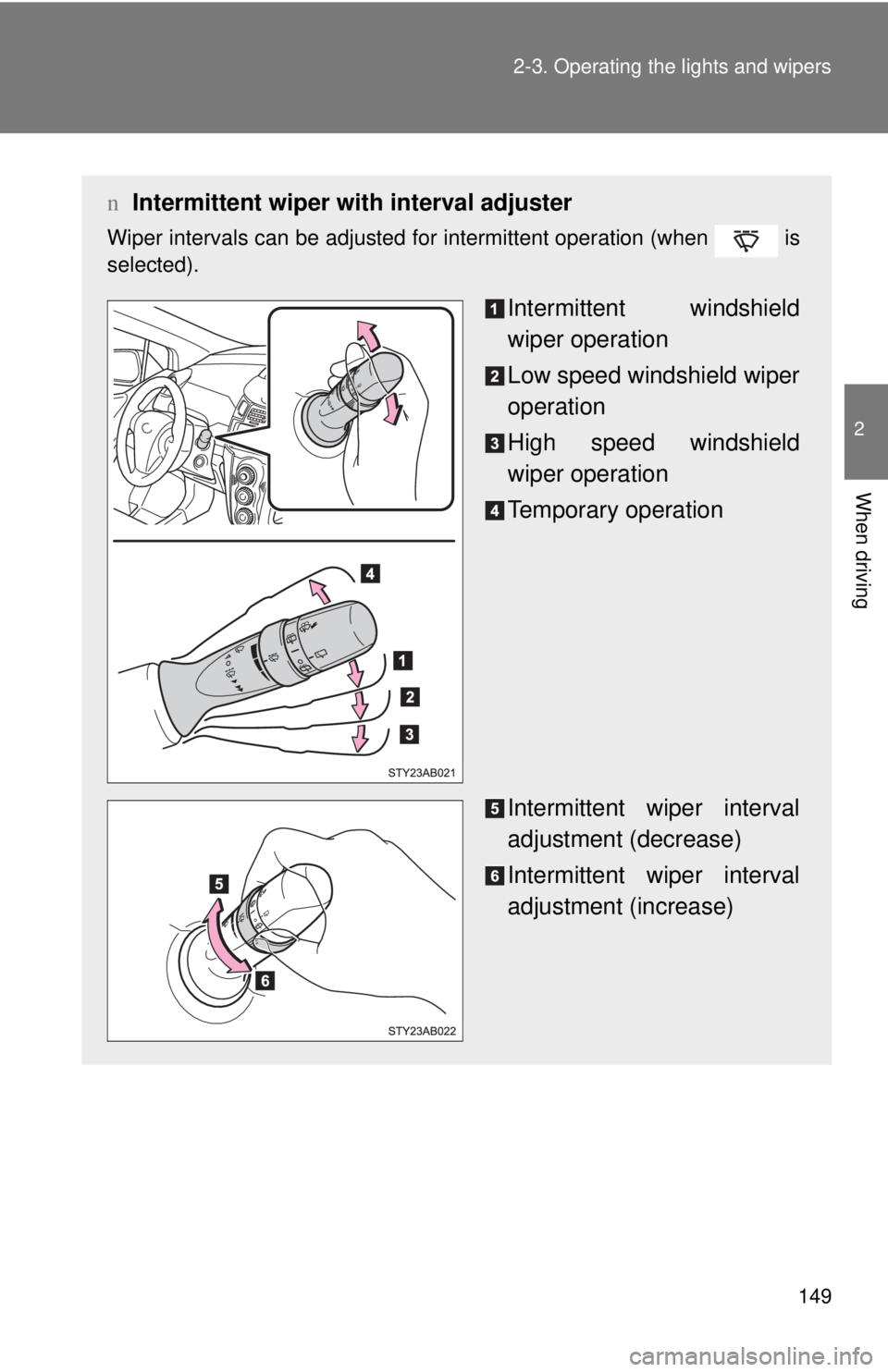
Intermittent wiper with interval adjuster
Wiper intervals can be adjusted for intermittent operation (when is
selected).
Intermittent windshield
wiper operation
Low speed windshield wiper
operation
High speed windshield
wiper operation
Temporary operation
Intermittent wiper interval
adjustment (decrease)
Intermittent wiper interval
adjustment (increase)
Page 163 of 402
150 2-3. Operating the lights and wipers
nThe windshield wiper and washer can be operated when
The engine switch must be in the ON position.
n If no windshield washer fluid spra
ys
Check that the washer nozzles are not blocked and if there is washer fluid in
the windshield washer fluid reserv
oir.
NOTICE
nWhen the windshield is dry
Do not use the wipers, as they may damage the windshield.
n When there is no washer fluid spray from the nozzle
Damage to the washer fluid pump may be caused if the lever is pulled
toward you and held continually.
n When a nozzle becomes block
Do not try to clear it with a pin or other object. The nozzle will be damaged.
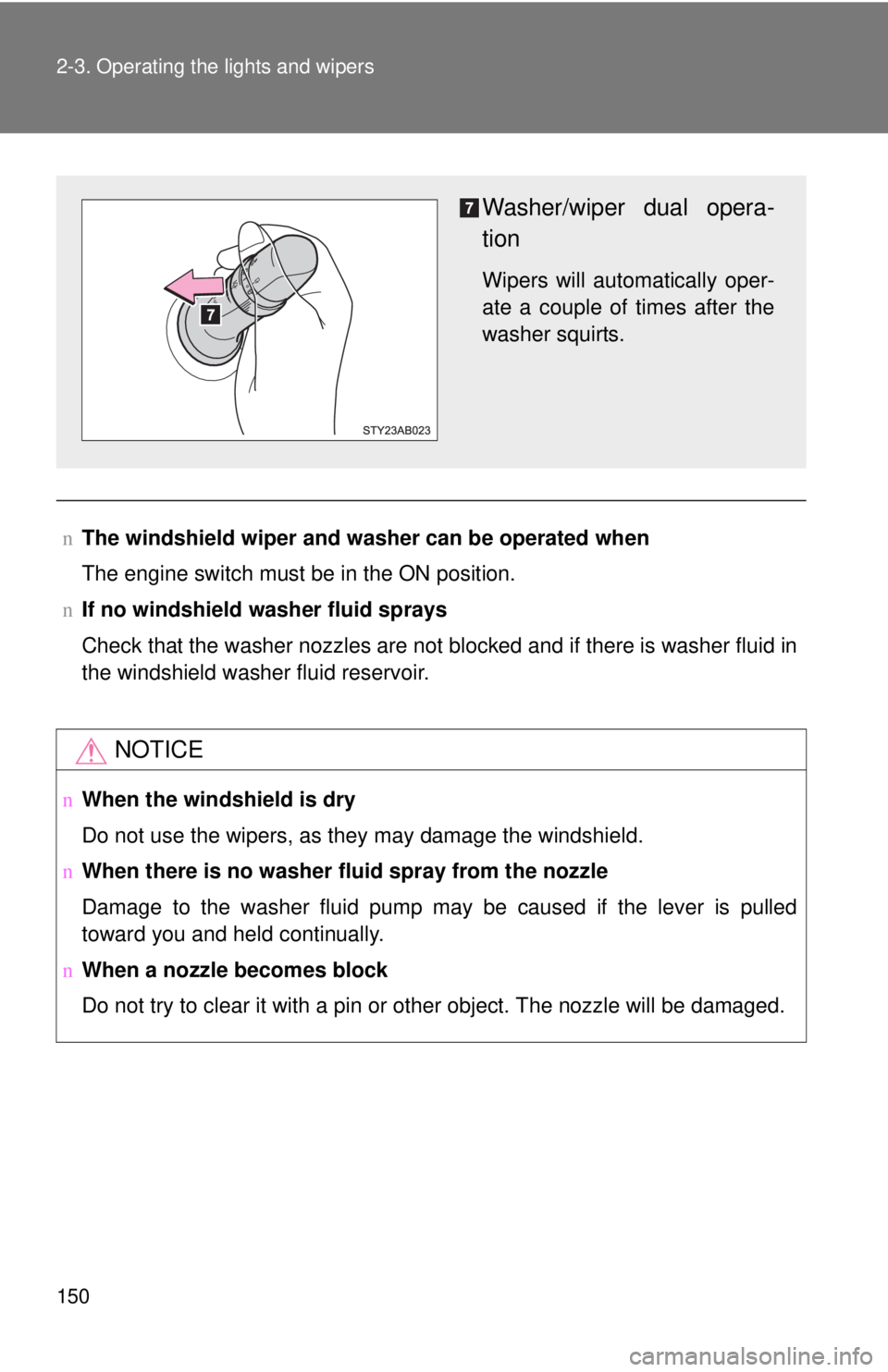
Washer/wiper dual opera-
tion
Wipers will automatically oper -
ate a couple of times after the
washer squirt
s.
Page 164 of 402
151
2-3. Operating the lights and wipers
2
When driving
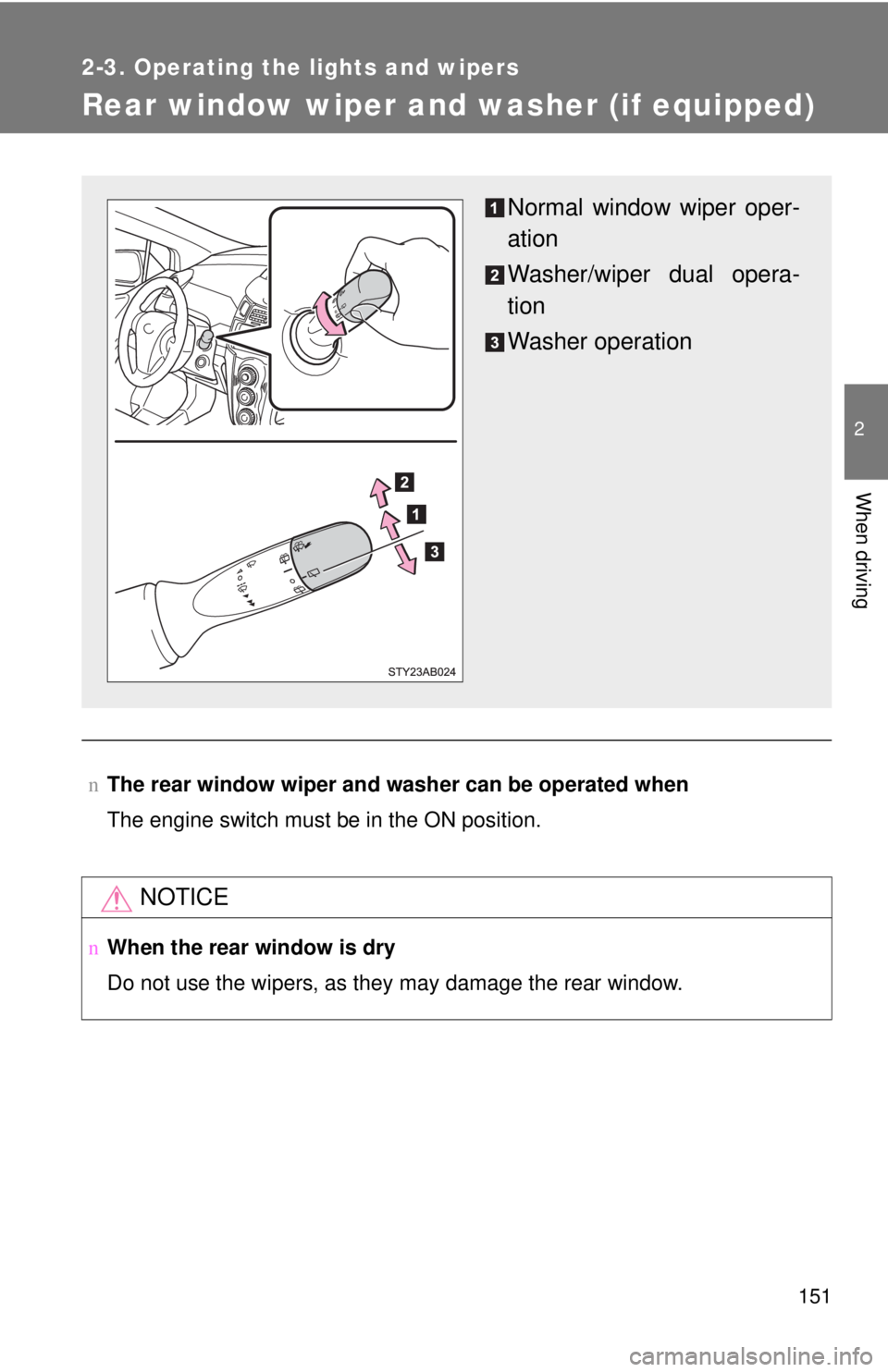
Rear window wiper and washer (if equipped)
nThe rear window wiper and washer can be operated when
The engine switch must be in the ON position.
NOTICE
nWhen the rear window is dry
Do not use the wipers, as they may damage the rear window.
Normal window wiper oper-
ation
Washer/wiper dual opera-
tion
Washer operation
Page 166 of 402
153
2-4. Using other
driving systems
2
When driving
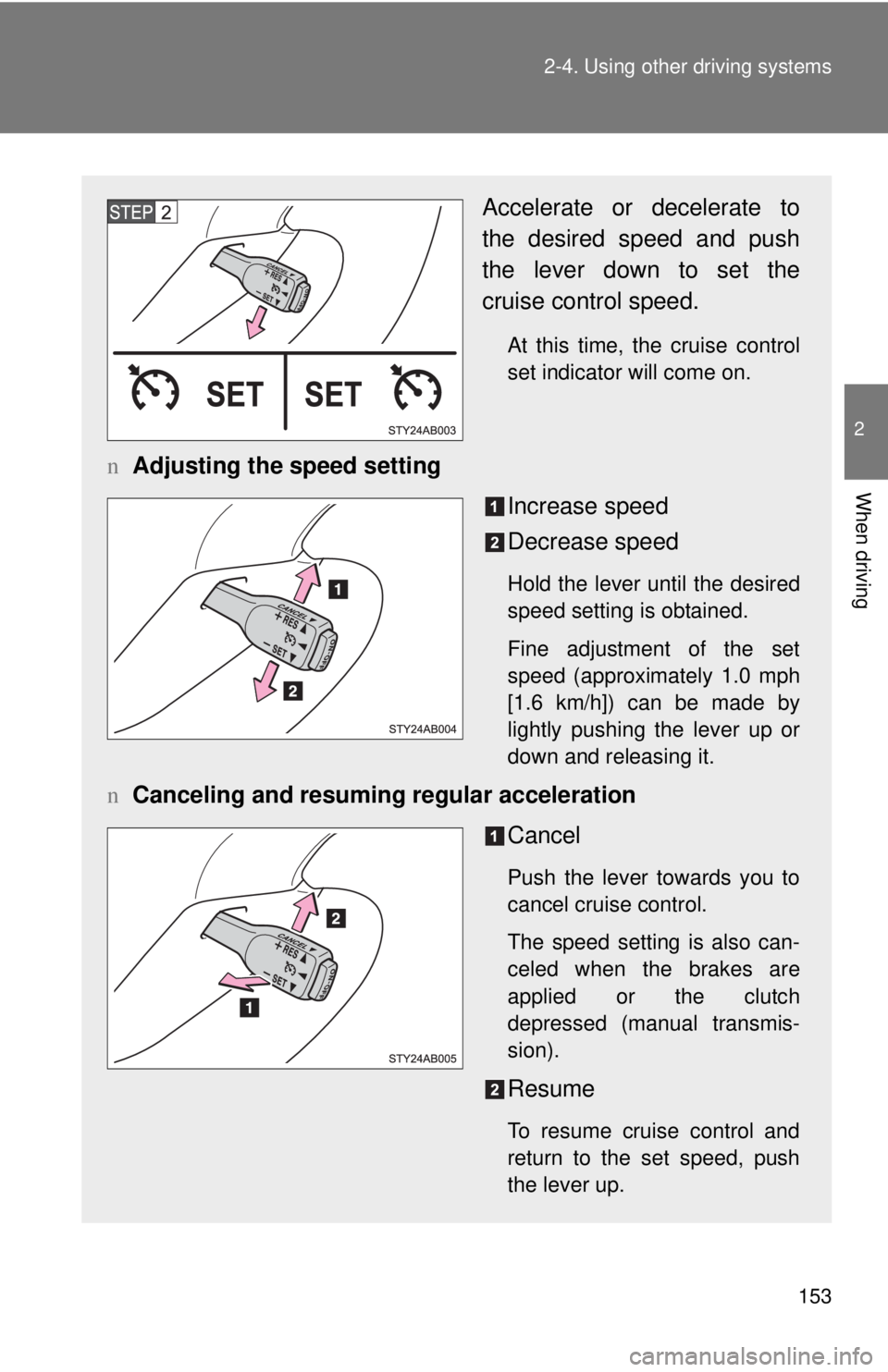
Accelerate or decelerate to
the desired speed and push
the lever down to set the
cruise control speed.
At this time, the cruise control
set indicator will come on.
nAdjusting the speed setting
Increase speed
Decrease speed
Hold the lever until the desired
speed setting is obtained.
Fine adjustment of the set
speed (approximately
1.0 mph
[1.6 km/h]) can be made by
lightly pushing the lever up or
down and releasing it.
n Canceling and resuming regular acceleration
Cancel
Push the lever towards you to
cancel cruise control.
The speed setting is also can-
celed when the brakes are
applied or the
clutch
depressed (manual transmis -
sion).
Resume
To resume cruise control and
return to the set speed, push
the lever up.