lock TOYOTA YARIS HATCHBACK 2010 Owners Manual
[x] Cancel search | Manufacturer: TOYOTA, Model Year: 2010, Model line: YARIS HATCHBACK, Model: TOYOTA YARIS HATCHBACK 2010Pages: 406, PDF Size: 8.14 MB
Page 3 of 406
1
OVERVIEW
FEATURES/OPERATIONS
SAFETY AND EMERGENCY FEATURES
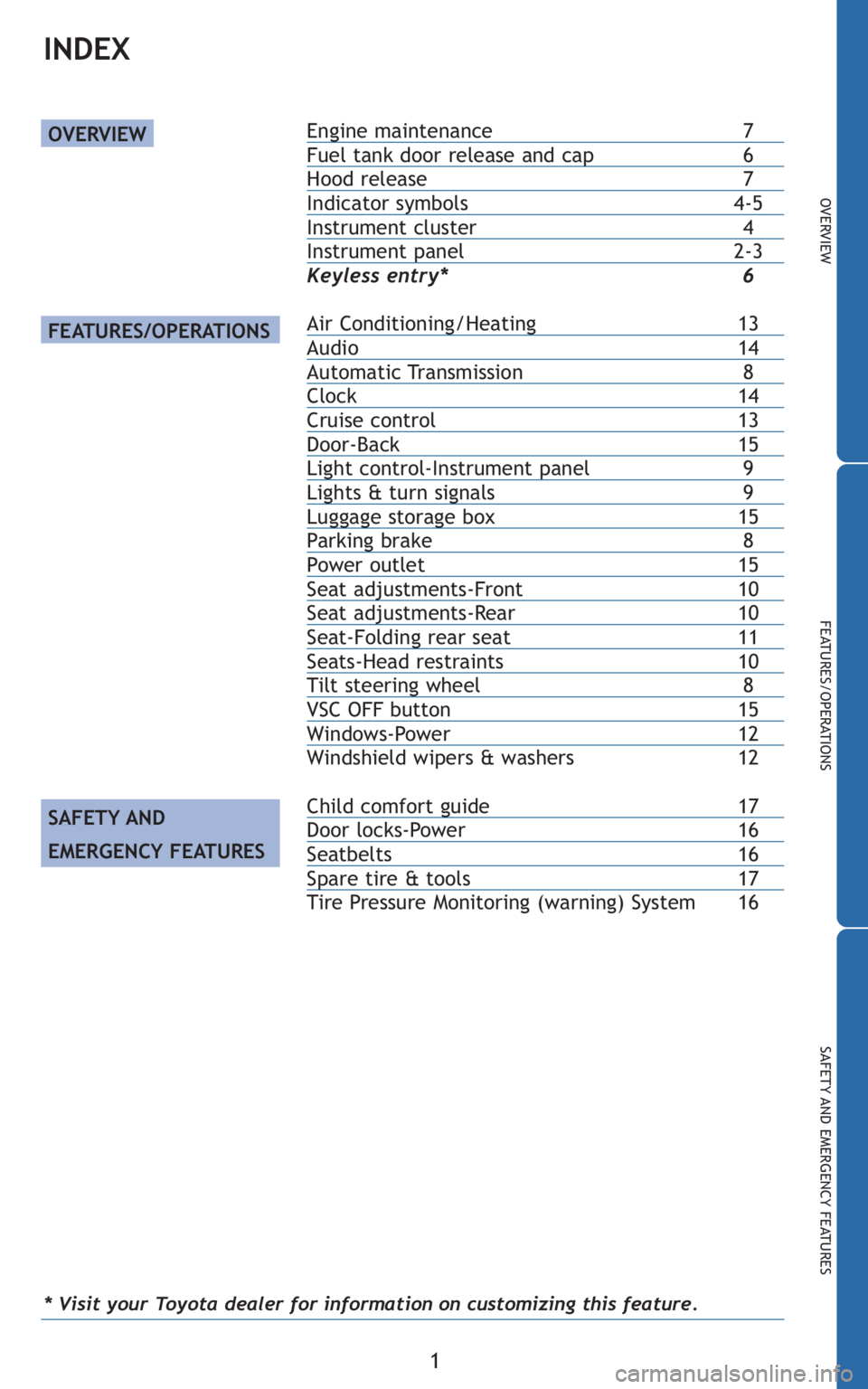
Engine maintenance7Fuel tank door release and cap 6Hood release 7Indicator symbols4-5Instrument cluster 4Instrument panel2-3
Keyless entry* 6
Air Conditioning/Heating13Audio 14Automatic Transmission 8Clock14Cruise control13Door-Back 15Light control-Instrument panel 9Lights & turn signals 9Luggage storage box15Parking brake 8Power outlet15Seat adjustments-Front10Seat adjustments-Rear10Seat-Folding rear seat11Seats-Head restraints10Tilt steering wheel 8VSC OFF button15Windows-Power 12
Windshield wipers & washers 12
Child comfort guide 17Door locks-Power 16Seatbelts16Spare tire & tools 17
Tire Pressure Monitoring (warning) System 16
OVERVIEW
FEATURES/OPERATIONS
SAFETY AND
EMERGENCY FEATURES
INDEX
* Visit your Toyota dealer for information on customizing this feature.
Page 5 of 406
3
OVERVIEW
FEATURES/OPERATIONS
SAFETY AND EMERGENCY FEATURES
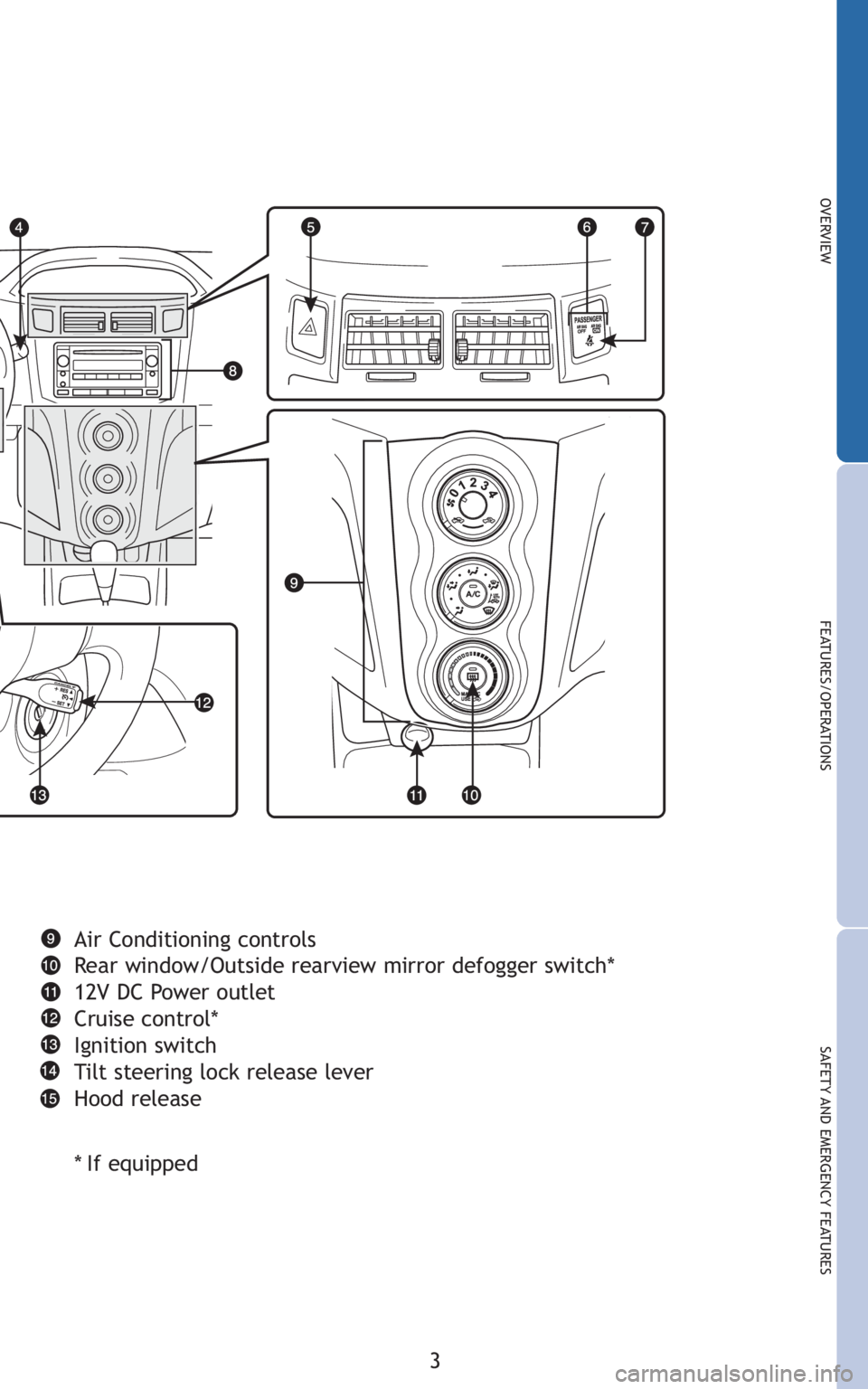
Air Conditioning controls
Rear window/Outside rearview mirror defogger switch*
12V DC Power outlet
Cruise control*
Ignition switch
Tilt steering lock release lever
Hood release
*If equipped
Page 6 of 406
4
OVERVIEW
Driver seatbelt reminder2
(alarm will sound if speed is over 12 mph)
Front passenger seatbelt reminder
2
(alarm will sound if speed is over 12 mph)
Brake system warning
1,2
1If indicator does not turn off within a few seconds of starting engine, there may
be a malfunction. Have vehicle inspected by your Toyota dealer.
Indicator symbols
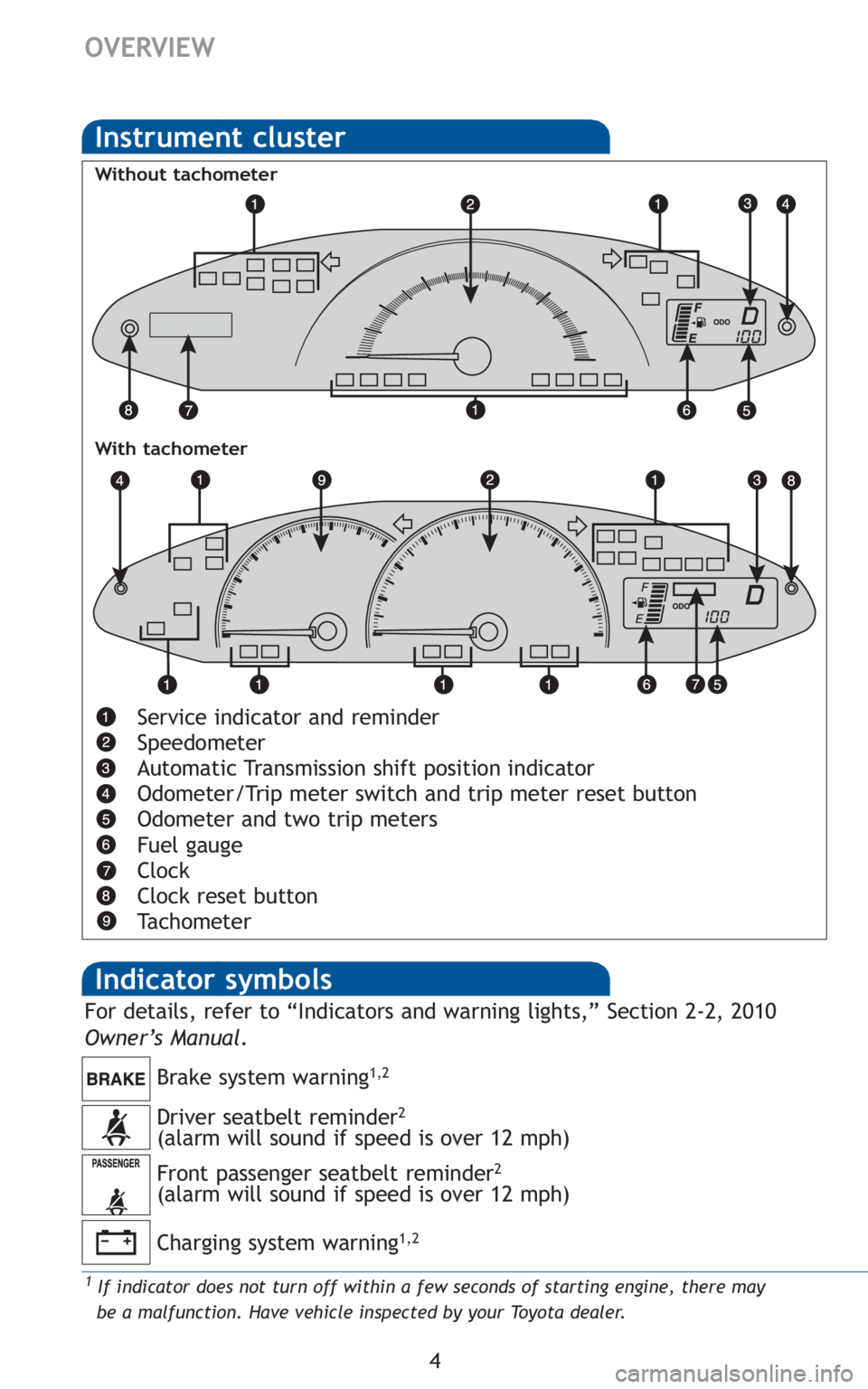
Service indicator and reminder
Speedometer
Automatic Transmission shift position indicator
Odometer/Trip meter switch and trip meter reset button
Odometer and two trip meters
Fuel gauge
Clock
Clock reset button
Tachometer
Instrument cluster
Without tachometer
With tachometer
Charging system warning1,2
For details, refer to “Indicators and warning lights,” Section 2-2, 2010
Owner’s Manual .
Page 7 of 406
5
OVERVIEW
FEATURES/OPERATIONS
SAFETY AND EMERGENCY FEATURES
2For details, refer to “If a warning light turns on or a warning buzzer sounds,” Section
5-2, 2010 Owner’s Manual.
3For details, refer to “If your vehicle overheats,” Section 5-2, 2010 Owner’s Manual.
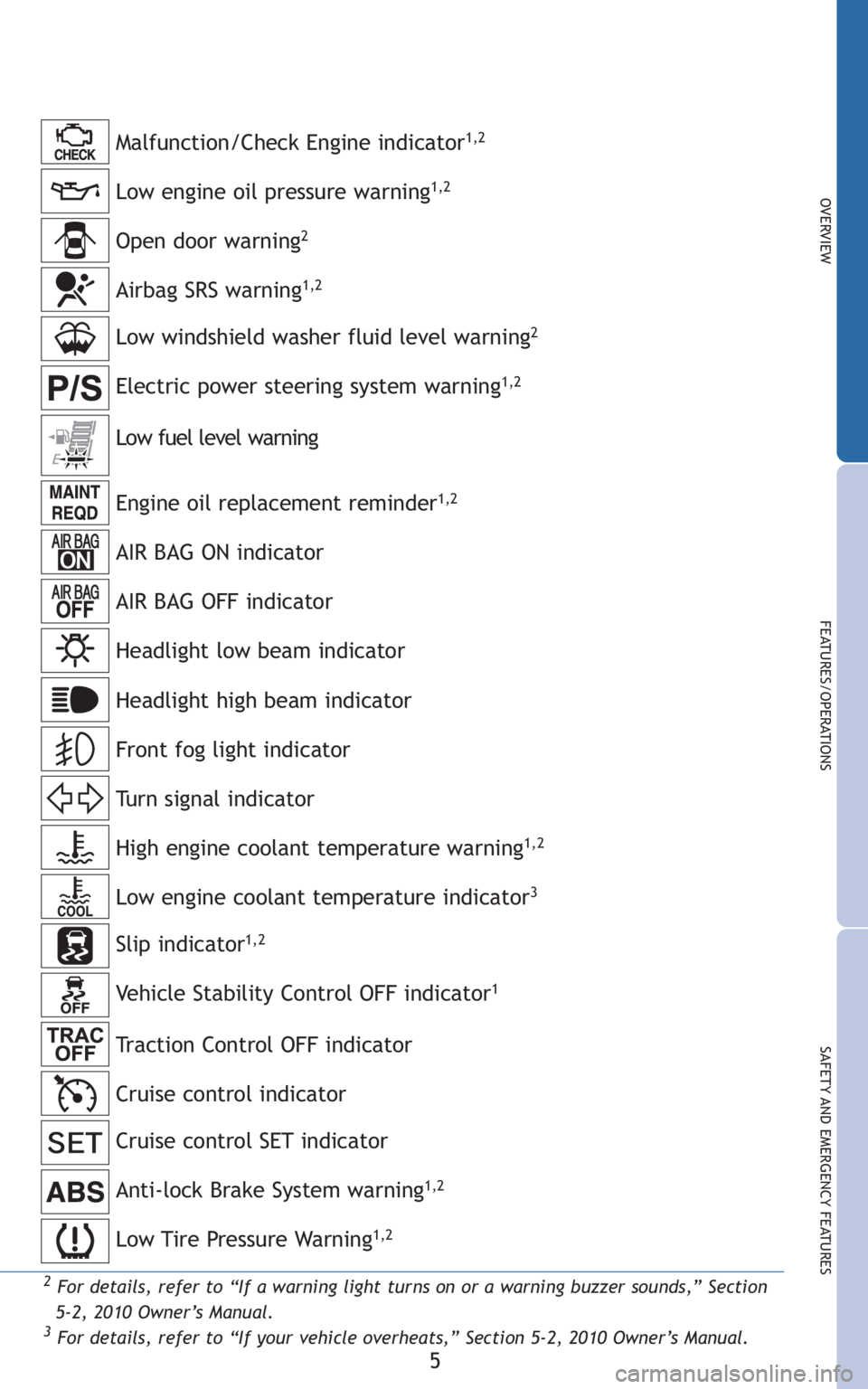
Low engine oil pressure warning1,2
Anti-lock Brake System warning1,2
Malfunction/Check Engine indicator1,2
Open door warning2
Low windshield washer fluid level warning2
Engine oil replacement reminder1,2
AIR BAG ON indicator
AIR BAG OFF indicator
Headlight low beam indicator
Turn signal indicator
Low fuel level warning
Headlight high beam indicator
High engine coolant temperature warning
1,2
Airbag SRS warning1,2
Electric power steering system warning1,2
Low engine coolant temperature indicator3
Front fog light indicator
Low Tire Pressure Warning1,2
Cruise control SET indicator
Cruise control indicator Slip indicator
1,2
Vehicle Stability Control OFF indicator1
Traction Control OFF indicator
Page 8 of 406
6
OVERVIEW
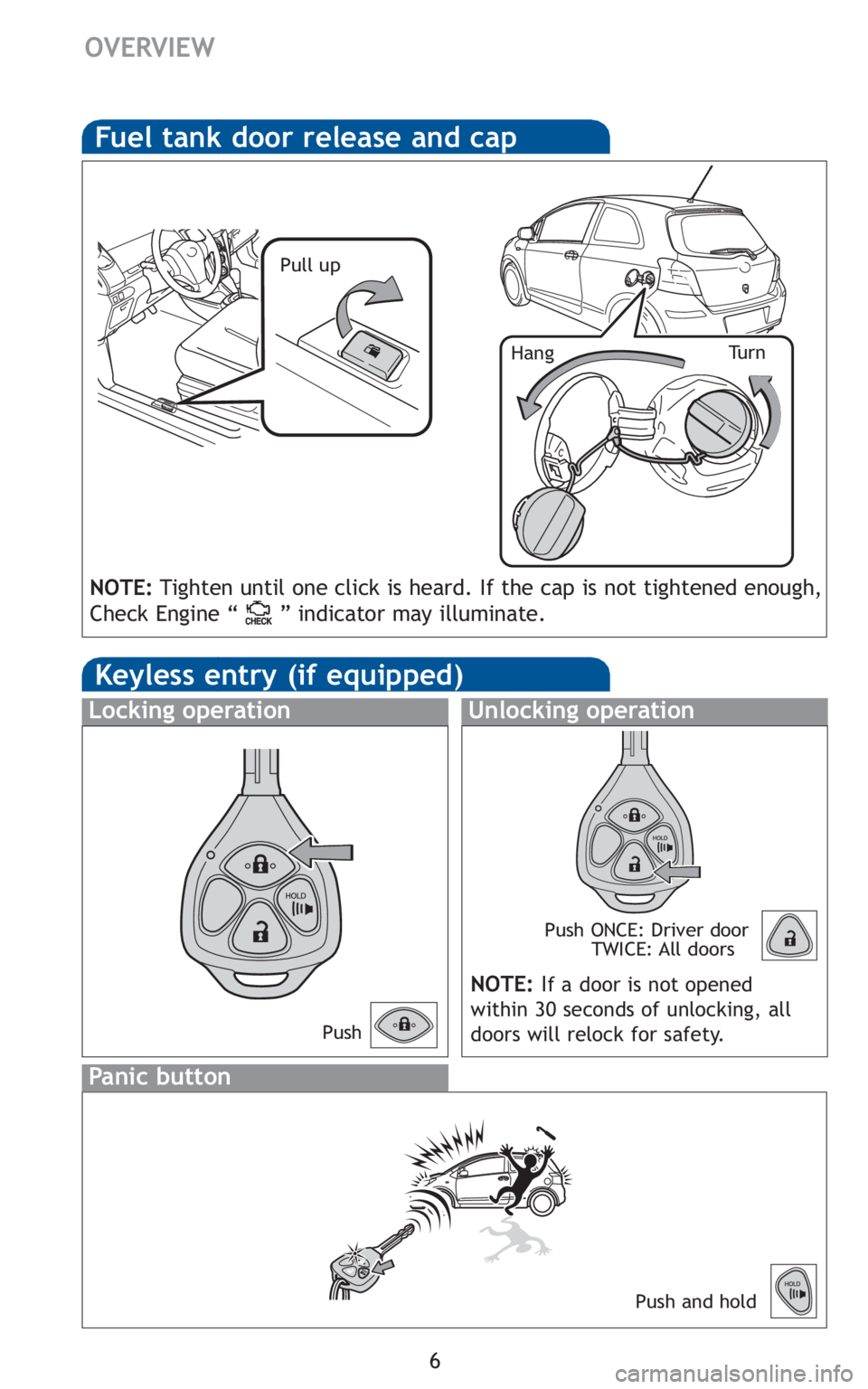
Fuel tank door release and cap
Pull up
Tu r n
Hang
NOTE: Tighten until one click is heard. If the cap is not tightened enough,
Check Engine “ ” indicator may illuminate.
Keyless entry (if equipped)
Unlocking operation
Panic button
Push ONCE: Driver door TWICE: All doors
Locking operation
Push and hold
NOTE: If a door is not opened
within 30 seconds of unlocking, all
doors will relock for safety.
Push
Page 10 of 406
8
FEATURES/OPERATIONS
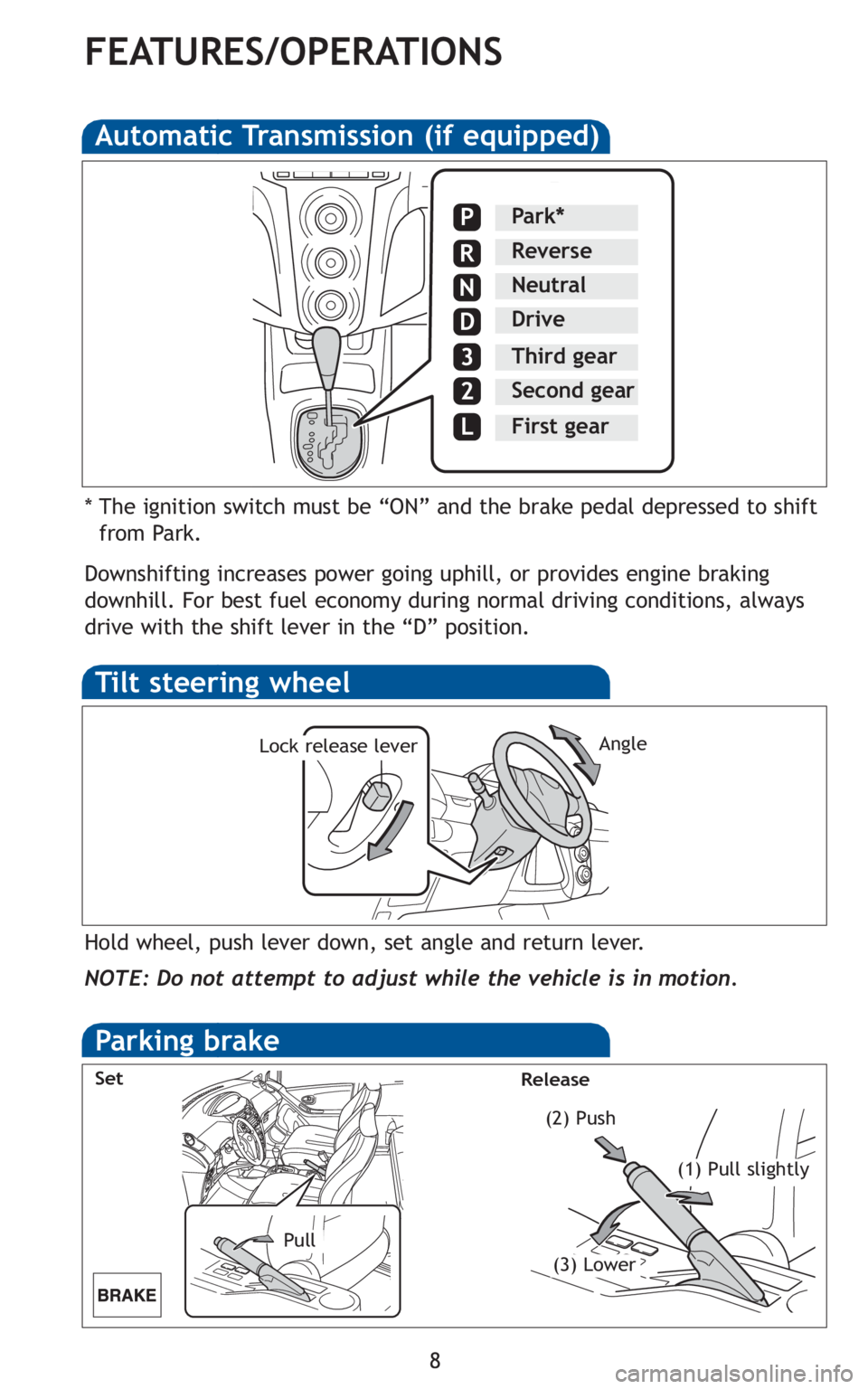
Automatic Transmission (if equipped)
* The ignition switch must be “ON” and the brake pedal depressed to shiftfrom Park.
Downshifting increases power going uphill, or provides engine braking
downhill. For best fuel economy during normal driving conditions, always
drive with the shift lever in the “D” position.
Park*
Reverse
Neutral
Drive
Third gear
Second gear
First gear
P
R
N
D
3
2
L
Tilt steering wheel
Angle
Hold wheel, push lever down, set angle and return lever.
NOTE: Do not attempt to adjust while the vehicle is in motion.
Lock release lever
Parking brake
Pull (2) Push
Set
Release
(1) Pull slightly
(3) Lower
Page 12 of 406
10
FEATURES/OPERATIONS
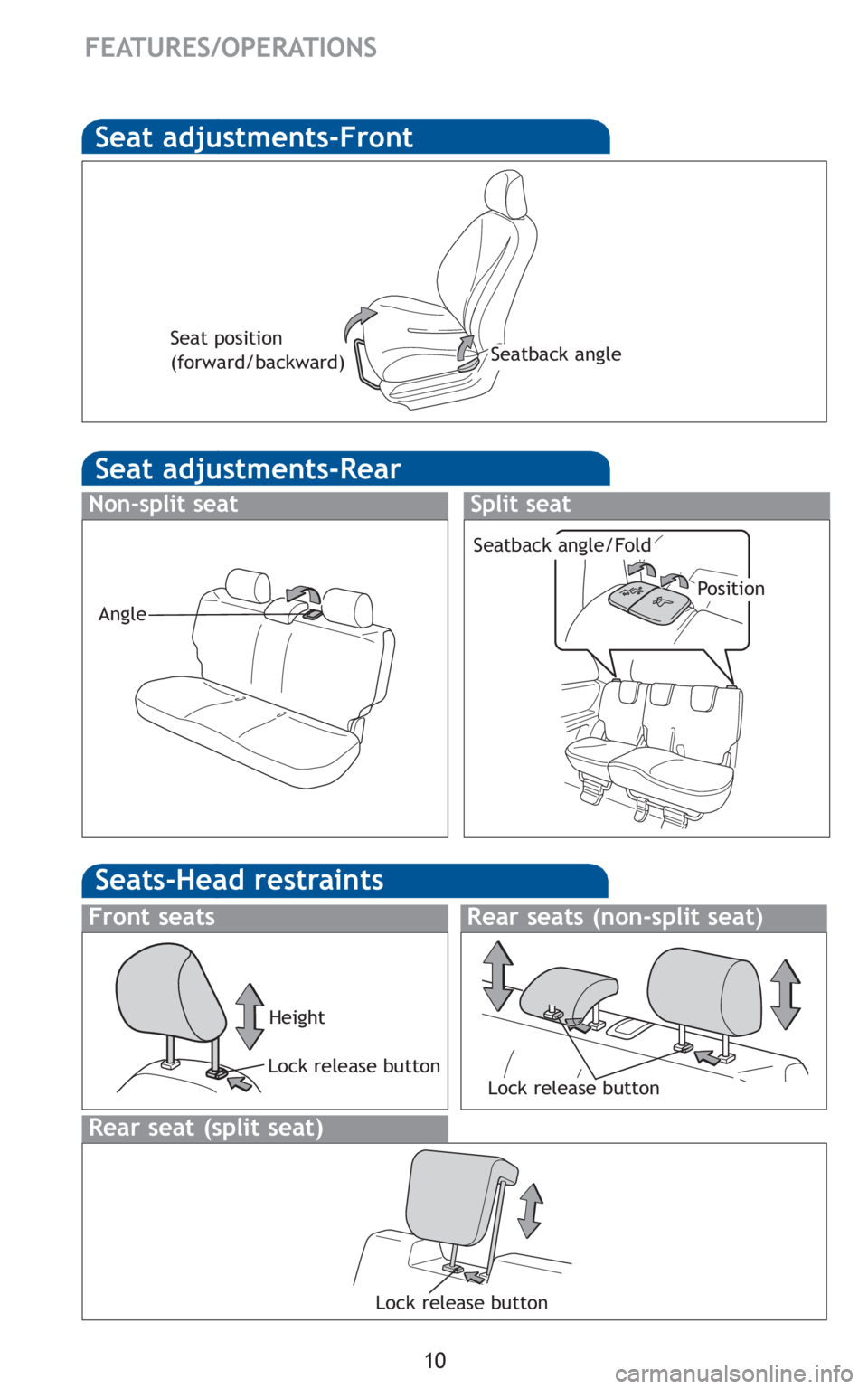
Seat adjustments-Front
Seat adjustments-Rear
Non-split seat
Seatback angle
Seat position
(forward/backward)
Angle
Split seat
Position
Seatback angle/Fold
Lock release button
Lock release button Height
Rear seat (split seat)
Front seats
Seats-Head restraints
Rear seats (non-split seat)
Lock release button
Page 14 of 406
12
FEATURES/OPERATIONS
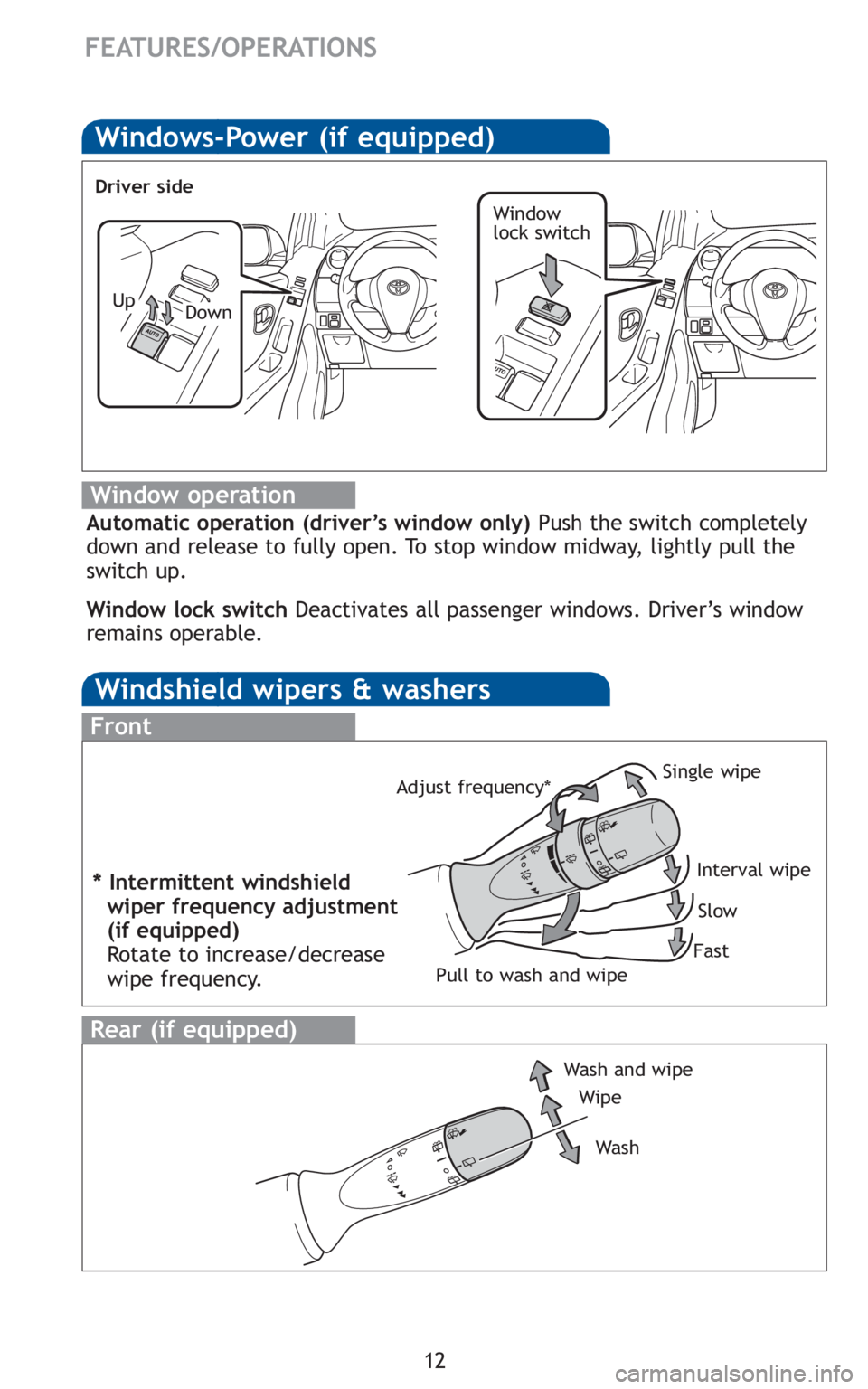
Windows-Power (if equipped)
Window operation
Automatic operation (driver’s window only)Push the switch completely
down and release to fully open. To stop window midway, lightly pull the
switch up.
Window lock switch Deactivates all passenger windows. Driver’s window
remains operable.
Window
lock switch
Up
Driver side
Down
Windshield wipers & washers
Wipe
Wash and wipe
Wa s h
Rear (if equipped)
Front
Single wipe
Interval wipeSlow
Fast
Pull to wash and wipe
Adjust frequency*
* Intermittent windshield
wiper frequency adjustment
(if equipped)
Rotate to increase/decrease
wipe frequency.
Page 16 of 406
14
FEATURES/OPERATIONS
Audio (if equipped)
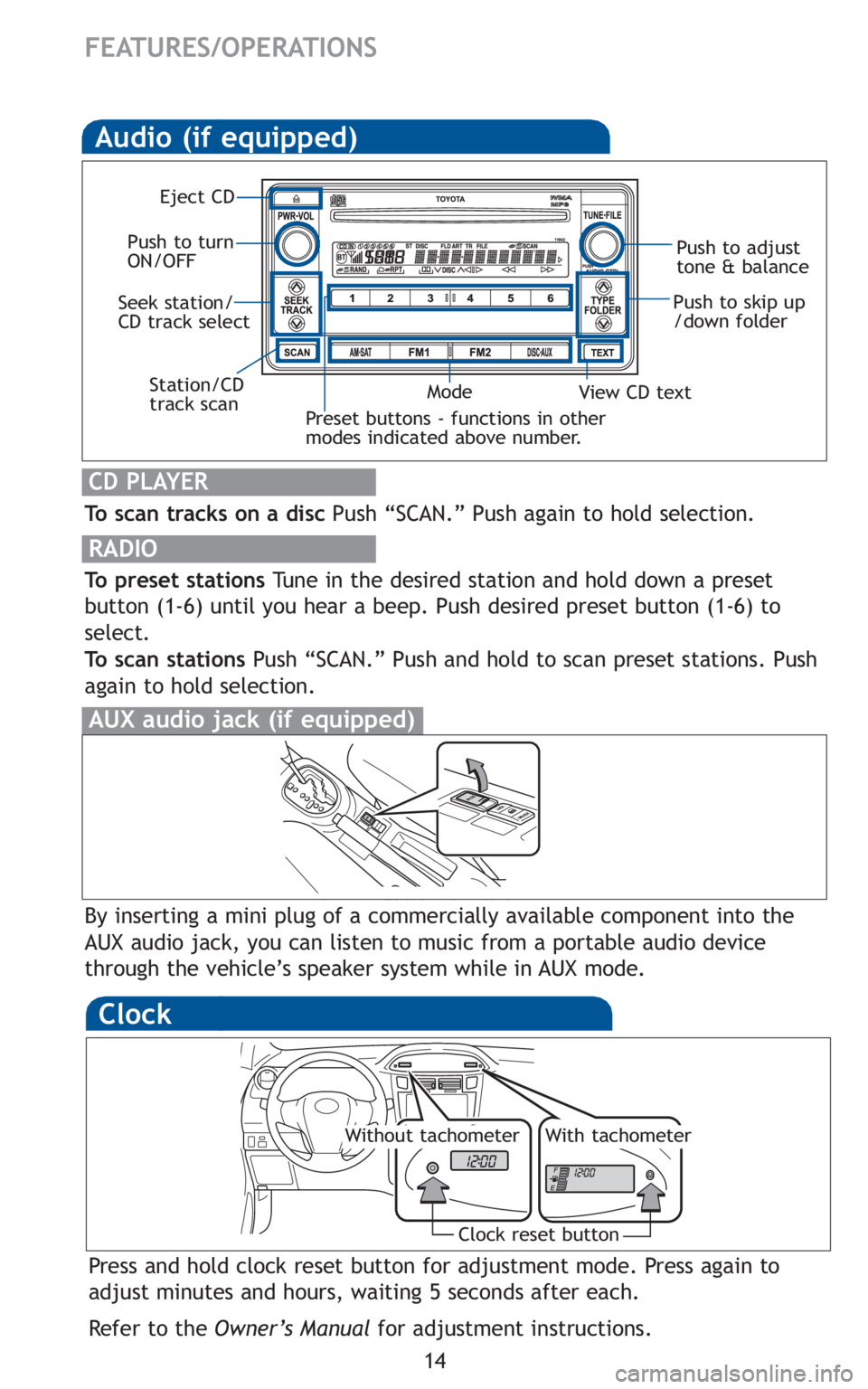
To scan tracks on a discPush “SCAN.” Push again to hold selection.
RADIO
To preset stationsTune in the desired station and hold down a preset
button (1-6) until you hear a beep. Push desired preset button (1-6) to
select.
To scan stations Push “SCAN.” Push and hold to scan preset stations. Push
again to hold selection.
CD PLAYER
Preset buttons - functions in other
modes indicated above number.
View CD text
Push to skip up
/down folder
Eject CD
Push to turn
ON/OFF Push to adjust
tone & balance
Mode
Seek station/
CD track select
Station/CD
track scan
By inserting a mini plug of a commercially available component into the
AUX audio jack, you can listen to music from a portable audio device
through the vehicle’s speaker system while in AUX mode.
AUX audio jack (if equipped)
Clock
Press and hold clock reset button for adjustment mode. Press again to
adjust minutes and hours, waiting 5 seconds after each.
Refer to the Owner’s Manual for adjustment instructions.
Clock reset button
Without tachometerWith tachometer
Page 17 of 406
15
OVERVIEW
FEATURES/OPERATIONS
SAFETY AND EMERGENCY FEATURES
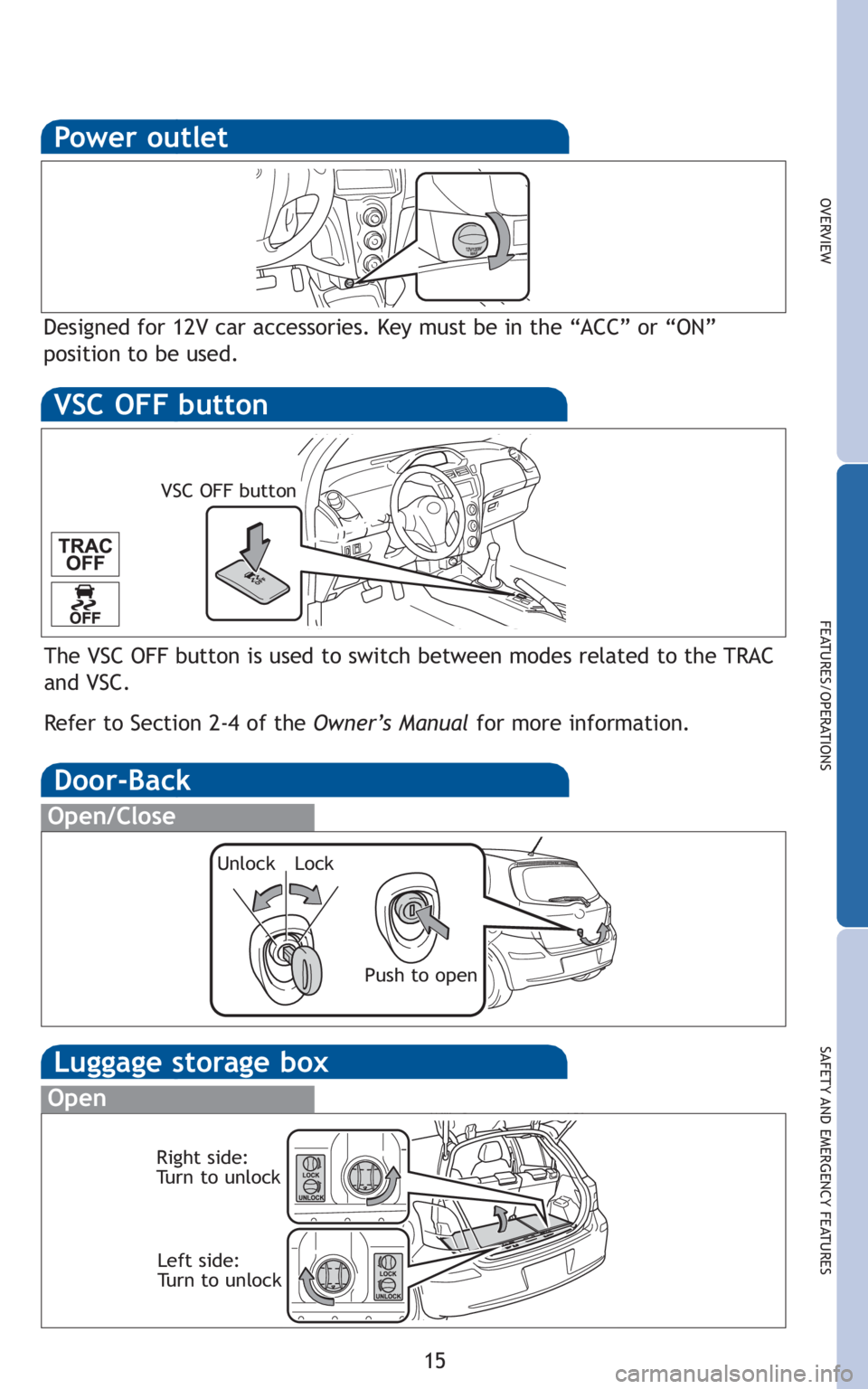
Luggage storage box
Open
Right side:
Turn to unlockLeft side:
Turn to unlock
Power outlet
Designed for 12V car accessories. Key must be in the “ACC” or “ON”
position to be used.
Door-Back
Open/Close
Unlock Lock
Push to open
The VSC OFF button is used to switch between modes related to the TRAC
and VSC.
Refer to Section 2-4 of the Owner’s Manualfor more information.
VSC OFF button
VSC OFF button