eco TOYOTA YARIS HATCHBACK 2015 Owner's Guide
[x] Cancel search | Manufacturer: TOYOTA, Model Year: 2015, Model line: YARIS HATCHBACK, Model: TOYOTA YARIS HATCHBACK 2015Pages: 540, PDF Size: 34.12 MB
Page 101 of 540
1012. Instrument cluster
2
Instrument cluster
YARIS_F_WE_52G04E
■Updating the past record data
Update the average fuel consumption by selecting “Update” to measure the
current fuel consumption again.
■ Resetting the data
The fuel consumption data can be deleted by selecting “Clear”.
■ Cruising range
Displays the estimated maximum distance that can be driven with the quan-
tity of fuel remaining.
This distance is computed based on your average fuel consumption.
As a result, the actual distance that can be driven may differ from that dis-
played.
Page 108 of 540
1083-1. Key information
YARIS_F_WE_52G04E
■ Electronic key battery depletion (vehicles with a smart entry & start sys-
tem)
● The standard battery life is 1 to 2 years.
● If the battery becomes low, an alarm will sound in the cabin when the engine
stops. ( P. 444)
● As the electronic key always receives radio waves, the battery will become
depleted even if the electronic key is not used. The following symptoms indi-
cate that the electronic key battery may be depleted. Replace the battery
when necessary. ( P. 394)
• The smart entry & start system or the wireless remote control does not
operate.
• The detection area becomes smaller.
• The LED indicator on the key surface does not turn on.
● To avoid serious deterioration, do not leave the electronic key within 1 m
(3 ft.) of the following electrical appliances that produce a magnetic field:
•TVs
• Personal computers
• Cellular phones, cordless phones and battery chargers
• Recharging cellular phones or cordless phones
• Induction cookers
• Table lamps
■ Replacing the battery
P. 394
■ Confirmation of the registered key number (vehicles with a smart entry &
start system)
The number of keys already registered to the vehicle can be confirmed. Ask
any authorized Toyota dealer or re pairer, or another duly qualified and
equipped professional for details.
■ If a wrong key is used
On some models, the key cylinder rotates freely to isolate inside mechanism.
■ Customization
Settings (e.g. wireless remote control system) can be changed.
(Customizable features: P. 516)
Page 116 of 540
1163-2. Opening, closing and locking the doors
YARIS_F_WE_52G04E
Side doors
The vehicle can be locked and unlocked using the entry function,
wireless remote control, key or door lock switches.
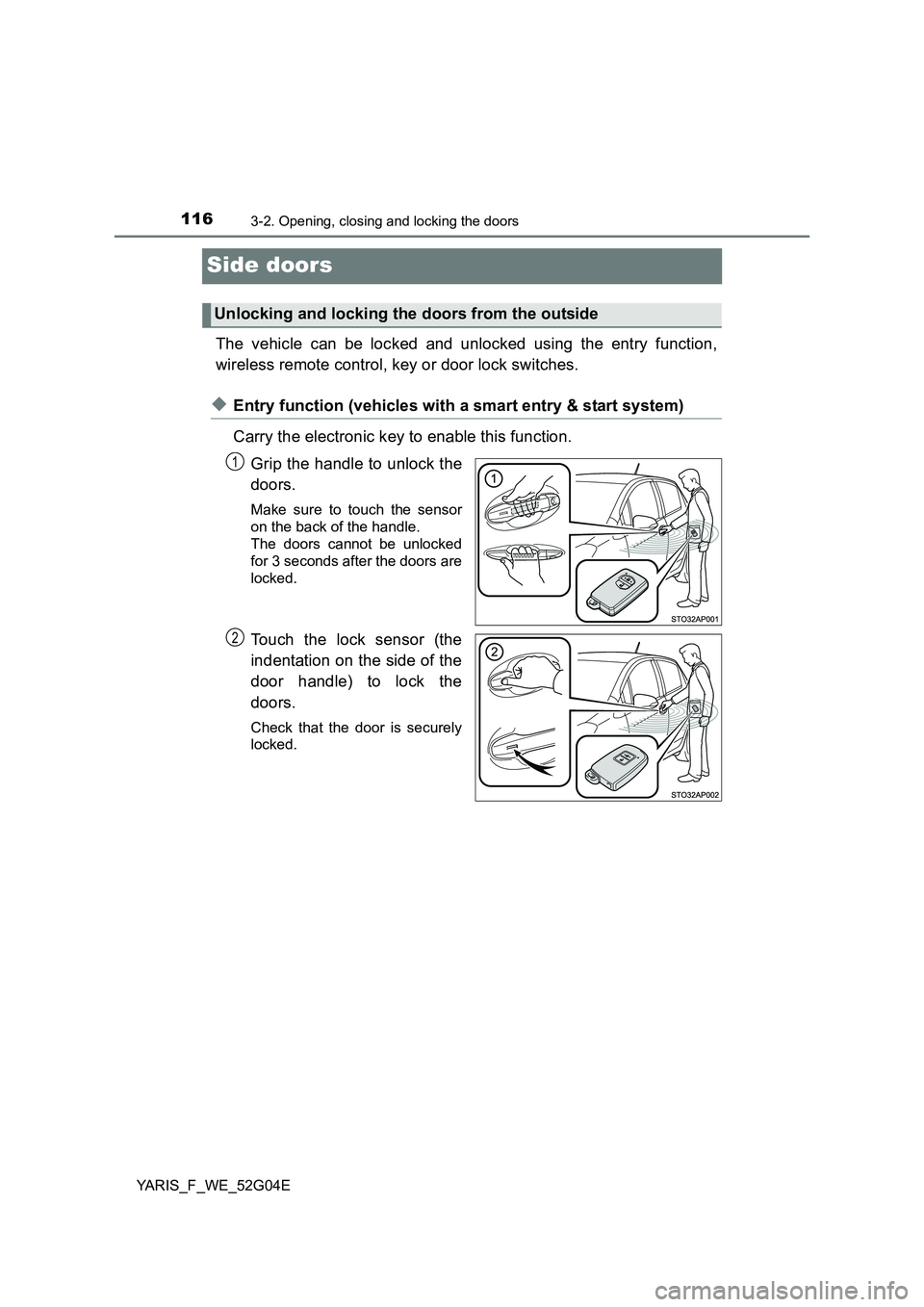
◆Entry function (vehicles with a smart entry & start system)
Carry the electronic key to enable this function.
Grip the handle to unlock the
doors.
Make sure to touch the sensor
on the back of the handle.
The doors cannot be unlocked
for 3 seconds after the doors are
locked.
Touch the lock sensor (the
indentation on the side of the
door handle) to lock the
doors.
Check that the door is securely
locked.
Unlocking and locking the doors from the outside
1
2
Page 119 of 540
1193-2. Opening, closing and locking the doors
3
Operation of each component
YARIS_F_WE_52G04E
■ Security feature
Vehicles without a smart entry & start system
If a door is not opened within approximately 30 seconds after the vehicle is
unlocked, the security feature automatically locks the vehicle again.
Vehicles with a smart entry & start system
If a door is not opened within approximately 30 seconds after the vehicle is
unlocked, the security feature automatically locks the vehicle again. (How-
ever, depending on the location of the electronic key, the key may be
detected as being in the vehicle. In this case, vehicle may be unlocked.)
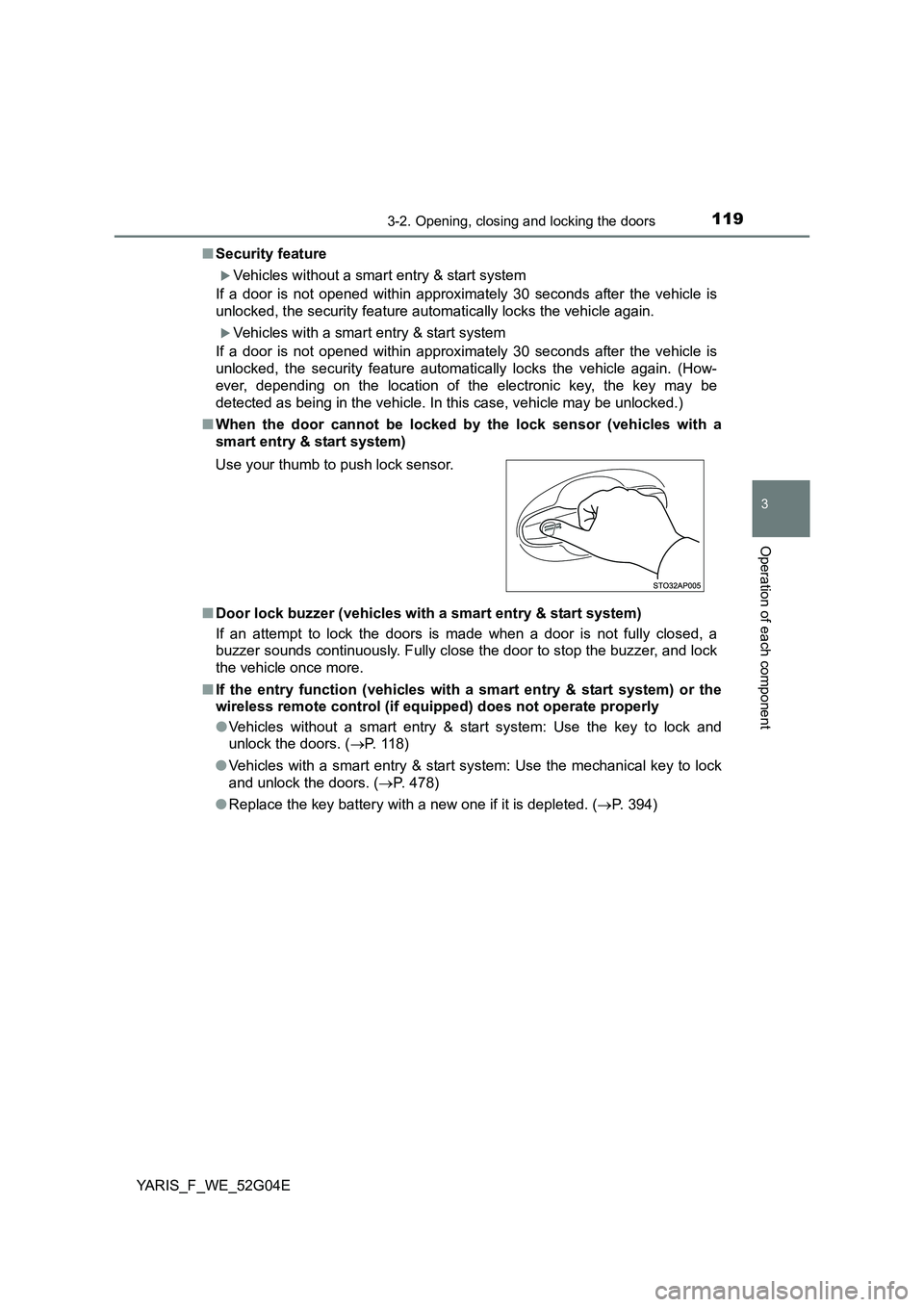
■ When the door cannot be locked by the lock sensor (vehicles with a
smart entry & start system)
■ Door lock buzzer (vehicles with a smart entry & start system)
If an attempt to lock the doors is made when a door is not fully closed, a
buzzer sounds continuously. Fully close the door to stop the buzzer, and lock
the vehicle once more.
■ If the entry function (vehicles with a smart entry & start system) or the
wireless remote control (if equipped) does not operate properly
● Vehicles without a smart entry & start system: Use the key to lock and
unlock the doors. ( P. 118)
● Vehicles with a smart entry & start system: Use the mechanical key to lock
and unlock the doors. ( P. 478)
● Replace the key battery with a new one if it is depleted. (P. 394)
Use your thumb to push lock sensor.
Page 123 of 540
123
3
3-2. Opening, closing and locking the doors
Operation of each component
YARIS_F_WE_52G04E
Back door
◆Door lock switch
P. 1 2 0
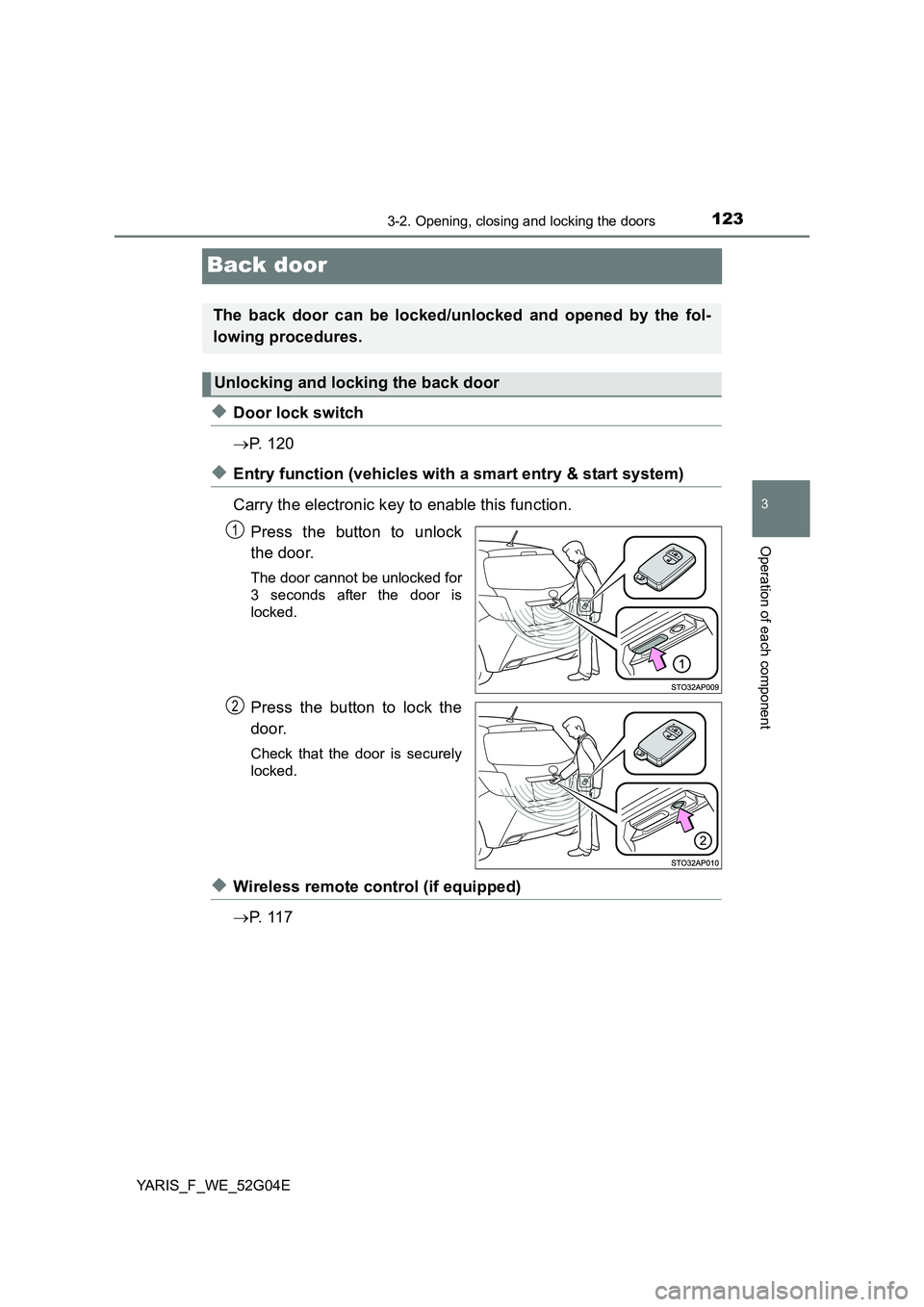
◆Entry function (vehicles with a smart entry & start system)
Carry the electronic key to enable this function.
Press the button to unlock
the door.
The door cannot be unlocked for
3 seconds after the door is
locked.
Press the button to lock the
door.
Check that the door is securely
locked.
◆Wireless remote control (if equipped)
P. 1 1 7
The back door can be locked/unlocked and opened by the fol-
lowing procedures.
Unlocking and locking the back door
1
2
Page 127 of 540
1273-2. Opening, closing and locking the doors
3
Operation of each component
YARIS_F_WE_52G04E
WARNING
●If anyone is in the vicinity, make sure they are safe and let them know that
the back door is about to open or close.
● Use caution when opening or closing the back door in windy weather as it
may move abruptly in strong wind.
● Do not pull on the back door damper stay to close the back door, and do
not hang on the back door damper stay.
Doing so may cause hands to be caught or the back door damper stay to
break, causing an accident.
● If a bicycle carrier or similar heavy object is attached to the back door, it
may suddenly shut again after being opened, causing someone’s hands,
head or neck to be caught and injured. When installing an accessory part
to the back door, using a genuine Toyota part is recommended.
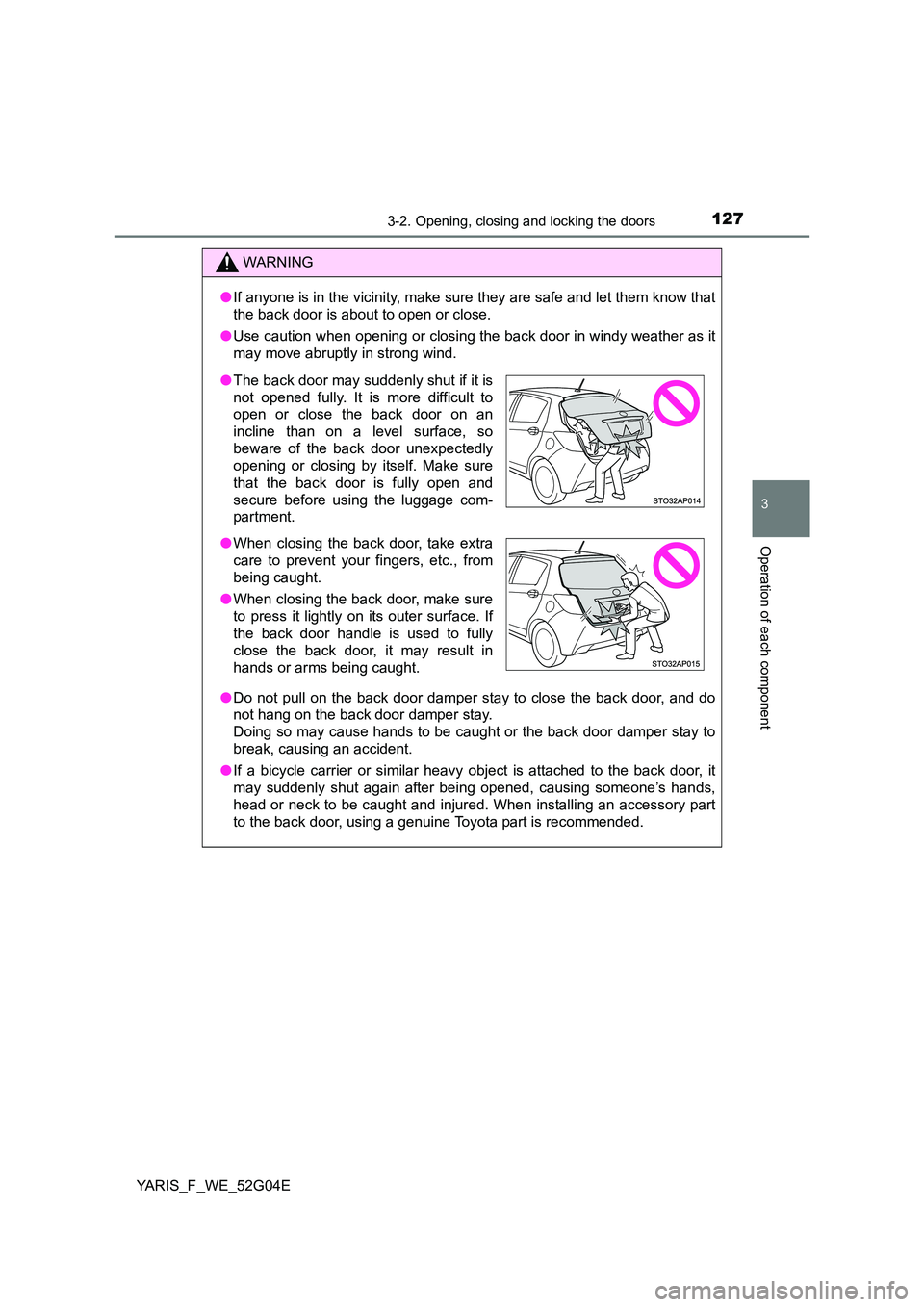
● The back door may suddenly shut if it is
not opened fully. It is more difficult to
open or close the back door on an
incline than on a level surface, so
beware of the back door unexpectedly
opening or closing by itself. Make sure
that the back door is fully open and
secure before using the luggage com-
partment.
● When closing the back door, take extra
care to prevent your fingers, etc., from
being caught.
● When closing the back door, make sure
to press it lightly on its outer surface. If
the back door handle is used to fully
close the back door, it may result in
hands or arms being caught.
Page 130 of 540
1303-2. Opening, closing and locking the doors
YARIS_F_WE_52G04E
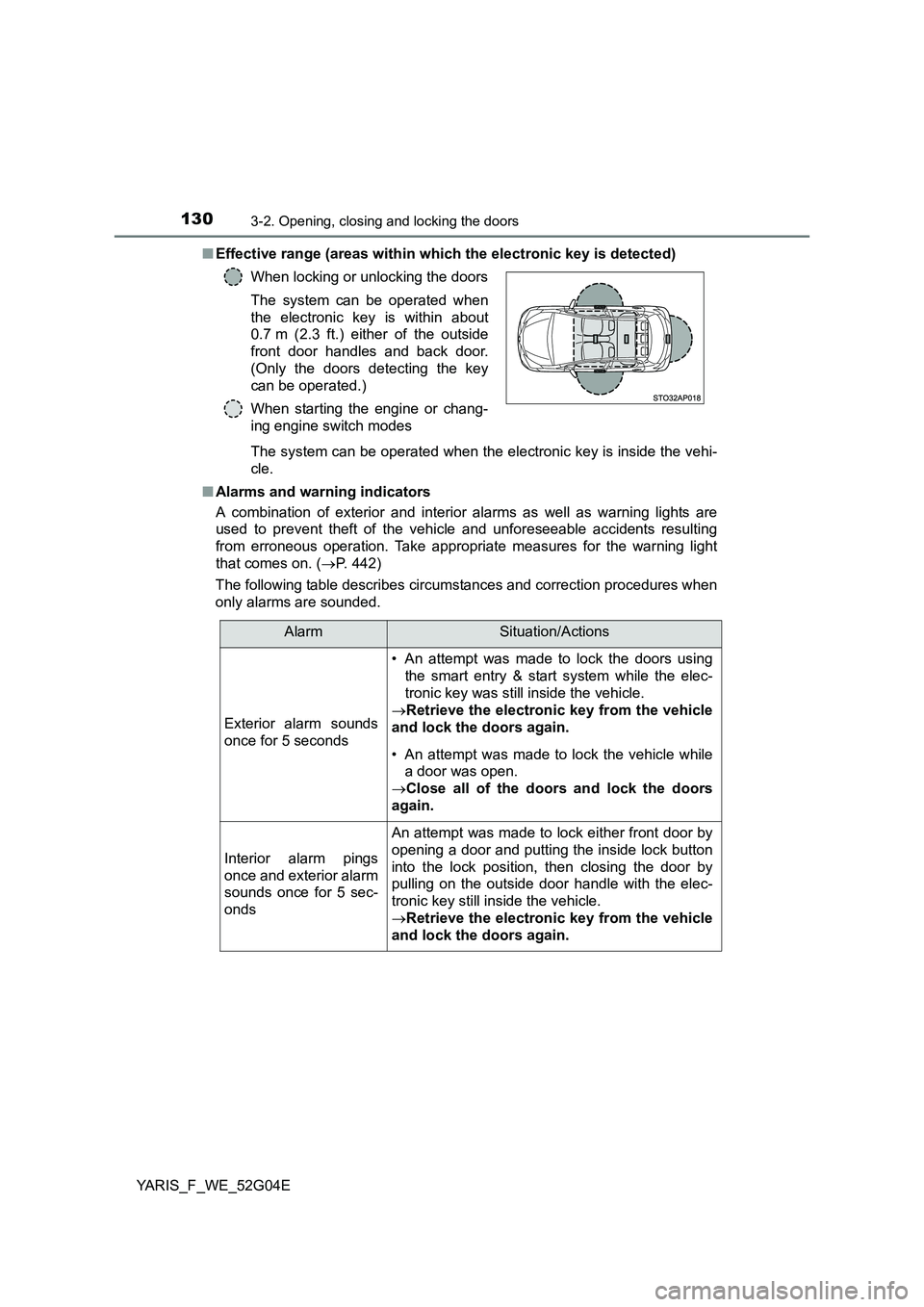
■ Effective range (areas within which the electronic key is detected)
The system can be operated when the electronic key is inside the vehi-
cle.
■ Alarms and warning indicators
A combination of exterior and interior alarms as well as warning lights are
used to prevent theft of the vehicle and unforeseeable accidents resulting
from erroneous operation. Take appropriate measures for the warning light
that comes on. ( P. 442)
The following table describes circumstances and correction procedures when
only alarms are sounded.
When locking or unlocking the doors
The system can be operated when
the electronic key is within about
0.7 m (2.3 ft.) either of the outside
front door handles and back door.
(Only the doors detecting the key
can be operated.)
When starting the engine or chang-
ing engine switch modes
AlarmSituation/Actions
Exterior alarm sounds
once for 5 seconds
• An attempt was made to lock the doors using
the smart entry & start system while the elec-
tronic key was still inside the vehicle.
Retrieve the electronic key from the vehicle
and lock the doors again.
• An attempt was made to lock the vehicle while
a door was open.
Close all of the doors and lock the doors
again.
Interior alarm pings
once and exterior alarm
sounds once for 5 sec-
onds
An attempt was made to lock either front door by
opening a door and putting the inside lock button
into the lock position, then closing the door by
pulling on the outside door handle with the elec-
tronic key still inside the vehicle.
Retrieve the electronic key from the vehicle
and lock the doors again.
Page 133 of 540
1333-2. Opening, closing and locking the doors
3
Operation of each component
YARIS_F_WE_52G04E
■ Notes for the entry function
● Even when the electronic key is within the effective range (detection areas),
the system may not operate properly in the following cases:
• The electronic key is too close to the window or outside door handle, near
the ground, or in a high place w hen the doors are locked or unlocked.
• The electronic key is on the inst rument panel, luggage cover (if equipped)
or floor, or in the door pockets, glove box, accessory box of the instru-
ment panel, or in/near the front cup holder when the engine is started or
engine switch modes are changed.
● Do not leave the electronic key on top of the instrument panel or near the
door pockets when exiting the vehicle. Depending on the radio wave recep-
tion conditions, it may be detected by the antenna outside the cabin and the
door will become lockable from the outside, possibly trapping the electronic
key inside the vehicle.
● As long as the electronic key is within the effective range, the doors may be
locked or unlocked by anyone.
● Even if the electronic key is not inside the vehicle, it may be possible to start
the engine if the electronic key is near the window.
● The doors may unlock if a large amount of water splashes on the door han-
dle, such as in the rain or in a car wash when the electronic key is within the
effective range. (The door will automatically be locked after approximately
30 seconds if the doors are not opened and closed.)
● Gripping the door handle when wearing a glove may not unlock the door.
● If the wireless remote control is used to lock the doors when the electronic
key is near the vehicle, there is a possibility that the door may not be
unlocked by the entry function. (Use the wireless remote control to unlock
the doors.)
● A sudden approach to the effective range or door handle may prevent the
doors from being unlocked. In this case, return the door handle to the origi-
nal position and check that the doors unlock before pulling the door handle
again.
■ Notes for locking the doors
● Touching the door lock sensor while wearing gloves may delay or prevent
lock operation. Remove the gloves and touch the lock sensor again.
● If the door handle becomes wet while the electronic key is within the effec-
tive range, the door may lock and unlock repeatedly. Place the key in a posi-
tion 2 m (6 ft.) or more separate from the vehicle while the vehicle is being
washed. (Take care to ensure that the key is not stolen.)
● If the electronic key is inside the vehicle and a door handle becomes wet
during a car wash, a buzzer will sound outside the vehicle. To turn off the
alarm, lock all the doors.
● The lock sensor may not work properly if it comes into contact with ice,
snow, mud, etc. Clean the lock sensor and attempt to operate it again.
Page 134 of 540
1343-2. Opening, closing and locking the doors
YARIS_F_WE_52G04E
■ Notes for the unlocking function
● A sudden approach to the effective range or door handle may prevent the
doors from being unlocked. In this case, return the door handle to the origi-
nal position and check that the doors unlock before pulling the door handle
again.
● Gripping the door handle when wearing a glove may not unlock the door.
Remove the gloves and touch the sensor on the back of the handle again.
● If the door handle becomes wet while the electronic key is within the effec-
tive range, the door may lock and unlock repeatedly. Place the key in a posi-
tion 2 m (6 ft.) or more separate from the vehicle while the vehicle is being
washed. (Take care to ensure that the key is not stolen.)
● If there is another electronic key in the detection area, it may take slightly
longer to unlock the doors after the door handle is gripped.
■ When the vehicle is not driven for extended periods
● To prevent theft of the vehicle, do not leave the electronic key within 2 m
(6 ft.) of the vehicle.
● The smart entry & start system can be deactivated in advance. (P. 515)
■ To operate the system properly
Make sure to carry the electronic key when operating the system. Do not get
the electronic key too close to the vehicle when operating the system from the
outside of the vehicle.
Depending on the position and holding condition of the electronic key, the key
may not be detected correctly and the system may not operate properly. (The
alarm may go off accidentally, or the door lock prevention function may not
operate.)
■ If the smart entry & start system does not operate properly
● Locking and unlocking the doors: Use the mechanical key. (P. 478)
● Starting the engine: P. 478
■ Customization
Settings (e. g. smart entry & start system) can be changed.
(Customizable features: P. 515)
■ If the smart entry & start system has been deactivated in a customized
setting
● Locking and unlocking the doors:
Use the wireless remote control or mechanical key. ( P. 117, 478)
● Starting the engine and changing engine switch modes: P. 478
● Stopping the engine: P. 188
Page 142 of 540
1423-3. Adjusting the seats
YARIS_F_WE_52G04E
■After passengers have entered the vehicle (3-door models only)
Slide the seat backward and then lift the seatback. The seat will be set and
locked to its previous position automatically. If the seat cannot be slid back to
the previous position due to the rear passenger or luggage, the seat will be
locked in that position, disabling the seat position memory system.
To recall the previous position, lift the seatback lock release lever after remov-
ing the luggage, or after having the pass enger get out or sit properly so that
the seat can be slid back to the previous position. However, if you slide the
seat further backwards than previous position using the seat position adjust-
ment lever, the memory of previous position will be overwritten.
WARNING
■ When adjusting the seat position
● Take care when adjusting the seat position to ensure that other passen-
gers are not injured by the moving seat.
● Do not put your hands under the seat or near the moving parts to avoid
injury.
Fingers or hands may become jammed in the seat mechanism.
■ Seat adjustment
● Be careful that the seat does not hit passengers or luggage.
● To reduce the risk of sliding under the lap belt during a collision, do not
recline the seat more than necessary.
If the seat is too reclined, the lap belt may slide past the hips and apply
restraint forces directly to the abdomen, or your neck may contact the
shoulder belt, increasing the risk of death or serious injury in the event of
an accident.
Adjustments should not be made while driving as the seat may unexpect-
edly move and cause the driver to lose control of the vehicle.
● After adjusting the seat, make sure that the seat is locked in position.
● Never allow anyone to touch seatback lock release levers while the vehi-
cle is moving.
● If anyone is in the vicinity, make sure they are clear of the seat back path
and let them know that the seat is about to move.
■ After returning the seatback to the upright position
Make sure the seatback is securely locked by pushing it forward and rear-
ward. Failure to do so may result in death or serious injury.