lights TOYOTA YARIS HATCHBACK 2018 Owner's Manual
[x] Cancel search | Manufacturer: TOYOTA, Model Year: 2018, Model line: YARIS HATCHBACK, Model: TOYOTA YARIS HATCHBACK 2018Pages: 520, PDF Size: 8.69 MB
Page 102 of 520
1023-2. Opening, closing and locking the doors
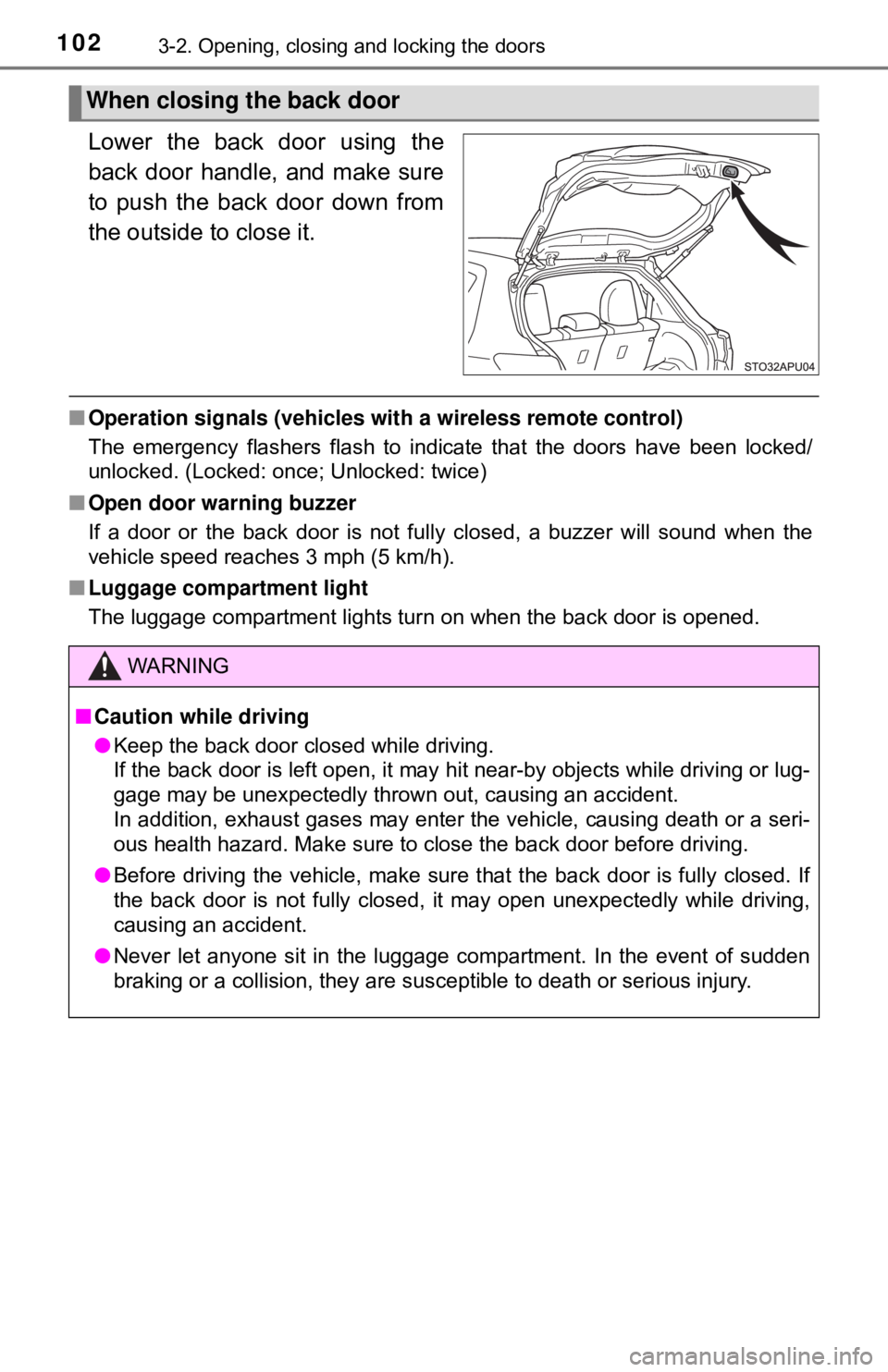
Lower the back door using the
back door handle, and make sure
to push the back door down from
the outside to close it.
■Operation signals (vehicles with a wireless remote control)
The emergency flashers flash to indicate that the doors have been locked/
unlocked. (Locked: once; Unlocked: twice)
■ Open door warning buzzer
If a door or the back door is not fully closed, a buzzer will sound when the
vehicle speed reaches 3 mph (5 km/h).
■ Luggage compartment light
The luggage compartment lights turn on when the back door is opened.
When closing the back door
WARNING
■Caution while driving
● Keep the back door closed while driving.
If the back door is left open, it may hit near-by objects while driving or lug-
gage may be unexpectedly thrown out, causing an accident.
In addition, exhaust gases may enter the vehicle, causing death or a seri-
ous health hazard. Make sure to close the back door before driving.
● Before driving the vehicle, make sure that the back door is fully closed. If
the back door is not fully closed, it may open unexpectedly while driving,
causing an accident.
● Never let anyone sit in the luggage compartment. In the event of sudden
braking or a collision, they are susceptible to death or serious injury.
Page 118 of 520
1183-4. Adjusting the steering wheel and mirrors
Inside rear view mirror
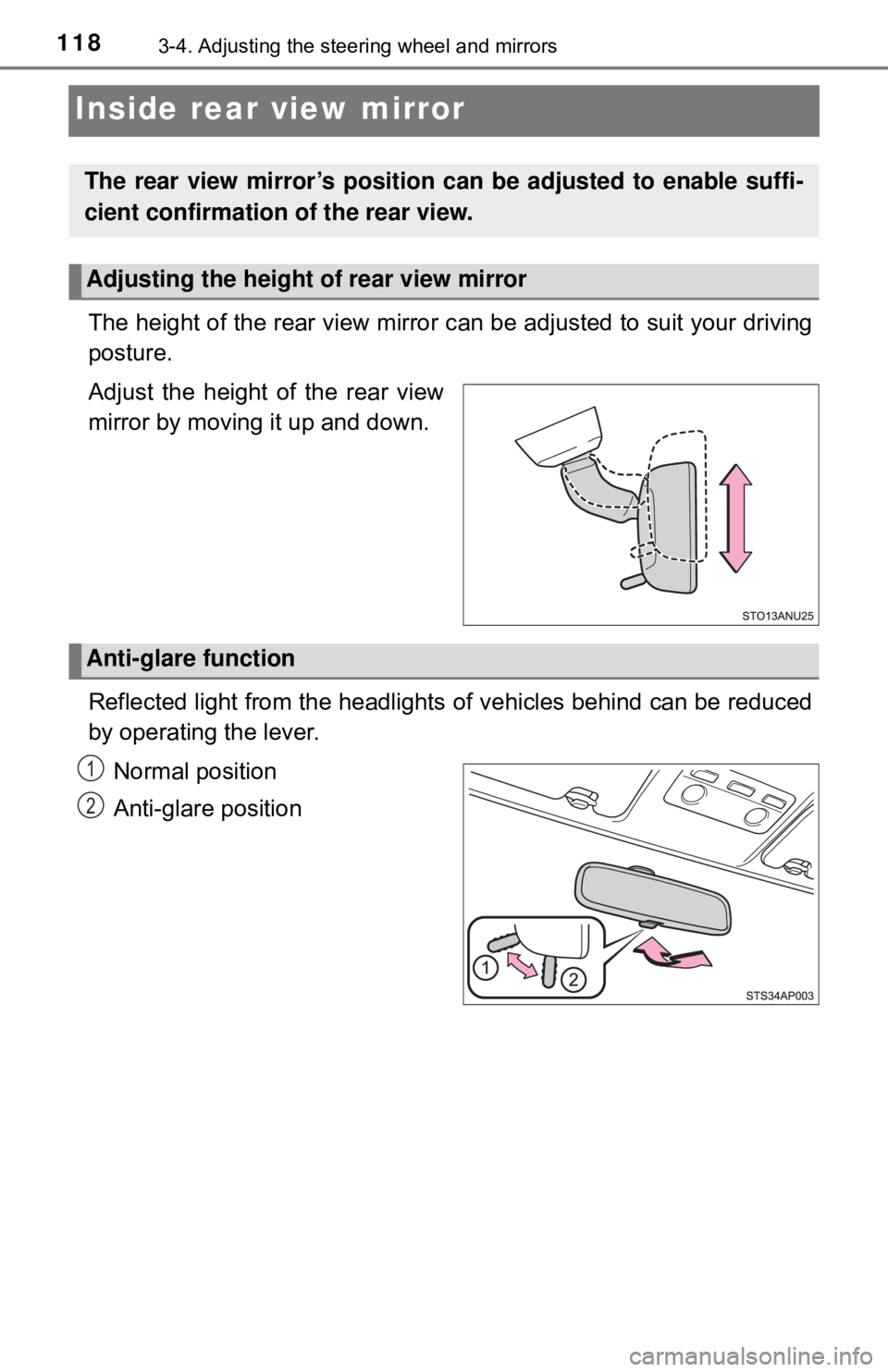
The height of the rear view mirror can be adjusted to suit your driving
posture.
Adjust the height of the rear view
mirror by moving it up and down.
Reflected light from the headlights of vehicles behind can be reduced
by operating the lever.
Normal position
Anti-glare position
The rear view mirror’s position can be adjusted to enable suffi-
cient confirmation of the rear view.
Adjusting the height of rear view mirror
Anti-glare function
1
2
Page 125 of 520

125
4Driving
4-1. Before drivingDriving the vehicle ............. 126
Cargo and luggage ........... 137
Vehicle load limits ............. 141
Trailer towing..................... 142
Dinghy towing (vehicles with an automatic
transmission)................... 143
Dinghy towing (vehicles with a manual
transmission)................... 144
4-2. Driving procedures Engine (ignition) switch ..... 146
Automatic transmission ..... 149
Manual transmission ......... 153
Turn signal lever................ 154
Parking brake .................... 155 4-3. Operating the lights
and wipers
Headlight switch ................ 156
Fog light switch ................. 160
Windshield wipers and washer ..................... 162
Rear window wiper and washer ..................... 165
4-4. Refueling Opening the fuel tank cap .................................. 168
4-5. Toyota Safety Sense C Toyota Safety Sense C ..... 171
PCS (Pre-Collision System) .... 177
LDA (Lane Departure Alert) .... 191
Automatic High Beam ....... 196
4-6. Using the driving support systems
Cruise control .................... 201
Rear view monitor system ............................ 205
Driving assist systems ...... 215
4-7. Driving tips Winter driving tips ............. 221
Page 154 of 520
1544-2. Driving procedures
Turn signal lever
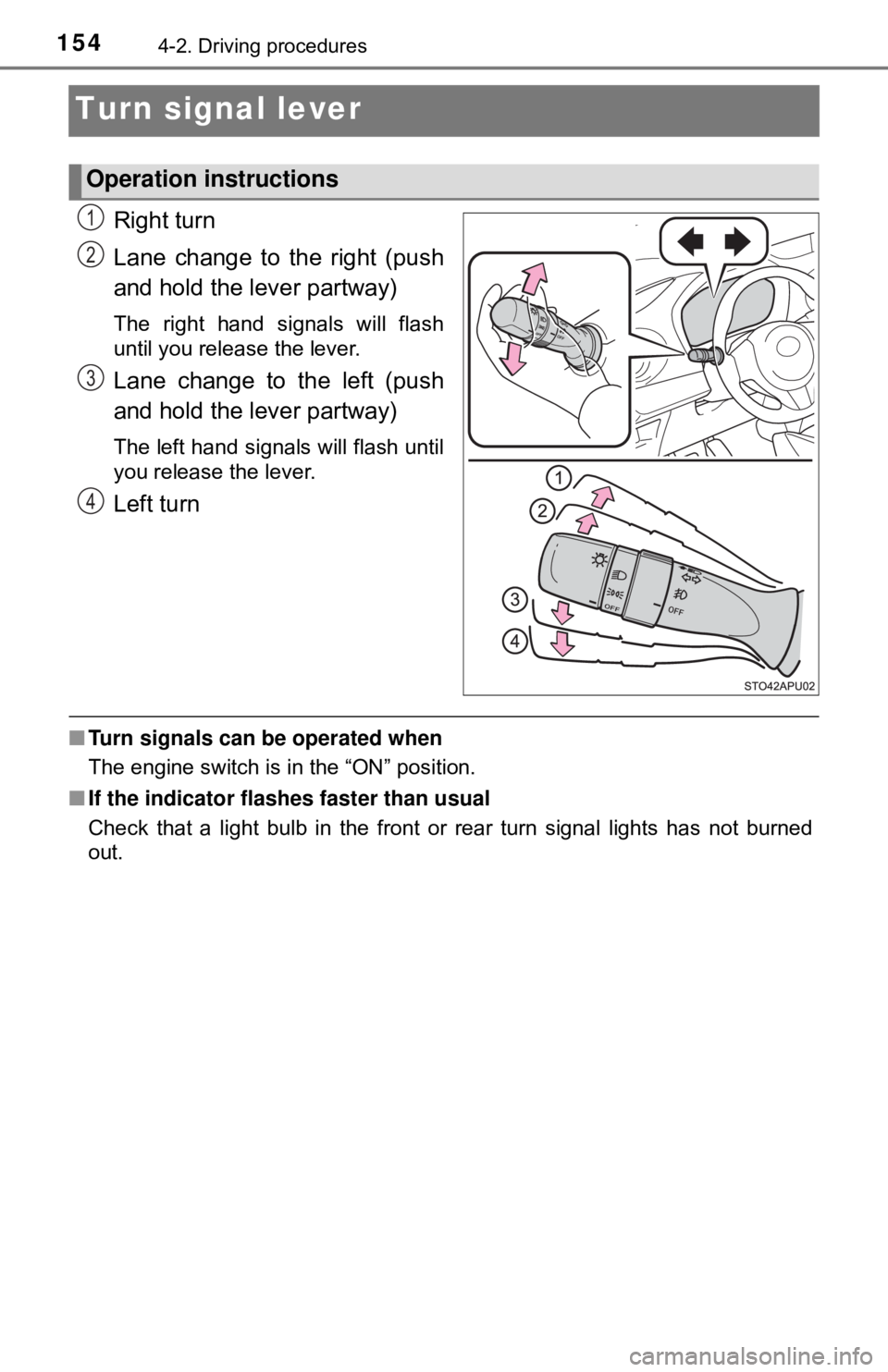
Right turn
Lane change to the right (push
and hold the lever partway)
The right hand signals will flash
until you release the lever.
Lane change to the left (push
and hold the lever partway)
The left hand signals will flash until
you release the lever.
Left turn
■Turn signals can be operated when
The engine switch is in the “ON” position.
■ If the indicator flashes faster than usual
Check that a light bulb in the front or rear turn signal lights has not burned
out.
Operation instructions
1
2
3
4
Page 156 of 520
1564-3. Operating the lights and wipers
Headlight switch
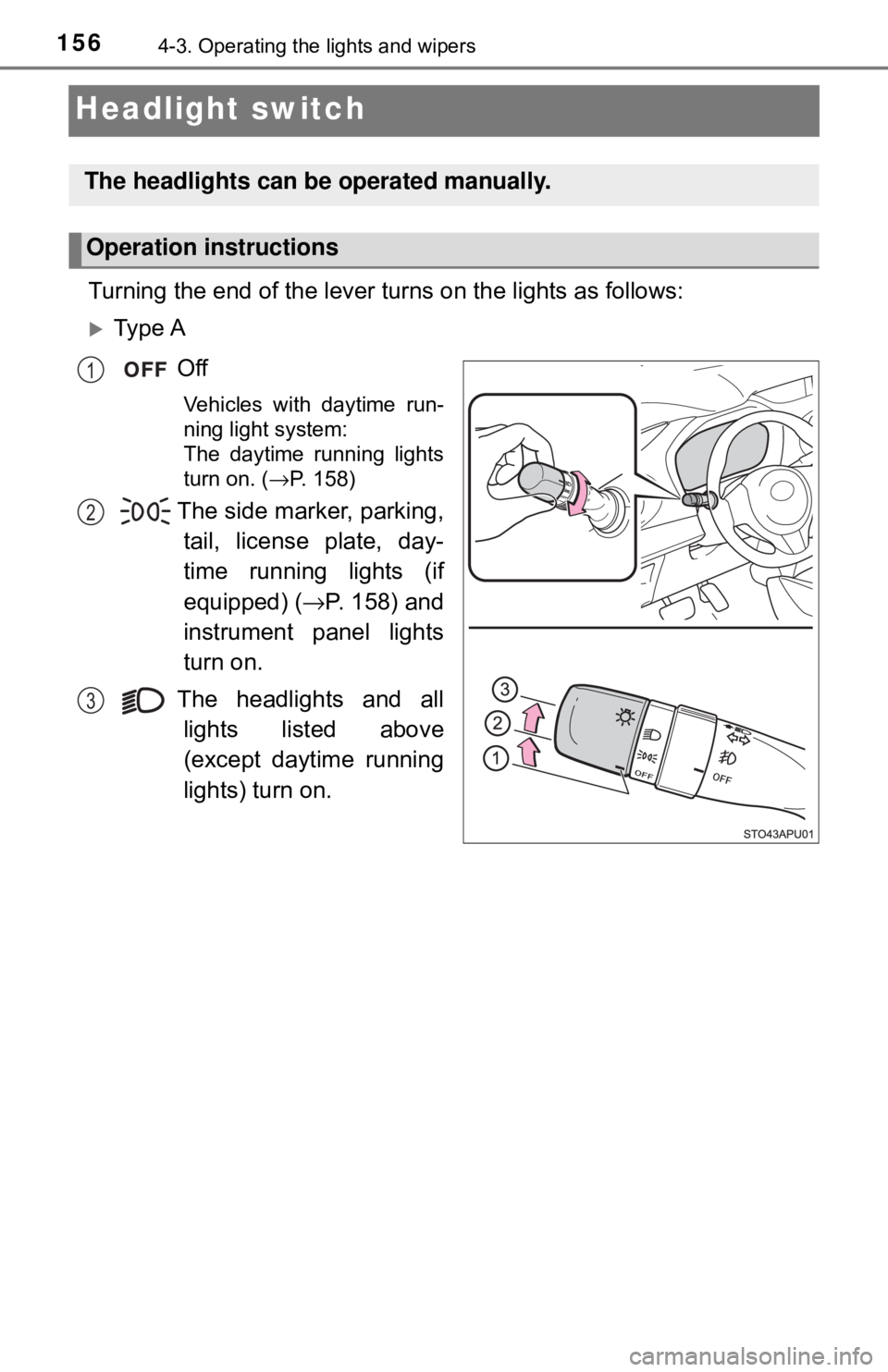
Turning the end of the lever turns on the lights as follows:
Ty p e AOff
Vehicles with daytime run-
ning light system:
The daytime running lights
turn on. ( →P. 158)
The side marker, parking,
tail, license plate, day-
time running lights (if
equipped)
( → P. 158) and
instrument panel lights
turn on.
The headlights and all lights listed above
(except daytime running
lights) turn on.
The headlights can be operated manually.
Operation instructions
1
2
3
Page 157 of 520
1574-3. Operating the lights and wipers
4
Driving
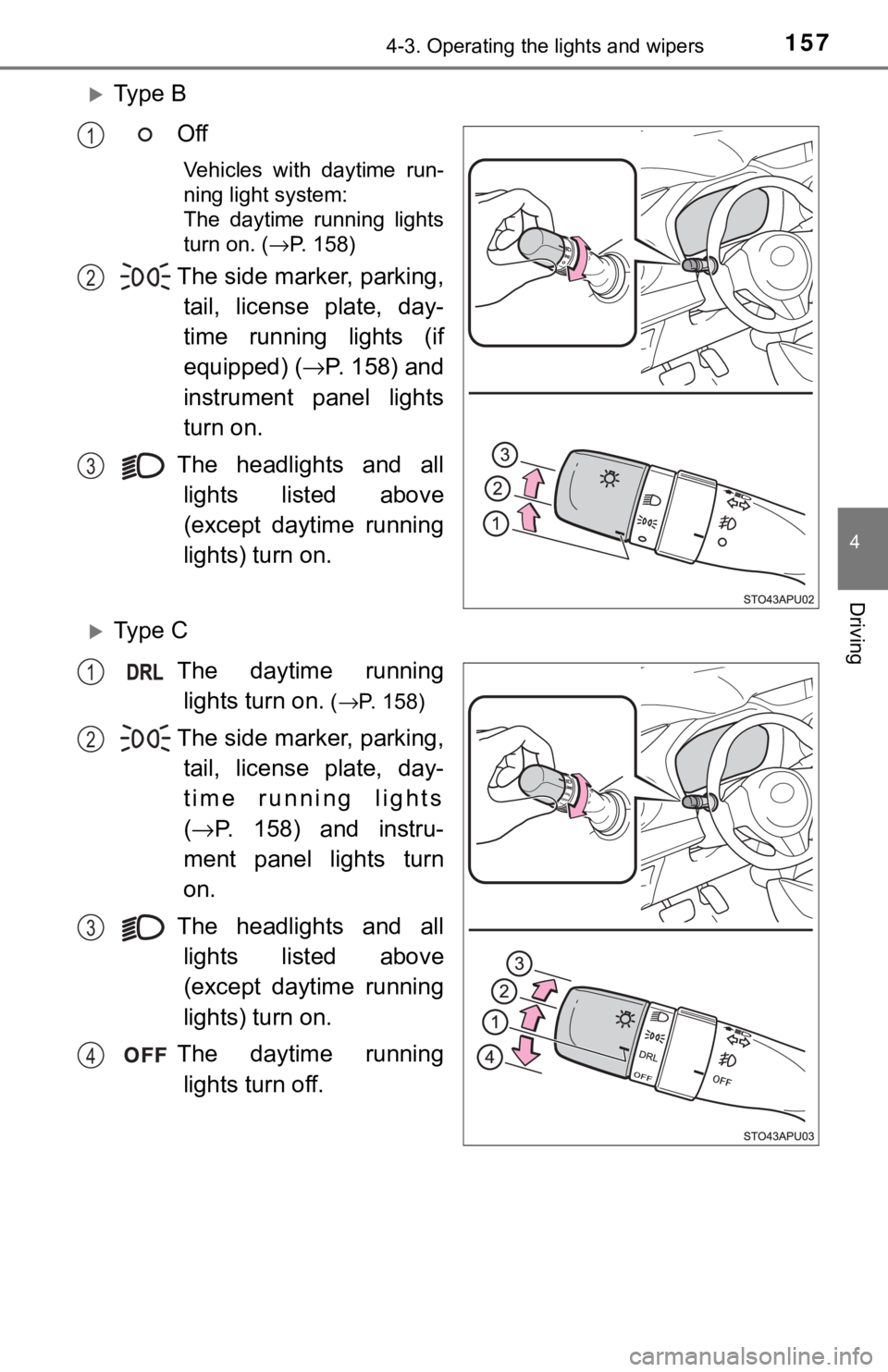
Ty p e BOff
Vehicles with daytime run-
ning light system:
The daytime running lights
turn on. ( →P. 158)
The side marker, parking,
tail, license plate, day-
time running lights (if
equipped)
( → P. 158) and
instrument panel lights
turn on.
The headlights and all lights listed above
(except daytime running
lights) turn on.
Ty p e C
The daytime runninglights turn on.
( →P. 158)
The side marker, parking,
tail, license plate, day-
time running lights
( → P. 158) and instru-
ment panel lights turn
on.
The headlights and all lights listed above
(except daytime running
lights) turn on.
The daytime running lights turn off.
1
2
3
1
2
3
4
Page 158 of 520
1584-3. Operating the lights and wipers
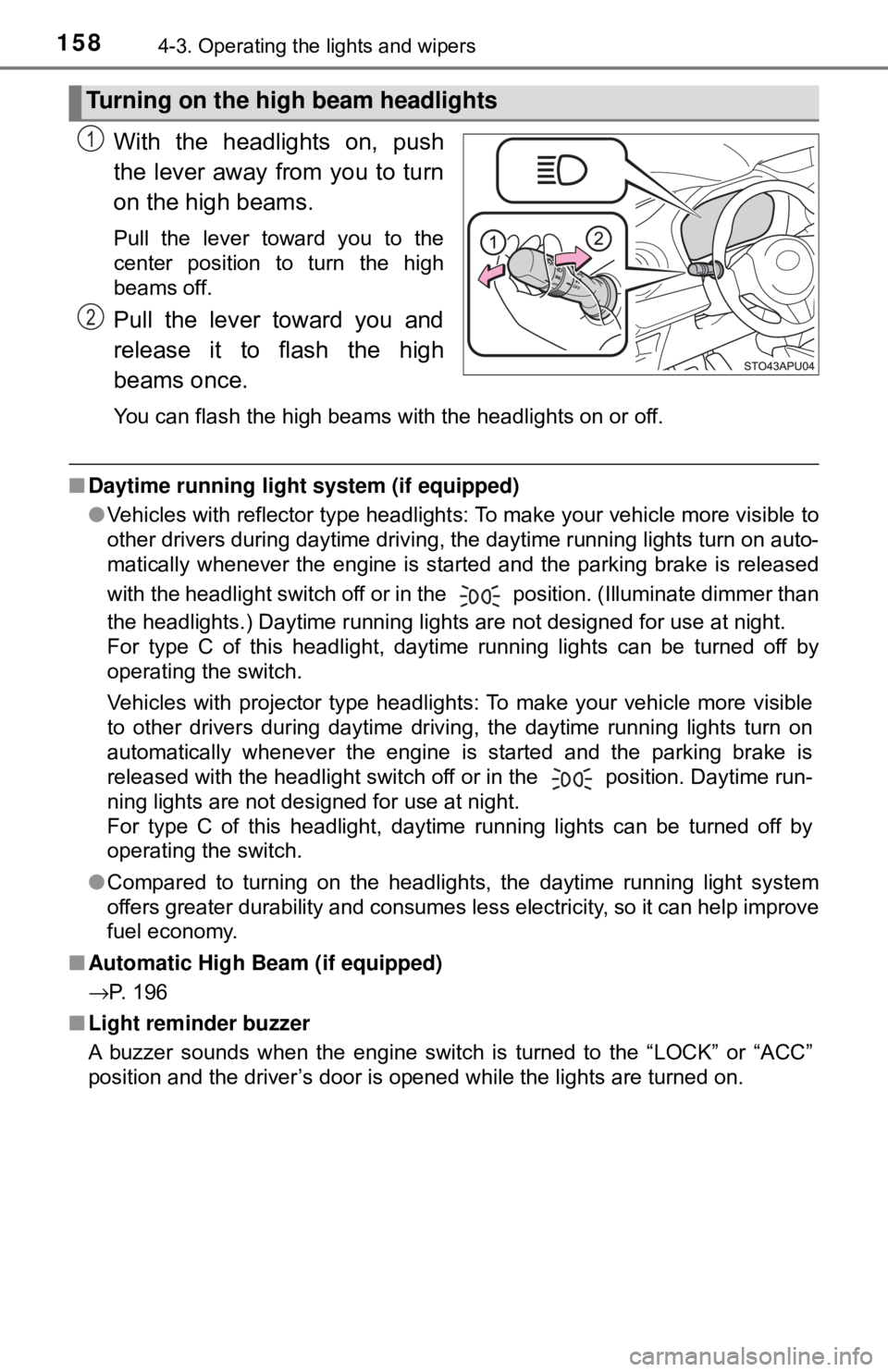
With the headlights on, push
the lever away from you to turn
on the high beams.
Pull the lever toward you to the
center position to turn the high
beams off.
Pull the lever toward you and
release it to flash the high
beams once.
You can flash the high beams with the headlights on or off.
■Daytime running light system (if equipped)
●Vehicles with reflector type headlights: To make your vehicle more visible to
other drivers during daytime driving, the daytime running lights turn on auto-
matically whenever the engine is started and the parking brake is released
with the headlight switch off or in the position. (Illuminate dimmer than
the headlights.) Daytime running lights are not designed for use at night.
For type C of this headlight, daytime running lights can be turned off by
operating the switch.
Vehicles with projector type headlights: To make your vehicle more visible
to other drivers during daytime driving, the daytime running lights turn on
automatically whenever the engine is started and the parking brake is
released with the headlight switch off or in the position. Daytime run-
ning lights are not designed for use at night.
For type C of this headlight, daytime running lights can be turned off by
operating the switch.
● Compared to turning on the headlights, the daytime running light system
offers greater durability and consumes less electricity, so it can help improve
fuel economy.
■ Automatic High Beam (if equipped)
→P. 196
■ Light reminder buzzer
A buzzer sounds when the engine switch is turned to the “LOCK” or “ACC”
position and the driver’s door is opened while the lights are turned on.
Turning on the high beam headlights
1
2
Page 159 of 520
1594-3. Operating the lights and wipers
4
Driving
■Automatic light off system (vehicles with daytime running light system)
● When the headlights are on: The headlights and tail lights turn off 30 sec-
onds after the engine switch is turned to the “ACC” or “LOCK” position and a
door is opened and closed. (The lights turn off immediately if on the key
is pressed after all the doors are locked.)
● When only the tail lights are on: The tail lights turn off automatically if the
engine switch is turned to the “ACC” or “LOCK” position and the driver’s
door is opened.
To turn the lights on again, turn the engine switch to the “ON” position, or turn
the headlight switch to or once and then back to the or
position.
If any of the doors is kept open, the lights automatically turn off after 20 min-
utes.
■ Battery-saving function (vehicles wit h daytime running light system or
Automatic High Beam)
In all following conditions, the headlights and the other remaining lights will go
off automatically after 20 minutes in order to prevent the vehicle battery from
being discharged:
● The engine switch is in the “LOCK” position.
● The headlights and/or tail lights are on.
This function will be canceled in any of the following situations:
● When the engine switch is turned to the “ON” position.
● When the light switch is operated.
● When the door is opened or closed.
■ Customization
Settings (e.g. automatic light off system) can be changed.
(Customizable features: →P. 489)
NOTICE
■To prevent battery discharge
Do not leave the lights on longer than necessary when the engine is not
running.
Page 160 of 520
1604-3. Operating the lights and wipers
Fog light switch∗
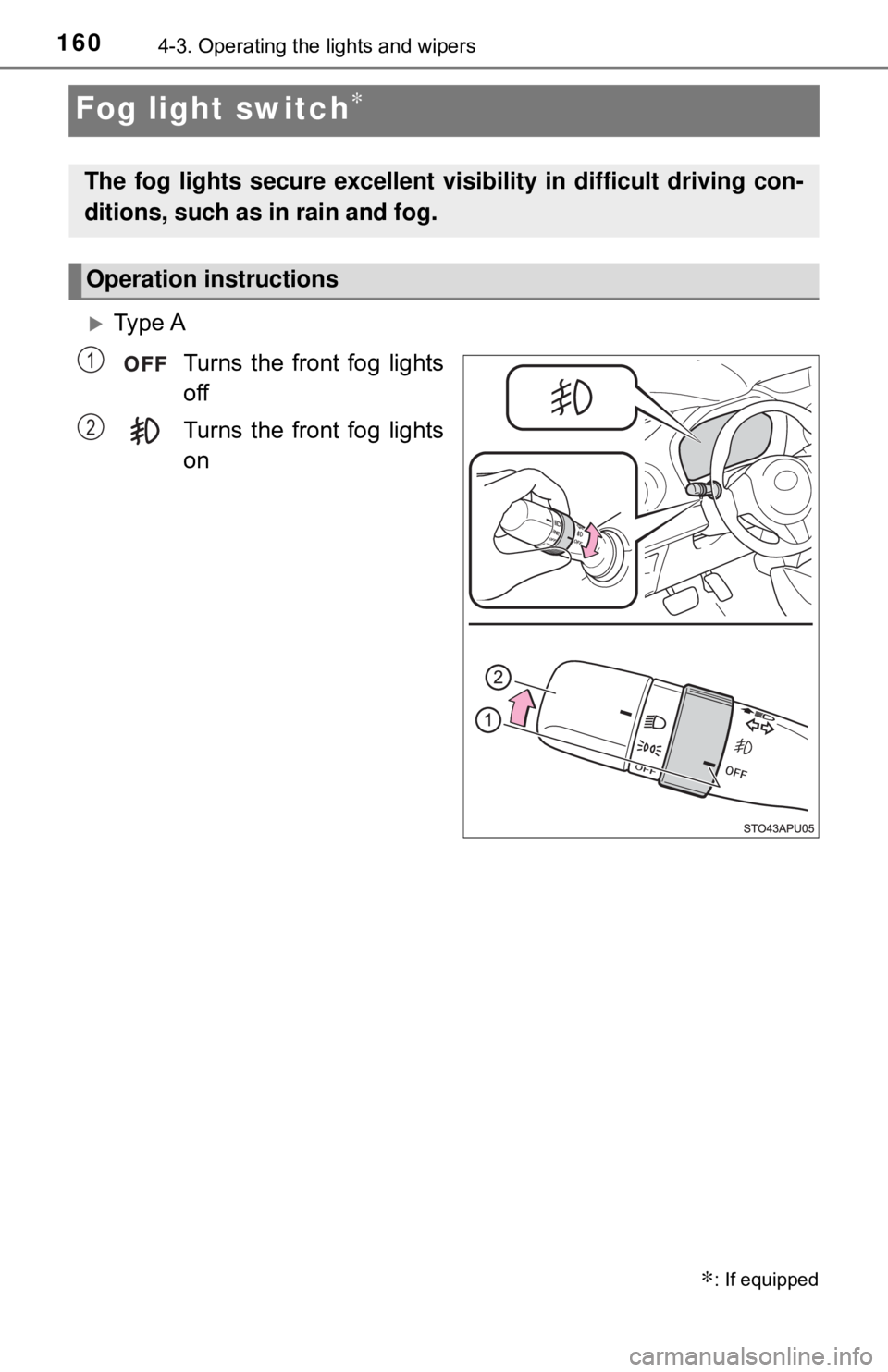
Ty p e ATurns the front fog lights
off
Turns the front fog lights
on
∗: If equipped
The fog lights secure excellent visibility in difficult driving con-
ditions, such as in rain and fog.
Operation instructions
1
2
Page 161 of 520
1614-3. Operating the lights and wipers
4
Driving
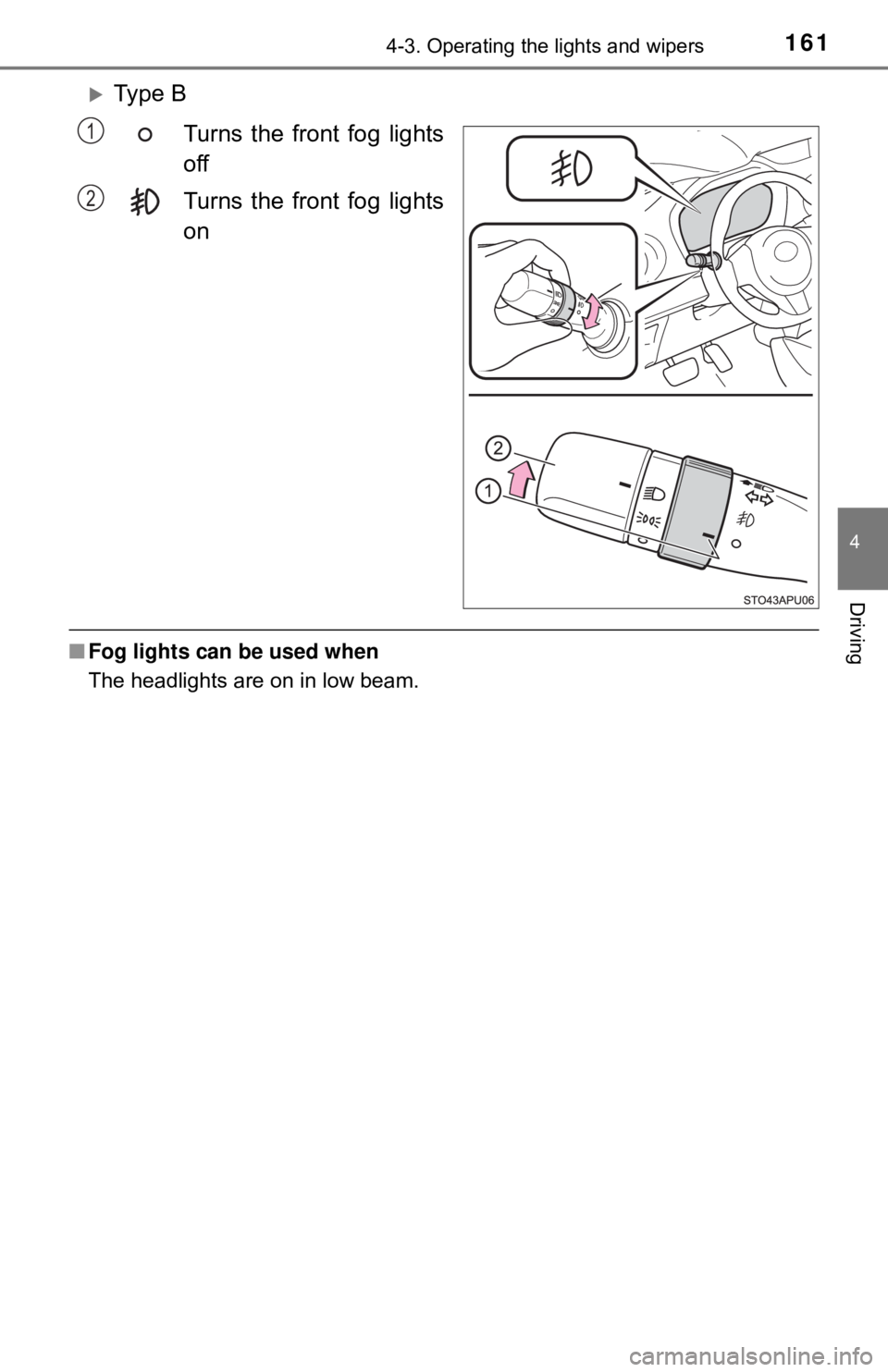
Ty p e BTurns the front fog lights
off
Turns the front fog lights
on
■Fog lights can be used when
The headlights are on in low beam.
1
2