fuel TOYOTA YARIS HATCHBACK 2019 User Guide
[x] Cancel search | Manufacturer: TOYOTA, Model Year: 2019, Model line: YARIS HATCHBACK, Model: TOYOTA YARIS HATCHBACK 2019Pages: 692, PDF Size: 68.71 MB
Page 122 of 692
1222. Instrument cluster
YARIS_F_OM_Europe_OM52A54E
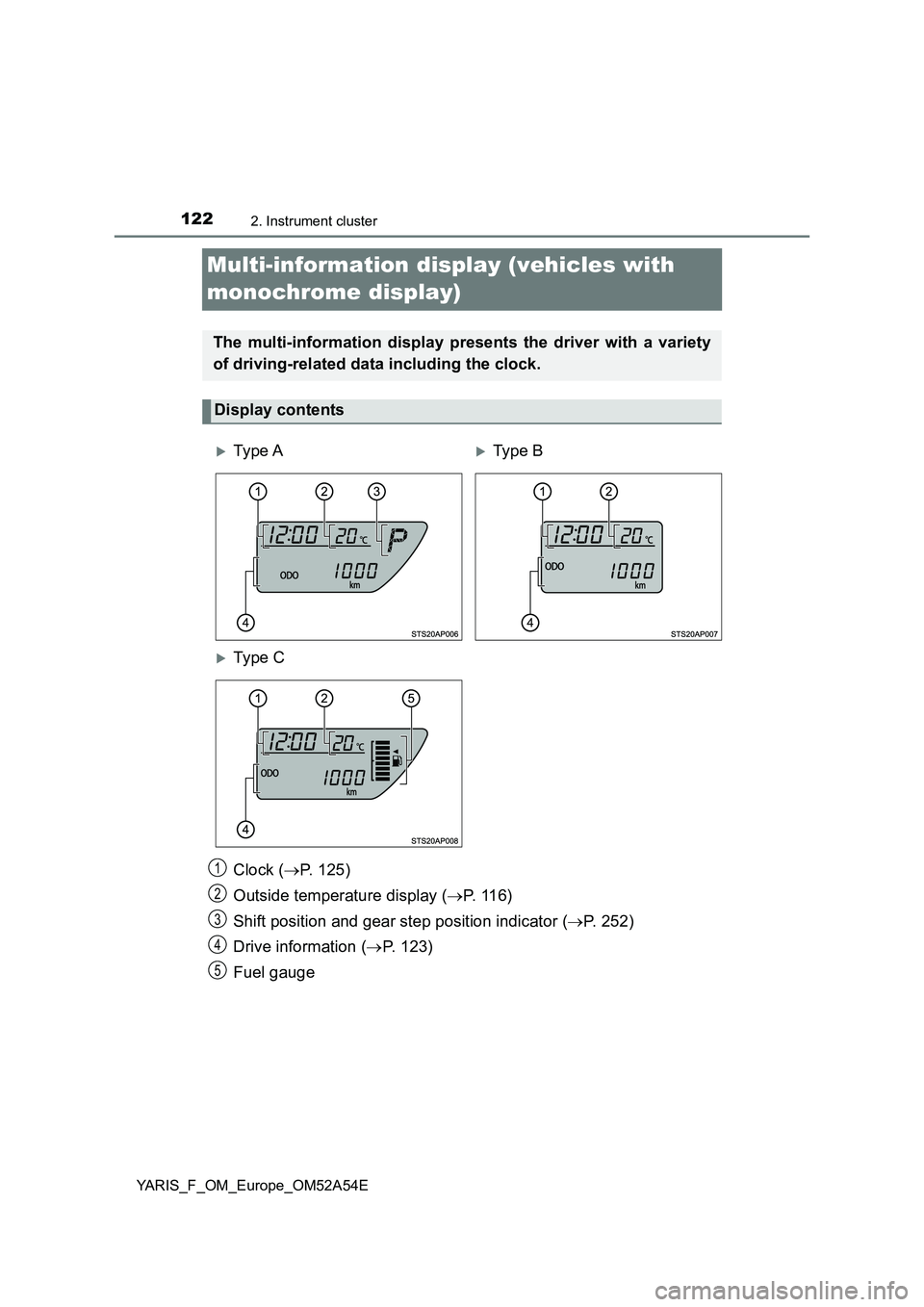
Multi-information display (vehicles with
monochrome display)
Clock (P. 125)
Outside temperature display (P. 116)
Shift position and gear step position indicator (P. 252)
Drive information (P. 123)
Fuel gauge
The multi-information display presents the driver with a variety
of driving-related data including the clock.
Display contents
Ty pe ATy pe B
Ty pe C
1
2
3
4
5
Page 124 of 692
1242. Instrument cluster
YARIS_F_OM_Europe_OM52A54E■
Instantaneous fuel consumption
Displays the instantaneous of fuel consumption.
Use the displayed instantaneous fuel consumption as a reference.
■
Average fuel consumption
Displays the average rate of fuel consumption.
• The function can be reset by pressing the button for longer than 1 sec-
ond when the average fuel consumption is displayed.
• Use the displayed average fuel consumption as a reference.
■
Driving range
Displays the estimated maximum distance that can be driven with
the quantity of fuel remaining.
• This distance is computed based on your average fuel consumption. As
a result, the actual distance that can be driven may differ from that dis-
played.
• When only a small amount of fuel is added to the tank, the display may
not be updated.
When refueling, turn the engine switch to the “LOCK” position (vehicles
without a smart entry & start system) or off (vehicles with a smart entry &
start system). If the vehicle is refueled without turning the engine switch to
the “LOCK” position or off, the display may not be updated.
■
Average vehicle speed
Displays the average vehicle speed since the engine was last
started.
Page 126 of 692
1262. Instrument cluster
YARIS_F_OM_Europe_OM52A54E
■When disconnecting and reconnecting battery terminals
The following information data will be reset:
● Stop & Start system total operation time (if equipped)
● Average fuel consumption
● Driving range
● Average vehicle speed
● Clock data
■ Liquid crystal display
Small spots or light spots may appear on the display. This phenomenon is
characteristic of liquid crystal display, and there is no problem continuing to
use the display.
■ Changing the pre-crash warning timing
P. 294
WARNING
■The information display at low temperatures
Allow the interior of the vehicle to warm up before using the liquid crystal
information display. At extremely low temperatures, the display monitor may
respond slowly, and display changes may be delayed.
For example, there is a lag between the driver’s shifting and the new gear
number appearing on the display. This lag could cause the driver to down-
shift again, causing rapid and exce ssive engine braking and possibly an
accident resulting in death or injury.
■ Cautions during setting up the display
As the engine needs to be running during setting up the display, ensure that
the vehicle is parked in a place with adequate ventilation. In a closed area
such as a garage, exhaust gases including harmful carbon monoxide (CO)
may collect and enter the vehicle. This may lead to death or a serious
health hazard.
Page 129 of 692
1292. Instrument cluster
2
Instrument cluster
YARIS_F_OM_Europe_OM52A54E
Items displayed can be switched by pressing “<” or “>” of the meter
control switches to select and pressing “” or “”.
●Average fuel consumption (after reset
*/after start/after refuel)
Displays the average fuel consumption since the function was reset, the
engine was started, and the vehicle was refueled, respectively
Use the displayed average fuel consumption as a reference.
●Average vehicle speed (after reset*/after start)
Displays the average vehicle speed since the function was reset and the
engine was started, respectively
●Elapsed time (after reset*/after start)
Displays the elapsed time since the function was reset and the engine was
started, respectively
●Distance (driving range/after refuel)
Displays the estimated maximum distance that can be driven with the
quantity of fuel remaining
• This distance is computed based on your average fuel consumption. As
a result, the actual distance that can be driven may differ from that dis-
played.
• When only a small amount of fuel is added to the tank, the display may
not be updated.
When refueling, turn the engine switch off. If the vehicle is refueled with-
out turning the engine switch off, the display may not be updated.
●Eco Driving Indicator Zone Display (vehicles with a Multidrive)
P. 134
●Speedometer
Displays the vehicle speed.
●Display off
A blank screen is displayed
*: The function can be reset by pressing and holding the of the meter
control switches when the reset item is displayed.
Drive information
Page 130 of 692
1302. Instrument cluster
YARIS_F_OM_Europe_OM52A54E■
Current idling stop time
Displays the current idling stop time (engine stop time due to the
Stop & Start system)
■Total idling stop time (after reset*/after start)
Displays the total idling stop time (engine stop time via the Stop &
Start system) after resetting and engine startup.
■Idling stop time fuel savings (after reset*/after start)
Displays the fuel savings (reference) during idling stop time after
resetting and engine startup.
■Reason of Stop & Start system operation cancel
Displays the reason for the Stop & Start system being canceled in
the meter display.
*: The function can be reset by pressing and holding the of the meter
control switches when the reset item is displayed.
Stop & Start system information (if equipped)
Page 137 of 692
137
2
2. Instrument cluster
Instrument cluster
YARIS_F_OM_Europe_OM52A54E
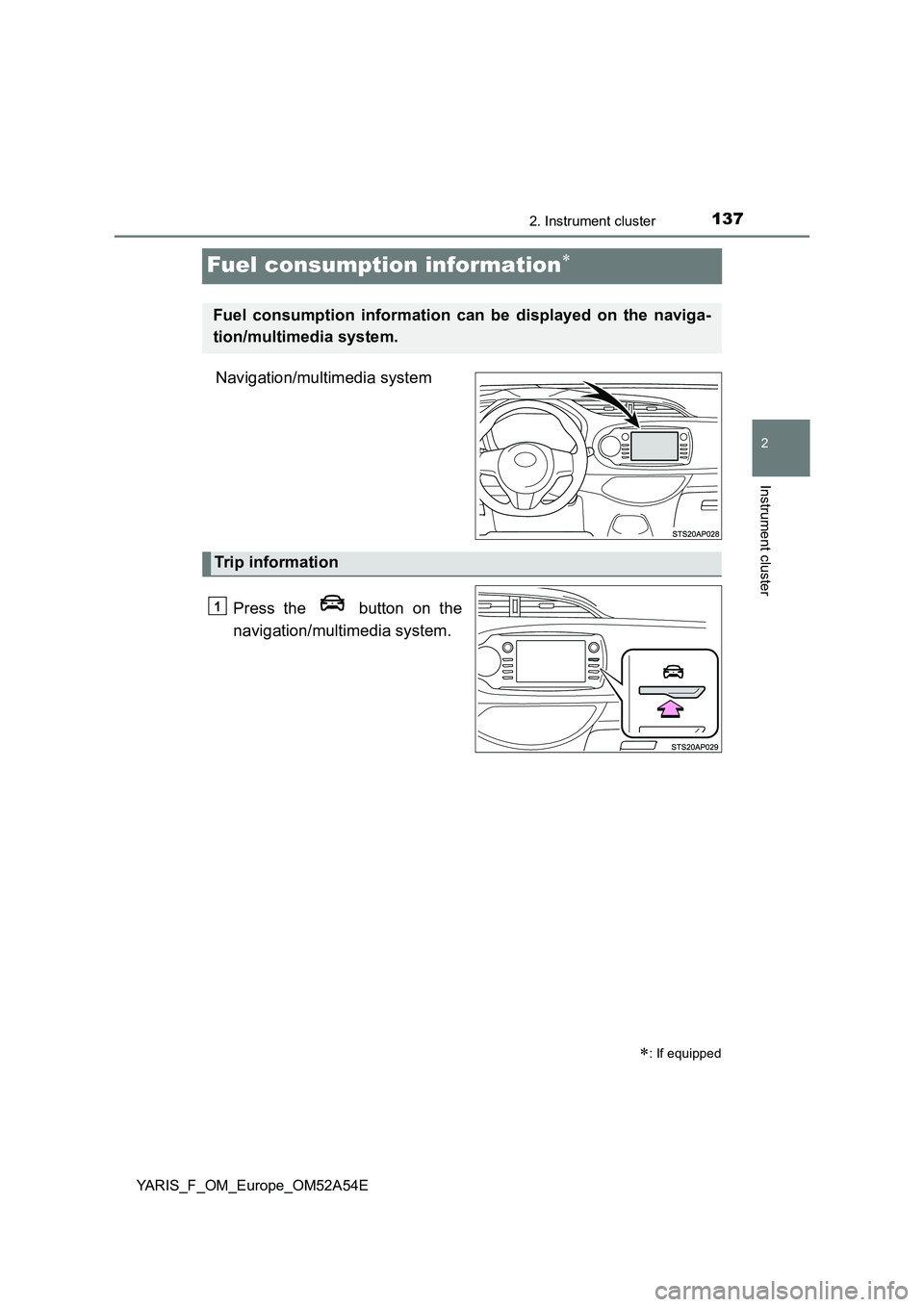
Fuel consumption information
Navigation/multimedia system
Press the button on the
navigation/multimedia system.
: If equipped
Fuel consumption information can be displayed on the naviga-
tion/multimedia system.
Trip information
1
Page 138 of 692
1382. Instrument cluster
YARIS_F_OM_Europe_OM52A54E
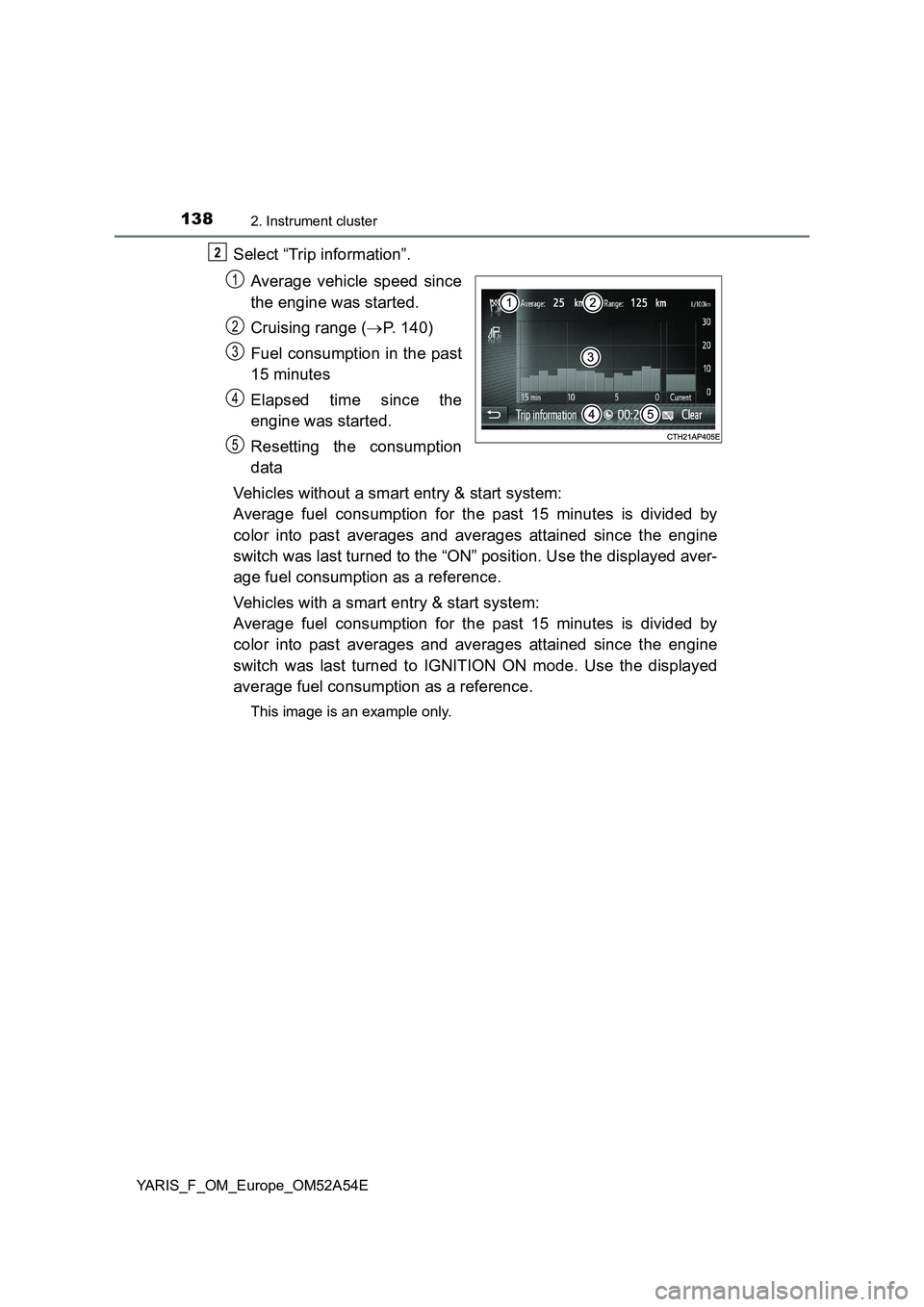
Select “Trip information”.
Average vehicle speed since
the engine was started.
Cruising range (P. 140)
Fuel consumption in the past
15 minutes
Elapsed time since the
engine was started.
Resetting the consumption
data
Vehicles without a smart entry & start system:
Average fuel consumption for the past 15 minutes is divided by
color into past averages and averages attained since the engine
switch was last turned to the “ON” position. Use the displayed aver-
age fuel consumption as a reference.
Vehicles with a smart entry & start system:
Average fuel consumption for the past 15 minutes is divided by
color into past averages and averages attained since the engine
switch was last turned to IGNITION ON mode. Use the displayed
average fuel consumption as a reference.
This image is an example only.
2
1
2
3
4
5
Page 139 of 692
1392. Instrument cluster
2
Instrument cluster
YARIS_F_OM_Europe_OM52A54E
Press the button on the
navigation/multimedia system.
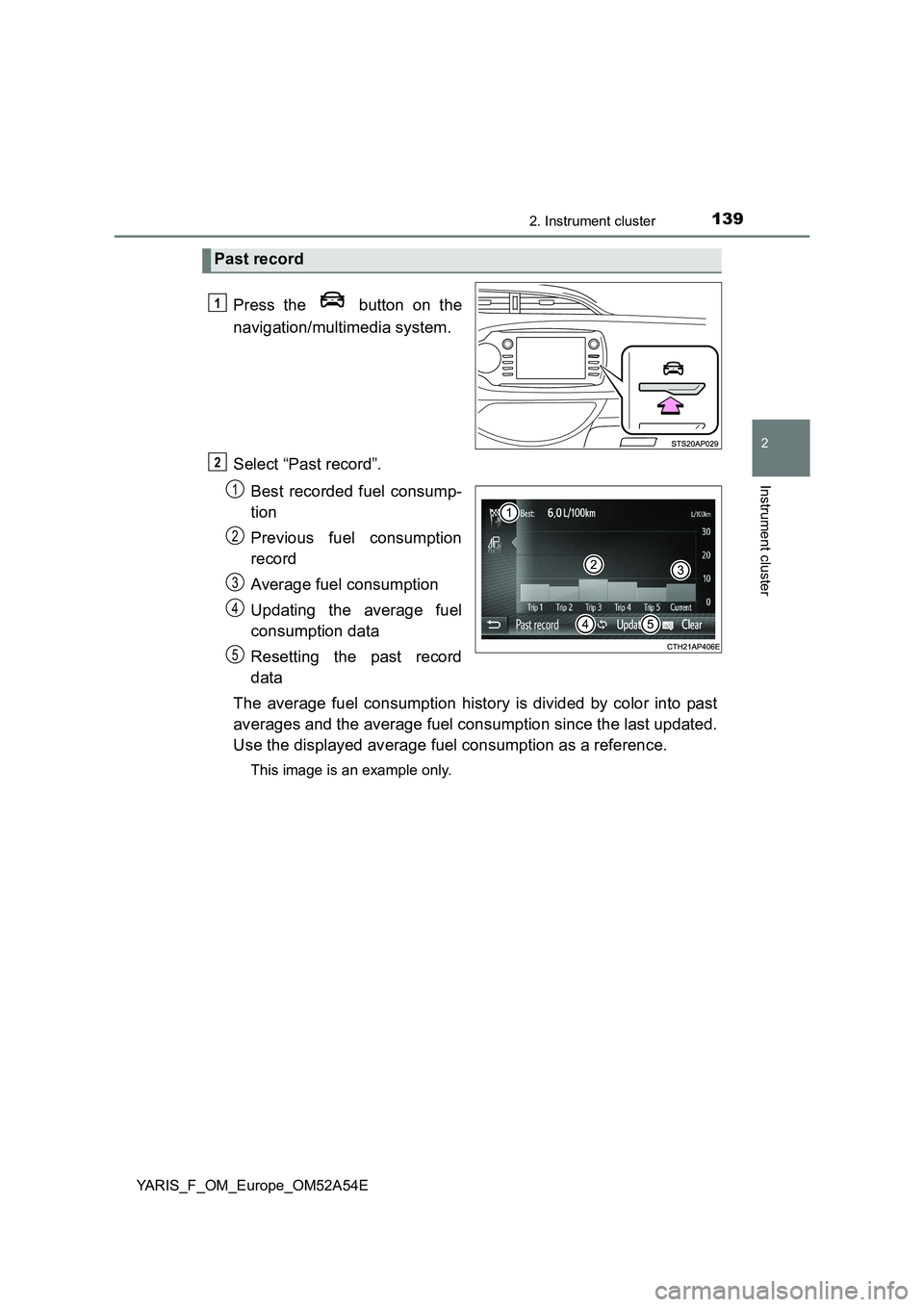
Select “Past record”.
Best recorded fuel consump-
tion
Previous fuel consumption
record
Average fuel consumption
Updating the average fuel
consumption data
Resetting the past record
data
The average fuel consumption history is divided by color into past
averages and the average fuel consumption since the last updated.
Use the displayed average fuel consumption as a reference.
This image is an example only.
Past record
1
2
1
2
3
4
5
Page 140 of 692
1402. Instrument cluster
YARIS_F_OM_Europe_OM52A54E
■Updating the past record data
Update the average fuel consumption by selecting “Update” to measure the
current fuel consumption again.
■Resetting the data
The fuel consumption data can be deleted by selecting “Clear”.
■Cruising range
Displays the estimated maximum distance that can be driven with the quan-
tity of fuel remaining.
This distance is computed based on your average fuel consumption.
As a result, the actual distance that can be driven may differ from that dis-
played.
Page 219 of 692
219
4Driving
YARIS_F_OM_Europe_OM52A54E4-1. Before driving
Driving the vehicle ............. 220
Cargo and luggage ............ 230
Trailer towing ..................... 231
4-2. Driving procedures
Engine (ignition) switch
(vehicles without
a smart entry &
start system) .................... 241
Engine (ignition) switch
(vehicles with
a smart entry &
start system) .................... 243
Multidrive ........................... 252
Manual transmission.......... 260
Turn signal lever ................ 264
Parking brake .................... 265
4-3. Operating the lights
and wipers
Headlight switch ................ 266
Fog light switch .................. 271
Windshield wiper and
washer ............................. 273
Rear window wiper and
washer ............................. 2774-4. Refueling
Opening the fuel tank
cap ................................... 279
4-5. Toyota Safety Sense
Toyota Safety Sense ......... 282
PCS
(Pre-Crash Safety
system) ............................ 290
LDA
(Lane Departure Alert) ..... 307
Automatic High Beam ........ 314
RSA (Road Sign Assist)..... 319
4-6. Using the driving support
systems
Cruise control..................... 325
Speed limiter ...................... 329
Rear view
monitor system ................ 334
Stop & start system............ 344
Driving assist systems ....... 355
4-7. Driving tips
Winter driving tips .............. 362