display TOYOTA YARIS HATCHBACK 2019 Manual PDF
[x] Cancel search | Manufacturer: TOYOTA, Model Year: 2019, Model line: YARIS HATCHBACK, Model: TOYOTA YARIS HATCHBACK 2019Pages: 692, PDF Size: 68.71 MB
Page 323 of 692
3234-5. Toyota Safety Sense
4
Driving
YARIS_F_OM_Europe_OM52A54E■Conditions in which the function may not operate or detect correctly
In the following situations, RSA does not operate normally and may not rec-
ognize signs, display the incorrect sign, etc. However, this does not indicate a
malfunction.
●The front sensor is misaligned due to a strong impact being applied to the
sensor, etc.
●Dirt, snow, stickers, etc., are on the windshield near the front sensor.
●In inclement weather such as heavy rain, fog, snow or sand storms
●Light from an oncoming vehicle, the sun, etc., enters the front sensor.
●The sign is small, dirty, faded, tilted or bent, and if an electronic sign, the
contrast is poor.
●All or part of the sign is hidden by the leaves of a tree, a pole, etc.
●The sign is only visible to the front sensor for a short amount of time.
●The driving scene (turning, lane change, etc.) is judged incorrectly.
●Even if it is a sign not appropriate for the currently traveled lane, such a sign
exists directly after a freeway branches, or in an adjacent lane just before
merging.
●Stickers are attached to the rear of the preceding vehicle.
●A sign resembling a system compatible sign is recognized.
●The vehicle is driven in a country with a different direction of traffic.
●Side road speed signs may be detected and displayed (if positioned in sight
of the front sensor) while the vehicle is traveling on the main road.
●Roundabout exit road speed signs may be detected and displayed (if posi-
tioned in sight of the front sensor) while traveling on a roundabout.
●The speed information displayed on the meter and that displayed on the
Navigation system (if equipped) may be different due to the Navigation sys-
tem using map data.
Page 324 of 692
3244-5. Toyota Safety Sense
YARIS_F_OM_Europe_OM52A54E
■ When driving vehicle in country with different speed unit
Since RSA recognizes signs based on the set unit of the meter, it is neces-
sary to change the set unit of the meter. Adjust the set unit of the meter to the
speed unit of signs in the current location. ( P. 671)
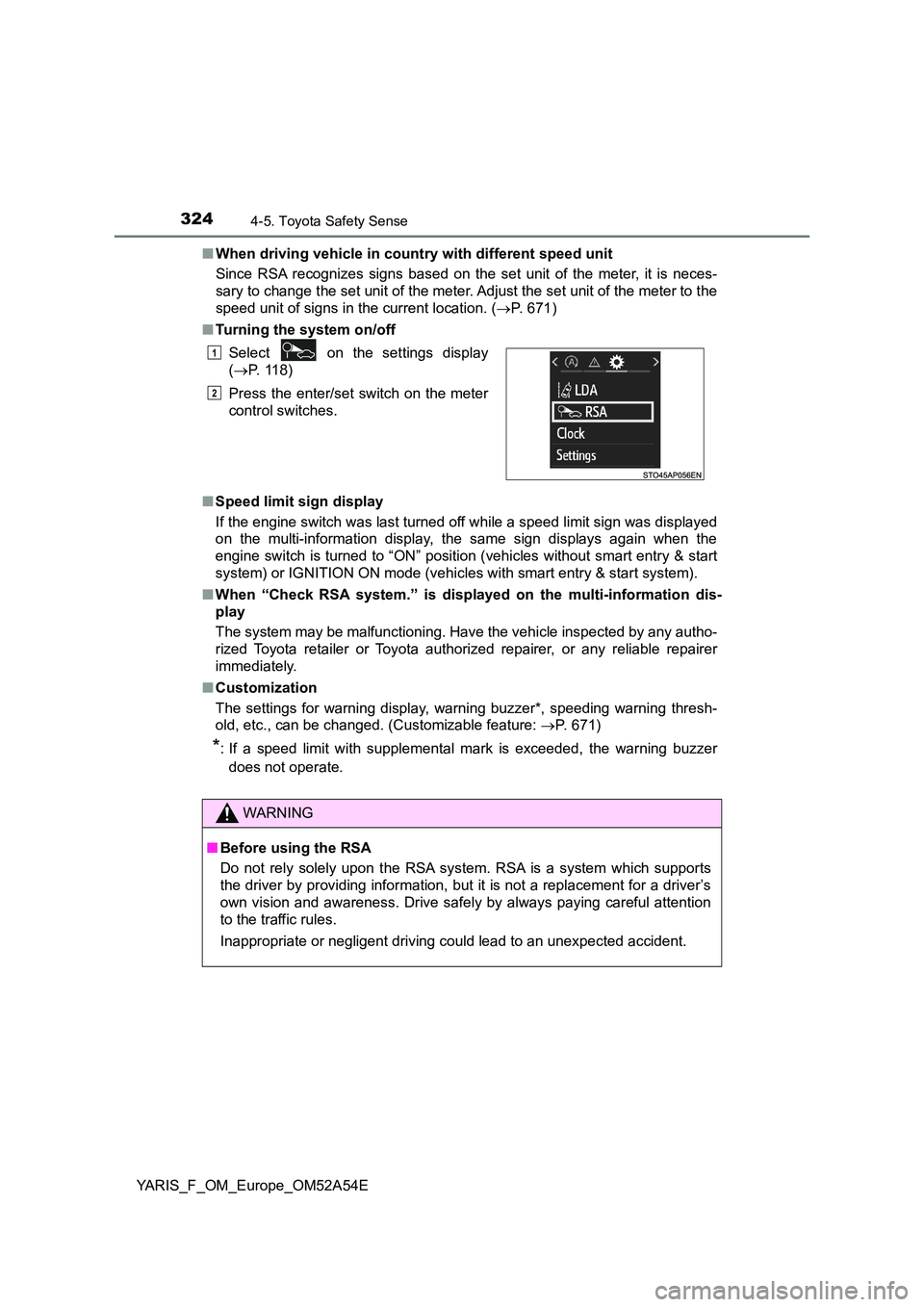
■ Turning the system on/off
■ Speed limit sign display
If the engine switch was last turned off while a speed limit sign was displayed
on the multi-information display, the same sign displays again when the
engine switch is turned to “ON” position (vehicles without smart entry & start
system) or IGNITION ON mode (vehicles with smart entry & start system).
■ When “Check RSA system.” is displayed on the multi-information dis-
play
The system may be malfunctioning. Have the vehicle inspected by any autho-
rized Toyota retailer or Toyota authorized repairer, or any reliable repairer
immediately.
■ Customization
The settings for warning display, warning buzzer*, speeding warning thresh-
old, etc., can be changed. (Customizable feature: P. 671)
*: If a speed limit with supplemental mark is exceeded, the warning buzzer
does not operate.
Select on the settings display
( P. 118)
Press the enter/set switch on the meter
control switches.
WARNING
■ Before using the RSA
Do not rely solely upon the RSA system. RSA is a system which supports
the driver by providing information, but it is not a replacement for a driver’s
own vision and awareness. Drive safely by always paying careful attention
to the traffic rules.
Inappropriate or negligent driving could lead to an unexpected accident.
1
2
Page 328 of 692
3284-6. Using the driving support systems
YARIS_F_OM_Europe_OM52A54E
■ If the cruise control indicator comes in yellow (vehicles with mono-
chrome display) or “Check cruise control system.” is displayed on the
multi-information display ( vehicles with color display)
Press the “ON-OFF” button once to deactivate the system, and then press
the button again to reactivate the system.
If the cruise control speed cannot be set or if the cruise control cancels
immediately after being activated, there may be a malfunction in the cruise
control system. Have the vehicle inspected by any authorized Toyota retailer
or Toyota authorized repairer, or any reliable repairer.
WARNING
■ To avoid operating the cruise control by mistake
Switch the cruise control off using the “ON-OFF” button when not in use.
■ Situations unsuitable for cruise control
Do not use cruise control in any of the following situations.
Doing so may result in loss of control and could cause an accident resulting
in death or serious injury.
● In heavy traffic
● On roads with sharp bends
● On winding roads
● On slippery roads, such as those covered with rain, ice or snow
● On steep hills
Vehicle speed may exceed the set speed when driving down a steep hill.
● When your vehicle is towing a trailer or during emergency towing
Page 329 of 692
329
4
4-6. Using the driving support systems
Driving
YARIS_F_OM_Europe_OM52A54E
Speed limiter
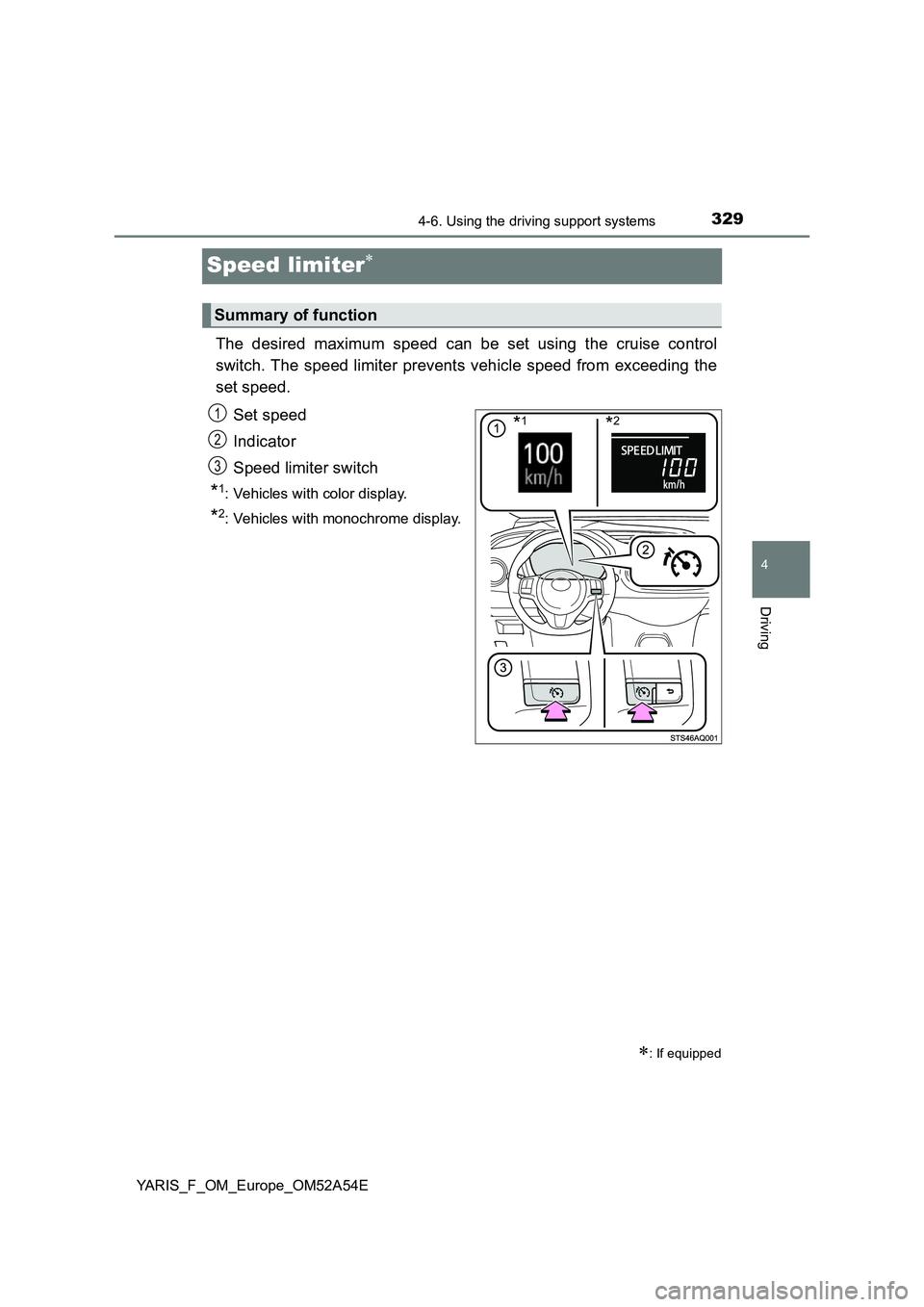
The desired maximum speed can be set using the cruise control
switch. The speed limiter prevents vehicle speed from exceeding the
set speed.
Set speed
Indicator
Speed limiter switch
*1: Vehicles with color display.
*2: Vehicles with monochrome display.
Summary of function
: If equipped
*1*2 1
2
13
Page 330 of 692
3304-6. Using the driving support systems
YARIS_F_OM_Europe_OM52A54E
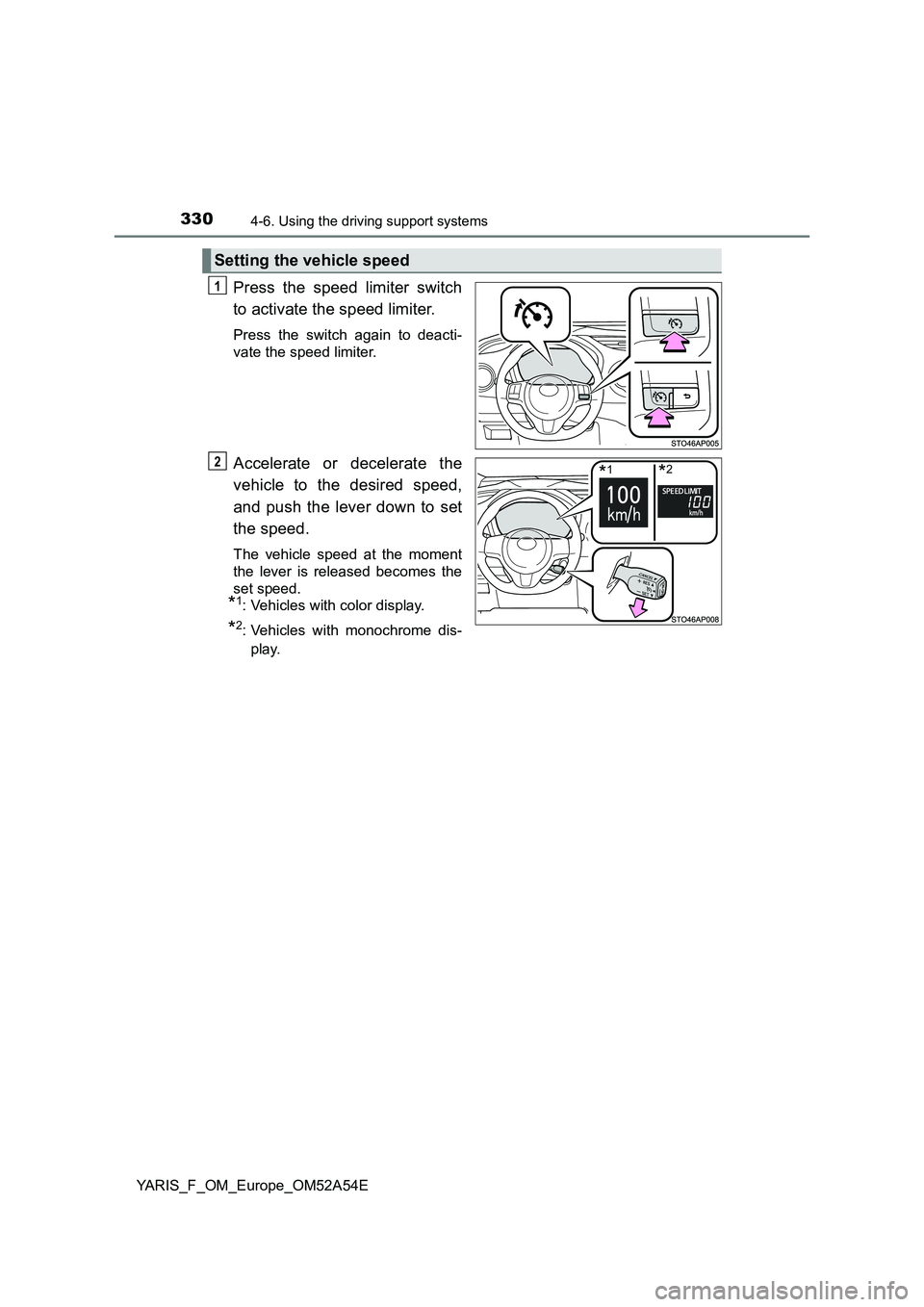
Press the speed limiter switch
to activate the speed limiter.
Press the switch again to deacti-
vate the speed limiter.
Accelerate or decelerate the
vehicle to the desired speed,
and push the lever down to set
the speed.
The vehicle speed at the moment
the lever is released becomes the
set speed.
*1: Vehicles with color display.
*2: Vehicles with monochrome dis-
play.
Setting the vehicle speed
1
*1*22
Page 332 of 692
3324-6. Using the driving support systems
YARIS_F_OM_Europe_OM52A54E
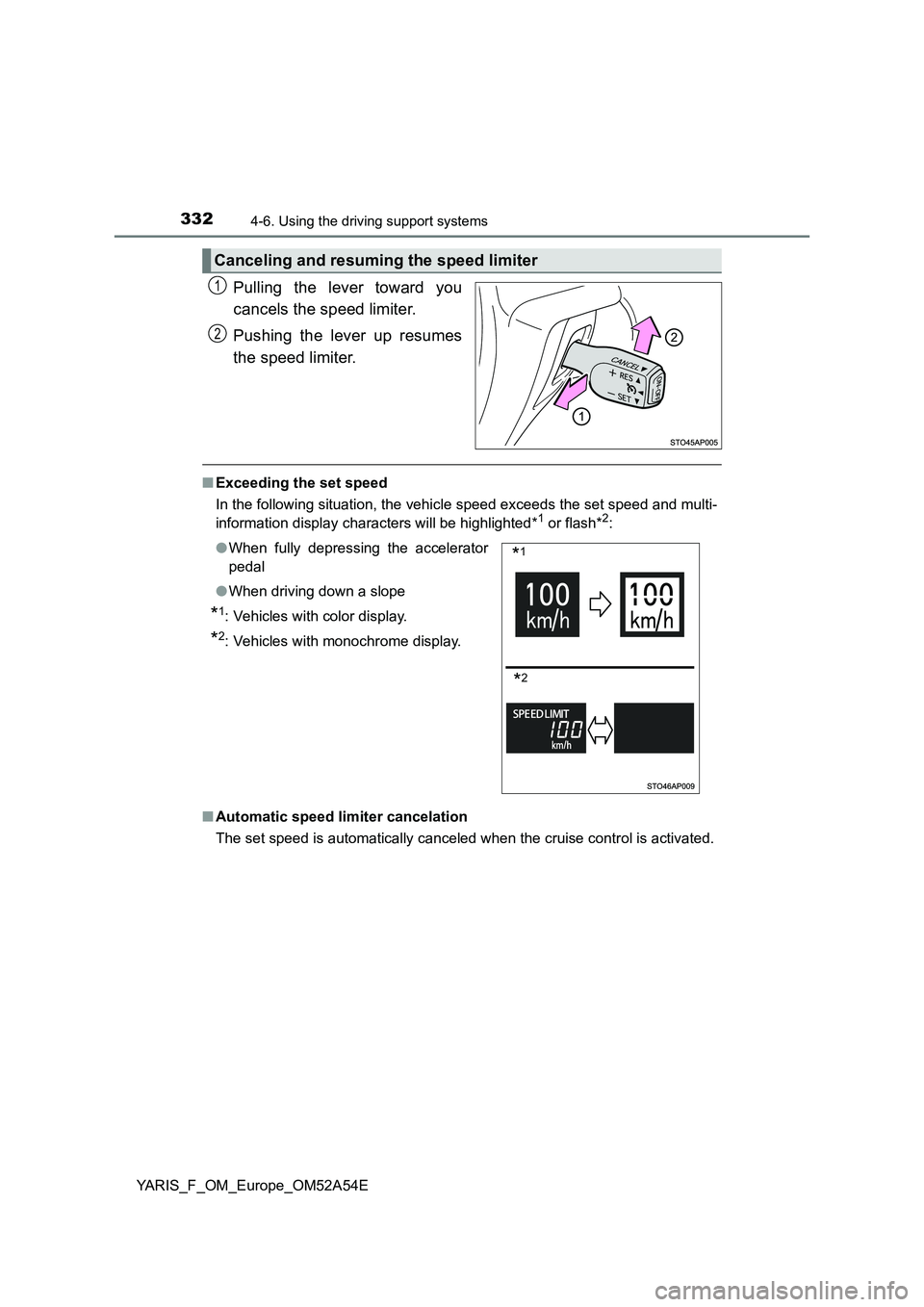
Pulling the lever toward you
cancels the speed limiter.
Pushing the lever up resumes
the speed limiter.
■ Exceeding the set speed
In the following situation, the vehicle speed exceeds the set speed and multi-
information display characters will be highlighted*1 or flash*2:
■ Automatic speed limiter cancelation
The set speed is automatically canceled when the cruise control is activated.
Canceling and resuming the speed limiter
1
2
● When fully depressing the accelerator
pedal
● When driving down a slope
*1: Vehicles with color display.
*2: Vehicles with monochrome display.
*1
*2
Page 333 of 692
3334-6. Using the driving support systems
4
Driving
YARIS_F_OM_Europe_OM52A54E
■ If the speed limiter indicator comes on in yellow (vehicles with mono-
chrome display) or “Check speed li miter system.” is displayed on the
multi-information display ( vehicles with color display)
Stop the engine and then restart the engine. After restarting the engine, set
the speed limiter. If the speed limiter cannot be set, there may be a malfunc-
tion in the speed limiter. Have the vehicle inspected by any authorized Toyota
retailer or Toyota authorized repairer, or any reliable repairer.
WARNING
■ To avoid operating the speed limiter by mistake
Switch the speed limiter off using the speed limiter switch when not in use.
■ Situations unsuitable for the speed limiter
Do not use the speed limiter in either of the following situations.
Doing so may result in loss of control and could cause a serious or fatal
accident.
● On slippery roads, such as those covered with rain, ice and snow
● On steep hills
● When your vehicle is towing a trailer or during emergency towing
Page 334 of 692
3344-6. Using the driving support systems
YARIS_F_OM_Europe_OM52A54E
Rear view monitor system
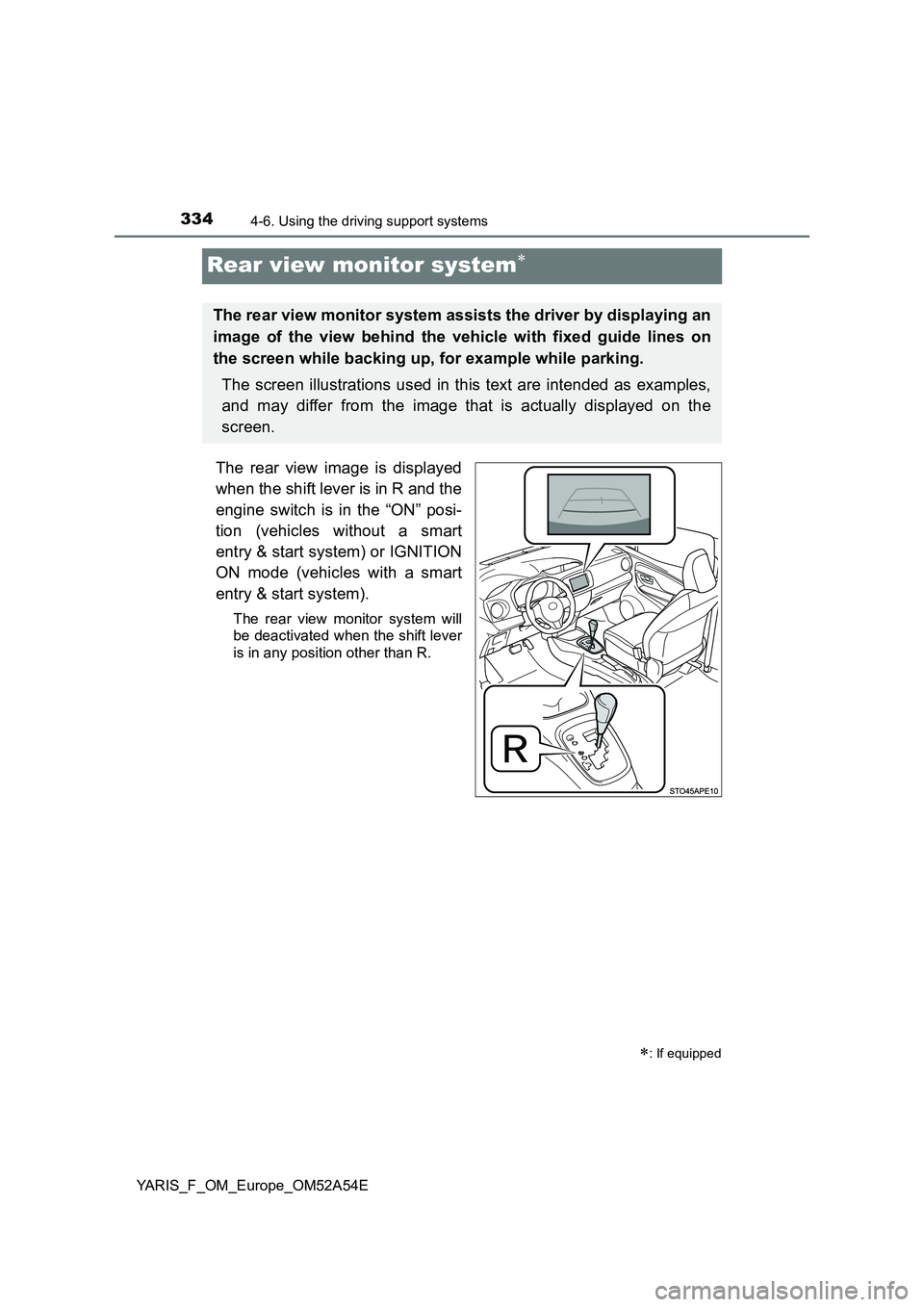
The rear view image is displayed
when the shift lever is in R and the
engine switch is in the “ON” posi-
tion (vehicles without a smart
entry & start system) or IGNITION
ON mode (vehicles with a smart
entry & start system).
The rear view monitor system will
be deactivated when the shift lever
is in any position other than R.
: If equipped
The rear view monitor system assists the driver by displaying an
image of the view behind the vehicle with fixed guide lines on
the screen while backing up, for example while parking.
The screen illustrations used in this text are intended as examples,
and may differ from the image that is actually displayed on the
screen.
Page 335 of 692
3354-6. Using the driving support systems
4
Driving
YARIS_F_OM_Europe_OM52A54E■
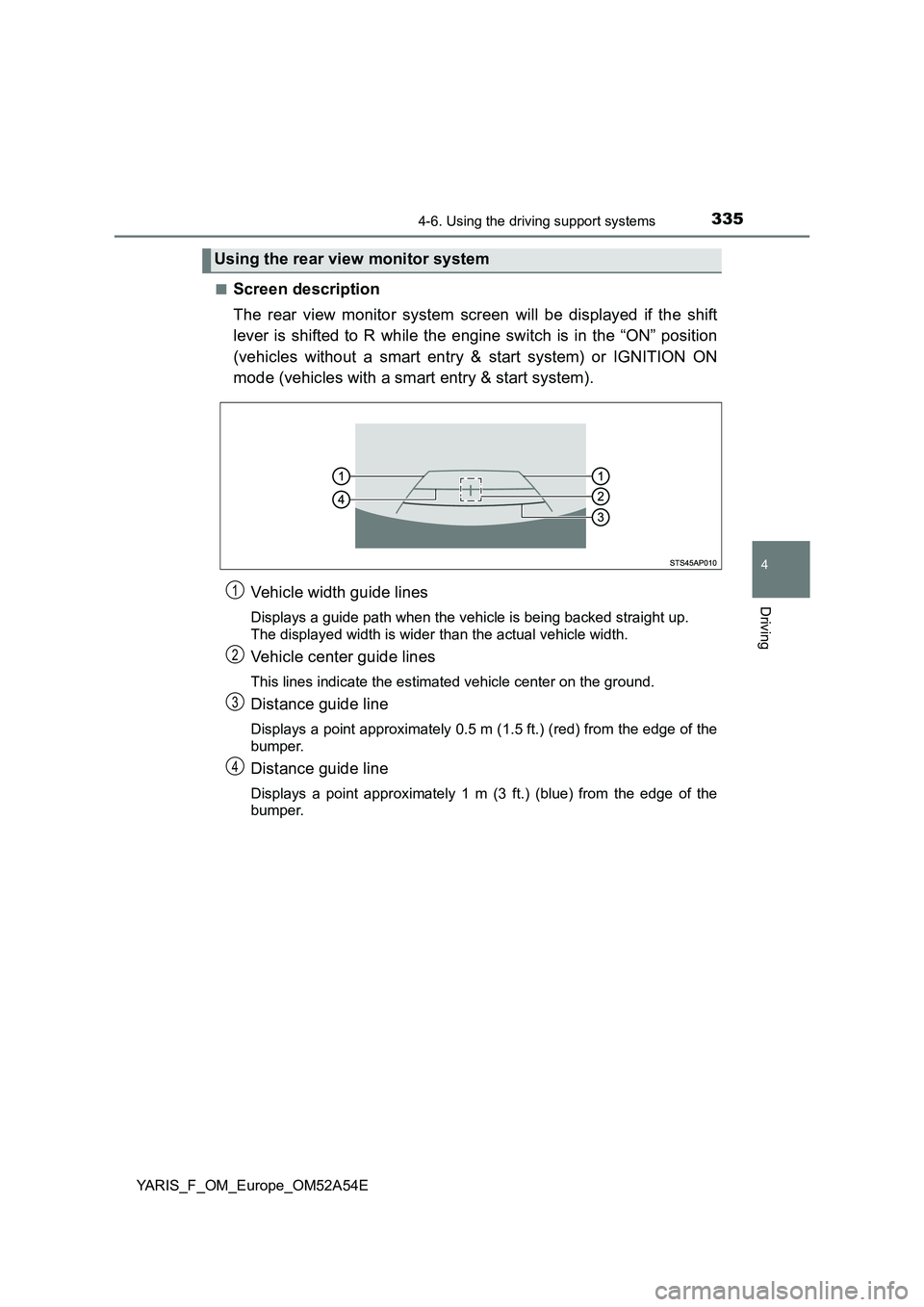
Screen description
The rear view monitor system screen will be displayed if the shift
lever is shifted to R while the engine switch is in the “ON” position
(vehicles without a smart entry & start system) or IGNITION ON
mode (vehicles with a smart entry & start system).
Vehicle width guide lines
Displays a guide path when the vehicle is being backed straight up.
The displayed width is wider than the actual vehicle width.
Vehicle center guide lines
This lines indicate the estimated vehicle center on the ground.
Distance guide line
Displays a point approximately 0.5 m (1.5 ft.) (red) from the edge of the
bumper.
Distance guide line
Displays a point approximately 1 m (3 ft.) (blue) from the edge of the
bumper.
Using the rear view monitor system
1
2
3
4
Page 336 of 692
3364-6. Using the driving support systems
YARIS_F_OM_Europe_OM52A54E
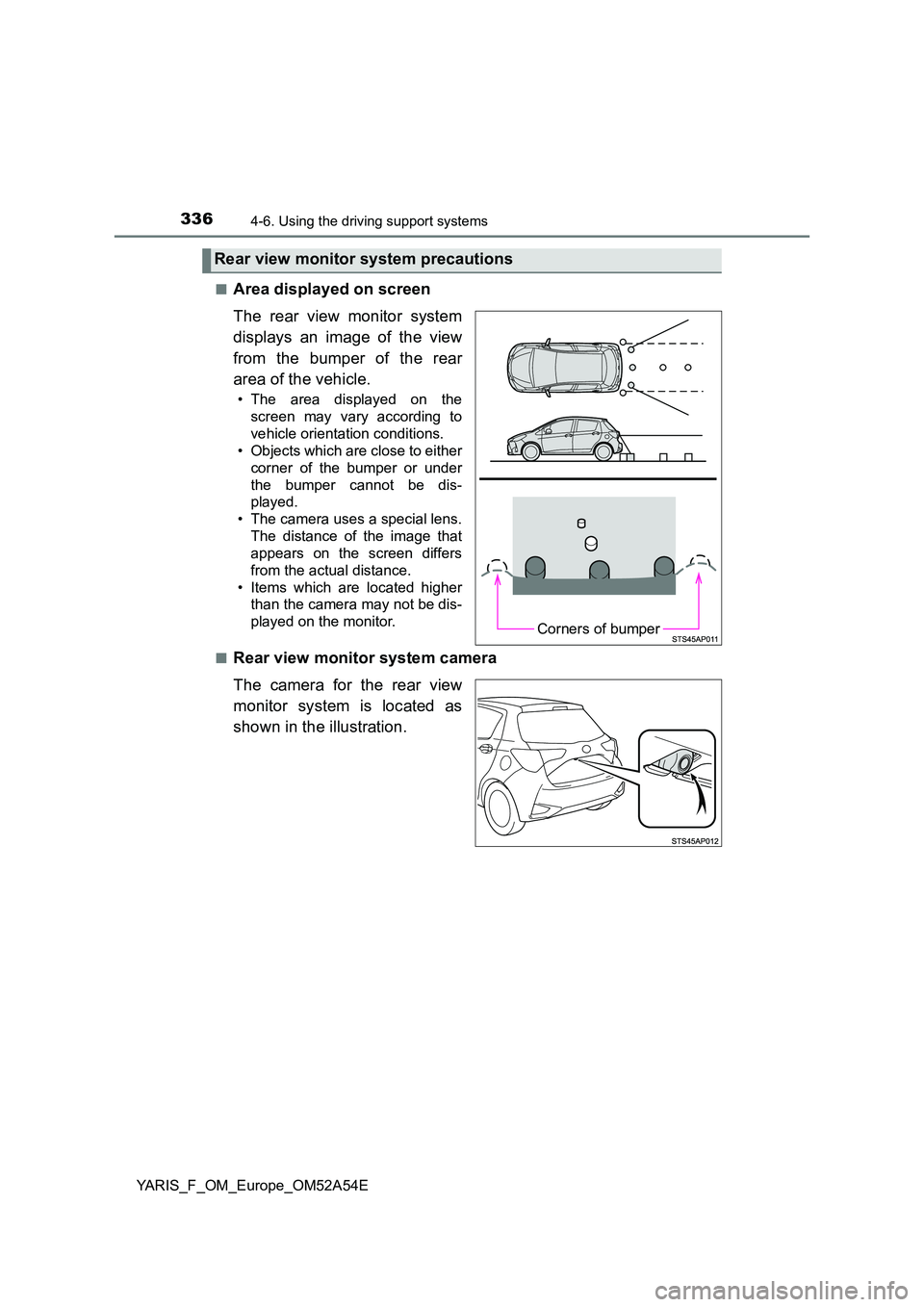
■Area displayed on screen
The rear view monitor system
displays an image of the view
from the bumper of the rear
area of the vehicle.
• The area displayed on the
screen may vary according to
vehicle orientation conditions.
• Objects which are close to either
corner of the bumper or under
the bumper cannot be dis-
played.
• The camera uses a special lens.
The distance of the image that
appears on the screen differs
from the actual distance.
• Items which are located higher
than the camera may not be dis-
played on the monitor.
■Rear view monitor system camera
The camera for the rear view
monitor system is located as
shown in the illustration.
Rear view monitor system precautions
Corners of bumper