warning light TOYOTA YARIS HATCHBACK 2021 User Guide
[x] Cancel search | Manufacturer: TOYOTA, Model Year: 2021, Model line: YARIS HATCHBACK, Model: TOYOTA YARIS HATCHBACK 2021Pages: 568, PDF Size: 110.34 MB
Page 41 of 568
41
1
YARIS(HB) Owner's Manual_Europe_MK0001_en
1-1. For safe use
For safety and security
WARNING
■SRS airbag precautions
Observe the following precautions
regarding the SRS airbags. Failure to do so may cause death or serious injury.
●The driver and all passengers in the vehicle must wear their seat belts
properly. The SRS airbags are supplemental devices to be used with the seat
belts.
●The SRS driver airbag deploys with
considerable force, and can cause death or serious injury especially if the driver is very close to the air-
bag.
Since the risk zone for the driver’s air-
bag is the first 50 - 75 mm (2 - 3 in.) of
inflation, placing yourself 250 mm (10
in.) from your driver airbag provides
you with a clear margin of safety. This
distance is measured from the center
of the steering wheel to your breast-
bone. If you sit less than 250 mm (10
in.) away now, you can change your
driving position in several ways:
• Move your seat to the rear as far as you can while still reaching the ped-als comfortably.
• Slightly recline the back of the seat. Although vehicle designs vary,
many drivers can achieve the 250 mm (10 in.) distance, even with the driver seat all the way forward, sim-
ply by reclining the back of the seat somewhat. If reclining the back of your seat makes it hard to see the
road, raise yourself by using a firm, non-slippery cushion, or raise the seat if your vehicle has that feature.
• If your steering wheel is adjustable, tilt it downward. This points the air-
bag toward your chest instead of your head and neck.
The seat should be adjusted as rec-ommended above, while still main-taining control of the foot pedals,
steering wheel, and your view of the instrument panel controls.
●The SRS front passenger airbag also deploys with considerable force, and can cause death or seri-
ous injury especially if the front pas- senger is very close to the airbag. The front passenger seat should be
as far from the airbag as possible with the seatback adjusted, so the front passenger sits upright.
●Improperly seated and/or restrained infants and children can be killed or
seriously injured by a deploying air- bag. An infant or child who is too small to use a seat belt should be
properly secured using a child restraint system. Toyota strongly recommends that all infants and
children be placed in the rear seats of the vehicle and properly restrained. The rear seats are safer
for infants and children than the front passenger seat. ( →P. 4 7 )
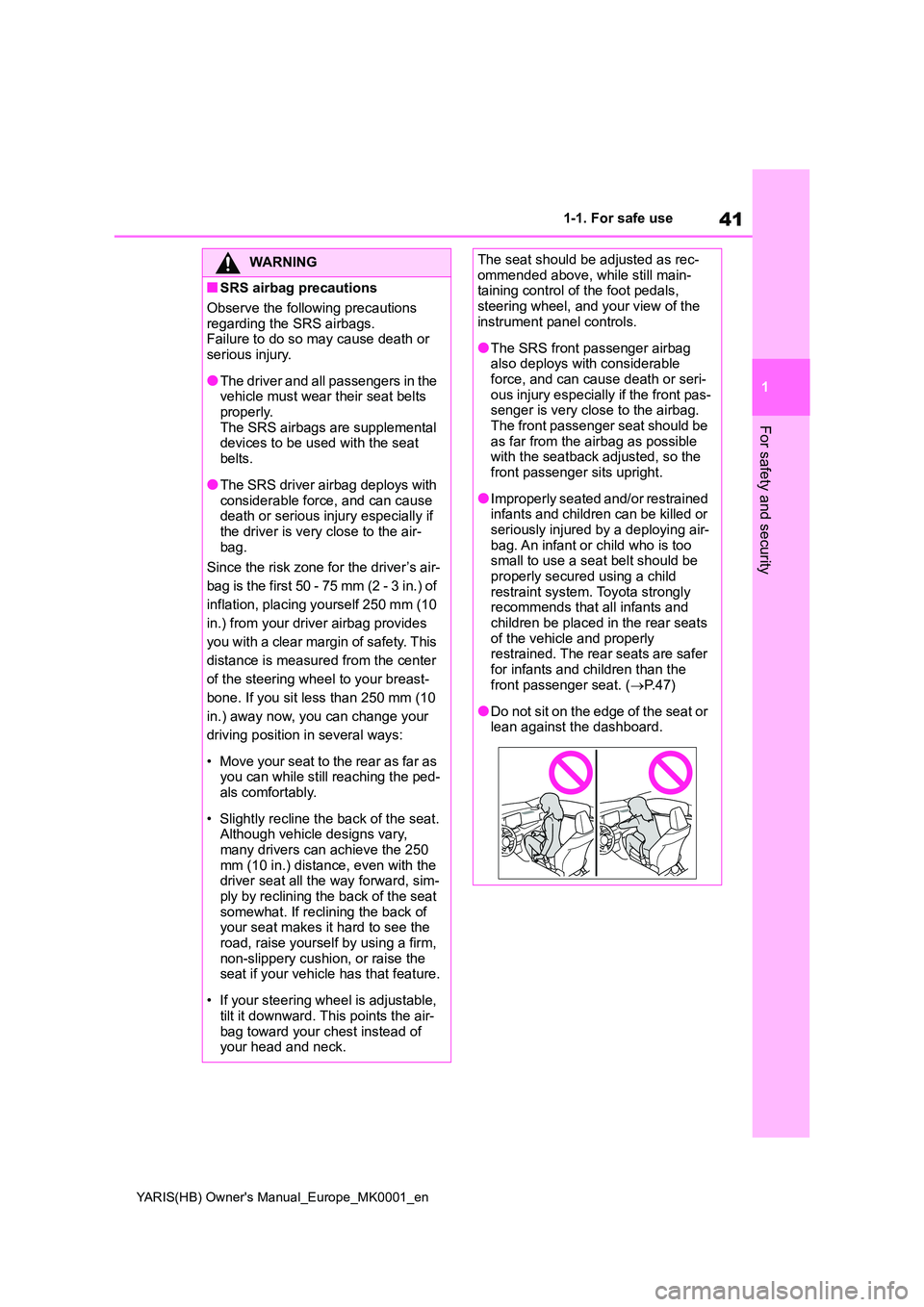
●Do not sit on the edge of the seat or lean against the dashboard.
Page 44 of 568
44
YARIS(HB) Owner's Manual_Europe_MK0001_en
1-1. For safe use
Exhaust gas precautions
Harmful substance to the
human body is included in
exhaust gases if inhaled.
WARNING
Exhaust gases include harmful car-
bon monoxide (CO), which is color- less and odorless. Observe the following precautions.
Failure to do so may cause exhaust gases enter the vehicle and may lead to an accident caused by light-
headedness, or may lead to death or a serious health hazard.
■Important points while driving
●Keep the back door closed.
●If you smell exhaust gases in the vehicle even when the back door is closed, open the windows and have
the vehicle inspected at any autho- rized Toyota retailer or Toyota authorized repairer, or any reliable
repairer as soon as possible.
■When parking
●If the vehicle is in a poorly venti- lated area or a closed area, such as a garage, stop the engine.
●Do not leave the vehicle with the engine on for a long time.
If such a situation cannot be avoided, park the vehicle in an open space and ensure that
exhaust fumes do not enter the vehicle interior.
●Do not leave the engine running in an area with snow build-up, or where it is snowing. If snowbanks
build up around the vehicle while the engine is running, exhaust gases may collect and enter the
vehicle.
■Exhaust pipe
The exhaust system needs to be checked periodically. If there is a hole
or crack caused by corrosion, dam- age to a joint or abnormal exhaust noise, be sure to have the vehicle
inspected and repaired by any autho- rized Toyota retailer or Toyota autho-rized repairer, or any reliable repairer.
Page 67 of 568
67
1
YARIS(HB) Owner's Manual_Europe_MK0001_en
1-3. Emergency assistance
For safety and security
tance required.
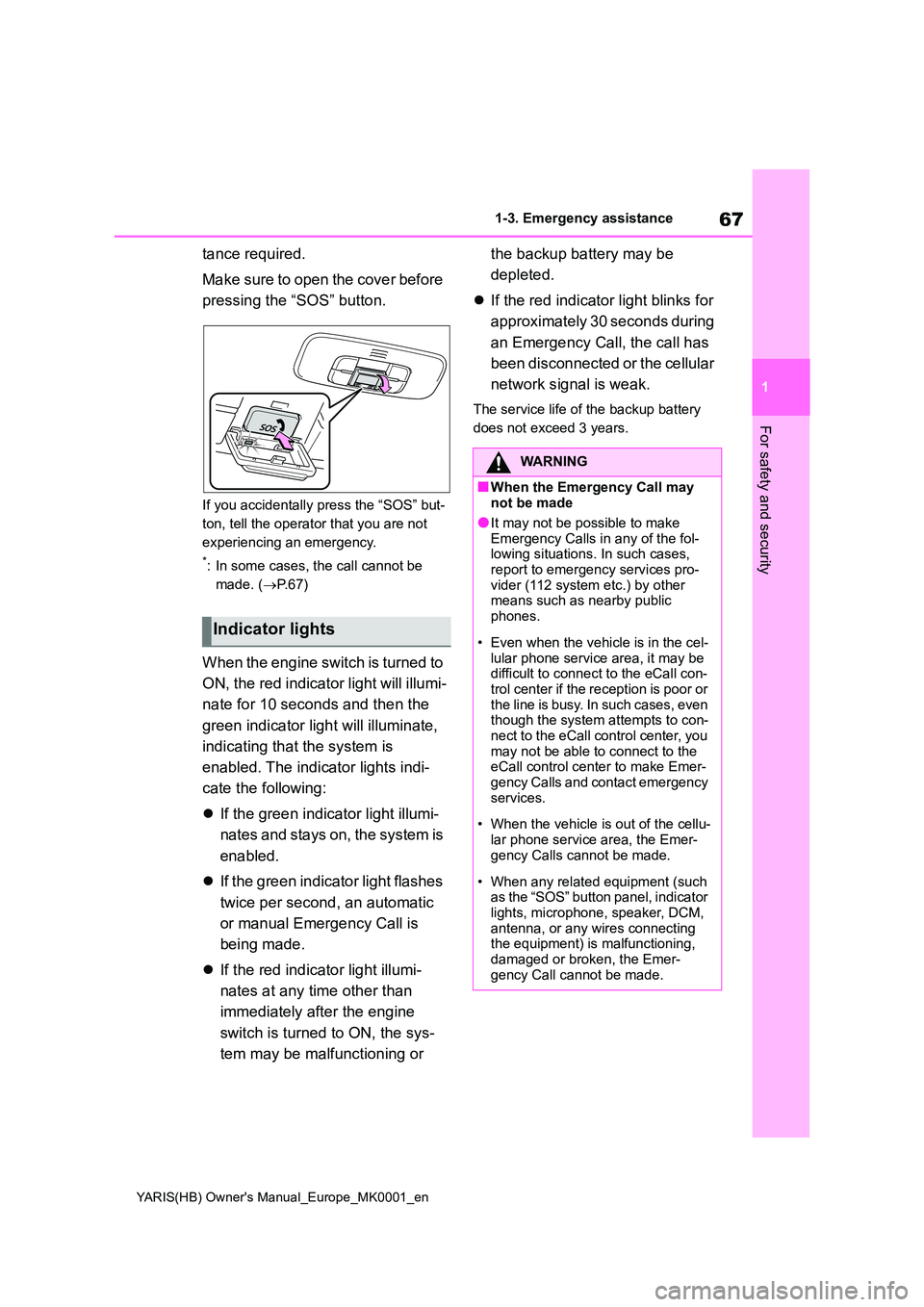
Make sure to open the cover before
pressing the “SOS” button.
If you accidentally press the “SOS” but-
ton, tell the operator that you are not
experiencing an emergency.
*: In some cases, the call cannot be
made. ( →P. 6 7 )
When the engine switch is turned to
ON, the red indicator light will illumi-
nate for 10 seconds and then the
green indicator light will illuminate,
indicating that the system is
enabled. The indicator lights indi-
cate the following:
z If the green indicator light illumi-
nates and stays on, the system is
enabled.
z If the green indicator light flashes
twice per second, an automatic
or manual Emergency Call is
being made.
z If the red indicator light illumi-
nates at any time other than
immediately after the engine
switch is turned to ON, the sys-
tem may be malfunctioning or
the backup battery may be
depleted.
z If the red indicator light blinks for
approximately 30 seconds during
an Emergency Call, the call has
been disconnected or the cellular
network signal is weak.
The service life of the backup battery
does not exceed 3 years.
Indicator lights
WARNING
■When the Emergency Call may not be made
●It may not be possible to make Emergency Calls in any of the fol-lowing situations. In such cases,
report to emergency services pro- vider (112 system etc.) by other means such as nearby public
phones.
• Even when the vehicle is in the cel-
lular phone service area, it may be difficult to connect to the eCall con-trol center if the reception is poor or
the line is busy. In such cases, even though the system attempts to con-nect to the eCall control center, you
may not be able to connect to the eCall control center to make Emer-gency Calls and contact emergency
services.
• When the vehicle is out of the cellu-
lar phone service area, the Emer- gency Calls cannot be made.
• When any related equipment (such as the “SOS” button panel, indicator lights, microphone, speaker, DCM,
antenna, or any wires connecting the equipment) is malfunctioning, damaged or broken, the Emer-
gency Call cannot be made.
Page 68 of 568
68
YARIS(HB) Owner's Manual_Europe_MK0001_en
1-3. Emergency assistance
WARNING
• During an Emergency Call, the sys- tem makes repeated attempts to
connect to the eCall control center. However, if it cannot connect to the eCall control center due to poor
radio wave reception, the system may not be able to connect to the cellular network and the call may
finish without connecting. The red indicator light will blink for approxi-mately 30 seconds to indicate this
disconnection.
●If the battery’s voltage decreases or
there is a disconnection, the system may not be able to connect to the eCall control center.
●The Emergency Call system might not work outside of EU area,
depending on the available infra- structure in the country.
■When the Emergency Call sys-tem is replaced with a new one
The Emergency Call system should
be registered. Contact any authorized Toyota retailer or Toyota authorized repairer, or any reliable repairer.
■For your safety
●Please drive safely.
The function of this system is to assist you in making the Emer-gency Call in case of accidents
such as traffic accidents or sudden medical emergencies, and it does not protect the driver or passengers
in any way. Please drive safely and fasten your seatbelts at all times for your safety.
●In case of an emergency, make lives the top priority.
●If you smell anything burning or other unusual smells, leave the
vehicle and evacuate to a safe area immediately.
●If the airbags deploy when the sys-tem is operating normally, the sys-tem makes emergency call. The
system also makes emergency call when the vehicle is struck from the rear or rolls over, even if the airbags
do not deploy.
●For safety, do not make the Emer-
gency Call while driving. Making calls during driving may cause mishandling of the steering
wheel, which may lead to unex- pected accidents.Stop the vehicle and confirm the
safety of your surroundings before making the Emergency Call.
●When changing fuses, please use the specified fuses. Using other fuses may cause ignition or smoke
in the circuit and lead to a fire.
●Using the system while there is
smoke or an unusual smell may cause a fire. Stop using the system immediately and consult any autho-
rized Toyota retailer or Toyota authorized repairer, or any reliable repairer.
NOTICE
■To prevent damage
Do not pour any liquids onto the “SOS” button panel, etc. and do not
impact it.
■If the “SOS” button panel,
speaker or microphone malfunc- tions during an Emergency Call or manual maintenance check
It may not be possible to make Emer- gency Calls, confirm the system sta-tus, or communicate with the eCall
control center operator. If any of the above equipment is damaged, please consult any authorized Toyota retailer
or Toyota authorized repairer, or any reliable repairer.
Page 81 of 568
2
81
YARIS(HB) Owner's Manual_Europe_MK0001_en
2
Vehicle status information and indicators
Vehicle status informa-
tion and indicators
2-1. Instrument cluster
Warning lights and indicators
......................................... 82
Gauges and meters (vertical
display) ............................. 86
Gauges and meters (horizontal
display) ............................. 90
Multi-information display (verti-
cal display)........................ 93
Multi-information display (hori-
zontal display)................... 99
Head-up display................ 105
Fuel consumption information
....................................... 109
Page 82 of 568
82
YARIS(HB) Owner's Manual_Europe_MK0001_en
2-1. Instrument cluster
2-1.In strument clu ste r
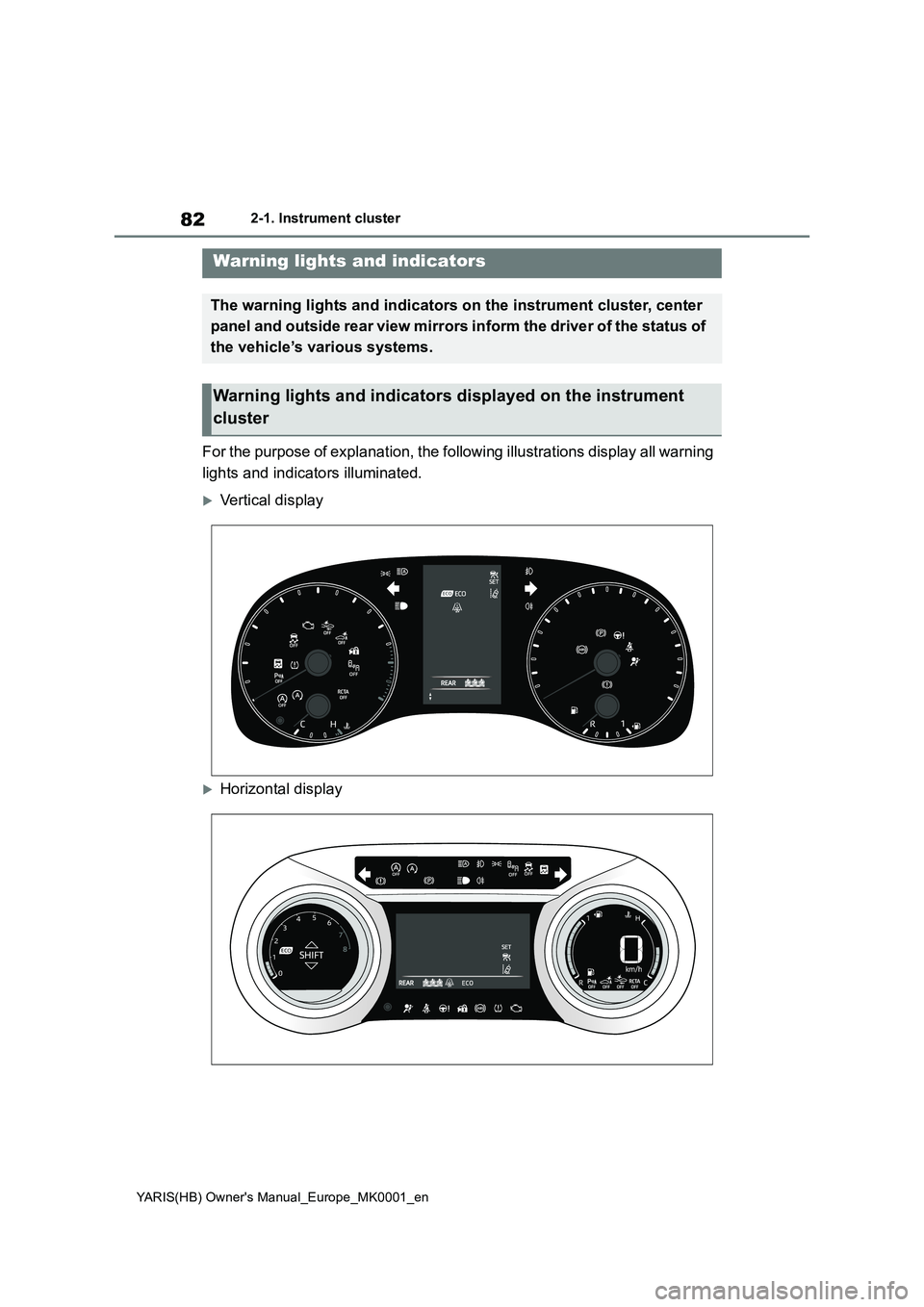
For the purpose of explanation, the following illustrations display all warning
lights and indicators illuminated.
Vertical display
Horizontal display
Warning lights and indicators
The warning lights and indicators on the instrument cluster, center
panel and outside rear view mirrors inform the driver of the status of
the vehicle’s various systems.
Warning lights and indicators displayed on the instrument
cluster
Page 83 of 568
83
2
YARIS(HB) Owner's Manual_Europe_MK0001_en
2-1. Instrument cluster
Vehicle status information and indicators
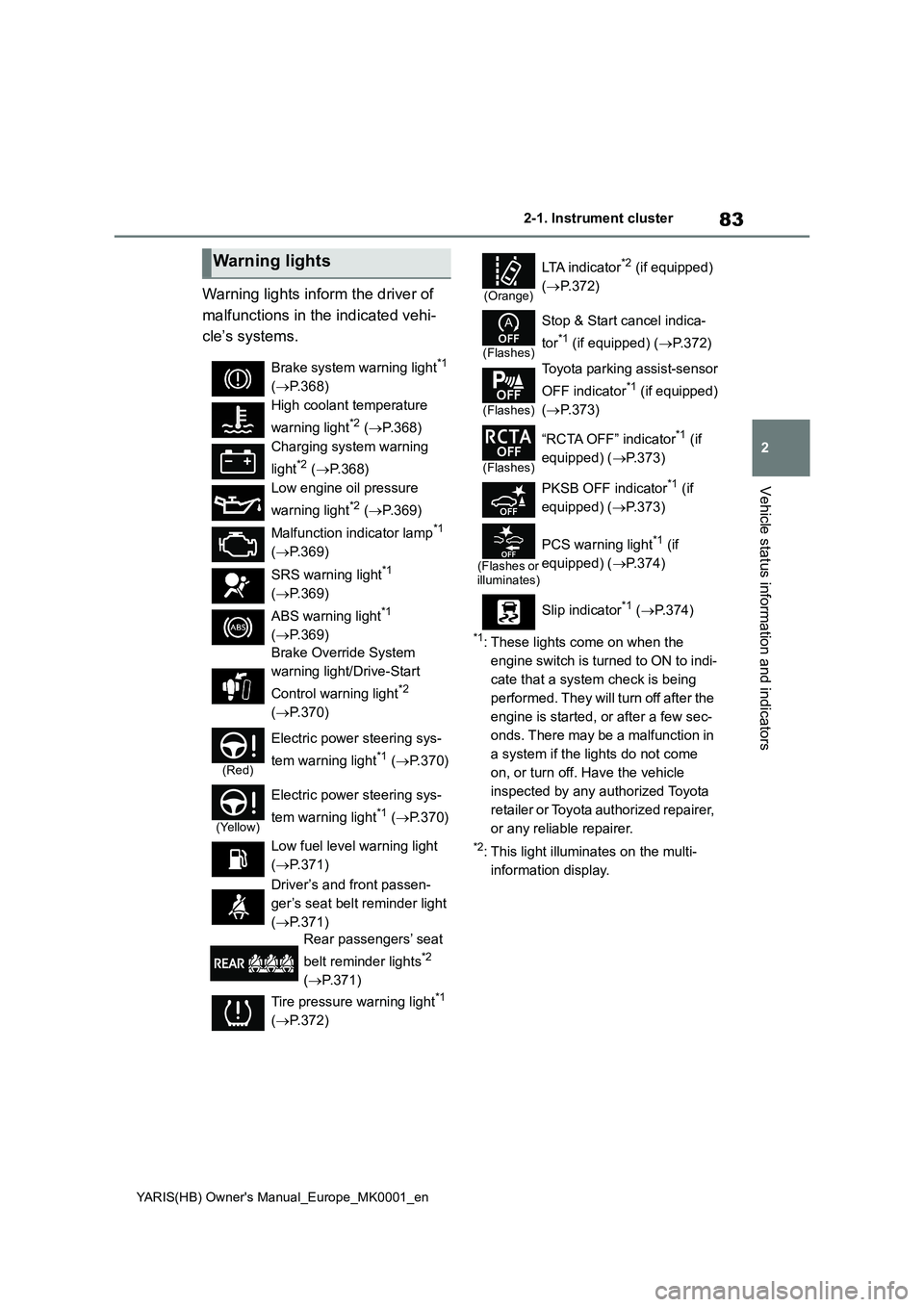
Warning lights inform the driver of
malfunctions in the indicated vehi-
cle’s systems.
*1: These lights come on when the
engine switch is turned to ON to indi-
cate that a system check is being
performed. They will turn off after the
engine is started, or after a few sec-
onds. There may be a malfunction in
a system if the lights do not come
on, or turn off. Have the vehicle
inspected by any authorized Toyota
retailer or Toyota authorized repairer,
or any reliable repairer.
*2: This light illuminates on the multi-
information display.
Warning lights
Brake system warning light*1
(→P.368)
High coolant temperature
warning light
*2 (→P.368)
Charging system warning
light
*2 (→P.368)
Low engine oil pressure
warning light
*2 (→P.369)
Malfunction indicator lamp
*1
(→P.369)
SRS warning light
*1
(→P.369)
ABS warning light
*1
(→P.369)
Brake Override System
warning light/Drive-Start
Control warning light
*2
(→P.370)
(Red)
Electric power steering sys-
tem warning light
*1 (→P.370)
(Yellow)
Electric power steering sys-
tem warning light
*1 (→P.370)
Low fuel level warning light
(→P.371)
Driver’s and front passen-
ger’s seat belt reminder light
(→P.371)
Rear passengers’ seat
belt reminder lights
*2
(→P.371)
Tire pressure warning light
*1
(→P.372)
(Orange)
LTA i n d i c a t o r*2 (if equipped)
(→P.372)
(Flashes)
Stop & Start cancel indica-
tor
*1 (if equipped) (→P.372)
(Flashes)
Toyota parking assist-sensor
OFF indicator
*1 (if equipped)
(→P.373)
(Flashes)
“RCTA OFF” indicator*1 (if
equipped) (→P.373)
PKSB OFF indicator
*1 (if
equipped) (→P.373)
(Flashes or
illuminates)
PCS warning light*1 (if
equipped) (→P.374)
Slip indicator
*1 (→P. 3 7 4 )
Page 84 of 568
84
YARIS(HB) Owner's Manual_Europe_MK0001_en
2-1. Instrument cluster
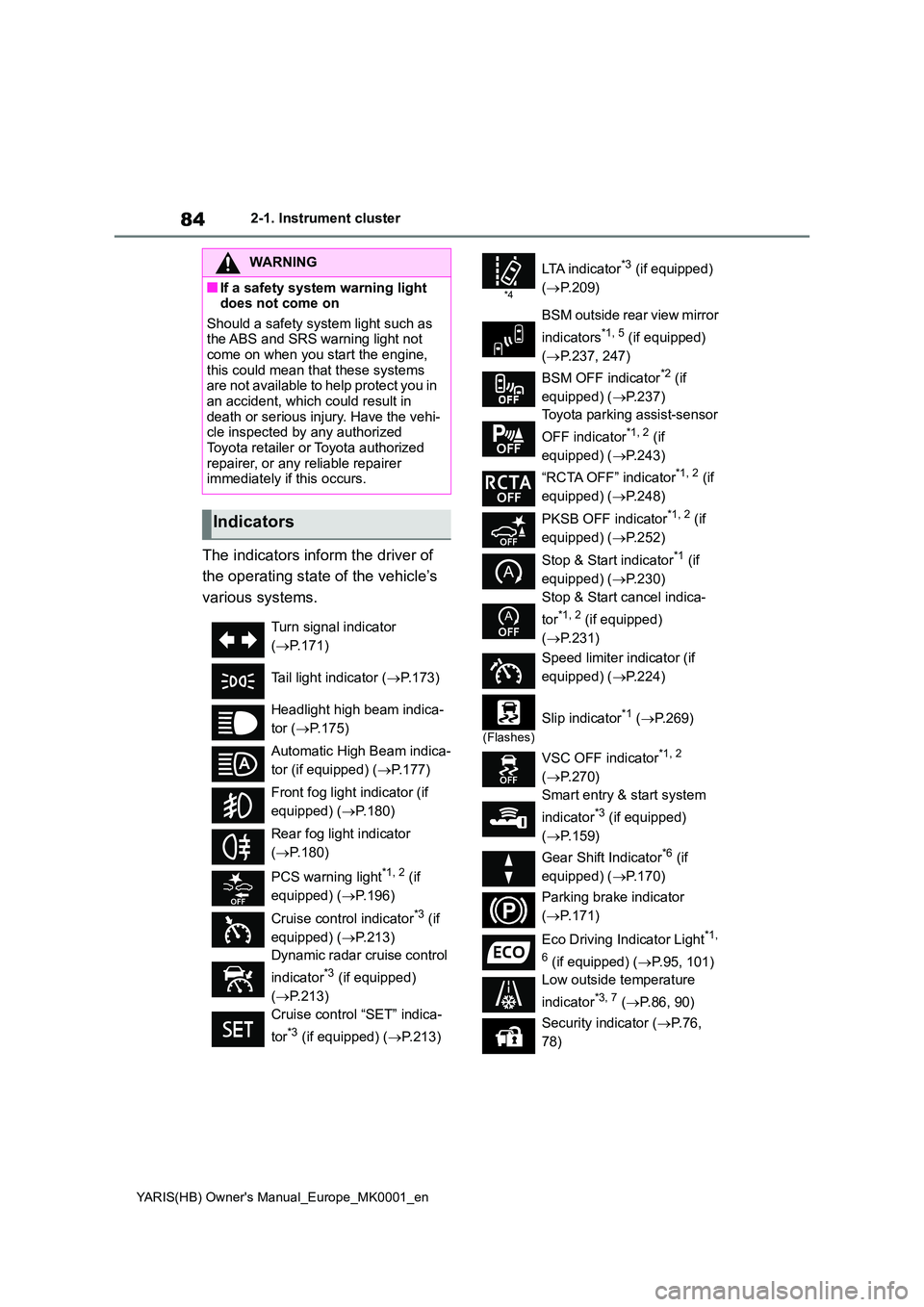
The indicators inform the driver of
the operating state of the vehicle’s
various systems.
WARNING
■If a safety system warning light does not come on
Should a safety system light such as the ABS and SRS warning light not come on when you start the engine,
this could mean that these systems are not available to help protect you in an accident, which could result in
death or serious injury. Have the vehi- cle inspected by any authorized Toyota retailer or Toyota authorized
repairer, or any reliable repairer immediately if this occurs.
Indicators
Turn signal indicator
( →P.171)
Tail light indicator ( →P.173)
Headlight high beam indica-
tor ( →P.175)
Automatic High Beam indica-
tor (if equipped) ( →P.177)
Front fog light indicator (if
equipped) ( →P.180)
Rear fog light indicator
( →P.180)
PCS warning light*1, 2 (if
equipped) ( →P.196)
Cruise control indicator*3 (if
equipped) ( →P.213)
Dynamic radar cruise control
indicator*3 (if equipped)
( →P.213)
Cruise control “SET” indica-
tor*3 (if equipped) ( →P.213)
*4
LTA i n d i c a t o r*3 (if equipped)
( →P.209)
BSM outside rear view mirror
indicators*1, 5 (if equipped)
( →P.237, 247)
BSM OFF indicator*2 (if
equipped) ( →P.237)
Toyota parking assist-sensor
OFF indicator*1, 2 (if
equipped) ( →P.243)
“RCTA OFF” indicator*1, 2 (if
equipped) ( →P.248)
PKSB OFF indicator*1, 2 (if
equipped) ( →P.252)
Stop & Start indicator*1 (if
equipped) ( →P.230)
Stop & Start cancel indica-
tor*1, 2 (if equipped)
( →P.231)
Speed limiter indicator (if
equipped) ( →P.224)
(Flashes)
Slip indicator*1 (→P. 2 6 9 )
VSC OFF indicator*1, 2
( →P.270)
Smart entry & start system
indicator*3 (if equipped)
( →P.159)
Gear Shift Indicator*6 (if
equipped) ( →P.170)
Parking brake indicator
( →P.171)
Eco Driving Indicator Light*1,
6 (if equipped) ( →P.95, 101)
Low outside temperature
indicator*3, 7 ( →P.86, 90)
Security indicator ( →P. 7 6 ,
78)
Page 93 of 568
93
2
YARIS(HB) Owner's Manual_Europe_MK0001_en
2-1. Instrument cluster
Vehicle status information and indicators
Have the vehicle inspected by any
authorized Toyota retailer or Toyota
authorized repairer, or any reliable
repairer.
The brightness of the instrument
panel lights can be adjusted on
select to the multi-information
display.
The brightness of the instrument panel
lights can be adjusted separately for
when the tail lights are on and off.
1Press or to select of
the multi-information display.
2Press or to select ,
and then press and hold the
.
3Press or to change the
brightness.
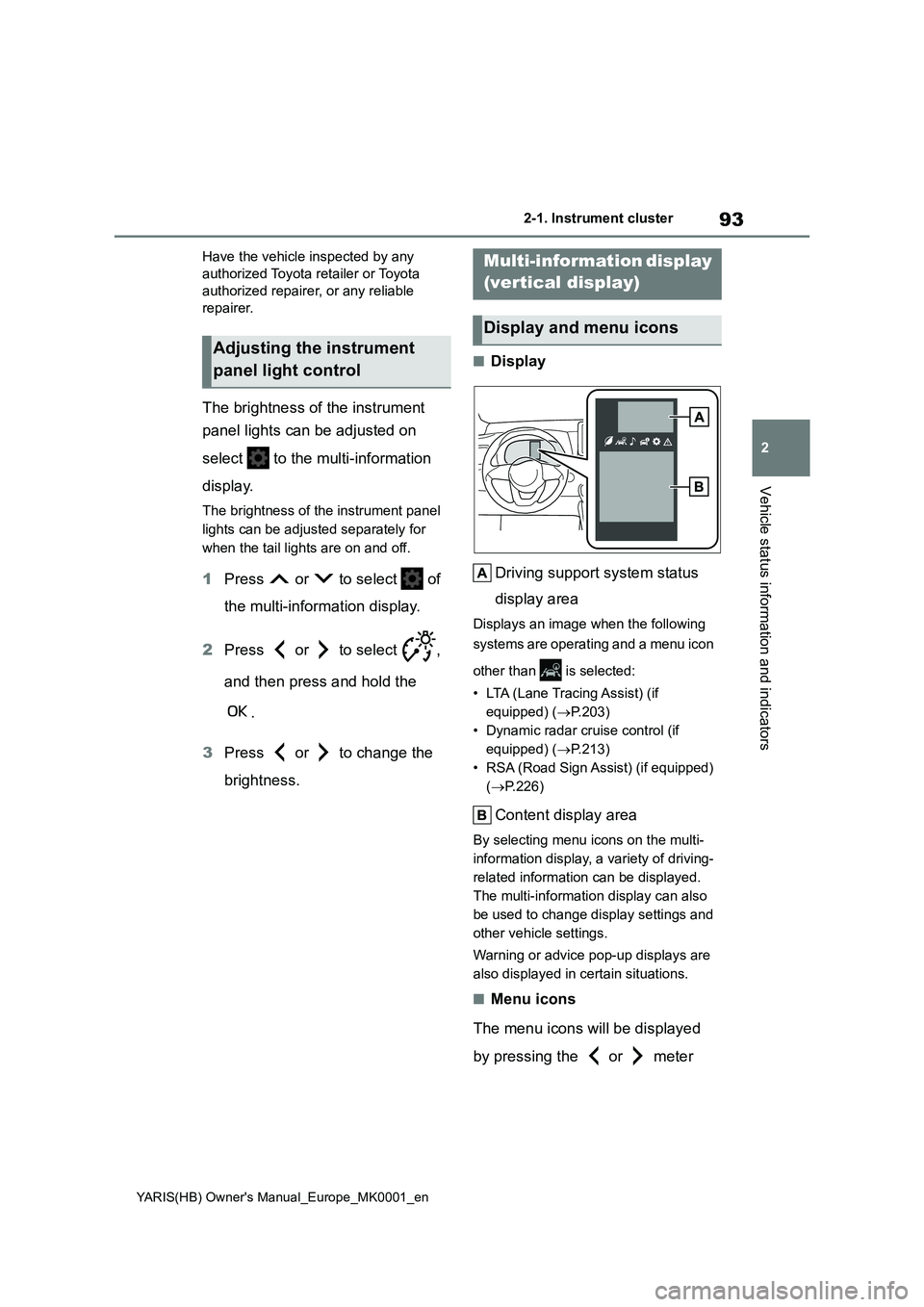
■Display
Driving support system status
display area
Displays an image when the following
systems are operating and a menu icon
other than is selected:
• LTA (Lane Tracing Assist) (if
equipped) (→P.203)
• Dynamic radar cruise control (if
equipped) (→P.213)
• RSA (Road Sign Assist) (if equipped)
(→P.226)
Content display area
By selecting menu icons on the multi-
information display, a variety of driving-
related information can be displayed.
The multi-information display can also
be used to change display settings and
other vehicle settings.
Warning or advice pop-up displays are
also displayed in certain situations.
■Menu icons
The menu icons will be displayed
by pressing the or meter
Adjusting the instrument
panel light control
Multi-information display
(vertical display)
Display and menu icons
Page 94 of 568
94
YARIS(HB) Owner's Manual_Europe_MK0001_en
2-1. Instrument cluster
control switch.
■Liquid crystal display
Small spots or light spots may appear on the display. This phenomenon is
characteristic of liquid crystal displays, and there is no problem continuing to use the display.
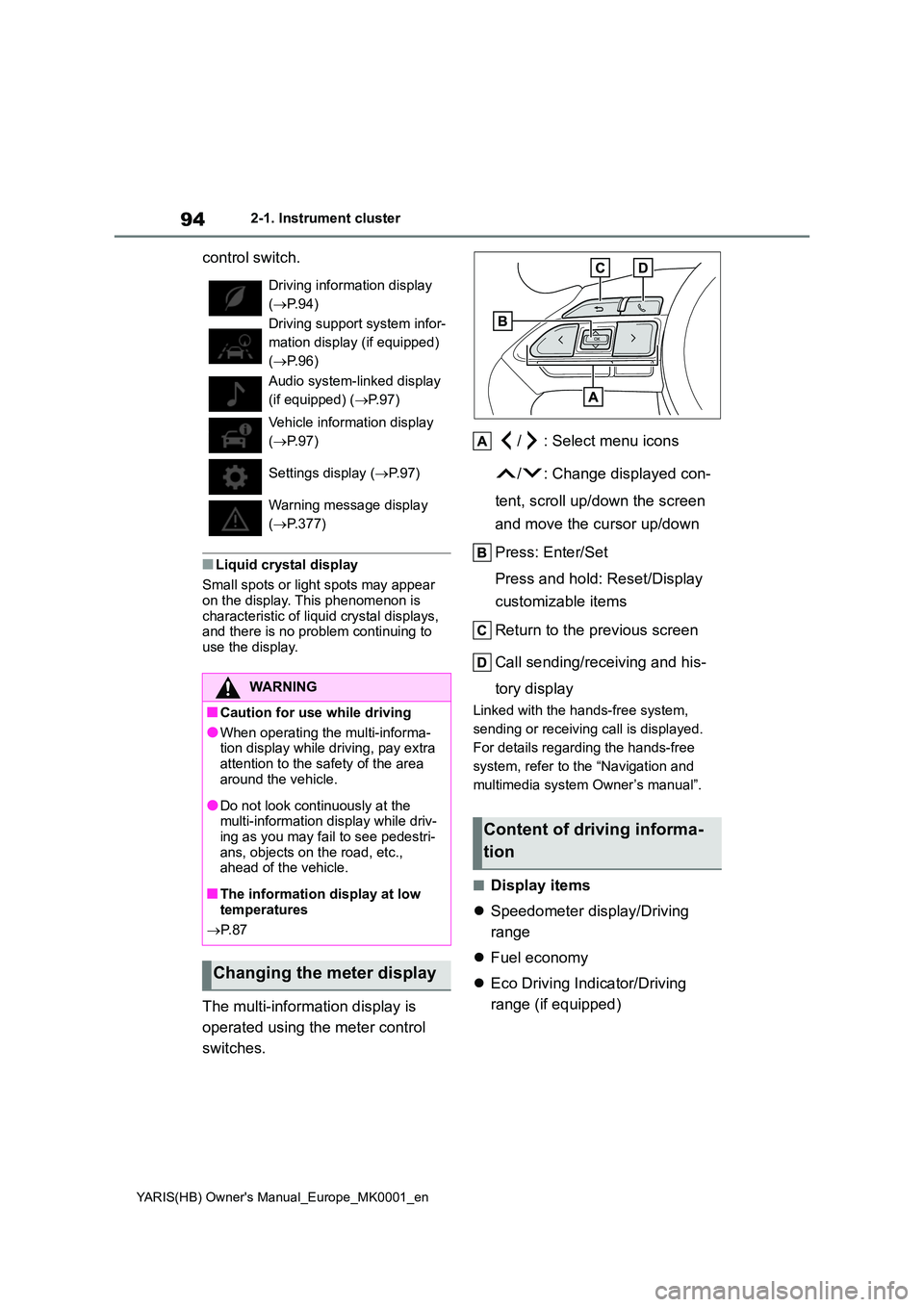
The multi-information display is
operated using the meter control
switches.
/ : Select menu icons
/ : Change displayed con-
tent, scroll up/down the screen
and move the cursor up/down
Press: Enter/Set
Press and hold: Reset/Display
customizable items
Return to the previous screen
Call sending/receiving and his-
tory display
Linked with the hands-free system,
sending or receiving call is displayed.
For details regarding the hands-free
system, refer to the “Navigation and
multimedia system Owner’s manual”.
■Display items
z Speedometer display/Driving
range
z Fuel economy
z Eco Driving Indicator/Driving
range (if equipped)
Driving information display
( →P.94)
Driving support system infor-
mation display (if equipped)
( →P.96)
Audio system-linked display
(if equipped) ( →P.97)
Vehicle information display
( →P.97)
Settings display ( →P. 9 7 )
Warning message display
( →P.377)
WARNING
■Caution for use while driving
●When operating the multi-informa- tion display while driving, pay extra
attention to the safety of the area around the vehicle.
●Do not look continuously at the multi-information display while driv-ing as you may fail to see pedestri-
ans, objects on the road, etc., ahead of the vehicle.
■The information display at low temperatures
→ P. 8 7
Changing the meter display
Content of driving informa-
tion