warning light TOYOTA YARIS HATCHBACK 2021 Owner's Guide
[x] Cancel search | Manufacturer: TOYOTA, Model Year: 2021, Model line: YARIS HATCHBACK, Model: TOYOTA YARIS HATCHBACK 2021Pages: 568, PDF Size: 110.34 MB
Page 157 of 568
157
4
YARIS(HB) Owner's Manual_Europe_MK0001_en
4-1. Before driving
Driving
■Transmission information
Multidrive
To maintain engine braking effi-
ciency and charging system perfor-
mance when using engine braking,
do not use the transmission in D,
must be in M and select gear step 4
or lower. ( →P.164)
Manual transmission
Refrain from driving in 6th gear to
maintain the effectiveness of
engine braking and to maintain
charging system performance.
■If the engine overheats
Towing a loaded trailer up a long,
steep incline in temperatures
exceeding 30°C (85°F) may result
in the engine overheating. If the
engine coolant temperature gauge
indicates that the engine is over-
heating, turn the air conditioning off
immediately, leave the road and
stop the vehicle in a safe place.
( →P.405)
■When parking the vehicle
Always place wheel chocks under
the wheels of both the vehicle and
trailer. Firmly set the parking brake
and shift the shift lever to P (Multid-
rive) and 1 or R (manual transmis-
sion).
WARNING
Follow all the instructions described in
this section. Failure to do so could cause an accident resulting in death or serious injury.
■Trailer towing precautions
When towing, make sure that none of the weight limits are exceeded.
( →P.153)
■Vehicle speed in towing
Observe the legal maximum speeds for trailer towing.
■Before descending hills or long declines
Reduce speed and downshift. How-
ever, never downshift suddenly while descending steep or long downhill grades.
■Operation of the brake pedal
Do not hold the brake pedal
depressed often or for long periods of time. Doing so may result in the brake overheating or reduce braking effects.
■To avoid accident or injury
●Vehicles with a compact spare tire:
Do not tow a trailer when the com- pact spare tire is installed on your vehicle.
●Vehicles with the emergency tire puncture repair kit: Do not tow a
trailer when the tire installed is repaired with the emergency tire puncture repair kit.
●Vehicles with a Dynamic radar cruise control: Do not use dynamic
radar cruise control when you are towing.
NOTICE
■Do not directly splice trailer
lights
Directly splicing trailer lights may damage your vehicle’s electrical sys-
tem and cause a malfunction.
Page 158 of 568
158
YARIS(HB) Owner's Manual_Europe_MK0001_en
4-2. Driving procedures
4-2.Driving pro cedu res
1Check that the parking brake is
set.
2 Check that the shift lever is in P
(Multidrive) or N (manual trans-
mission).
3 Firmly depress the brake pedal
(Multidrive) or clutch pedal
(manual transmission).
4 Turn the engine switch to
START to start the engine.
■If the engine does not start
The engine immobilizer system may not
have been deactivated. ( →P.76) Contact any authorized Toyota retailer or Toyota authorized repairer, or any reliable
repairer.
■When the steering lock cannot be released
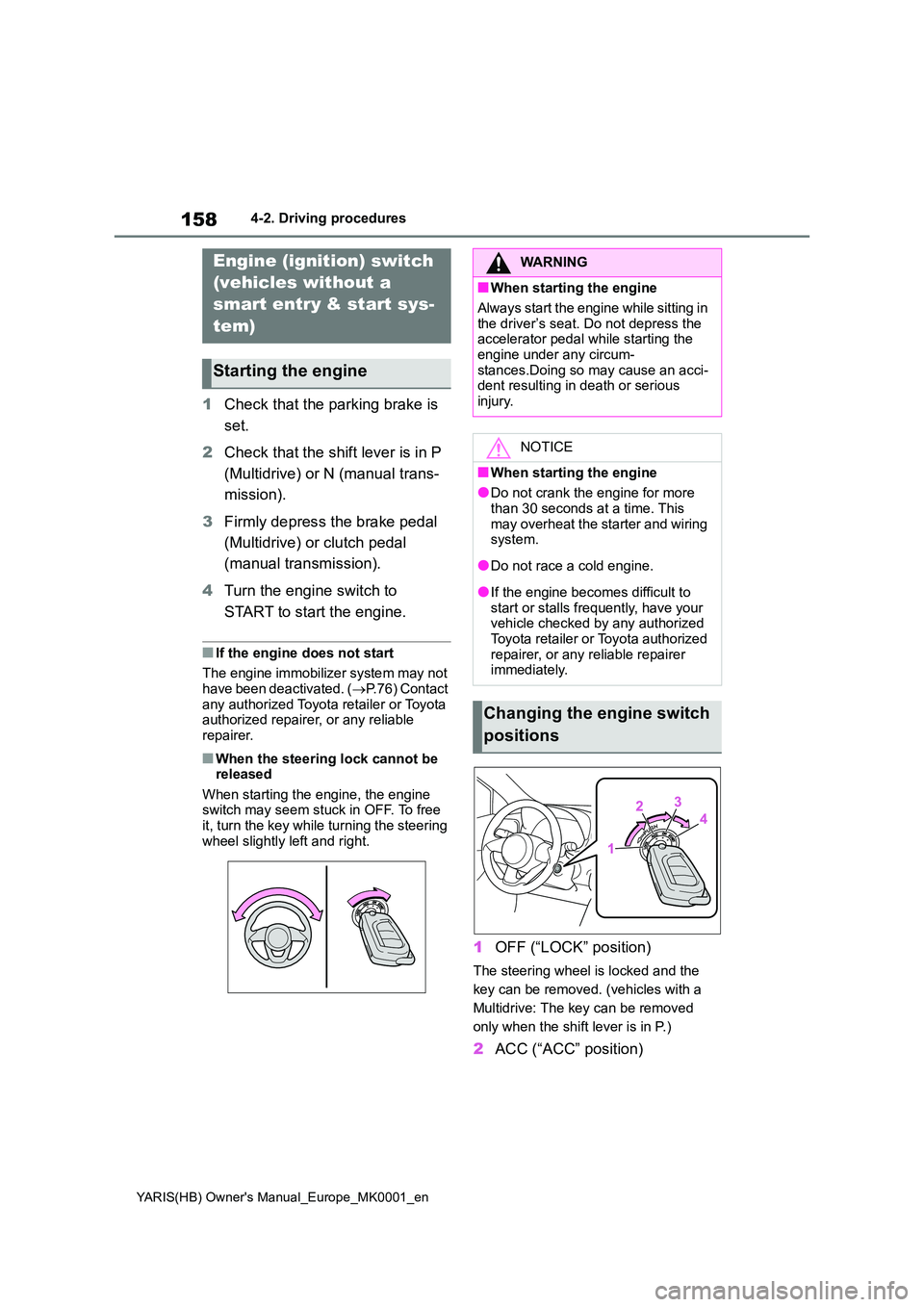
When starting the engine, the engine switch may seem stuck in OFF. To free it, turn the key while turning the steering
wheel slightly left and right.
1 OFF (“LOCK” position)
The steering wheel is locked and the
key can be removed. (vehicles with a
Multidrive: The key can be removed
only when the shift lever is in P.)
2 ACC (“ACC” position)
Engine (ignition) switch
(vehicles without a
smart entry & start sys-
tem)
Starting the engine
WARNING
■When starting the engine
Always start the engine while sitting in
the driver’s seat. Do not depress the accelerator pedal while starting the engine under any circum-
stances.Doing so may cause an acci- dent resulting in death or serious injury.
NOTICE
■When starting the engine
●Do not crank the engine for more
than 30 seconds at a time. This may overheat the starter and wiring system.
●Do not race a cold engine.
●If the engine becomes difficult to start or stalls frequently, have your vehicle checked by any authorized
Toyota retailer or Toyota authorized repairer, or any reliable repairer immediately.
Changing the engine switch
positions
Page 161 of 568
161
4
YARIS(HB) Owner's Manual_Europe_MK0001_en
4-2. Driving procedures
Driving
■Customization
If the smart entry & start system has been deactivated in a customized set-ting, refer to P.399.
Multidrive
1 Stop the vehicle completely.
2 Set the parking brake (→P.171),
and shift the shift lever to P.
Check the parking brake indicator is
illuminated.
3 Press the engine switch.
The engine will stop, and the meter dis- play will be extinguished.
4 Release the brake pedal and
check that “ACCESSORY” or
“IGNITION ON” is not shown on
the multi-information display.
Manual transmission
1 Stop the vehicle completely.
2 If the parking brake is in manual
mode, set the parking brake.
( →P.171)
Check the parking brake indicator is illuminated.
3 Shift the shift lever to N.
( →P.168)
4 Press the engine switch.
The engine will stop, and the meter dis-
play will be extinguished.
5 Release the brake pedal and
check that “ACCESSORY” or
“IGNITION ON” is not shown on
the multi-information display.
WARNING
■When starting the engine
Always start the engine while sitting in the driver’s seat. Do not depress the
accelerator pedal while starting the engine under any circumstances.Doing so may cause an accident
resulting in death or serious injury.
■Caution while driving
If engine failure occurs while the vehi- cle is moving, do not lock or open the doors until the vehicle reaches a safe
and complete stop. Activation of the steering lock in this circumstance may lead to an accident, resulting in death
or serious injury.
NOTICE
■When starting the engine
●Do not race a cold engine.
●If the engine becomes difficult to start or stalls frequently, have your vehicle checked by any authorized
Toyota retailer or Toyota authorized repairer, or any reliable repairer immediately.
■Symptoms indicating a malfunc-tion with the engine switch
If the engine switch seems to be oper- ating somewhat differently than usual, such as the switch sticking slightly,
there may be a malfunction. Contact any authorized Toyota retailer or Toyota authorized repairer, or any reli-
able repairer immediately.
Stopping the engine
Page 171 of 568
171
4
YARIS(HB) Owner's Manual_Europe_MK0001_en
4-2. Driving procedures
Driving
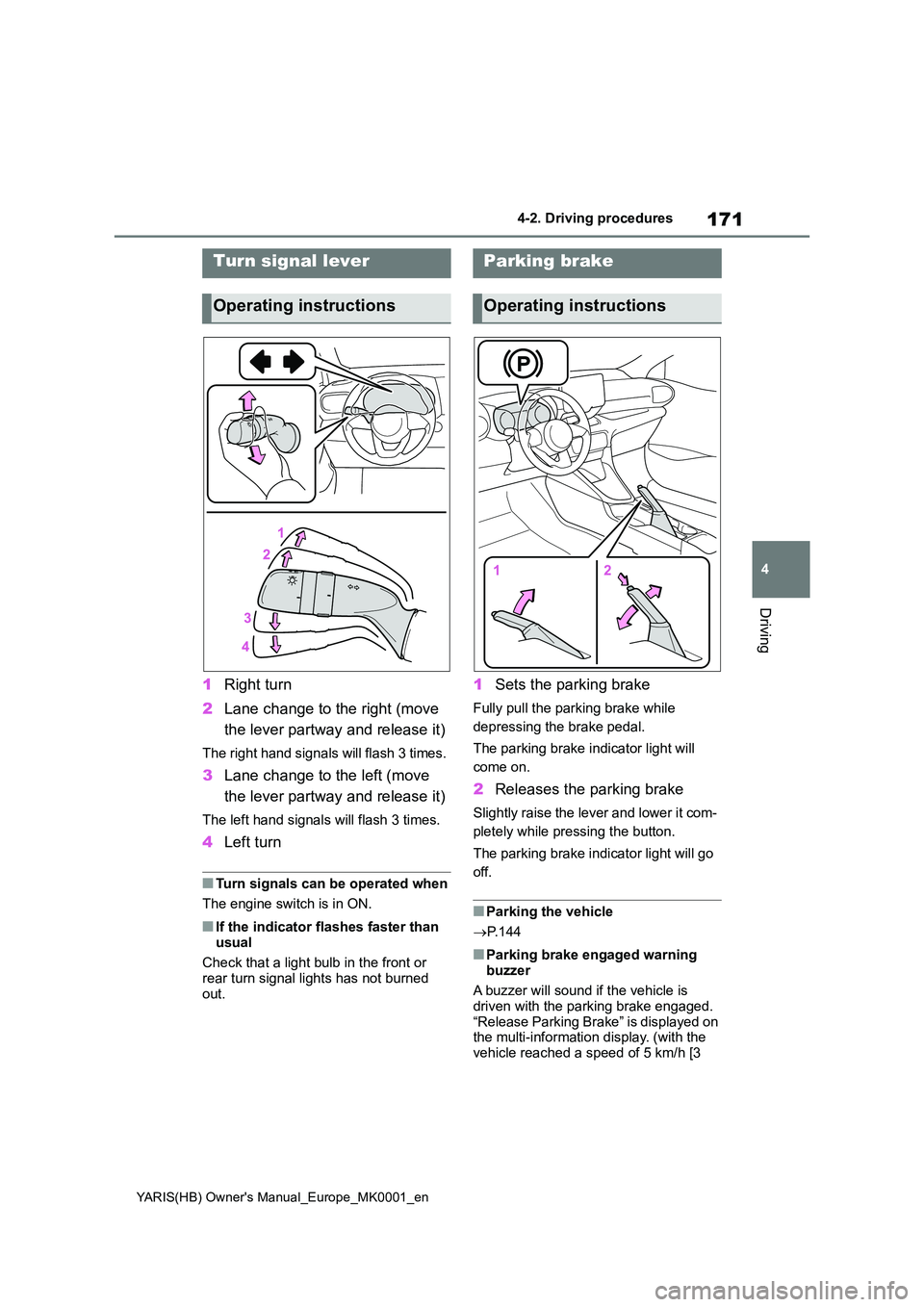
1Right turn
2 Lane change to the right (move
the lever partway and release it)
The right hand signals will flash 3 times.
3 Lane change to the left (move
the lever partway and release it)
The left hand signals will flash 3 times.
4 Left turn
■Turn signals can be operated when
The engine switch is in ON.
■If the indicator flashes faster than
usual
Check that a light bulb in the front or rear turn signal lights has not burned
out.
1 Sets the parking brake
Fully pull the parking brake while
depressing the brake pedal.
The parking brake indicator light will
come on.
2 Releases the parking brake
Slightly raise the lever and lower it com-
pletely while pressing the button.
The parking brake indicator light will go
off.
■Parking the vehicle
→ P. 1 4 4
■Parking brake engaged warning
buzzer
A buzzer will sound if the vehicle is driven with the parking brake engaged.
“Release Parking Brake” is displayed on the multi-information display. (with the
vehicle reached a speed of 5 km/h [3
Turn signal lever
Operating instructions
Parking brake
Operating instructions
Page 177 of 568
177
4
YARIS(HB) Owner's Manual_Europe_MK0001_en
4-3. Operating the lights and wipers
Driving
M15A-FKS engine (right-hand
drive vehicles)
*: If equipped
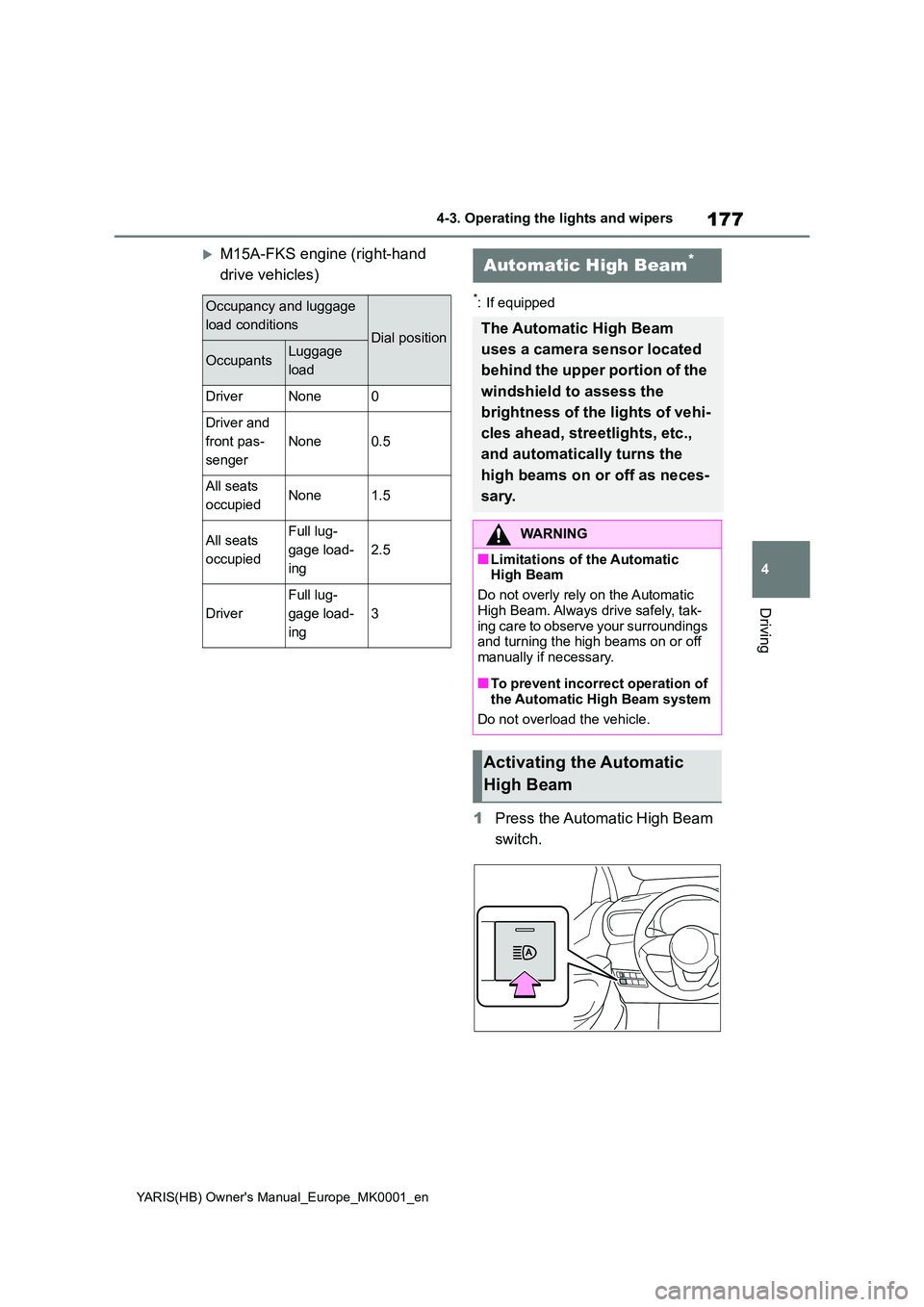
1 Press the Automatic High Beam
switch.
Occupancy and luggage
load conditionsDial position
OccupantsLuggage
load
DriverNone0
Driver and
front pas-
senger
None0.5
All seats
occupiedNone1.5
All seats
occupied
Full lug-
gage load-
ing
2.5
Driver
Full lug-
gage load-
ing
3
Automatic High Beam*
The Automatic High Beam
uses a camera sensor located
behind the upper portion of the
windshield to assess the
brightness of the lights of vehi-
cles ahead, streetlights, etc.,
and automatically turns the
high beams on or off as neces-
sary.
WARNING
■Limitations of the Automatic High Beam
Do not overly rely on the Automatic
High Beam. Always drive safely, tak- ing care to observe your surroundings and turning the high beams on or off
manually if necessary.
■To prevent incorrect operation of
the Automatic High Beam system
Do not overload the vehicle.
Activating the Automatic
High Beam
Page 183 of 568
183
4
YARIS(HB) Owner's Manual_Europe_MK0001_en
4-3. Operating the lights and wipers
Driving
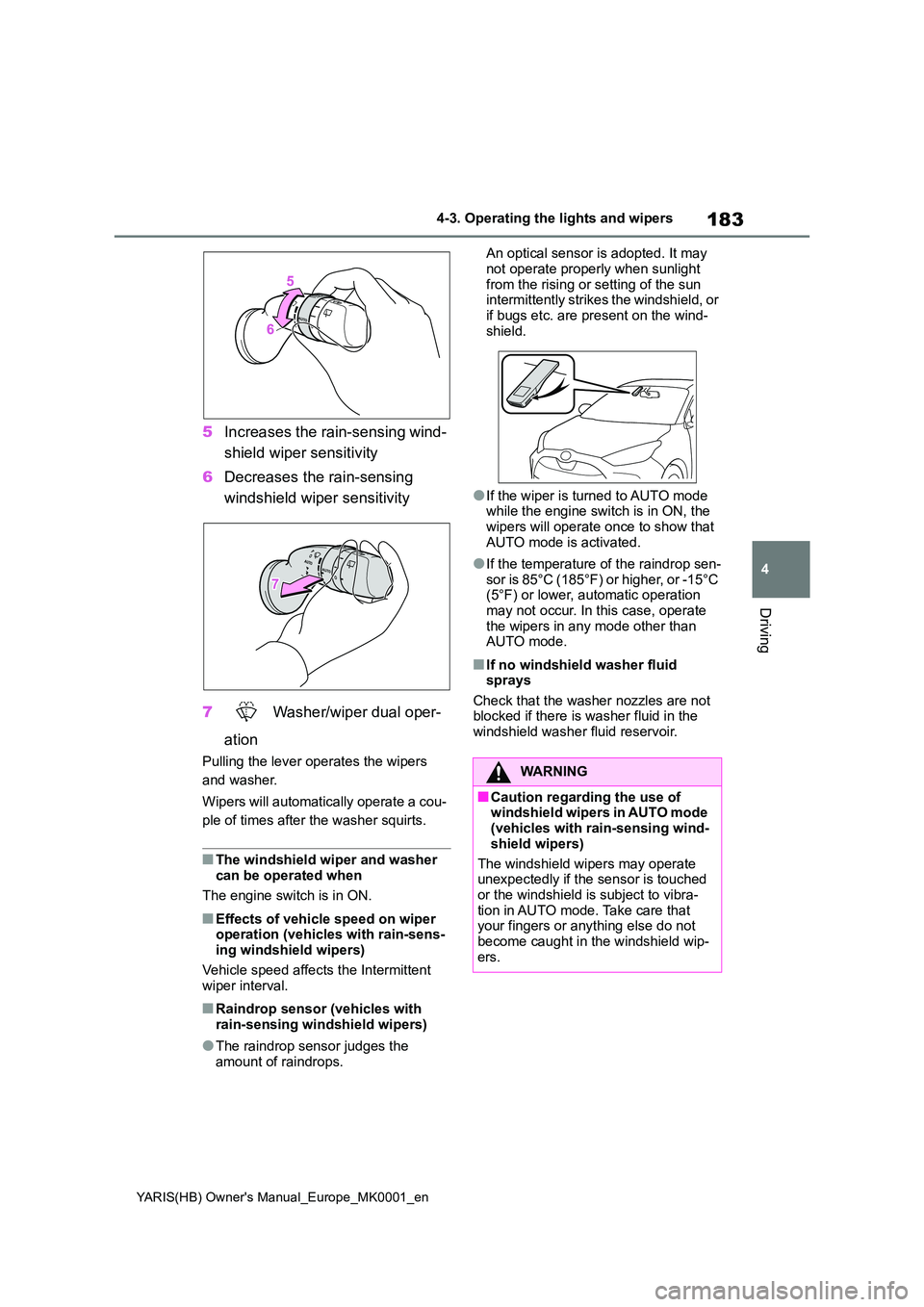
5Increases the rain-sensing wind-
shield wiper sensitivity
6 Decreases the rain-sensing
windshield wiper sensitivity
7 Washer/wiper dual oper-
ation
Pulling the lever operates the wipers
and washer.
Wipers will automatically operate a cou-
ple of times after the washer squirts.
■The windshield wiper and washer can be operated when
The engine switch is in ON.
■Effects of vehicle speed on wiper operation (vehicles with rain-sens-ing windshield wipers)
Vehicle speed affects the Intermittent wiper interval.
■Raindrop sensor (vehicles with rain-sensing windshield wipers)
●The raindrop sensor judges the amount of raindrops.
An optical sensor is adopted. It may
not operate properly when sunlight from the rising or setting of the sun intermittently strikes the windshield, or
if bugs etc. are present on the wind- shield.
●If the wiper is turned to AUTO mode while the engine switch is in ON, the wipers will operate once to show that
AUTO mode is activated.
●If the temperature of the raindrop sen-
sor is 85°C (185°F) or higher, or -15°C (5°F) or lower, automatic operation may not occur. In this case, operate
the wipers in any mode other than AUTO mode.
■If no windshield washer fluid sprays
Check that the washer nozzles are not blocked if there is washer fluid in the windshield washer fluid reservoir.
WARNING
■Caution regarding the use of windshield wipers in AUTO mode (vehicles with rain-sensing wind-
shield wipers)
The windshield wipers may operate unexpectedly if the sensor is touched
or the windshield is subject to vibra- tion in AUTO mode. Take care that your fingers or anything else do not
become caught in the windshield wip- ers.
Page 184 of 568
184
YARIS(HB) Owner's Manual_Europe_MK0001_en
4-3. Operating the lights and wipers
*: If equipped
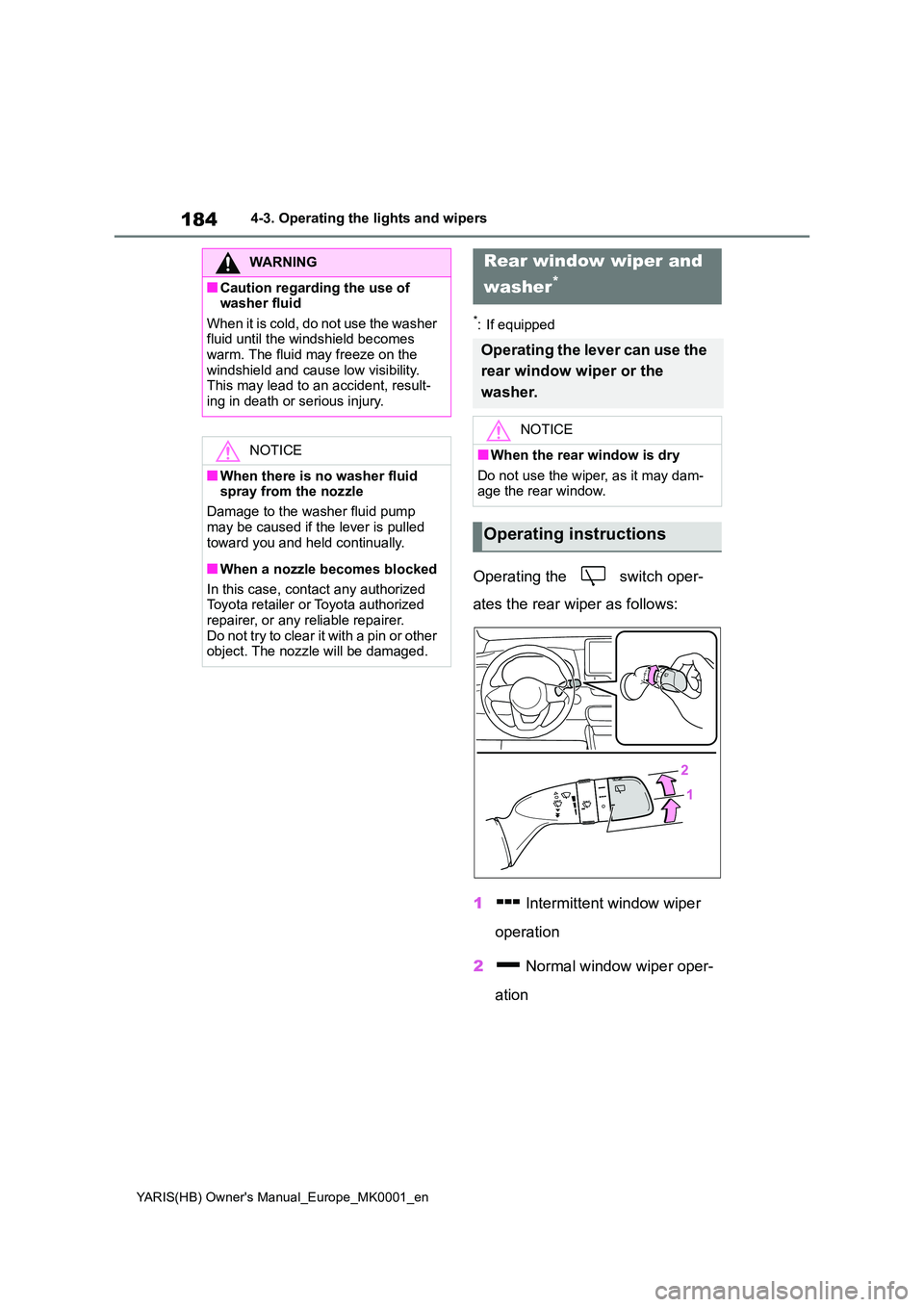
Operating the switch oper-
ates the rear wiper as follows:
1 Intermittent window wiper
operation
2 Normal window wiper oper-
ation
WARNING
■Caution regarding the use of washer fluid
When it is cold, do not use the washer fluid until the windshield becomes warm. The fluid may freeze on the
windshield and cause low visibility. This may lead to an accident, result-ing in death or serious injury.
NOTICE
■When there is no washer fluid spray from the nozzle
Damage to the washer fluid pump
may be caused if the lever is pulled toward you and held continually.
■When a nozzle becomes blocked
In this case, contact any authorized Toyota retailer or Toyota authorized
repairer, or any reliable repairer. Do not try to clear it with a pin or other object. The nozzle will be damaged.
Rear window wiper and
washer*
Operating the lever can use the
rear window wiper or the
washer.
NOTICE
■When the rear window is dry
Do not use the wiper, as it may dam- age the rear window.
Operating instructions
Page 187 of 568
187
4
YARIS(HB) Owner's Manual_Europe_MK0001_en
4-4. Refueling
Driving
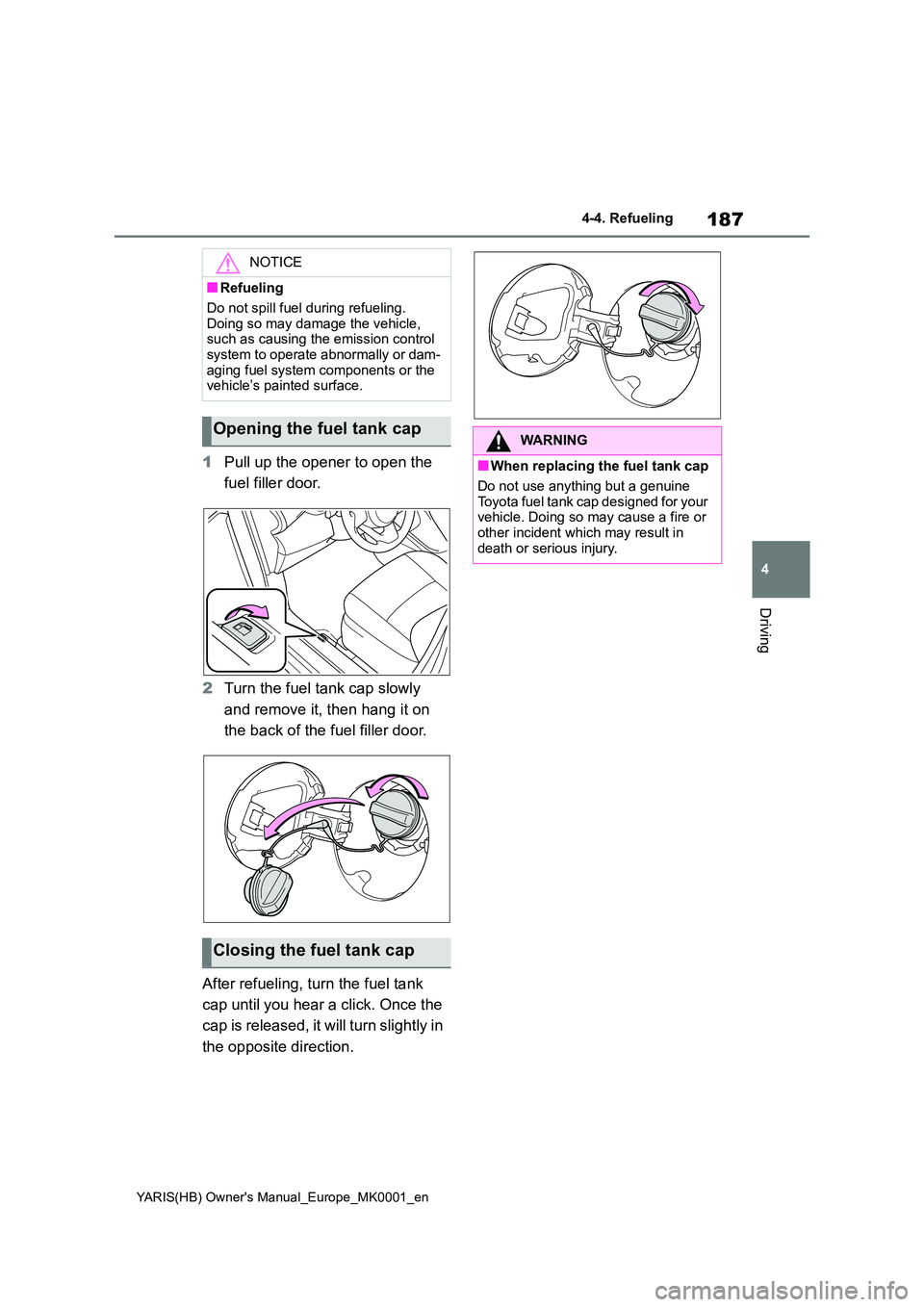
1Pull up the opener to open the
fuel filler door.
2 Turn the fuel tank cap slowly
and remove it, then hang it on
the back of the fuel filler door.
After refueling, turn the fuel tank
cap until you hear a click. Once the
cap is released, it will turn slightly in
the opposite direction.
NOTICE
■Refueling
Do not spill fuel during refueling.
Doing so may damage the vehicle, such as causing the emission control system to operate abnormally or dam-
aging fuel system components or the vehicle’s painted surface.
Opening the fuel tank cap
Closing the fuel tank cap
WARNING
■When replacing the fuel tank cap
Do not use anything but a genuine
Toyota fuel tank cap designed for your vehicle. Doing so may cause a fire or other incident which may result in
death or serious injury.
Page 190 of 568
190
YARIS(HB) Owner's Manual_Europe_MK0001_en
4-5. Using the driving support systems
WARNING
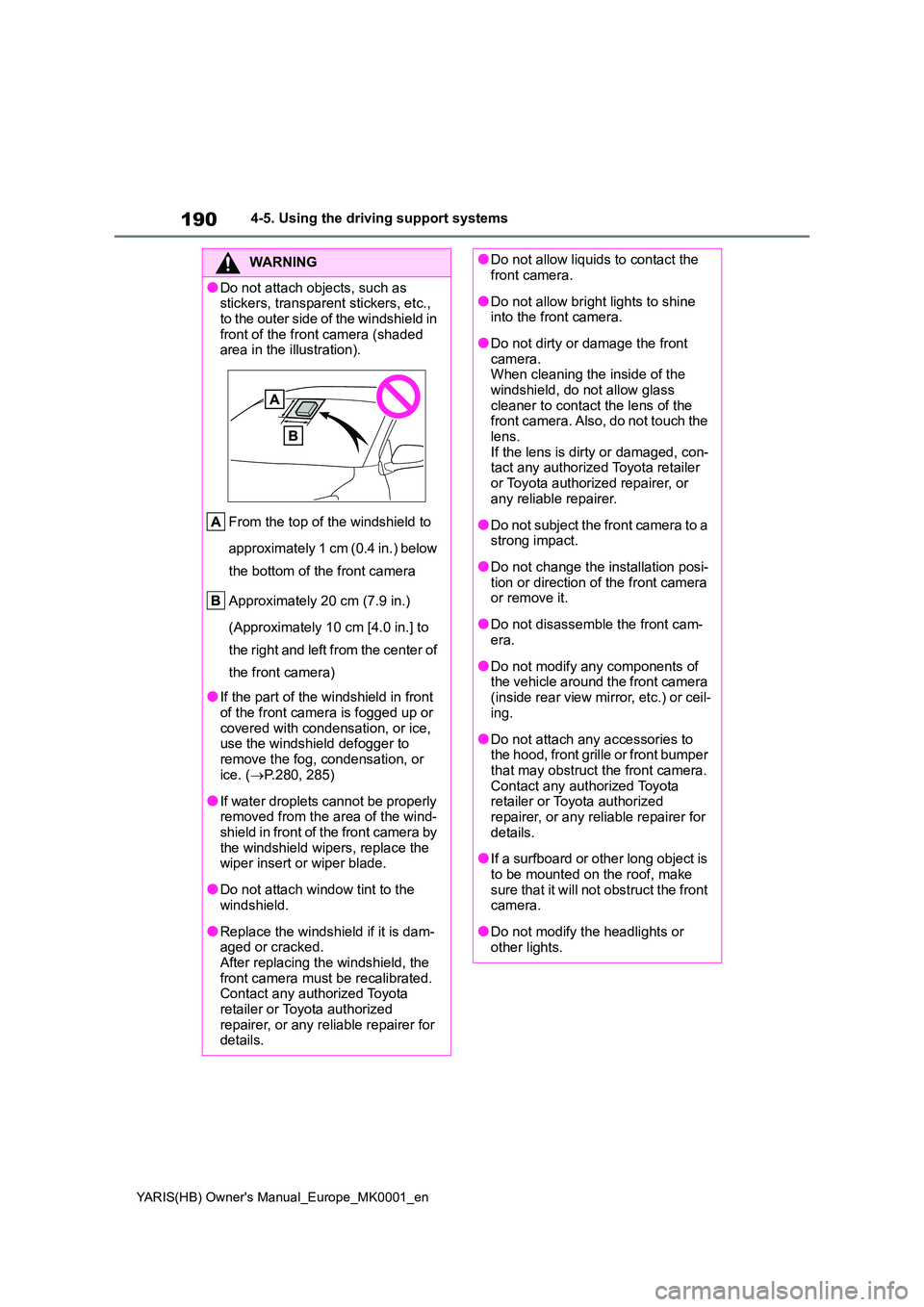
●Do not attach objects, such as stickers, transparent stickers, etc.,
to the outer side of the windshield in front of the front camera (shaded area in the illustration).
From the top of the windshield to
approximately 1 cm (0.4 in.) below
the bottom of the front camera
Approximately 20 cm (7.9 in.)
(Approximately 10 cm [4.0 in.] to
the right and left from the center of
the front camera)
●If the part of the windshield in front
of the front camera is fogged up or covered with condensation, or ice, use the windshield defogger to
remove the fog, condensation, or ice. ( →P.280, 285)
●If water droplets cannot be properly removed from the area of the wind-shield in front of the front camera by
the windshield wipers, replace the wiper insert or wiper blade.
●Do not attach window tint to the windshield.
●Replace the windshield if it is dam-aged or cracked.After replacing the windshield, the
front camera must be recalibrated. Contact any authorized Toyota retailer or Toyota authorized
repairer, or any reliable repairer for details.
●Do not allow liquids to contact the front camera.
●Do not allow bright lights to shine into the front camera.
●Do not dirty or damage the front camera.When cleaning the inside of the
windshield, do not allow glass cleaner to contact the lens of the front camera. Also, do not touch the
lens. If the lens is dirty or damaged, con-tact any authorized Toyota retailer
or Toyota authorized repairer, or any reliable repairer.
●Do not subject the front camera to a strong impact.
●Do not change the installation posi-tion or direction of the front camera or remove it.
●Do not disassemble the front cam-era.
●Do not modify any components of the vehicle around the front camera
(inside rear view mirror, etc.) or ceil- ing.
●Do not attach any accessories to the hood, front grille or front bumper that may obstruct the front camera.
Contact any authorized Toyota retailer or Toyota authorized repairer, or any reliable repairer for
details.
●If a surfboard or other long object is
to be mounted on the roof, make sure that it will not obstruct the front camera.
●Do not modify the headlights or other lights.
Page 191 of 568
191
4
YARIS(HB) Owner's Manual_Europe_MK0001_en
4-5. Using the driving support systems
Driving
■Certifications for the Toyota Safety Sense
→P. 5 2 0
■If a warning message is displayed on the multi-information display
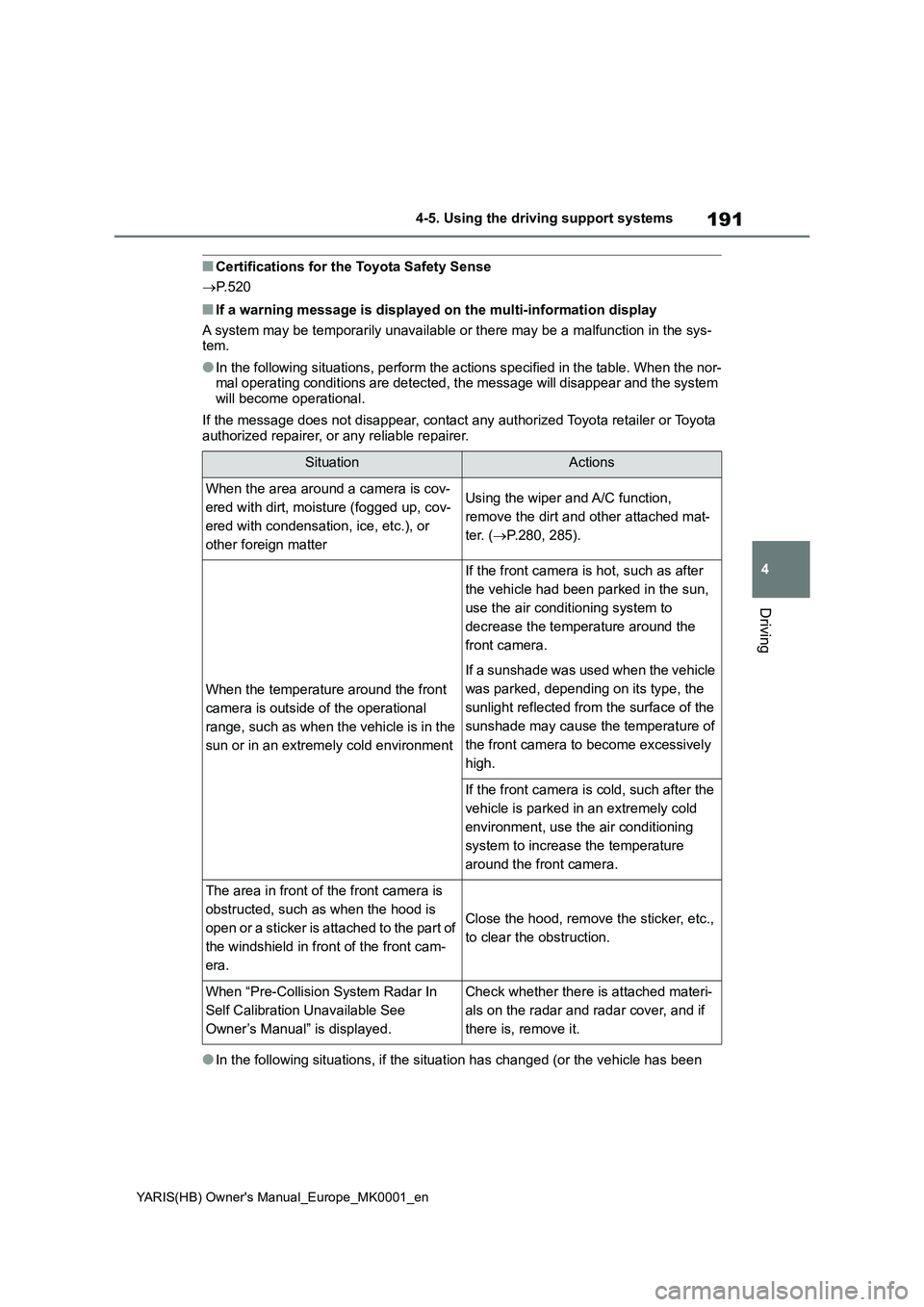
A system may be temporarily unavailable or there may be a malfunction in the sys-
tem.
●In the following situations, perform the actions specified in the table. When the nor-
mal operating conditions are detected, the message will disappear and the system
will become operational.
If the message does not disappear, contact any authorized Toyota retailer or Toyota
authorized repairer, or any reliable repairer.
●In the following situations, if the situation has changed (or the vehicle has been
SituationActions
When the area around a camera is cov-
ered with dirt, moisture (fogged up, cov-
ered with condensation, ice, etc.), or
other foreign matterUsing the wiper and A/C function,
remove the dirt and other attached mat-
ter. (→P.280, 285).
When the temperature around the front
camera is outside of the operational
range, such as when the vehicle is in the
sun or in an extremely cold environment
If the front camera is hot, such as after
the vehicle had been parked in the sun,
use the air conditioning system to
decrease the temperature around the
front camera.
If a sunshade was used when the vehicle
was parked, depending on its type, the
sunlight reflected from the surface of the
sunshade may cause the temperature of
the front camera to become excessively
high.
If the front camera is cold, such after the
vehicle is parked in an extremely cold
environment, use the air conditioning
system to increase the temperature
around the front camera.
The area in front of the front camera is
obstructed, such as when the hood is
open or a sticker is attached to the part of
the windshield in front of the front cam-
era.
Close the hood, remove the sticker, etc.,
to clear the obstruction.
When “Pre-Collision System Radar In
Self Calibration Unavailable See
Owner’s Manual” is displayed.Check whether there is attached materi-
als on the radar and radar cover, and if
there is, remove it.