display TOYOTA YARIS HYBRID 2017 User Guide
[x] Cancel search | Manufacturer: TOYOTA, Model Year: 2017, Model line: YARIS HYBRID, Model: TOYOTA YARIS HYBRID 2017Pages: 504, PDF Size: 31.33 MB
Page 103 of 504
1032. Instrument cluster
2
Instrument cluster
YARIS_HV_OM_Europe_OM52G76E
■When disconnecting and reconnecting battery terminals
The following information data will be reset.
● Average fuel consumption
● Driving range
● Average vehicle speed
● Clock data
■ Liquid crystal display
Small spots or light spots may appear on the display. This phenomenon is
characteristic of liquid crystal display, and there is no problem continuing to
use the display.
■ Changing the pre-crash warning timing
P. 221
WARNING
■Cautions during setting up the display
As the engine needs to be running during setting up the display, ensure that
the vehicle is parked in a place with adequate ventilation. In a closed area
such as a garage, exhaust gases including harmful carbon monoxide (CO)
may collect and enter the vehicle. This may lead to death or a serious
health hazard.
NOTICE
■ The Multi-information display at low temperatures
Allow the interior of the vehicle to warm up before using the liquid crystal
information display. At extremely low temperatures, the display monitor may
respond slowly, and display changes may be delayed.
Page 106 of 504
1062. Instrument cluster
YARIS_HV_OM_Europe_OM52G76E
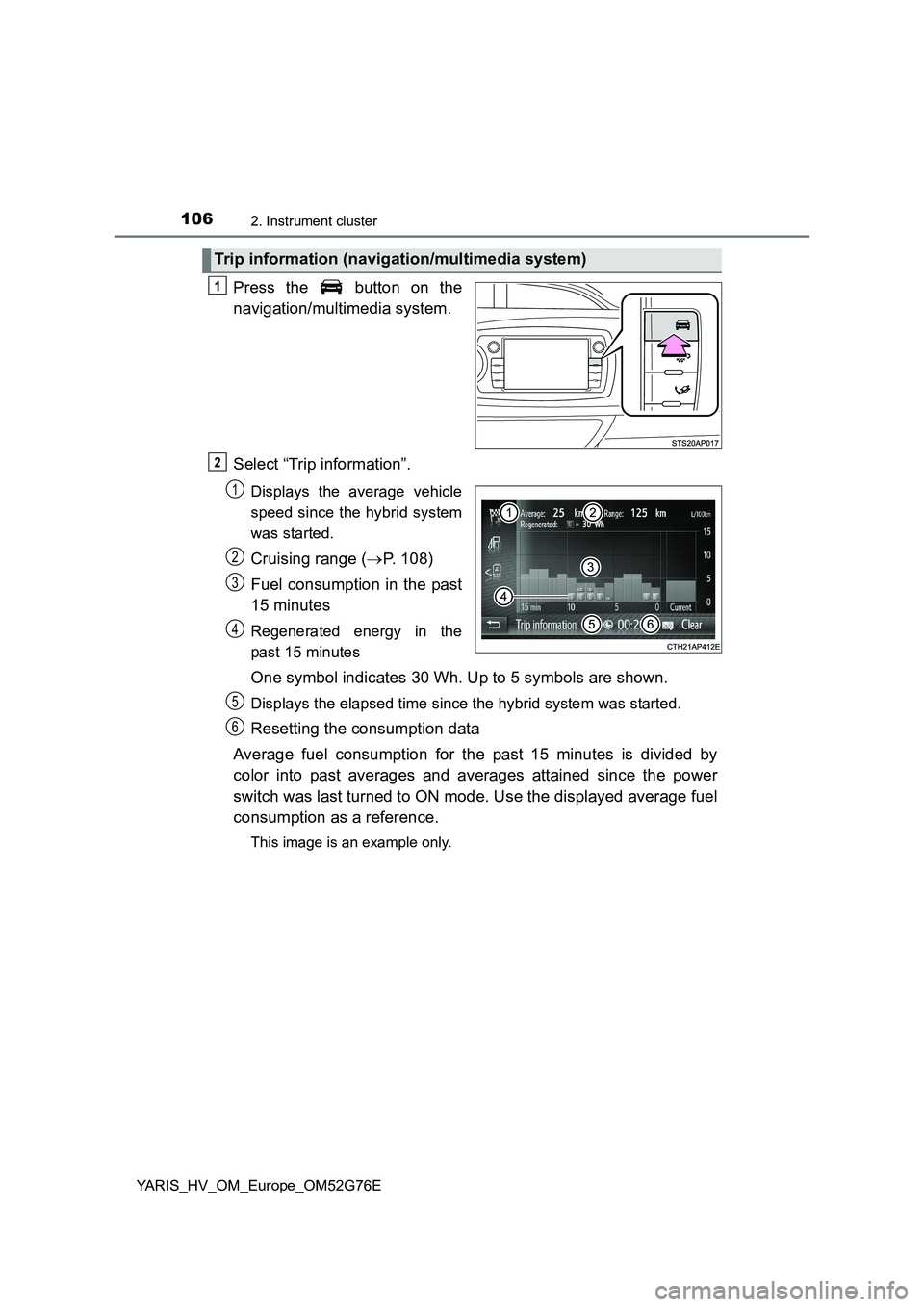
Press the button on the
navigation/multimedia system.
Select “Trip information”.
Displays the average vehicle
speed since the hybrid system
was started.
Cruising range ( P. 108)
Fuel consumption in the past
15 minutes
Regenerated energy in the
past 15 minutes
One symbol indicates 30 Wh. Up to 5 symbols are shown.
Displays the elapsed time since the hybrid system was started.
Resetting the consumption data
Average fuel consumption for the past 15 minutes is divided by
color into past averages and averages attained since the power
switch was last turned to ON mode. Use the displayed average fuel
consumption as a reference.
This image is an example only.
Trip information (navigation/multimedia system)
1
2
1
2
3
4
5
6
Page 107 of 504
1072. Instrument cluster
2
Instrument cluster
YARIS_HV_OM_Europe_OM52G76E
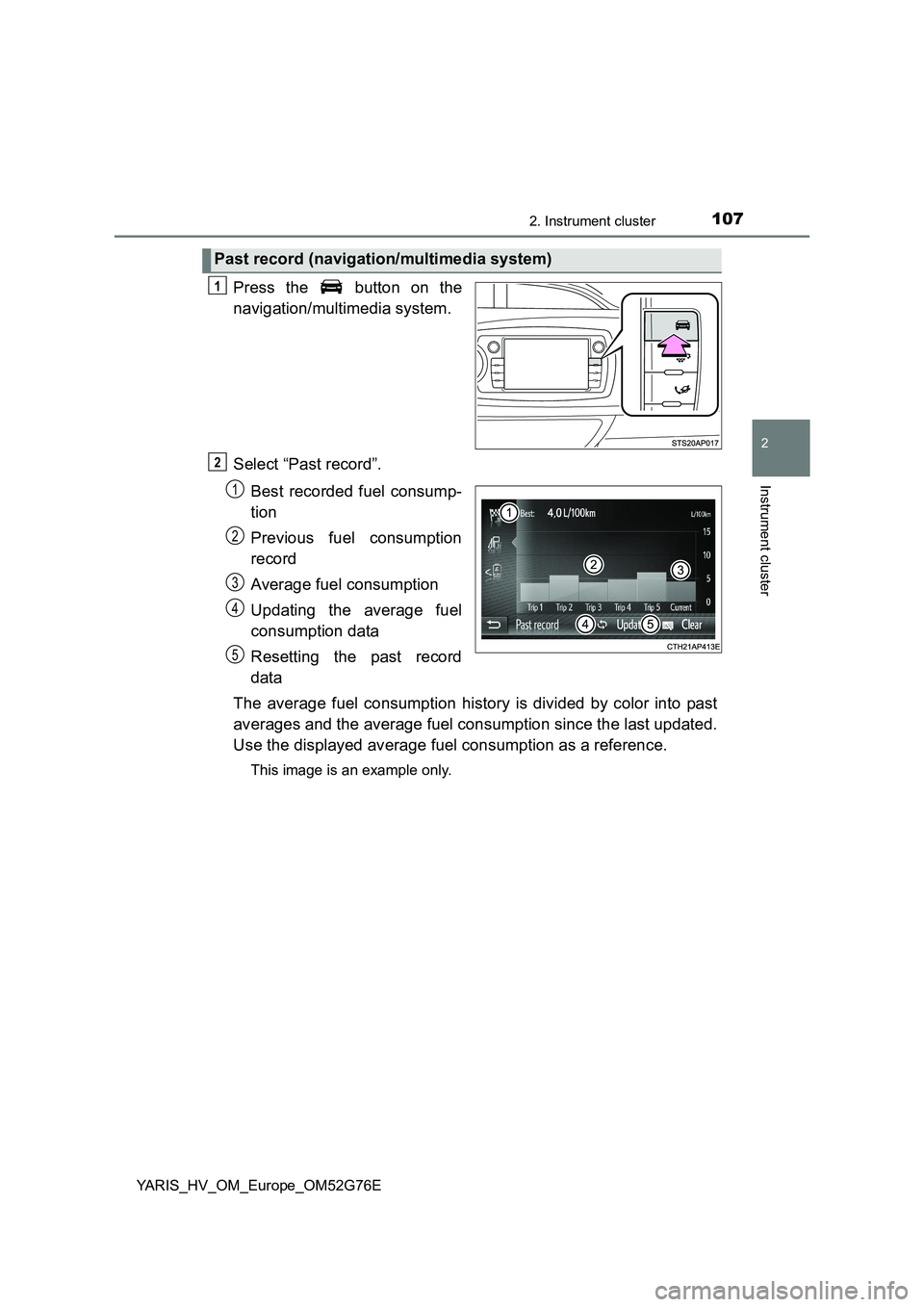
Press the button on the
navigation/multimedia system.
Select “Past record”.
Best recorded fuel consump-
tion
Previous fuel consumption
record
Average fuel consumption
Updating the average fuel
consumption data
Resetting the past record
data
The average fuel consumption history is divided by color into past
averages and the average fuel consumption since the last updated.
Use the displayed average fuel consumption as a reference.
This image is an example only.
Past record (navigation/multimedia system)
1
2
1
2
3
4
5
Page 108 of 504
1082. Instrument cluster
YARIS_HV_OM_Europe_OM52G76E
■Updating the past record data
Update the average fuel consumption by selecting “Update” to measure the
current fuel consumption again.
■ Resetting the data
The fuel consumption data can be deleted by selecting “Clear”.
■ Cruising range
Displays the estimated maximum distance that can be driven with the quan-
tity of fuel remaining.
This distance is computed based on your average fuel consumption.
As a result, the actual distance that can be driven may differ from that dis-
played.
Page 188 of 504
1884-2. Driving procedures
YARIS_HV_OM_Europe_OM52G76E
EV drive mode
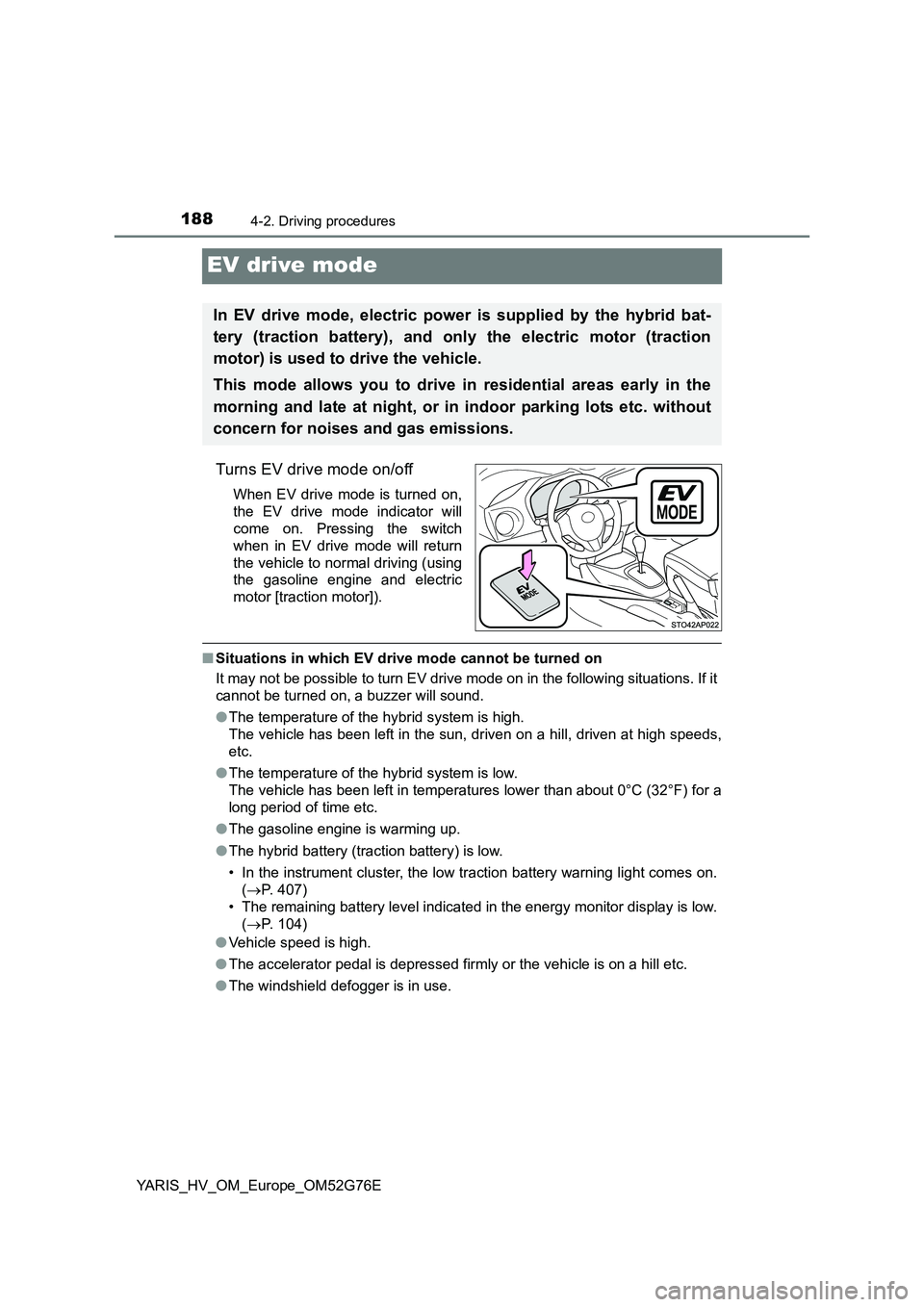
Turns EV drive mode on/off
When EV drive mode is turned on,
the EV drive mode indicator will
come on. Pressing the switch
when in EV drive mode will return
the vehicle to normal driving (using
the gasoline engine and electric
motor [traction motor]).
■ Situations in which EV drive mode cannot be turned on
It may not be possible to turn EV drive mode on in the following situations. If it
cannot be turned on, a buzzer will sound.
● The temperature of the hybrid system is high.
The vehicle has been left in the sun, driven on a hill, driven at high speeds,
etc.
● The temperature of the hybrid system is low.
The vehicle has been left in temperatures lower than about 0°C (32°F) for a
long period of time etc.
● The gasoline engine is warming up.
● The hybrid battery (traction battery) is low.
• In the instrument cluster, the low traction battery warning light comes on.
( P. 407)
• The remaining battery level indicated in the energy monitor display is low.
( P. 104)
● Vehicle speed is high.
● The accelerator pedal is depressed firmly or the vehicle is on a hill etc.
● The windshield defogger is in use.
In EV drive mode, electric power is supplied by the hybrid bat-
tery (traction battery), and only the electric motor (traction
motor) is used to drive the vehicle.
This mode allows you to drive in residential areas early in the
morning and late at night, or in indoor parking lots etc. without
concern for noises and gas emissions.
Page 189 of 504
1894-2. Driving procedures
4
Driving
YARIS_HV_OM_Europe_OM52G76E
■ Switching to EV drive mode when the gasoline engine is cold
If the hybrid system is started while the gasoline engine is cold, the gasoline
engine will start automatically after a short period of time in order to warm up.
In this case, you will become unable to switch to EV drive mode.
After the hybrid system has started and the “READY” indicator has illumi-
nated, press the EV drive mode switch before the gasoline engine starts to
switch to EV drive mode.
■ Automatic cancelation of EV drive mode
When driving in EV drive mode, the gasoline engine may automatically restart
in the following situations. When EV drive mode is canceled, a buzzer will
sound and the EV drive mode indicator will flash and go off.
● The hybrid battery (traction battery) becomes low.
• In the instrument cluster, the low traction battery warning light comes on.
( P. 407)
• The remaining battery level indicated in the energy monitor display is low.
( P. 104)
● Vehicle speed is high.
● The accelerator pedal is depressed firmly or the vehicle is on a hill etc.
■ Possible driving distance when driving in EV drive mode
EV drive mode’s possible driving distance ranges from a few hundred meters
to approximately 1 km (0.6 miles). However, depending on vehicle conditions,
there are situations when EV drive mode cannot be used.
(The distance that is possible depends on the hybrid battery [traction battery]
level and driving conditions.)
■ Fuel economy
The hybrid system is designed to achieve the best possible fuel economy
during normal driving (using the gasol ine engine and electric motor [traction
motor]). Driving in EV drive mode more than necessary may lower fuel econ-
omy.
WARNING
■ Caution while driving
When driving in EV drive mode, pay s pecial attention to the area around the
vehicle. Because there is no engine noise, pedestrians, people riding bicy-
cles or other people and vehicles in the area may not be aware of the vehi-
cle starting off or approaching them, so take extra care while driving.
Page 221 of 504
2214-5. Toyota Safety Sense
4
Driving
YARIS_HV_OM_Europe_OM52G76E
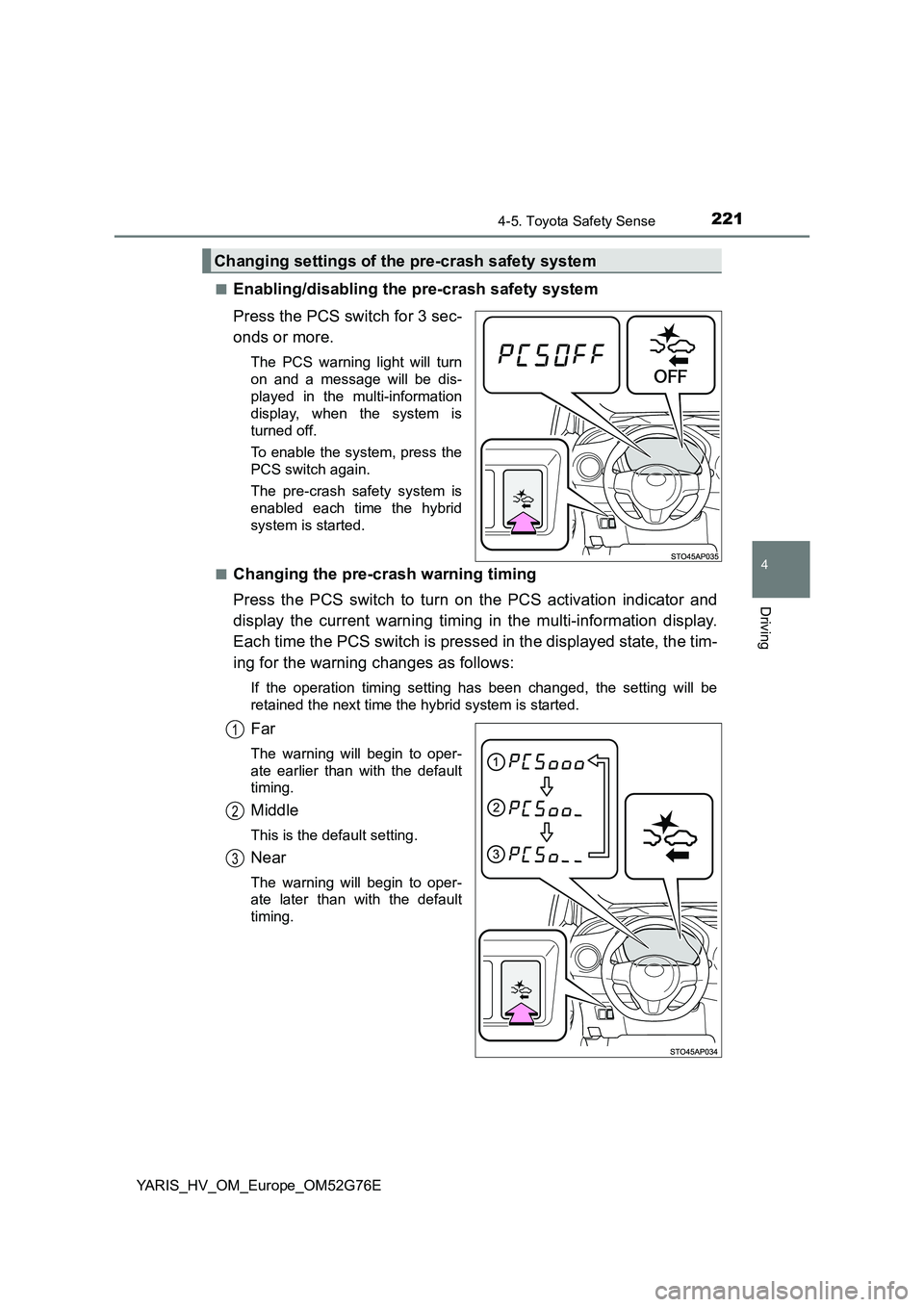
■Enabling/disabling the pre-crash safety system
Press the PCS switch for 3 sec-
onds or more.
The PCS warning light will turn
on and a message will be dis-
played in the multi-information
display, when the system is
turned off.
To enable the system, press the
PCS switch again.
The pre-crash safety system is
enabled each time the hybrid
system is started.
■Changing the pre-crash warning timing
Press the PCS switch to turn on the PCS activation indicator and
display the current warning timing in the multi-information display.
Each time the PCS switch is pressed in the displayed state, the tim-
ing for the warning changes as follows:
If the operation timing setting has been changed, the setting will be
retained the next time the hybrid system is started.
Far
The warning will begin to oper-
ate earlier than with the default
timing.
Middle
This is the default setting.
Near
The warning will begin to oper-
ate later than with the default
timing.
Changing settings of the pre-crash safety system
1
2
3
Page 262 of 504
2625-2. Using the audio system
YARIS_HV_OM_Europe_OM52G76E
Optimal use of the audio system
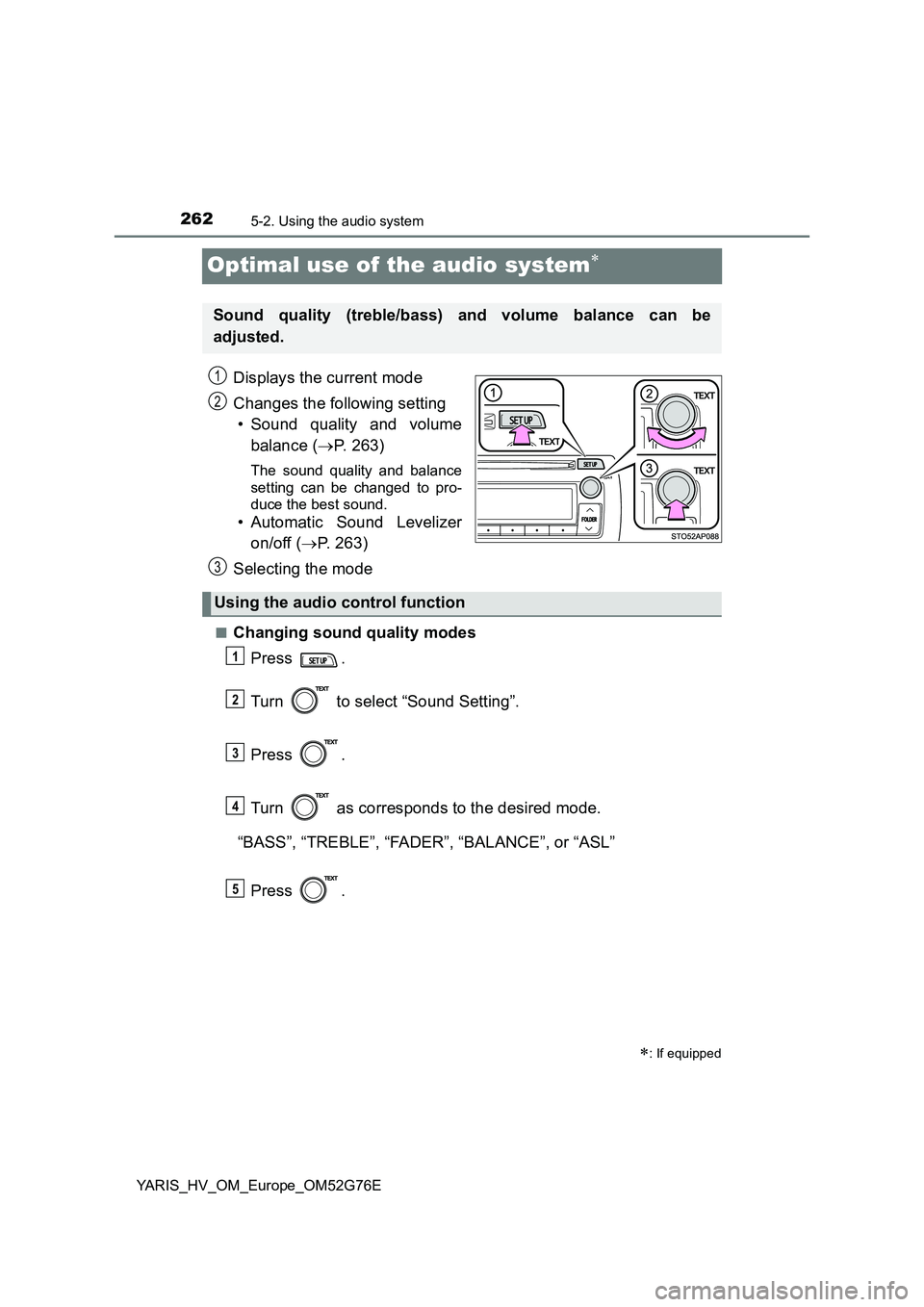
Displays the current mode
Changes the following setting
• Sound quality and volume
balance ( P. 263)
The sound quality and balance
setting can be changed to pro-
duce the best sound.
• Automatic Sound Levelizer
on/off ( P. 263)
Selecting the mode
■Changing sound quality modes
Press .
Turn to select “Sound Setting”.
Press .
Turn as corresponds to the desired mode.
“BASS”, “TREBLE”, “FADER”, “BALANCE”, or “ASL”
Press .
: If equipped
Sound quality (treble/bass) and volume balance can be
adjusted.
STO51AP005
1
2
3
Using the audio control function
1
2
3
4
5
Page 263 of 504
2635-2. Using the audio system
5
Audio system
YARIS_HV_OM_Europe_OM52G76E
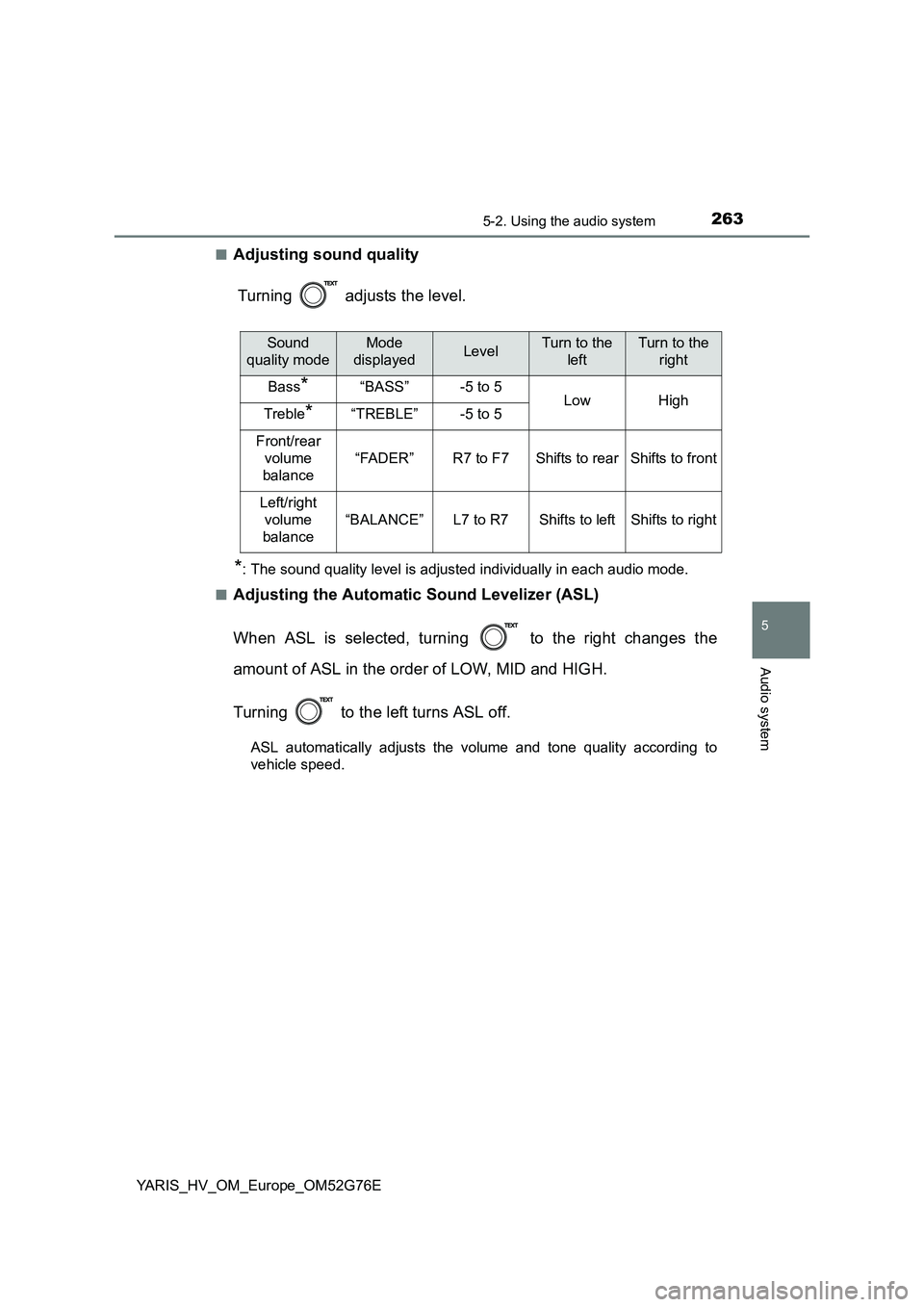
■Adjusting sound quality
Turning adjusts the level.
*: The sound quality level is adjusted individually in each audio mode.
■Adjusting the Automatic Sound Levelizer (ASL)
When ASL is selected, turning to the right changes the
amount of ASL in the order of LOW, MID and HIGH.
Turning to the left turns ASL off.
ASL automatically adjusts the volume and tone quality according to
vehicle speed.
Sound
quality mode
Mode
displayedLevelTurn to the
left
Turn to the
right
Bass*“BASS”-5 to 5LowHighTreble*“TREBLE”-5 to 5
Front/rear
volume
balance
“FADER”R7 to F7Shifts to rearShifts to front
Left/right
volume
balance
“BALANCE”L7 to R7Shifts to leftShifts to right
Page 264 of 504
2645-3. Using the radio
YARIS_HV_OM_Europe_OM52G76E
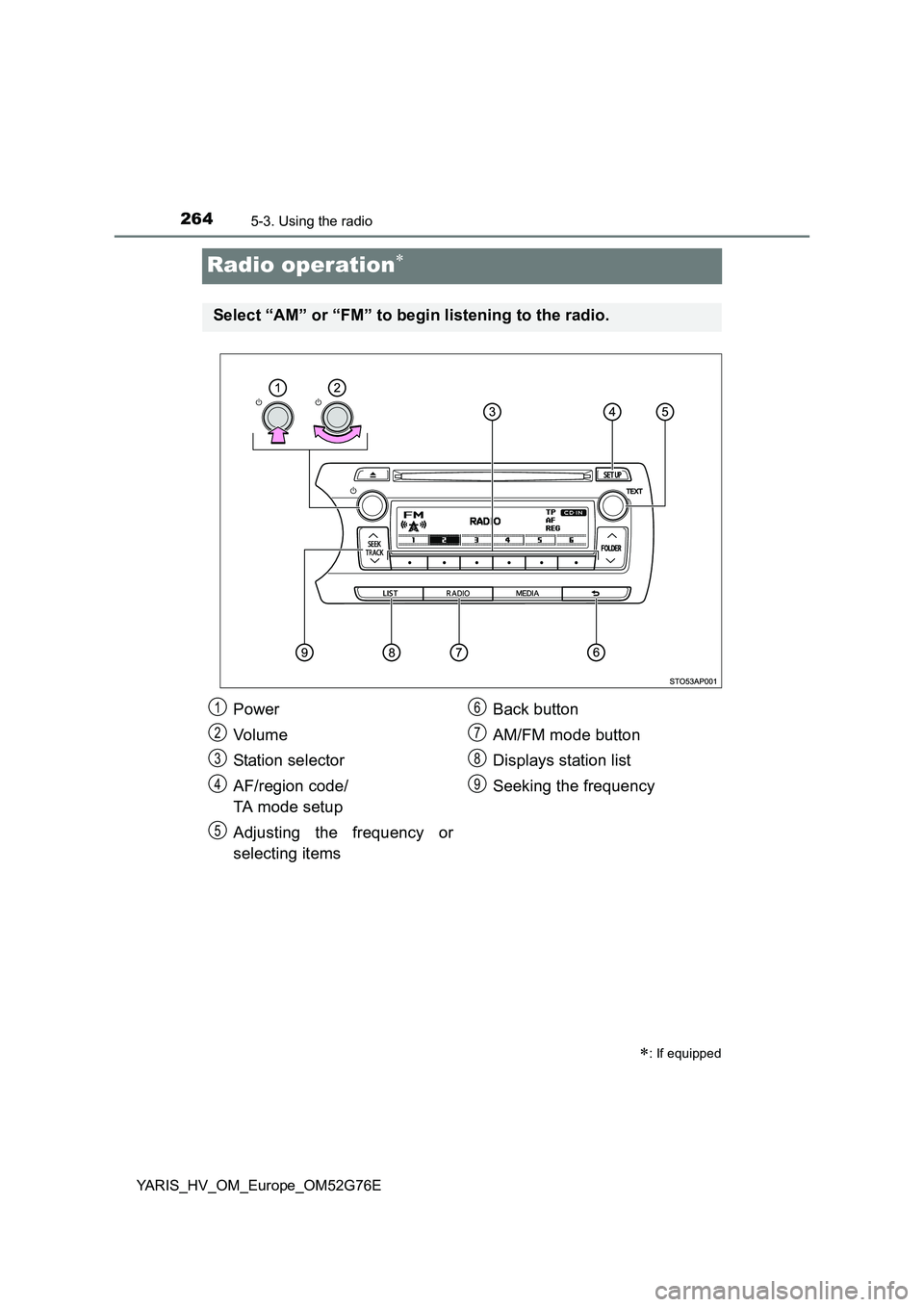
Radio operation
: If equipped
Select “AM” or “FM” to begin listening to the radio.
Power
Vo lu m e
Station selector
AF/region code/
TA mode setup
Adjusting the frequency or
selecting items
Back button
AM/FM mode button
Displays station list
Seeking the frequency
1
2
3
4
5
6
7
8
9