navigation system TOYOTA YARIS LIFTBACK 2020 Accessories, Audio & Navigation (in English)
[x] Cancel search | Manufacturer: TOYOTA, Model Year: 2020, Model line: YARIS LIFTBACK, Model: TOYOTA YARIS LIFTBACK 2020Pages: 164, PDF Size: 3.77 MB
Page 31 of 164
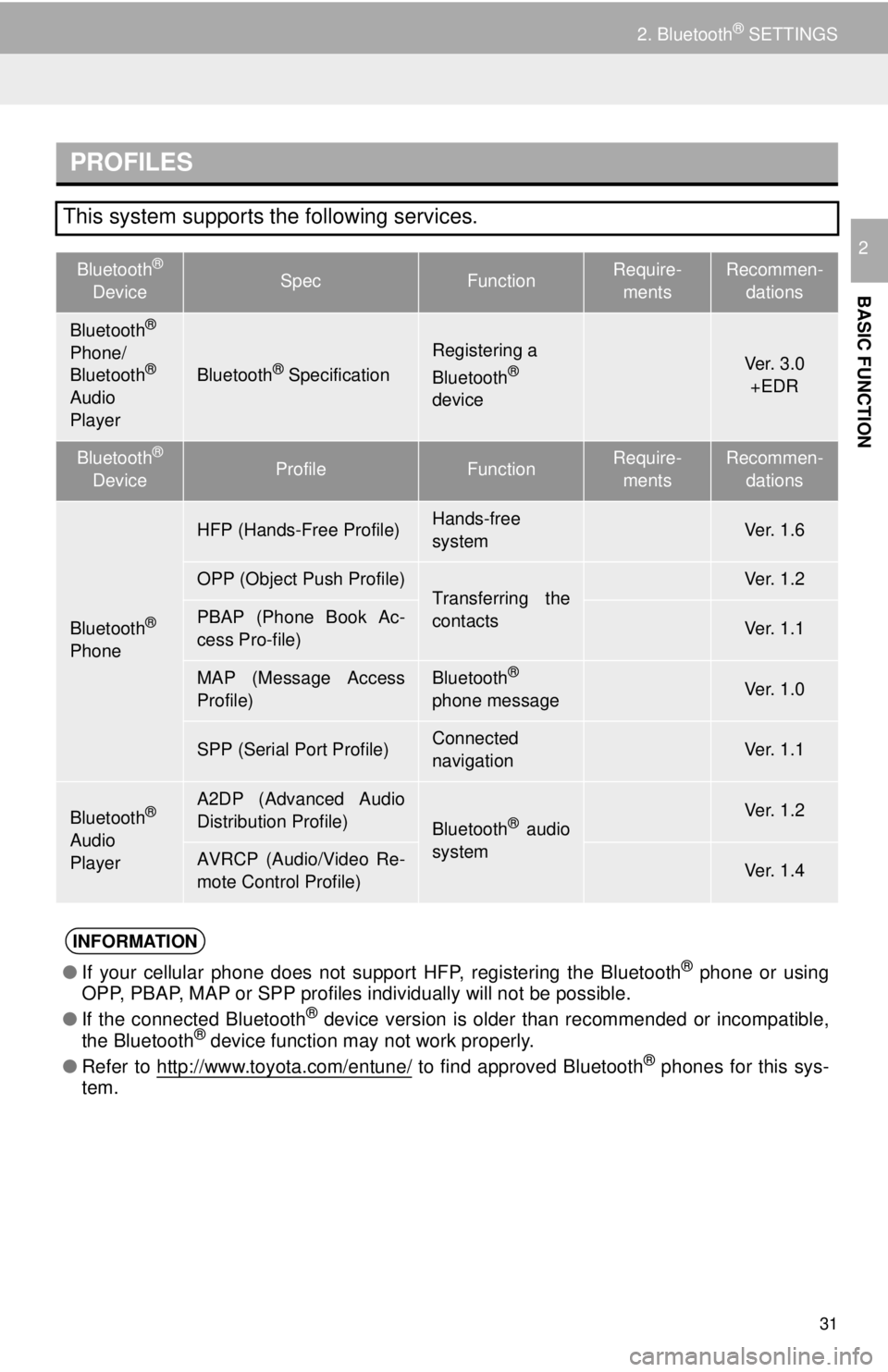
PROFILES
Bluetooth®
DeviceSpecFunctionRequire -
ments
Recommen-
dations
Ve r. 2 . 0Ver. 3.0
+EDR
Bluetooth®
DeviceProfileFunctionRequire -
ments
Recommen-
dations
Ve r. 1 . 0Ve r. 1 . 6
Ve r. 1 . 1Ve r. 1 . 2
Ve r. 1 . 0Ve r. 1 . 1
⎯Ve r. 1 . 0
⎯Ve r. 1 . 1
Ve r. 1 . 0Ve r. 1 . 2
Ve r. 1 . 0Ve r. 1 . 4
●If your cellular phone does not support HFP, registering the Bluetooth® phone or using
OPP, PBAP, MAP or SPP profiles individually will not be possible.
● If the connected Bluetooth
® device version is older than recommended or incompatible,
the Bluetooth® device function may not work properly.
● Refer to
http://www.toyota.com/entune/ to find approved Bluetooth® phones for this sys -
tem.
31
2. Bluetooth® SETTINGS
BASIC FUNCTION
2
This system supports the following services.
Bluetooth®
Phone/
Bluetooth®
Audio
PlayerBluetooth® Specification
Registering a
Bluetooth®
device
Bluetooth®
Phone
HFP (Hands-Free Profile)Hands-free
system
OPP (Object Push Profile)Transferring the
contactsPBAP (Phone Book Ac-
cess Pro-file)
MAP (Message Access
Profile)Bluetooth®
phone message
SPP (Serial Port Profile)Connected
navigation
Bluetooth®
Audio
Player
A2DP (Advanced Audio
Distribution Profile)
Bluetooth® audio
system
AVRCP (Audio/Video Re-
mote Control Profile)
INFORMATION
Page 105 of 164
105
VOICE COMMAND SYSTEM
4
2. MOBILE ASSISTANT OPERATION
1. MOBILE ASSISTANT
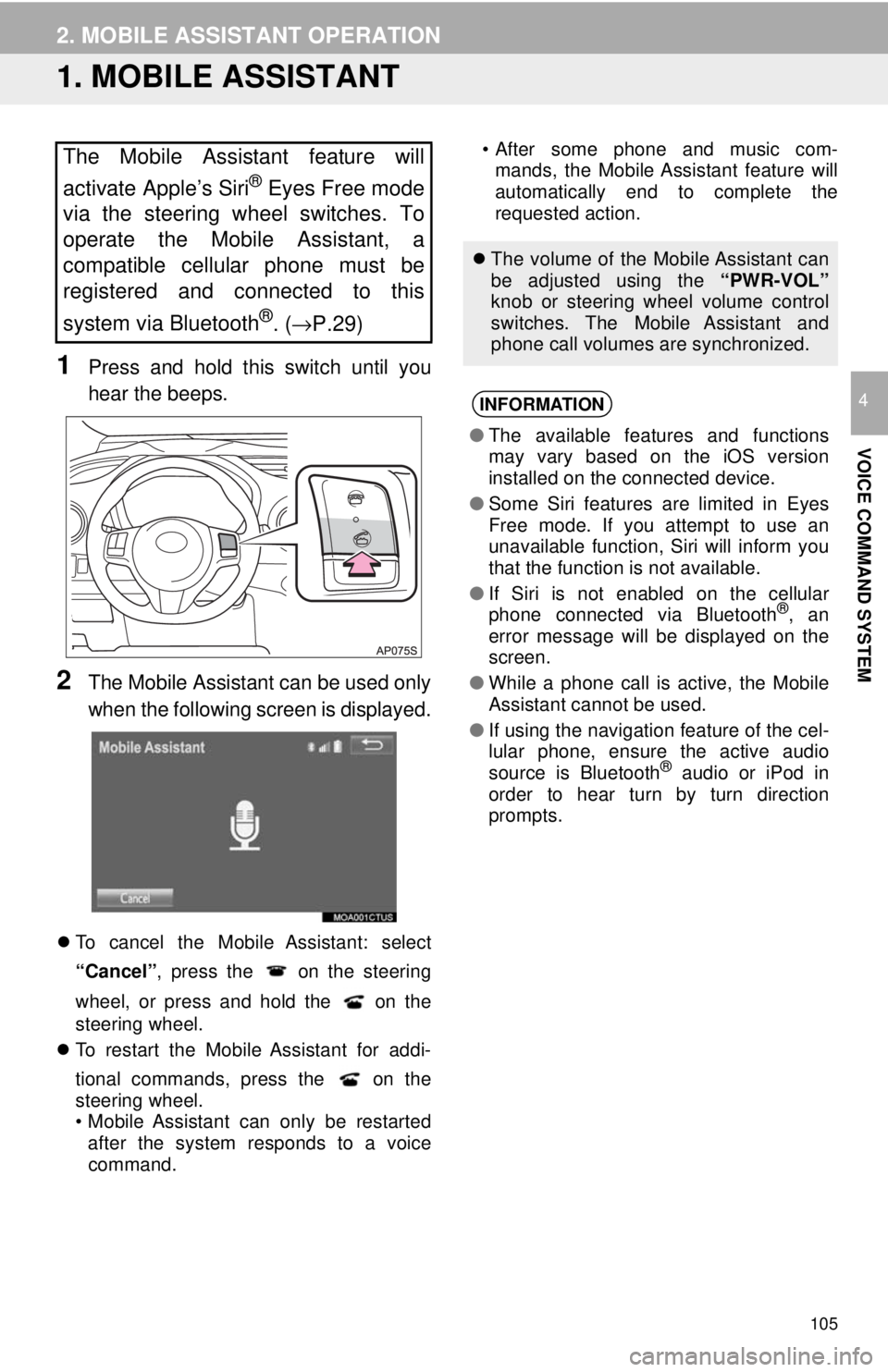
1Press and hold this switch until you
hear the beeps.
2The Mobile Assistant can be used only
when the following screen is displayed.
To cancel the Mobile Assistant: select
“Cancel”, press the
on the steering
wheel, or press and hold the
on the
steering wheel.
To restart the Mobile Assistant for addi-
t
ional commands, press the
on the
steering wheel.
• Mobile Assistant can only be restarted
afte r the system respon
ds to a voice
command. • After some phone and music com-
m a
nds, the Mobile Assistant feature will
automatically end to complete the
requested action.The Mobile Assistant feature will
activate Apple’s Siri
® Eyes Free mode
via the steering wheel switches. To
operate the Mobile Assistant, a
compatible cellular phone must be
registered and connected to this
system via Bluetooth
®. ( →P.29)
The volume of the Mobile Assistant can
be adjusted using the “PWR-VOL”
knob or steering wheel volume control
switches. The Mobile Assistant and
phone call volumes are synchronized.
INFORMATION
● The available features and functions
may vary based on the iOS version
installed on the connected device.
● Some Siri features are limited in Eyes
Free mode. If you attempt to use an
unavailable function, Siri will inform you
that the function is not available.
● If Siri is not enabled on the cellular
phone connected via Bluetooth
®, an
error message will be displayed on the
screen.
● While a phone call is active, the Mobile
Assistant cannot be used.
● If using the navigation feature of the cel-
lular phone, ensure the active audio
source is Bluetooth
® audio or iPod in
order to hear turn by turn direction
prompts.