Rear VAUXHALL ADAM 2015 Workshop Manual
[x] Cancel search | Manufacturer: VAUXHALL, Model Year: 2015, Model line: ADAM, Model: VAUXHALL ADAM 2015Pages: 225, PDF Size: 6.81 MB
Page 138 of 225

136Driving and operating
The system has four ultrasonic
parking sensors in the rear bumper.
Activation
When reverse gear is engaged, the
system is ready to operate
automatically.
An illuminated LED in the parking
assist button r indicates that the
system is ready to operate.
Indication
The system warns the driver with
acoustic signals against potentially
hazardous obstacles behind the
vehicle in a distance range up to
1.5 metres. The interval between the
sounds becomes shorter as the
vehicle gets closer to that obstacle.
When the distance is less than about
30 cm, the sound is continuous.
Additionally the distance to obstacles
is shown in the Driver Information
Centre 3 89 or, depending on the
version, on the Colour-Info-Display
3 94.
Deactivation
The system automatically switches
off when reverse gear is disengaged.
Manual deactivation is also possible
by pressing the parking assist button
r .
In both cases the LED in the button
extinguishes.
Fault
In the event of a fault or if the system does not work temporarily, e.g.
because of high external noise level
or other interference factors, the LED
in the button flashes for 3 seconds
and then extinguishes. Control
indicator r illuminates in the
instrument cluster 3 87 and a
message pops-up in the Driver
Information Centre.
Front-rear parking assist9 Warning
The driver bears full responsibility
for the parking manoeuvre.
Always check the surrounding
area when driving backwards or
forwards while using parking
assist system.
The front-rear parking assist
measures the distance between the vehicle and obstacles in front and
Page 139 of 225

Driving and operating137
behind the vehicle. The system givesacoustic signals and display
messages.
The system has six ultrasonic parking
sensors each in the rear and front
bumper.
It uses two different acoustic warning
signals for the front and rear
monitoring areas, each with a
different tone frequency.
Front-rear parking assist is always
combined with advanced parking
assist, see Advanced parking assist
section below.
Parking assist button and operation
logic
Front-rear parking assist and
advanced parking assist both use the same button for activation and
deactivation:
A brief press of button D activates
or deactivates the parking assist.
Long press of button D (approx.
one second) activates or deactivates
the advanced parking assist, see
separate description.
Button logic operates the systems by
pressing as follows:
■ If only front-rear parking assist is active, a brief press deactivates
front-rear parking assist.
■ If only front-rear parking assist is active, long press activates
advanced parking assist.
■ If only advanced parking assist is active, a brief press activates front-
rear parking assist.
■ If only advanced parking assist is active, long press deactivates
advanced parking assist.
■ If a forward gear or neutral is selected, a brief press activates ordeactivates only front parking
assist.
■ If reverse gear is selected, a brief press activates or deactivates frontand rear parking assist.
Operation
When reverse gear is engaged, the
front and rear parking assist is ready
to operate.
Page 140 of 225

138Driving and operating
An illuminated LED in the parking
assist button D indicates that the
system is ready to operate.
The front parking assist can also be
activated at a speed up to 7 mph with
a brief press of the parking assist
button.
If the D button is switched on once
within an ignition cycle, the front
parking assist is deactivated at a
speed above 7 mph. It will be
reactivated if vehicle speed has not
exceeded 16 mph beforehand. If
vehicle speed has exceeded 16 mph
beforehand, front parking assist
remains deactivated when speed
drops below 7 mph.
When the system is deactivated, the
LED in the button extinguishes and
Park Assist Off pops-up in the Driver
Information Centre.
The system is deactivated
automatically when exceeding
16 mph.Indication
The system warns the driver with
acoustic signals against potentially
hazardous obstacles behind the
vehicle in a distance range up to
1.5 metres and in front up to
1.2 metres . Depending on which side
of the vehicle is closer to an obstacle,
you will hear acoustic warning signals in the vehicle on the respective side.
The interval between the sounds
becomes shorter as the vehicle gets
closer to that obstacle. When the
distance is less than approx. 30 cm,
the sound is continuous.
Additionally the distance to obstacles
is shown in the Driver Information
Centre 3 89 or, depending on the
version, on the Colour-Info-Display
3 94.
The distance to a front and rear
obstacle is displayed by changing
distance lines in the Driver
Information Centre.
The distance indication can be
inhibited by vehicle messages with a
higher priority. After approving the
message by pressing the SET/CLR
button on the turn signal lever,
distance indication appears again.
Page 141 of 225

Driving and operating139
The distance to obstacles is shown onthe Colour-Info-Display by coloured
zones in front of or behind the vehicle
3 94.
Fault
In the event of a fault or if the system does not work temporarily, e.g.
because of high external noise level
or other interference factors, the LED
in the button flashes for 3 seconds
and then extinguishes. Control
indicator r illuminates in the
instrument cluster 3 87 and a
message pops-up in the Driver
Information Centre.
Vehicle messages 3 96.
Advanced parking assist9 Warning
The driver bears full responsibility
for accepting the parking slot
suggested by the system and the
parking manoeuvre.
Always check the surrounding
area in all directions when using
the advanced parking assist.
The advanced parking assist
measures a suitable parking slot
while passing, calculates the
trajectory and automatically steers
the vehicle into a parallel or
perpendicular parking slot.
Instructions are given on the Colour-
Info-Display supported by acoustic
signals. The driver must control
acceleration, braking and gear
shifting, while steering is done
automatically.
Advanced parking assist can only be
activated when driving forwards.
Advanced parking assist is always
combined with front-rear parking assist, see previous section. Both
systems use the same sensors in the front and rear bumper.
Button D and operation logic
Advanced parking assist and front-
rear parking assist both use the same
button for activation and deactivation:
A brief press of button D activates
or deactivates the parking assist.
Long press of button D (approx. one
second) activates or deactivates the
advanced parking assist, see
separate description below.
Page 142 of 225

140Driving and operating
Button logic operates the systems by
pressing as follows:
■ If only front-rear parking assist is active, a brief press deactivates
front-rear parking assist.
■ If only front-rear parking assist is active, long press activates
advanced parking assist.
■ If only advanced parking assist is active, a brief press activates front-
rear parking assist.
■ If only advanced parking assist is active, long press deactivates
advanced parking assist.
■ If forward gear or neutral is selected, a brief press activates ordeactivates only front parking
assist.
■ If reverse gear is selected, a brief press activates or deactivates frontand rear parking assist.Activation
When searching for a parking slot, the
system is ready to operate with a long press of button D.
The system recognises and
memorises (10 metres for parallel
parking slots or 6 metres for
perpendicular parking slots) even in
the parking assist mode. Long press
of button D activates advanced
parking assist to start parking
manoeuvre.
The system can only be activated at
a speed up to 18 mph and the system searches for a parking slot at a speed
up to 18 mph.
The maximum allowed parallel
distance between the vehicle and a
row of parked cars is 1.8 metres for
parallel parking and 2.5 metres for
perpendicular parking.
FunctionalityParking slot searching mode
Page 144 of 225

142Driving and operating
slots after the Stop message is given.
The system calculates the optimal
path into the parking slot.
A brief vibration in the steering wheel
after engaging reverse gear indicates
that the steering is controlled by the
system. Then the vehicle is steered
into the slot automatically by giving
the driver detailed instructions for
braking, accelerating and gear
shifting. The driver must keep hands
away from the steering wheel.
Always pay attention to the sound of
the front-rear parking assist.
Continuous sound means that the
distance to an obstacle is less than
approx. 30 cm.
If, for any reason, the driver must take over control of the steering, hold the
steering wheel only at the outer edge. Automatic steering is cancelled in thisevent.Changing the parking side
The system is configured to detect
parking slots by default on the
passenger side. To detect parkingslots on the driver side, switch on turn
indicator to the driver side for the
durance of the search.
As soon as the turn indicator is
switched off, the system searches for
parking slots on the passenger side
again.Display indication
The instructions in the display show:
■ general hints and warning messages,
■ a hint when driving faster than 18 mph during parking slot
searching mode, or 5 mph in
guiding mode,
■ the demand to stop the vehicle, when a parking slot is detected,
■ the direction of driving during the parking manoeuvre,
■ the demand to shift rearwards or forwards,
■ the demand to accelerate or brake,
■ for some of the instructions a progress bar is shown in the DriverInformation Centre,■ the successful parking indicated by
a pop-up symbol and a chime,
■ the cancelling of a parking manoeuvre.
Display priorities
Advanced parking assist indication on
the Driver Information Centre can be
inhibited by vehicle messages with a higher priority. After approving the
message by pressing the SET/CLR
button on the turn signal lever,
advanced parking assist instructions
appear again and the parking
manoeuvre can be continued.
Deactivation
The system is deactivated by:
■ long press of button D,
■ parking manoeuvre successfully ended,
■ driving faster than 18 mph during parking slot search,
■ driving faster than 5 mph during parking guidance,
■ driver interference on steering wheel detected,
Page 146 of 225

144Driving and operating
Advanced parking assist system
may not respond to changes in the
available parking space after
initiating a parking manoeuvre. The
system may recognize an entry, a
gateway, a courtyard or even a
crossing as a parking slot. After
selecting reverse gear the system
would start a parking manoeuvre.
Take care of the availability of the
suggested parking slot.
Surface irregularities, e.g. on
construction zones, are not detected
by the system. The driver accepts
responsibility.
Notice
If engaging a forward gear and
exceeding a certain speed, the rear
parking assist will be deactivated
when the rear carrier system is
extended.
If engaging reverse at first, the
parking assist will detect the rear
carrier system and provide a buzzing
sound. Press r or D briefly to
deactivate the parking assist.Notice
After production, the system
requires a calibration. For optimal parking guidance, a driving distance of at least 6 miles, including a
number of bends, is required.
Side blind spot alert The Side blind spot alert system
detects and reports objects on either
side of the vehicle, within a specified
"blind spot" zone. The system alerts visually in each exterior mirror, when
detecting objects that may not be
visible in the interior and exterior
mirrors.
Side blind spot alert uses some of the advanced parking assist sensors
which are located in the front and rear
bumper on both sides of the vehicle.9 Warning
Side blind spot alert does not
replace driver vision.
The system does not detect:
■ Vehicles outside the side blind zones which may be rapidly
approaching.
■ Pedestrians, cyclists or animals.
Before changing a lane, always
check all mirrors, look over the
shoulder and use the turn signal.
When the system detects a vehicle in the side blind zone while driving
forward, either while passing a
vehicle or being passed, an amber warning symbol B will illuminate in
the relevant exterior mirror. If the
driver then activates the turn signal,
the warning symbol B starts flashing
amber as a warning not to change
lanes.
Page 147 of 225

Driving and operating145
Side blind spot alert is active from
speeds of 6 mph up to 87 mph.
Driving faster than 87 mph
deactivates the system, indicated by
low lighting warning symbols B in
both exterior mirrors. Reducing the speed again will extinguish the
warning symbols. If a vehicle is then
detected in the blind zone, the
warning symbols B will illuminate as
normal on the relevant side.
When the vehicle is started, both exterior mirror displays will briefly
come on to indicate that the system is operating.
The system can be activated or
deactivated in the Info-Display,
vehicle personalisation 3 99.
Deactivation is indicated by a
message in the Driver Information
Centre.
Detection zones
The detection zones start at the rear
bumper and extend approx.
3 metres rearwards and to the sides.
The height of the zone is approx.
between 0.5 metres and 2 metres off
the ground.
Side blind spot alert is designed to ignore stationary objects, e.g.
guardrails, posts, curbs, walls and
beams. Parked vehicles or oncoming
vehicles are not detected.
Fault
Occasional missed alerts can occur
under normal circumstances and will
increase in wet conditions.
Side blind spot alert does not operate when the left or right corners of the
rear bumper are covered with mud,dirt, snow, ice, slush, or in heavy
rainstorms. Cleaning instructions
3 197.
In the event of a fault in the system or if the system does not work due to
temporary conditions, a message is
displayed in the Driver Information
Centre. Seek the assistance of a
workshop.
Page 150 of 225
148Driving and operatingRefuelling9Danger
Before refuelling, switch off the
engine.
Switch off any mobile phones.
Follow the operating and safety
instructions of the gas station
when refuelling.
9 Danger
Fuel is flammable and explosive.
No smoking. No naked flames or
sparks.
If you can smell fuel in your
vehicle, have the cause of this
remedied immediately by a
workshop.
Caution
In case of misfuelling, do not
switch on ignition.
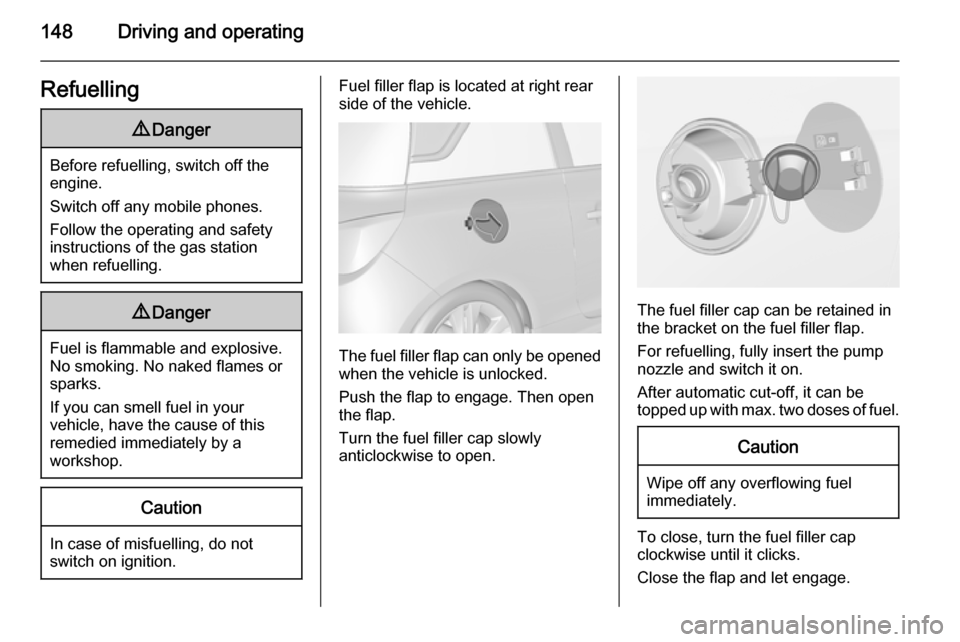
Fuel filler flap is located at right rear
side of the vehicle.
The fuel filler flap can only be opened
when the vehicle is unlocked.
Push the flap to engage. Then open
the flap.
Turn the fuel filler cap slowly
anticlockwise to open.
The fuel filler cap can be retained in
the bracket on the fuel filler flap.
For refuelling, fully insert the pump
nozzle and switch it on.
After automatic cut-off, it can be
topped up with max. two doses of fuel.
Caution
Wipe off any overflowing fuel
immediately.
To close, turn the fuel filler cap
clockwise until it clicks.
Close the flap and let engage.
Page 161 of 225
Vehicle care159Wiper blade replacement
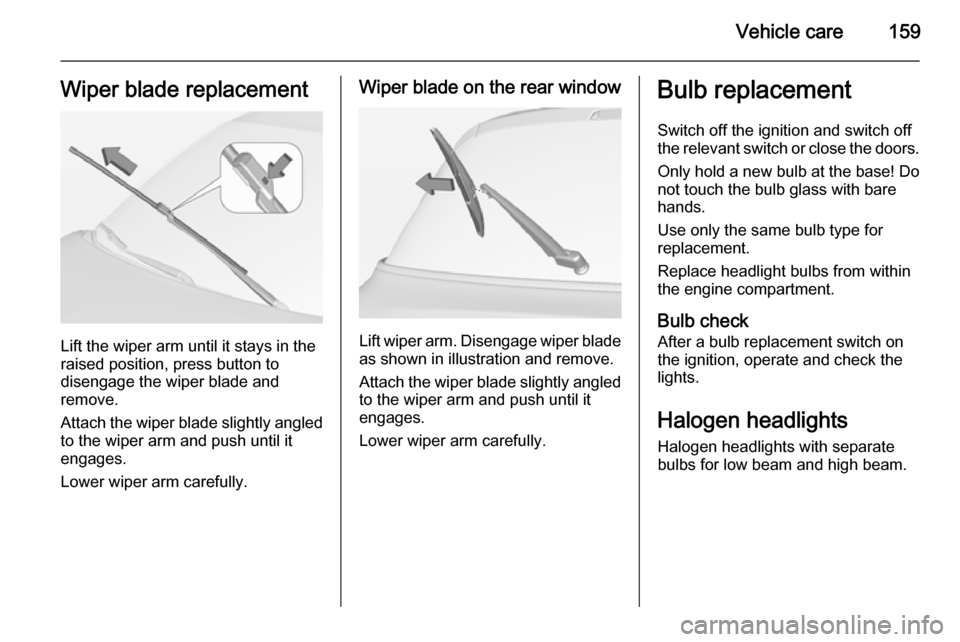
Lift the wiper arm until it stays in the
raised position, press button to
disengage the wiper blade and
remove.
Attach the wiper blade slightly angled
to the wiper arm and push until it
engages.
Lower wiper arm carefully.
Wiper blade on the rear window
Lift wiper arm. Disengage wiper blade as shown in illustration and remove.
Attach the wiper blade slightly angled
to the wiper arm and push until it
engages.
Lower wiper arm carefully.
Bulb replacement
Switch off the ignition and switch off
the relevant switch or close the doors.
Only hold a new bulb at the base! Do not touch the bulb glass with bare
hands.
Use only the same bulb type for
replacement.
Replace headlight bulbs from within
the engine compartment.
Bulb check After a bulb replacement switch on
the ignition, operate and check the
lights.
Halogen headlights
Halogen headlights with separate
bulbs for low beam and high beam.