bonnet VAUXHALL ANTARA 2014 Owner's Manual
[x] Cancel search | Manufacturer: VAUXHALL, Model Year: 2014, Model line: ANTARA, Model: VAUXHALL ANTARA 2014Pages: 217, PDF Size: 5.94 MB
Page 13 of 217

In brief11
1Side air vents .....................119
2 Fixed air vents .................... 120
3 High beam .......................... 106
Headlight flash ...................106
Turn and lane-change
signals ................................ 108
Exit lighting ......................... 112
Parking lights .....................109
Cruise control ....................... 90
4 Remote control on
steering wheel ......................72
Trip computer .....................100
5 Horn ..................................... 73
6 Instruments .......................... 79
7 Windscreen wiper and
washer system, headlight
washer system .....................73
Rear window wiper and
washer system .....................758Info-Display .......................... 93
Check control, tyre
pressure monitoring
system ................................ 176
Trip computer .....................100
9 Centre air vents .................. 119
10 Hazard warning flashers ....107
Parking assist ..................... 141
Electronic Stability Control . 137
Descent control system ...... 138
Status LED for anti-theft
alarm system ........................ 24
Folding exterior mirrors ........27
Eco button for stop/start
system ................................. 124
11 Infotainment system .............10
12 Front passenger airbag ........46
13 Status LEDs for front
passenger airbag .................48
Control indicator for front
passenger seat belt .............41
14 Glovebox .............................. 5515Fuse box ............................ 170
16 Climate control system ....... 114
17 Ignition switch with
steering wheel lock ............123
18 Accelerator pedal ...............122
19 Driver airbag ........................ 46
20 Brake pedal ........................ 135
21 Clutch pedal ....................... 122
22 Steering wheel adjustment ..72
23 Bonnet release ...................152
24 Coin storage ......................... 56
25 Card holder .......................... 56
26 Light switch ........................ 105
Automatic light control .......105
Instrument illumination .......110
Rear fog light ...................... 109
Front fog lights ...................108
Headlight range
adjustment ......................... 106
Page 22 of 217

20Keys, doors and windows
Key with fixed key sectionOpen the unit with a small screwdriver in the notch on the cover. Replace the
battery (battery type CR2032), paying
attention to the installation position.
Close the unit.
Central locking system
Unlocks and locks doors, load
compartment and fuel filler flap.
A pull on an interior door handle
unlocks the respective door. Pulling the handle once more opens the door.
Notice
In the event of an accident in which
airbags or belt pretensioners are
deployed, the vehicle is
automatically unlocked.Unlocking
Press button q.
Notice
If no door is opened within
5 minutes after the vehicle has been unlocked, the vehicle is relocked
automatically (and the anti-theft
alarm is reactivated).
When button q is pressed, the
instrument panel illuminates for
approx. 30 seconds or until ignition
switch is turned to position ACC.
Locking
Close doors, load compartment, fuel
filler flap, bonnet, windows and
sunroof.
Press button p.
The central locking system can be
activated with the windows open.
Page 26 of 217

24Keys, doors and windows
Activating
Press button p on the radio remote
control twice within 3 seconds.
Alternatively, turn key in driver's door
towards rear of vehicle again within
3 seconds after locking.
Anti-theft alarm system
The anti-theft alarm system is
combined with the central locking
system.
It monitors:
■ Doors, tailgate, bonnet
■ Passenger compartment including adjoining load compartment
■ Vehicle inclination, e.g. if it is raised
■ Siren power supply
■ Ignition
Activation
Ensure the doors, tailgate, fuel filler
flap, bonnet, windows and sunroof
are closed.
Press button p on radio remote
control or manually lock the driver's
door.
The system is activated: ■ Automatically, 30 seconds after locking the vehicle (initialisation of
the system)
■ Directly by pressing p on the radio
remote control once more after
locking
If the hazard warning lights do not flash once upon activation or the
control indicator flashes rapidly, this
may indicate that a door, the tailgate
or the bonnet is not fully closed.
Notice
Changes to the vehicle interior such
as the use of seat covers, and open
windows or sunroof, could impair the function of passenger compartment
monitoring.
Page 27 of 217
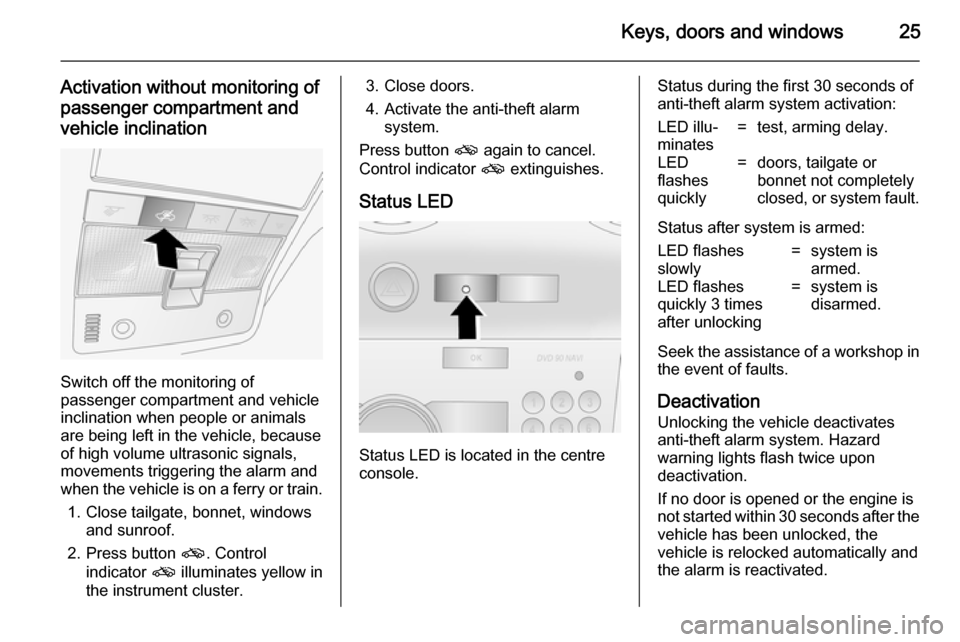
Keys, doors and windows25
Activation without monitoring of
passenger compartment and
vehicle inclination
Switch off the monitoring of
passenger compartment and vehicle
inclination when people or animals
are being left in the vehicle, because
of high volume ultrasonic signals,
movements triggering the alarm and
when the vehicle is on a ferry or train.
1. Close tailgate, bonnet, windows and sunroof.
2. Press button o. Control
indicator o illuminates yellow in
the instrument cluster.
3. Close doors.
4. Activate the anti-theft alarm system.
Press button o again to cancel.
Control indicator o extinguishes.
Status LED
Status LED is located in the centre
console.
Status during the first 30 seconds of
anti-theft alarm system activation:LED illu‐
minates=test, arming delay.LED
flashes
quickly=doors, tailgate or
bonnet not completely
closed, or system fault.
Status after system is armed:
LED flashes
slowly=system is
armed.LED flashes
quickly 3 times
after unlocking=system is
disarmed.
Seek the assistance of a workshop in
the event of faults.
Deactivation
Unlocking the vehicle deactivates
anti-theft alarm system. Hazard
warning lights flash twice upon
deactivation.
If no door is opened or the engine is
not started within 30 seconds after the
vehicle has been unlocked, the
vehicle is relocked automatically and
the alarm is reactivated.
Page 92 of 217

90Instruments and controls
Illuminates when the front fog lights
are switched on 3 108.
Rear fog light
r illuminates yellow.
Illuminates when the rear fog light is switched on 3 109.
Cruise control
m illuminates yellow or green.
Illuminates yellow
The system is ready for operation.
Illuminates green
A certain speed is stored.
Cruise control 3 140.
Speed warning
à illuminates yellow.
In vehicles equipped with the
overspeed warning light, when
vehicle speed exceeds 75 mph,
control indicator à flashes,accompanied by a warning chime, to
warn the driver to reduce speed as
appropriate.
Trailer indicator á illuminates green.
Illuminates when a trailer is
connected to the vehicle 3 146.
Bonnet open
/ illuminates red.
Illuminates when the bonnet is open.
Stop-start system 3 124.
Door open ( illuminates red.
Illuminates when a door is open or not
securely latched.
Tailgate open
1 illuminates red.
Illuminates when tailgate is open or
not securely latched 3 22.Anti-theft alarm system
a illuminates yellow.
Illuminates when alarm system
monitoring of the passenger
compartment and vehicle inclination
has been switched off with button a in the roof lining.
Anti-theft alarm system 3 24.
Page 127 of 217

Driving and operating125
An Autostop is indicated by the
needle at the AUTOSTOP position in
the tachometer.
During an Autostop, the heating, power steering and brake
performance will be maintained.
Air conditioning system may or may
not inhibit the stop-start system
according to the cooling performance.
Caution
The steering assist can be
reduced during an Autostop.
Conditions for an Autostop
The stop-start system checks if each
of the following conditions is fulfilled.
■ The stop-start system is not manually deactivated
■ the bonnet is fully closed
■ the driver's door is closed or the driver's seat belt is fastened
■ the vehicle battery is sufficiently charged and in good condition
■ the engine is warmed up
■ the engine coolant temperature is not too high or low
■ the engine exhaust temperature is not too high, e.g. after driving with
high engine load
■ the ambient temperature is not too low
■ the defrosting function is not activated
■ the climate control system does not
inhibit an engine stop
■ the brake vacuum is sufficient■ the self-cleaning function of the diesel particle filter is not active
■ the vehicle has moved since the last Autostop
Otherwise an Autostop will be
inhibited.
Certain settings of the climate control
system may inhibit an Autostop. See
Climate control chapter for more
details 3 116.
Immediately after motorway driving
an Autostop may be inhibited.
New vehicle running-in 3 122.
Vehicle battery discharge protection
To ensure reliable engine restarts, several vehicle battery discharge
protection features are implemented
as part of the stop-start system.
Restart of the engine by the
driver
Depress the clutch pedal to restart the
engine.
The engine start is indicated by the
needle at the idle speed position in
the tachometer.
Page 128 of 217

126Driving and operating
If the selector lever is shifted out of
neutral before depressing the clutch
first, control indicator - illuminates.
Control indicator - 3 89.
Restart of the engine by the
stop-start system
The selector lever must be in neutral to enable an automatic restart.
If one of the following conditions occurs during an Autostop, the
engine will be restarted automatically
by the stop-start system.
■ The stop-start system is manually deactivated
■ the bonnet is opened
■ the driver's seat belt is unfastened and the driver's door is opened
■ the engine temperature is too low
■ the charging level of the vehicle battery is below a defined level
■ the brake vacuum is not sufficient
■ the vehicle is driven at least at walking speed
■ the defrosting function is activated■ the climate control system requests
an engine start
■ the air conditioning is manually switched on
If an electrical accessory, e.g. a
portable CD player, is connected to
the power outlet, a brief power drop
during restart might be noticeable.
Parking ■ Do not park the vehicle on an easily
ignitable surface. The high
temperature of the exhaust system
could ignite the surface.
■ Always apply the electrical parking brake.
Pull switch m.
For maximum force, e.g. parking
with a trailer or on inclines, pull
switch m twice.
■ Switch off the engine and turn the ignition key to position LOCK, push
key into ignition switch and remove.
Turn the steering wheel until the
steering wheel lock is felt to
engage.For vehicles with automatic
transmission, depress foot brake
and shift into P before pushing key
into ignition switch and removing.
■ If the vehicle is on a level surface or
uphill slope, engage first gear ormove the selector lever to P before
switching off the ignition. On an
uphill slope, turn the front wheels
away from the kerb.
If the vehicle is on a downhill slope, engage reverse gear or move the
selector lever to P before switching
off the ignition. Turn the front
wheels towards the kerb.
■ Lock the vehicle with button p on
the radio remote control 3 20 and
activate the anti-theft alarm system 3 24.
Page 153 of 217

Vehicle care151
■ Open the bonnet, close all doorsand lock the vehicle.
■ Disconnect the clamp from the negative terminal of the vehicle
battery. Beware that all systems are
not functional, e.g. anti-theft alarm
system.
Putting back into operation
When the vehicle is to be put back into
operation:
■ Connect the clamp to the negative terminal of the vehicle battery.
Activate the electronics of the
power windows.
■ Check tyre pressure.
■ Fill up the washer fluid reservoir.
■ Check the engine oil level.
■ Check the coolant level.
■ Fit the number plate if necessary.End-of-life vehicle
recovery
Information on end-of-life vehicle
recovery centres and the recycling of
end-of-life vehicles is available on our website, where legally required. Only
entrust this work to an authorised
recycling centre.Vehicle checks
Performing work9 Warning
Only perform engine compartment
checks when the ignition is off.
The cooling fan may start
operating even if the ignition is off.
9 Danger
The ignition system and Xenon
headlights use extremely high
voltage. Do not touch.
Page 154 of 217

152Vehicle careBonnetOpening
Pull the release lever and return it to
its original position.
Locate the safety catch, found slightly left of centre on the underside of the
bonnet, push the catch upwards and
lift the bonnet gently.
The bonnet is held open
automatically.
If the bonnet is opened during an Autostop, the engine will be restarted automatically for safety reasons.
Air intake 3 120.
Closing
Lower the bonnet and let it fall into the latch from a low height (20-25 cm).
Check that the bonnet is engaged.
Caution
Do not press the bonnet into the
latch to avoid dents.
Engine oil
Check the engine oil level manually on a regular basis to prevent damage
to the engine.
Ensure that the correct specification
of oil is used. Recommended fluids
and lubricants 3 195.
Check with the vehicle on a level
surface. The engine must be at
operating temperature and switched
off for at least 5 minutes.
Pull out the dipstick, wipe it clean, insert it to the stop on the handle, pull
out and read the engine oil level.
Caution
It is the owner's responsibility to
maintain the proper level of an
appropriate quality oil in the
engine.
Page 162 of 217

160Vehicle care
1. Switch off the ignition andheadlight switch.
2. Open the bonnet, release the 11 retainers and remove the
radiator cover.
3. Remove 3 bolts and withdraw headlamp.
4. Depress harness connector tags and disconnect headlamp wiring.
5. Remove the headlamp assembly.
Headlamp assembly installation is the
reverse of removal - ensure locating
dowel aligns with its socket. Do not
overtighten bolts or retainers.
Halogen headlights
Halogen headlights A can be
identified from Xenon headlights B by
the different lens layout.
Low and high beam
Halogen headlights have separate
systems for high beam 1 (inner bulbs)
and low beam 2 (outer bulbs).
1. Remove headlamp assembly 3 159.
2. Remove headlamp cap.
3. Release bulb retaining spring and
remove bulb from reflector
housing.
4. When inserting a new bulb, ensure the lugs engage correctly
with the recesses on the reflector.