Personalisation VAUXHALL ASTRA J 2014 Owner's Guide
[x] Cancel search | Manufacturer: VAUXHALL, Model Year: 2014, Model line: ASTRA J, Model: VAUXHALL ASTRA J 2014Pages: 329, PDF Size: 10.07 MB
Page 180 of 329
178Driving and operating
automatically changes the settings
within the selected driving mode or, when recognising greater variations,
the driving mode is changed for the
length of variation.
If, for example, NORMAL mode is
selected and DMC detects a sporty
driving behaviour, DMC changes
several settings of the Normal mode
into sporty settings. The DMC
changes to SPORT mode in case of
very sporty driving behaviour.
If, for example, TOUR mode is
selected and whilst driving on a
winding road a sudden hard brake is
necessary, DMC will detect the
dynamic vehicle condition and
changes the settings for suspension
to SPORT mode to increase vehicle
stability.
When the driving characteristic or the
dynamic vehicle state returns to
former state, DMC will change the
settings to the preselected driving
mode.Personalised settings in the
Sport mode The driver can select the functions of
the SPORT mode when SPORT
button is pressed. These settings can
be changed in the menu Settings in
the Info-Display. Vehicle
personalisation 3 132.
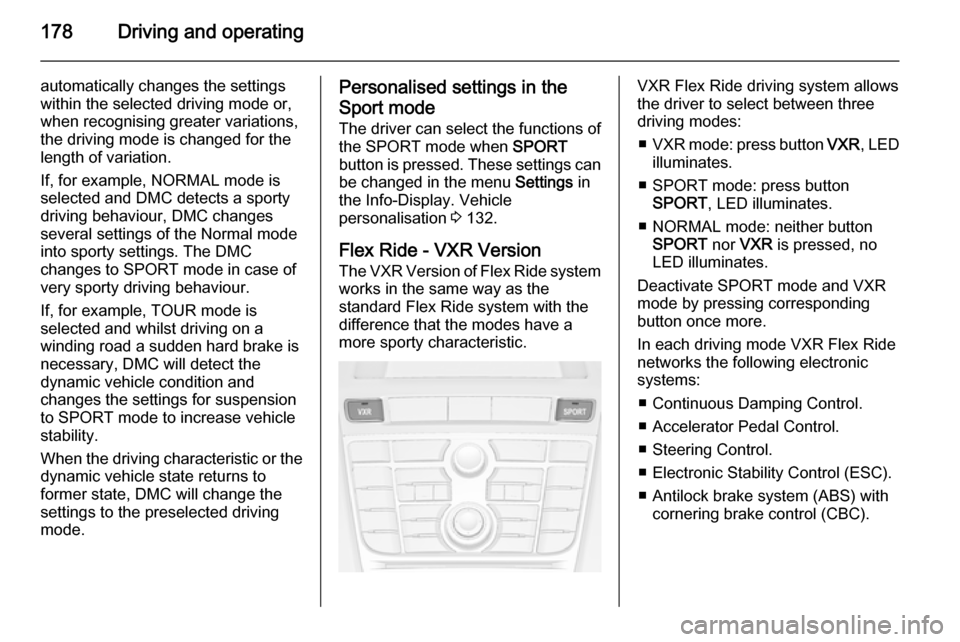
Flex Ride - VXR Version
The VXR Version of Flex Ride system works in the same way as the
standard Flex Ride system with the
difference that the modes have a
more sporty characteristic.VXR Flex Ride driving system allows
the driver to select between three
driving modes:
■ VXR mode: press button VXR, LED
illuminates.
■ SPORT mode: press button SPORT , LED illuminates.
■ NORMAL mode: neither button SPORT nor VXR is pressed, no
LED illuminates.
Deactivate SPORT mode and VXR
mode by pressing corresponding
button once more.
In each driving mode VXR Flex Ride
networks the following electronic
systems:
■ Continuous Damping Control.
■ Accelerator Pedal Control.
■ Steering Control.
■ Electronic Stability Control (ESC).
■ Antilock brake system (ABS) with cornering brake control (CBC).
Page 181 of 329
Driving and operating179
NORMAL mode
In NORMAL mode, when neither
SPORT nor VXR button is pressed,
all settings of the systems are
adapted to standard values.
SPORT mode
The settings of the systems are
adapted to a sportier driving style.
VXR mode
The drive dynamic characteristics are adapted to high performance
settings.
In this mode the illumination of main
instruments is switched to red.
Personalised settings in the VXR
mode
The driver can select the functions of
the VXR mode when VXR button is
pressed. These settings can be changed in the menu Settings in the
Info-Display. Vehicle personalisation 3 132.Driver assistance
systems9 Warning
Driver assistance systems are
developed to support the driver
and not to replace the driver's
attention.
The driver accepts full
responsibility when driving the
vehicle.
When using driver assistance
systems, always take care
regarding the current traffic
situation.
Cruise control
The Cruise control can store and
maintain speeds of approx. 20 to
120 mph. Deviations from the stored
speeds may occur when driving uphill or downhill.
For safety reasons the cruise controlcannot be activated until the foot
brake has been operated once.
Activating in first gear is not possible.
Do not use the cruise control if it is not advisable to maintain a constant
speed.
With automatic transmission, only
activate cruise control in automatic
mode.
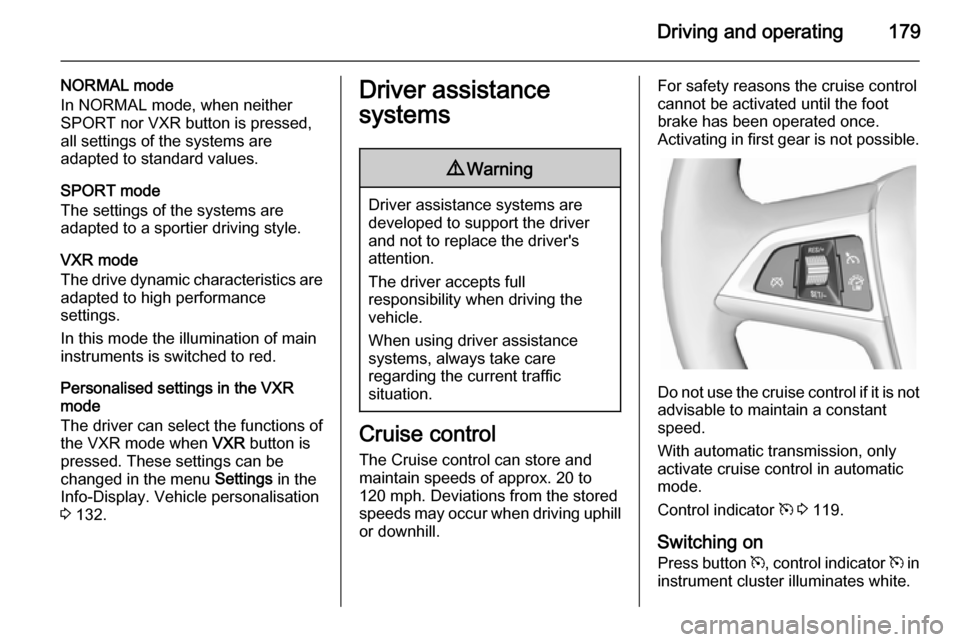
Control indicator m 3 119.
Switching on Press button m, control indicator m in
instrument cluster illuminates white.
Page 190 of 329

188Driving and operating
Hill and trailer considerations
System performance on hills and
when towing a trailer depends on your
vehicle speed, vehicle load, traffic
conditions and the road gradient. It
may not detect a vehicle in your path
while driving on hills. On steep hills,
you may have to use the accelerator
pedal to maintain your vehicle speed. When going downhill, especially
when towing a trailer, you may have
to brake to maintain or reduce your
speed.
Note that applying the brake
deactivates the system. It is not
recommended to use adaptive cruise
control on steep hills especially when towing a trailer.
Radar unit
The radar unit is mounted behind the
radiator grille below the brand
emblem.
9 Warning
The radar unit was aligned
carefully during manufacture.
Therefore, after a frontal accident, do not use the system. The front
bumper may appear to be intact,
however the sensor behind can be
out of position and react
incorrectly. After an accident,
consult a workshop to verify and
correct the adaptive cruise control
sensor position.
Settings
Settings can be changed in the Auto
collision preparation menu in the
vehicle personalisation, 3 132.
Fault If the adaptive cruise control does not
work due to temporary conditions
(e.g. blockage by ice) or if there is a
permanent system error, then a
message is displayed in the Driver
Information Centre.
Page 191 of 329

Driving and operating189
Vehicle messages 3 126.
Forward collision alert The forward collision alert can help to
avoid or reduce the harm caused by
front-end crashes.
A vehicle ahead is indicated by a
control indicator A.
If a vehicle directly ahead is
approached too quickly, a warning
chime and alert in the Driver
Information Centre is provided.
A precondition is that forward collision
alert is activated in the vehicle
personalisation menu 3 132 or that it
is not deactivated by the button V
(depending on the system, see
following).
Depending on the vehicle's
equipment, there are two variants of
the forward collision alert available:
■ Forward collision alert based on
radar system
on vehicles equipped with adaptive cruise control 3 182.
■ Forward collision alert based on
front camera system
on vehicles with traditional cruise
control or none 3 179.
Forward collision alert based on radar system
The system uses the radar sensor
behind the radiator grille to detect a
vehicle directly ahead, in your path,
within a maximum distance of
150 metres.
Activation
Forward collision alert operates
automatically above walking speed,
provided that Auto collision
preparation setting is not deactivated
in the vehicle personalisation menu
3 132.
Selecting the alert sensitivity
The alert sensitivity can be set to
near, medium or far.
Page 193 of 329

Driving and operating191
SettingsSettings can be changed in the Auto
collision preparation menu in the
vehicle personalisation 3 132.
Forward collision alert based on front camera system
Forward collision alert uses the front
camera system in the windscreen to
detect a vehicle directly ahead, in
your path, within a distance of approx. 60 metres.
Activation
Forward collision alert operates
automatically above 25 mph, if it is not
deactivated by button V, see below.
Selecting the alert sensitivity
The alert sensitivity can be set to
near, medium or far.
Press button V; the current setting is
shown on the Driver Information
Centre. Press button V again to
change the alert sensitivity.
Alerting the driver
A green illuminated vehicle ahead
control indicator A lights up in the
instrument cluster when the system has detected a vehicle in the driving
path.
When the distance to a preceding
moving vehicle gets too small or when
approaching another vehicle too
rapidly and a collision is imminent, the
collision alert symbol pops up in the
Driver Information Centre.
Simultaneously a warning chime
sounds. Depress the brake pedal, if it is required by the situation.
Page 195 of 329

Driving and operating193
The minimum indicated distance is
0.5 s.
If there is no vehicle ahead or the vehicle ahead is out of range, two
dashes will be displayed: -.- s.
Active Emergency Braking
Active emergency braking can help to reduce the damage from crashes with vehicles and obstacles directly
ahead, when a collision can no longer be avoided either by manual braking
or by steering. Before the active
emergency braking applies, the driver
is warned by the forward collision
alert 3 189.
The feature uses various inputs (e.g.
radar sensor, brake pressure, vehicle speed) to calculate the probability ofa frontal collision.
Active emergency braking operates automatically above walking speed,
provided that Auto collision
preparation setting is not deactivated
in the vehicle personalisation menu
3 132.
The system includes: ■ Brake preparation system
■ Emergency automatic braking
■ Forward looking brake assist9 Warning
This system is not intended to
replace the driver responsibility of driving the vehicle and looking
ahead. Its function is limited to
supplemental use only. The driver
shall continue to apply the brake
pedal as the driving situation
dictates.
Brake preparation system
When approaching a vehicle ahead
so quickly that a collision is likely, the brake preparation system slightly
pressurises the brakes. This reduces
the response time, when a manual or automatic braking is requested.
The brake system is prepared so that braking can occur more rapidly.
Emergency automatic braking After the brake preparation and just
before the imminent collision, this
function automatically applies limited
braking to reduce the impact speed of
the collision.
Forward looking brake assist
In addition to brake preparation
system and emergency automatic
braking, the forward looking brake
assist function makes the brake assist more sensitive. In this way,
depressing the brake pedal slightly
Page 196 of 329

194Driving and operating
results immediately in a strong
braking. This function helps the driver brake quicker and stronger before theimminent collision.9 Warning
Active emergency braking is not
designed to apply strong
autonomous braking or to avoid automatically a collision. It is
designed to reduce the vehicle
speed before collision. It may not
react on stopped vehicles,
pedestrians or animals. After a
sudden lane change, the system
needs a certain time to detect the
next preceding vehicle.
The complete attention of the
driver is always required while
driving. The driver shall always be ready to take action and apply the brakes and steer to avoid
collisions. The system is designed
to work with all occupants wearing their seat belts.
System limitations
The active emergency braking has
limited or no function during rain,
snow or heavy dirt, as the radar
sensor can be covered by a water
film, dust, ice or snow. In case of
sensor blockage, clean the sensor
cover.
In some seldom cases the active
emergency braking system may
provide a short automatic braking in
situations that seem to be
unnecessary, for instance due to
traffic signs in a curve or due to
vehicles in another lane. This is
acceptable operation, the vehicle
does not need service. Firmly apply
the accelerator pedal to override the
automatic braking.
Settings Settings can be changed in the Auto
collision preparation menu in the
vehicle personalisation, 3 132.
Fault
In the event of a system service
requirement, a message is displayed
in the Driver Information Centre.
If the system does not work as it
should do, vehicle messages are
displayed in the Driver Information
Centre.
Vehicle messages 3 126.
Page 204 of 329

202Driving and operating
Side blind spot alert is active from
speeds of 6 mph up to 87 mph.
Driving faster than 87 mph
deactivates the system, indicated by
low lighting warning symbols B in
both exterior mirrors. Reducing the speed again will extinguish the
warning symbols. If a vehicle is then
detected in the blind zone, the
warning symbols B will illuminate as
normal on the relevant side.
When the vehicle is started, both exterior mirror displays will briefly
come on to indicate that the system is operating.
The system can be activated or
deactivated in the menu Settings in
the Info-Display, vehicle
personalisation 3 132.
Deactivation is indicated by a
message in the Driver Information
Centre.
Detection zones
The system sensor covers a zone of
approx. 3 metres on both sides of the
vehicle. This zone starts at each
exterior mirror and extends rearwards by approx. 3 metres. The height of the
zone is approx. between 0.5 metres
and 2 metres off the ground.
The system is deactivated if the
vehicle is towing a trailer.
Side blind spot alert is designed to
ignore stationary objects such as
guardrails, posts, curbs, walls and
beams. Parked vehicles or oncoming
vehicles are not detected.
Fault
Occasional missed alerts can occur
under normal circumstances.Side blind spot alert does not operate when the left or right corners of the
rear bumper are covered with mud,
dirt, snow, ice or slush. Cleaning
instructions 3 277.
In the event of a fault in the system or if the system does not work due to
temporary conditions, a message is
displayed in the Driver Information
Centre. Seek the assistance of a
workshop.
Rear view camera The rear view camera assists the
driver when reversing by displaying a view of the area behind the vehicle.
The view of the camera is displayed
in the Colour-Info-Display.9 Warning
The rear view camera does not
replace driver vision. Note that
objects that are outside the
camera's field of view and the
advanced parking assist sensors,
Page 206 of 329

204Driving and operating
Deactivation
The camera is deactivated when a
certain forward speed is exceeded or if reverse gear is not engaged for
approx. 10 seconds.
Activation or deactivation of the rear
view camera can be changed in the
menu Settings in the Info-Display.
Vehicle personalisation 3 132.
Fault
Fault messages are displayed with a 9 on the top line of the Info-Display.
The rear view camera may not
operate properly when:
■ the surrounding is dark,
■ the sun or the beam of headlights is
shining directly into the camera
lens,
■ ice, snow, mud, or anything else covers the camera lens. Clean the
lens, rinse it with water, and wipe it
with a soft cloth,
■ the tailgate is not closed correctly,
■ the vehicle had a rear end accident,
■ there are extreme temperature changes.Traffic sign assistant
Functionality The traffic sign assistant system
detects designated traffic signs via a
front camera and displays them in the
Driver Information Centre.
Traffic signs, which will be detected,
are:
Limit and no passing signs ■ speed limit
■ no passing
■ end of speed limit
■ end of no passingRoad signs
Beginning and end of:
■ motorways
■ A-roads
■ play streetsAdd on signs ■ additional hints to traffic signs
■ restriction of trailer towing
■ wet warning
■ ice warning
■ direction arrows
Speed limit signs are displayed in the
Driver Information Centre until the
next speed limit sign or end of speed
limit is detected or up to a defined sign timeout.
Page 328 of 329

326
Towing the vehicle .....................275
Traction Control system ............. 174
Traction Control system off ........ 117
Traffic sign assistant ...................204
Trailer coupling ........................... 215
Trailer stability assist .................220
Trailer towing ............................. 216
Transmission ............................... 18
Transmission display .................167
Tread depth ............................... 261
Trip computer ............................ 130
Trip odometer ............................ 108
Turn and lane-change signals ...145
Turn signal ................................. 113
Tyre chains ................................ 262
Tyre designations ......................257
Tyre pressure ............................ 257
Tyre pressure monitoring system ............................ 117, 258
Tyre pressures ........................... 306
Tyre repair kit ............................. 262
U Ultrasonic parking assist ...116, 195
Underseat storage .......................62
Upholstery .................................. 280
Upshift ........................................ 116
Using this manual ..........................3V
Vehicle battery ........................... 226
Vehicle checks............................ 222
Vehicle data ................................ 286
Vehicle data recording and privacy ..................................... 319
Vehicle detected ahead ..............119
Vehicle dimensions .................... 303
Vehicle Identification Number ....284
Vehicle jack ................................ 255
Vehicle messages .....................126
Vehicle personalisation .............132
Vehicle security ............................ 28
Vehicle specific data ......................3
Vehicle storage ........................... 221
Vehicle tools ............................... 255
Vehicle unlocking ........................... 6
Vehicle weight ........................... 298
Ventilation ................................... 151
W
Warning chimes .........................129
Warning lights ............................. 108
Warning triangle .......................... 94
Washer and wiper systems .........16
Washer fluid ............................... 226
Wheel changing .........................265
Wheel covers ............................. 261
Wheels and tyres .......................257Windows....................................... 33
Windscreen................................... 33
Windscreen wiper/washer .........102
Winter tyres ............................... 257
Wiper blade replacement ..........228