alarm VAUXHALL CASCADA 2015.5 Owner's Manual
[x] Cancel search | Manufacturer: VAUXHALL, Model Year: 2015.5, Model line: CASCADA, Model: VAUXHALL CASCADA 2015.5Pages: 255, PDF Size: 7.56 MB
Page 14 of 255

12In brief
1Power windows .....................32
2 Exterior mirrors .....................29
3 Cruise control .....................153
Speed limiter ....................... 155
Forward collision alert .........156
4 Side air vents ...................... 130
5 Turn and lane-change
signals, headlight flash,
low beam and high beam,
high beam assist .................116
Exit lighting ......................... 120
Parking lights ...................... 117
Buttons for Driver
Information Centre (DIC) ....... 95
6 Instruments .......................... 84
7 Steering wheel controls .......77
8 Driver Information Centre
(DIC) ..................................... 95
9 Windscreen wiper,
windscreen washer
system, headlight washer
system ................................... 7910 Sport mode ........................ 151
Central locking system ..........22
Hazard warning flashers ....116
Control indicator for airbag deactivation .......................... 89
Control indicator for front
passenger seat belt .............89
Tour mode .......................... 151
11 Info-Display ........................ 100
12 Anti-theft alarm system
status LED ........................... 27
13 Centre air vents .................. 130
14 Glovebox, lockable ...............69
Fuse box ............................. 203
15 Traction Control system
(TC) ..................................... 149
Electronic Stability Control (ESC) .................................. 150
Parking assist systems .......159
Lane departure warning .....173
Eco button for stop-start
system ................................. 13516 Climate control system ........ 122
17 AUX input, USB input ..........11
18 Power outlet .......................... 83
19 Soft top operation switch .....34
Central window switch .........32
20 Selector lever, transmission
21 Parking brake, manual or
electric operation ................147
22 Ignition switch with
steering wheel lock ............133
23 Horn ..................................... 78
Driver airbag ........................ 60
24 Bonnet release lever ..........186
25 Storage compartment ..........70
Fuse box ............................ 203
26 Steering wheel adjustment ..77
27 Light switch ........................ 109
Rear fog light ...................... 117
Instrument illumination .......118
Headlight range
adjustment ......................... 112
Front fog lights ...................117
Page 21 of 255

In brief19Parking9Warning
■ Do not park the vehicle on an
easily ignitable surface. The
high temperature of the exhaust system could ignite the surface.
■ Always apply the parking brake.
Activate the manual parking
brake without pressing the
release button. Apply as firmly
as possible on a downhill slope
or uphill slope. Depress foot
brake at the same time to
reduce operating force.
For vehicles with electric
parking brake, pull switch m for
approx. one second.
The electric parking brake is
applied when control indicator
m illuminates 3 90.
■ Switch off the engine. ■ If the vehicle is on a level surface or uphill slope, engage
first gear or set the selector lever
to position P before removing
the ignition key. On an uphill
slope, turn the front wheels
away from the kerb.
If the vehicle is on a downhill
slope, engage reverse gear or
set the selector lever to position P before removing the ignition
key. Turn the front wheels
towards the kerb.
■ Close the windows and the soft top.
■ Remove the ignition key. Turn the steering wheel until the
steering wheel lock is felt to
engage.
For vehicles with automatic
transmission, the key can only
be removed when the selector
lever is in position P.
■
Lock the vehicle with e on the radio
remote control.
Activate the anti-theft alarm system
3 27.
■ The engine cooling fans may run after the engine has been switchedoff 3 185.Caution
After running at high engine
speeds or with high engine loads,
operate the engine briefly at a low load or run in neutral for
approx. 30 seconds before
switching off, in order to protect
the turbocharger.
Keys, locks 3 20, Laying the vehicle
up for a long period of time 3 184.
Page 23 of 255
Keys, doors and windows21Radio remote control
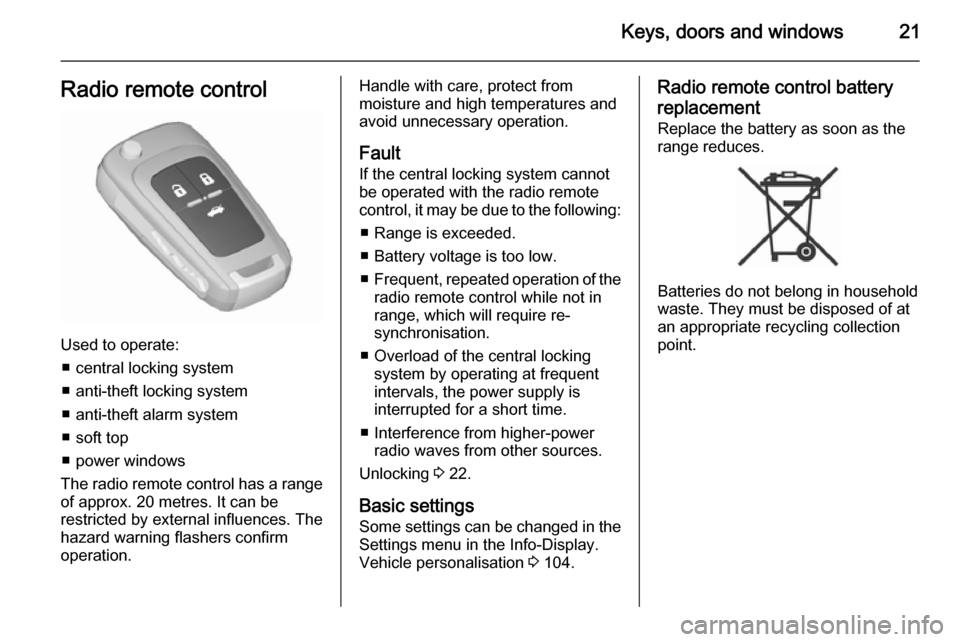
Used to operate:■ central locking system
■ anti-theft locking system
■ anti-theft alarm system
■ soft top
■ power windows
The radio remote control has a range of approx. 20 metres. It can be
restricted by external influences. The
hazard warning flashers confirm
operation.
Handle with care, protect from
moisture and high temperatures and
avoid unnecessary operation.
Fault
If the central locking system cannot
be operated with the radio remote
control, it may be due to the following:
■ Range is exceeded.
■ Battery voltage is too low.
■ Frequent, repeated operation of the
radio remote control while not in
range, which will require re-
synchronisation.
■ Overload of the central locking system by operating at frequent
intervals, the power supply is
interrupted for a short time.
■ Interference from higher-power radio waves from other sources.
Unlocking 3 22.
Basic settings
Some settings can be changed in the Settings menu in the Info-Display.
Vehicle personalisation 3 104.Radio remote control battery
replacement
Replace the battery as soon as the
range reduces.
Batteries do not belong in household
waste. They must be disposed of at
an appropriate recycling collection
point.
Page 29 of 255

Keys, doors and windows27
Activating
Press e on the radio remote control
twice briefly within 15 seconds. Long press will activate soft top closing.
Anti-theft alarm system The anti-theft alarm system is
combined with the central locking
system.
It monitors:
■ doors, boot lid, bonnet
■ passenger compartment including adjoining load compartment
■vehicle inclination, e.g. if it is raised
■ ignition
Activation ■ Self-activated 30 seconds after locking the vehicle by pressing e
once.
■ Directly by pressing e twice briefly
within five seconds. Long press will activate soft top closing.
Notice
Changes to the vehicle interior, such as the use of seat covers and openwindows, could impair the function
of passenger compartment
monitoring.Activation without monitoring of
passenger compartment and vehicle inclination
Switch off the monitoring of
passenger compartment and vehicle
inclination when animals are being
left in the vehicle, because of high
volume ultrasonic signals or
movements triggering the alarm. Also switch off when the vehicle is on a
ferry or train.
Page 30 of 255
28Keys, doors and windows
1. Close boot lid, bonnet, windowsand soft top.
2. Press o. LED in the button o
illuminates for a maximum of
10 minutes.
3. Close doors.
4. Activate the anti-theft alarm system.
To prevent false alarms passenger
compartment monitoring is
deactivated if the soft top is open. The LED in the button o does not
illuminate.
If only the windows are open,
passenger compartment monitoring
operates restricted and the LED in the
button o illuminates.
Status message is displayed in the
Driver Information Centre (DIC).Status LED
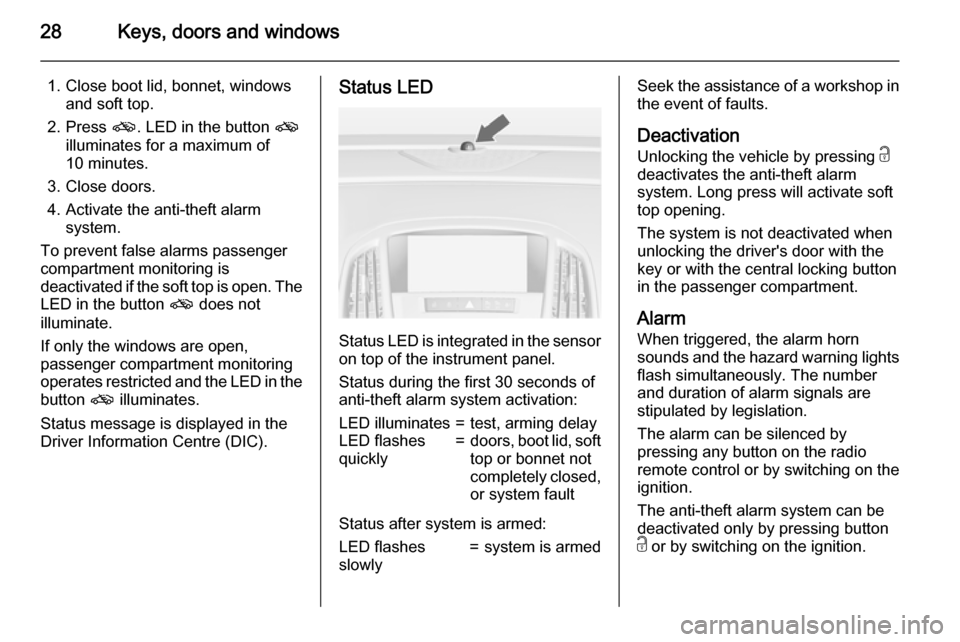
Status LED is integrated in the sensor
on top of the instrument panel.
Status during the first 30 seconds of
anti-theft alarm system activation:
LED illuminates=test, arming delayLED flashes
quickly=doors, boot lid, soft
top or bonnet not
completely closed, or system fault
Status after system is armed:
LED flashes
slowly=system is armedSeek the assistance of a workshop in
the event of faults.
Deactivation
Unlocking the vehicle by pressing c
deactivates the anti-theft alarm
system. Long press will activate soft
top opening.
The system is not deactivated when
unlocking the driver's door with the
key or with the central locking button
in the passenger compartment.
Alarm When triggered, the alarm horn
sounds and the hazard warning lights
flash simultaneously. The number
and duration of alarm signals are
stipulated by legislation.
The alarm can be silenced by
pressing any button on the radio
remote control or by switching on the
ignition.
The anti-theft alarm system can be
deactivated only by pressing button
c or by switching on the ignition.
Page 31 of 255

Keys, doors and windows29
A triggered alarm, which has not beeninterrupted by the driver, will be
indicated by the hazard warning
lights. They will flash quickly three
times the next time the vehicle is
unlocked with the radio remote
control. Additionally a warning
message is displayed in the DIC after
switching on the ignition.
Vehicle messages 3 102.
If the vehicle's battery is to be
disconnected (e.g. for maintenance
work), the alarm siren must be
deactivated as follows: switch the
ignition on then off, then disconnect
the vehicle's battery within
15 seconds.
Immobiliser The system is part of the ignition
switch and checks whether the
vehicle is allowed to be started with the key being used.
The immobiliser is activated
automatically after the key has been removed from the ignition switch.If the control indicator d flashes when
the ignition is on, there is a fault in the
system; the engine cannot be started. Switch off the ignition and repeat the
start attempt.
If the control indicator continues
flashing, attempt to start the engine
using the spare key and seek the
assistance of a workshop.
Notice
The immobiliser does not lock the
doors. You should always lock the
vehicle after leaving it.
Switch on the anti-theft alarm
system 3 22, 3 27.
Control indicator d 3 94.Exterior mirrors
Convex shape
The convex exterior mirror contains
an aspherical area and reduces blind spots. The shape of the mirror makes
objects appear smaller, which will
affect the ability to estimate
distances.
Electric adjustment
Select the relevant exterior mirror by
turning the control to left (L) or right
(R) . Then swivel the control to adjust
the mirror.
Page 104 of 255

102Instruments and controlsVehicle messagesMessages are indicated in the Driver
Information Centre (DIC), in some
cases together with a warning and
signal sound.
Press the SET/CLR button, the
MENU button or turn the adjuster
wheel to confirm a message.
Messages in the Driver
Information Centre (DIC)
The vehicle messages are displayed
as text. Follow the instructions given
in the messages.
The system displays messages
regarding the following topics:
■ service messages
■ fluid levels
■ anti-theft alarm system
■ brakes
■ ride control systems
■ driver assistance systems
■ cruise control
■ speed limiter
■ forward collision alert
■ parking assist systems
■ lighting, bulb replacement
■ wiper/washer system
■ doors, windows
■ soft top
■ load compartment, boot lid
■ side blind spot alert
■ traffic sign assistant
■ lane departure warning
■ radio remote control
■ seat belts
■ airbag systems
■ engine and transmission
■ tyre pressure
■ diesel particle filter
■ vehicle battery status
■ selective catalytic reduction, diesel exhaust fluid (DEF), AdBlue
3 140
Page 140 of 255

138Driving and operatingkey. Turn the front wheels
towards the kerb.
■ Close the windows and the soft top.
■ Remove the ignition key. Turn the steering wheel until the
steering wheel lock is felt to
engage.
For vehicles with automatic
transmission, the key can only
be removed when the selector
lever is in position P.
■ Lock the vehicle.
■ Activate the anti-theft alarm system.
■ The engine cooling fans may run after the engine has been switchedoff 3 185.
Caution
After running at high engine
speeds or with high engine loads,
operate the engine briefly at a low load or run in neutral for
approx. 30 seconds before
switching off, in order to protect
the turbocharger.
Notice
In the event of an accident with airbag deployment, the engine is
turned off automatically if the vehicle
comes to a standstill within a certain time.
Engine exhaust9 Danger
Engine exhaust gases contain
poisonous carbon monoxide,
which is colourless and odourless and could be fatal if inhaled.
If exhaust gases enter the interior
of the vehicle, open the windows.
Have the cause of the fault
rectified by a workshop.
Avoid driving with an open load
compartment, otherwise exhaust
gases could enter the vehicle.
Diesel particle filter
The diesel particle filter system filters
harmful soot particles out of the
exhaust gases. The system includes
a self-cleaning function that runs
automatically during driving without
any notification. The filter is cleaned
by periodically burning off the soot
particles at high temperature. This
process takes place automatically
under set driving conditions and may
Page 187 of 255

Vehicle care185
■ Open the bonnet, close all doorsand lock the vehicle.
■ Close the soft top.
■ Cover the soft top to reduce environment influences.
■ Disconnect the clamp from the negative terminal of the vehicle
battery. Beware that all systems are
not functional, e.g. anti-theft alarm
system.
Putting back into operation
When the vehicle is to be put back into
operation:
■ Connect the clamp to the negative terminal of the vehicle battery.
Activate the electronics of the
power windows.
■ Check tyre pressure.
■ Fill up the washer fluid reservoir.
■ Check the engine oil level.
■ Check the coolant level.
■ Fit the number plate if necessary.End-of-life vehicle
recovery
Information on end-of-life vehicle
recovery centres and the recycling of
end-of-life vehicles is available on our website, where legally required. Only
entrust this work to an authorised
recycling centre.Vehicle checks
Performing work9 Warning
Only perform engine compartment
checks when the ignition is off.
The cooling fan may start
operating even if the ignition is off.
Page 192 of 255

190Vehicle care
Laying up the vehicle for more than
4 weeks can lead to battery
discharge. Disconnect the clamp from the negative terminal of the vehicle
battery.
Ensure the ignition is switched off
before connecting or disconnecting
the vehicle battery.
The anti-theft alarm siren must be
deactivated as follows: Switch the
ignition on then off, disconnect the
vehicle's battery within 15 seconds.
Vehicle battery discharge protection
3 120.
Replacing the vehicle battery Notice
Any deviation from the instructions
given in this section may lead to
temporary deactivation of the stop-
start system.
When the vehicle battery is being replaced, please ensure that there
are no open ventilation holes in the
vicinity of the positive terminal. If a
ventilation hole is open in this area, itmust be closed off with a dummy cap, and the ventilation in the vicinity of the
negative terminal must be opened.
Only use vehicle batteries that allow
the fuse box to be mounted above the vehicle battery.
In vehicles with stop-start system, be
sure to have the AGM (Absorptive
Glass Mat) battery replaced with
another AGM battery.
An AGM battery can be identified by
the label on the battery. We
recommend the use of an original
Vauxhall vehicle battery.
Notice
Using an AGM vehicle battery
different from the original Vauxhall
vehicle battery may result in a lower performance of the stop-start
system.
We recommend that you have the
vehicle battery replaced by a
workshop.
Stop-start system 3 135.
Charging the vehicle battery9 Warning
On vehicles with stop-start
system, ensure that the charging potential does not exceed
14.6 volts when using a battery
charger. Otherwise the vehicle
battery might be damaged.
Jump starting 3 221.