park assist VAUXHALL CASCADA 2016.5 User Guide
[x] Cancel search | Manufacturer: VAUXHALL, Model Year: 2016.5, Model line: CASCADA, Model: VAUXHALL CASCADA 2016.5Pages: 263, PDF Size: 7.72 MB
Page 138 of 263

136Driving and operatingDriving hints
Control of the vehicle
Never coast with engine not
running (except during Autostop)
Many systems will not function in this
situation (e.g. brake servo unit, power steering). Driving in this manner is a
danger to yourself and others. All
systems function during an Autostop,
but there will be a controlled reduction
in power steering assist and vehicle
speed is reduced.
Stop-start system 3 138.
Idle boost
If charging of the battery is required
due to battery condition, the power
output of the generator has to be
increased. This will be achieved by an idle boost which may be audible. A
message is displayed in the Driver
Information Centre.Pedals
To ensure the pedal travel is
uninhibited, there must be no mats in
the area of the pedals.
Use only floor mats, which fit properly and are fixed by the retainers on the
driver's side.
Steering If power steering assist is lost
because the engine stops or due to a
system malfunction, the vehicle can
be steered but may require increased
effort.
Control indicator c 3 91.Caution
Vehicles equipped with hydraulic
power steering:
If the steering wheel is turned until it reaches the end of its travel, and
is held in that position for more
than 15 seconds, damage may
occur to the power steering
system and there may be loss of
power steering assist.
Ground clearance
Due to the reduced ground clearance,
the vehicle can be damaged
depending on the vehicle loading and
appearance of the ground. Take
special care and drive slowly on steep driveways, entry and exit of parking
garages, high kerbs and uneven
surfaces. If possible, drive diagonally
with one wheel after another when running over kerbs or uneven
surfaces.
Page 147 of 263

Driving and operating145Notice
A volume of at least 5 litres of AdBlue
must be added when refilling.
Otherwise the refilling of AdBlue
may not be detected by the system.
In case AdBlue refill is not
successfully detected:
1. Continuously drive the vehicle for 10 minutes making sure that
vehicle speed is always higher
than 12 mph.
2. If AdBlue refill is detected successfully, AdBlue supply
driven limitations will disappear.
If AdBlue refill is still not detected
seek the assistance of a workshop.
If AdBlue must be refilled at
temperatures below -11 °C, the
refilling of AdBlue may not be
detected by the system. In this case, park the vehicle in a space with a
higher ambient temperature until
AdBlue is liquefied.Notice
When unscrewing the protective cap from the filler neck, ammonia fumes
may emerge. Do not inhale as the fumes have a pungent smell. The
fumes are not harmful by inhalation.
The vehicle must be parked on a level surface.
The filler neck for AdBlue is located
behind the fuel filler flap.
The fuel filler flap is located at right rear side of the vehicle.
The fuel filler flap can only be opened
if the vehicle is unlocked.
1. Remove key from ignition lock.
2. Close all doors to avoid ammonia fumes entering the interior of the
vehicle.
3. Pull fuel filler flap at the recess and open 3 179.
4. Unscrew protective cap from the
filler neck.
5. Open AdBlue canister.
6. Mount one end of the hose on the
canister and screw the other end
on the filler neck.
7. Lift the canister until it is empty.
8. Unscrew the hose from the filler neck.
9. Mount the protective cap and turn
clockwise until it engages.
Notice
Dispose of AdBlue canister and
hose according to environmental
requirements.
Page 148 of 263
146Driving and operatingExchanging AdBlue
If less than 5 litres of AdBlue have
been refilled during the last 2 years,
the remaining fluid should be
exchanged since AdBlue has a
limited durability. Seek the assistance of a workshop.Caution
Disregard could lead to damage to
the selective catalytic reduction
system.
Automatic transmission
The automatic transmission permits
automatic gearshifting (automatic
mode) or manual gearshifting
(manual mode).
Manual shifting is possible in manual
mode by tapping the selector lever
3 148.
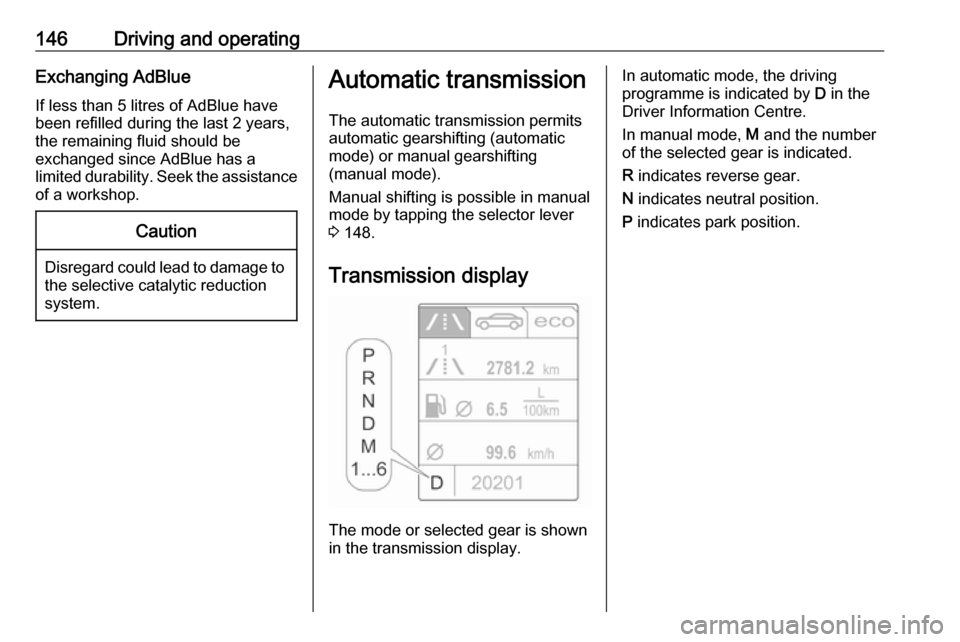
Transmission display
The mode or selected gear is shown
in the transmission display.
In automatic mode, the driving
programme is indicated by D in the
Driver Information Centre.
In manual mode, M and the number
of the selected gear is indicated.
R indicates reverse gear.
N indicates neutral position.
P indicates park position.
Page 154 of 263

152Driving and operatingadequate force. For maximum
force, e.g. parking with trailer or on
inclines, pull switch m twice.
The electric parking brake is
applied when control indicator m
illuminates 3 90.
The electric parking brake can always
be activated, even if the ignition is off.
Do not operate electric parking brake
system too often without engine
running as this will discharge the
vehicle battery.
Before leaving the vehicle, check the electric parking brake status. Control
indicator m 3 90.
Releasing
Switch on ignition. Keep brake pedal
depressed then push switch m.
Drive away function
Vehicles with manual transmission:
Depressing the clutch pedal and then
slightly releasing the clutch pedal and
slightly depressing the accelerator
pedal releases the electric parking
brake automatically. This is not
possible when the switch m is pulled
at the same time.
Vehicles with automatic transmission: Engaging D and then depressing the
accelerator pedal releases the
electric parking brake automatically. This is not possible when the switch
m is pulled at the same time.
Dynamic braking when vehicle is
moving
When the vehicle is moving and the
switch m is kept pulled, the electric
parking brake system will decelerate
the vehicle, but will not apply
statically.
As soon as the switch m is released,
dynamic braking will be stopped.
Fault
Failure mode of electric parking brake
is indicated by control indicator j and
by a vehicle message which is
displayed in the Driver Information
Centre.Apply electric parking brake: pull and
hold the switch m for more than
5 seconds. If control indicator m
illuminates, electric parking brake is applied.
Release electric parking brake: push
and hold the switch m for more than
2 seconds. If control indicator m
extinguishes, electric parking brake is
released.
Control indicator m flashes: electric
parking brake is not fully applied or released. When continuously
flashing, release electric parking
brake and retry applying.
Brake assist If the brake pedal is depressed
quickly and forcefully, maximum
brake force is automatically applied
(full braking).
Maintain steady pressure on the
brake pedal for as long as full braking
is required. Maximum brake force is
automatically reduced when the
brake pedal is released.
Page 165 of 263

Driving and operating163If there is no vehicle ahead or the
vehicle ahead is out of range, two
dashes will be displayed: -.- s.
Parking assist Rear parking assist9 Warning
The driver bears full responsibility
for the parking manoeuvre.
Always check the surrounding
area while reversing and using the rear parking assist system.
The rear parking assist makes
parking easier by measuring the
distance between the vehicle and
rear obstacles. It informs and warns
the driver by giving acoustic signals.
The system has four ultrasonic
parking sensors in the rear bumper.
Activation
When reverse gear is engaged, the
system is ready to operate
automatically.
An illuminated LED in the parking
assist button r indicates that the
system is ready to operate.
Indication
The system warns the driver with
acoustic signals against potentially
hazardous obstacles behind the
vehicle. The interval between the
sounds becomes shorter as the
vehicle gets closer to that obstacle.
When the distance is less than
approx. 30 cm, the sound is
continuous.
Additionally, the distance to obstacles can be shown in the Driver
Information Centre.
Deactivation
The system automatically switches
off when reverse gear is disengaged.
To switch on the system again,
engage reverse gear.
Manual deactivation is also possible by pressing the parking assist button
r .
Page 166 of 263

164Driving and operatingWhen the system is deactivated, the
LED in the button extinguishes.
Additionally, Park Assist Off pops-up
in the Driver Information Centre when the system is deactivated manually.
Fault
In the event of a fault in the system or if the system does not work due to
temporary conditions like ice covered
sensors, a message is displayed in
the Driver Information Centre.
Vehicle messages 3 101.
Front-rear parking assist9 Warning
The driver bears full responsibility
for the parking manoeuvre.
Always check the surrounding
area when driving backwards or
forwards while using parking
assist system.
The front-rear parking assist
measures the distance between the vehicle and obstacles in front and
behind the vehicle. The system gives acoustic signals and display
messages.
The system has four ultrasonic
parking sensors each in the rear and
front bumper.
It uses two different acoustic warning
signals for the front and rear
monitoring areas, each with a
different tone frequency. The signal
for front obstacles sounds via the
front speakers, for rear obstacles it
sounds via the rear speakers.
Parking assist button and operation
logic
Front-rear parking assist is equipped
with r. If the vehicle is additionally
equipped with advanced parking
assist (see the following separate
description) the system is equipped
with D. Both systems will be
operated by pressing D.
Short press of r or D deactivates
or activates the front parking assist.
Long press of D (approx.
one second) activates or deactivates
the advanced parking assist.
Page 167 of 263

Driving and operating165Button logic to operate the systems is
as follows:
● Front-rear parking assist is active: short press deactivates
front-rear parking assist.
● Front-rear parking assist is active: long press activates
advanced parking assist if a
forward gear is engaged.
● Advanced parking assist is active: short press activates
front-rear parking assist.
● Advanced parking assist is active: long press deactivates
advanced parking assist.
● Advanced parking assist and front-rear parking assist are
active: short press deactivates
both systems.
Activation
When reverse gear is engaged, the
front and rear parking assist is ready to operate.
The front parking assist is also
activated automatically at a speed up to 7 mph.An illuminated LED in the parking
assist button r or D indicates that
the system is ready to operate.
If the vehicle exceeds a speed of
7 mph, the front parking assist is
deactivated. The front parking assist
is always reactivated when vehicle
speed drops below 7 mph.
Indication
The system warns the driver with acoustic signals against potentially
hazardous obstacles behind and in
front of the vehicle. Depending on
which side of the vehicle is closer to
an obstacle, you will hear acoustic warning signals on the respective
side of the vehicle. The interval
between the sounds becomes shorter as the vehicle gets closer to that
obstacle. When the distance is less
than approx. 30 cm, the sound is
continuous.
Additionally, the distance to obstacles is shown in the Driver Information
Centre 3 95.
The distance to a front and rear
obstacle is indicated by changing
distance lines around the vehicle.
Rear obstacles are indicated
acoustically and visually at the same
time.
Front obstacles are indicated visually
first. At distances less than 80 cm an
acoustic signal also sounds.
The distance indication in the Driver
Information Centre can be inhibited
by vehicle messages with a higher
priority. After approving the message
by pressing SET/CLR on the turn
signal lever, distance indication
appears again.
Page 168 of 263
166Driving and operatingDeactivation
The rear parking assist automatically
switches off when reverse gear is
disengaged.
The front parking assist is deactivated
automatically at a speed above
7 mph.
Manual deactivation is possible by
pressing the parking assist button
r or D briefly.
When the system is deactivated, the
LED in the button extinguishes.
Additionally, Park Assist Off pops-up
in the Driver Information Centre when the system is deactivated manually.
After a manual deactivation, the frontparking assist is activated again if the
parking assist button r or D is
pressed or if reverse gear is engaged.
Fault
In the event of a fault in the system or if the system does not work due to
temporary conditions, e.g. ice
covered sensors, a message is
displayed in the Driver Information
Centre.
Vehicle messages 3 101.
Advanced parking assist9 Warning
The driver bears full responsibility
for accepting the parking slot
suggested by the system and the
parking manoeuvre.
Always check the surrounding
area in all directions when using
advanced parking assist.
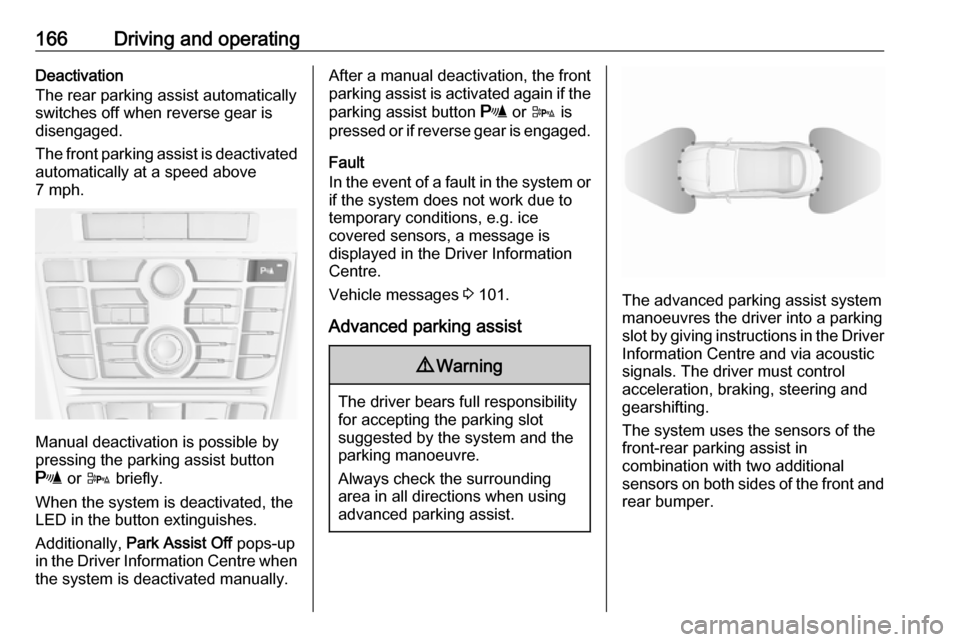
The advanced parking assist system manoeuvres the driver into a parkingslot by giving instructions in the Driver Information Centre and via acoustic
signals. The driver must control
acceleration, braking, steering and
gearshifting.
The system uses the sensors of the
front-rear parking assist in
combination with two additional
sensors on both sides of the front and rear bumper.
Page 169 of 263

Driving and operating167Parking assist button D and
operation logic
Advanced parking assist and front-
rear parking assist, (see previous
description) are both operated by
pressing D.
Short press of D deactivates or
activates the front parking assist.
Long press of D (approx.
one second) activates or deactivates
the advanced parking assist.
Button logic to operate the systems is
as follows:
● Front-rear parking assist is active: short press deactivates
front-rear parking assist.
● Front-rear parking assist is active: long press activates
advanced parking assist if a
forward gear is engaged.
● Advanced parking assist is active: short press activates
front-rear parking assist.● Advanced parking assist is active: long press deactivates
advanced parking assist.
● Advanced parking assist and front-rear parking assist are
active: short press deactivates
both systems.
Activation
When searching for a parking slot, the
system is ready to operate by
pressing D for approx. one second.
The system can only be activated and can only search for a parking slot at a
speed up to 18 mph .
The maximum allowed parallel
distance between the vehicle and a
row of parked cars is 1.8 metres.
Functionality
When the vehicle passes a row of
cars and the system is activated, the
advanced parking assist system
begins searching for a suitable
parking slot. When a suitable slot is
detected, visual feedback in the
Driver Information Centre and an
acoustic signal are given.
If the driver does not stop the vehicle
within 10 metres after a parking slot is
proposed, the system starts to search for another suitable parking slot.
Page 170 of 263

168Driving and operating
The parking slot suggestion of the
system is accepted when the vehicle is stopped by the driver within
10 metres after the "Stop" message is given. The system calculates the
optimal route into the parking slot. Then it manoeuvres the driver into the
slot by giving detailed instructions.The instructions in the display show:
● A hint when driving faster than 18 mph.
● The demand to stop the vehicle, when a parking slot is detected.
● The direction of driving during the
parking manoeuvre.
● The steering wheel position during parking.
● For some of the instructions a progress bar is shown.A successful parking manoeuvre is
indicated by the 'End position'
symbol.
Always pay attention to the sound of
the front-rear parking assist.
Continuous sound means that the
distance to an obstacle is less than approx. 30 cm.
Changing the parking side
The system is configured to detect parking slots by default on the
passenger side. To detect parking
slots on the driver side, switch on turn
indicator to the driver side for the
duration of searching.