phone VAUXHALL CORSA 2014.5 Infotainment system
[x] Cancel search | Manufacturer: VAUXHALL, Model Year: 2014.5, Model line: CORSA, Model: VAUXHALL CORSA 2014.5Pages: 177, PDF Size: 2.97 MB
Page 3 of 177

Touch & Connect...........................5
CD 40 USB .................................. 89
CD 30 / CD 30 MP3 ...................129
Mobile phone portal ...................157Contents
Page 5 of 177

Introduction.................................... 6
Radio ........................................... 20
CD Player .................................... 25
AUX input ..................................... 30
USB port ...................................... 31
Bluetooth music ........................... 34
Navigation .................................... 36
Phone .......................................... 75
Index ............................................ 86Touch & Connect
Page 6 of 177

6IntroductionIntroductionGeneral information.......................6
Theft-deterrent feature ...................7
Control elements overview ............9
Operation ..................................... 11General information
The Infotainment system provides
you with state-of-the-art in-car
infotainment.
The radio has six station memories
for the AM waveband and twelve
station memories for the FM
waveband.
The integrated audio player will
entertain you with audio CDs and
MP3/WMA CDs.
You can connect external data
storage devices, e.g. iPod, MP3
player or USB stick or a portable CD
player to the Infotainment system as
further audio sources; either via cable or via Bluetooth.
The navigation system with dynamic
route planning will reliably guide you
to your destination, and, if desired,
will automatically avoid traffic jams or other traffic problems.
In addition the Infotainment system is equipped with a phone portal that
allows for comfortable and safe use of
your mobile phone in the vehicle.Optionally, the Infotainment system
can be operated using controls on the steering wheel.
The well-thought-out design of the
control elements, the touch screen
and the clear displays enable you to
control the system easily and
intuitively.
Notice
This manual describes all options
and features available for the
various Infotainment systems.
Certain descriptions, including those for display and menu functions, may
not apply to your vehicle due to
model variant, country
specifications, special equipment or
accessories.
Important information on
operation and traffic safety9 Warning
The Infotainment system has to be
used so that the vehicle can bedriven safely at all times. If in doubt
Page 10 of 177

10Introduction
1l......................................... 21
Radio: scroll down in
station memory .....................21
CD/MP3: short press: skip
track backwards; long
press: fast rewind ..................26
2 W......................................... 11
Day / Night / Auto mode:
press: toggle between
modes ................................... 11
Brightness: press: activate
setting; turn multifunction
knob: adjust setting ...............11
3 m......................................... 21
Radio: scroll up in station
memory ................................. 21
CD/MP3: short press: skip
track forwards; long press:
fast forward ........................... 26
4 CD slot .................................. 26
5 MAP ...................................... 37
Display map .......................... 376R.......................................... 26
CD ejection ........................... 26
7 NAV ....................................... 37
Navigation menu ...................37
8 TRAF ..................................... 65
Traffic info menu ...................65
9 SETUP .................................. 11
Setup menu ........................... 11
10 Multifunction knob .................11
Turn: mark screen buttons
or menu items; set
numeric values .....................11
Press: select/activate the
marked screen button or
menu item; confirm set
value; switch to different
setting option ........................ 11
11 /.......................................... 11
Menu: one level back ............11
12 Radio station buttons 1...6 ...21
Long press: save station .......21
Short press: select station ....2113 I.......................................... 79
Phone menu ......................... 79
14 m knob .................................. 11
Press: switch on/off
Infotainment system ..............11
Turn: adjust volume ..............11
15 MEDIA ................................... 11
Change audio source
(radio, CD, AUX etc.) ............11
16 FM-AM .................................. 20
Activate radio or change
waveband .............................. 20
Page 11 of 177
Introduction11
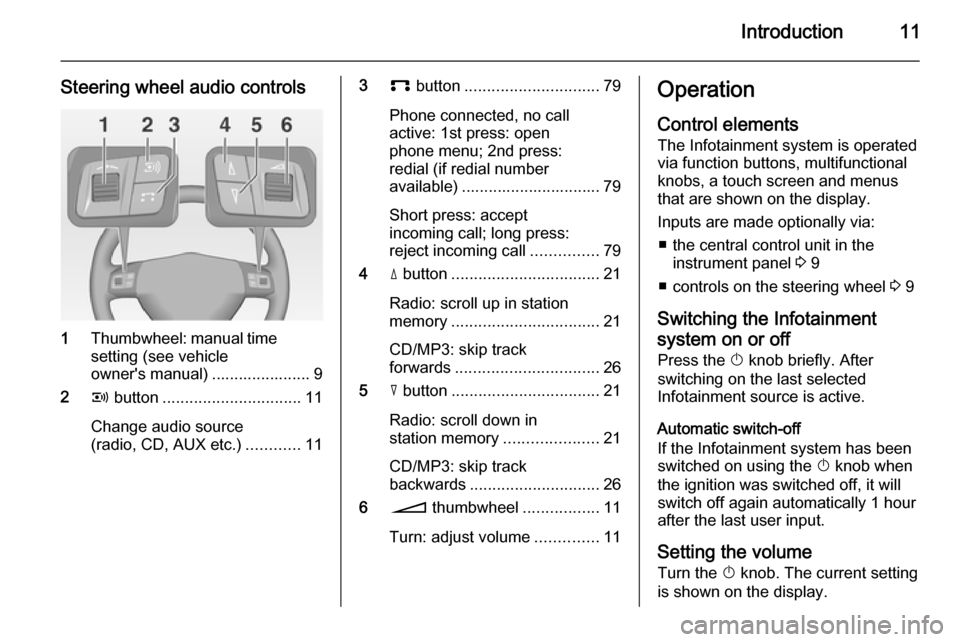
Steering wheel audio controls
1Thumbwheel: manual time
setting (see vehicle
owner's manual) ...................... 9
2 q button ............................... 11
Change audio source
(radio, CD, AUX etc.) ............11
3p button .............................. 79
Phone connected, no call
active: 1st press: open
phone menu; 2nd press:
redial (if redial number
available) ............................... 79
Short press: accept
incoming call; long press:
reject incoming call ...............79
4 d button ................................. 21
Radio: scroll up in station
memory ................................. 21
CD/MP3: skip track
forwards ................................ 26
5 c button ................................. 21
Radio: scroll down in
station memory .....................21
CD/MP3: skip track
backwards ............................. 26
6 o thumbwheel .................11
Turn: adjust volume ..............11Operation
Control elements The Infotainment system is operated
via function buttons, multifunctional
knobs, a touch screen and menus
that are shown on the display.
Inputs are made optionally via: ■ the central control unit in the instrument panel 3 9
■ controls on the steering wheel 3 9
Switching the Infotainment
system on or off
Press the X knob briefly. After
switching on the last selected
Infotainment source is active.
Automatic switch-off
If the Infotainment system has been
switched on using the X knob when
the ignition was switched off, it will
switch off again automatically 1 hour
after the last user input.
Setting the volume Turn the X knob. The current setting
is shown on the display.
Page 12 of 177

12Introduction
When the Infotainment system is
switched on, the last selected volume
is set.
If the volume is muted (set to zero),
the \ symbol is shown in the top line
of all main menus.
Speed compensated volume
When speed compensated volume is
activated, see "Volume settings"
below, the volume is adapted
automatically to make up for the road and wind noise as you drive.
Adjusting the volume of traffic
announcements (TA)
The volume of traffic announcements
can be adjusted during an
announcement using the X knob.
When the announcement is finished
or cancelled the volume is
automatically reset to the original
setting.
Further details on the TA function
3 20 and 3 22.Adjusting the volume of voice
commands (navigation)
The volume of voice commands can
be adjusted while a command is
announced using the X knob, or via
the navigation setup menu, see
"Volume settings" below.
The adjusted setting is stored by the
Infotainment system, and will be
automatically used for all future voice command announcements, until the
setting is changed again.
Adjusting the volume of AUX input
sources
The relative volume level of external
audio sources, e.g. a portable CD
player, can be adjusted via the audio
setup menu, see "Volume settings"
below.
Adjusting the volume of phone audio
The volume of phone audio can be
adjusted during a phone call using the
X knob.The adjusted setting is stored by the
Infotainment system and will be
automatically used for all future
phone calls until the setting is
changed again.
Notice
When the volume of phone audio is
changed the volume of the ring tone is changed simultaneously.
Modes of operation
Radio
Press the FM-AM button to open the
AM , FM1 or FM2 menus or to change
between these menus.
Detailed description of the radio
functions 3 20.
Audio players
Press the MEDIA button to open the
CD , CD MP3 , iPod , USB , AUX or
BLUETOOTH AUDIO menus (if
available) or to change between
these menus.
Detailed description of: ■ CD player functions 3 26
■ AUX input functions 3 30
Page 13 of 177
Introduction13
■ USB port functions 3 31
■ Bluetooth music functions 3 34
Navigation
Press the NAV button to open the
NAVIGATION menu.
Press the MAP button to display a
roadmap that shows the vehicle's
current position.
Detailed description of the navigation
functions 3 36.
Phone
Press the I button to open the
PHONE menu.
Detailed description of the phone
portal functions 3 75.
Controls for menu operation
Touch screen
The display of the Infotainment
system has a touch-sensitive surface
that allows for direct interaction with
the displayed menu controls.You can, for example, activate an on-
screen button by tapping on it with a
finger or change the position of an on- screen slider element by moving it
with a finger.Caution
Do not use pointed or hard items
like ball pens, pencils or similar for
touch screen operation.
Multifunction knob
In case the touch screen is not used
for menu operation the multifunction
knob is the central control element for
the menus.
Turn: ■ to select a screen button or menu item
■ to change a setting valuePress: ■ to activate a selected screen button
or menu item
■ to confirm a changed setting value
■ to switch to a different setting option/ (back) button
Press the / button to return from a
submenu to the next higher menu
level.
If a main menu is currently active,
e.g. the FM1 or CD menu, pressing
the / button displays the map with
the vehicle's current position.
Examples of menu operation
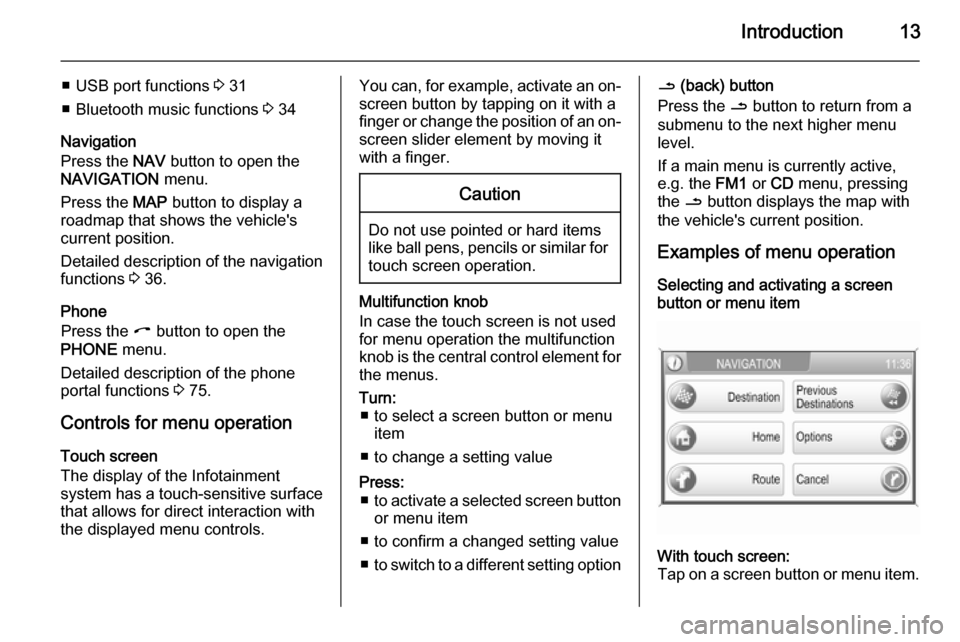
Selecting and activating a screen
button or menu itemWith touch screen:
Tap on a screen button or menu item.
Page 14 of 177
14Introduction
The corresponding system function is
activated, or a message is displayed, or a submenu with further options is
displayed.With multifunction knob: 1. Turn the multifunction knob clockwise or anti-clockwise to
select a screen button or menu
item.
The currently selected screen
button or menu item is
highlighted.
2. Press the multifunction knob to activate the selected screen
button or menu item.
The corresponding system
function is activated or a message
is displayed or a submenu with
further options is displayed.
Notice
In the audio and phone main menus, see example below, the screen
buttons at the bottom of the menus
can only be selected/activated via
the touch screen not via the
multifunction knob.
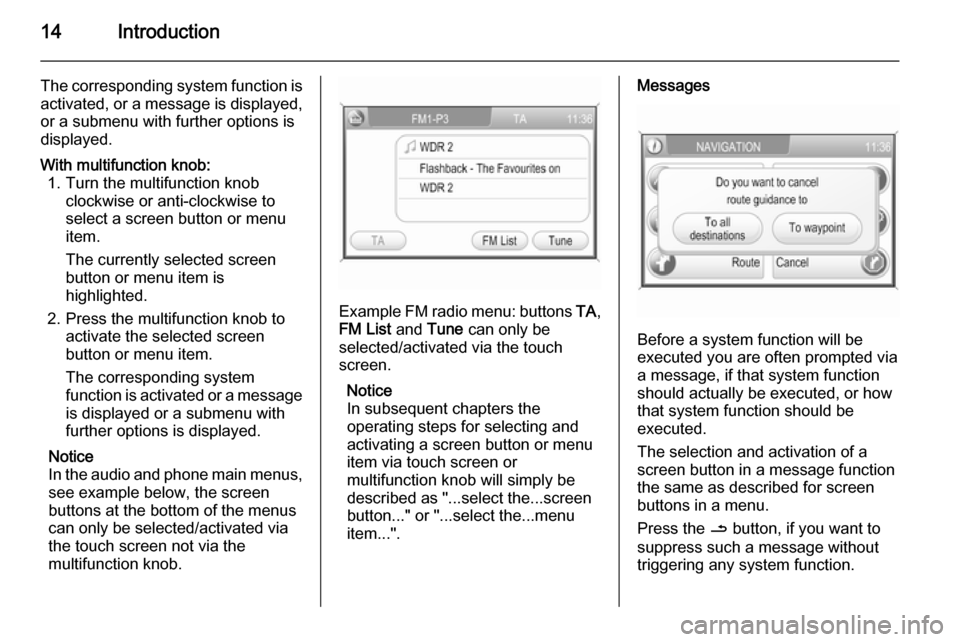
Example FM radio menu: buttons TA,
FM List and Tune can only be
selected/activated via the touch
screen.
Notice
In subsequent chapters the
operating steps for selecting and
activating a screen button or menu
item via touch screen or
multifunction knob will simply be
described as "...select the...screen
button..." or "...select the...menu
item...".
Messages
Before a system function will be
executed you are often prompted via
a message, if that system function
should actually be executed, or how
that system function should be
executed.
The selection and activation of a
screen button in a message function
the same as described for screen
buttons in a menu.
Press the / button, if you want to
suppress such a message without
triggering any system function.
Page 34 of 177

34Bluetooth musicBluetooth musicGeneral information.....................34
Operation ..................................... 34General information
Bluetooth enabled audio sources (e.g. music mobile phones, MP3
players featuring Bluetooth, etc.),
which support Bluetooth music
protocol A2DP, can be connected
wirelessly to the Infotainment system.
Important information ■ The Infotainment system only connects to Bluetooth devices that
support A2DP (Advanced Audio
Distribution Profile) version 1.2 or
higher.
■ The Bluetooth device must support
AVRCP (Audio Video Remote
Control Profile) version 1.0 or
higher. If the device does not
support AVRCP only the volume
can be controlled via the
Infotainment system.
■ Before connecting the Bluetooth device to the Infotainment system,
become acquainted with its user
guide for Bluetooth functions.Operation
Prerequisites
The following prerequisites must be
met in order to use the Bluetooth
music mode of the Infotainment
system:
■ The Bluetooth function of the Infotainment system must be
activated 3 76.
■ The Bluetooth function of the external Bluetooth audio source
must be activated (see user guide
of the device).
■ Depending on the external Bluetooth audio source, it may be
required to set that device to
"visible" (see user guide of the
device).
■ The external Bluetooth audio source must be paired and
connected to the Infotainment
system 3 76.
Page 65 of 177

Navigation65
The old home address (if available)
will be deleted.
■ Start : sets the displayed home
address or GPS coordinates as
new destination, and starts route
guidance to that destination.
Description on route guidance, see
chapter "Guidance" 3 65.
Guidance General information
Route guidance is provided by the
navigation system by visual
instructions and voice commands
(voice guidance).
Visual instructions
Visual instructions are displayed on
the map display, in the TRAFFIC
INFO menu, in all audio main menus,
e.g. the CD menu, and in the
PHONE menu.
Visual instructions shown on the map display:
Visual instructions shown in menus,
e.g. the FM1 radio menu:
Detailed descriptions on the map
display and the visual route guidance information, see chapter "Usage"3 37.
Voice commands
Voice commands will announce
which direction to follow, when
approaching an intersection at which you need to turn.
To enable or disable voice guidance:
touch the Voice screen button on the
map display for a few seconds, see
image of map display above. If voice
guidance is enabled, the button label
is shown in white, otherwise in black.
To repeat the last announced voice
command: tap on the Voice screen
button.
To adjust the voice volume when
voice commands are announced: turn
the X knob.
Notice
The activation/deactivation of voice
guidance is indicated by a beep, if system sounds are activated 3 11.