phone VAUXHALL CORSA 2014.5 Infotainment system
[x] Cancel search | Manufacturer: VAUXHALL, Model Year: 2014.5, Model line: CORSA, Model: VAUXHALL CORSA 2014.5Pages: 177, PDF Size: 2.97 MB
Page 67 of 177

Navigation67
Automatic: all TMC messages are
automatically taken into account for
route calculation/recalculation.
Prompt : in the event of a traffic jam
or other traffic incidents, for which
the navigation system receives a
TMC message, you will be
prompted by a message:
if an alternative route to the
destination should be calculated
or
if the previously calculated route
should remain unchanged.
The messages will be shown on the display even if an audio mode (e.g.
AM/FM or CD) or the telephone
mode are currently active.
■ Route mode : select, if the fastest,
the most economical, or the
shortest route should be calculated for route guidance.
■ Motorways : select, if motorways
should be avoided or utilised for
route guidance.
■ Tolls & Ferries : select, if toll roads
and ferries should be avoided or
utilised, or, if the use of toll roadsand ferries should be minimized,
when calculating the route to the
destination.
Displaying the route list
Press the NAV button, and then
select the Route menu item to open
the ROUTE LIST .
The route list shows all streets on the
calculated route, starting with the
current location.
Each list entry may show the following
information:
■ Name of street, motorway, or motorway junction.
■ Direction arrow or motorwaysymbol.
Notice
An additional small red triangle in a
direction arrow or motorway symbol
indicates a pending traffic event in
the course of the related street or
motorway.
■ Distance to the next street on the route, or
■ estimated time required to reach the next street on the route, or
■ estimated arrival time when reaching the next street on the
route.
The displayed time information
depend on, whether display of the
estimated remaining travel time or the estimated arrival time was previously
selected on the map display.
To change the mode of time display:
press the MAP button, and then tap
on the time information, shown below the direction arrow, on the left side of
the map display.
Page 75 of 177

Phone75PhoneGeneral information.....................75
Bluetooth connection ...................76
Emergency call ............................ 78
Operation ..................................... 79General information
The Phone portal provides you with
the possibility of having mobile phone conversations via a vehicle
microphone and the vehicle
loudspeakers as well as operating the
most important mobile phone
functions via the Infotainment system in the vehicle. To be able to use the
Phone portal, the mobile phone has
to be connected to it via Bluetooth 3 76.
Not all Phone portal functions are
supported by every mobile phone.
The possible phone functions depend on the relevant mobile phone and
network provider. You will find further
information on this in the operating
instructions for your mobile phone, or you can enquire about them at your
network provider.Important information for
operation and traffic safety9 Warning
Mobile phones have effects on
your environment. For this reason safety regulations and directions
have been prepared. You should
be familiar with the related
directions before you use the
telephone function.
9 Warning
Use of the hands-free facility while
driving can be dangerous because
your concentration is reduced
when telephoning. Park your
vehicle before you use the hands- free facility. Follow the stipulations
of the country in which you find
yourself at present.
Do not forget to follow the special
regulations that apply in specific areas and always switch off the
mobile phone if the use of mobile
Page 76 of 177
76Phonephones is prohibited, if
interference is caused by the
mobile phone or if dangerous
situations can occur.
Bluetooth
The Phone portal is certified by the
Bluetooth Special Interest Group
(SIG).
You will find further information about the specification on the Internet at
http://www.bluetooth.com
Bluetooth connection Bluetooth is a radio standard for the
wireless connection of, for example, a
mobile phone or an MP3 player to
other devices.
To be able to set up a Bluetooth
connection to the Infotainment
system, the Bluetooth function of the
Bluetooth device has to be activated and the Bluetooth device has to be set to "visible" (discovery mode). For
further information please consult the
user guide of the Bluetooth device.
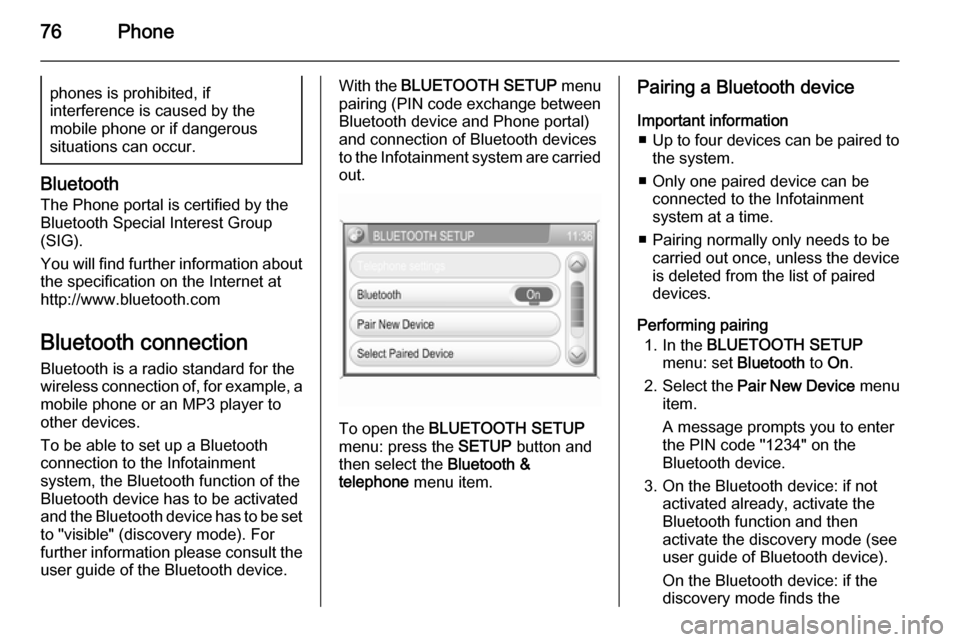
With the BLUETOOTH SETUP menu
pairing (PIN code exchange between Bluetooth device and Phone portal)
and connection of Bluetooth devices
to the Infotainment system are carried
out.
To open the BLUETOOTH SETUP
menu: press the SETUP button and
then select the Bluetooth &
telephone menu item.
Pairing a Bluetooth device
Important information ■ Up to four devices can be paired to
the system.
■ Only one paired device can be connected to the Infotainment
system at a time.
■ Pairing normally only needs to be carried out once, unless the device
is deleted from the list of paired
devices.
Performing pairing 1. In the BLUETOOTH SETUP
menu: set Bluetooth to On.
2. Select the Pair New Device menu
item.
A message prompts you to enter
the PIN code "1234" on the
Bluetooth device.
3. On the Bluetooth device: if not activated already, activate the
Bluetooth function and then
activate the discovery mode (see
user guide of Bluetooth device).
On the Bluetooth device: if the
discovery mode finds the
Page 77 of 177
Phone77
Infotainment system's Bluetooth
unit, CAR HF UNIT will be
displayed.
4. On the Bluetooth device: select CAR HF UNIT and then follow the
instructions to enter the PIN code
"1234".
5. On the Bluetooth device: confirm the entered PIN code.
On the Infotainment system's
display: after a few seconds a
message is displayed that shows,
if the pairing process was
successfully performed or if it
failed.
If the Bluetooth connection was
successfully performed: in case
another Bluetooth device was
connected to the Infotainment
system, that device is now
disconnected from the system.
If the Bluetooth connection failed:
start the procedure described above again, or consult the user guide of the Bluetooth device.Connecting to another paired
device
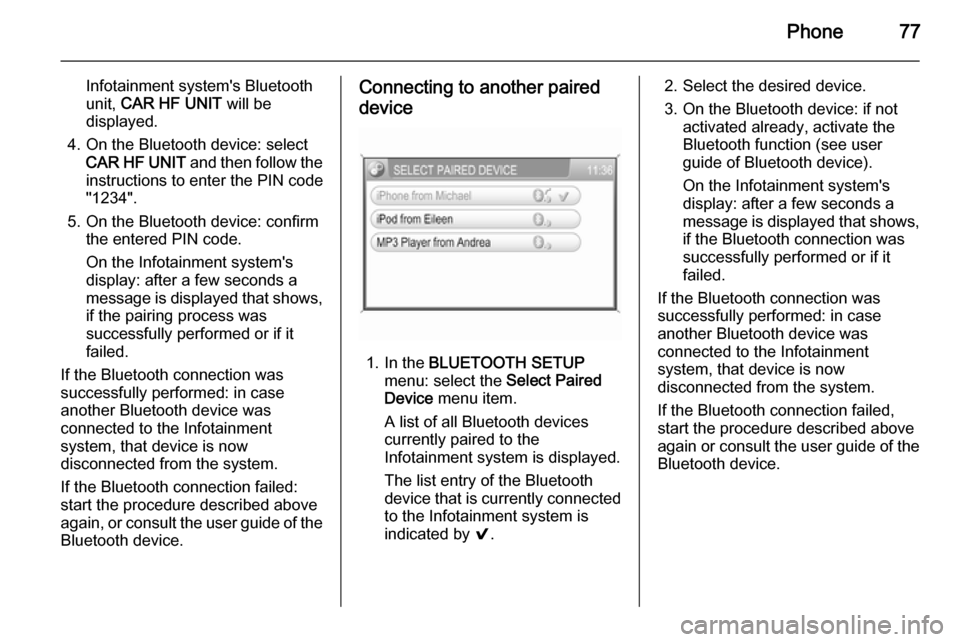
1. In the BLUETOOTH SETUP
menu: select the Select Paired
Device menu item.
A list of all Bluetooth devices
currently paired to the Infotainment system is displayed.
The list entry of the Bluetooth
device that is currently connected
to the Infotainment system is
indicated by 9.
2. Select the desired device.
3. On the Bluetooth device: if not activated already, activate the
Bluetooth function (see user
guide of Bluetooth device).
On the Infotainment system's
display: after a few seconds a
message is displayed that shows,
if the Bluetooth connection was
successfully performed or if it
failed.
If the Bluetooth connection was
successfully performed: in case
another Bluetooth device was
connected to the Infotainment
system, that device is now
disconnected from the system.
If the Bluetooth connection failed,
start the procedure described above again or consult the user guide of the
Bluetooth device.
Page 78 of 177
78Phone
Removing a paired device
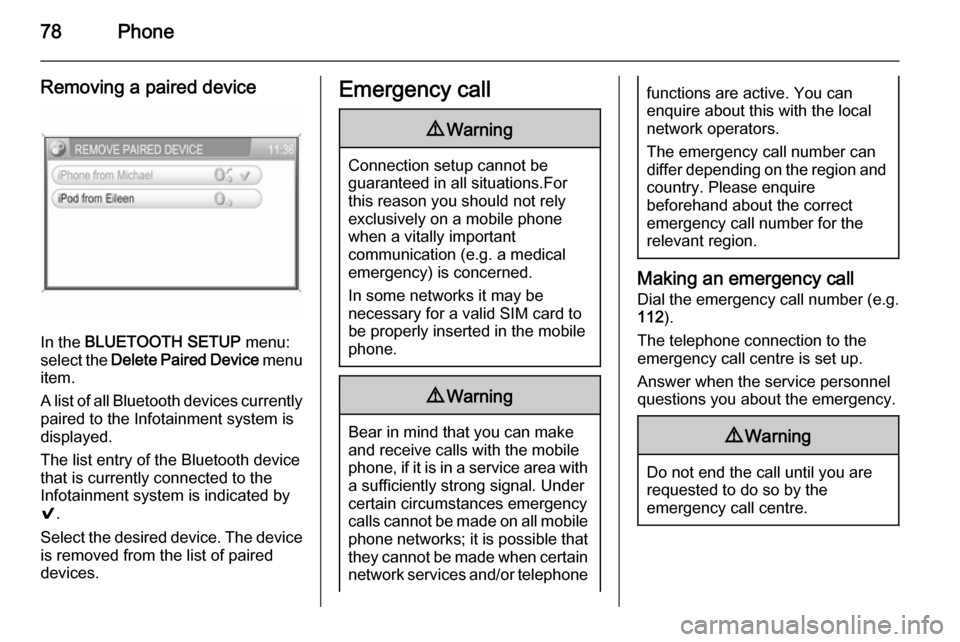
In the BLUETOOTH SETUP menu:
select the Delete Paired Device menu
item.
A list of all Bluetooth devices currently
paired to the Infotainment system is
displayed.
The list entry of the Bluetooth device
that is currently connected to the
Infotainment system is indicated by
9 .
Select the desired device. The device is removed from the list of paired
devices.
Emergency call9 Warning
Connection setup cannot be
guaranteed in all situations.For this reason you should not rely
exclusively on a mobile phone
when a vitally important
communication (e.g. a medical
emergency) is concerned.
In some networks it may be
necessary for a valid SIM card to
be properly inserted in the mobile
phone.
9 Warning
Bear in mind that you can make
and receive calls with the mobile
phone, if it is in a service area with
a sufficiently strong signal. Under
certain circumstances emergency
calls cannot be made on all mobile
phone networks; it is possible that
they cannot be made when certain network services and/or telephone
functions are active. You can
enquire about this with the local
network operators.
The emergency call number can
differ depending on the region and country. Please enquire
beforehand about the correct
emergency call number for the
relevant region.
Making an emergency call
Dial the emergency call number (e.g.
112 ).
The telephone connection to the
emergency call centre is set up.
Answer when the service personnel
questions you about the emergency.
9 Warning
Do not end the call until you are
requested to do so by the
emergency call centre.
Page 79 of 177

Phone79Operation
As soon as a connection via
Bluetooth has been set up between
your mobile phone and the
Infotainment system, you can operate many functions of your mobile phone
via the Infotainment system.
Notice
In the handsfree mode mobile phone
operation continues to be possible,
e.g. taking a call or adjusting the
volume.
After setup of a connection between
the mobile phone and the
Infotainment system, mobile phone data is transmitted to the Infotainment system. This can take some time
depending on the mobile phone and
the amount of data to be transferred.
During this period operation of the
mobile phone via the Infotainment
system is possible only to a limited extent.Notice
Not every mobile phone supports all
functions of the Phone portal.
Therefore deviations from the range of functions described with these
specific mobile phones are possible.
Control elements for phone
operation The most important phone specific
control elements are the following:
On instrument panel
m knob: turn to adjust volume.
I button: press to display phone
menu.
On steering wheel
p button:
■ If Phone portal inactive: 1st press: display phone menu; 2nd press:
redial (if phone connected and
number stored in redial list).
■ If Phone portal active: short press: accept incoming call or end active
call; long press: reject incoming
call.o thumbwheel: turn to adjust
volume.
Prerequisites
The following prerequisites must be
met in order to use the handsfree mode of the Infotainment system:
■ The Bluetooth function of the Infotainment system must be
activated 3 76.
■ The Bluetooth function of the mobile phone must be activated
(see user guide of the device).
■ The mobile phone must be set to "visible" (see user guide of the
device).
■ The mobile phone must be paired to the Infotainment system 3 76.
Activating the handsfree mode Press the I button.
The PHONE menu appears on the
display.
Page 80 of 177
80Phone
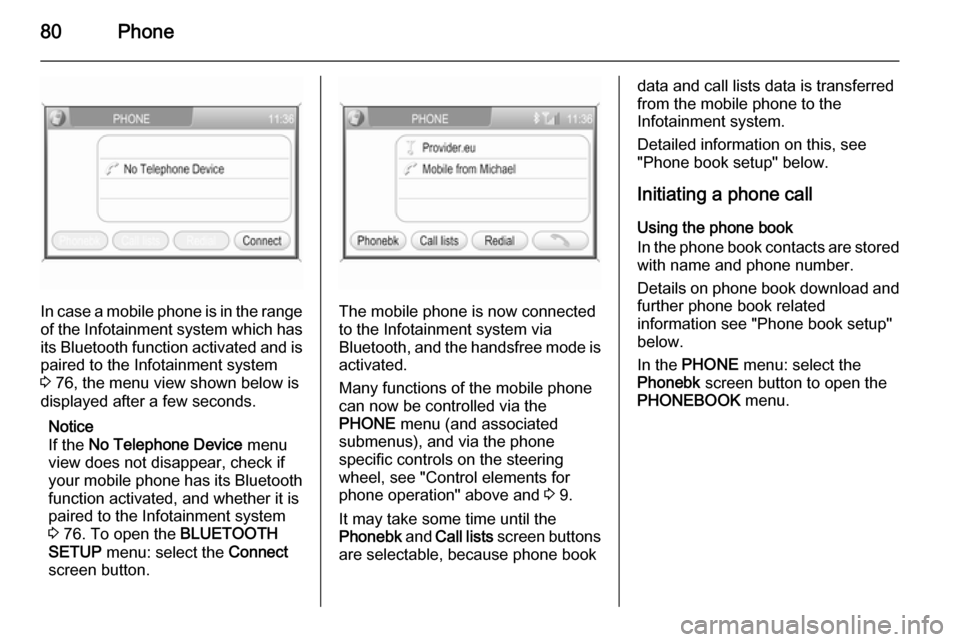
In case a mobile phone is in the rangeof the Infotainment system which has its Bluetooth function activated and is
paired to the Infotainment system
3 76, the menu view shown below is
displayed after a few seconds.
Notice
If the No Telephone Device menu
view does not disappear, check if
your mobile phone has its Bluetooth
function activated, and whether it is
paired to the Infotainment system
3 76. To open the BLUETOOTH
SETUP menu: select the Connect
screen button.The mobile phone is now connected to the Infotainment system via
Bluetooth, and the handsfree mode is activated.
Many functions of the mobile phone
can now be controlled via the
PHONE menu (and associated
submenus), and via the phone
specific controls on the steering
wheel, see "Control elements for
phone operation" above and 3 9.
It may take some time until the
Phonebk and Call lists screen buttons
are selectable, because phone book
data and call lists data is transferred from the mobile phone to the
Infotainment system.
Detailed information on this, see
"Phone book setup" below.
Initiating a phone call Using the phone book
In the phone book contacts are stored
with name and phone number.
Details on phone book download and
further phone book related
information see "Phone book setup"
below.
In the PHONE menu: select the
Phonebk screen button to open the
PHONEBOOK menu.
Page 81 of 177
Phone81
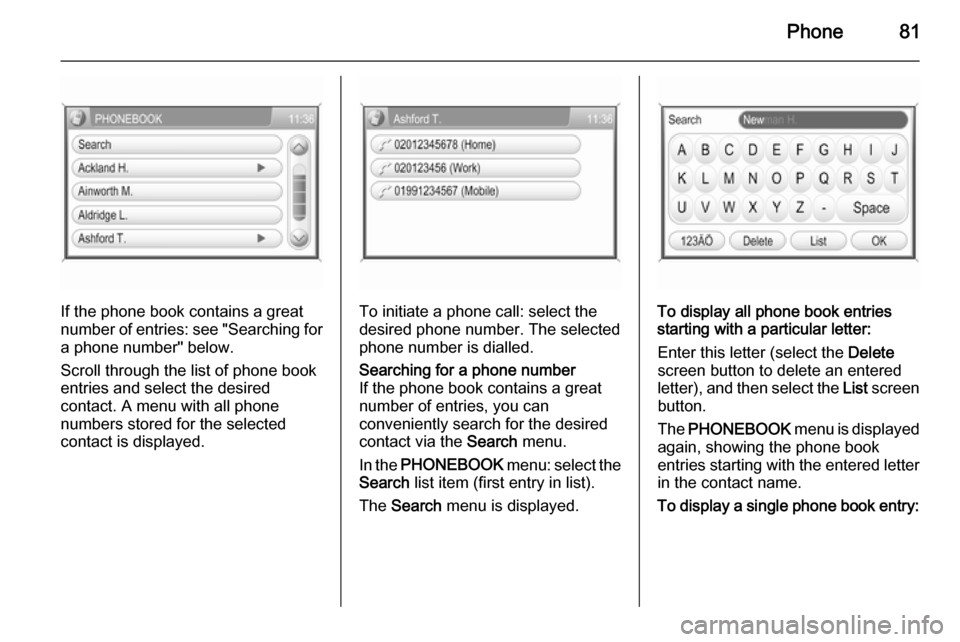
If the phone book contains a great
number of entries: see "Searching for
a phone number" below.
Scroll through the list of phone book
entries and select the desired
contact. A menu with all phone
numbers stored for the selected
contact is displayed.To initiate a phone call: select the
desired phone number. The selected
phone number is dialled.
Searching for a phone number
If the phone book contains a great
number of entries, you can
conveniently search for the desired contact via the Search menu.
In the PHONEBOOK menu: select the
Search list item (first entry in list).
The Search menu is displayed.
To display all phone book entries
starting with a particular letter:
Enter this letter (select the Delete
screen button to delete an entered
letter), and then select the List screen
button.
The PHONEBOOK menu is displayed
again, showing the phone book
entries starting with the entered letter
in the contact name.
To display a single phone book entry:
Page 82 of 177
82Phone
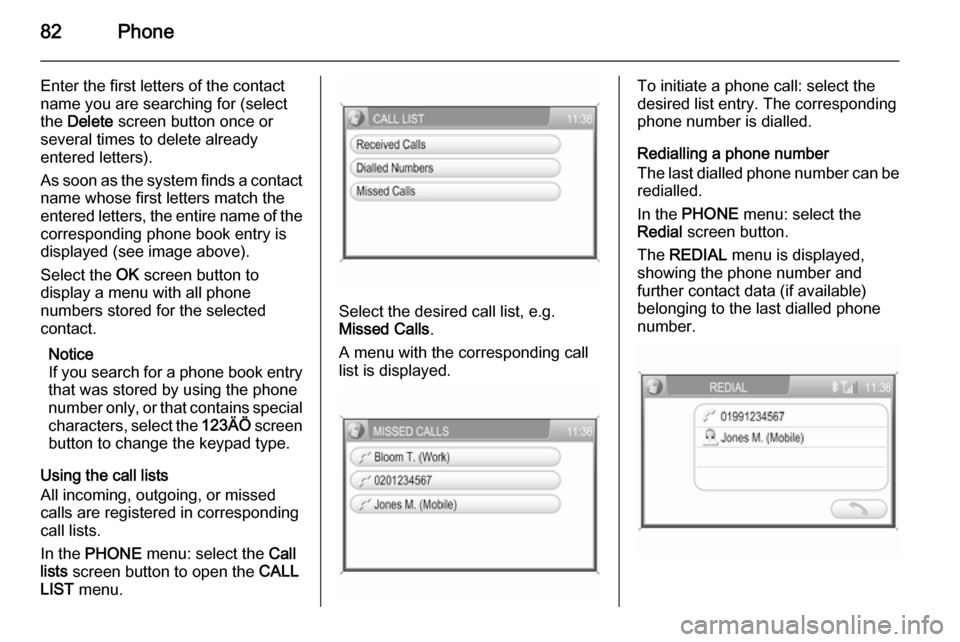
Enter the first letters of the contact
name you are searching for (select
the Delete screen button once or
several times to delete already
entered letters).
As soon as the system finds a contact
name whose first letters match the
entered letters, the entire name of the corresponding phone book entry is
displayed (see image above).
Select the OK screen button to
display a menu with all phone
numbers stored for the selected
contact.
Notice
If you search for a phone book entry
that was stored by using the phone
number only, or that contains special characters, select the 123ÄÖ screen
button to change the keypad type.
Using the call lists
All incoming, outgoing, or missed
calls are registered in corresponding
call lists.
In the PHONE menu: select the Call
lists screen button to open the CALL
LIST menu.
Select the desired call list, e.g.
Missed Calls .
A menu with the corresponding call
list is displayed.
To initiate a phone call: select the
desired list entry. The corresponding
phone number is dialled.
Redialling a phone number
The last dialled phone number can be
redialled.
In the PHONE menu: select the
Redial screen button.
The REDIAL menu is displayed,
showing the phone number and
further contact data (if available)
belonging to the last dialled phone
number.
Page 83 of 177
Phone83
To initiate a phone call: select the
{ screen button. The displayed
phone number is dialled.
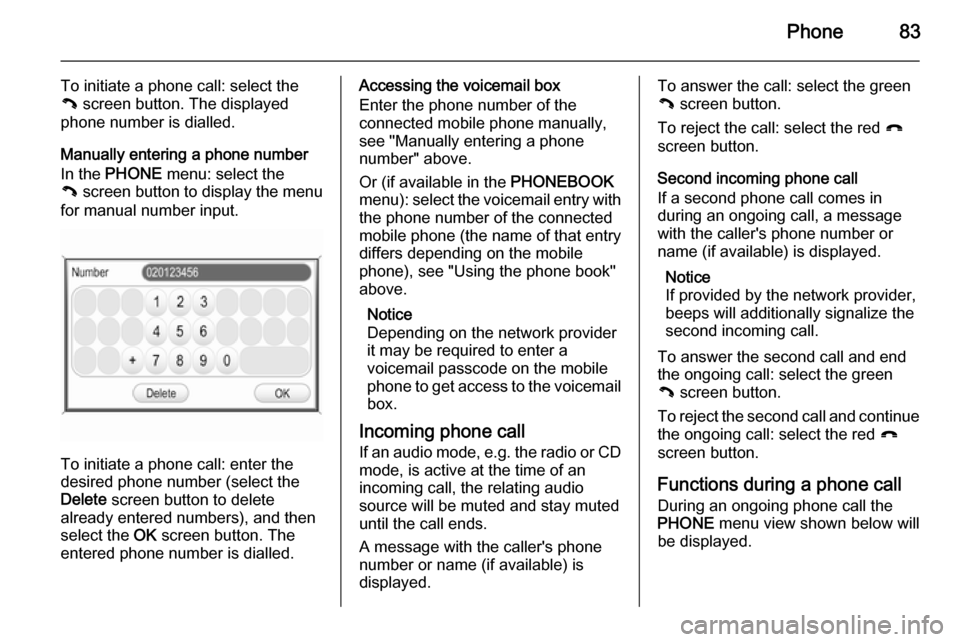
Manually entering a phone number
In the PHONE menu: select the
{ screen button to display the menu
for manual number input.
To initiate a phone call: enter the
desired phone number (select the
Delete screen button to delete
already entered numbers), and then
select the OK screen button. The
entered phone number is dialled.
Accessing the voicemail box
Enter the phone number of the
connected mobile phone manually,
see "Manually entering a phone
number" above.
Or (if available in the PHONEBOOK
menu): select the voicemail entry with
the phone number of the connected
mobile phone (the name of that entry
differs depending on the mobile
phone), see "Using the phone book"
above.
Notice
Depending on the network provider
it may be required to enter a
voicemail passcode on the mobile
phone to get access to the voicemail box.
Incoming phone call If an audio mode, e.g. the radio or CD
mode, is active at the time of an
incoming call, the relating audio
source will be muted and stay muted
until the call ends.
A message with the caller's phone
number or name (if available) is
displayed.To answer the call: select the green
{ screen button.
To reject the call: select the red }
screen button.
Second incoming phone call
If a second phone call comes in
during an ongoing call, a message
with the caller's phone number or
name (if available) is displayed.
Notice
If provided by the network provider,
beeps will additionally signalize the
second incoming call.
To answer the second call and end
the ongoing call: select the green
{ screen button.
To reject the second call and continue the ongoing call: select the red }
screen button.
Functions during a phone call
During an ongoing phone call the
PHONE menu view shown below will
be displayed.