cruise control VAUXHALL CROSSLAND X 2019.75 Owner's Manual
[x] Cancel search | Manufacturer: VAUXHALL, Model Year: 2019.75, Model line: CROSSLAND X, Model: VAUXHALL CROSSLAND X 2019.75Pages: 247, PDF Size: 7.77 MB
Page 13 of 247

In brief111Power windows .....................36
2 Exterior mirrors .....................33
3 Cruise control .....................139
Speed limiter ....................... 141
Heated steering wheel .........70
4 Turn lights ........................... 103
Headlight flash ....................101
High beam ........................... 100
High beam assist ...............100
Exit lighting ......................... 106
Parking lights ...................... 104
Buttons for Driver
Information Centre ................87
5 Side air vents ...................... 117
6 Instruments .......................... 77
Driver Information Centre ...... 87
7 Infotainment controls ...........70
8 Windscreen wiper and
washer, rear wiper and
washer ................................. 71
9 Head-up display ....................92
10 Centre air vents .................. 11711Hazard warning flashers ....102
12 Info Display .......................... 90
13 Centre air vent ....................118
14 Anti-theft alarm system
status LED ........................... 31
15 Central locking system ..........23
16 Glovebox .............................. 61
Fuse box ............................ 190
17 Controls for Info Display
operation ............................... 90
18 Climate control system ........ 108
19 USB port .............................. 74
20 Electronic Stability Control
and Traction Control ...........137
Lane departure warning .....162
Stop-start system ................125
Parking assist ..................... 149
Advanced parking assist ....152
Electric child locks ................ 28
21 Power outlet .......................... 74
22 Selector lever ...................... 132
23 Parking brake ......................136
24 Power button ....................... 122
25 Ignition switch .....................12226Steering wheel adjustment ..70
27 Horn ..................................... 71
28 Bonnet release lever ..........174
29 Storage ................................. 61
Fuse box ............................ 190
30 Head-up display ....................92
31 Light switch .......................... 99
Headlight range
adjustment ......................... 101
Front fog lights ...................103
Rear fog light ...................... 104
Instrument illumination .......105
Page 71 of 247

Instruments and controls69Instruments and
controlsControls ....................................... 70
Steering wheel adjustment ........70
Steering wheel controls .............70
Heated steering wheel ...............70
Horn ........................................... 71
Windscreen wiper and washer ..71
Rear window wiper and washer ...................................... 73
Outside temperature ..................73
Clock ......................................... 74
Power outlets ............................. 74
Inductive charging .....................75
Cigarette lighter ......................... 76
Ashtrays .................................... 76
Warning lights, gauges and indi‐ cators ........................................... 76
Instrument cluster ......................76
Speedometer ............................. 77
Odometer .................................. 78
Trip odometer ............................ 78
Tachometer ............................... 78
Fuel gauge ................................ 79
Engine coolant temperature gauge ....................................... 79Engine oil level monitor.............79
Service display .......................... 80
Control indicators ......................81
Turn lights .................................. 81
Seat belt reminder .....................81
Airbag and belt tensioners .........82
Airbag deactivation ....................82
Charging system .......................82
Malfunction indicator light ..........82
Service vehicle soon .................83
Stop engine ............................... 83
System check ............................ 83
Brake and clutch system ...........83
Parking brake ............................ 83
Antilock brake system (ABS) .....83
Gear shifting .............................. 84
Lane departure warning ............84
Electronic Stability Control and Traction Control system ...........84
Electronic Stability Control and Traction Control system off ......84
Engine coolant temperature ......84
Preheating ................................. 85
Exhaust filter .............................. 85
AdBlue ....................................... 85
Deflation detection system ........85
Engine oil pressure ....................85
Low fuel ..................................... 86
Autostop .................................... 86
Exterior light .............................. 86Low beam.................................. 86
High beam ................................. 86
High beam assist .......................86
Front fog lights ........................... 86
Rear fog light ............................. 86
Rain sensor ............................... 86
Cruise control ............................ 87
Side blind spot alert ...................87
Active emergency braking .........87
Speed limiter ............................. 87
Door open .................................. 87
Displays ....................................... 87
Driver Information Centre ..........87
Info Display ................................ 90
Head-up display ........................92
Vehicle messages ........................93
Warning chimes .........................94
Vehicle personalisation ................94
Telematics services .....................97
Vauxhall Connect ......................97
Page 72 of 247
70Instruments and controlsControlsSteering wheel adjustment
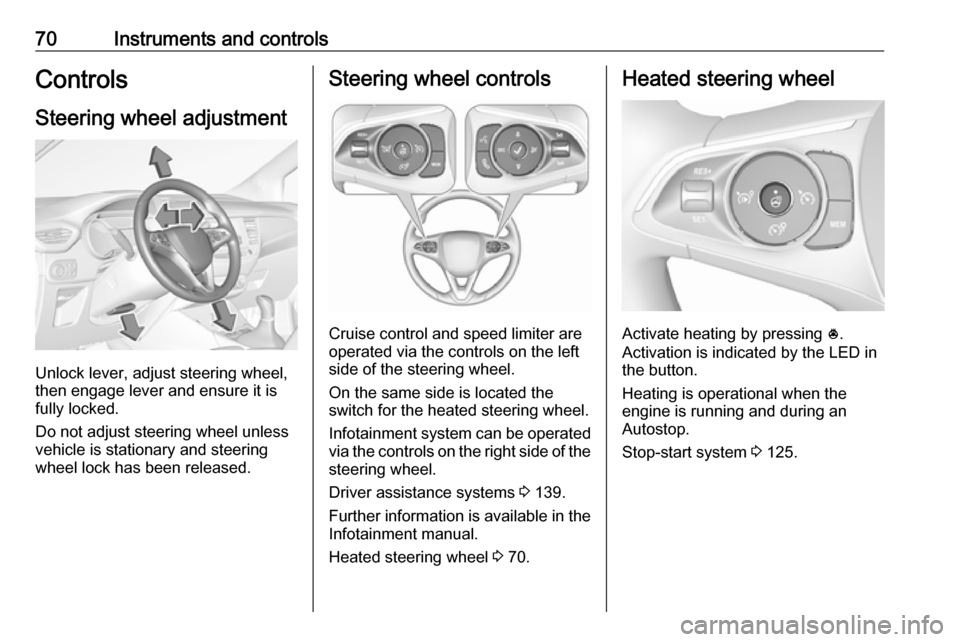
Unlock lever, adjust steering wheel,
then engage lever and ensure it is
fully locked.
Do not adjust steering wheel unless
vehicle is stationary and steering
wheel lock has been released.
Steering wheel controls
Cruise control and speed limiter are
operated via the controls on the left
side of the steering wheel.
On the same side is located the
switch for the heated steering wheel.
Infotainment system can be operated
via the controls on the right side of the
steering wheel.
Driver assistance systems 3 139.
Further information is available in the
Infotainment manual.
Heated steering wheel 3 70.
Heated steering wheel
Activate heating by pressing *.
Activation is indicated by the LED in
the button.
Heating is operational when the
engine is running and during an
Autostop.
Stop-start system 3 125.
Page 79 of 247

Instruments and controls77STOPStop engine 3 83JSystem check 3 83RBrake and clutch system
3 83mParking brake 3 83uAntilock brake system (ABS)
3 83RGear shifting 3 84)Lane departure warning
3 84bElectronic Stability Control
and Traction Control system
3 84aElectronic Stability Control
and Traction Control system
off 3 84W oEngine coolant temperature
high 3 84!Preheating 3 85%Exhaust filter 3 85YAdBlue 3 85wDeflation detection system
3 85IEngine oil pressure 3 85
Engine oil level monitor
3 79Y oLow fuel 3 86DAutostop 3 868Exterior light 3 869Low beam 3 86CHigh beam 3 86fHigh beam assist 3 86>Front fog lights 3 86øRear fog light 3 86
Speedometer
Indicates vehicle speed.
Page 89 of 247

Instruments and controls87Cruise control
m illuminates in the Driver
Information Centre.
Cruise control 3 139.
Side blind spot alert B illuminates green.
The system is active 3 156.
Active emergency braking
m illuminates or flashes yellow.
Illuminates
The system has been deactivated or
a fault has been detected.
Additionally, a warning message is
displayed in the Driver Information
Centre.
Check the reason of the deactivation
3 145 and in case of a system fault,
seek the assistance of a workshop.Notice
m also illuminates if the seat belts
of the front passengers are not
fastened. In this case, active
emergency braking is deactivated.
Flashes
The system is actively engaged. Depending on the situation, the
vehicle may automatically brake
moderately or hard.
Forward collision alert 3 144.
Front pedestrian protection 3 148.
Speed limiter ß illuminates in the Driver
Information Centre.
Speed limiter 3 141.
Door open h illuminates red.
A door or the tailgate is open.Displays
Driver Information Centre
The Driver Information Centre is
located in the instrument cluster.
Depending on the version, the Driver
Information Centre is available as
monochrome or colour display.
Driver Information Centre indicates: ● overall and trip odometer
● digital speed indication
● trip / fuel information menu
● gear shift indication
● service information
● vehicle and warning messages
● driver assistance messages
● pop-up messages
● AdBlue information
Page 94 of 247
92Instruments and controlsTouch required menu display icon or
a function.
Confirm a required function or
selection by touching.
Touch r on the display to exit a
menu without changing a setting.
For further information, see
Infotainment manual.Speech recognition
Description see Infotainment manual.
Vehicle personalisation 3 94.
Head-up display
The head-up display displays driver
information onto a foldable projection plane on the driver's side.
The information appears as an image
projected from a lense in the
instrument panel onto the projection
plane directly ahead in driver's view.
The image appears focused out
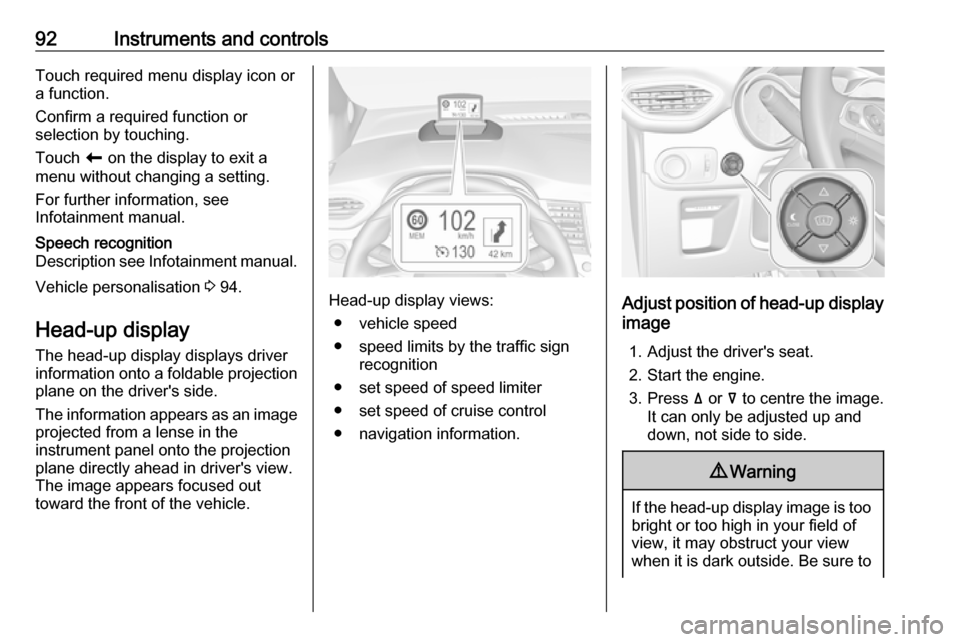
toward the front of the vehicle.Head-up display views:
● vehicle speed
● speed limits by the traffic sign recognition
● set speed of speed limiter
● set speed of cruise control
● navigation information.Adjust position of head-up display
image
1. Adjust the driver's seat.
2. Start the engine.
3. Press ä or å to centre the image.
It can only be adjusted up and
down, not side to side.
9 Warning
If the head-up display image is too
bright or too high in your field of
view, it may obstruct your view
when it is dark outside. Be sure to
Page 96 of 247
94Instruments and controlsMessages in the
Colour Info Display
Some important messages may
appear additionally in the
Info Display. Some messages only
pop-up for a few seconds.
Warning chimes If several warnings appear at the
same time, only one warning chime
will sound.
When starting the engine or whilst
driving
The warning chime regarding not
fastened seat belts has priority over
any other warning chime.
● If a seat belt is not fastened.
● If a door or the tailgate is not fully
closed when starting off.
● If a certain speed is exceeded with parking brake applied.
● If cruise control deactivates automatically.
● If a programmed speed or speed
limit is exceeded.● If a warning message appears in the Driver Information Centre.
● If the electronic key is not in the passenger compartment.
● If the parking assist detects an object.
● If an unintended lane change occurs.
● If the exhaust filter has reached the maximum filling level.
When the vehicle is parked and / or the driver's door is opened
● With exterior lights on.
During an Autostop ● If the driver's door is opened.
● If any condition for an autostart is
not fulfilled.Vehicle personalisation
The vehicle's behaviour can be
personalised by changing the settings in the Info Display.
Some functions are only displayed or
active when the engine is running.
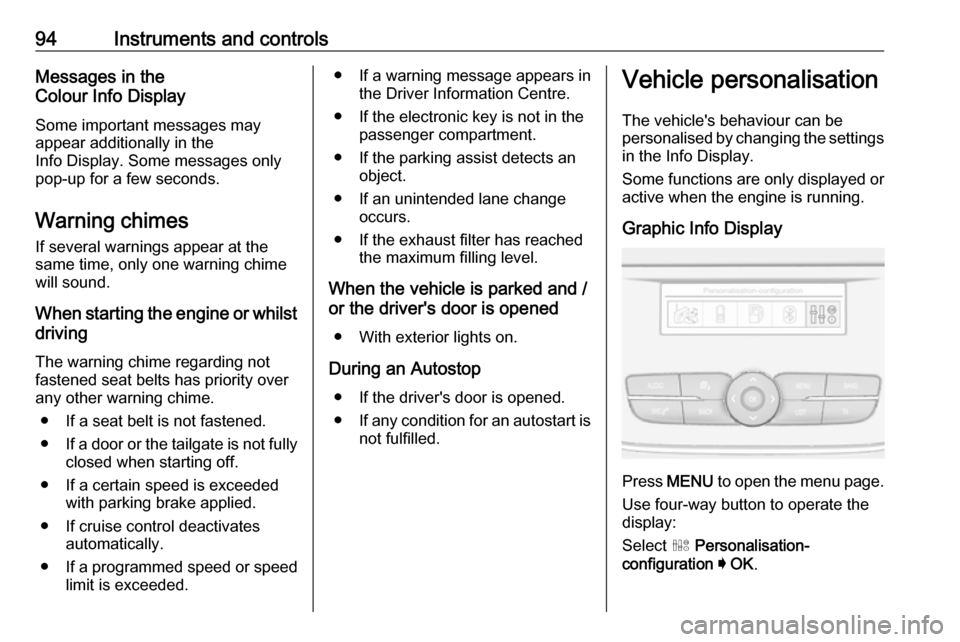
Graphic Info Display
Press MENU to open the menu page.
Use four-way button to operate the
display:
Select ˆ Personalisation-
configuration I OK .
Page 122 of 247

120Driving and operatingDriving and
operatingDriving hints ............................... 121
Control of the vehicle ...............121
Steering ................................... 121
Starting and operating ...............121
New vehicle running-in ............121
Ignition switch positions ...........122
Power button ........................... 122
Starting the engine ..................123
Overrun cut-off ........................ 125
Stop-start system ....................125
Parking .................................... 127
Engine exhaust .......................... 128
Exhaust filter ............................ 128
Catalytic converter ...................129
AdBlue ..................................... 129
Automatic transmission ..............132
Transmission display ...............132
Gear selection ......................... 132
Manual mode ........................... 133
Electronic driving programmes 133
Fault ........................................ 134
Interruption of power supply ....134
Manual transmission ..................135Brakes........................................ 136
Antilock brake system .............136
Parking brake .......................... 136
Brake assist ............................. 137
Hill start assist ......................... 137
Ride control systems .................137
Electronic Stability Control and Traction Control system .........137
Driver assistance systems .........139
Cruise control .......................... 139
Speed limiter ........................... 141
Forward collision alert .............144
Active emergency braking .......145
Front pedestrian protection .....148
Parking assist .......................... 149
Advanced parking assist .........152
Side blind spot alert .................156
Panoramic view system ...........158
Rear view camera ...................160
Lane departure warning ..........162
Driver alert ............................... 163
Fuel ............................................ 164
Fuel for petrol engines .............164
Fuel for diesel engines ............164
Refuelling ................................ 166
Trailer hitch ................................ 167
General information .................167
Driving characteristics and towing tips .............................. 168Trailer towing........................... 168
Towing equipment ...................169
Page 141 of 247
Driving and operating139Driver assistance
systems9 Warning
Driver assistance systems are
developed to support the driver
and not to replace the driver's
attention.
The driver stays in full control of
the vehicle and accepts full
responsibility when driving the
vehicle.
When using driver assistance
systems, always take care
regarding the current traffic
situation and follow applicable
traffic rules.
Cruise control
The cruise control can store and
maintain speeds above 25 mph.
Additionally at least the third gear
must be engaged on manual
transmission.
Additionally position D or the second
or a higher gear in position M must be
selected on automatic transmission.
Deviations from the stored speeds
may occur when driving uphill or
downhill.
The system maintains the vehicle
speed at the preset speed by the
driver, without any action on the
accelerator pedal.
The preset speed can be exceeded
temporarily by pressing the
accelerator pedal firmly.
The status and preset speed is
displayed in the Driver Information Centre.
Do not use the cruise control if it is not advisable to maintain a constant
speed.
Control indicator m 3 87.Switching on the system
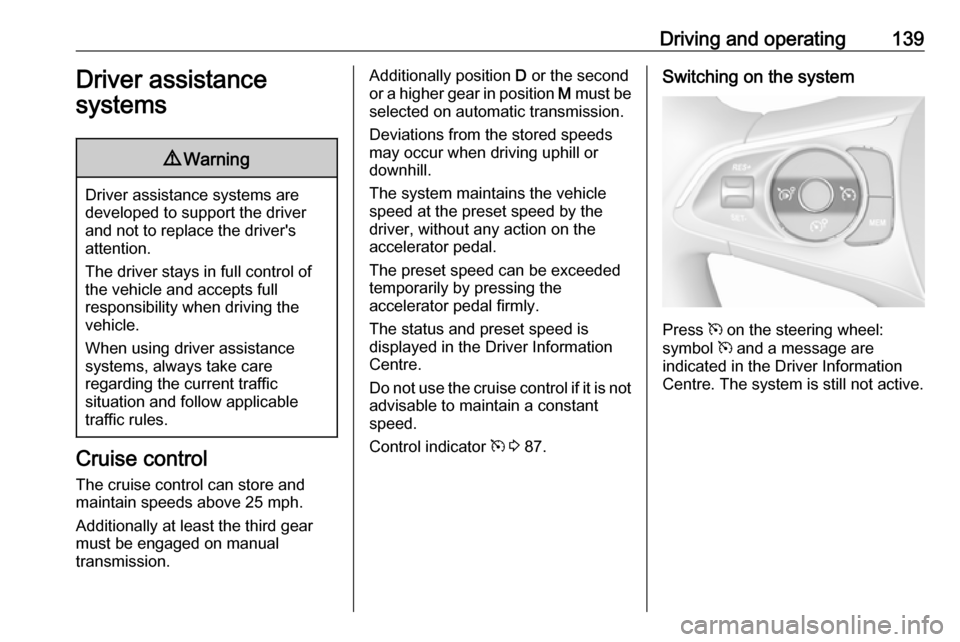
Press m on the steering wheel:
symbol m and a message are
indicated in the Driver Information
Centre. The system is still not active.
Page 142 of 247
140Driving and operating
Activation of the functionalitySetting speed by the driver
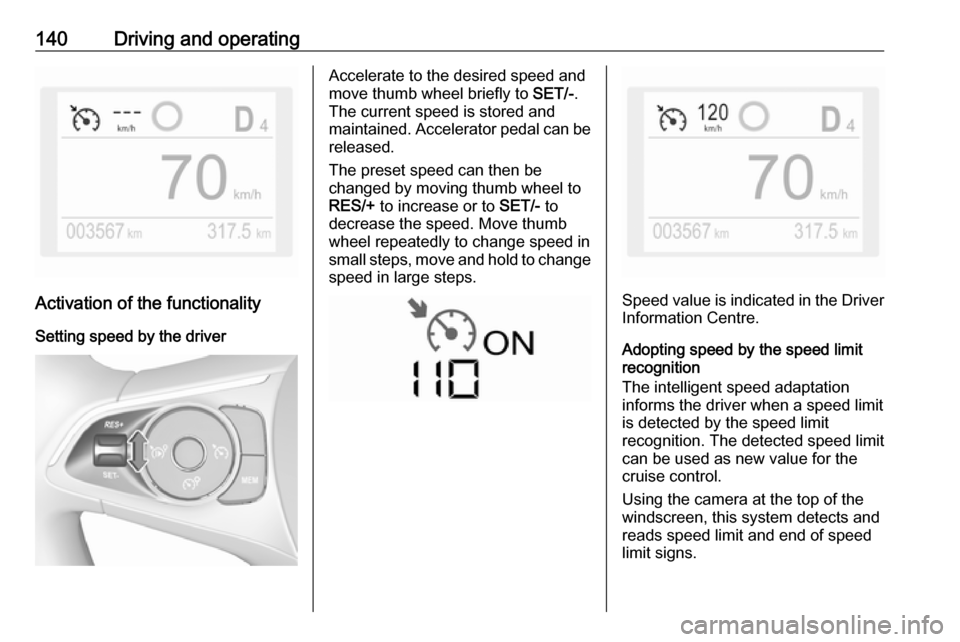
Accelerate to the desired speed and
move thumb wheel briefly to SET/-.
The current speed is stored and
maintained. Accelerator pedal can be
released.
The preset speed can then be
changed by moving thumb wheel to RES/+ to increase or to SET/- to
decrease the speed. Move thumb
wheel repeatedly to change speed in
small steps, move and hold to change speed in large steps.
Speed value is indicated in the Driver
Information Centre.
Adopting speed by the speed limit
recognition
The intelligent speed adaptation
informs the driver when a speed limit
is detected by the speed limit
recognition. The detected speed limit
can be used as new value for the
cruise control.
Using the camera at the top of the
windscreen, this system detects and
reads speed limit and end of speed
limit signs.