phone VAUXHALL INSIGNIA 2017 Infotainment system
[x] Cancel search | Manufacturer: VAUXHALL, Model Year: 2017, Model line: INSIGNIA, Model: VAUXHALL INSIGNIA 2017Pages: 123, PDF Size: 2.38 MB
Page 59 of 123
Navigation59Voice prompts during phone calls
Select MENU in the interaction
selector bar and then select
Navigation Voice Preferences to
display the respective submenu.
Select Prompts During Phone Calls .
If On is selected, navigation voice
prompts are also read out during phone calls.
If Off is selected, no voice prompts
are given out. If Beeps is selected, a
beep sounds instead of the
announcement.
Volume
To adjust the volume of the voice
prompts, select ─ or w.
Information on traffic incidents Traffic list
To display a list of traffic incidents
close to the current location of the
vehicle, press ; and then select
TRAFFIC .Alternatively, select MENU in the
interaction selector bar and then select Traffic to display the respective
submenu. Select Show Nearby
Traffic Incidents .
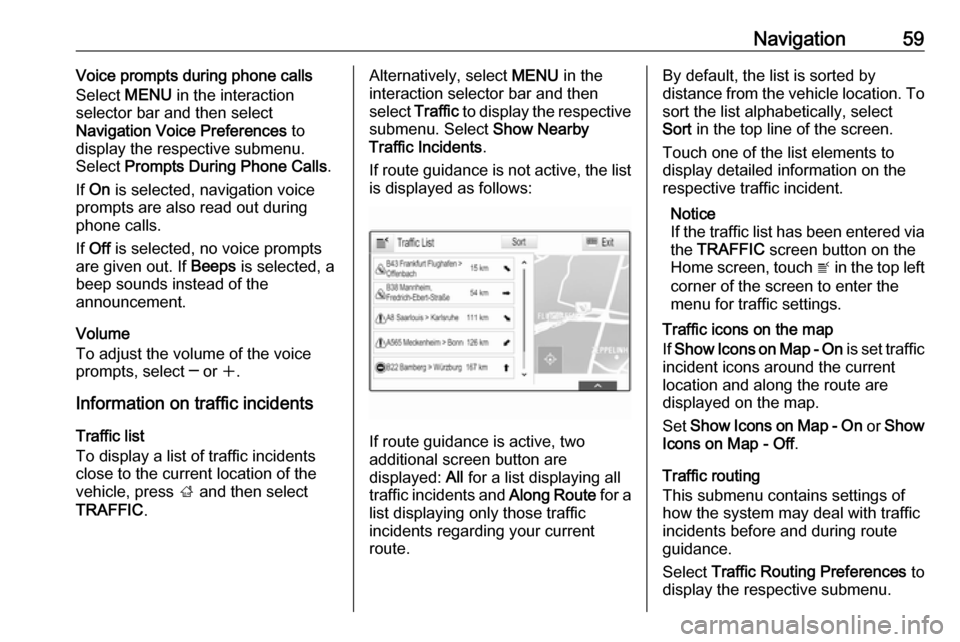
If route guidance is not active, the list is displayed as follows:
If route guidance is active, two
additional screen button are
displayed: All for a list displaying all
traffic incidents and Along Route for a
list displaying only those traffic
incidents regarding your current
route.
By default, the list is sorted by
distance from the vehicle location. To sort the list alphabetically, select
Sort in the top line of the screen.
Touch one of the list elements to
display detailed information on the
respective traffic incident.
Notice
If the traffic list has been entered via
the TRAFFIC screen button on the
Home screen, touch w in the top left
corner of the screen to enter the menu for traffic settings.
Traffic icons on the map
If Show Icons on Map - On is set traffic
incident icons around the current
location and along the route are
displayed on the map.
Set Show Icons on Map - On or Show
Icons on Map - Off .
Traffic routing
This submenu contains settings of
how the system may deal with traffic
incidents before and during route
guidance.
Select Traffic Routing Preferences to
display the respective submenu.
Page 65 of 123

Speech recognition65Prompt Length
The length and the level of detail of the questions and statements the
speech recognition gives out can be
adjusted in the corresponding
submenu.Audio Feedback Speed
The speed with which the speech
recognition asks questions or makes statements can be adjusted in the
corresponding submenu.
If Medium is selected, the system's
speech rate corresponds to natural
speech.
Notice
When starting to use the speech
recognition, it may be advantageous
to use the Long setting. As you get
more experienced, it may be
advantageous to use the Short
setting.
Voice pass-thru application
The voice pass-thru application of the Infotainment system allows access tothe speech recognition commands on
your smartphone.
The availability of this function
depends on your smartphone. For
more information on compatibility,
see our website.
Usage
Embedded speech recognition
Activating speech recognition Notice
Speech recognition is not available
during an active phone call.Activation via the w button on the
steering wheel
Press w on the steering wheel.
The audio system mutes, a voice
output message prompts you to say a command, and help menus with the
most important commands currently
available are shown on the Info-
Display and in the Driver Information
Centre.
As soon as the speech recognition is
ready for voice input, a beep is heard. The speech recognition symbol in the
upper left corner of the help menu
changes from white to red.You can now say a voice command to
initiate a system function (e.g. playing a preset radio station).Activation via the VOICE screen
button on the centre display
Select VOICE in the interaction
selector bar of a centre display main
menu.
The audio system mutes, a voice
output message prompts you to say a command, and a help menu with the
most important commands currently
available is shown on the centre
display.
As soon as the speech recognition is
ready for voice input, a beep is heard.
The speech recognition symbol on
the right side of the help menu
changes from black to red.
You can now say a voice command, see description above.
Adjusting the volume of voice
prompts
Press ! or # on the steering wheel
upwards (increase volume) or
downwards (decrease volume).
Page 66 of 123

66Speech recognitionInterrupting a voice prompt
As an experienced user, you can
interrupt a voice prompt by briefly
pressing w on the steering wheel.
A beep is heard immediately, the
speech recognition symbol changes
to red, and a command can be stated
without having to wait.
Cancelling a dialogue sequence
There are various possibilities to
cancel a dialogue sequence and to
deactivate the speech recognition:
● Say " Cancel" or "Exit".
● Press n on the steering wheel.
● If the speech recognition session
was started via the VOICE
screen button on the centre
display, you may alternatively:
● Press ; on the control panel.
● Select m or Exit in the help
menu.In the following situations, a dialogue
sequence is automatically cancelled:
● If you do not say any command for a certain period of time (by
default you are prompted three times to say a command).
● If you say commands that are not
recognised by the system (by
default you are prompted three
times to say a correct command).
Operation via speech commands
The speech recognition can
understand commands that are either naturally stated in sentence form, or
direct commands stating the
application and the action.
For best results: ● Listen for the voice prompt and wait for the beep before saying acommand or replying.
● Say " Help" or read the example
commands on the screen.● The voice prompt can be interrupted by pressing w again.
● Wait for the beep and then speak
the command naturally, not too fast, not too slow. Use short and
direct commands.
Usually commands can be spoken in
a single command. For example,
"Call David Smith at work", "Play"
followed by the artist or song name,
"Tune to" followed by the radio
waveband and frequency/station
name, or "Find address" followed by
the address e.g. "123 Main Road,
London".
In case of complex commands or
when information are missing, the
system starts a dialogue sequence.
When searching for a "Place of
Interest", only major chains may be
selected by name. Chains are
businesses with at least 20 locations.
For other POIs, say the name of a
category like "Restaurants",
"Shopping centres", or "Hospitals".
If you say "Phone" or "Phone
commands", the system understands
that a phone call is requested and
responds with respective questions
Page 67 of 123

Speech recognition67until enough details are gathered. If
the phone number has been saved
with a name and a place, the direct
command should include both, for
example "Call David Smith at work".Selecting list items
When a list is displayed, a voice
prompt asks to confirm or select an
item from that list. A list item may be
manually selected, or by speaking the
line number of the item.
The list on a speech recognition
screen functions the same as a list on
other screens. Manually scrolling the
list on a screen during a speech
recognition session suspends the
current speech recognition event and
plays a prompt like "Make your
selection from the list using the
manual controls, press the back
button on the faceplate, or press the
back screen button to try again".
If no manual selection is made within
15 seconds, the speech recognition session terminates, you are prompted
with a message, and the former
screen is redisplayed.The "Back" command
To return to the previous menu,
optionally: say " Back", press k
BACK on the control panel, or press
m .The "Help" command
After saying " Help", the help prompt
for the current screen is read aloud.
Additionally, the prompt is displayed
on the screen.
Depending on how speech
recognition was initiated, the help
prompt is either displayed in the
Driver Information Centre or on the
centre display.
To interrupt the help prompt, press w.
A beep is heard. You may say a
command.
Voice pass-thru application
Activating speech recognition
Press and hold s on the steering
wheel until a speech recognition icon is displayed in the Driver Information
Centre.
In addition, a message in the Driver
Information Centre informs you when the voice pass-thru application is
ready for use.
Adjusting the volume of voice
prompts
Turn m on the control panel or
press ! or # on the steering wheel
upwards (increase volume) or
downwards (decrease volume).
Deactivating speech recognition
Press n on the steering wheel. The
speech recognition session is ended.
Page 68 of 123

68PhonePhoneGeneral information.....................68
Bluetooth connection ...................69
Emergency call ............................ 71
Operation ..................................... 71
Text messages ............................ 75
Mobile phones and CB radio equipment .................................... 77General information
The Phone portal provides you with
the possibility of having mobile phone conversations via a vehicle
microphone and the vehicle
loudspeakers as well as operating the
most important mobile phone
functions via the Infotainment system in the vehicle. To be able to use the
Phone portal, the mobile phone must
be connected to the Infotainment
system via Bluetooth.
Not all Phone functions are supported by every mobile phone. The usable
phone functions depend on the
relevant mobile phone and network
provider. You will find further
information on this in the operating
instructions for your mobile phone, or you can enquire about them with your
network provider.Important information for
operation and traffic safety9 Warning
Mobile phones have effects on
your environment. For this reason, safety regulations and directions
have been prepared. You should
be familiar with the related
directions before you use the
telephone function.
9 Warning
Use of the hands-free facility while
driving can be dangerous because
your concentration is reduced
when telephoning. Park your
vehicle before you use the hands- free facility. Follow the stipulations
of the country in which you find
yourself at present.
Do not forget to follow the special
regulations that apply in specific
areas and always switch off the
mobile phone if the use of mobile
phones is prohibited, if
Page 69 of 123

Phone69interference is caused by the
mobile phone or if dangerous
situations can occur.
Bluetooth
The Phone portal is certified by the
Bluetooth Special Interest Group
(SIG).
You will find further information about the specification on the Internet at
http://www.bluetooth.com
Bluetooth connection
Bluetooth is a radio standard for the
wireless connection of e.g. mobile
phones or other devices.
To be able to set up a Bluetooth
connection to the Infotainment
system, the Bluetooth function of the
Bluetooth device must be activated.
For further information, please
consult the user guide of the
Bluetooth device.
Via the Bluetooth settings menu,
pairing (PIN code exchange between
Bluetooth device and Infotainment
system) and connecting of the
Bluetooth devices to the Infotainment
system are carried out.
Bluetooth settings menu
Press ; and then select the
SETTINGS icon.
Select Bluetooth to display the
respective submenu.
Pairing a device
Important information ● Up to five devices can be paired to the system.
● Only one paired device can be connected to the Infotainment
system at a time.
● Pairing normally only needs to be
carried out once, unless the
device is deleted from the list of
paired devices. If the device has
been connected previously, theInfotainment system
automatically establishes a
connection.
● Bluetooth operation considerably
drains the device's battery.
Therefore, connect the device to
the USB port for charging.
Pairing via the Settings application 1. Press ; and then select the
SETTINGS icon.
Select Bluetooth to display the
respective submenu.
2. Select Pair Device .
Alternatively, select Device
Management to display the
device list and then select Pair
Device .
3. A message is displayed on the Infotainment system indicating
the name and PIN code of the
Infotainment system.
4. Start Bluetooth searching on the Bluetooth device to be paired.
5. Confirm the pairing procedure: ● If SSP (secure simple pairing) is supported:
Page 70 of 123

70PhoneCompare the PIN code (if
demanded) and confirm the
messages on the Infotainment system and the
Bluetooth device.
● If SSP (secure simple pairing) is not supported:
If desired, select Set PIN to
change the PIN code of the
Infotainment system. A
keypad is displayed. Enter the new PIN code and
confirm your input.
Enter the Infotainment PIN
code on the Bluetooth device
and confirm your input.
6. The Infotainment system and the device are paired and the device
list is displayed.
Notice
If the Bluetooth connection fails, a
failure message is displayed on the
screen of the Infotainment system.
7. If available on the Bluetooth device, phone book and calls listsare downloaded to the
Infotainment system. If required,confirm the respective message
on your smartphone.
Notice
For the contacts to be read by the
Infotainment system, they must be
stored in the phone memory of the mobile phone.
If this function is not supported by
the Bluetooth device, a
corresponding message is
displayed on the Infotainment
system.
Pairing via the Phone application 1. Press ; and then select the
PHONE icon.
2. Select Pair Device .
3. Proceed from step 3 of "Pairing via the Settings application" (see
above).
4. If the device has been successfully paired, the phone
menu is displayed.
Notice
If the Bluetooth connection fails, a
failure message is displayed on the
screen of the Infotainment system.Connecting a paired device
1. Press ; and then select the
SETTINGS icon.
Select Bluetooth to display the
respective submenu.
2. Select Device Management to
display the device list.
3. Select the Bluetooth device you wish to connect.
4. The device is connected and displayed within the Connected
field of the device list.
Disconnecting a device 1. Press ; and then select the
SETTINGS icon.
Select Bluetooth to display the
respective submenu.
2. Select Device Management to
display the device list.
3. Select ╳ beside the Bluetooth device currently connected. You
are prompted with a message.
4. Select Yes to disconnect the
device.
Page 71 of 123

Phone71Deleting a device1. Press ; and then select the
SETTINGS icon.
Select Bluetooth to display the
respective submenu.
2. Select Device Management to
display the device list.
3. Select ─ beside the Bluetooth device to be deleted. You are
prompted with a message.
4. Select Yes to delete the device.
Emergency call9 Warning
Connection setup cannot be
guaranteed in all situations.For this reason you should not rely
exclusively on a mobile phone
when a vitally important
communication (e.g. a medical
emergency) is concerned.
In some networks it may be
necessary for a valid SIM card to
be properly inserted in the mobile
phone.
9 Warning
Bear in mind that you can make
and receive calls with the mobile
phone, if it is in a service area with
a sufficiently strong signal. Under
certain circumstances emergency
calls cannot be made on all mobile phone networks; it is possible that
they cannot be made when certain network services and/or telephone
functions are active. You can
enquire about this with the local
network operators.
The emergency call number can
differ depending on the region and country. Please enquire
beforehand about the correct
emergency call number for the
relevant region.
Making an emergency call
Dial the emergency call number (e.g.
112 ).
The telephone connection to the
emergency call centre is set up.
Answer when the service personnel
questions you about the emergency.
9 Warning
Do not end the call until you are
requested to do so by the
emergency call centre.
Operation
As soon as a connection via
Bluetooth has been set up between
your mobile phone and the
Infotainment system, you can operate many functions of your mobile phone
via the Infotainment system.
Notice
Not every mobile phone supports all
functions of the Phone portal.
Therefore, deviations from the range
of functions described below are
possible.
Phone application
Press ; and then select the
PHONE icon (with phone symbol) to
display the respective menu.
The Phone portal comprises different
views accessible via tabs. Select the
desired tab.
Page 72 of 123
72PhoneNotice
The phone main menu is only
available, if a mobile phone is
connected to the Infotainment
system via Bluetooth. For a detailed
description 3 69.
Initiating a phone call
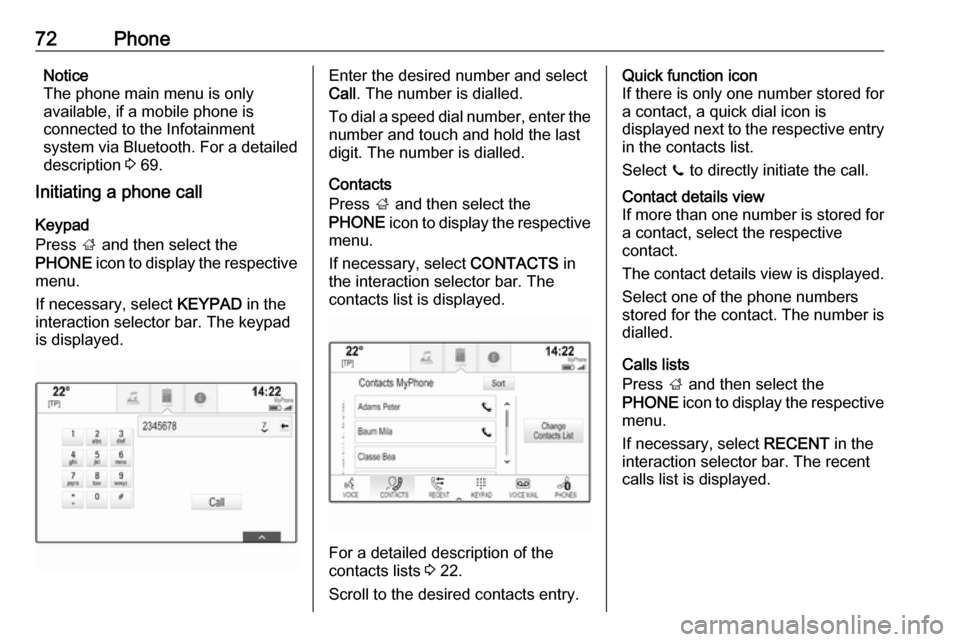
Keypad
Press ; and then select the
PHONE icon to display the respective
menu.
If necessary, select KEYPAD in the
interaction selector bar. The keypad
is displayed.Enter the desired number and select
Call . The number is dialled.
To dial a speed dial number, enter the number and touch and hold the last
digit. The number is dialled.
Contacts
Press ; and then select the
PHONE icon to display the respective
menu.
If necessary, select CONTACTS in
the interaction selector bar. The
contacts list is displayed.
For a detailed description of the
contacts lists 3 22.
Scroll to the desired contacts entry.
Quick function icon
If there is only one number stored for
a contact, a quick dial icon is
displayed next to the respective entry
in the contacts list.
Select z to directly initiate the call.Contact details view
If more than one number is stored for a contact, select the respective
contact.
The contact details view is displayed. Select one of the phone numbers
stored for the contact. The number is
dialled.
Calls lists
Press ; and then select the
PHONE icon to display the respective
menu.
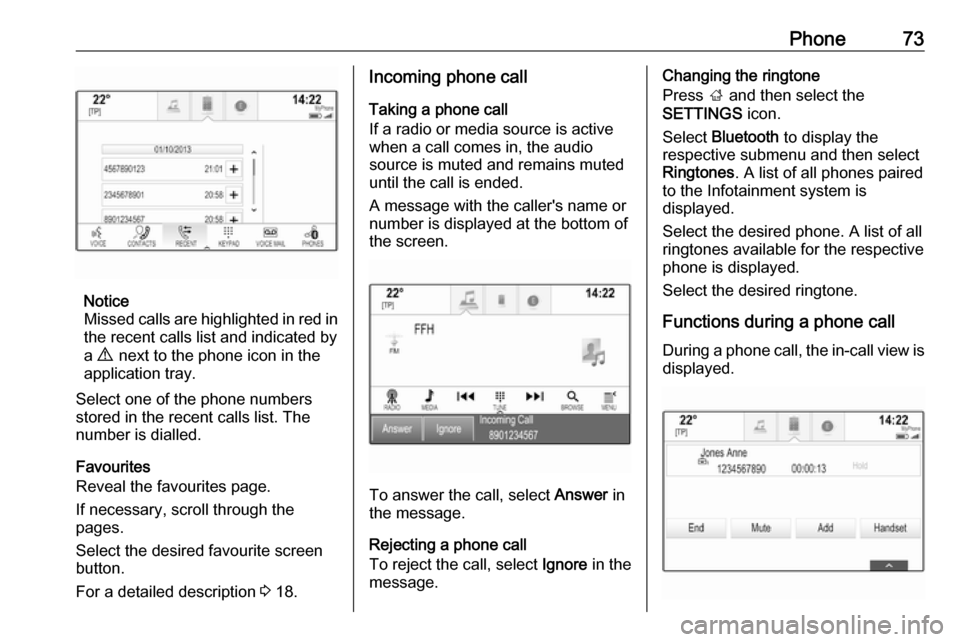
If necessary, select RECENT in the
interaction selector bar. The recent calls list is displayed.
Page 73 of 123
Phone73
Notice
Missed calls are highlighted in red in the recent calls list and indicated by
a 9 next to the phone icon in the
application tray.
Select one of the phone numbers
stored in the recent calls list. The
number is dialled.
Favourites
Reveal the favourites page.
If necessary, scroll through the
pages.
Select the desired favourite screen
button.
For a detailed description 3 18.
Incoming phone call
Taking a phone call
If a radio or media source is active
when a call comes in, the audio
source is muted and remains muted
until the call is ended.
A message with the caller's name or
number is displayed at the bottom of
the screen.
To answer the call, select Answer in
the message.
Rejecting a phone call
To reject the call, select Ignore in the
message.
Changing the ringtone
Press ; and then select the
SETTINGS icon.
Select Bluetooth to display the
respective submenu and then select Ringtones . A list of all phones paired
to the Infotainment system is
displayed.
Select the desired phone. A list of all
ringtones available for the respective
phone is displayed.
Select the desired ringtone.
Functions during a phone call During a phone call, the in-call view is displayed.