phone VAUXHALL INSIGNIA 2017 Infotainment system
[x] Cancel search | Manufacturer: VAUXHALL, Model Year: 2017, Model line: INSIGNIA, Model: VAUXHALL INSIGNIA 2017Pages: 123, PDF Size: 2.38 MB
Page 87 of 123

Introduction.................................. 88
Basic operation ............................ 95
Radio ......................................... 100
CD Player .................................. 106
External devices ........................109
Phone ........................................ 112
Index .......................................... 120R300 Color / R400 Color
Page 88 of 123

88IntroductionIntroductionGeneral information.....................88
Theft-deterrent feature .................89
Control elements overview ..........90
Usage .......................................... 93General information
The Infotainment system provides
you with state-of-the-art in-car
infotainment.
Using the FM, AM or DAB radio
functions, you can register a great
number of stations on various
favourites pages.
You can connect external data
storage devices to the Infotainment
system as further audio sources;
either via a cable or via Bluetooth ®
.
The digital sound processor provides
you with several preset equaliser
modes for sound optimisation.
In addition, the Infotainment system is equipped with a Phone portal that
allows comfortable and safe use of
your mobile phone in the vehicle.
Optionally, the Infotainment system
can be operated using the control
panel or the controls on the steering
wheel.
Notice
This manual describes all options
and features available for the
various Infotainment systems.
Certain descriptions, including thosefor display and menu functions, may
not apply to your vehicle due to
model variant, country
specifications, special equipment or
accessories.
Important information on
operation and traffic safety9 Warning
Drive safely at all times when
using the Infotainment system.
If in doubt, stop the vehicle before operating the Infotainment
system.
9 Warning
In some areas one-way streets
and other roads and entrances
(e.g. pedestrian zones) that you
are not allowed to turn into are not marked on the map. In such areas
the Infotainment system may
issue a warning that must be
accepted. Here you must pay
Page 92 of 123
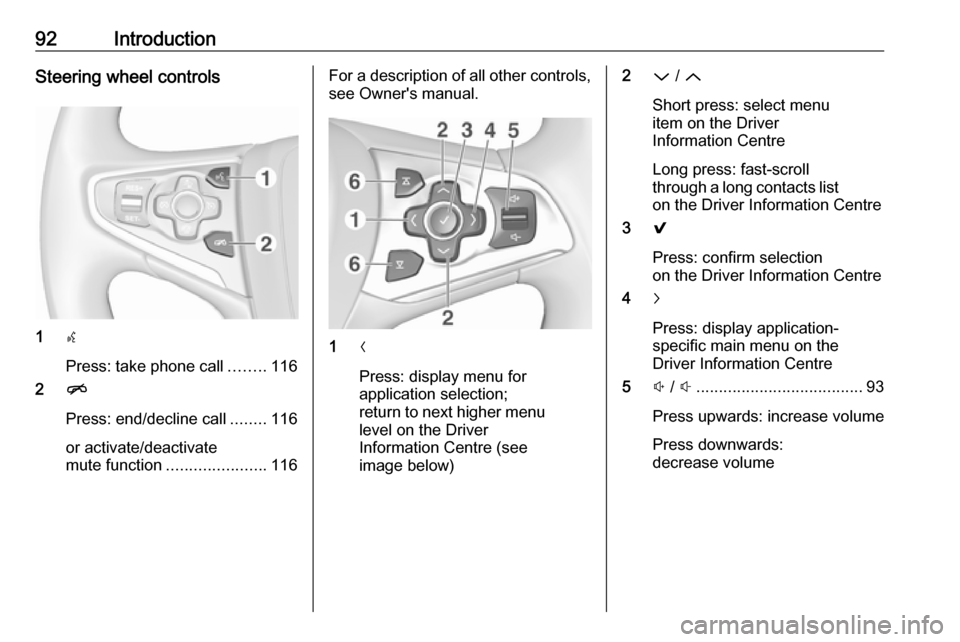
92IntroductionSteering wheel controls
1s
Press: take phone call ........116
2 n
Press: end/decline call ........116
or activate/deactivate
mute function ...................... 116
For a description of all other controls,
see Owner's manual.
1 N
Press: display menu for
application selection;
return to next higher menu
level on the Driver
Information Centre (see
image below)
2 P / Q
Short press: select menu
item on the Driver
Information Centre
Long press: fast-scroll
through a long contacts list on the Driver Information Centre
3 9
Press: confirm selection
on the Driver Information Centre
4 j
Press: display application-
specific main menu on the
Driver Information Centre
5 ! / # ..................................... 93
Press upwards: increase volume
Press downwards:
decrease volume
Page 94 of 123

94IntroductionMute function
Press m to mute the audio sources.
To cancel the mute function: turn m.
Modes of operation Radio
Press RADIO to open the radio main
menu or to toggle between the
different wavebands.
For a detailed description of the radio
functions 3 100.
CD player
Press MEDIA repeatedly to activate
the CD player.
For a detailed description of the CD player functions 3 106.
External devices
Press MEDIA repeatedly to activate
the playback mode for a connected
external device.
For a detailed descriptions on
connecting and operating external
devices 3 109.
Phone
Press ; to display the Home screen.Select PHONE to establish a
Bluetooth connection between the Infotainment system and a mobile
phone.
If a connection can be established,
the main menu of the phone mode is
displayed.
For a detailed description of mobile
phone operation via the Infotainment
system 3 116.
If no connection can be established,
a corresponding message is
displayed. For a detailed description
of preparing and establishing a
Bluetooth connection between the
Infotainment system and a mobile phone 3 113.
Page 98 of 123
98Basic operationValet mode
If valet mode is activated, all vehicle
displays are locked and no changes
may be performed within the system.
Notice
Vehicle-related messages remain
enabled.
Locking the system
Press ; and then select SETTINGS.
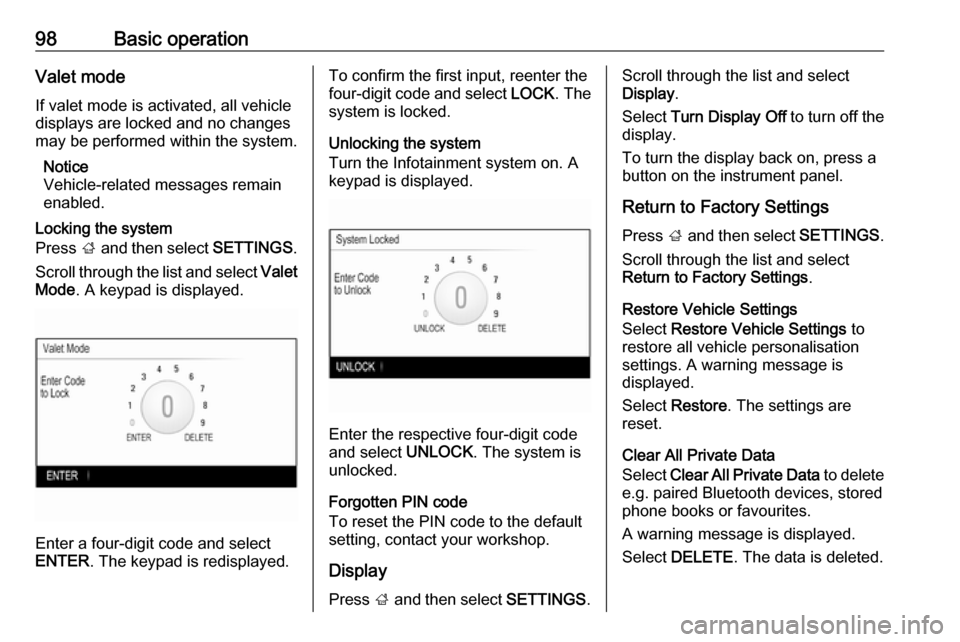
Scroll through the list and select Valet
Mode . A keypad is displayed.
Enter a four-digit code and select
ENTER . The keypad is redisplayed.
To confirm the first input, reenter the
four-digit code and select LOCK. The
system is locked.
Unlocking the system
Turn the Infotainment system on. A
keypad is displayed.
Enter the respective four-digit code
and select UNLOCK. The system is
unlocked.
Forgotten PIN code
To reset the PIN code to the default
setting, contact your workshop.
Display Press ; and then select SETTINGS.
Scroll through the list and select
Display .
Select Turn Display Off to turn off the
display.
To turn the display back on, press a
button on the instrument panel.
Return to Factory Settings Press ; and then select SETTINGS.
Scroll through the list and select
Return to Factory Settings .
Restore Vehicle Settings
Select Restore Vehicle Settings to
restore all vehicle personalisation
settings. A warning message is
displayed.
Select Restore . The settings are
reset.
Clear All Private Data
Select Clear All Private Data to delete
e.g. paired Bluetooth devices, stored
phone books or favourites.
A warning message is displayed.
Select DELETE . The data is deleted.
Page 109 of 123

External devices109External devicesGeneral information...................109
Playing audio ............................. 110General information
An AUX and USB card socket for the
connection of external devices is
located underneath the armrest in the centre console. Find a detailed
description on raising the armrest in
the Owner's Manual.
Notice
The socket must always be kept
clean and dry.
AUX input
It is possible to connect auxiliary
devices to the AUX input.
When connected to the AUX input,
the audio signal of the auxiliary device
is transmitted via the speakers of the
Infotainment system.
The volume and the tone settings can
be adjusted via the Infotainment
system. All other control functions
must be operated via the auxiliary device. The Infotainment system can
play music files contained in auxiliary devices.Connecting/disconnecting a device
To connect the auxiliary device to the
AUX input socket of the Infotainment
system, use the following cable:
3-pole for audio source.
To disconnect the AUX device, select
another function and then remove the AUX device.
USB port
An MP3 player, USB device or
Smartphone can be connected to the USB port.
When connected to the USB port, the
devices mentioned above can be
operated via the controls and menus
of the Infotainment system. The
Infotainment system can play music
files contained in USB storage
devices.
Notice
Not all auxiliary devices are
supported by the Infotainment
system.
Connecting/disconnecting a device
Connect the USB device to the USB port.
Page 110 of 123
110External devicesNotice
If a non-readable USB device is
connected, a corresponding error
message appears and the
Infotainment system automatically
switches to the previous function.
To disconnect the USB device, select
another function and then remove the
USB storage device.Caution
Avoid disconnecting the device
during playback. This may
damage the device or the
Infotainment system.
Bluetooth
Bluetooth enabled audio sources
(e.g. music mobile phones, MP3
players featuring Bluetooth, etc.),
which support the Bluetooth music
profiles A2DP and AVRCP can be
connected wirelessly to the
Infotainment system.
The Infotainment system can play
music files contained in Bluetooth
devices.
Connecting a device
For a detailed description on the
Bluetooth connection 3 113.
File formats
Only devices formatted in the FAT32, NTFS and HFS+ file systems are
supported.
Notice
Some files may not be played properly. This might be due to a
different recording format or the
condition of the file.
Files from online shops to which
Digital Rights Management (DRM)
has been applied cannot be played.
The Infotainment system can play the
following audio files stored on
external devices:
MP3, WMA, AAC and AIF.
When playing a file with ID3 tag
information, the Infotainment system
can display information, e.g. on the
track title and artist.Playing audio
Starting playback Connect the device 3 109.
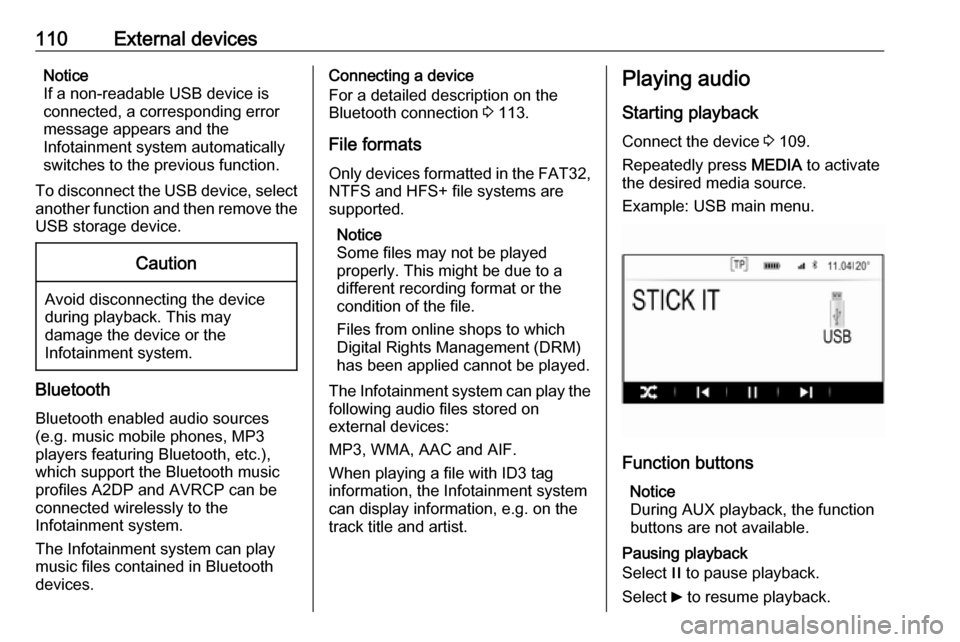
Repeatedly press MEDIA to activate
the desired media source.
Example: USB main menu.
Function buttons
Notice
During AUX playback, the function
buttons are not available.
Pausing playback
Select / to pause playback.
Select 6 to resume playback.
Page 112 of 123

112PhonePhoneGeneral information...................112
Bluetooth connection .................113
Emergency call .......................... 115
Operation ................................... 116
Mobile phones and CB radio
equipment .................................. 118General information
The Phone portal provides you with
the possibility of having mobile phone conversations via a vehicle
microphone and the vehicle
loudspeakers as well as operating the
most important mobile phone
functions via the Infotainment system in the vehicle. To be able to use the
Phone portal, the mobile phone must
be connected to the Infotainment
system via Bluetooth.
Not all Phone functions are supported by every mobile phone. The usable
phone functions depend on the
relevant mobile phone and network
provider. You will find further
information on this in the operating
instructions for your mobile phone, or you can enquire about them with your
network provider.Important information for
operation and traffic safety9 Warning
Mobile phones have effects on
your environment. For this reason, safety regulations and directions
have been prepared. You should
be familiar with the related
directions before you use the
telephone function.
9 Warning
Use of the hands-free facility while
driving can be dangerous because
your concentration is reduced
when telephoning. Park your
vehicle before you use the hands- free facility. Follow the stipulations
of the country in which you find
yourself at present.
Do not forget to follow the special
regulations that apply in specific
areas and always switch off the
mobile phone if the use of mobile
phones is prohibited, if
Page 113 of 123

Phone113interference is caused by the
mobile phone or if dangerous
situations can occur.
Bluetooth
The Phone portal is certified by the
Bluetooth Special Interest Group
(SIG).
You will find further information about the specification on the Internet at
http://www.bluetooth.com.
Bluetooth connection
Bluetooth is a radio standard for the
wireless connection of e.g. mobile
phones or other devices.
To be able to set up a Bluetooth
connection to the Infotainment
system, the Bluetooth function of the
Bluetooth device must be activated.
For further information, please
consult the user guide of the
Bluetooth device.
Via the Bluetooth settings menu,
pairing (PIN code exchange between Bluetooth device and Infotainment
system) and connecting of the
Bluetooth devices to the Infotainment
system are carried out.
Bluetooth settings menu
Press ; and then select SETTINGS.
Select Bluetooth to display the
respective submenu.
Pairing a device
Important information ● Up to five devices can be paired to the system.
● Only one paired device can be connected to the Infotainment
system at a time.
● Pairing normally only needs to be
carried out once, unless the
device is deleted from the list of
paired devices. If the device has
been connected previously, the
Infotainment system establishes
the connection automatically.
● Bluetooth operation considerably
drains the device's battery.
Therefore, connect the device to
the power outlet for charging.Pairing via the settings application
1. Press ; and then select
SETTINGS .
Select Bluetooth to display the
respective submenu.
2. Select Pair Device or select
Device Management to display
the device list and then select
PAIR .
3. A message is displayed on the Infotainment system indicating
the name and PIN code of the
Infotainment system.
4. Start Bluetooth searching on the Bluetooth device to be paired.
5. Confirm pairing: ● If SSP (secure simple pairing) is supported:
Compare the PIN code (if
demanded) and confirm the messages on the
Infotainment system and the
Bluetooth device.
● If SSP (secure simple pairing) is not supported:
Page 114 of 123

114PhoneEnter the Infotainment PIN
code on the Bluetooth device
and confirm your input.
6. The Infotainment system and the device are paired.
7. If available on the Bluetooth device, phone book and calls listsare downloaded to the
Infotainment system. If required,
confirm the respective message
on your smartphone.
Notice
For the contacts to be read by the
Infotainment system, they must be
stored in the phone memory of the mobile phone.
If this function is not supported by
the Bluetooth device, a
corresponding message is
displayed on the Infotainment
system.
8. If the device has been successfully paired, the device list
is redisplayed.
Notice
If the Bluetooth connection fails, a
failure message is displayed on the
screen of the Infotainment system.Pairing via the Phone application
1. Press ; and then select PHONE.
The phone main menu is
displayed.
2. Select Manage Phones to display
the device list.
3. Select PAIR.
4. Proceed from step 3 of "Pairing via the settings application" (see
above).
5. If the device has been successfully paired, the phone
menu is displayed.
Notice
If the Bluetooth connection fails, a
failure message is displayed on the
screen of the Infotainment system.
Pairing via the Audio application Notice
The Bluetooth audio main menu is
only available if a Bluetooth music
device is already paired to the
Infotainment system.1. Repeatedly press MEDIA to
display the Bluetooth music main
menu and then press MENU.
2. Select Manage Phones to display
the device list.
3. To pair a new device, select PAIR.
4. Proceed from step 3 of "Pairing via the settings application" (see
above).
5. If the device has been successfully paired, the device list
is redisplayed.
Notice
If the Bluetooth connection fails, a
failure message is displayed on the
screen of the Infotainment system.
Connecting a paired device 1. Press ; and then select
SETTINGS .
Select Bluetooth to display the
respective submenu.
2. Select Device Management to
display the device list.