phone VAUXHALL INSIGNIA 2017 Infotainment system
[x] Cancel search | Manufacturer: VAUXHALL, Model Year: 2017, Model line: INSIGNIA, Model: VAUXHALL INSIGNIA 2017Pages: 123, PDF Size: 2.38 MB
Page 115 of 123
Phone1153. Select the Bluetooth device youwish to connect and then select
CONNECT . You are prompted
with a message.
4. Confirm the message. The device
is connected and displayed within the Connected field of the device
list.
Disconnecting a device 1. Press ; and then select
SETTINGS .
Select Bluetooth to display the
respective submenu.
2. Select Device Management to
display the device list.
3. Select the Bluetooth device you wish to disconnect and then select
DROP . You are prompted with a
message.
4. Confirm the message. The device
is disconnected and displayed
within the Not Connected field of
the device list.
Deleting a device 1. Press ; and then select
SETTINGS .Select Bluetooth to display the
respective submenu.
2. Select Device Management to
display the device list.
3. Select the Bluetooth device you wish to delete and then select
DELETE . You are prompted with
a message.
4. Confirm the message. The device
is deleted from the list.
Emergency call9 Warning
Connection setup cannot be
guaranteed in all situations.For this reason you should not rely
exclusively on a mobile phone
when a vitally important
communication (e.g. a medical
emergency) is concerned.
In some networks it may be
necessary for a valid SIM card to
be properly inserted in the mobile
phone.
9 Warning
Bear in mind that you can make
and receive calls with the mobile
phone, if it is in a service area with
a sufficiently strong signal. Under
certain circumstances emergency
calls cannot be made on all mobile phone networks; it is possible that
they cannot be made when certain network services and/or telephone
functions are active. You can
enquire about this with the local
network operators.
The emergency call number can
differ depending on the region and country. Please enquire
beforehand about the correct
emergency call number for the
relevant region.
Making an emergency call
Dial the emergency call number (e.g.
112 ).
The telephone connection to the
emergency call centre is set up.
Answer when the service personnel
questions you about the emergency.
Page 116 of 123
116Phone9Warning
Do not end the call until you are
requested to do so by the
emergency call centre.
Operation
As soon as a connection via
Bluetooth has been set up between
your mobile phone and the
Infotainment system, you can operate many functions of your mobile phone
via the Infotainment system.
Notice
Not every mobile phone supports all
functions of the Phone portal.
Therefore, deviations from the range
of functions described below are
possible.
Phone application
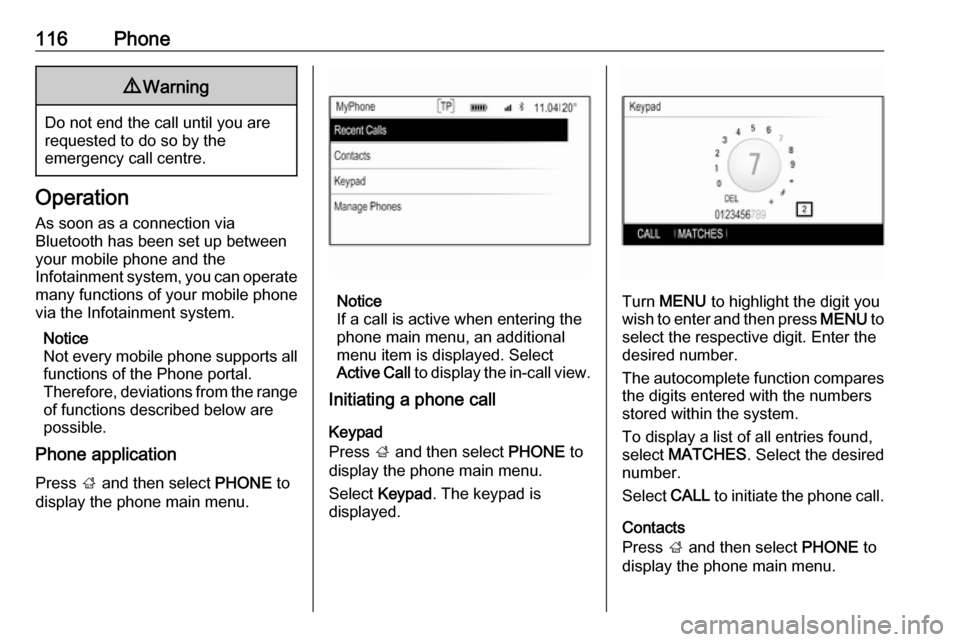
Press ; and then select PHONE to
display the phone main menu.
Notice
If a call is active when entering the
phone main menu, an additional
menu item is displayed. Select
Active Call to display the in-call view.
Initiating a phone call
Keypad
Press ; and then select PHONE to
display the phone main menu.
Select Keypad . The keypad is
displayed.Turn MENU to highlight the digit you
wish to enter and then press MENU to
select the respective digit. Enter the
desired number.
The autocomplete function compares the digits entered with the numbers
stored within the system.
To display a list of all entries found,
select MATCHES . Select the desired
number.
Select CALL to initiate the phone call.
Contacts
Press ; and then select PHONE to
display the phone main menu.
Page 117 of 123
Phone117Select Contacts . The contacts list is
displayed.
Scroll through the list and select the
desired contact entry. The contact
details view is displayed.
Select one of the phone numbers
stored under that contact. The
number is dialled.
Calls lists
Press ; and then select PHONE to
display the phone main menu.
Select Recent Calls . The recent calls
list is displayed.
Notice
The recent calls list for the currently
connected mobile phone is
displayed.
Select one of the phone numbers
stored in the recent calls list. The
number is dialled.
Incoming phone call
Taking a phone call
If a radio or media source is active
when a call comes in, the audio
source is muted and remains muted
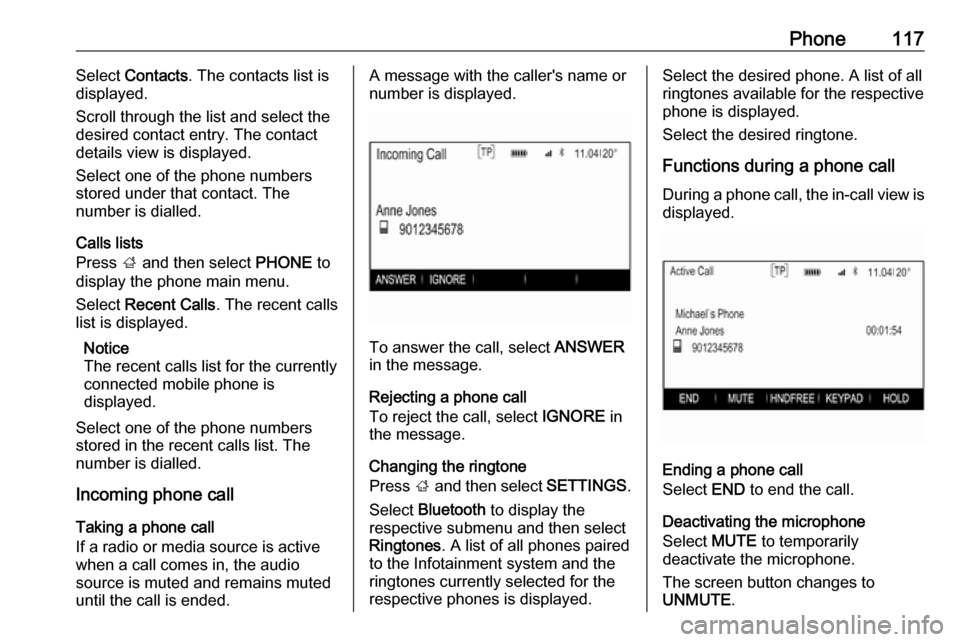
until the call is ended.A message with the caller's name or
number is displayed.
To answer the call, select ANSWER
in the message.
Rejecting a phone call
To reject the call, select IGNORE in
the message.
Changing the ringtone
Press ; and then select SETTINGS.
Select Bluetooth to display the
respective submenu and then select Ringtones . A list of all phones paired
to the Infotainment system and the ringtones currently selected for the
respective phones is displayed.
Select the desired phone. A list of all
ringtones available for the respective
phone is displayed.
Select the desired ringtone.
Functions during a phone call During a phone call, the in-call view is displayed.
Ending a phone call
Select END to end the call.
Deactivating the microphone
Select MUTE to temporarily
deactivate the microphone.
The screen button changes to
UNMUTE .
Page 118 of 123
118PhoneTo reactivate the microphone, select
UNMUTE .
Deactivating the handsfree function
To continue the conversation on your
mobile phone, select HANDSET.
The screen button changes to
HNDFREE .
To reactivate the handsfree function,
select HNDFREE .
Second phone call
Initiating a second phone call
To initiate a second phone call, select HOLD in the in-call view. The active
phone call is put on hold.
Initiate a second phone call. If you
wish to use the keypad, select
KEYPAD in the in-call view. For a
detailed description, see above.
Both calls are displayed in the in-call view.
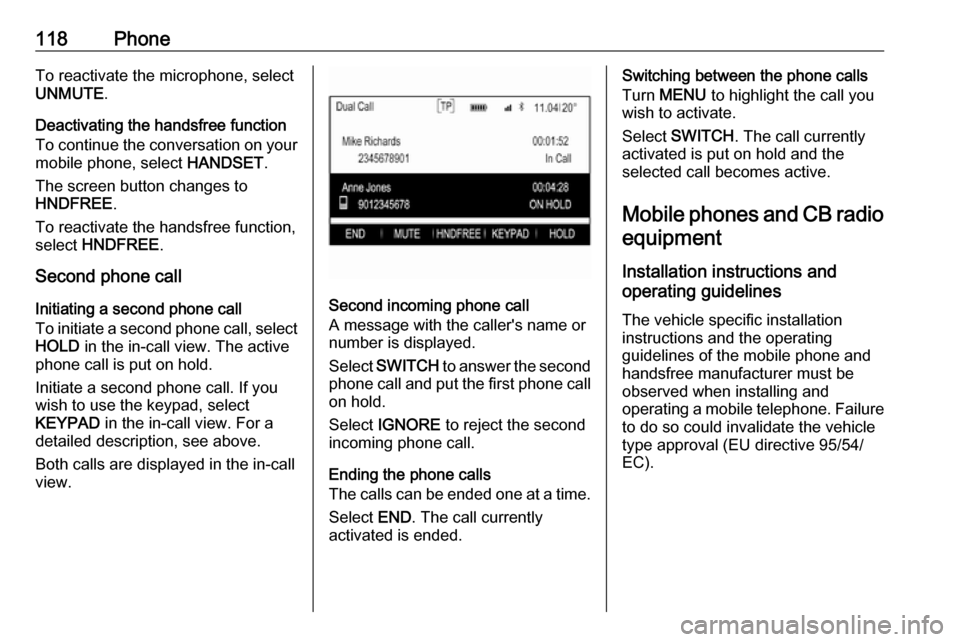
Second incoming phone call
A message with the caller's name or
number is displayed.
Select SWITCH to answer the second
phone call and put the first phone call on hold.
Select IGNORE to reject the second
incoming phone call.
Ending the phone calls
The calls can be ended one at a time.
Select END. The call currently
activated is ended.
Switching between the phone calls
Turn MENU to highlight the call you
wish to activate.
Select SWITCH . The call currently
activated is put on hold and the selected call becomes active.
Mobile phones and CB radio equipment
Installation instructions and
operating guidelines
The vehicle specific installation
instructions and the operating
guidelines of the mobile phone and
handsfree manufacturer must be
observed when installing and
operating a mobile telephone. Failure to do so could invalidate the vehicletype approval (EU directive 95/54/
EC).
Page 119 of 123
Phone119Recommendations for fault-free
operation:
● The exterior antenna must be professionally installed to obtain
the maximum range possible.
● Maximum transmission power: 10 watts.
● The mobile phone must be installed in a suitable spot.
Consider relevant note in the
Owner's manual, chapter Airbag
system .
Seek advice on predetermined
installation points for the external
antenna or equipment holder and
ways of using devices with a
transmission power exceeding
10 watts.
Use of a handsfree attachment without external antenna with mobile
telephone standards GSM
900/1800/1900 and UMTS is only
permitted if the maximum
transmission power of the mobile
telephone is 2 watts for GSM 900 or
1 watt for the other types.For reasons of safety, do not use the
phone while driving. Even use of a handsfree set can be a distraction
while driving.9 Warning
Operation of radio equipment and
mobile telephones which fail to
meet above mentioned mobile
telephone standards is only
permitted using an antenna
located outside of the vehicle.
Caution
Mobile telephones and radio
equipment may lead to
malfunctions in the vehicle
electronics when operated inside
the vehicle with no exterior
antenna, unless the above
mentioned regulations are
observed.
Page 120 of 123

120IndexAActivating AUX............................ 110
Activating Bluetooth music .........110
Activating CD player ...................107
Activating radio ........................... 100
Activating the Infotainment system 93
Activating the phone portal .........116
Activating USB............................ 110
Audio files ................................... 109
Auto Set ........................................ 97
Auto volume control ......................97
AUX ............................................ 109
B BACK button ................................. 95
Balance......................................... 96
Basic operation ............................. 95
Five-way-controller ....................95
Instrument panel .......................95
Bass.............................................. 96
Bluetooth connection ..................113
Bluetooth music .......................... 109
C
Category list................................ 100
CD player.................................... 106
Clock display ................................ 97
Control elements Infotainment system ..................90
Steering wheel .......................... 90
Control elements overview ...........90D
DAB ............................................ 104
DAB linking ................................. 104
Digital audio broadcasting ..........104
E Emergency call ........................... 115
EQ ................................................ 96
Equaliser....................................... 96
F
Fader ............................................ 96
Favourite lists ............................. 101
Retrieving stations................... 101
Storing stations .......................101
File formats Audio files................................ 109
Five-way-controller .......................95
Forgotten PIN ............................... 97
Frequency list ............................. 100
G General information ....106, 109, 112
AUX ......................................... 109
Bluetooth music....................... 109
CD ........................................... 106
Infotainment system ..................88
Phone ...................................... 112
Radio ....................................... 100
USB ......................................... 109
Page 121 of 123

121HHome button ................................. 95
I
Infotainment control panel ............90
Intellitext ..................................... 104
L
Language ..................................... 97
L-Band ........................................ 104
M
Maximum startup volume .............97
MENU knob .................................. 95
Menu operation............................. 95
Midrange....................................... 96
Mobile phones and CB radio equipment .............................. 118
Mute.............................................. 93
O Operation .................................... 116
AUX ......................................... 110
Bluetooth music....................... 110
CD ........................................... 107
Infotainment system ..................93
Menu ......................................... 95
Phone ...................................... 116
Radio ....................................... 100
USB ......................................... 110P
Pairing ........................................ 113
Phone Bluetooth ................................. 112
Bluetooth connection ..............113
Emergency calls ......................115
General information ................112
Handsfree mode .....................116
Phone book ............................. 116
Recent calls............................. 116
Ringtone .................................. 116
Phone book ................................ 116
Phone call Initiating ................................... 116
Rejecting ................................. 116
Taking ..................................... 116
Playing audio .............................. 110
R Radio Category list ............................ 100
DAB ......................................... 104
DAB announcements ..............104
DAB menu ............................... 104
Digital Audio Broadcasting ......104
Favourite lists .......................... 101
FM menu ................................. 103
Frequency list .......................... 100
Intellitext .................................. 104
L-Band..................................... 104Radio Data System .................103
RDS......................................... 103
Region ..................................... 103
Regionalisation ....................... 103
Retrieving stations................... 101
Station list................................ 100
Station search ......................... 100
Storing stations .......................101
TP............................................ 103
Traffic Programme ..................103
Waveband ............................... 100
Radio data system (RDS) ..........103
Region ........................................ 103
Regionalisation ........................... 103
Retrieving stations ......................101
Return to factory settings.............. 97
Ringtone ..................................... 116
S Station list ................................... 100
Station search............................. 100
Storing stations ........................... 101
Switching the Infotainment system on .................................. 93
System settings ............................ 97
Display ...................................... 97
Language .................................. 97
Return to factory settings ..........97
Time and Date........................... 97
Valet mode ................................ 97
Page 122 of 123

122T
Theft-deterrent feature ................. 89
Time.............................................. 97 Tone settings ................................ 96
TP ............................................... 103
Traffic Programme ......................103
Treble ........................................... 96
U
Usage ........................... 93, 100, 107
AUX ......................................... 110
Bluetooth music....................... 110
CD ........................................... 107
Infotainment system ..................93
Menu ......................................... 95
Phone ...................................... 116
USB ......................................... 110
USB ............................................ 109
V Valet mode Locking ...................................... 97
Unlocking .................................. 97
Volume Auto volume control ..................97
Maximum startup volume ..........97
Mute function............................. 93
Setting the volume ....................93Speed compensated volume ....97
Volume limitation at high temperatures ............................. 93
Volume settings ............................ 97
W
Waveband selection ...................100