ECU VAUXHALL INSIGNIA 2019.5 Owner's Guide
[x] Cancel search | Manufacturer: VAUXHALL, Model Year: 2019.5, Model line: INSIGNIA, Model: VAUXHALL INSIGNIA 2019.5Pages: 321, PDF Size: 9.37 MB
Page 274 of 321
272Vehicle care● Use the jack only to changewheels in case of puncture, not
for seasonal winter or summer
tyre change.
● The jack is maintenance-free.
● If the ground on which the vehicle
is standing is soft, a solid board
(max. 1 cm thick) should be
placed under the jack.
● Take heavy objects out of the vehicle before jacking up.
● No people or animals may be in the vehicle when it is jacked-up.
● Never crawl under a jacked-up vehicle.
● Do not start the vehicle when it is
raised on the jack.
● Clean wheel nuts and thread with
a clean cloth before mounting the
wheel.9 Warning
Do not grease wheel bolt, wheel
nut and wheel nut cone.
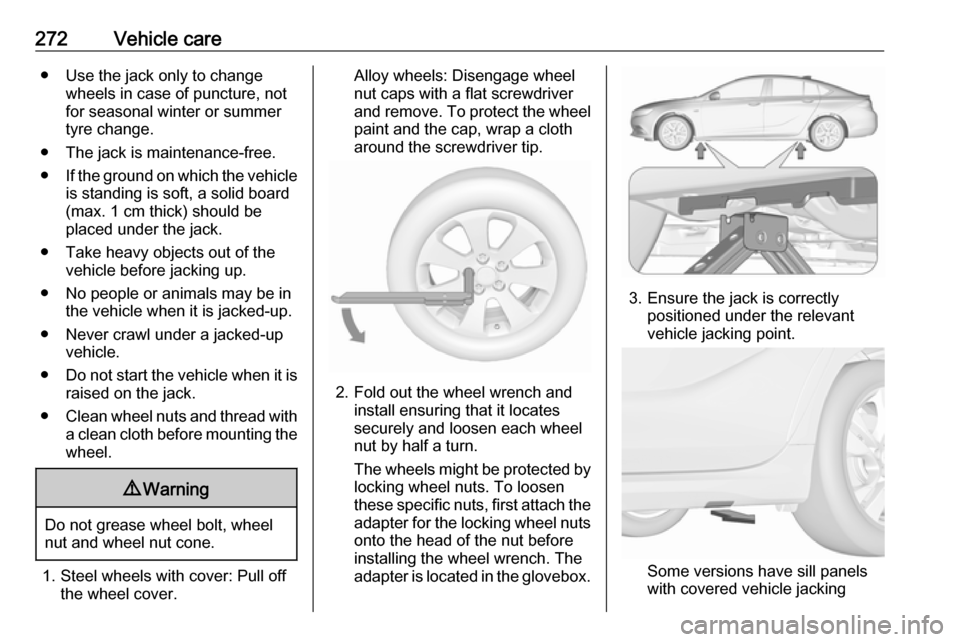
1. Steel wheels with cover: Pull off the wheel cover.
Alloy wheels: Disengage wheel
nut caps with a flat screwdriver
and remove. To protect the wheel paint and the cap, wrap a cloth
around the screwdriver tip.
2. Fold out the wheel wrench and install ensuring that it locates
securely and loosen each wheel
nut by half a turn.
The wheels might be protected by
locking wheel nuts. To loosen
these specific nuts, first attach the adapter for the locking wheel nuts
onto the head of the nut before
installing the wheel wrench. The
adapter is located in the glovebox.
3. Ensure the jack is correctly positioned under the relevant
vehicle jacking point.
Some versions have sill panels
with covered vehicle jacking
Page 275 of 321

Vehicle care273points: pull out the cover at the
respective jacking point firstly.
4. Set the jack to the necessary height. Position it directly below
the jacking point in a manner that
prevents it from slipping.
Attach wheel wrench and with the
jack correctly aligned rotate wheel wrench until wheel is clear of the
ground.
5. Unscrew the wheel nuts. 6. Change the wheel.
7. Screw on the wheel nuts.
8. Lower the vehicle and remove jack.
9. Install the wheel wrench ensuring that it is located securely and
tighten each nut in a crosswise
sequence. Tightening torque is
140 Nm for all models except GSi.
GSi models have a tightening
torque of 190 Nm
10. Align the valve hole in the wheel cover with the tyre valve before
installing.
Install wheel nut caps.
11. Install vehicle jacking point cover,
if removed before.
12. Stow and secure the replaced wheel, the vehicle tools 3 258 and
the adapter for the locking wheel
nuts 3 72.
13. Check the tyre pressure of the installed tyre and the wheel nut
torque as soon as possible.
Stowing the replaced full size
wheel in the spare wheel well
Secure a damaged full size wheel facing upwards with the wing nut in
the spare wheel well after mounting
an extension bolt on the thread bolt.
The extension bolt is stowed with the
vehicle tools 3 258. To secure the
wheel:
Page 276 of 321

274Vehicle care
1. Stick the extension bolt onto thethread bolt.
2. Store the damaged wheel outside
up in the spare wheel well and
secure it by turning the wing nut
clockwise on the extension bolt.
9 Warning
Storing a jack, a wheel or other
equipment in the load
compartment could cause injury if they are not fixed properly. During
a sudden stop or a collision, looseequipment could strike someone.
Always store jack and tools in the
respective storage compartments
and secure them by fixing.
Damaged wheel placed in the load
compartment must always be
secured with the strap.
Spare wheel with directional tyre
The following applies to tyres fitted
opposing the rolling direction:
● Driveability may be affected. Have the defective tyre renewed
or repaired as soon as possible
and fit it instead of the spare
wheel.
● Drive particularly carefully on wet
and snow-covered road
surfaces.
Jump starting
A vehicle with a discharged vehicle
battery can be started using jump
leads and the vehicle battery of
another vehicle.
Do not start with quick charger.9 Warning
Be extremely careful when starting
with jump leads. Any deviation
from the following instructions can
lead to injuries or damage caused
by battery explosion or damage to the electrical systems of both
vehicles.
9 Warning
Avoid contact of the battery with
eyes, skin, fabrics and painted
surfaces. The fluid contains
sulphuric acid which can cause
injuries and damage in the event
of direct contact.
● Never expose the vehicle battery
to naked flames or sparks.
Page 310 of 321

308Customer informationunzipThis is version 2005-Feb-10 of the
Info-ZIP copyright and license. The
definitive version of this document
should be available at ftp://ftp.info-
zip.org/pub/infozip/license.html
indefinitely.
Copyright (c) 1990-2005 Info-ZIP. All
rights reserved.
For the purposes of this copyright and
license, “Info-ZIP” is defined as the
following set of individuals:
Mark Adler, John Bush, Karl Davis,
Harald Denker, Jean-Michel Dubois,
Jean-loup Gailly, Hunter Goatley, Ed
Gordon, Ian Gorman, Chris Herborth, Dirk Haase, Greg Hartwig, Robert
Heath, Jonathan Hudson, Paul
Kienitz, David Kirschbaum, Johnny
Lee, Onno van der Linden, Igor
Mandrichenko, Steve P. Miller, Sergio
Monesi, Keith Owens, George
Petrov, Greg Roelofs, Kai Uwe
Rommel, Steve Salisbury, Dave
Smith, Steven M. Schweda, Christian Spieler, Cosmin Truta, Antoine
Verheijen, Paul von Behren, Rich
Wales, Mike White.This software is provided “as is,”
without warranty of any kind, express
or implied. In no event shall Info-ZIP
or its contributors be held liable for
any direct, indirect, incidental, special or consequential damages arising out
of the use of or inability to use this
software.
Permission is granted to anyone to
use this software for any purpose,
including commercial applications,
and to alter it and redistribute it freely,
subject to the following restrictions:
1. Redistributions of source code must retain the above copyright
notice, definition, disclaimer, and
this list of conditions.
2. Redistributions in binary form (compiled executables) must
reproduce the above copyright
notice, definition, disclaimer, and
this list of conditions in
documentation and/or other
materials provided with the
distribution. The sole exception to
this condition is redistribution of a
standard UnZipSFX binary
(including SFXWiz) as part of a
self-extracting archive; that ispermitted without inclusion of this
license, as long as the normal
SFX banner has not been
removed from the binary or
disabled.
3. Altered versions--including, but not limited to, ports to new
operating systems, existing ports
with new graphical interfaces, and dynamic, shared, or static library
versions--must be plainly marked
as such and must not be
misrepresented as being the
original source. Such altered
versions also must not be
misrepresented as being Info-ZIP
releases--including, but not
limited to, labeling of the altered
versions with the names “Info-
ZIP” (or any variation thereof,
including, but not limited to,
different capitalizations), “Pocket
UnZip,” “WiZ” or “MacZip” without the explicit permission of Info-ZIP.
Such altered versions are further
prohibited from misrepresentative
Page 320 of 321

318Traffic sign assistant...........110, 219
Trailer coupling ........................... 230
Trailer stability assist .................233
Trailer towing ............................. 230
Transmission ............................... 16
Transmission display .................168
Tread depth ............................... 263
Trip odometer ............................ 101
Turn lights .......................... 104, 139
Tyre chains ................................ 265
Tyre designations ......................260
Tyre pressure ............................ 260
Tyre pressure monitoring system ............................. 108, 261
Tyre pressures ........................... 296
Tyre repair kit ............................. 265
U
Upholstery .................................. 280
Uplevel display ........................... 111
USB port ....................................... 92
Using this manual ..........................3
V
Valet mode ................................. 117
Vehicle battery ........................... 240
Vehicle checks............................ 236
Vehicle data ................................ 286
Vehicle data recording and privacy ..................................... 310
Vehicle detected ahead ..............110Vehicle dimensions .................... 294
Vehicle identification number ....284
Vehicle jack ................................ 258
Vehicle messages .....................122
Vehicle personalisation .............123
Vehicle security ............................ 33
Vehicle specific data ......................3
Vehicle storage ........................... 235
Vehicle tools ............................... 258
Vehicle unlocking ........................... 6
Ventilating ..................................... 53
W
Warning chimes .........................122
Warning lights ............................. 100
Warning triangle .......................... 82
Washer and wiper systems .........13
Washer fluid ............................... 239
Wheel changing .........................270
Wheel covers ............................. 264
Wheels and tyres .......................259
Windows ....................................... 39
Windscreen................................... 39
Windscreen wiper and washer ....88
Winter tyres ............................... 259
Wiper blade replacement ..........242