set VAUXHALL INSIGNIA 2020 Infotainment system
[x] Cancel search | Manufacturer: VAUXHALL, Model Year: 2020, Model line: INSIGNIA, Model: VAUXHALL INSIGNIA 2020Pages: 85, PDF Size: 1.89 MB
Page 22 of 85

22Speech recognitionE.g., for entering an address in
France, the display must be set to
French.
Notice
For a multilingual country, several
languages can be used.
E.g. French, German or Italian can
be used for Switzerland.Input order for destination addresses
The order in which the parts of an
address need to be entered using the speech recognition system is
dependent on the country where the
destination is located.
Notice
The system only works with
complete addresses. The city and
the street need to be entered.
Setting up speech recognition
Several settings and adaptions for the
embedded speech recognition of the
Infotainment system can be
performed, such as the frequency of
command confirmations by the user
or the level of detailed feedback given by the system.
To set up speech recognition, go to
the homescreen and select Settings I
System I Voice .
Prompt Length
The prompt length can be set to either
Informative , Short or Auto . When set
to Auto , the system provides more
detailed feedback in the beginning of
its first usage. The system adjusts
automatically to the speech habits.
The more familiar you are with the system, the less detailed feedback is
given by the system.
To set up the prompt length, go to the
homescreen and select Settings I
System I Voice I Prompt Length .
Voice pass-thru application
The voice pass-thru application of the
Infotainment system allows access to the speech recognition commands on a smartphone.
To activate the speech recognition on
a smartphone, press and hold Y on
the steering wheel when phone projection is active.The availability of this function
depends on the smartphone. For
more information on compatibility,
see our website.
Usage
Activating speech recognition Notice
Speech recognition is not available
during an active phone call.
1. Press Y on the steering wheel.
The audio system mutes, a voice
output message asks for a
command, and help menus with
the most important commands
currently available are shown on
the Info Display. It is highly
recommended to follow the
wording suggestions of the
system.
Do not talk when the speech
recognition symbol is red and no
beep has been heard.
Page 25 of 85
Phone25PhoneGeneral information.....................25
Bluetooth connection ...................25
Using smartphone applications ...27General information
Not every mobile phone fully supports
the phone function. Therefore,
deviations from the range of functions
described below are possible.
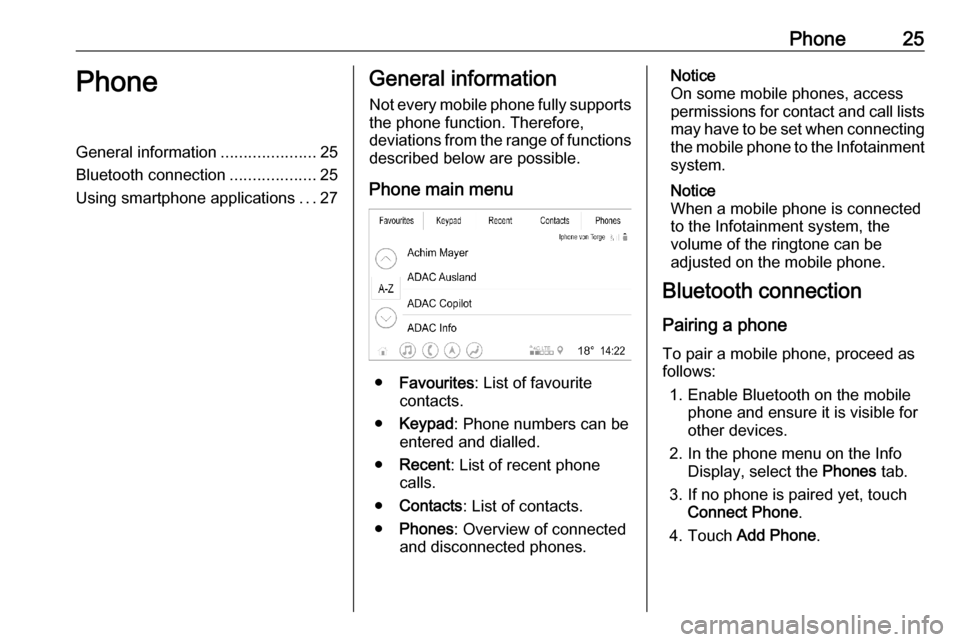
Phone main menu
● Favourites : List of favourite
contacts.
● Keypad : Phone numbers can be
entered and dialled.
● Recent : List of recent phone
calls.
● Contacts : List of contacts.
● Phones : Overview of connected
and disconnected phones.
Notice
On some mobile phones, access
permissions for contact and call lists
may have to be set when connecting the mobile phone to the Infotainment
system.
Notice
When a mobile phone is connected
to the Infotainment system, the
volume of the ringtone can be
adjusted on the mobile phone.
Bluetooth connection
Pairing a phone
To pair a mobile phone, proceed as follows:
1. Enable Bluetooth on the mobile phone and ensure it is visible for
other devices.
2. In the phone menu on the Info Display, select the Phones tab.
3. If no phone is paired yet, touch Connect Phone .
4. Touch Add Phone .
Page 26 of 85

26Phone5. Select the Infotainment systemfrom the Bluetooth device list onthe mobile phone.
6. Compare and confirm the shown code on the mobile phone and on
the Info Display. Touch Pair on the
Info Display.
Some mobile phones require
access to certain phone features,
follow the instructions.
Once the mobile phone is
successfully paired, it will be
connected automatically and shown
as connected.
Connecting
If several paired mobile phones enter
the range of the system at the same
time:
● only the phone first detected by the system will be connected
automatically or
● the mobile phone assigned as First to Connect is connected
automatically or
● Secondary Phone is enabled and
two phones are allowed to
connect at the same timeFirst to Connect
Assign a phone as primary phone:
1. In the phone menu on the Info Display, select Phones.
2. Touch / next to the paired
mobile phone to open the settings menu.
3. Enable First to Connect .
Notice
Only one phone can be assigned as
primary phone at a time.
Secondary Phone
It is possible to connect a second mobile phone alongside the primary
phone to the system.
Allow two phones to connect at the
same time via Bluetooth:
1. In the phone menu on the Info Display, select Phones.
2. Touch / next to the paired
mobile phone to open the settings menu.
3. Enable Secondary Phone .
The phone that has been connected
first will automatically be assigned as
primary phone. The primary phone isable to operate outgoing calls and to receive incoming calls. It also
provides access to its contact list.
The secondary phone is only able to
receive incoming calls via the
Infotainment system. However, it is
possible to operate an outgoing call
via the secondary mobile phone itself,
but using the vehicle's microphone.
Switching mobile phone
assignment
It is possible to switch the phone
assignment of the mobile phones
from either primary to secondary
phone or vice versa.
Precondition is that Secondary
Phone is enabled for both mobile
phones.
Page 27 of 85

Phone27To switch the mobile phone
assignment:
1. In the phone menu on the Info Display, select Phones.
2. Touch on the current secondary phone to define it as the primary
phone.
3. The mobile phone assignment changes from either primary to
secondary phone or vice versa.
When First to Connect is enabled for
one mobile phone, this phone will automatically be connected as
primary phone.
Disconnecting a connected
mobile phone
1. In the phone menu on the Info Display, select Phones.
2. Touch / next to the paired
mobile phone to open the settings menu.
3. Touch Disconnect .Deleting a paired mobile phone
1. In the phone menu on the Info Display, select Phones.
2. Touch / next to the paired
mobile phone to open the settings menu.
3. Touch Forget Phone .
Using smartphone
applications
The phone projection applications
Apple CarPlay and Android Auto
display selected applications from a
smartphone on the Info Display and
allow their operation directly via the
Infotainment controls.
Check with the device's manufacturer if this function is compatible with the
smartphone and if this application is
available in the country you are in.
Preparing the smartphone
Android phone: Download the
Android Auto application to the
smartphone from the Google Play Store.iPhone ®
: Make sure Siri ®
is activated
on the smartphone.
Activating phone projection
To activate or deactivate phone
projection, go to the homescreen and select Settings I Apps .
Scroll through the list and select
Apple CarPlay or Android Auto .
Make sure the respective application
is activated.
Connecting the mobile phone Connect the smartphone to the USB
port via an original cable provided by
the manufacturer of the smartphone.
Returning to the Infotainment
screen
Press !.
Page 29 of 85

29SSecond phone .............................. 25
Smartphone Phone projection .......................27
Sound settings .............................. 15
Speech commands .......................22
Speech recognition .......................21
Steering wheel controls ..................6
System settings ............................ 10
T
Traffic programme ........................15
U Usage ........................................... 22
USB port ....................................... 15
User profiles ................................. 13
Using smartphone applications ....27
V
Voice pass-thru application ....21, 22
Voice prompts............................... 22
Voice recognition ..........................21
W
Wi-Fi connection ........................... 10
Page 34 of 85

34Introduction1Info Display / home screen ...39
2 Home menu .......................... 39
Screen buttons for access to:
Audio : audio functions
Gallery : picture and movie
functions
Phone : mobile phone functions
Projection : phone projection
or Nav : BringGo ®
app
Navigation : embedded
navigation
Settings : system settings
3 Time, date and
temperature indicators ..........42
4 w
Short press: open phone
menu ..................................... 76
or open phone projection
function (if activated) .............56
Long press: activate
speech recognition ................725e
Short press: skip to next
station when radio active ......45
or skip to next track when
external devices active .........53
Long press: seek up when
radio active ............................ 45
or fast forward when
external devices active .........53
6 )
Short press: switch on
Infotainment system if
turned off ............................... 35
or mute system if turned on . 35
Long press: switch off
Infotainment system ..............35
Turn: adjust volume ..............35
7 d
Short press: skip to
previous station when
radio active ............................ 45or skip to previous track
when external devices
active ..................................... 53
Long press: seek down
when radio active ..................45
or fast rewind when
external devices active .........53
8 !
Short press: display the
home screen ......................... 35
Long press: open phone
projection function (if
activated) .............................. 56
Page 36 of 85

36IntroductionAutomatic switch-off
If the Infotainment system has been
switched on by pressing ) while the
ignition is switched off, it will
automatically switch off again after
10 minutes.
Setting the volume Turn ). The current setting is shown
on the display.
When the Infotainment system is
switched on, the last selected volume
is set, provided that it is lower than the maximum start-up volume. For a
detailed description 3 42.
Speed compensated volume
When the speed compensated
volume is activated 3 42, the
volume is adapted automatically to
make up for the road and wind noise
while driving.
Mute
Press ) to mute the Infotainment
system.
To cancel the mute function,
press ) again. The last selected
volume is set again.Modes of operation
Press ! to display the home screen.
Notice
For a detailed description of menu
operation via touchscreen 3 39.
Audio
Select Audio to open the main menu
of the last selected audio mode.
Select Source on the screen to
display the interaction selector bar.
To change to another audio mode,
touch one of the items in the
interaction selector bar.
For a detailed description of:
● radio functions 3 45
● external devices 3 53
Gallery
Select Gallery to open the picture and
movie menu for files stored on an
external device, e.g. USB device or
smartphone.
Select - or m to display the picture or
movie menu. Select the desired
picture or movie file to show the
respective item on the display.
Page 38 of 85

38IntroductionSettings
Select Settings to open a menu for
various system-related settings, e.g.
deactivating Audible Touch
Feedback .
Page 39 of 85

Basic operation39Basic operationBasic operation............................ 39
Tone settings ............................... 41
Volume settings ........................... 42
System settings ........................... 42Basic operation
The display of the Infotainment
system has a touch-sensitive surface
that allows direct interaction with the
displayed menu controls.Caution
Do not use pointed or hard items
like ballpoint pens, pencils or
similar for touchscreen operation.
ß screen button
When operating the menus, press
ß in the respective submenu to
return to the next higher menu level.
Press ! to display the home screen.
Selecting or activating a screen
button or menu item
Touch a screen button or menu item.
The corresponding system function is activated, a message is shown, or a
submenu with further options is
displayed.
Page 41 of 85

Basic operation41
To directly jump to the Audio menu,
select k.
To directly jump to the Navigation
menu, select j.
Notice
The j symbol is only available if
route guidance is active.
Tone settings
In the tone settings menu, the tone characteristics can be set. The menu
may be accessed from each audio
main menu.
To open the tone settings menu,
select Menu in the respective audio
main menu. If necessary, scroll
through the list of menu items and
select Tone Settings . The respective
menu is displayed.
Equaliser mode
Use this setting to optimise the tone for the style of music, e.g. Rock or
Classical .
Select the desired sound style in the
interaction selector bar at the bottom of the screen. By choosing Custom,
the following settings can manually
be adjusted.
Bass
Use this setting to enhance or
attenuate the deep frequencies of the audio sources.
Touch + or - to adjust the setting.
Midrange
Use this setting to enhance or
attenuate the midrange frequencies
of the audio source.
Touch + or - to adjust the setting.
Treble
Use this setting to enhance or
attenuate the high frequencies of the
audio sources.
Touch + or - to adjust the setting.
Setting balance and fader
Use the illustration at the right side of
the menu to adjust balance and fader.
To define the point in the passenger
compartment where the sound is at its
highest level, touch the
corresponding point in the illustration.
Alternatively, the red marker can be
moved to the desired point.