radio VAUXHALL MOKKA 2014 Infotainment system
[x] Cancel search | Manufacturer: VAUXHALL, Model Year: 2014, Model line: MOKKA, Model: VAUXHALL MOKKA 2014Pages: 221, PDF Size: 4.66 MB
Page 62 of 221

62Phonephones is prohibited, if
interference is caused by the
mobile phone or if dangerous
situations can occur.
Bluetooth
The Phone portal is certified by the
Bluetooth Special Interest Group
(SIG).
You will find further information about the specification on the Internet at
http://www.bluetooth.com
Bluetooth connection Bluetooth is a radio standard for the
wireless connection of e.g. mobile
phones, iPod/iPhone models, or other devices.
To be able to set up a Bluetooth
connection to the Infotainment
system, the Bluetooth function of the
Bluetooth device must be activated.
For further information, please
consult the user guide of the
Bluetooth device.
Via the Bluetooth menu, pairing (PIN
code exchange between Bluetooth device and Infotainment system) and
connecting of the Bluetooth devices
to the Infotainment system are carried
out.
Important information ■ Up to five devices can be paired to the system.
■ Only one paired device can be connected to the Infotainment
system at a time.
■ Pairing normally only needs to be carried out once, unless the device
is deleted from the list of paired
devices. If the device has been connected previously, the
Infotainment system establishes
the connection automatically.
■ Bluetooth operation considerably drains the device's battery.
Therefore, connect the device to
the power outlet for charging.Bluetooth menu
To open the Bluetooth menu, you
may optionally:
■ Press the O button. Select the
Phone Settings menu item and
then Bluetooth .
■ Press the CONFIG button. Select
the Phone Settings menu item and
then Bluetooth .
■ Press the ; button and select the
Config icon. Select the Phone
Settings menu item and then
Bluetooth .
The menu items Device list and Pair
device are displayed.
Pair device To initiate the pairing process on the
Infotainment system, select the Pair
device menu item. A message with a
four-digit Infotainment system code is
displayed.
Initiate the pairing process on the
Bluetooth device. If required, enter
the Infotainment system code on the
Bluetooth device.
Page 69 of 221

Phone69Mobile phones and CB
radio equipment
Installation instructions and operating guidelines The vehicle specific installation
instructions and the operating
guidelines of the mobile phone and
handsfree manufacturer must be
observed when installing and
operating a mobile telephone. Failure to do so could invalidate the vehicle
type approval (EU directive 95/54/
EC).
Recommendations for fault-free
operation:
■ Professionally installed exterior antenna to obtain the maximumrange possible,
■ Maximum transmission power 10 watts,
■ Installation of the phone in a suitable spot, consider relevant
Note in the Owner's Manual,
chapter Airbag system .Seek advice on predetermined
installation points for the external
antenna or equipment holder and
ways of using devices with a
transmission power exceeding
10 watts.
Use of a handsfree attachment
without external antenna with mobile
telephone standards
GSM 900/1800/1900 and UMTS is
only permitted if the maximum
transmission power of the mobile telephone is 2 watts for GSM 900 or
1 watt for the other types.
For reasons of safety, do not use the
phone while driving. Even use of a handsfree set can be a distraction
while driving.9 Warning
Operation of radio equipment and
mobile telephones which fail to
meet above mentioned mobile
telephone standards is only
permitted using an antenna
located outside of the vehicle.
Caution
Mobile telephones and radio
equipment may lead to
malfunctions in the vehicle
electronics when operated inside
the vehicle with no exterior
antenna, unless the above
mentioned regulations are
observed.
Page 70 of 221

70IndexAActivating AUX.............................. 34
Activating Bluetooth music ...........34
Activating CD player .....................31
Activating radio ............................. 24
Activating the Infotainment system 14
Activating the navigation system ..39
Activating the phone portal ...........64
Activating USB audio ....................34
Activating USB picture ..................35
Address book................................ 43
Audio CUE volume .......................20
Audio files ..................................... 32
Autostore lists ............................... 25
Retrieving stations..................... 25
Storing stations ......................... 25
Auto volume.................................. 20
AUX .............................................. 32
B BACK button ................................. 16
Balance......................................... 19
Basic operation ............................. 16
Bass.............................................. 19 Bluetooth connection ....................62
Bluetooth music ............................ 32
Bread crumbs ............................... 52C
Category list.................................. 24
CD player...................................... 30
Chime volume............................... 20
Control elements Infotainment system ....................8
Steering wheel ............................ 8
Control elements overview .............8
D DAB .............................................. 29
Date .............................................. 21
Destination input ..........................43
Digital audio broadcasting ............29
Display .......................................... 21
Displaying pictures .......................35
E Emergency call ............................. 63
EQ ................................................ 19
Equaliser....................................... 19
F
Factory defaults ............................ 21
Fader ............................................ 19
Favourite lists ............................... 26
Retrieving stations..................... 26
Storing stations ......................... 26
File formats ................................... 30
Page 71 of 221

71
Audio files.................................. 32
Picture files................................ 32
G General information 30, 32 , 38 , 57 , 61
AUX ........................................... 32
Bluetooth music......................... 32
CD ............................................. 30
Infotainment system ....................6
Navigation ................................. 38
Phone portal .............................. 61
Radio ......................................... 24
USB ........................................... 32
Guidance ..................................... 52
H Home address .............................. 43
Home Page............................. 16, 21
I
Infotainment control panel ..............8
K Keyboard ...................................... 43
L
Language ..................................... 21
M
Maps ............................................. 39
Maximum startup volume .............20Menu operation............................. 16
Messages ..................................... 16
Midrange....................................... 19
Mobile phones and CB radio equipment ................................ 69
Multifunction knob......................... 16
Mute.............................................. 14
N Navigation Address book ............................ 43
Bread crumbs ............................ 52
Coordinates ............................... 43
Current location ......................... 39
Destination input .......................43
Favourite routes ........................43
General settings ........................39
Guidance alerts ......................... 52
Home address ........................... 43
Keyboard ................................... 43
Map display ............................... 39
Map manipulation ......................39
POIs .......................................... 43
Recent destinations ..................43
Route guidance ......................... 52
Route options ............................ 52
Route simulation .......................39
Route tracking ........................... 52
TMC stations ............................. 52
Traffic incidents ......................... 52Turn list..................................... 52
Voice prompts ........................... 52
Waypoint trip ............................. 43
Navigation system ........................38
Navigation volume ........................20
O Operation ...................................... 64
AUX ........................................... 34
Blueotooth music....................... 34
CD ............................................. 31
Infotainment system ..................14
Menu ......................................... 16
Navigation system .....................39
Phone ........................................ 64
Radio ......................................... 24
USB ..................................... 34, 35
P Pairing .......................................... 62
Phone Bluetooth ................................... 61
Bluetooth connection ................62
Conference call ......................... 64
Emergency calls ........................63
Functions during a call ..............64
Phone book ............................... 64
Recent calls............................... 64
Text messages .......................... 67
Phone book ............................ 43, 64
Page 72 of 221

72
Phone callInitiating ..................................... 64
Taking ....................................... 64
Picture files ................................... 32
Pictures......................................... 35
Playing audio ................................ 34
POIs.............................................. 43
R
Radio Autostore lists............................ 25
Category list .............................. 24
DAB ........................................... 29
DAB announcements ................29
Digital Audio Broadcasting ........29
Favourite lists ............................ 26
Radio Data System ...................27
RDS........................................... 27
RDS Options menu ...................27
Regional .................................... 27
Retrieving stations ..............25, 26
Station list.................................. 24
Station search ........................... 24
Storing stations ...................25, 26
TP.............................................. 27 Traffic Programme ....................27
Waveband selection ..................24
Radio data system (RDS) ............27
Regionalisation ............................. 27Route guidance............................ 52
Route simulation ........................... 39
S
Software update ........................... 21
Speech recognition .......................57
Station list ..................................... 24
Station search............................... 24
Switching the Infotainment system on .................................. 14
System settings ............................ 21
Display ...................................... 21
Home Page ............................... 21
Language .................................. 21
Software .................................... 21
Time and Date........................... 21
T
TA ................................................. 27
TA volume .................................... 20
Text messages ............................. 67
Theft-deterrent feature ................... 7
Time.............................................. 21
Time format .................................. 21
TMC .............................................. 52
Tone settings ................................ 19
TP ................................................. 27
Traffic incidents ............................ 52
Traffic programme ........................27Treble........................................... 19
Turn list ......................................... 52
U Usage ................... 14, 24, 31, 39, 58
AUX ........................................... 34
Bluetooth music......................... 34
CD ............................................. 31
Infotainment system ..................14
Navigation system .....................39
Phone ........................................ 64
USB ..................................... 34, 35
USB .............................................. 32
Using apps.................................... 36
V Voice recognition ..........................57
Volume Audio Cue volume .....................20
Auto volume .............................. 20
Chime volume ........................... 20
Maximum startup volume ..........20
Mute function............................. 14
Navigation volume..................... 20
Volume of traffic
announcements ........................ 20
Volume settings ............................ 20
Page 75 of 221

Introduction.................................. 76
Radio ........................................... 87
CD Player .................................... 96
AUX input ..................................... 99
USB port .................................... 100
Digital picture frame ...................102
Navigation .................................. 105
Speech recognition ....................143
Phone ........................................ 148
Index .......................................... 160Navi 600
Page 76 of 221

76IntroductionIntroductionGeneral information.....................76
Theft-deterrent feature .................77
Control elements overview ..........78
Usage .......................................... 81
Basic operation ............................ 82
Tone settings ............................... 84
Volume settings ........................... 86General information
The Infotainment system provides
you with state-of-the-art in-car
infotainment.
For the AM, FM and DAB wavebands the radio is equipped with twelve
automatically assignable channel presets. Furthermore, 36 channels
can be allocated manually
(waveband-independent).
The integrated audio player will
entertain you with audio CDs and MP3/WMA CDs.
Furthermore, you can connect
external data storage devices, e.g.
iPod, MP3 player or USB stick, or a
portable CD player to the
Infotainment system as further audio
sources.
The digital sound processor provides
you with several preset equalizer
modes for sound optimisation.
The navigation system with dynamic
route planning will reliably guide you
to your destination, and, if desired,
will automatically avoid traffic jams or other traffic problems.Optionally, the Infotainment system
can be operated using controls on the
steering wheel or via the speech
recognition system (if available).
In addition the Infotainment system can be equipped with a mobile phone portal.
The well-thought-out design of the
control elements, the clear displays
and a large multifunction knob enable you to control the system easily and
intuitively.
Notice
This manual describes all options
and features available for the
various Infotainment systems.
Certain descriptions, including those for display and menu functions, may
not apply to your vehicle due to
model variant, country
specifications, special equipment or
accessories.
Page 77 of 221
Introduction77
Important information on
operation and traffic safety9 Warning
The Infotainment system has to be
used so that the vehicle can bedriven safely at all times. If in doubt
stop your vehicle and operate the Infotainment system while the
vehicle is stationary.
9 Warning
The usage of the navigation
system does not release the driver
from the responsibility for a
correct, vigilant attitude in road
traffic.The related traffic
regulations must always be
followed.
Only make entries (e.g. addresses) with the vehicle
stationary.
If a navigation instruction
contradicts traffic regulations, the
traffic regulations always apply.
9 Warning
In some areas one-way streets
and other roads and entrances
(e.g. pedestrian zones) that you
are not allowed to turn into are not marked on the map. In such areas
the Infotainment system may
issue a warning that must be
accepted. Here you must pay
particular attention to one-way
streets, roads and entrances that
you are not allowed to drive into.
Radio reception
Radio reception may be disrupted by
static, noise, distortion or loss of reception due to
■ changes in distance from the transmitter,
■ multi-path reception due to reflection,
■ shadowing.
Theft-deterrent feature
The Infotainment system is equipped
with an electronic security system for
the purpose of theft deterrent.
The Infotainment system therefore
functions only in your vehicle and is
worthless to a thief.
Page 79 of 221

Introduction79
1 RADIO BAND button
Activate radio or change
waveband .............................. 87
2 CD/AUX button
Start CD/MP3/WMA
replay or change audio
source ................................... 99
3 s button
Radio: search backwards .....87
CD/MP3/WMA: skip track
backwards ............................. 97
4 DEST / NAV button
Navigation destination
entry .................................... 106
5 m VOL knob
Press: switch on/off
Infotainment system ..............81
Turn: adjust volume ..............81
6 u button
Radio: search forwards .........87
CD/MP3/WMA: skip track
forwards ................................ 977 TONE button
Tone settings ........................ 84
8 Radio station buttons 1...6
Long press: save station .......88
Short press: select station ....88
9 FAV 1-2-3 button
Lists of favourites (preset
radio stations) ....................... 88
10 AS 1-2 button
Automatic memory levels
(preset radio stations) ...........88
11 TP button
Activate or deactivate
radio traffic service ................92
12 d button
CD ejection ........................... 97
13 CONFIG button
System settings ..................... 86
14 INFO button
Radio: information on the
currently played station .........87CD/MP3/WMA:
information on the
currently inserted CD ............97
Digital picture frame:
shows currently selected
picture/photo ....................... 102
Navigation: information,
e.g., on the current location 105
15 Multifunction knob
Turn: mark menu options
or set numeric values ...........82
Press (the outer ring):
select/activate the marked
option; confirm set value;
switch function on/off ............82
16 Eight-way switch
Navigation: move display
window in map view ............106
17 CD slot .................................. 97
18 BACK button
Menu: one level back ............82
Input: delete last character
or entire entry ........................ 82
Page 80 of 221
80Introduction
19 RPT / NAV button
Repeat last navigation
message ............................. 136
20 O button
Open telephone menu ........154
Activate/deactivate mute .......81
21 NAV button
Display map ....................... 106Steering wheel audio controls
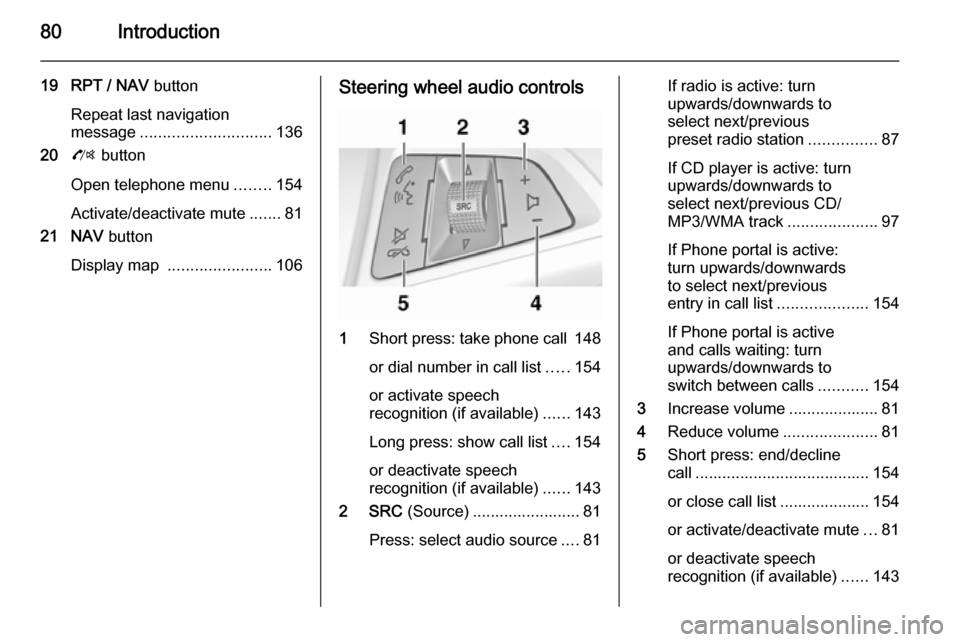
1
Short press: take phone call 148
or dial number in call list .....154
or activate speech
recognition (if available) ......143
Long press: show call list ....154
or deactivate speech
recognition (if available) ......143
2 SRC (Source) ........................ 81
Press: select audio source ....81
If radio is active: turn
upwards/downwards to
select next/previous
preset radio station ...............87
If CD player is active: turn
upwards/downwards to
select next/previous CD/
MP3/WMA track ....................97
If Phone portal is active:
turn upwards/downwards
to select next/previous
entry in call list ....................154
If Phone portal is active
and calls waiting: turn
upwards/downwards to
switch between calls ...........154
3 Increase volume .................... 81
4 Reduce volume .....................81
5 Short press: end/decline
call ....................................... 154
or close call list .................... 154 or activate/deactivate mute ...81
or deactivate speech
recognition (if available) ......143