USB VAUXHALL MOVANO_B 2015.5 Infotainment system
[x] Cancel search | Manufacturer: VAUXHALL, Model Year: 2015.5, Model line: MOVANO_B, Model: VAUXHALL MOVANO_B 2015.5Pages: 139, PDF Size: 1.84 MB
Page 57 of 139

USB port57
music shops may not play correctly
or not at all.
Applicable playlist
extensions: .m3u, .pls.
Playlist entries must be in the form
of relative paths.
Playing saved audio files
Once connected, it is only possible to use the controls and menus of the
Infotainment system to operate the
audio device.
R15 BT USB, R16 BT USB,
CD16 BT USB, CD18 BT USB -
Playing music via USB socket
MP3 player / iPod / USB drives
The system detects the audio device
when a USB device is connected and
the current track is displayed
automatically.
When a new audio device is
connected, the first track in the first
folder is played automatically. When
reconnecting the device, the
previously played track is resumed.Depending on the audio device
connected, select a folder (MP3
player, USB drive) or a playlist
(portable digital music player).
The operation of data sources
connected via USB is generally the
same as for an audio/MP3/WMA CD
3 51.
Selecting a track
To select tracks directly (and change
folders), first access the audio device
menu structure by pressing the OK rotary knob during playback. Select
tracks and change folders by turning
and pressing the knob.
CD35 BT USB - Playing music
via USB socket
MP3 player / iPod / USB drives
The system detects the audio device when a USB device is connected and
the first track in the first folder is
played automatically. When
reconnecting the device, the
previously played track is resumed.Depending on the audio device
connected, select a folder (MP3
player, USB drive) or a playlist
(portable digital music player).
The operation of data sources
connected via USB is generally the
same as for an audio/MP3/WMA CD
3 51.
Selecting a track
To select tracks directly (and change
folders), first access the audio device menu structure by pressing the
central rotary knob during playback
(with iPod, turn the knob to access
menu). Select tracks and change
folders by turning and pressing the
knob.
NAVI 50 - Playing music via USB socket
MP3 player / iPod / USB drives
The system detects the audio device when a USB device is connected and
the current track is displayed
automatically.
Page 58 of 139

58USB port
When the MEDIA menu is active, the
following submenus are available:
■ Player
■ List
■ Options
To switch between audio sources,
press S in top left corner. The
following options are available:
■ USB : Select to change the audio
source to USB mode.
■ iPod : Select to change the audio
source to USB mode.
■ BT : Refer to NAVI 50 "Bluetooth
music" 3 60.
■ AUX : Refer to NAVI 50 "Aux input"
3 54.Player
Press to display the current track. In this display screen, the following
options are available:
■ l (press to skip to previous track,
press and hold to fast rewind)
■ =/l (press to pause/play)
■ m (press to skip to next track,
press and hold to fast forward)List
Displays a list of the tracks in the
current album/folder. Press a
particular track to play it directly.
Notice
By default, albums are listed in
alphabetical order.
If a USB drive is connected, all the
folders will be at the same level on
the tree structure.
To return to the previous level on the
folder tree structure, press ò.Options
Press to display the following options:
■ Repeat (Off/Track/Folder/All)
■ Shuffle (On/Off)
NAVI 80 - Playing music via
USB socket
MP3 player / USB drives
Change the audio source to USB
mode to playback files from a
connected USB device.
To access the media menu from the
Home page, press MENU then
Multimedia , followed by Media on the
display screen.
Press < to open a pop-up menu. The
following options are available:
■ USB : Change the audio source to
USB mode.
■ Auxiliary socket : Refer to NAVI 80
"AUX input" 3 54.
■ Bluetooth connection : Refer to
NAVI 80 "Bluetooth music" 3 60.
■ SD card
■ CD player : Refer to NAVI 80 "AUX
input" 3 54.
When USB mode is selected, the display includes the following options:
■ t or v: Move to previous/next
track
■ =: Pause track
■ Scroll bar for time elapsed: Scroll through tracks
■ New selection : Choose another
track from the connected audio
source
Page 59 of 139

USB port59
■Current playlist : Access the current
playback list
■ r : Return to previous screen
■ <: Open pop-up menu; To change
the audio source or access the
track settings (e.g. switch on/off
shuffle or repeat, show current
track details, and access sound
settings).
Disconnecting from USB socket
Playback is stopped immediately
when the audio device is withdrawn
from the USB socket.
Page 61 of 139

Bluetooth music61
R15 BT USB, R16 BT USB,CD16 BT USB, CD18 BT USB -Playing music via Bluetooth
Bluetooth connection
A connection must be set up between the audio device and the Infotainmentsystem via Bluetooth, i.e. the device
must be paired to the vehicle before
using it.
Refer to "Bluetooth connection" in the
"Phone" section 3 118.
■ A maximum of 5 audio devices can
be paired and saved in the device
list, but only one can be connected
at a time.
■ If the device has both audio player and telephone functions, both
functions will be paired. Pairing a
mobile phone 3 115.
■ Phone functions will remain active while the audio player is in use, and
audio playback will be suspended
during phone use.Pairing an auxiliary audio device to
the Infotainment system
To pair the audio device, press the
TEL button and select Pair device by
turning and pressing the OK rotary
knob. The Ready to Pair screen is
displayed.
Then, on the audio device, search for
Bluetooth equipment in the vicinity of
the device.
Select My Radio (i.e. the name of the
system) from the list on the audio
device, then, if applicable, on the
audio device keypad enter the pairing
code shown on the Infotainment
system display screen.
Notice
If the audio device does not have a
screen, enter the default pairing
code on the device, then on the
Infotainment system. Refer to the
operating instructions for this default audio device pairing code, usually
0000 . Depending on the device, the
pairing code may need to be entered
in reverse order, i.e. on the
Infotainment system first.If pairing fails, the system returns to
the previous menu and a
corresponding message is displayed. Repeat procedure if necessary.
When pairing is completed, a
confirmation message followed by the
name of the paired audio device is shown on the Infotainment system
display screen.
Notice
When a Bluetooth connection is
active, controlling the audio device
via the Infotainment system will
discharge the audio device battery more rapidly.
Connecting an audio device
Audio devices are automatically
connected to the Infotainment system
after the pairing procedure is
completed.
To connect any audio device that has been paired, or to connect to a
different paired audio device than the
current one, press the TEL button and
select the Select Device menu. The
device list shows the audio devices already paired.
Page 62 of 139

62Bluetooth music
Select the desired device from the list
and confirm by pressing the OK rotary
knob. A display message confirms
connection.
Disconnecting an audio device
To disconnect an audio device from
the Infotainment system, press the
TEL button (or the SETUP button)
and select Bluetooth connection .
Select the desired device from the
device list then select Disconnect the
device by turning and pressing the
OK rotary knob. A display message
confirms disconnection.
Switching off the audio device or
deactivating the Bluetooth function on the audio device also disconnects the
device from the Infotainment system.
Unpairing an auxiliary audio device
from the Infotainment system
If the list of paired audio devices is full, a new device can only be paired if an
existing device is unpaired.
To unpair, i.e. to delete an audio
device from the system memory,
press the TEL button and select
Delete device . Select the desiredaudio device from the list and press
the OK rotary knob to confirm deletion
when prompted.
Operation via Infotainment system
When paired and connected
wirelessly, audio playback begins
automatically.
The audio device can then be
operated via the Infotainment system
function buttons, rotary knobs and
display menus.
The range of accessible functions
that can be operated via the
Infotainment system depends on the
type of audio player.
The operation of the audio device
when connected wirelessly is similar
to the operations for the CD player
3 51.CD35 BT USB - Playing music
via Bluetooth
Bluetooth connection
A connection must be set up between
the audio device and the Infotainment system via Bluetooth, i.e. the device
must be paired to the vehicle before
using it.
Refer to (CD35 BT USB) "Bluetooth connection" in the "Phone" section
3 118.
■ A maximum of 5 audio devices can
be paired and saved in the device
list, but only one can be connected
at a time.
■ If the device has both audio player and telephone functions, one or
both functions can be paired.
Pairing a mobile phone 3 115.
■ Phone functions will remain active while the audio player is in use, andaudio playback will be suspended
during phone use.
Page 65 of 139

Bluetooth music65
audio device pairing code, usually
0000 . Depending on the device, the
pairing code may need to be entered
in reverse order, i.e. on the
Infotainment system first.
If pairing fails, repeat procedure if
necessary.
Notice
When a Bluetooth connection is
active, controlling the audio device
via the Infotainment system will
discharge the audio device battery more rapidly.
Connecting an audio device
Audio devices are automatically
connected to the Infotainment system after the pairing procedure is
completed.
To change the audio device
connected, press the Home
button ; followed by SETTINGS on
the display screen.
Then select Bluetooth followed by
View Bluetooth device list . The device
list shows the audio devices already
paired.Select the desired audio device from
the list and confirm by pressing OK.
Disconnecting an audio device
Switching off the audio device or
deactivating the Bluetooth function on
the audio device disconnects the
device from the Infotainment system.
Unpairing an auxiliary audio device
from the Infotainment system
If the list of paired audio devices is full, a new device can only be paired if an
existing device is unpaired.
To unpair, i.e. to delete an audio
device from the system memory,
press the Home button ; followed by
SETTINGS on the display screen.
Select Bluetooth then View Bluetooth
device list .
Select the desired audio device from
the list, the press ë to delete the
device. If required, delete all devices
in the list by pressing Options
followed by Delete all. Confirm with
the OK button.Operation via Infotainment system
When paired and connected
wirelessly, audio playback begins
automatically.
The audio device can then be
operated via the Infotainment system
display options.
The range of accessible functions
that can be operated via the
Infotainment system depends on the
type of audio player.
For operation of the audio device
when connected wirelessly, refer to
(NAVI 50) "Playing saved audio files"
in the "USB port" section 3 57.
NAVI 80 - Playing music via
Bluetooth
Bluetooth connection
A connection must be set up between the audio device and the Infotainment
system via Bluetooth, i.e. the device
must be paired to the vehicle before
using it.
Page 66 of 139

66Bluetooth music
■ There is a maximum number ofaudio devices that can be paired
and saved in the device list, but only
one can be connected at a time.
■ If the device has both audio player and telephone functions, both
functions will be paired. Pairing a
mobile phone 3 115.
■ Phone functions will remain active while the audio player is in use, andaudio playback will be suspended
during phone use.
Pairing an auxiliary audio device to
the Infotainment system
From the Home page, press MENU
then Multimedia , followed by
Settings on the display screen.
Select Media to access the media
settings menu, then select the
"Configure Bluetooth connection"
option.
The pairing procedure is similar to
pairing a mobile phone. Refer to (NAVI 80) "Bluetooth connection" in
the "Phone" section 3 118.Connecting an audio device
Audio devices are automatically
connected to the Infotainment system
after the pairing procedure is
completed.
At any time, change the audio source to Bluetooth mode to playback filesfrom a connected Bluetooth device.
From the Home page, press MENU
then Multimedia , followed by Media
on the display screen.
Press < (to open a pop-up menu) and
select Bluetooth connection to
change the audio source to
Bluetooth.
Disconnecting an audio device
Switching off the audio device or
deactivating the Bluetooth function on the audio device disconnects the
device from the Infotainment system.
Unpairing an auxiliary audio device
from the Infotainment system
To unpair, i.e. to delete a device from
the system memory:From the Home page, press MENU
then Multimedia , followed by
Settings on the display screen.
Select Media to access the media
settings menu, then select the
"Configure Bluetooth connection"
option.
The unpairing procedure is similar to
pairing a mobile phone. Refer to
(NAVI 80) "Bluetooth connection" in
the "Phone" section 3 118.
Operation via Infotainment system
When paired and connected
wirelessly, audio playback may begin automatically.
The audio device can then be
operated via the Infotainment system
display options.
The range of accessible functions
that can be operated via the
Infotainment system depends on the
type of audio player.
For operation of the audio device
when connected wirelessly, refer to
(NAVI 80) "Playing saved audio files"
in the "USB port" section 3 57.
Page 67 of 139

External devices67External devicesDisplaying pictures ....................... 67
Playing movies ............................. 67Displaying pictures
NAVI 80 - Displaying pictures
To access the "Pictures" menu from
the Home page, press MENU then
Multimedia , followed by Pictures on
the display screen.
Select the connected source device
(e.g. SD card, USB) to access
individual photos or present a
slideshow of all compatible photos on the device.
The display includes the following
options:
■ N or O: Move to previous/next photo
■ Thumbnails : Switch between full
screen and minimised view
■ New selection : Choose another
photo from the connected source
device
■ <: Open pop-up menu; To change
the source device or access the
photo settings.
When viewing a photo/slideshow,
the pop-up menu also allows you to set zoom level and display all
photos in thumbnail form.Photo settings - refer to (NAVI 80)
"System settings" 3 34.
Playing movies NAVI 80 - Playing movies
To access the "Videos" menu from
the Home page, press MENU then
Multimedia , followed by Videos on the
display screen.
Select the connected source device
(e.g. SD card, USB) to access
individual or all compatible videos on
the device.
The display includes the following
options:
■ t or v: Move to previous/next
video
■ =: Pause video
■ Scroll bar for time elapsed: Scroll through videos
■ New selection : Choose another
photo from the connected source
device
■ Full screen : Switch to full screen
display
Page 69 of 139

Navigation69NavigationGeneral information.....................69
Usage .......................................... 73
Destination input ..........................90
Guidance ..................................... 98
Symbols overview ......................109General information9Warning
The navigation system is an aid to
your navigational abilities and
does not replace them. Drive with
due care and attention and adopt
a safe, vigilant attitude.
If a navigation system instruction
contradicts traffic regulations, the
traffic regulations always apply.
The Navigation system will reliably
guide you to your chosen destination
without the need for physical road
maps.
If the Traffic info service is available
in your country or region, the current
traffic situation is also considered in
route calculations. The system
receives traffic messages in the
current reception area.
To receive the most up-to-date, real-
time traffic information possible,
subscribe to the Live services facility
via the TomTom™ website1)
.
Functioning of the Navigation
system The position and movement of the
vehicle are detected by the
Navigation system using sensors.
The distance travelled is determined
by the vehicle's speedometer signal,
and turning movements on bends are
determined by a gyro sensor. The position is determined by GPS
(Global Positioning System)
satellites.
By comparing these sensor signals
with the digital maps on the
Navigation system, it is possible to
accurately determine the position of
the vehicle.
When using the vehicle for the first
time, or after a ferry trip, etc., the
system will self-calibrate. It is,
therefore, normal if it does not provide
an exact location until the vehicle has
travelled for some distance.1) CD35 BT USB NAVI, NAVI 80.
Page 70 of 139
70Navigation
After the entry of the destination
address or point of interest (nearest
petrol station, hotel, etc.) the route is
calculated from the current location to the selected destination.
Route guidance is provided by voice
output and the display screen.9 Warning
Areas such as one-way streets
and pedestrian zones are not
marked on the navigation system map. In such areas, the system
may issue a warning that must be
accepted. Therefore, pay
particular attention to one-way
streets and other roads and
entrances that must not be driven
into.
SD card (CD35 BT USB NAVI,
NAVI 80) An SD card is supplied with the
Navigation system and contains,
among other things, a digital map of
the towns and roads in your country.
After delivery of a new vehicle, there
is a maximum of 60 days in which to
update the digital map for free. After
this time has elapsed, a fee is
charged for map updates.
Notice
To avoid possible technical issues,
only use a compatible SD card for
operating and updating the
Navigation system. Do not insert SD
card in any other device (e.g. digital
camera, mobile phone, etc.), or in
another vehicle.
TomTom HOME™ software
installation
To update the digital maps and to
benefit from exclusive downloadable
services, including real-time safety
and traffic alerts, an account must be created on the TomTom™ website
and the free TomTom HOME™
software must be installed.Creating an account
Create your TomTom™ internet
account via the TomTom™ website.
Select e.g., the Create account option
on the web page and enter the
appropriate details.Installing the software
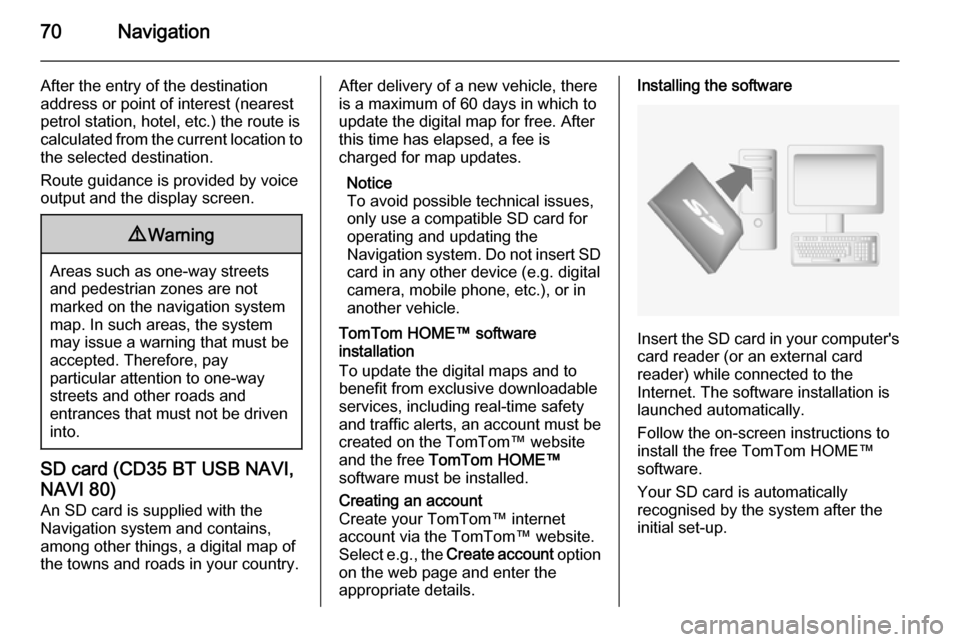
Insert the SD card in your computer's card reader (or an external card
reader) while connected to the
Internet. The software installation is
launched automatically.
Follow the on-screen instructions to
install the free TomTom HOME™
software.
Your SD card is automatically
recognised by the system after the
initial set-up.