change time VAUXHALL MOVANO_B 2016 Infotainment system
[x] Cancel search | Manufacturer: VAUXHALL, Model Year: 2016, Model line: MOVANO_B, Model: VAUXHALL MOVANO_B 2016Pages: 147
Page 63 of 147

USB port63player/USB drive or iPod) is also
recognised and the relevant audio source mode (USB or iPod) is
selected automatically.
When the t/ü MEDIA menu is
active, the following submenus are
available:
● Main /Player
● List
● Options
To switch between audio sources,
press S in top left corner. The
following options are available:
● USB : Select to change the audio
source to USB mode.
Notice
During use, the battery of a
connected USB device is charged or
maintained.
● iPod : Select to change the audio
source to iPod mode.
● BT: Refer to NAVI 50 "Bluetooth
music" - 3 65.
● Aha : AhaⓇ application for
smartphones (available
depending on version).Refer to "Usage", Additional
features (NAVI 50) in the
"Introduction" section 3 24.
● AUX : Refer to NAVI 50 - "Aux
input usage" 3 59.Main/Player
Press to display the current track. In this display screen, the following
options are available:
● l (press to skip to previous
track, press and hold to fast
rewind)
● =/l (press to pause/play)
● m (press to skip to next track,
press and hold to fast forward)List
Displays a list of the tracks in the
current album/folder. Press a
particular track to play it directly.
Notice
By default, albums are listed in
alphabetical order.
If a USB drive is connected, all the
folders will be at the same level on
the tree structure.
To return to the previous level on the
folder tree structure, press ò.Options
Press to display the following options:
● Repeat (Off/Track/Folder/All)
● Shuffle (On/Off)
NAVI 80 - Playing music via USB
socket
MP3 player / USB drives
Change the audio source to USB
mode to playback files from a
connected USB device.
To access the media menu from the
Home page, press MENU then
Multimedia , followed by Media on the
display screen.
Press < to open a pop-up menu. The
following options are available:
● USB : Change the audio source to
USB mode.
● Auxiliary socket : Refer to
NAVI 80 "AUX input" 3 59.
● Bluetooth connection : Refer to
NAVI 80 "Bluetooth music"
3 65.
● SD card
● CD player : Refer to NAVI 80
"AUX input" 3 59.
Page 64 of 147

64USB portWhen USB mode is selected, the
display includes the following options:
● t or v: Move to previous/next
track.
● =: Pause track.
● Scroll bar for time elapsed: Scroll
through tracks.
● New selection : Choose another
track from the connected audio
source.
● Current playlist : Access the
current playback list.
● r: Return to previous screen.
● <: Open pop-up menu; To
change the audio source or
access the track settings (e.g.
switch on/off shuffle or repeat,
show current track details, and access sound settings).
Disconnecting from USB socket Playback is stopped immediately
when the audio device is withdrawn
from the USB socket.
Page 69 of 147

Bluetooth music69The range of accessible functions
that can be operated via the
Infotainment system depends on the
type of audio player.
The operation of the audio device when connected wirelessly is similarto the operations for the CD player
3 56.
NAVI 50 - Playing music via
Bluetooth
Bluetooth connection
A connection must be set up between
the audio device and the Infotainment system via Bluetooth, i.e. the device
must be paired to the vehicle before
using it.
Refer to (NAVI 50) "Bluetooth
connection" in the "Phone" section
3 127.
● A maximum of 5 audio devices can be paired and saved in the
device list, but only one can be
connected at a time (depending
on version, up to 8 audio devices
may be paired).● If the device has both audio player and telephone functions,
both functions will be paired.
Pairing a mobile phone 3 124.
● Phone functions will remain active while the audio player is inuse, and audio playback will be
suspended during phone use.
Pairing an auxiliary audio device to the Infotainment system
To pair the audio device, press 7
followed by ÿSETTINGS on the
display screen.
Select Bluetooth then either Search
for Bluetooth device or External
device authorisation .
On the audio device, search for
Bluetooth equipment in the vicinity of
the device.
Select the name of the Infotainment
system (e.g. MEDIA-NAV) from the
list on the audio device, then (if
required), on the audio device
keypad, enter the pairing code shown
on the Infotainment system display
screen.The default pairing code is 0000. To
change this pairing code before the
pairing procedure is started, select
Change passkey to update.
Notice
If the audio device does not have a
screen, enter the default pairing
code on the device, then on the
Infotainment system. Refer to the
operating instructions for this default
audio device pairing code, usually
0000 . Depending on the device, the
pairing code may need to be entered
in reverse order, i.e. on the
Infotainment system first.
If pairing fails, repeat procedure if
necessary.
Notice
When a Bluetooth connection is active, controlling the audio devicevia the Infotainment system will
discharge the audio device battery more rapidly.
Connecting an audio device
Audio devices are automatically
connected to the Infotainment system after the pairing procedure is
completed.
Page 70 of 147

70Bluetooth musicTo change the audio device
connected, press 7 followed by
ÿ SETTINGS on the display screen.
Then select Bluetooth followed by
View Bluetooth device list . The device
list shows the audio devices already paired.
Select the desired audio device from
the list and confirm by pressing OK.
Disconnecting an audio device Switching off the audio device or
deactivating the Bluetooth function on the audio device disconnects the
device from the Infotainment system.
Unpairing an auxiliary audio device
from the Infotainment system
If the list of paired audio devices is full,
a new device can only be paired if an
existing device is unpaired.
To unpair, i.e. to delete an audio
device from the system memory,
press 7 followed by ÿSETTINGS on
the display screen.
Select Bluetooth then View Bluetooth
device list .Select the desired audio device from
the list, then press ë to delete the
device. If required, delete all devices
in the list by pressing Options
followed by Delete all. Confirm with
OK .
Operation via Infotainment system
When paired and connected
wirelessly, audio playback begins
automatically.
The audio device can then be
operated via the Infotainment system
display options.
The range of accessible functions
that can be operated via the
Infotainment system depends on the
type of audio player.
The operation of the audio device
when connected wirelessly is similar
to the operations for playing saved
audio files via the USB socket. Refer
to "NAVI 50 - Playing music via USB
socket" in the "USB port" section
3 62.NAVI 80 - Playing music via
Bluetooth
Bluetooth connection
A connection must be set up between
the audio device and the Infotainment system via Bluetooth, i.e. the device
must be paired to the vehicle before
using it.
● There is a maximum number of audio devices that can be paired
and saved in the device list, but
only one can be connected at a
time.
● If the device has both audio player and telephone functions,
both functions will be paired.
Pairing a mobile phone 3 124.
● Phone functions will remain active while the audio player is inuse, and audio playback will be
suspended during phone use.
Pairing an auxiliary audio device to
the Infotainment system
From the Home page, press MENU
then Multimedia , followed by
Settings on the display screen.
Page 71 of 147

Bluetooth music71Select Media to access the media
settings menu, then select the
"Configure Bluetooth connection"
option.
The pairing procedure is similar to
pairing a mobile phone. Refer to
(NAVI 80) "Bluetooth connection" in
the "Phone" section 3 127.
Connecting an audio device
Audio devices are automatically
connected to the Infotainment system
after the pairing procedure is
completed.
At any time, change the audio source to Bluetooth mode to playback filesfrom a connected Bluetooth device.
From the Home page, press MENU
then Multimedia , followed by Media
on the display screen.
Press < (to open a pop-up menu) and
select Bluetooth connection to
change the audio source to
Bluetooth.Disconnecting an audio device
Switching off the audio device or
deactivating the Bluetooth function on the audio device disconnects the
device from the Infotainment system.
Unpairing an auxiliary audio device
from the Infotainment system
To unpair, i.e. to delete a device from
the system memory:
From the Home page, press MENU
then Multimedia , followed by
Settings on the display screen.
Select Media to access the media
settings menu, then select the
"Configure Bluetooth connection"
option.
The unpairing procedure is similar to
pairing a mobile phone. Refer to
(NAVI 80) "Bluetooth connection" in
the "Phone" section 3 127.
Operation via Infotainment system
When paired and connected
wirelessly, audio playback may begin
automatically.
The audio device can then be
operated via the Infotainment system
display options.The range of accessible functions
that can be operated via the
Infotainment system depends on the
type of audio player.
The operation of the audio device when connected wirelessly is similarto the operations for playing saved
audio files via the USB socket. Refer
to "NAVI 80 - Playing music via USB
socket" in the "USB port" section
3 62.
Page 72 of 147

72External devicesExternal devicesDisplaying pictures ....................... 72
Playing movies ............................. 72Displaying pictures
NAVI 80 - Displaying pictures
To access the "Pictures" menu from
the Home page, press MENU then
Multimedia , followed by Pictures on
the display screen.
Select the connected source device (e.g. SD card, USB) to access
individual photos or present a
slideshow of all compatible photos on
the device.
The display includes the following
options:
● N or O: Move to previous/next
photo.
● Thumbnails : Switch between full
screen and minimised view.
● New selection : Choose another
photo from the connected source device.
● <: Open pop-up menu; To
change the source device or
access the photo settings.
When viewing a photo/
slideshow, the pop-up menu also allows you to set zoom level anddisplay all photos in thumbnail
form.
Photo settings - refer to (NAVI 80)
"System settings" 3 40.
Playing movies
NAVI 80 - Playing movies To access the "Videos" menu from
the Home page, press MENU then
Multimedia , followed by Videos on the
display screen.
Select the connected source device (e.g. SD card, USB) to access
individual or all compatible videos on
the device.
The display includes the following
options:
● t or v: Move to previous/next
video.
● =: Pause video.
● Scroll bar for time elapsed: Scroll
through videos.
● New selection : Choose another
photo from the connected source device.
Page 75 of 147

Navigation75After the entry of the destination
address or point of interest (nearest
petrol station, hotel, etc.) the route is
calculated from the current location to
the selected destination.
Route guidance is provided by voice
output and the display screen.9 Warning
Areas such as one-way streets
and pedestrian zones are not
marked on the navigation system map. In such areas, the system
may issue a warning that must be
accepted. Therefore, pay
particular attention to one-way
streets and other roads and
entrances that must not be driven
into.
Notice
Depending on Infotainment system, radio reception may be interrupted
during voice guidance and before
each change of direction.
USB memory stick (NAVI 50)
A USB memory stick is required for
the Navigation system, to contain,
among other things, a digital map of
the towns and roads in your country.
Notice
Use a USB memory stick, formatted
to FAT32 format, with a minimum
4 GB and maximum 32 GB of
storage capacity.
After delivery of a new vehicle, there
is a maximum of 90 days in which to
update the digital map for free. After
this time has elapsed, a fee is
charged for map updates.
Notice
To avoid possible technical issues,
only use a compatible USB memory stick for operating and updating the
Navigation system. Do not insert USB memory stick in any other
device (e.g. digital camera, mobile
phone, etc.), or in another vehicle.
Software installation
To update the digital maps and to
benefit from exclusive downloadable
services, an account must be createdon the vauxhall.naviextras.com
website and the free software must be
installed.Creating an account
Create your internet account via the
vauxhall.naviextras.com website.
Select e.g., the "Register" option on
the web page and enter the
appropriate details.Installing the software
Install the software on your computer
by downloading from
vauxhall.naviextras.com.
Follow the on-screen instructions to
install the software and launch the
online application.Registering the Navigation system
The Navigation system must be
registered with your new internet
account.
Insert an empty USB memory stick in
the Navigation system's USB slot. Press 7 then select yNAVI / ýNav ,
followed by Options then Map update .
Page 81 of 147
Navigation81Switching between Navigation
system and Infotainment system
menusCD35 BT USB NAVI
With the Infotainment and Navigation
systems on, press NAVI (on the
steering column controls) to switch between the Navigation system and
Infotainment system screens.
When the Infotainment controls are
used to change, for example, the
audio source, the Infotainment
system screen pops-up temporarily
over the Navigation system screen.
The display switches back after a
delay.
Notice
The clock is displayed when
switched to the Infotainment system screen.NAVI 50
With the Navigation system active,
press 7 or press and hold q/r on
the display screen to return to the
Infotainment system Home menu.NAVI 80
With the Navigation system active,
press r on the display screen (one
or more times) to return to the
Infotainment system Home page.
Information on the display
CD35 BT USB NAVI - Information on
the displayMenu screen
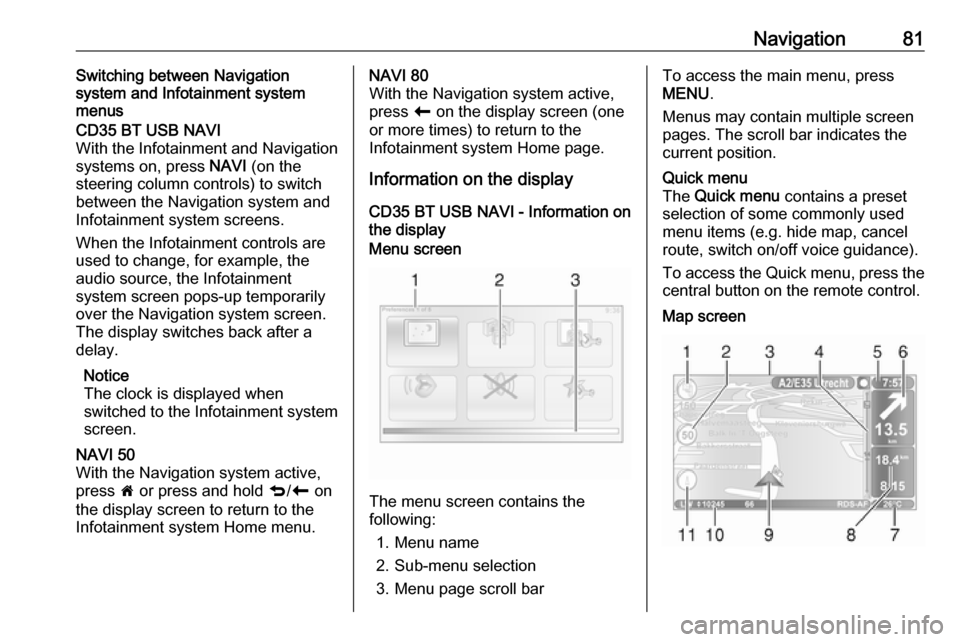
The menu screen contains the
following:
1. Menu name
2. Sub-menu selection
3. Menu page scroll bar
To access the main menu, press
MENU .
Menus may contain multiple screen pages. The scroll bar indicates the
current position.Quick menu
The Quick menu contains a preset
selection of some commonly used
menu items (e.g. hide map, cancel
route, switch on/off voice guidance).
To access the Quick menu, press the
central button on the remote control.Map screen
Page 82 of 147
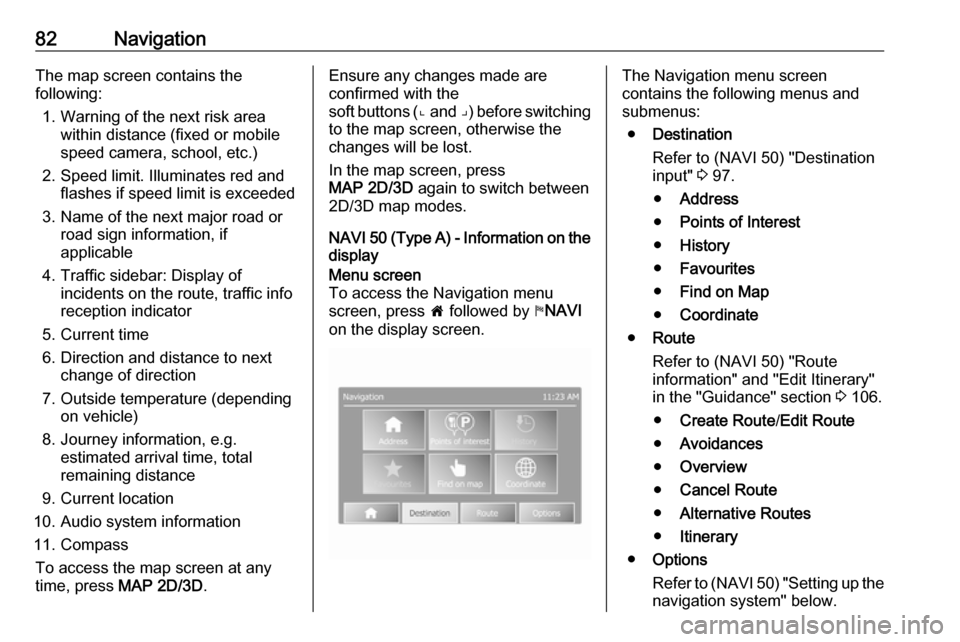
82NavigationThe map screen contains the
following:
1. Warning of the next risk area within distance (fixed or mobile
speed camera, school, etc.)
2. Speed limit. Illuminates red and flashes if speed limit is exceeded
3. Name of the next major road or road sign information, if
applicable
4. Traffic sidebar: Display of incidents on the route, traffic info
reception indicator
5. Current time
6. Direction and distance to next change of direction
7. Outside temperature (depending on vehicle)
8. Journey information, e.g. estimated arrival time, total
remaining distance
9. Current location
10. Audio system information
11. Compass To access the map screen at anytime, press MAP 2D/3D .Ensure any changes made are
confirmed with the
soft buttons ( ⌞ and ⌟) before switching
to the map screen, otherwise the changes will be lost.
In the map screen, press
MAP 2D/3D again to switch between
2D/3D map modes.
NAVI 50 (Type A) - Information on the
displayMenu screen
To access the Navigation menu
screen, press 7 followed by yNAVI
on the display screen.The Navigation menu screen
contains the following menus and
submenus:
● Destination
Refer to (NAVI 50) "Destination
input" 3 97.
● Address
● Points of Interest
● History
● Favourites
● Find on Map
● Coordinate
● Route
Refer to (NAVI 50) "Route
information" and "Edit Itinerary" in the "Guidance" section 3 106.
● Create Route /Edit Route
● Avoidances
● Overview
● Cancel Route
● Alternative Routes
● Itinerary
● Options
Refer to (NAVI 50) "Setting up the
navigation system" below.
Page 83 of 147
Navigation83●Warnings
● Route settings
● Map settings
● Voice settings
● Coordinate format
● GPS
● Map updateMap screen
To access the map screen without
route guidance, press 7 followed by
s MAP on the display screen. Refer to
(NAVI 50) "Browse map" in the
"Guidance" section 3 106.
Press anywhere on the map. The cursor indicates the current selected
position. To scroll within the map,
drag the cursor in the required
direction.
To access the map screen with route
guidance, press 7 followed by
y NAVI on the display screen and
enter a destination. Refer to
(NAVI 50) "Destination input" 3 97.
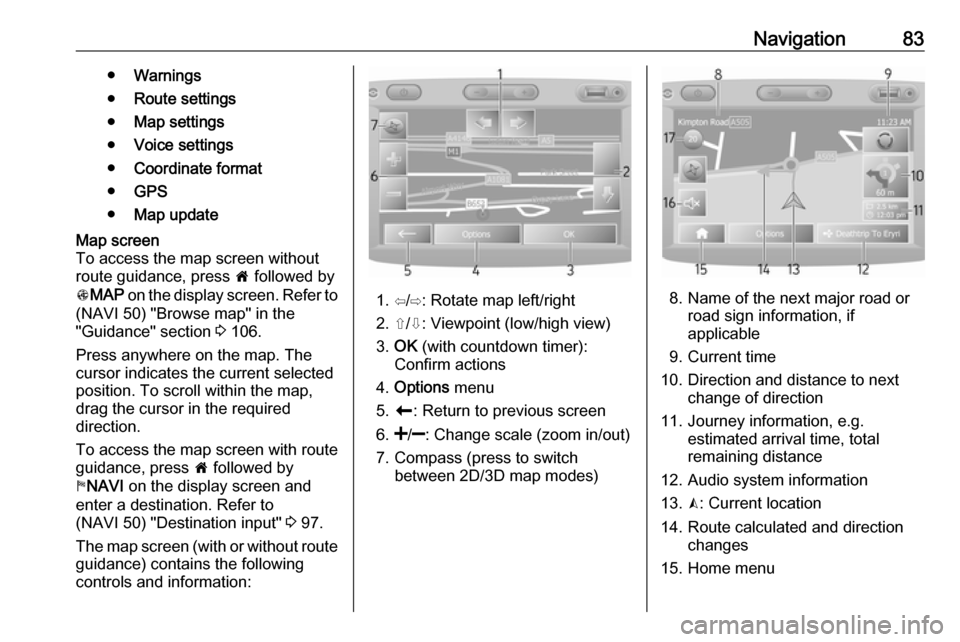
The map screen (with or without route guidance) contains the following
controls and information:
1. ⇦/⇨: Rotate map left/right
2. ⇧/⇩: Viewpoint (low/high view)
3. OK (with countdown timer):
Confirm actions
4. Options menu
5. r : Return to previous screen
6.
7. Compass (press to switch between 2D/3D map modes)8. Name of the next major road orroad sign information, if
applicable
9. Current time
10. Direction and distance to next change of direction
11. Journey information, e.g. estimated arrival time, total
remaining distance
12. Audio system information
13. K: Current location
14. Route calculated and direction changes
15. Home menu