battery VAUXHALL VIVARO 2016.5 User Guide
[x] Cancel search | Manufacturer: VAUXHALL, Model Year: 2016.5, Model line: VIVARO, Model: VAUXHALL VIVARO 2016.5Pages: 211, PDF Size: 5 MB
Page 104 of 211

102LightingExit lighting
If equipped, headlights come on for
approx. 30 seconds after the vehicle
is parked and the system is activated.
Activating 1. Switch off ignition.
2. Remove ignition key.
3. Open driver's door.
4. Pull turn signal lever towards steering wheel.
This action can be repeated up to four times to a maximum period of
2 minutes.
The lighting is turned off immediately
by switching on the ignition or turning
the light switch.
Battery discharge protection
To prevent discharge of the vehicle
battery when the ignition is switched
off, some interior lights may be
switched off automatically after some
time.
Page 110 of 211

108Climate controlAuxiliary heater
Coolant heater The Eberspächer engine-
independent, fuel-powered coolant
heater provides rapid heating of the
engine coolant to enable heating of
the vehicle interior without the engine
running.9 Warning
Do not operate the system when
refuelling, when dust or
combustible vapours are present
or in enclosed spaces (e.g.
garage).
Before starting or programming the
system to start, turn the vehicle's
climate control system to heat, set the
air distribution to V and turn the fan
on.
Switch off when not required. Heating stops automatically after the
programmed runtime. It will also
cease to operate if the vehicle fuel
level drops too low.
During operation, power from the
vehicle battery is used. The driving
time should therefore be at least as
long as the heating time. For short
journey times, check the vehicle
battery regularly and recharge if
necessary.
To ensure efficient performance,
briefly operate the auxiliary heater
once a month.
Control units
The timer or remote control unit turns the system on and off, and is used to
programme specific departure times.
Timer1 Display:Displays preset,
weekday or preset
day, current time or preset time,
temperature, Z and
Y2 Temperature:Selects
temperature3 l:Adjusts values up4 k:Adjusts values
down5 Y:Selects heat
settings6 P:Selects preset
settings7 Þ:Selects time and
weekday settings
Page 111 of 211
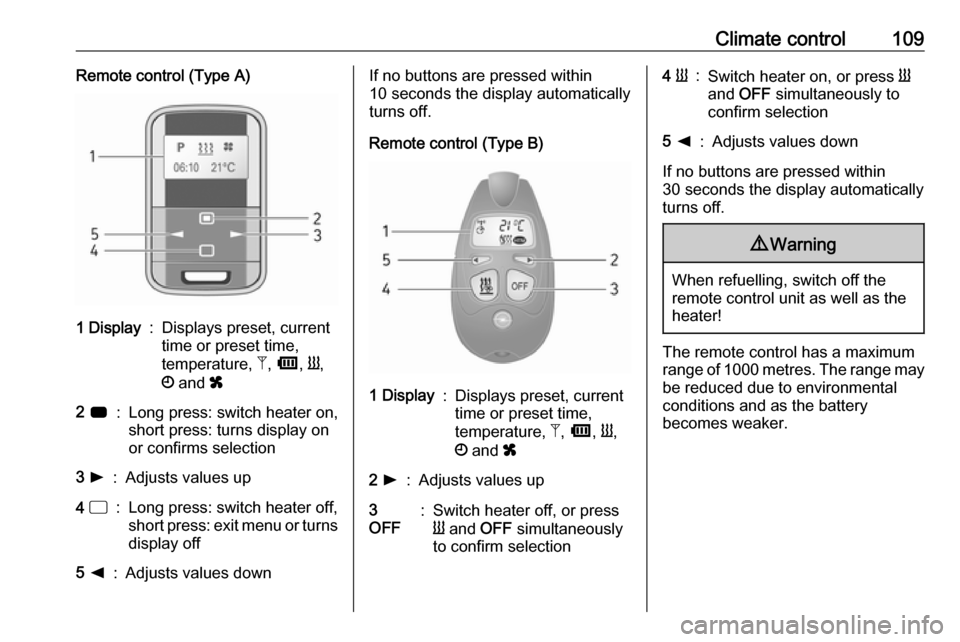
Climate control109Remote control (Type A)1 Display:Displays preset, current
time or preset time,
temperature, Z, Ü , Y ,
Ö and x2 7:Long press: switch heater on,
short press: turns display on
or confirms selection3 l:Adjusts values up4 d:Long press: switch heater off,
short press: exit menu or turns
display off5 k:Adjusts values downIf no buttons are pressed within
10 seconds the display automatically
turns off.
Remote control (Type B)1 Display:Displays preset, current
time or preset time,
temperature, Z, Ü , Y ,
Ö and x2 l:Adjusts values up3
OFF:Switch heater off, or press
Y and OFF simultaneously
to confirm selection4 Y:Switch heater on, or press Y
and OFF simultaneously to
confirm selection5 k:Adjusts values down
If no buttons are pressed within
30 seconds the display automatically
turns off.
9 Warning
When refuelling, switch off the
remote control unit as well as the
heater!
The remote control has a maximum
range of 1000 metres. The range may
be reduced due to environmental
conditions and as the battery
becomes weaker.
Page 112 of 211
110Climate control
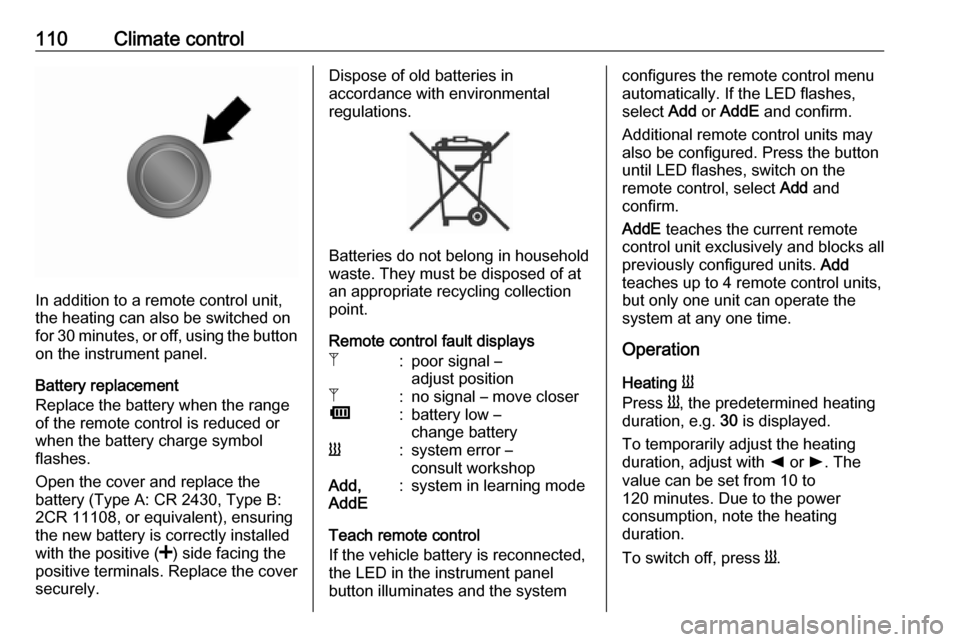
In addition to a remote control unit,
the heating can also be switched on
for 30 minutes, or off, using the button
on the instrument panel.
Battery replacement
Replace the battery when the range
of the remote control is reduced or when the battery charge symbol
flashes.
Open the cover and replace the
battery (Type A: CR 2430, Type B: 2CR 11108, or equivalent), ensuring
the new battery is correctly installed
with the positive ( <) side facing the
positive terminals. Replace the cover
securely.
Dispose of old batteries in
accordance with environmental
regulations.
Batteries do not belong in household
waste. They must be disposed of at
an appropriate recycling collection
point.
Remote control fault displays
Z:poor signal –
adjust positionZ:no signal – move closerÜ:battery low –
change batteryY:system error –
consult workshopAdd,
AddE:system in learning mode
Teach remote control
If the vehicle battery is reconnected, the LED in the instrument panel
button illuminates and the system
configures the remote control menu
automatically. If the LED flashes,
select Add or AddE and confirm.
Additional remote control units may
also be configured. Press the button
until LED flashes, switch on the
remote control, select Add and
confirm.
AddE teaches the current remote
control unit exclusively and blocks all
previously configured units. Add
teaches up to 4 remote control units,
but only one unit can operate the
system at any one time.
Operation
Heating Y
Press Y, the predetermined heating
duration, e.g. 30 is displayed.
To temporarily adjust the heating duration, adjust with k or l. The
value can be set from 10 to
120 minutes. Due to the power
consumption, note the heating
duration.
To switch off, press Y.
Page 113 of 211

Climate control111To change the default predeterminedheating duration, ensure the heater is switched off, press and hold k until
the display flashes and adjust with
k or l.
Programming P
Up to 3 preset departure times during
one day, or one preset departure time over one week can be programmed.
● Press P once to select preset
memory number 1.
● Press P twice to select preset
memory number 2.
● Press P three times to select
preset memory number 3.
● Press P again to exit the preset
memory.
Start heating within 24 hours ● Press P to select desired preset
memory number 1, 2 or 3.
● Briefly press k or l; the preset
time flashes.
● Adjust the preset time with k or
l .
● Press P to confirm and exit the
preset memory.Start heating up to 7 days
● Press P to select desired preset
memory number 1, 2 or 3.
● Briefly press k or l; the preset
time flashes.
● Adjust the preset time with k or
l .
● After 5 seconds the preset day flashes.
● Adjust the preset day with k or
l .
● The preset time and day are set once the display changes to the
current time.
Set time and weekday Þ
If the vehicle battery is disconnected
or its voltage is too low, the unit will
need to be reset.
● Press Þ until the time flashes.
● Press k or l to change the
current time.
● Time is stored when the display stops flashing.
● Wait for weekday to flash.● Press k or l to change the
weekday.
● Weekday is stored when the display stops flashing.
Heating level
The preferred heating level for
programmed departure times can be set between 10 to 30℃.
Adjust using the temperature
preselection dial.
Page 118 of 211

116Driving and operatingStarting and operating
New vehicle running-in
Do not brake unnecessarily hard for
the first few journeys and after new
disc brake pads have been fitted.
During the first drive, smoke may
occur because of wax and oil
evaporating off the exhaust system.
Park the vehicle in the open for a
while after the first drive and avoid
inhaling the fumes.
During the running-in period, fuel and engine oil consumption may be
higher and the cleaning process of
the diesel particle filter may take
place more often. Autostop may be
inhibited to allow for charging the
vehicle battery.
Stop-start system 3 119.
Diesel particle filter 3 122.Ignition switch positions0:Ignition off1:Steering wheel lock released,
ignition off2:Ignition on
Diesel engines: preheating3:StartingPower button
Electronic key must be inside the
vehicle, either in the card reader or
the front passenger compartment.
If the electronic key is not inside the
vehicle, a corresponding message
appears in the Driver Information
Centre (DIC) 3 90.
Notice
Do not put the electronic key in the
load compartment during driving, as
this is outside of the detection zone
(indicated by a warning chime at low
speed 3 92 and a message in the
Driver Information Centre (DIC)
3 91).
Page 120 of 211

118Driving and operating● Battery voltage too low.
● Overload of the central locking system by operating at frequentintervals, the power supply is
interrupted for a short time.
● Interference from higher-power radio waves from other sources.
Battery replacement 3 20.
Central locking system 3 23.
Electronic key system 3 22.
Starting the engine
Manual transmission: operate clutch.
Do not accelerate.
Diesel engines: turn the key to
position 2 for preheating until control
indicator ! extinguishes in the
instrument cluster 3 88.
Turn key to position 3 and release.
The increased engine speed
automatically returns to normal idling
speed as the engine temperature
rises.
Start attempts should not last longer
than 15 seconds. If engine does not
start, wait 15 seconds before
repeating starting procedure. If
necessary, depress accelerator
before repeating starting procedure.
Before restarting or to switch off the
engine, turn key back to 0.
During an Autostop, the engine can
be started by depressing the clutch
pedal. Stop-start system 3 119.
Turbo engine warm-up Upon start-up, engine available
torque may be limited for a short time,
especially when the engine
temperature is cold. The limitation is
to allow the lubrication system to fully protect the engine.Idle speed control
To increase the idle speed, press theswitch. After a few seconds the
function will be activated.
The function will be deactivated
when:
● The clutch pedal is depressed.
● The accelerator pedal is depressed.
● Vehicle speed is above 0 mph.
● Control indicator F, W or C
illuminate in the instrument
cluster.
To increase or decrease the fast idle
speed rate, consult a workshop.
Page 121 of 211

Driving and operating119Notice
When the fast idle function is
activated, the stop-start system is
automatically deactivated.
Stop-start system 3 119.
Vehicle shutdown
Fuel cut-off system
If the vehicle runs out of fuel, the fuel
system is cut-off and must be reset
after refuelling. A corresponding
warning message may also appear in
the Driver Information Centre (DIC)3 90.9 Danger
If you can smell fuel in the vehicle,
or a fuel leak is present, have thecause of this remedied
immediately by a workshop. Do
not reset the fuel cut-off system, to avoid the risk of fire.
Resetting with remote control
key / manual key
To reset the fuel cut-off system and
enable the vehicle to be driven:
1. Turn the ignition key to position 2
3 116.
2. Wait a few minutes to allow the fuel system to be reset.
3. Turn key to position 3 to start the
engine.
If the engine does not start, repeat the
procedure.
Resetting with electronic key
system
To reset the fuel cut-off system and
enable the vehicle to be driven:
1. Insert the electronic key in the card reader 3 116.
2. Press START/STOP without
depressing any pedals.
3. Wait a few minutes to allow the fuel system to be reset.
If the engine does not start, repeat the procedure.
Electronic key system 3 22.Power button 3 116.
Refuelling 3 141.
Overrun cut-off The fuel supply is automatically cut off
during overrun, i.e. when the vehicle
is driven with a gear engaged but
accelerator is released.
Stop-start system The stop-start system helps to save
fuel and to reduce the exhaust
emissions. When conditions allow, it
switches off the engine as soon as the
vehicle is at a low speed or at a
standstill, e.g. at a traffic light or in a
traffic jam. It restarts the engine
automatically as soon as the clutch
pedal is depressed.
A vehicle battery sensor ensures that
an Autostop is only performed if the
vehicle battery is sufficiently charged
for a restart.
Page 123 of 211

Driving and operating121Conditions for an Autostop
The stop-start system checks if each
of the following conditions is fulfilled:
● the stop-start system is not manually deactivated
● the bonnet is fully closed
● the vehicle battery is sufficiently charged and in good condition
● the engine is warmed-up
● the engine coolant temperature is
not too high
● the outside temperature is not too
low or too high (e.g. below 0 °C
or above 35 °C)
● the brake vacuum is sufficient
● the defrosting function is not activated 3 105
● the self-cleaning function of the diesel particle filter is not active
3 122
● the Antilock brake system (ABS) 3 129, Traction Control system
(TC) 3 130 and ElectronicStability Program (ESP® Plus
)
3 131 ride control systems are
not actively engaged
● the vehicle has moved since the last Autostop
Otherwise an Autostop will be
inhibited.
Certain settings of the climate control
system may inhibit an Autostop. See
" Climate control " chapter for further
information 3 105
Restart of the engine by the driver
Depress the clutch pedal to restart the
engine.
Notice
If any gear is selected, the clutch pedal must be fully depressed to
restart the engine.
Control indicator Ï 3 89 extinguishes
in the instrument cluster when the engine is restarted.
Restart of the engine by the stop- start system
The selector lever must be in neutral
to enable an automatic restart.If one of the following conditions occurs during an Autostop, the
engine will be restarted automatically by the stop-start system:
● the stop-start system is manually
deactivated
● the bonnet is opened
● the vehicle battery is discharged
● the engine temperature is too low
● the brake vacuum is not sufficient
● the vehicle starts to move
● the defrosting function is activated 3 105
If an electrical accessory, e.g. a
portable CD player, is connected to
the power outlet, a brief power drop
during engine restart may be
noticeable.
Fault
If a fault occurs in the stop-start
system, the LED in Î illuminates,
and a corresponding message
appears in the DIC 3 90. Seek the
assistance of a workshop.
Vehicle messages 3 91.
Warning chimes 3 92.
Page 146 of 211

144Vehicle careVehicle careGeneral Information...................145
Accessories and vehicle modifications .......................... 145
Vehicle storage ........................145
End-of-life vehicle recovery .....145
Vehicle checks ........................... 146
Performing work ......................146
Bonnet ..................................... 146
Engine oil ................................. 147
Engine air filter ........................ 148
Engine coolant ......................... 148
Power steering fluid .................149
Washer fluid ............................ 150
Brakes ..................................... 150
Brake fluid ............................... 150
Vehicle battery ......................... 150
Diesel fuel filter ........................152
Diesel fuel system bleeding .....152
Wiper blade replacement ........153
Bulb replacement .......................154
Headlights ............................... 154
Fog lights ................................. 154
Front turn signal lights .............155
Tail lights ................................. 155
Side turn signal lights ..............156Centre high-mounted brake
light ......................................... 156
Reversing light ......................... 157
Number plate light ...................157
Fog tail light ............................. 157
Interior lights ............................ 158
Instrument panel illumination ...158
Electrical system ........................159
Fuses ....................................... 159
Instrument panel fuse box .......160
Vehicle tools .............................. 163
Tools ........................................ 163
Wheels and tyres .......................164
Tyres ....................................... 164
Winter tyres ............................. 164
Tyre designations ....................164
Tyre pressure .......................... 164
Tyre pressure monitoring system .................................... 166
Tread depth ............................. 167
Changing tyre and wheel size . 168
Wheel covers ........................... 168
Tyre chains .............................. 168
Tyre repair kit .......................... 169
Wheel changing .......................171
Spare wheel ............................ 173
Jump starting ............................. 174Towing....................................... 176
Towing the vehicle ...................176
Towing another vehicle ...........177
Appearance care .......................177
Exterior care ............................ 177
Interior care ............................. 179