ad blue VAUXHALL VIVARO 2016.5 Owner's Manual
[x] Cancel search | Manufacturer: VAUXHALL, Model Year: 2016.5, Model line: VIVARO, Model: VAUXHALL VIVARO 2016.5Pages: 211, PDF Size: 5 MB
Page 76 of 211

74Instruments and controlsInstruments and
controlsControls ....................................... 75
Steering wheel adjustment ........75
Steering wheel controls .............75
Horn ........................................... 75
Steering column controls ...........75
Windscreen wiper/washer .........76
Rear window wiper/washer .......77
Outside temperature ..................77
Clock ......................................... 77
Power outlets ............................. 78
Cigarette lighter ......................... 79
Ashtrays .................................... 79
Warning lights, gauges and indi‐ cators ........................................... 79
Instrument cluster ......................79
Speedometer ............................. 79
Odometer .................................. 80
Trip odometer ............................ 80
Tachometer ............................... 80
Fuel gauge ................................ 81
Fuel economy gauge .................81
Service display .......................... 81
Control indicators ......................82
Turn signal ................................. 84Seat belt reminder.....................85
Airbag and belt tensioners .........85
Airbag deactivation ....................85
Charging system .......................86
Malfunction indicator light ..........86
Service vehicle soon .................86
Stop engine ............................... 86
Brake system ............................. 86
Antilock brake system (ABS) .....87
Upshift ....................................... 87
Electronic Stability Program ......87
Electronic Stability Program off ............................................. 87
Engine coolant temperature ......87
Preheating ................................. 88
AdBlue ....................................... 88
Tyre pressure monitoring system ...................................... 88
Engine oil pressure ....................88
Fuel economy mode ..................89
Low fuel ..................................... 89
Autostop .................................... 89
Exterior light .............................. 89
High beam ................................. 89
Fog light ..................................... 90
Rear fog light ............................. 90
Cruise control ............................ 90
Tachograph ............................... 90
Door open .................................. 90Information displays.....................90
Driver Information Centre ..........90
Vehicle messages ........................91
Warning chimes .........................92
Engine oil level .......................... 92
Trip computer ............................... 93
Tachograph .................................. 95
Page 84 of 211

82Instruments and controlsWhen the remaining distance before
the next service is less than
1000 miles or 1 month, a message
appears in the DIC.
When the distance reaches 0 miles or
the service date is due, control
indicator F illuminates in the
instrument cluster and the DIC
respectively, and a corresponding
message appears in the DIC.
The vehicle needs a service. Seek the assistance of a workshop.
Resetting the service display After a service, the service display
must be reset:
Select the distance before service
display in the DIC, then press and
hold button on end of wiper lever for
approx. 10 seconds.
Trip computer 3 93.
Driver Information Centre (DIC)
3 90.
Service information 3 181.Control indicators
The control indicators described are
not present in all vehicles. The
description applies to all instrument
versions.
Depending on the equipment the
position of the control indicators may
vary.
When the ignition is switched on,
most control indicators will illuminate
briefly as a functionality test.
The control indicator colours mean:red:danger, important reminderyellow:warning, information, faultgreen:confirmation of activationblue:confirmation of activationwhite:confirmation of activation
Page 86 of 211
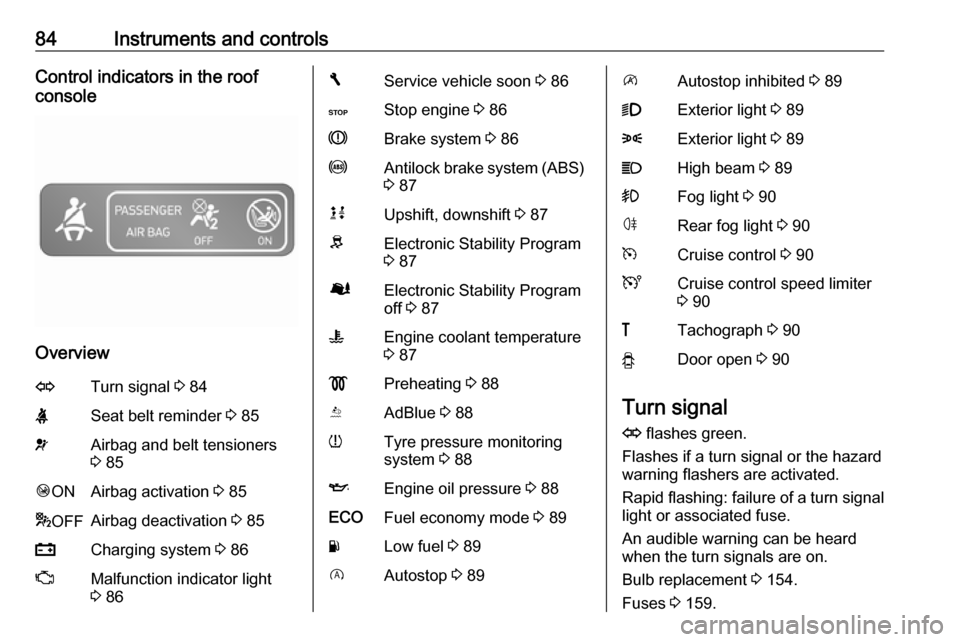
84Instruments and controlsControl indicators in the roof
console
Overview
OTurn signal 3 84XSeat belt reminder 3 85vAirbag and belt tensioners
3 85Ó ONAirbag activation 3 85* OFFAirbag deactivation 3 85pCharging system 3 86ZMalfunction indicator light
3 86FService vehicle soon 3 86CStop engine 3 86RBrake system 3 86uAntilock brake system (ABS)
3 87kjUpshift, downshift 3 87RElectronic Stability Program
3 87ØElectronic Stability Program
off 3 87WEngine coolant temperature
3 87!Preheating 3 88YAdBlue 3 88wTyre pressure monitoring
system 3 88IEngine oil pressure 3 88ECOFuel economy mode 3 89YLow fuel 3 89DAutostop 3 89\Autostop inhibited 3 899Exterior light 3 898Exterior light 3 89CHigh beam 3 89>Fog light 3 90øRear fog light 3 90mCruise control 3 90UCruise control speed limiter
3 90&Tachograph 3 90yDoor open 3 90
Turn signal
O flashes green.
Flashes if a turn signal or the hazard
warning flashers are activated.
Rapid flashing: failure of a turn signal
light or associated fuse.
An audible warning can be heard
when the turn signals are on.
Bulb replacement 3 154.
Fuses 3 159.
Page 89 of 211

Instruments and controls87If R illuminates together with control
indicator C and a warning chime,
there is a fault in the braking system.
A corresponding message also
appears in the Driver Information
Centre (DIC) 3 90. Seek the
assistance of a workshop
immediately.
Brake system 3 128.
Antilock brake system (ABS)
u illuminates yellow.
Illuminates briefly after the ignition is
switched on. The system is ready for
operation when u extinguishes.
If control indicator u does not go out
after a few seconds, or if it illuminates while driving, there is a fault in the
ABS. Control indicator F may also
illuminate in the instrument cluster
together a corresponding message in the Driver Information Centre (DIC)3 90. The brake system remains
operational but without ABS
regulation.If control indicators u, F , R and C
illuminate, there is a fault in the
braking system. A corresponding
message appears in the DIC. Seek
the assistance of a workshop
immediately.
Antilock brake system (ABS) 3 129.
Upshift k or j illuminates.
It is recommended to shift gear when
illuminated to improve fuel economy.
Electronic Stability Program
R flashes or illuminates yellow.
Illuminates briefly when the ignition is
switched on.
Flashing during driving The system is actively engaged.
Engine output may be reduced and
the vehicle may be braked
automatically to a small degree.Illuminates while driving
The system is not available. A
corresponding message also
appears in the Driver Information
Centre (DIC) 3 90.
ESP® Plus
3 131, Traction Control
system 3 130.
Electronic Stability Program
off
Ø illuminates green.
If ESP ®Plus
has been deactivated with
Ø on the instrument panel, control
indicator Ø illuminates and a
corresponding message appears in
the Driver Information Centre (DIC)
3 90.
ESP® Plus
3 131, Traction Control
system 3 130.
Engine coolant temperature
W illuminates blue or red.
Illuminates red briefly when the
ignition is switched on, then turns
blue.
Page 90 of 211
88Instruments and controlsIlluminates red when the engine is
running
Stop, switch off engine.Caution
Coolant temperature too high.
Check coolant level 3 148.
If there is sufficient coolant, consult a workshop.
The control indicator must be blue
before continuing driving.
Preheating
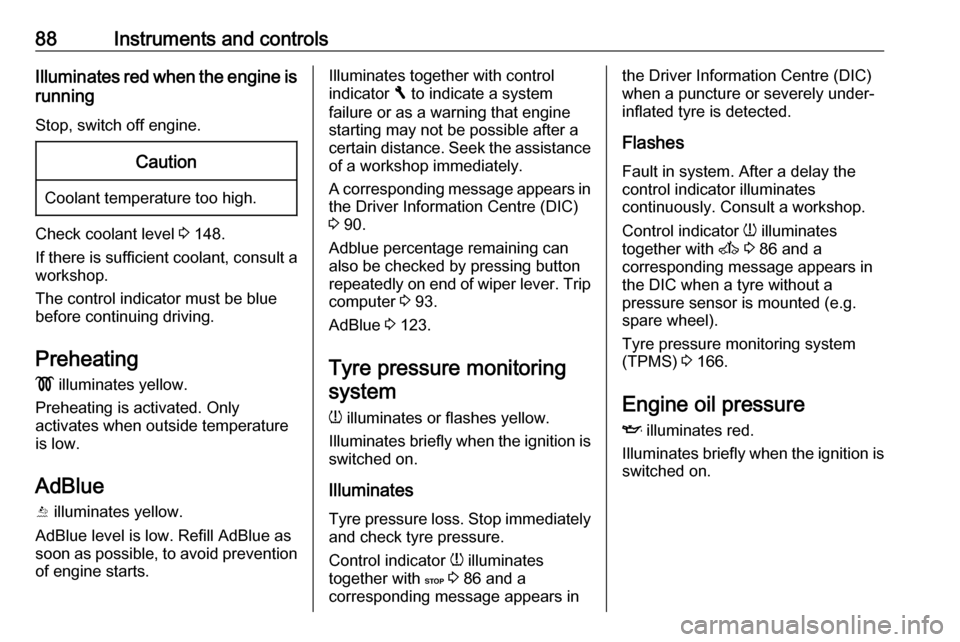
! illuminates yellow.
Preheating is activated. Only
activates when outside temperature
is low.
AdBlue Y illuminates yellow.
AdBlue level is low. Refill AdBlue as
soon as possible, to avoid prevention
of engine starts.
Illuminates together with control
indicator F to indicate a system
failure or as a warning that engine starting may not be possible after a
certain distance. Seek the assistance
of a workshop immediately.
A corresponding message appears in the Driver Information Centre (DIC)
3 90.
Adblue percentage remaining can
also be checked by pressing button
repeatedly on end of wiper lever. Trip
computer 3 93.
AdBlue 3 123.
Tyre pressure monitoring
system
w illuminates or flashes yellow.
Illuminates briefly when the ignition is
switched on.
Illuminates
Tyre pressure loss. Stop immediately
and check tyre pressure.
Control indicator w illuminates
together with C 3 86 and a
corresponding message appears inthe Driver Information Centre (DIC)
when a puncture or severely under- inflated tyre is detected.
Flashes
Fault in system. After a delay the
control indicator illuminates
continuously. Consult a workshop.
Control indicator w illuminates
together with A 3 86 and a
corresponding message appears in
the DIC when a tyre without a
pressure sensor is mounted (e.g.
spare wheel).
Tyre pressure monitoring system (TPMS) 3 166.
Engine oil pressure
I illuminates red.
Illuminates briefly when the ignition is
switched on.
Page 91 of 211

Instruments and controls89Illuminates when the engine is
running
If control indicator I illuminates
when the engine is running (together
with control indicator C and a
warning chime): Stop, switch off
engine.Caution
Engine lubrication may be
interrupted. This may result in
damage to the engine and/or
locking of the drive wheels.
1. Depress clutch.
2. Select neutral gear (or move selector lever to N).
3. Move out of the flow of traffic as quickly as possible without
impeding other vehicles.
4. Switch off ignition.
9 Warning
When the engine is off,
considerably more force is needed
to brake and steer.
Do not remove key until vehicle is stationary, otherwise the steeringwheel lock could engage
unexpectedly.
Check oil level before seeking
assistance of a workshop 3 147.
Fuel economy mode
ECO illuminates green when ECO
mode is engaged to reduce fuel
consumption.
ECO mode, driving economically
3 114.
Low fuel Y illuminates yellow.
Illuminates briefly when the ignition is
switched on.
Illuminates when level in fuel tank is
low (range of approx. 30 miles); refuel immediately 3 141.
Catalytic converter 3 123.
Bleeding the diesel fuel system
3 152.
Autostop D illuminates when engine is in an
Autostop.
\ illuminates when an Autostop is
inhibited when certain conditions are
not fulfilled.
Stop-start system 3 119.
Exterior light
9 illuminates green.
Illuminated when the headlights are
on.
8 illuminates green.
Illuminated when the sidelights are
on.
Lighting 3 96.
High beam
P illuminates blue.
Illuminated when high beam is on and during headlight flash 3 97.
Page 94 of 211

92Instruments and controlsWarning chimesOnly one warning chime will sound at a time.
A corresponding message may also
appear in the Driver Information
Centre (DIC) when a warning chime
is sounded.
When starting the engine or whilst driving:
● If seat belt is not fastened 3 49.
● During operation of the turn and lane-change signals 3 99.
● During illumination of certain control indicators.
● If the parking assist detects an object 3 136.
● If the vehicle speed briefly exceeds a set limit 3 133,
3 136.
● If a door or the bonnet is not properly closed when vehicle
exceeds a certain speed.
● If there is a fault in the brake system 3 86.● If the vehicle battery is not
charging 3 86.
● If engine lubrication is interrupted
3 88.
● If AdBlue needs to be refilled or a
fault is present 3 123.
● If the electronic key is outside of the detection range.
Electronic key system 3 22,
Power button 3 116.
When the vehicle is parked and/or
the driver's door is opened:
● If the key has been left in the ignition.
● If the electronic key has been left
in the card reader.
Electronic key system 3 22,
Power button 3 116.
● If the vehicle is in an Autostop. Stop-start system 3 119.
● If the exterior lights are on.Engine oil level
If the minimum engine oil level is
reached, a message is displayed in
the Driver Information Centre (DIC)
3 90 for 30 seconds after the engine
is started.
Check oil level 3 147.
Page 95 of 211

Instruments and controls93Trip computer
The trip computer provides
information on driving data, which is
continually recorded and evaluated electronically.
Depending on vehicle, the following
functions can be selected by pressing button repeatedly on end of wiper
lever:
● odometer 3 80
● fuel used
● average consumption
● instantaneous consumption
● range
● trip odometer
● average speed
● distance before service 3 81
● clock 3 77, outside temperature
3 77
● cruise control and speed limiter stored speed 3 133
● fuel economy rating
● Adblue percentage remaining 3 123
● fault and information messages
Fuel used Displays the amount of fuel
consumed since the last reset.
The measurement can be restarted at any time by pressing and holding the
button.
Average consumption The value is displayed after driving a
distance of 0.25 miles.
Average consumption is displayed, taking into consideration the distance
travelled and the fuel used since the
last reset.The measurement can be restarted at
any time.
Instantaneous consumption
The value is displayed after reaching
a speed of 20 mph.
Range The value is displayed after driving a
distance of 0.25 miles.
The range is calculated from the
current contents of the fuel tank and
the average consumption since the
last reset.
The range will not display if control
indicator Y is illuminated in the
instrument cluster 3 89.
Trip odometer Displays the distance driven since the
last reset.
The measurement can be restarted at
any time.
Trip odometer 3 80.
Page 105 of 211
Climate control103Climate controlClimate control systems.............103
Heating and ventilation system 103
Air conditioning system ...........104
Electronic climate control system .................................... 105
Rear heating system ...............107
Rear air conditioning system ...107
Auxiliary heater ........................108
Air vents ..................................... 112
Adjustable air vents .................112
Fixed air vents ......................... 112
Glovebox cooler ......................112
Maintenance .............................. 113
Air intake ................................. 113
Pollen filter ............................... 113
Air conditioning regular operation ................................ 113
Service .................................... 113Climate control systems
Heating and ventilation system
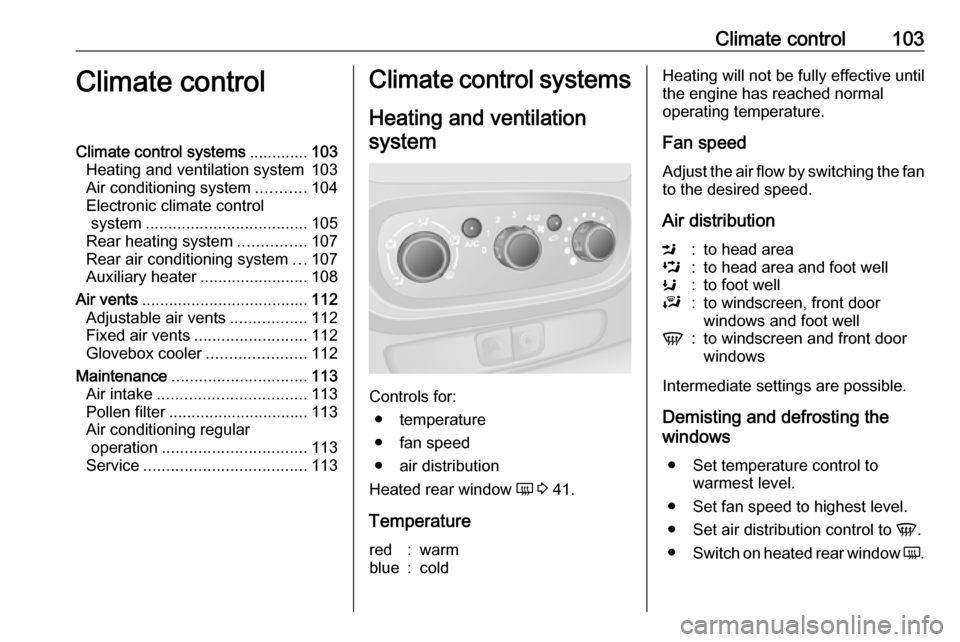
Controls for: ● temperature
● fan speed
● air distribution
Heated rear window Ü 3 41.
Temperature
red:warmblue:coldHeating will not be fully effective until
the engine has reached normal
operating temperature.
Fan speed
Adjust the air flow by switching the fan
to the desired speed.
Air distributionM:to head areaL:to head area and foot wellK:to foot wellJ:to windscreen, front door
windows and foot wellV:to windscreen and front door
windows
Intermediate settings are possible.
Demisting and defrosting the
windows
● Set temperature control to warmest level.
● Set fan speed to highest level.
● Set air distribution control to V.
● Switch on heated rear window Ü.
Page 116 of 211
114Driving and operatingDriving and
operatingDriving hints ............................... 114
Driving economically ...............114
Control of the vehicle ...............115
Steering ................................... 115
Starting and operating ...............116
New vehicle running-in ............116
Ignition switch positions ...........116
Power button ........................... 116
Starting the engine ..................118
Idle speed control ....................118
Vehicle shutdown ....................119
Overrun cut-off ........................ 119
Stop-start system ....................119
Parking .................................... 122
Engine exhaust .......................... 122
Diesel particle filter ..................122
Catalytic converter ...................123
AdBlue ..................................... 123
Manual transmission ..................128
Brakes ........................................ 128
Antilock brake system .............129
Parking brake .......................... 129Brake assist............................. 130
Hill start assist ......................... 130
Ride control systems .................130
Traction Control system ..........130
Electronic stability program .....131
Driver assistance systems .........133
Cruise control .......................... 133
Speed limiter ........................... 136
Parking assist .......................... 136
Rear view camera ...................139
Fuel ............................................ 140
Fuel for diesel engines ............140
Refuelling ................................ 141
Fuel consumption - CO 2-
Emissions .............................. 142
Trailer hitch ................................ 142
General information .................142
Driving characteristics and towing tips .............................. 142
Trailer towing ........................... 143
Trailer stability assist ...............143Driving hints
Driving economically
ECO mode
ECO mode is a function that
optimises fuel consumption. It affects engine power and torque,
acceleration, gear shift indication,
heating, air conditioning and electrical consumers.
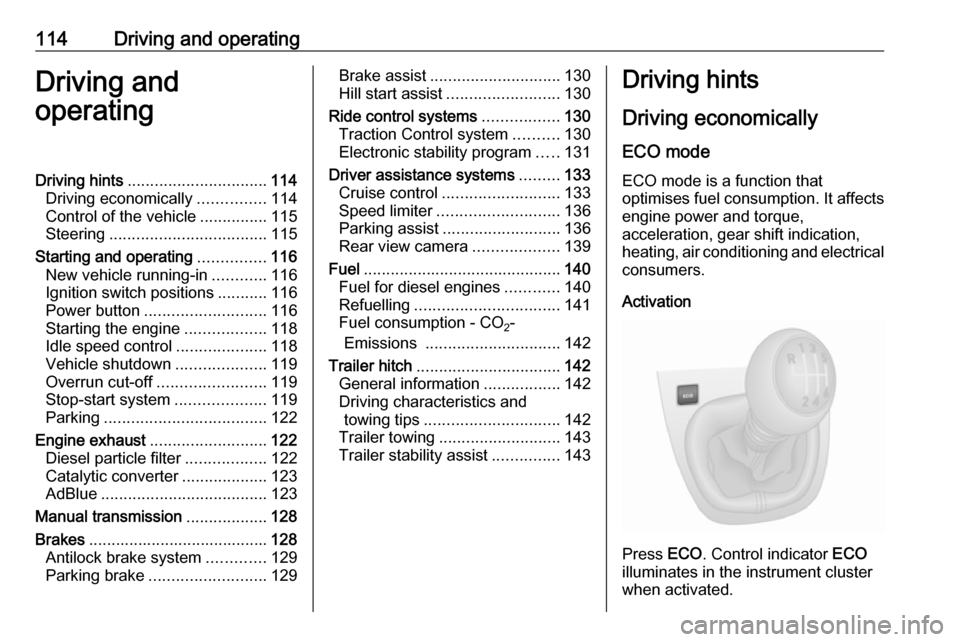
Activation
Press ECO. Control indicator ECO
illuminates in the instrument cluster when activated.