phone VAUXHALL VIVARO C 2020 Infotainment system
[x] Cancel search | Manufacturer: VAUXHALL, Model Year: 2020, Model line: VIVARO C, Model: VAUXHALL VIVARO C 2020Pages: 117, PDF Size: 2.46 MB
Page 55 of 117

Introduction.................................. 56
Basic operation ............................ 63
Radio ........................................... 69
External devices .......................... 73
Speech recognition ......................77
Phone .......................................... 80
Index ............................................ 86Multimedia
Page 59 of 117

Introduction591).......................................... 61
If switched off: switch
power on / off
If switched on: mute system
Turn: adjust volume
2 c
Display navigation app
when phone projection is
active ..................................... 75
3 b
Open audio menu:
Radio ..................................... 69
External devices (USB,
Bluetooth) .............................. 73
4 _
Open vehicle settings
menu, see Owner's Manual
5 :
Open settings menu ..............63
6 d
Open menu for picture
function ................................. 757a
Open phone menu ................82
Display phone projection
screen when phone
projection is active ................75Steering wheel controls
1Y / Z
Toggle between the
menus in the Driver
Information Centre
2 +
Increase volume
3 8
Mute the audio
4 –
Decrease volume
Page 60 of 117
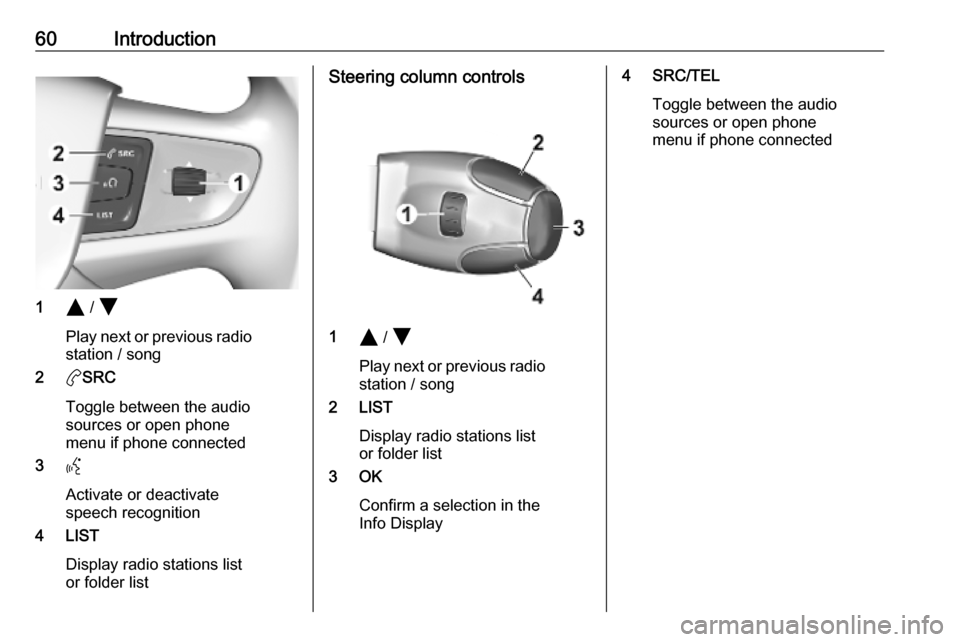
60Introduction
1Y / Z
Play next or previous radio station / song
2 aSRC
Toggle between the audio
sources or open phone
menu if phone connected
3 Y
Activate or deactivate
speech recognition
4 LIST
Display radio stations list
or folder list
Steering column controls
1 Y / Z
Play next or previous radio station / song
2 LIST
Display radio stations list
or folder list
3 OK
Confirm a selection in the
Info Display
4 SRC/TEL
Toggle between the audio
sources or open phone
menu if phone connected
Page 62 of 117
62IntroductionPhone
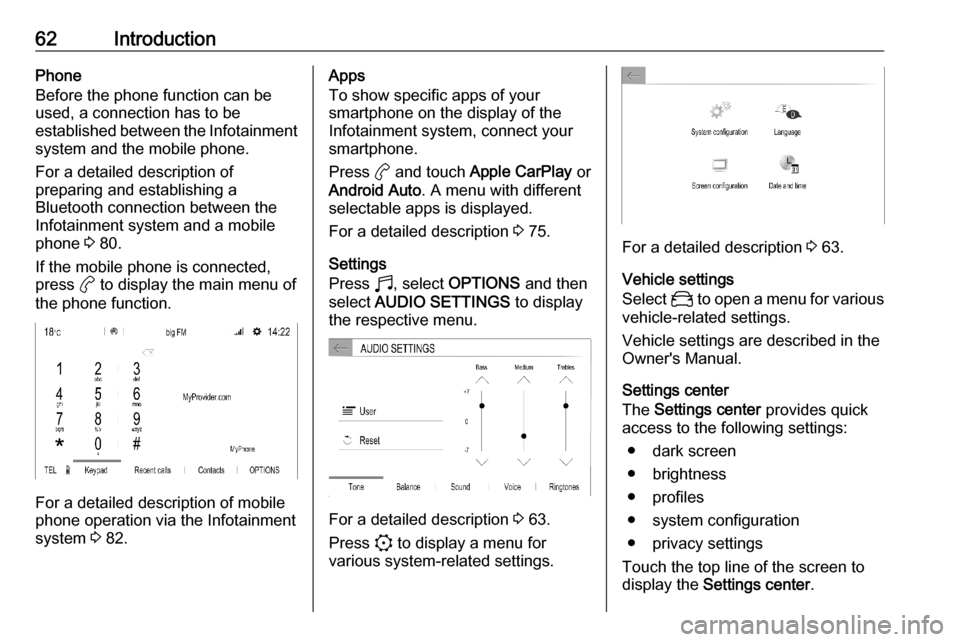
Before the phone function can be
used, a connection has to be
established between the Infotainment system and the mobile phone.
For a detailed description of
preparing and establishing a
Bluetooth connection between the Infotainment system and a mobile
phone 3 80.
If the mobile phone is connected,
press a to display the main menu of
the phone function.
For a detailed description of mobile
phone operation via the Infotainment
system 3 82.
Apps
To show specific apps of your
smartphone on the display of the
Infotainment system, connect your smartphone.
Press a and touch Apple CarPlay or
Android Auto . A menu with different
selectable apps is displayed.
For a detailed description 3 75.
Settings
Press b, select OPTIONS and then
select AUDIO SETTINGS to display
the respective menu.
For a detailed description 3 63.
Press : to display a menu for
various system-related settings.
For a detailed description 3 63.
Vehicle settings
Select _ to open a menu for various
vehicle-related settings.
Vehicle settings are described in the
Owner's Manual.
Settings center
The Settings center provides quick
access to the following settings:
● dark screen
● brightness
● profiles
● system configuration
● privacy settings
Touch the top line of the screen to
display the Settings center .
Page 67 of 117
Basic operation67Adjusting the screenSelect Screen configuration .
Text scroll function
Select the Animation tab.
If long texts on the screen should be
scrolled automatically, activate
Automatic scrolling .
If Automatic scrolling is deactivated,
long texts are truncated.
Adjusting the brightness
Select Brightness and set the
brightness of the screen to the
desired level.
Storing your personal settings
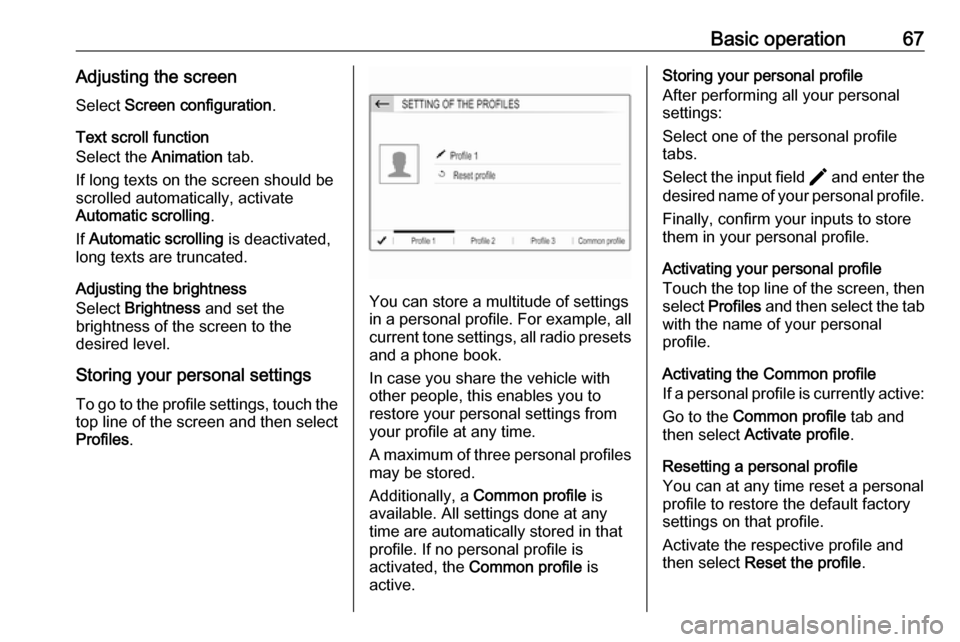
To go to the profile settings, touch the top line of the screen and then select
Profiles .
You can store a multitude of settings
in a personal profile. For example, all
current tone settings, all radio presets
and a phone book.
In case you share the vehicle with
other people, this enables you to
restore your personal settings from
your profile at any time.
A maximum of three personal profiles may be stored.
Additionally, a Common profile is
available. All settings done at any
time are automatically stored in that
profile. If no personal profile is
activated, the Common profile is
active.
Storing your personal profile
After performing all your personal
settings:
Select one of the personal profile
tabs.
Select the input field > and enter the
desired name of your personal profile.
Finally, confirm your inputs to store
them in your personal profile.
Activating your personal profile
Touch the top line of the screen, then select Profiles and then select the tab
with the name of your personal
profile.
Activating the Common profile
If a personal profile is currently active:
Go to the Common profile tab and
then select Activate profile .
Resetting a personal profile
You can at any time reset a personal
profile to restore the default factory
settings on that profile.
Activate the respective profile and
then select Reset the profile .
Page 73 of 117

External devices73External devicesGeneral information.....................73
Playing audio ............................... 74
Displaying pictures ....................... 75
Using smartphone applications ...75General information
A USB port is located in the centre
console.Caution
To protect the system, do not use
a USB hub.
Notice
The USB ports must always be kept clean and dry.
USB ports
An MP3 player, USB device, SD card (via USB connector / adapter) or
smartphone can be connected to the
USB port.
The Infotainment system can play
audio files or show picture files
contained in USB devices.
When connected to a USB port,
various functions of the devices
mentioned above can be operated via the controls and menus of the
Infotainment system.
Notice
Not all auxiliary devices are
supported by the Infotainment
system.
Connecting / disconnecting a device Connect one of the devices
mentioned above to a USB port. If
required, use the appropriate
connection cable. The music function
starts automatically.
Notice
If a non-readable USB device is
connected, a corresponding error
message appears and the
Infotainment system automatically
switches to the previous function.
To disconnect a USB device, select
another function and then remove the USB device.Caution
Avoid disconnecting the device
during playback. This may
damage the device or the
Infotainment system.
Page 74 of 117

74External devicesBluetooth audio streamingStreaming allows you to listen to
music from your smartphone.
For a detailed description on how to
establish a Bluetooth connection
3 81.
If audio playback does not start
automatically, it may be necessary to
start the playback on the smartphone.
First adjust the volume on your
smartphone (to a high level). Then
adjust the volume of Infotainment system.
File formats The audio equipment supports
different file formats.
Playing audio
Playing audio via USB or
Bluetooth
Activating the music function
Connecting the USB or Bluetooth
device 3 73.If device already connected, but
playback of stored music files not
active:
Press b, select SOURCES and then
select the respective source.
Playback of the audio tracks starts
automatically.
Playback functionsInterrupting and resuming playback
Touch 5 to interrupt playback. The
screen button changes to 4.
Touch 4 to resume playback.Playing the previous or next track
Touch P or Q.Fast forwarding and rewinding
Touch and hold P or Q. Release to
return to normal playback mode.
Alternatively, you can move the slider showing the current track position to
the left or right.Playing tracks randomly
Select OPTIONS and touch the
Random icon repeatedly:
j : play tracks of currently selected
list (album, artist, etc.) in random
order.k : play tracks of currently
selected list (album, artist, etc.) in
normal playback mode.Repeating tracks
Select OPTIONS and touch the
Repeat icon n repeatedly to select
one of the following options:
● repeat tracks of currently selected list (album, artist, etc.)
● repeat tracks of currently selected list (album, artist, etc.)
once
● play tracks of currently selected list (album, artist, etc.) in normal
playback mode
Page 75 of 117
External devices75Playing audio via the AUX input
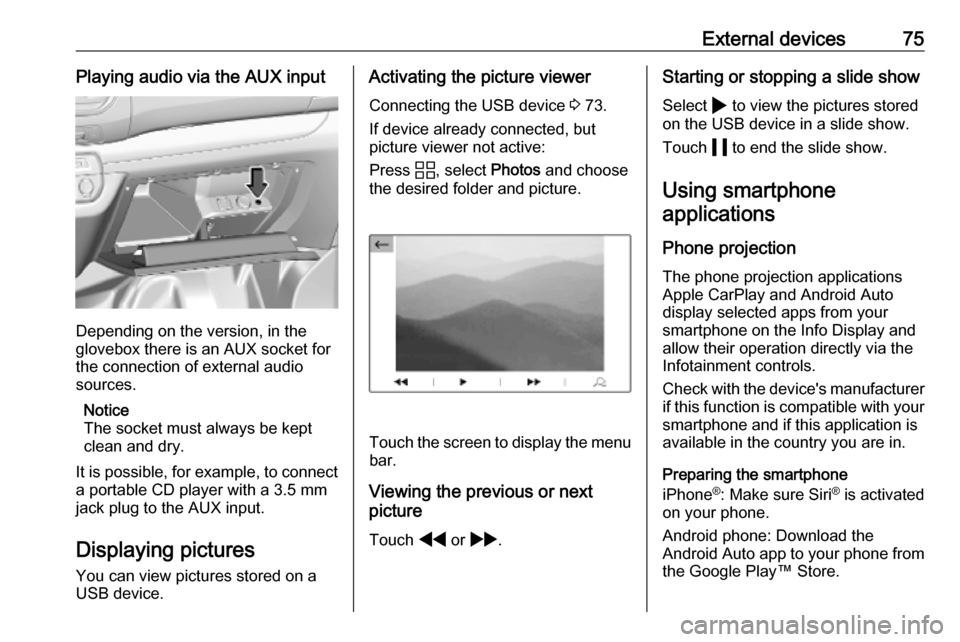
Depending on the version, in the
glovebox there is an AUX socket for
the connection of external audio
sources.
Notice
The socket must always be kept
clean and dry.
It is possible, for example, to connect a portable CD player with a 3.5 mm
jack plug to the AUX input.
Displaying pictures
You can view pictures stored on a
USB device.
Activating the picture viewer
Connecting the USB device 3 73.
If device already connected, but
picture viewer not active:
Press d, select Photos and choose
the desired folder and picture.
Touch the screen to display the menu
bar.
Viewing the previous or next
picture
Touch f or g .
Starting or stopping a slide show
Select 4 to view the pictures stored
on the USB device in a slide show.
Touch 5 to end the slide show.
Using smartphone
applications
Phone projection
The phone projection applications
Apple CarPlay and Android Auto
display selected apps from your
smartphone on the Info Display and
allow their operation directly via the
Infotainment controls.
Check with the device's manufacturer
if this function is compatible with your smartphone and if this application is
available in the country you are in.
Preparing the smartphone
iPhone ®
: Make sure Siri ®
is activated
on your phone.
Android phone: Download the
Android Auto app to your phone from the Google Play™ Store.
Page 76 of 117

76External devicesConnecting the smartphoneiPhone
Connect the phone to the USB port
3 73.
If the phone is already connected via
Bluetooth, upon connecting to the
USB port and launching Apple
CarPlay, the Bluetooth connection
will disconnect. After disconnecting
the USB connection, the phone will be connected via Bluetooth again.Android phone
Connect the phone via Bluetooth
3 81 and then connect the phone to
the USB port 3 73.
Starting phone projection
If phone projection is not starting
automatically, press a and then
touch Apple CarPlay or
Android Auto .
The phone projection screen
displayed depends on your
smartphone and software version.
Returning to the Infotainment screen
Press, e.g., the b button on the
control panel.
Page 77 of 117

Speech recognition77Speech recognitionGeneral information.....................77
Usage .......................................... 78General information
Embedded speech recognition
The embedded speech recognition of
the Infotainment system enables you to operate various functions of the
Infotainment system via voice input. It recognises commands and numeric
sequences independently of the
relevant speaker. The commands
and numeric sequences can be
spoken without a voice pause
between the individual words.
In the event of incorrect operation or
commands, the speech recognition
gives visual and / or acoustic
feedback and requests you to re-
enter the desired command. Apart
from this, the speech recognition
acknowledges important commands
and will enquire if necessary.
In general, there are different ways to
speak commands for performing the
desired actions.
Notice
To ensure that conversations inside
the vehicle do not lead to
unintentional triggering of thesystem functions, the speech
recognition does not start until it has
been activated.
Important informationLanguage support ● Not all languages available for the display of the Infotainment
system are also available for the
speech recognition.
● If the display language currently selected is not supported by the
speech recognition, speech
recognition is not available.
In such a case, you need to select
another language for the display
if you want to control the
Infotainment system via voice
input. To change the display
language 3 66.
Voice pass-thru application
The voice pass-thru application of the
Infotainment system allows access to the speech recognition commands on
your smartphone.