spec VOLKSWAGEN BEETLE 2010 Owners Manual
[x] Cancel search | Manufacturer: VOLKSWAGEN, Model Year: 2010, Model line: BEETLE, Model: VOLKSWAGEN BEETLE 2010Pages: 138, PDF Size: 48.59 MB
Page 2 of 138
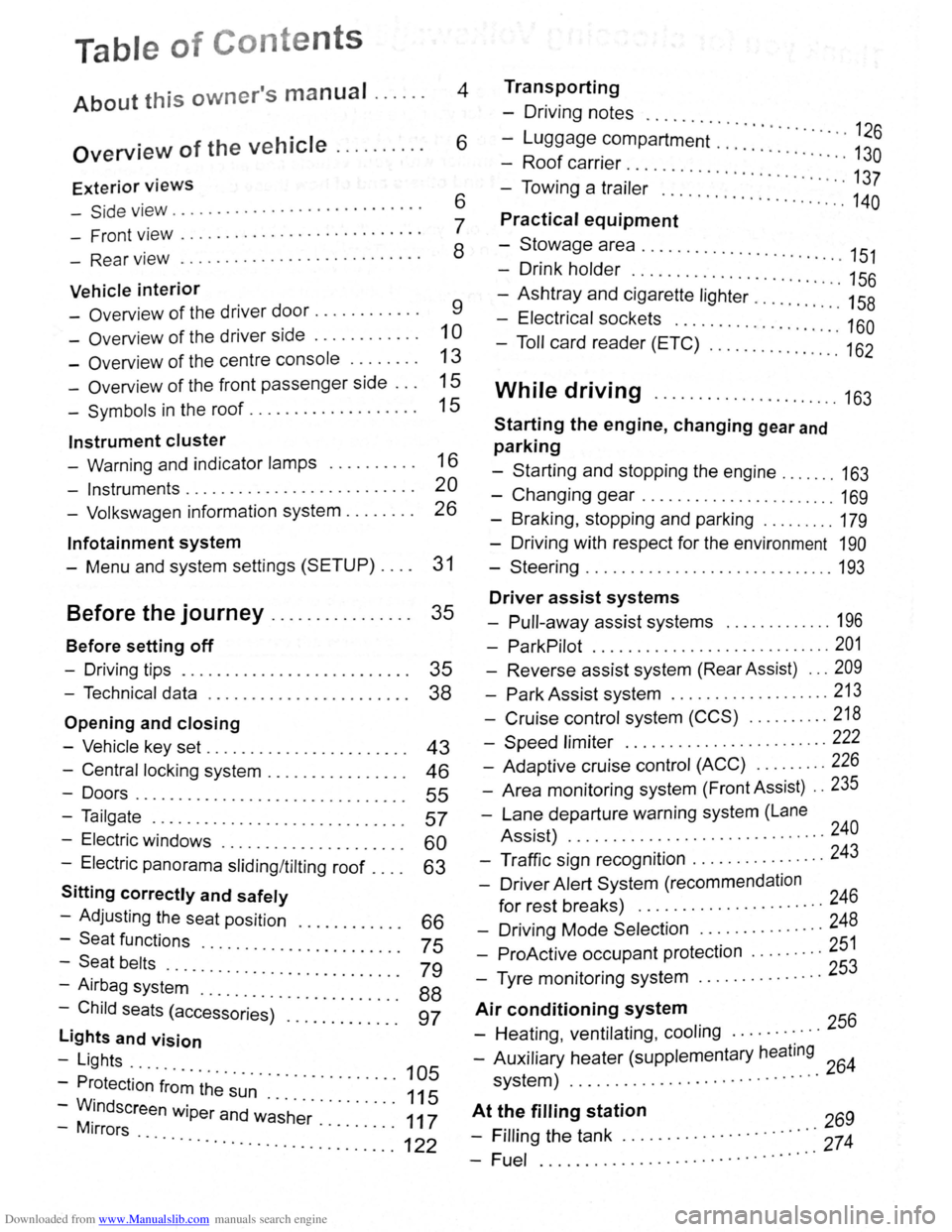
Downloaded from www.Manualslib.com manuals search engine Table of Conte nts
About this owner's manual . . . . . . 4
Overview of the vehicle . . . . . . . . . . 6
Exterior views
-Side v iew . . . . . . . . . . . . . . . . . . . . . . . . . . . . 6
- Front view . . . . . . . . . . . . . . . . . . . . . . . . . . . 7
- Rear view . . . . . . . . . . . . . . . . . . . . . . . . . . . 8
Vehicle interior
- Overview of the driver door........... . 9
-Overv iew of the driver side . . . . . . . . . . . . 1 0
- Overview of the centre console . . . . . . . . 13
- Overview of the front passenger side . . . 15
-Symbols in the roof . . . . . . . . . . . . . . . . . . . 15
Instrument cluster
- Warning and indicator lamps . . . . . . . . . . 16
- Instruments.......................... 20
- Volkswagen information system . . . . . . . . 26
lnfotainment system
- Menu and system settings (SETUP) . . . . 31
Before the journey . . . . . . . . . . . . . . . . 35
Before setting off
- Driving tips . . . . . . . . . . . . . . . . . . . . . . . . . . 35
- Technical data . . . . . . . . . . . . . . . . . . . . . . . 38
Opening and closing
-Vehicle key set . . . . . . . . . . . . . . . . . . . . . . . 43
- Central locking system . . . . . . . . . . . . . . . . 46
-Doors....................... .. . 55
-Tailgate . . . . . . . . . . . . . . . . . . . . . . . . . . . . . 57
- Electric windows . . . . . . . . . . . . . . . . 60
- Electric panorama sliding/tilting roof . : : : : 63
Sitting correctly and safely
- Adjusting the seat position . . . . 66
-Seat functions · · · · · · · · 75 -Seat belts ..... · · · · · · · · · · · · · · · · · ·
- Airbag syst~~ . : : : : · · · · · · · · · · · · · · · 79
-Child seats (access~;;~~)· :::::::::::: : ~~
lights and vision
-Lights ...
- Protection
·f~~~ ~h~· ~~~ · · · · · · · · · · · 105
-WM.indscreen wiper and w~·s·h~r· . . . . . . . . . 111175
-1rrors · · · · · · · .. ............. ...... ........... 122
Transporting
- Driving notes ..........
-Luggage compartment · · · · · · · · · · · · · · 126
-Roof carrier · · · · · · · · · · · · · · · · 130
- Towing a trai·l~; .. ... · · · · · · · · · · · · · · · · · · 137
..... ................. 140
Practical equipment
-Stowage area ........... .. .
- Drink holder
.. · · · · · .. · 151 . . . . . . . . . . . . . . . . . . . . . . . 156
-Ashtray and cigarette lighter ......... : ." 158
- Electrical sockets ........ .. .......... 160
- Toll card reader (ETC) .............. .. 162
While driving ...................... 163
Starting the engine, changing gear and
parking
-Starting and stopping the engine ....... 163
-Changing gear ....................... 169
-Braking , stopping and parking ........ . 179
- Driving with respect for the environment 190
-Steering ............................. 193
Driver assist systems
- Pull-away assist systems ............. 196
- ParkPilot ............................ 201
- Reverse assist system (Rear Assist) ... 209
-Park Assist system ................... 213
-Cruise control system (CCS) .......... 218
-Speed limiter ........ .. .............. 222
- Adaptive cruise control (ACC) ........ . 226
- Area monitoring system (Front Assist) .. 235
-Lane departure warning system (Lane
Assist) .
.......... ................... 240
- Traffic sign recognition ................ 243
- Driver Alert System (recommendation
for rest breaks) ........... ........... 246
- Driving Mode Selection ............... 248
- ProActive occupant protection ..... .... 251
- Tyre monitoring system .. ............. 253
Air conditioning system
- Heating , ventilating, cooling ........... 256
- Auxiliary heater (supplementary heating 64 system) ................. ............ 2
At t~~ filling station 269
- Frllrng the tank ............. · · · · · · ·::: 274
-Fuel ................ .. · · · · · · · · ·· ·
Page 20 of 138
Downloaded from www.Manualslib.com manuals search engine L
l:l If several w arning reports a re detecte d, the
L!J symbols will appear f or s eve ra l seconds, on e
a ft e r a
noth er. T he symbols will continue to appear
until the fa ults a re rectifie d .
l:l If w arni ng messages about malfunctions are
L!J displa ye d when th e ig nition is switched on, it
m ay
not be possib le to a dju st some settings as de-
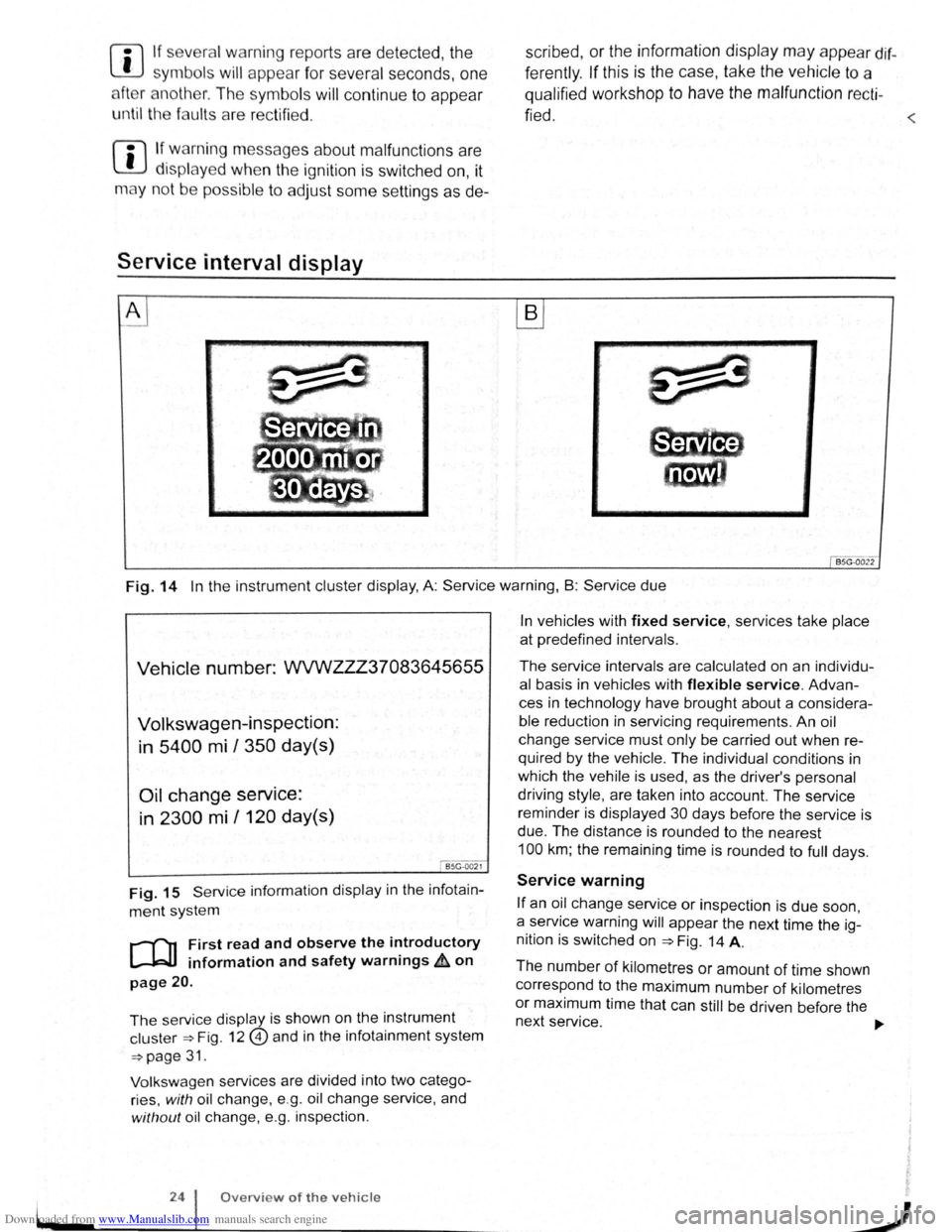
Service interval display
A
scribed, or the information display m ay appea r dif
f e rently .
If this is the case, take the ve hicl e to a
qualified
workshop to have the m alfunction re cti -
fied .
<
B
BSG-0022
Fig. 14 In th e instrum ent cluster display , A: Service warning, B : Serv ice due
Vehicle number: WVWZZZ37083645655
Volkswagen-inspection:
in
5400 mi I 350 day(s)
Oil change service:
in 2300 mi /120 day(s)
I BSG-0021
Fig. 15 Servi ce informatio n displ ay in the infot ain
m ent sy ste m
r-f"n First read and observe the introductory
l-J=JJ information and safety warnings£ on
page 20 .
The se rvice disp la y i s s hown on th e instrum ent
cl us te r ~Fig. 12@) a nd in th e infota inment syste m
~page 3 1.
V ol
ksw age n se rvi ces are divid ed into two cate go
r ies,
w ith oil c h a nge, e.g . o il ch a ng e se rvice , and
with out oil cha nge, e.g. in spectio n .
24 Overview of the vehicle
In ve hicles with fixed service, services ta ke place
at prede fin ed int ervals .
The service intervals are calculated on an individu
al basis in ve hicles with flexible service. Advan
c es in technology have brought about a considera
ble redu ction in servi cing re quirements . An oil
chang e service must only be carried out when re
quired by the vehicle. The individual conditions in
which the ve hile is used , as the driver's pe rsonal
driv i
ng style , are taken into account. The se rvice
reminder is displayed 30 da ys befor e the service is
due . The dista nce is round ed to the nearest
100 km ; th e re maining time is rounded to full days.
Service warning
If an oil change service or inspection is due soon,
a service warning
will appear th e next time the ig
nition is switched on
~Fig. 14 A.
Th e numb er
of kilometr es or amount of time shown
c orr espond to the maximum number
of kilometr es
or maximum time that can still be driv en b efo re the
n ext servic
e. ..,..
J
Page 30 of 138
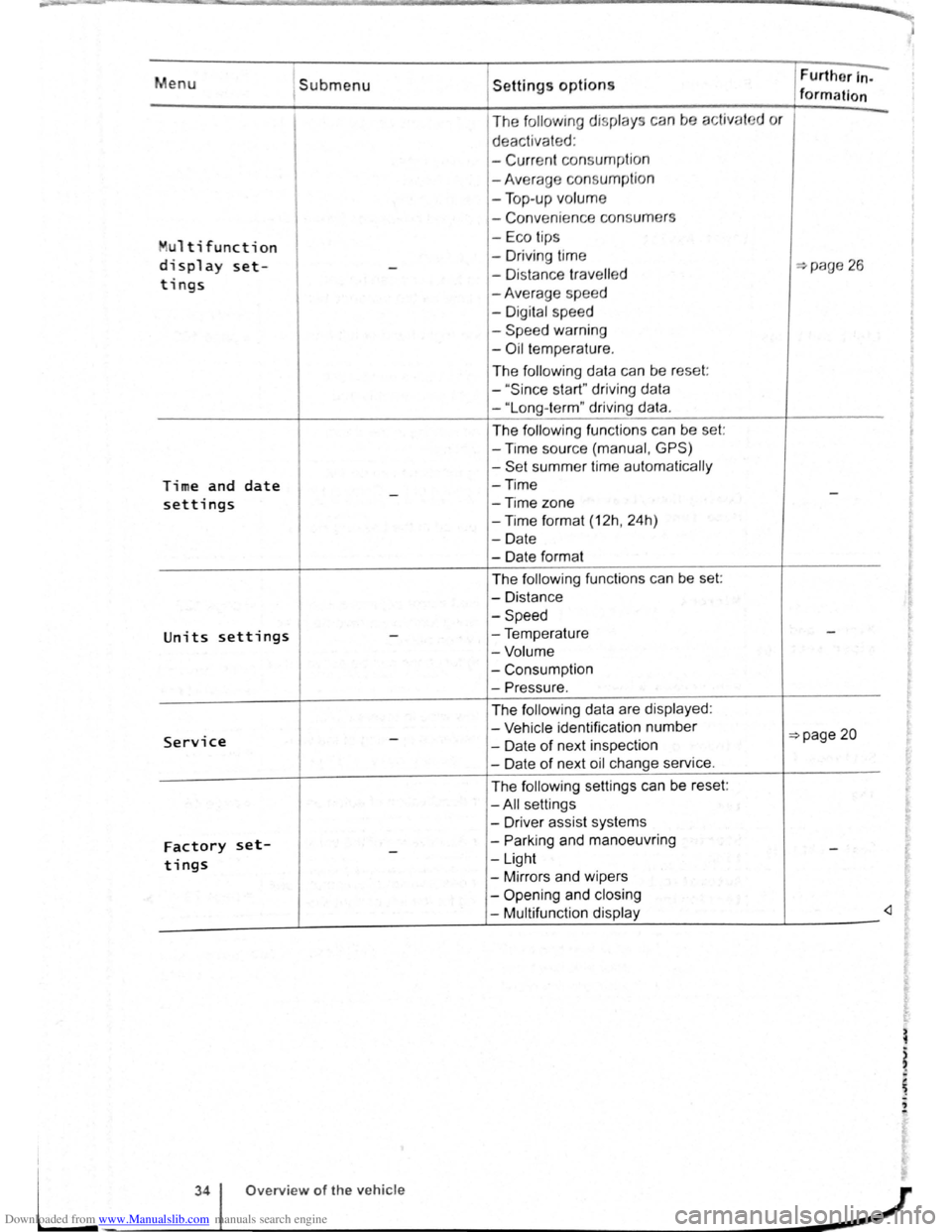
Downloaded from www.Manualslib.com manuals search engine Menu 1submenu
Multi function
display set--
tings
Time and date -settings
Units settings -
Service -
Factory set--tings
Settings options
The following display s ca n be activat
deactivated :
-
Curr ent consu mption
-Average consumpti on
- Top -up volume
- Conveni ence consum ers
- Eco tips
- Driv ing time
- Di stance
travell ed
-Average spee d
- Digital speed
-
Speed warning
-Oil t empe rature .
The
foll ow ing data can be reset:
-
" Sin ce start" driving data
-"Long -term" driving data.
The following functions can be set:
-Time source (manual , GPS)
-Set summer time automatically
-Time
-Time
zone
-Time format (12h, 24h)
-Date
- Date format
The
following functions can be set:
-Distance
-Speed
-Temperature
-Volume
-Consumption
-Pressure.
The follow ing data are displayed :
- Vehicle identification number
- Date
of next inspection
-Date of next oil change service.
The
following settings can be reset:
-All settings
- Driver assist systems
-
Parking and manoeuvring
-Light
-Mirrors and wipers
-
Opening and closing
- Multifunction display Further
In-
formation ~ ~
d
or
...,page 26
-
-
=>page 20
-
-
"'
L
34 Overview of the vehicle
-~~------------~J
Page 31 of 138
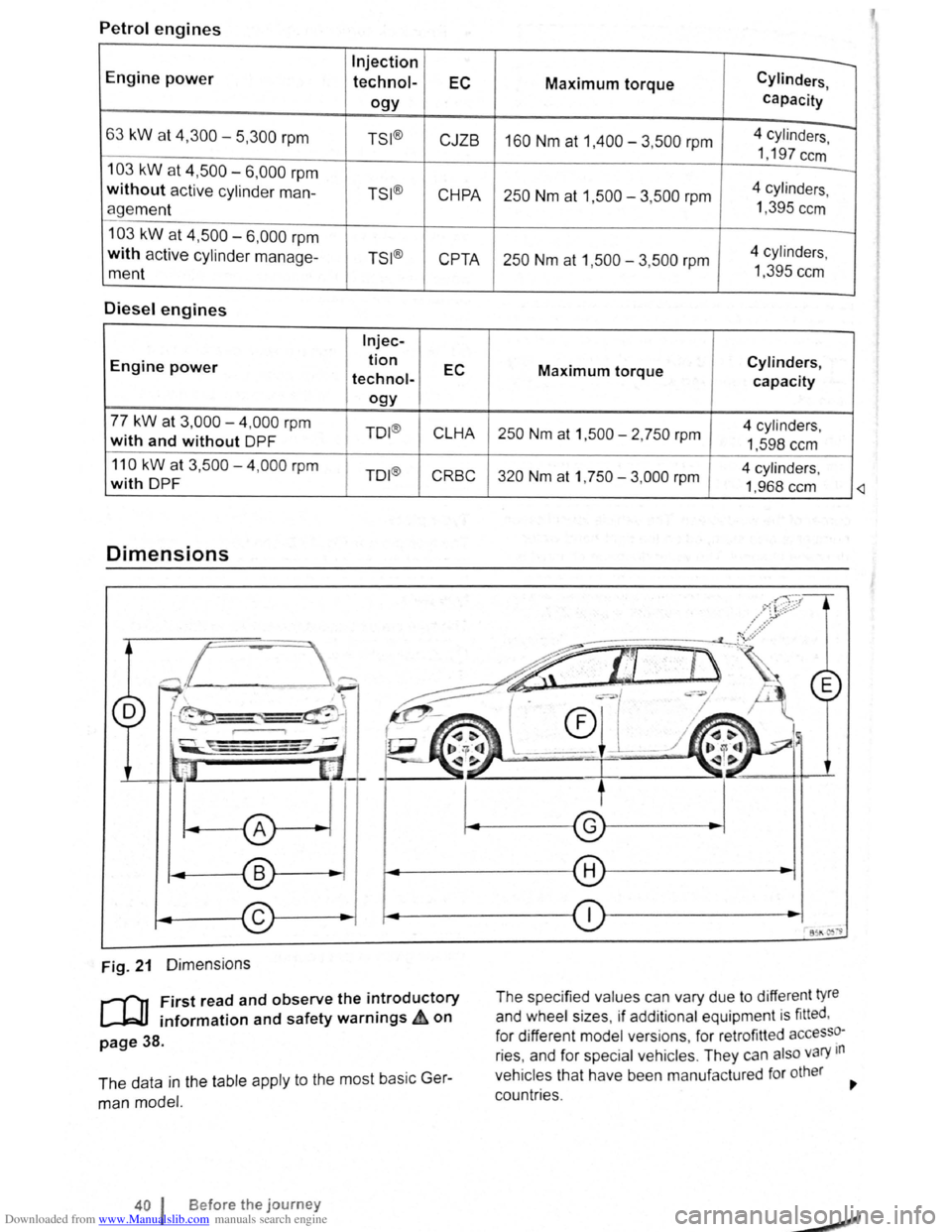
Downloaded from www.Manualslib.com manuals search engine Petrol engines
Engine power
Injection
technol-EC
ogy
63 kW at 4,300-5,300 rpm TSI ®
CJZB
103 kW at 4,500 6,000 rpm
without active cylinder man-TSI®
CHPA
agement
103 kW at 4,500 6,000 rpm
with active cylinder manage-TSI®
CPTA
ment
Diesel engines
lnjec-
Engine power tion
EC technol-
ogy
77 kW at 3,000-4,000 rpm TO I®
CLHA with and without DPF
110
kW at 3,500-4 ,000 rpm TO I®
CRBC with DPF
Dimensions
Fig. 21 Dimensions
r-f"n First read and observe the introductory
L.-Jr=JJ information and safety warnings ~ on
page 38.
The data in the table apply to the most basic Ger
man model.
40 I Before the journey
Maximum torque Cylinders
capacity
,
4 cylinders -160 Nm at 1,400 -3,500 rpm I
1,197 ccm
-
250 Nm at 1,500-3,500 rpm 4
cylinders ,
1 ,395
ccm
250 Nm at 1,500 -3 ,500 rpm 4
cylinders ,
1 ,395 ccm
Cylinders, Maximum torque
capacity
250 Nm at 1 ,500 - 2, 750 rpm 4 cylinders ,
1,598 ccm
320 Nm at 1, 750 -3,000 rpm 4
cylinders ,
1 ,968 ccm
The specified values can vary due to diffe rent t
yre
and wheel sizes , if add itional equipment is fitted ,
for different model versions , for retrofitted
accesso
ries , and for special veh icles . They can also vary 1n
vehicles
that have been manufa ctured for other
countr ies.
£
Page 33 of 138
Downloaded from www.Manualslib.com manuals search engine -r n -"') ...
Ope ning and closing
Vehi cle key set
ClJJ Introduction
Th is c hapte r contai ns info rmatio n on th e fo llo wi ng
subj ects:
V eh
icle ke y . . . . . . . . . . . . . . . . . . . . . . . . . . . . . 43
I
ndicator l amp in th e ve hi cle key . . . . . . . . . . . 44
Replacing the battery . . . . . . . . . . . . . . . . . . . . 45
S yn ch ronis ing the ve hicle key . . . . . . . . . . . . . 45
Additional information and warnings:
• Settin g s in the Volkswagen inform atio n system
=>page 26
• Central locking sys te m =>page 46
• S tarti ng and stopping the engine =>page 163
• Consumer info rmation =>page 328
• Manua lly closin g or open ing =>page 339
Swallowing batteries with a diameter of
20 mm or other lithium batteries can result in
severe or even fatal injuries within a very
short period of time.
• Always keep the vehicle key, key ring w ith
batteries, spare batteries, round cells and
other batteries that are larger than 20 mm out
of the reach of children.
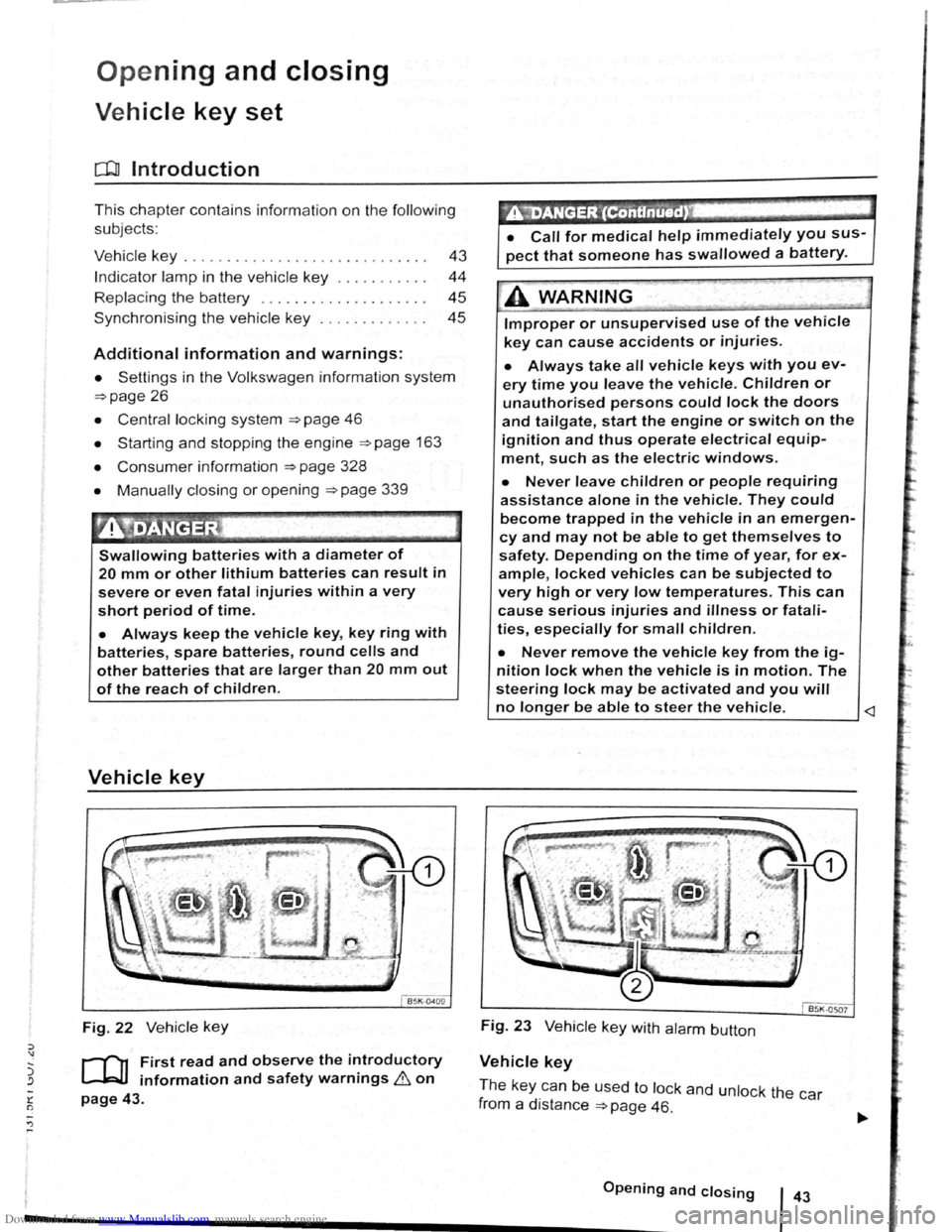
Vehicle key
Fig. 22 Ve hicle key
r-('n First read and observe the introductory
L-J.=J.I information and safety warnings & on
page 43.
~"iDANGER '(ContinUed) .
• Call for medical help immediately you sus
pect that someone has swallowed a battery.
A WARNING . .,~
Improper or unsupervised use of the vehicle
key can cause accidents or injuries.
• Always take all vehicle keys with you ev
ery time you leave the vehicle. Children or
unauthorised persons could lock the doors
and tailgate, start the engine or switch on the
ignition and thus operate electrical equip
ment, such as the electric windows.
• Never leave children or people requiring
assistance alone in the vehicle. They could
become trapped in the vehicle in an emergen
cy and may not be able to get themselves to
safety. Depending on the time of year, for ex
ample, locked vehicles can be subjected to
very high or very low temperatures. This can
cause serious injuries and illness or fatali
ties, especially for small children.
• Never remove the vehicle key from the ig
nition Jock when the vehicle is in motion. The
steering Jock may be activated and you will
no longer be able to steer the vehicle.
Vehicle key
Th e ke y ca n b e used t o lock and unlock th e car
f rom a
distance =>page 46.
------------------.............................................. O•p•e•n•i•n•g•a•n•d--c-lo_s_i_n_g ___ l 43
Page 35 of 138
Downloaded from www.Manualslib.com manuals search engine 0 N t--o ~
Replacing the battery
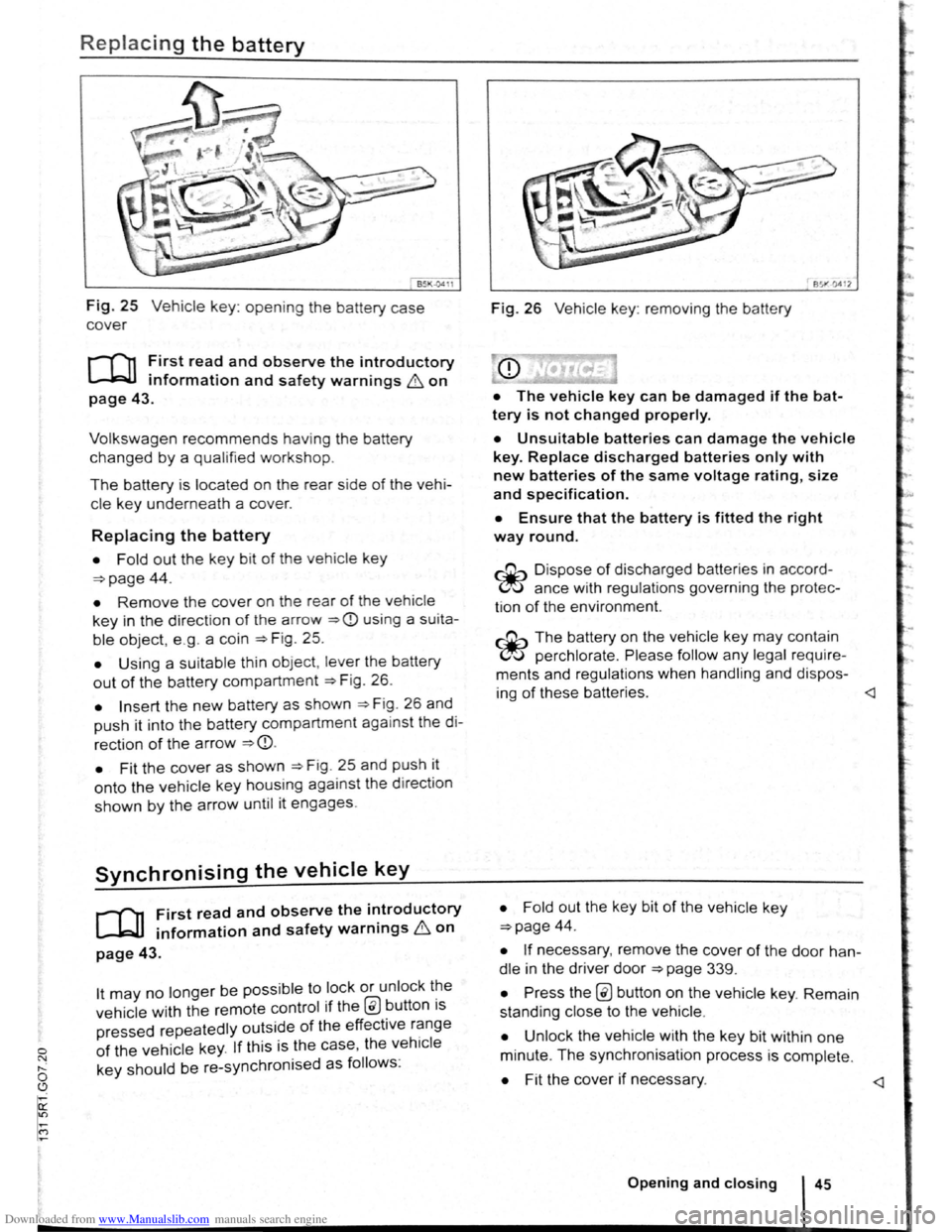
Fig. 25 Vehicle key: opening the battery case
cover
r-f""n First read and observe the introductory
L-kJJ information and safety warnings & on
page 43.
Volkswagen recommends having the battery
changed by a qualified workshop.
The battery is located on the rear side of the vehi
cle ke y underneath a cover.
Replacing the battery
• Fold out the key bit of the vehicle key
=>page 44.
• Remove the cover on the rear of the vehicle
key in the direction of t h e a rrow =>CD using a su ita
ble object, e .g . a coin =>Fig . 25.
• Using a suitable th in object, lever the battery
out of the battery compartment =>F ig . 26.
• Insert the new battery as shown =>F ig . 26 and
push it into the battery compartment against the di
rection of the arrow =>CD.
•
Fit the cover as shown =>F ig . 25 and push it
onto the vehicle key housing against the d irect ion
shown by the arrow until it engages.
Synchronising the vehicle key
r-f11 First read and observe the i~troductory
~ information and safety warnmgs 6 on
page 43.
lt may no longer be possible to lock or unlock t~e
vehicle with the remote control if the @ button ts
pressed repeatedly outside of the effective r~nge
of the vehicle key. If this is the case, the vehtcle
key should be re-synchronised as follows:
851"·0412
Fig. 26 Vehicle key: removing the battery
• The vehicle key can be damaged if the bat
tery is not changed properly.
• Unsuitable batteries can damage the vehicle
key. Replace discharged batteries only with
new batteries of the same voltage rating, size
and specif ication.
• Ensure that the battery is fitted the right
way round.
~ Dispo se of discharged batteries in accord
~ ance with regulations governing the protec
tion
of the enviro nment.
~ The battery on the vehicle key may contain
~ perchlorate . Please follow any legal require
ments and regulations when handling and dispos-
ing
of these batteries.
=>page 44.
• If necessary, remove the cover of the door han
dle in the driver door =>page 339.
• Press the @ button on the vehicle key. Remain
standing close to the vehicle .
• Unlock the vehicle w ith the key bit within one
minute. The synchronisation process is complete.
• Fit the cover if necessary.
Page 36 of 138
Downloaded from www.Manualslib.com manuals search engine Central locking system
c:DJ Introduction
This chapter contains information on the following
subjects:
Description
of the central locking system 46
Locking and unlocking the vehicle from the
outside . . . . . . . . . . . . . . . . . . . . . . . . . . . . . . . .
47
Locking and unlocking the vehicle from the
inside . . . . . . . . . . . . . . . . . . . . . . . . . . . . . . . . .
48
Locking and unlocking the vehicle with
Keyless Access . . . . . . . . . . . . . . . . . . . . . . . . . 49
SAFELOCK mechanism . . . . . . . . . . . . . . . . . . 51
Anti-theft alarm . . . . . . . . . . . . . . . . . . . . . . . . . 52
Interior monitoring system and anti-tow alarm 53
The central locking system
will only work correctly
when all doors and the tailgate are closed properly.
The
vehicle cannot be locked with the key if the
driver door is open .
In vehicles with the Keyless Access locking and
starting system, the
veh icle can only be locked
when the ignition has been switched
off and the
driver door is closed .
If the vehicle is unlocked and not used for a long
time (e.g. in your own garage) the
vehicle battery
could discharge
or the engine may not start.
Additional information and warnings:
• Exterior views ~page 6
• lnfotainment system ~page 31
• Vehicle key set ~page 43
• Doors ~page 55
• Tailgate ~page 57
• Electric windows ~page 60 •
Electric
panorama sliding/tilting roof
~page 63
• Towing a trailer ~page 140
•
Manual opening or closing ~page 339
A WARNING
Improper use of the central locking system
could cause serious injury.
• The central locking system locks all
doors. Locking the vehicle from the inside
may prevent the doors from being opened
unintentionally and unauthorised persons
from entering the vehicle . However, locked
doors can delay assistance to passengers in
side the vehicle in the event of an accident or
emergency.
• Never leave children or people requiring
assistance alone in the vehicle. All doors can
be
locked from the inside using the central
locking button. This may mean that people
lock themselves in the vehicle. People locked
in the vehicle may be subjected to very high
or very low temperatures.
• Depending on the time of year, locked ve
hicles can be subjected to very high or very
low temperatures. This can cause serious in
juries and illness or fatalities, especially for
small children.
• Never leave anyone inside a locked vehi
cle. People in the vehicle could become trap
ped in an emergency and may not be able to
get themselves to safety.
Description of the central locking system
r-('n First read and observe the introductory
L-Jr=JJ information and safety warnings & on
page 46.
The central locking system enables you to lock and
unlock
all the doors, the tailgate and tank flap from
one central point:
• From outside the vehi cle with the vehicle key
~page 47.
• From outside the vehicle with Keyless-Access
~page 49.
• From inside the vehicle with the central locking
button ~page 48.
Certain central locking functions can be activated
or deactivated in the infotainm ent system using the
@ill button and the~ and (Open and Clos e) function
buttons =>page 31, or the vehicle can be taken to a~
qualifi ed work shop .
--~--------------------~~
Page 48 of 138
Downloaded from www.Manualslib.com manuals search engine l
• If the window is again prevented from closing
within approximately
10 seconds of the first at
temp t because it is stiff or obstructed, the automat
Ic clo s
1ng fun ctio n Is switched off fo r approximately
10 seconds.
• If the window is still obstructed , the window
st ops at this point. To c lose the window withou t the
roll-bac k function, press the button again within
1 0 seconds ~ &,.
Closing the window without the roll-back
function
• Try to close the window again within approxi
mately 10 seconds by holding the button . The roll
back function will be dea ctiva ted for a small
section of the path of the closing window.
• If the c losing procedure takes longer than ap
proximately 10 seconds, the roll-back functio n will
be reac tivat ed . The window will then stop again if it
Is s tiff o r meets another obstacle .
• Please proceed to a qualified workshop if the
window
st1ll can not be closed .
t:2 I Bflfore th journey
---
A WARNING
Closing the electric windows without the roll
back function can lead to severe injuries.
• Always take care when closing electric
windows.
• Ensure that nobody obstructs the path of
the electric windows, especially if the roll
back function is not active.
• The roll-back function does not prevent
fingers or other body parts from being press
ed against the window frame and sustaining
injury.
W The roll-back fun ctio n is also ac tivated if the
l!J windows are closed using t he ve hicle key f or
convenience closing
~page 61.
I ..
Page 57 of 138
Downloaded from www.Manualslib.com manuals search engine Lights and vision
Lights
Introduction
Th1s ·hapt r c nt 1n inf rm lion on th e f llowing
utject :
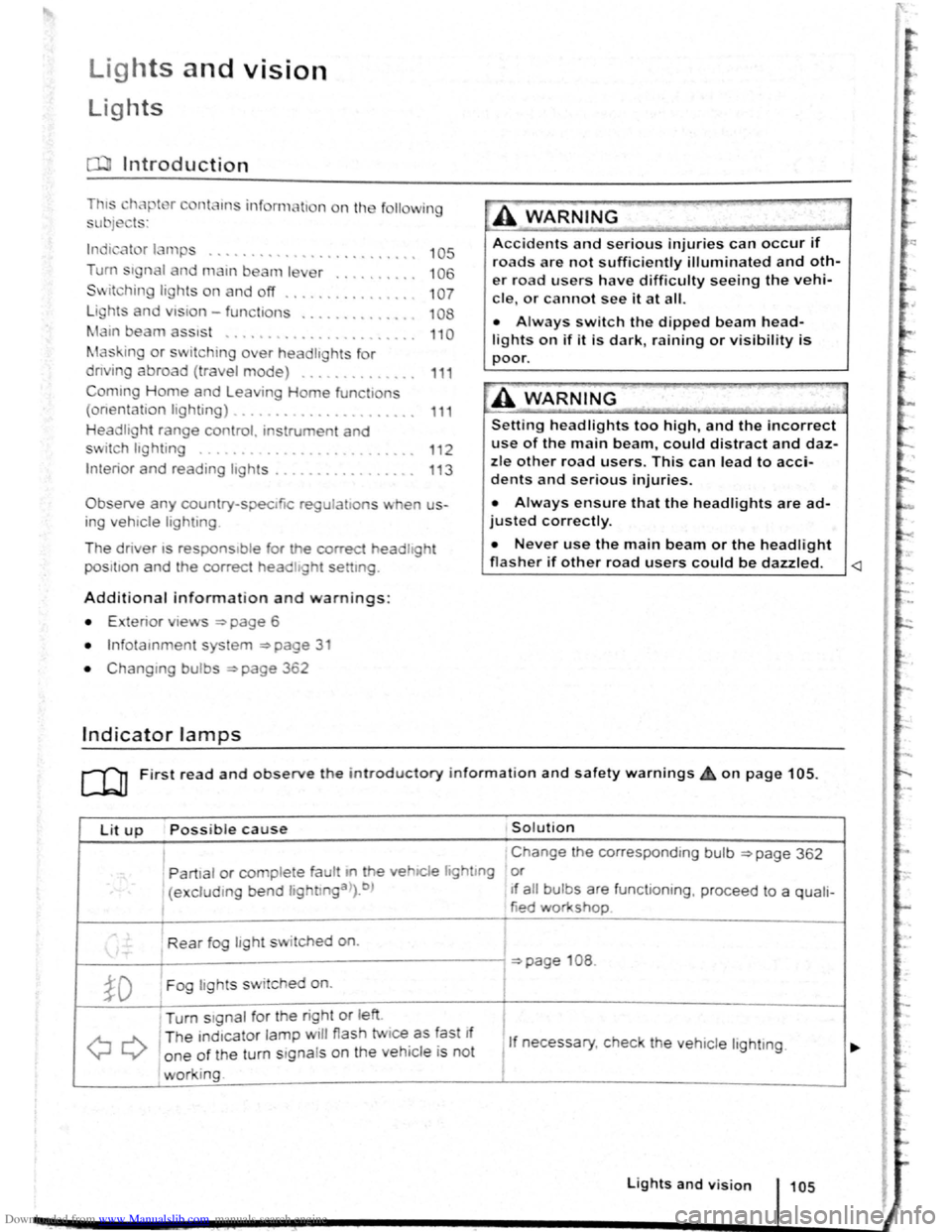
lnd1 ator lamps . . <>-~ • .. .. .. .. .. • .. .. ~ • .. • .. • • .. •
Turn s1gnal and main beam lever ..•.......
Svvitching lights on and off .............. .
Lights
and v1sion -functions ............ .
~1ain beam ass1st . . . . . . . . . . . . . . . . ... .
Ma king or sv itching over headlights for
dnving abroad (travel mode) . . . . ........ .
Commg Home and Leaving Home functions
(onentation
lighting) . . . . . . . ............ .
Headl i
ght range control, instrument and
s~ itch lighting . . . . . . . . . . . . . . . ....
Interior and reading hght s ...............•.
105
106
107
108
110
111
111
112
113
Observe any country-spec•fic regu lations when us
ing veh1c le lighting.
The driver 1s responsib le for the correct headlight
pos1t1on and the correct headlight settm g.
Addit ional information and warnings:
• Exterior views ~page 6
• lnfotamment system ~page 31
• Changing bulbs ~page 362
Indicator lamps
A WARNING
Accidents and serious injuries can occur if
roads are not sufficiently illuminated and oth
er r oad users have d ifficulty seeing the vehi
cle, or cannot see it at all.
• Always switch the dipped beam head
lights on if it is dark, raining or visibility is
poor.
A WARNING
Setting headlights too high, and the incorrect
use of the main beam, could d istract and daz
zle other road users. This can lead to acci
dents and serious injuries.
• Always ensure that the headlights are ad
justed correctly.
• Never use the main beam or the headlight
flasher if other road users could be dazzled.
Lit up Possi ble cause Solution
I Change the corresponding bulb ~page 362
' Partial or complete fau tt m he vehiCle hghtmg or
(excluding bend lightlnga>).b ) If a ll bulbs are functioning , proceed to a quali-
tied workshop
Rear fog light switched on.
~page 108 .
~D Fog lights sw itched on. I
Turn stgnal for the right or left i
I
QQ
T he ind1cator lamp will flash twice as fast If
1 If necessary, c heck the vehicle lighting. o ne of the turn signals on the vehicl e is not
working. I
Lights and v is ion 105
Page 59 of 138
Downloaded from www.Manualslib.com manuals search engine ..,
of turn signals, a failure to use
r f rg tting to switch off a turn
nfuse other road users. This can
nt and serious Injuries.
• lw. y activate the turn signal In good
tim wh n ch anging lanes and performing
'lt king or turning manoeuvres.
• Alw ys switch off the turn signal once the
le ne change or overtaking or turning ma-
n euvre has been completed.
A W~RNING
In correct use of the main beam headlights
ca n lead to accidents and serious injuries as
the main beam headlights can distract and
dazzle other road users.
Switching lights on and off
m The turn signal will only work when the igni
W tion is switched on. The hazard warning lights
a ls o work
when the ignition is switched off
=>page 336.
m If one turn signal fails, the indicator lamp will
W start flashing twice as fast.
m The main beam headlights can only be
W switched on if the dipped beam headlights
are already on.
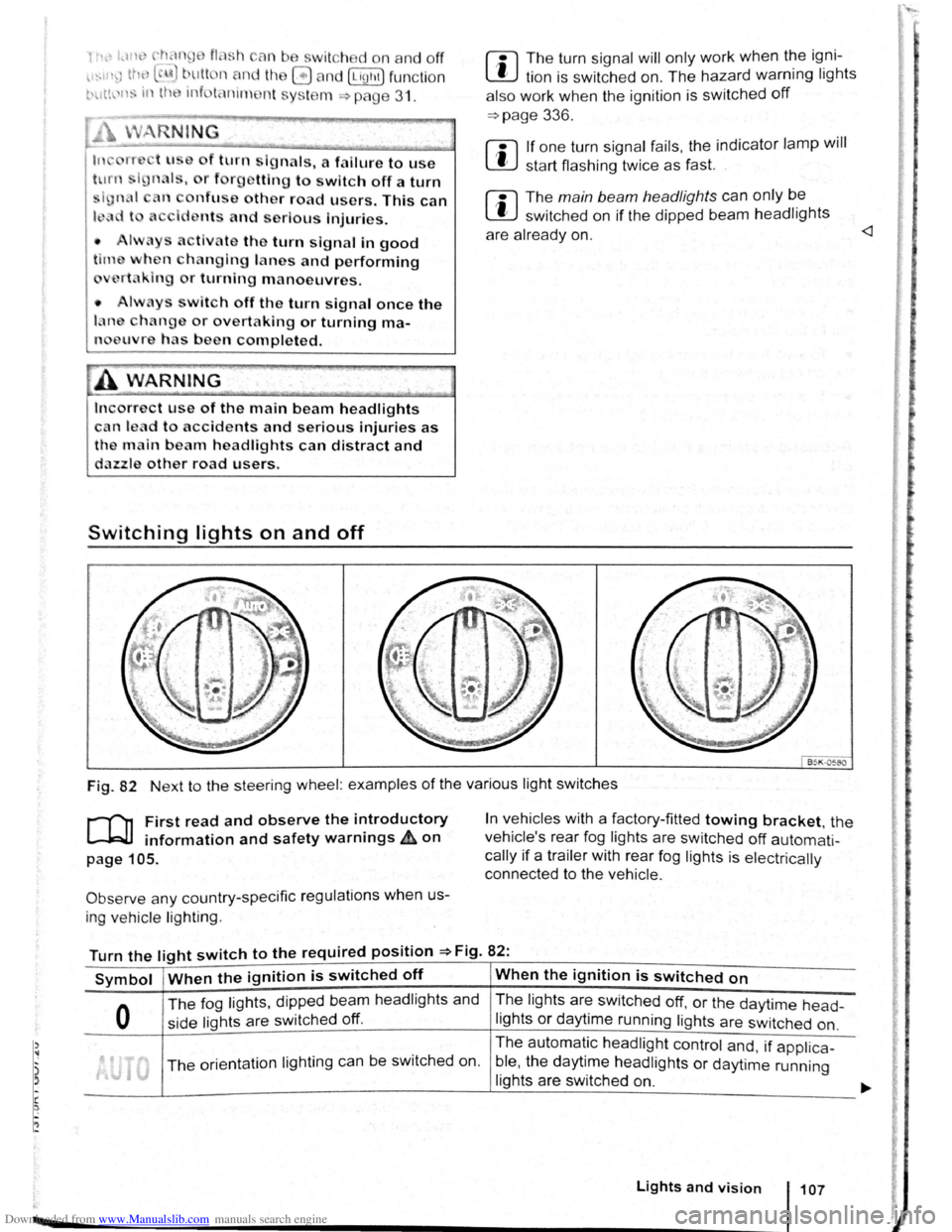
Fig. 82 Next to the steering wheel: examples of the various light switches
r-("n First read and observe the introductory
L-.W1 information and safety warnings ~on
page 105.
Observe any country-specific regulations when us
ing ve hic le lighting .
In vehicles with a factory-fitted towing bracket, the
vehicle's rear fog lights are switched
off automati
cally if a trailer with rear fog lights is electrically
connected to the vehicle .
Turn the light switch to the required position =>Fig. 82:
Symbol When the ignition is switched off When the ignition is switched on
0
The fog lights, dipped bea m headlights and
side lights are switched
off.
The lights are switched off, or the daytime head-
lights or daytime running lights are switched on.
The orientation lighting ca n be switched on. The
automatic
headlight control and, if applica -
ble ,
the daytime headlights or daytime running
lights are switched
on.
Lights and vision 107