Fig. 12 VOLKSWAGEN GOLF 2011 Owner´s Manual
[x] Cancel search | Manufacturer: VOLKSWAGEN, Model Year: 2011, Model line: GOLF, Model: VOLKSWAGEN GOLF 2011Pages: 138, PDF Size: 49.24 MB
Page 72 of 138
Downloaded from www.Manualslib.com manuals search engine . -~~~Q§@~~iC!~;a--................................................................ ~~~~--~--~~~~.a.-.. __ .... ~.c .. ~~~~ ~ .. ~h:;;;;;;..,-~= I n 70 a M= ,..._ ~;e,--~· ... - - -v· --.. iiA.ir ...
...
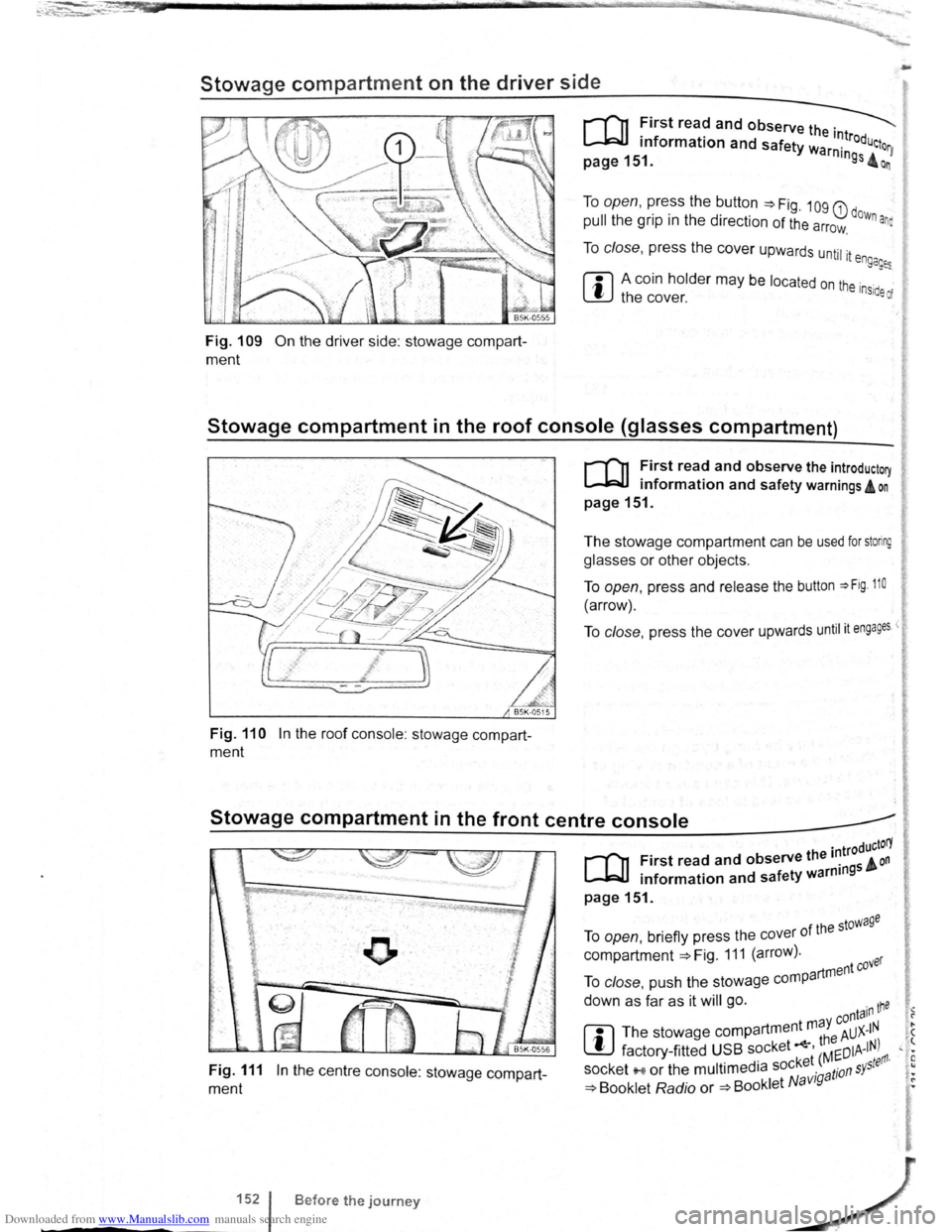
Stowage compartment on the driver side
Fig. 109 On the driver side: stowage compart
ment
To open, press the button ~Fig. 109 G) dow .
pull the grip in the direction of the arrow. n ana
To close, press the cover upwards until it e ngages
ffi A coin holder may be located on the inside of W the cover.
Stowage compartment in the roof console (glasses compartment)
Fig. 110 In the roof console : stowage compart
ment
r-('n First read and observe the introductory
~ information and safety warnings A on
page 151.
The stowage compartment can be used for storing
glasses or other objects.
To open, press and release the button ~Fig. 110
(arrow).
To close, press the cover upwards until it engages <
Stowage compartment in the front centre console _____.
Fig. 111 In the centre console: stowage compart
ment
1521
-----
B efore the journey
. troductorY
[Q] First read and observe the 1~ 5 & on . f ty warnm9 • information and sa e
page151.
f the stowage To open, briefly press the cover 0
compartment ~Fig. 111 (arrow). ver
artment eo To close, push the stowage comp
down as far as it will go. ·n tne • -y conta1 1 ?
rn
The stowage compartment m a AUX-IN . ( ~ th8 ' t factory -fitted USB socket ' Mr:DIA-IN) , • · ket ( ~ tefl'l· E socket '"'' or the multimedia soc ·g a tion s Y5
, •
~ Booklet Radio or ~Booklet N avt • ~
Page 73 of 138
Downloaded from www.Manualslib.com manuals search engine ~
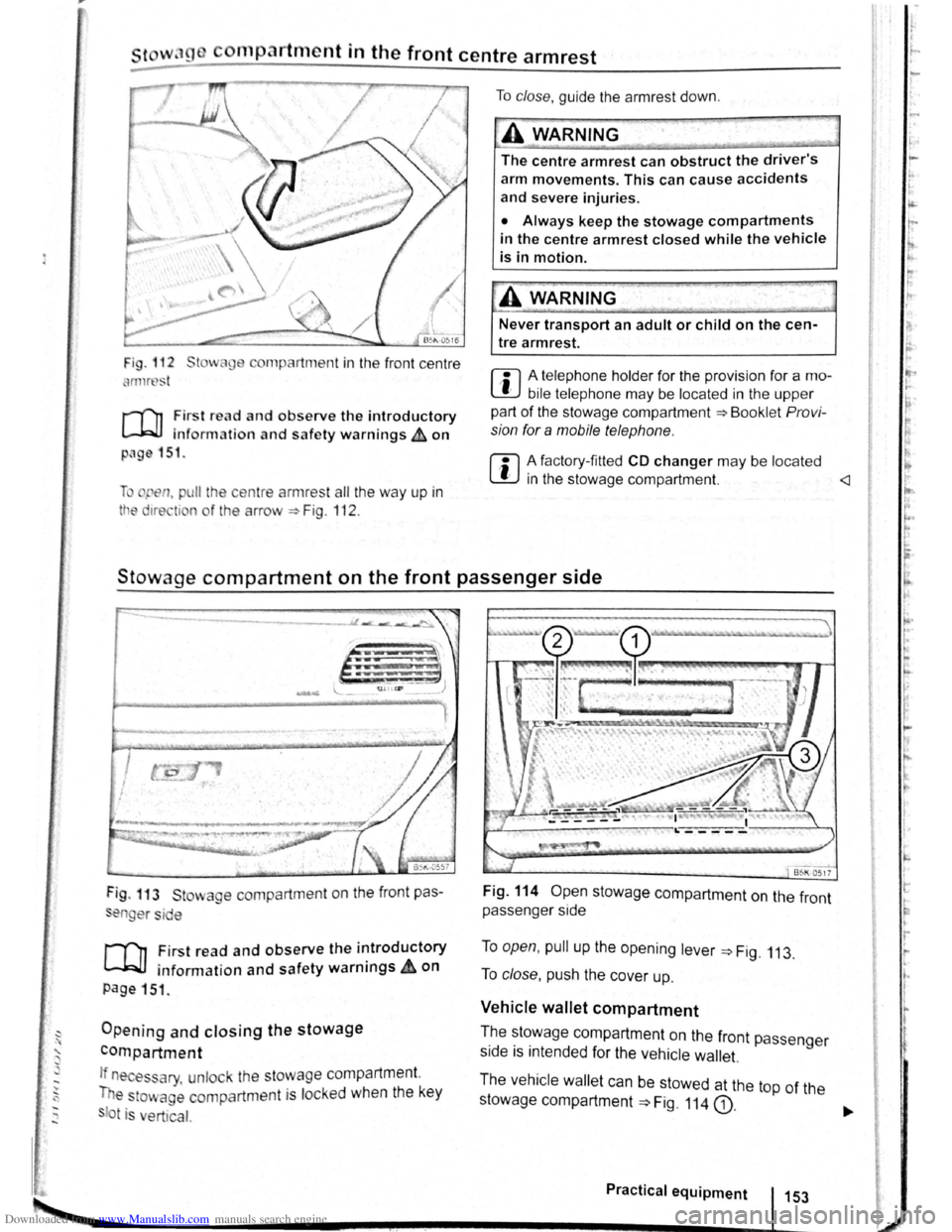
cornp~rtment in the front centre armrest
r-('n First read and observe the introductory
l.-J,r::JJ information and safety warnings th on
png 151.
li pen, pu ll the ce ntre armres t all the way up in
tt e 1re ti n o f the arrow ::. Fig . 112 .
To clo se, guide the a rmr est down .
A WARNING
The centre armrest can obstruct the driver's
arm movements. This can cause accidents
and severe injuries.
• Always keep the stowage compartments
in the centre armrest closed while the vehicle
is in motion.
Never transport an adult or child on the cen
tre armrest.
m A telephone holder for the provision for a mo
L!J bile telephone may be located in the upper
part of the stowage compartment ::.Bookl et Pro vi
sion for a mobile telephone .
m A factory-fi tted CD changer may be located
W in the stowage compartment.
Stowage compartment on the front passenger side
Fig . 113 St wage compartment on the front pas
en er si e
,.....-('n First read and observe the introductory
~ information and safety warnings.&. on
page 151 .
Opening and closing the stowage
compartment
If n es ary, unlock the stowage compartment.
T e
to~ age compartm ent is locked when the key
t is ert ical.
Fig. 114 Open stowage compartment on the front
passenger side
To open, pull up the opening lever ::. Fig. 113.
To close , push the cover up.
Vehicle wallet compartment
T.he ~~~wage compartment on the front passenger
s1de IS mtended for the vehicle wallet.
The vehicle wallet can be stowed at the top of the
stowage compartment
==>Fig. 114 G).
Practical equipment 153
~--------------------~~----------~--~.~! ~--.J-------~
I ,.
~·
~
I
t
r
r r I.
t·
'
Page 74 of 138
Downloaded from www.Manualslib.com manuals search engine sockets in the vehicle
....
-c, r-, o o o o o CJ 0 o
I
(_; 0 () () () (j () (J f')
® l
0 (J (_) () () f') 0 0 u 0 c) ( J (j 0 ( j () 0 0 (J 0 () f) u f) f) 0 () (; 0 000(;00000 ) 0 0 0 (J 0 0 0 0 0 0
-............ .--. --'
--J.> ,, B~K-0578
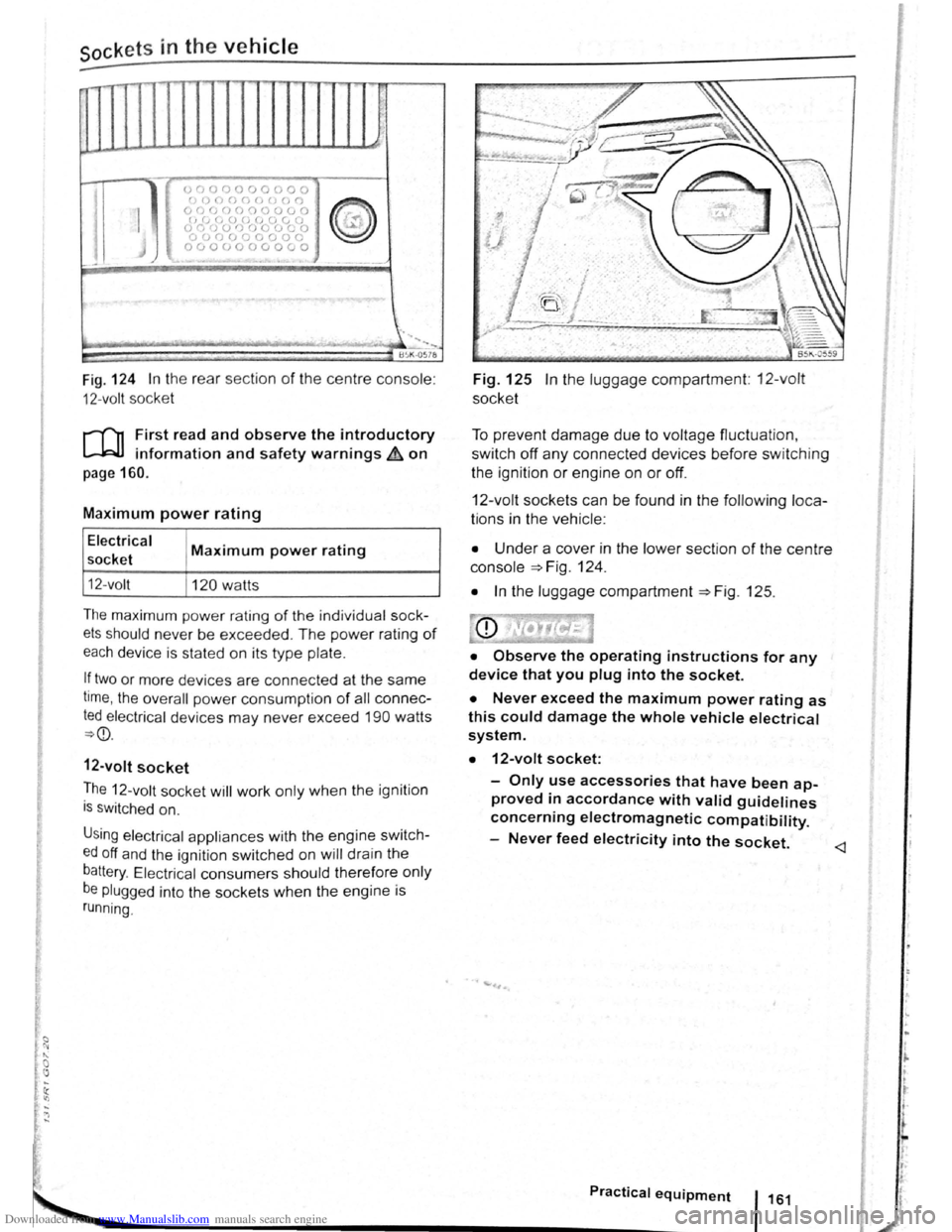
Fig . 124 In the rear sect ion of the centre console :
12-volt socket
l'('n First read and observe the introductory
l-bJ.J information and safety warnings&. on
page 160.
Maximum power rating
Electrical
socket
12- volt
Maximum power rating
120 watts
The maxim um power rating of the individ ua l sock
ets should never be exceeded . The power rating of
each device is stated on its type plate.
If two or more devices are connected at the same
time, the overall power consump tion of all con nec
ted electrical devices may never exceed 190 watts
~CD.
12-volt socket
The 12-volt socket will work only when the ignition
is switc hed on.
Using elec tric al app liances with the engine swit ch
ed off and the ignition switched on will drain the
battery. Electrical consumers should therefore only
be plugged into the sockets when the engine is
running.
Fig. 125 In the luggage compartment: 12-volt
socket
To prevent damage due to voltage fluctuation ,
switch
oft any connected devices before switching
the ignition
or engine on or off.
12-volt socket s can be found in the following loca
tions in the vehicle :
• Under a cover in the lower section of the centre
console =>Fig. 124 .
• In the luggage compartment =>Fig. 125.
• Observe the operating instructions for any
device that you plug into the socket.
• Never exceed the maximum power rating as
this could damage the whole vehicle electrical
system.
• 12-volt socket:
-Only use accessories that have been ap
proved in accordance with valid guidelines
concerning electromagnetic compatibility.
-
Never feed electricity into the socket.
Practical equipment 1161
Page 75 of 138
Downloaded from www.Manualslib.com manuals search engine CD
Please note the following to help avoid damag o
and premature wear:
• Do not rest your hand on the g ear le ve r
when
driving. The pressure from your hand is
passed onto the selector forks in the gearbox.
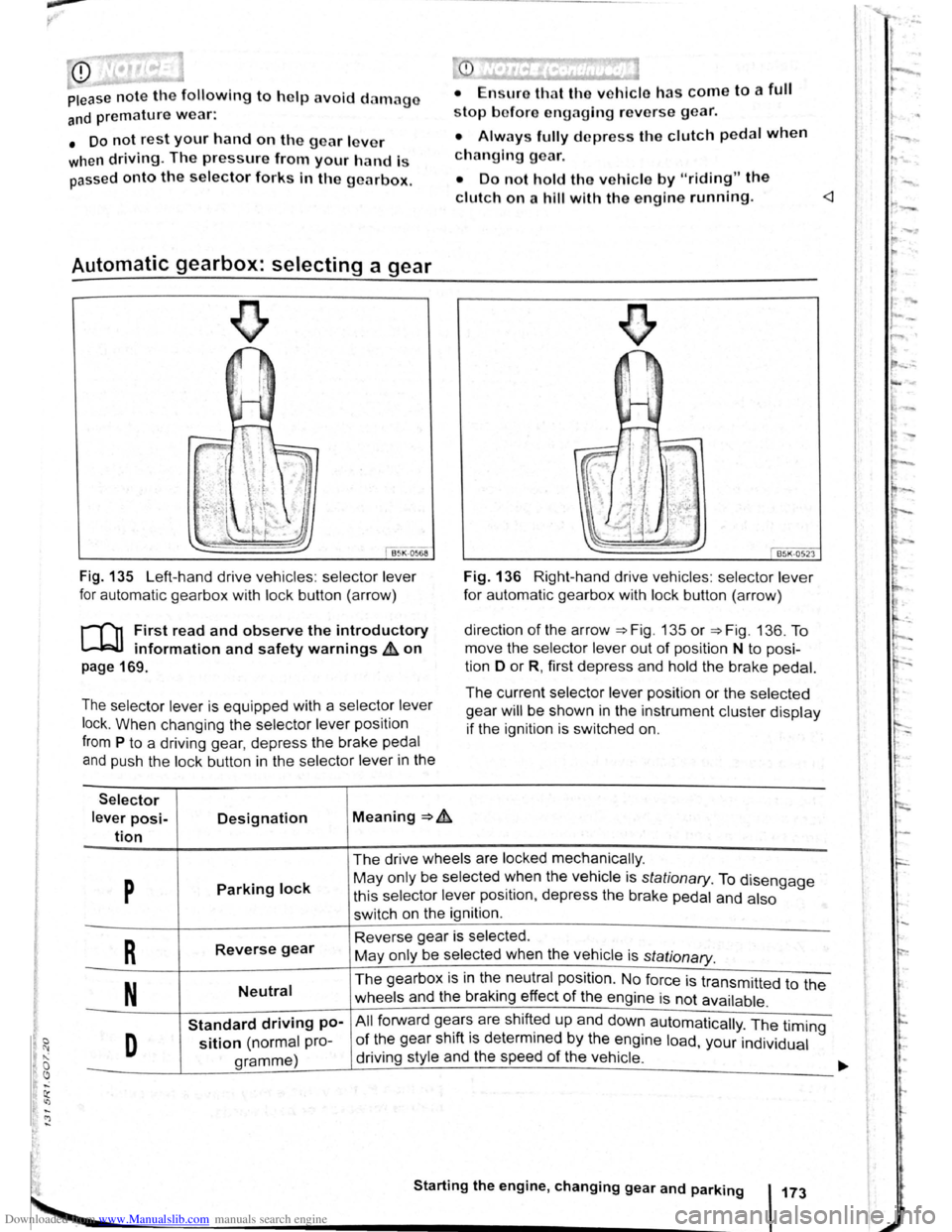
Automatic gearbox: selecting a gear
Fig . 135 Left-hand drive vehicles : selector lever
for automatic gearbox with lock button (arrow)
r-('n First read and observe the introductory
~ information and safety warnings & on
page 169.
The selector lever is equipped with a selector lever
lock .
When changing the selector lever position
from P to a driving gear, depress the brake pedal
and push the lock button in the selector lever in the
Selector
lever posi-Designation Meaning ~ .&.
tion
stop bofore engaging re verse gear.
• Always fully d epress the clutch pedal when
changing gear.
• Do not hold the vehicle by "riding" the
clutch on a hill with the engine running.
Fig. 136 Right-hand drive vehicles : selector lever
for automatic gearbox with lock button (arrow)
direction
of the arrow ~Fig. 135 or ~Fig. 136. To
move the selector
lever out of position N to posi
tion D
or R, first depress and hold the brake pedal.
The current selector lever position or the selected
gear
will be shown in the instrument cluster display
if the ignition is switched on.
The drive wheels are locked mechanically .
p Parking lock May only be selected ~hen the vehicle is stationary. To disengage
this selector lever pos1t1on, depress the brake pedal and also
switch on the ignition .
R Reverse gear Reverse gear is selected.
May only be selected when the vehicle is
stationary.
N Neutral The gearbox is in the neutral position . No force is transmitted to the
wheels and the braking effect
of the engine is not available .
Standard driving po-All forward ge~r~ are shift~d up and down automatically . The timing
D sition (normal pro-of the gear sh1ft 1s determmed by the engine load, your individual
gramme) driving
style and the speed
of the vehicle . -
Starting the engine, changing gear and parking 173
Page 76 of 138
Downloaded from www.Manualslib.com manuals search engine Sele1:• r
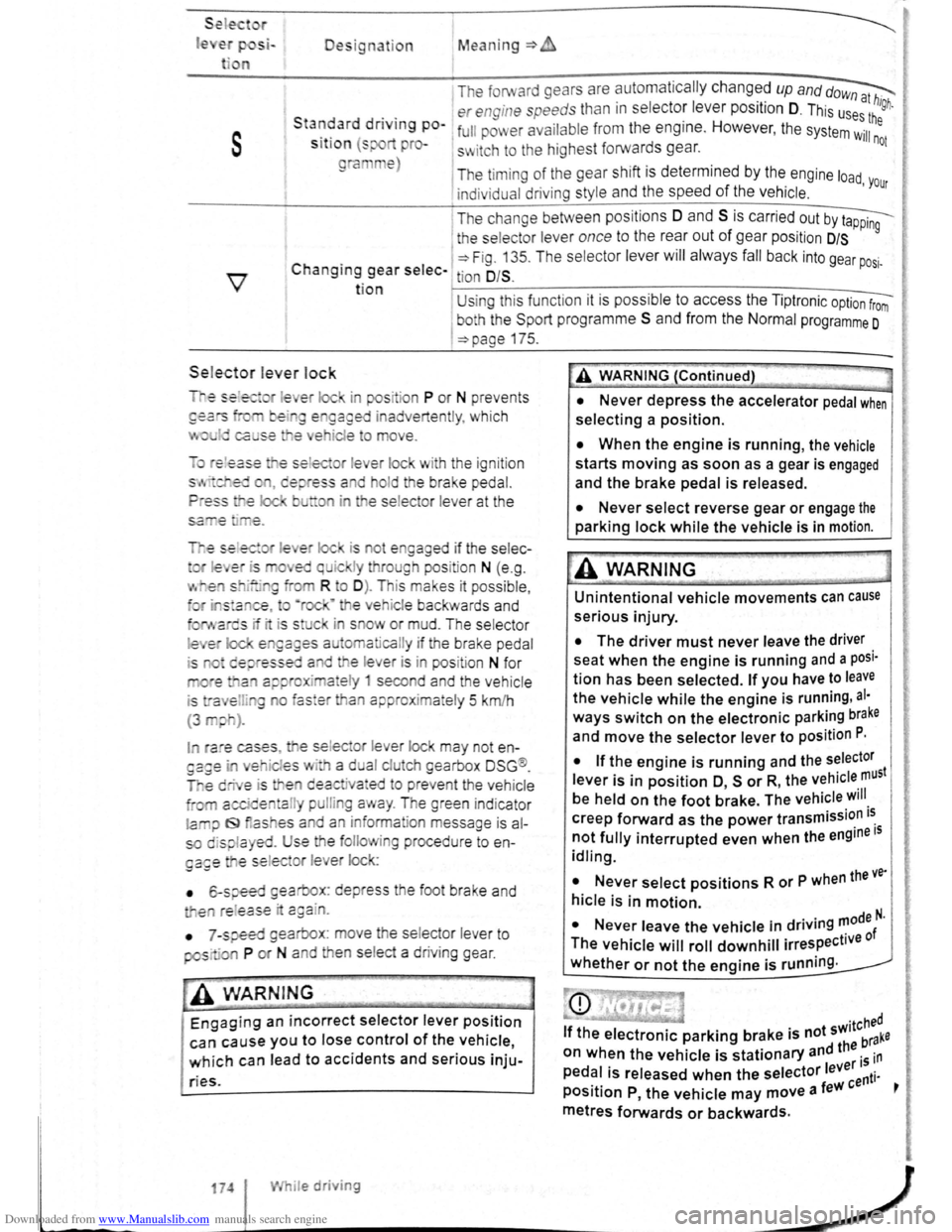
le Designation Mean ing=>
1 The forward gears are automa tic ally changed up and dow~
. . er engine speeds than in s electo: leve r position D. This us~:! high.
s
Sta~~ard dnvtng po-1 full pm er ava ilabl e from the eng1ne. However , the system Wil:he
S lt lo n (s pro-s~ itch to the highest forwards gear. not
ra e)
The timi ng of the gear shift is determined by the engine load
indivi dual driving style and the speed of the vehicle . 'Your
I T he change between positions 0 and S is carried out by t~
1 the selecto r lever once to the rear out of gear pos it ion D/S 9
C . 1 ~Fig. 13 5. T he se lec tor lever will alwa ys fall back into gear po .
h angtng gear selec- tion O/S . SI·
t ion U sing thi s funct ion it is possible to access the Tipt ronic option from
I
bo h the Spo rt programm e S and from the Normal programme 0
=>page 175.
Sele.ctor le ver lock
is ot e gaged if the selec-
I ra e cases , e se lec or lever lock may not en
es · a d al clu eh gearbox DSG ®.
e deactiva•ed to preve nt the vehicle
a l pulli g a ay . The green ind icator
la iJ f9 as es a d an inform ation message is al
so displa yed. Use the folio ing procedu re to en
ga£e e se lec or l e er lock:
• 6-speed gearbox: depress the foot brake and
e re l
ease · c:gain.
•
7 -speed gearbox : move he se lector lever to
pos· ·a P or N and en se lect a driv ing gear .
-• ·----
A WARNIN G
Engaging an incorrect selector lever position
can cause you to lose control of the vehicle,
which can lead to accidents and serious inju-
ries.
174 I While driving
A WARNING (Continued)
• Never depress the accelerator pedal when
selecting a position.
• When the engine is running, the vehicle
starts moving as soon as a gear is engaged
and the brake pedal is released.
• Never select reverse gear or engage the
parking lock while the vehicle is in motion.
A WARNING
Unintentional vehicle movements can cause
serious injury.
• The driver must never leave the driver
seat when the engine is running and a posi·
tion has been selected. If you have to leave
the vehicle while the engine is running , al·
ways switch on the electronic parking brake
and move the selector lever to position P.
I
• If the engine is running and the selector
lever is in position O, s or R, the vehicle must
be held on the foot brake. The vehicle will
creep forward as the power transmission i~
not fully interrupted even when the engine IS
idling.
• Never select positions R or P when the ve·
hicle is in motion.
N I . . d . . ..,0de N. • ever eave the vehicle m nv.ng '" f
The vehicle will roll downhill irrespective 0
whether or not the engine is running .
Page 77 of 138
Downloaded from www.Manualslib.com manuals search engine rfl If tho lo vo r Is move d accid entally to N when
L!J dr iving , take yo ur foot off the accele rato r.
WiJil fo r tile e ng in e ~~v s in t~e ne utral po sitio n be-
fo re solo ctin g a pos1!1o n agam.
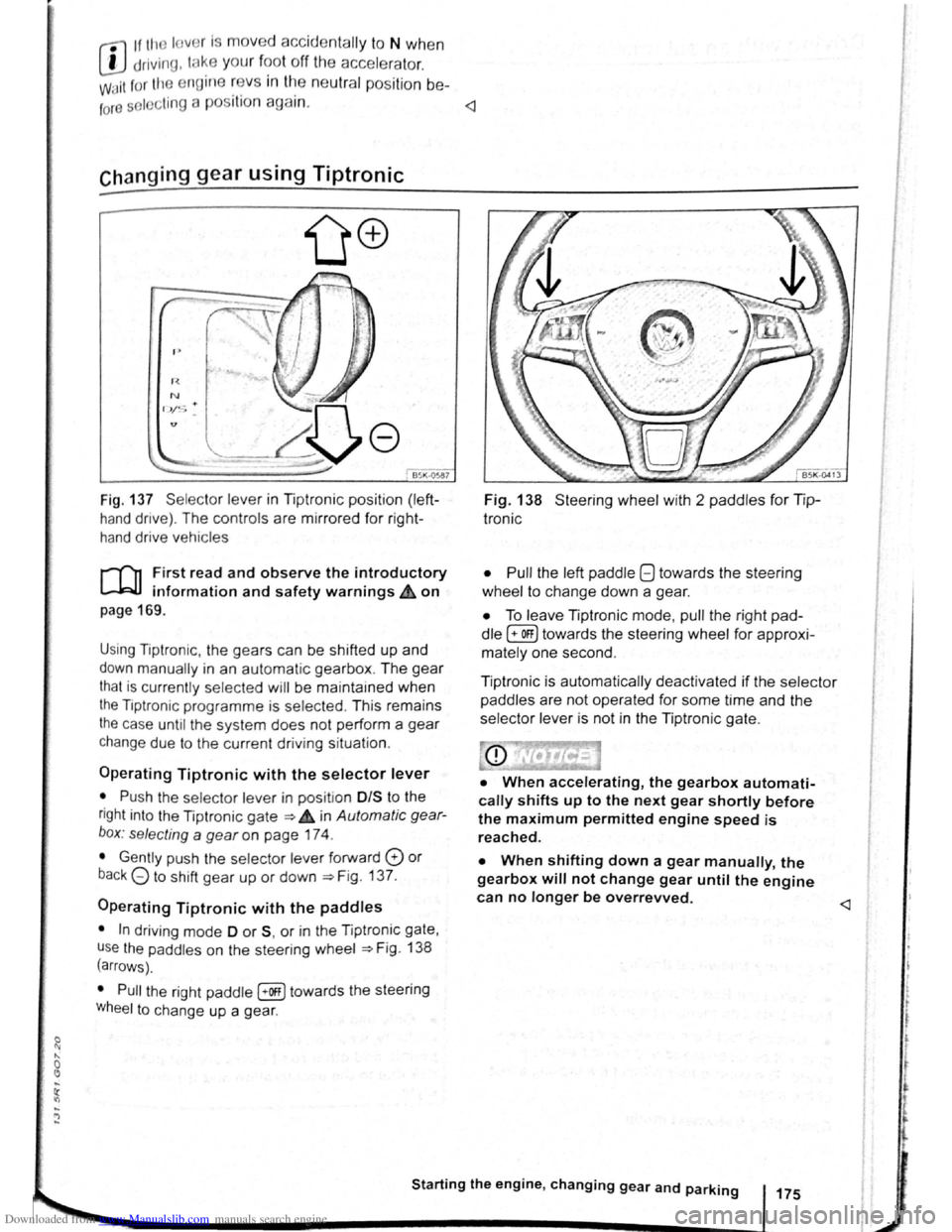
Fig. 137 Se lecto r leve r in Tiptronic position (left
hand drive) . The controls are mirrored for right
hand drive vehicles
rT'n F irst read and observe the introductory
L-.W.I information and safety warnings.& on
page 169 .
Using Tiptronic , the ge ars can be shifted up and
down manually in an automat ic gearbox . The gear
that is currently selected will be maintained when
the Tiptronic programme is selected . This remains
the case until the system does not perform a gear
change due to the current driv ing situation .
Operating Tiptronic with the selector lever
• Push the selector lever in pos it ion 0/S t o the
right into the Tiptronic gate ~ 4 in Automatic gear
b o x: selecting a
gear on page 174 .
• Gently push the selecto r lever forward 0 or
back G to shift gear up or down ~Fig. 137.
Operating Tiptronic with the paddles
• In driving mode 0 or S, or in the Tiptronic gate,
u se
the paddles o n the steering wheel ~Fig. 138
(arrows) .
• Pull the right paddle [+Off] towards the steering
Wheel to change up a gea r.
Fig. 138 Steer ing wheel with 2 padd les for Tip
Ironic
• Pull
the left paddle 8 towards the stee ring
whe el to cha nge down a gea r.
• To leave Tiptronic mode, pull the right pad
dle (+OFF) towa rds the steering whee l for approxi
mat ely one second .
Tiptronic is
automatically deactivated if the selector
paddles
are not operated for some time and the
selector lever is not in the Tiptronic gate.
• When accelerating, the gearbox automati
cally shifts up to the next gear shortly before
the maximum permitted engine speed is
reached.
• When shifting down a gear manually, the
gearbox will not change gear until the engine
can no longer be overrevved.
l t t
t
r
Page 80 of 138
Downloaded from www.Manualslib.com manuals search engine Gear-change indicator
B~K-O~Y8
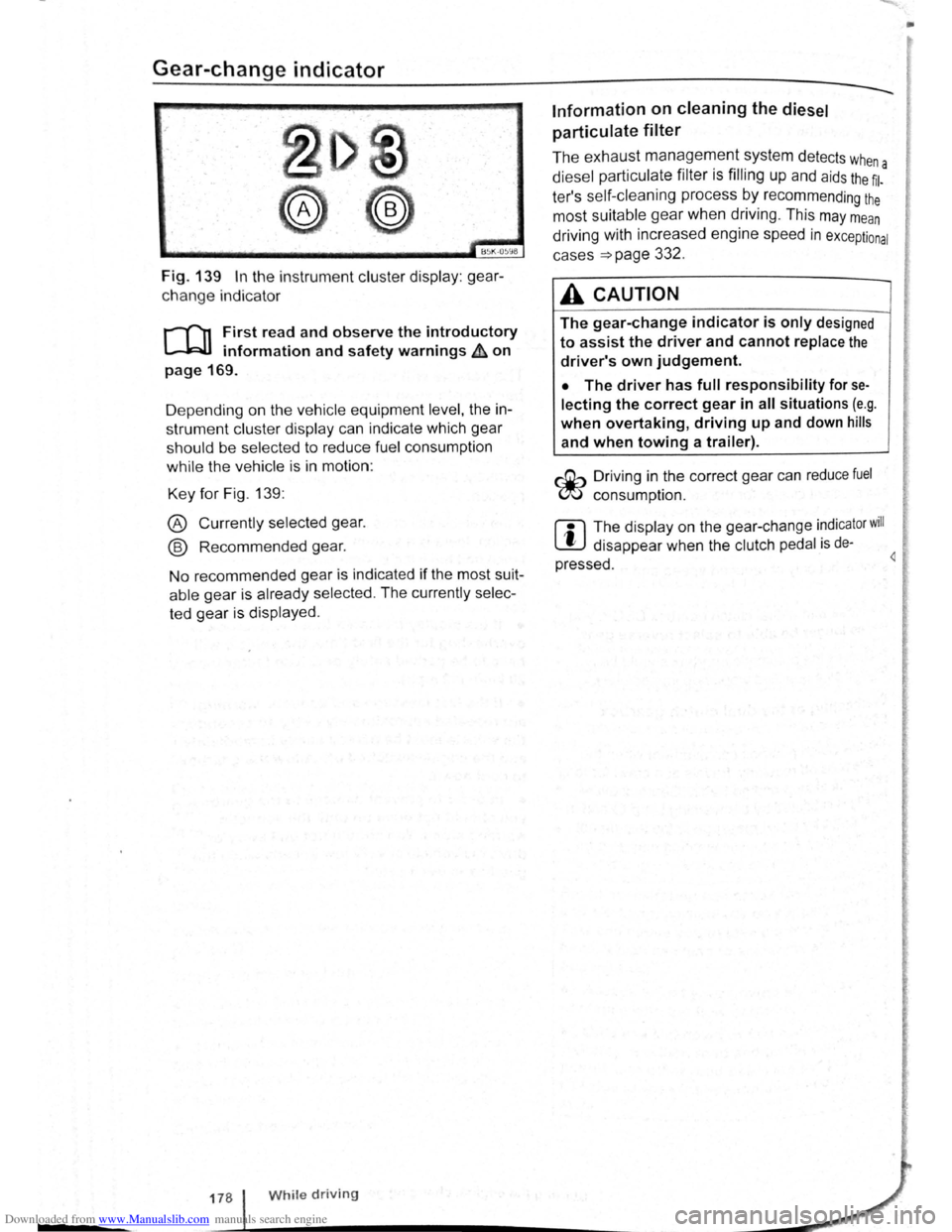
Fig. 139 In the instrument cluster display: gear
change indicator
r-T'n First read and observe the introductory
L-.WI information and safety warnings ~ on
page 169.
D epending on the vehicle equipment
level, the in
strument cluster display can indicate which gear
should be selected to reduce fuel consumption
while the vehicle is in motion :
Key for Fig. 139:
® Currently selected gear.
@ Recommended gear.
No recommended gear is indicated if the most suit
able gear is already selected . The currently selec
ted gear is displayed .
178 While driving
Information on cleaning the diesel
particulate
filter
The exhaust management system detects whe
diesel particulate filter is filling up and aids the ~l-a
ter's self-cleaning process by recommending the
most suitable gear when driving . This may mean
driving with increased engine speed in exceptional
cases
=>page 332 .
A CAUTION
The gear-change indicator is only designed
to assist the driver and cannot replace the
driver's own judgement.
• The driver has full responsibility for se
lecting the correct gear in all situations (e.g .
when overtaking, driving up and down hills
and when towing a trailer).
r::Gb Driv ing in the correct gear can reduce fuel
W consumpt ion.
m The display on the gear-change indicator will
W disappear when the clutch pedal is de·
pressed . 4
•
Page 81 of 138
Downloaded from www.Manualslib.com manuals search engine • o;;--"cc A WAR'I'G (Contmued)
tf the brake warning lamp 0 does not go
'Jt or if it lights up when driving, the brake Ol , . • fluid level in the reservoir IS too low or there
is a fault in the brake system. Stop the vehi
c le immediately and seek expert assistance
=>page 188 , Brake fluid.
, tf the brake warning lamp ID lights up to
gether with the ABS indicator lamp 8, the
control function of the ABS may have failed.
This can cause the rear wheels to lock quick
ly when you brake. Locked rear wheels can
lead to a loss of control of the vehicle. If pos
s ible, reduce your speed and drive carefully
at low speed to the nearest qualified work
shop in order to have the brake system tes
ted . Avoid sudden braking and driving ma
noeuvres on the way.
• The ABS is not functioning correctly if the
ABS indicator lamp Et does not go out or
com es on while the vehicle is in motion. The
Electronic parking brake
BSIV)•~9
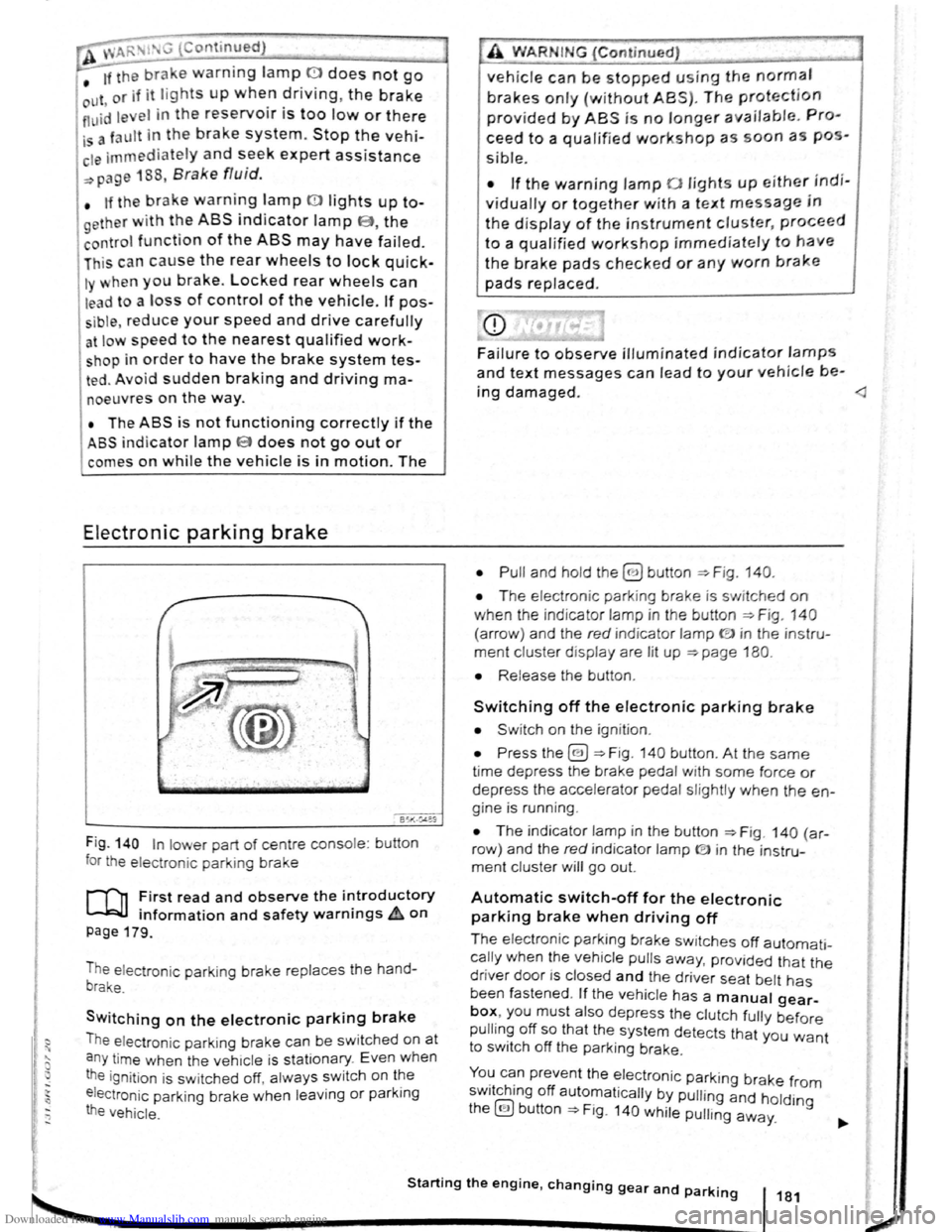
Fig . 140 In lower part of centre console : bu tton
for the electron ic parkin g brake
rf'n First read and observe the i~troductory
~ information and safety warnmgs A on
page 179.
The electronic parking brake replaces the hand
brake.
Switching on the electronic parking brake
The elec tron ic park ing brake can be swit ched on at
a n y time when the vehic le
is stationary . Even when
the ignition is sw itched off, always switch on the
e lectroni c parking brake when leaving
or parking
the vehicle .
_,
A WARN IN.G (Continued) .,~ ,1
vehicle can be stopped using the normal
brakes only {without ABS). The protection
provided by ABS is no longer available. Pro
ceed to a qualified workshop as soon a s pos
s ible.
• If the warning lamp 0 lights up either indi
vidually or together with a text message in
the d isplay of the instrument cluster, proceed
to a qualified workshop immediately to have
the brake pads checked or any worn brake
pads replaced.
Fa i
lure to observe illuminated indicator lamps
and text messages can lead to your vehicle be-
ing damaged.
• T he electron ic park ing brake is switched on
when the indicato r lamp in the button ::;;. Fig. 140
(a rro w) and the red indicator lamp ID in the instru
ment cluster displ ay are lit up ::;;. page 180.
• Release the button .
Switching off the electronic parking brake
• Swit ch on the ignition .
• Press the@) ::;;. Fig . 140 button . At the same
time depress the brake pedal with some force or
depress the accele rator pedal slightly when the en
gine is run ning .
• The indicator lamp in the button =:;.Fig . 140 (a r
row ) and the red indicator lamp ® in the instru
ment cluster will go out.
Automatic switch-off for the electronic
parking brake when driving off
The elec tronic parking brake switches off automati
cally when the vehi cle pulls away, prov ided that the
driver door is closed and the drive r sea t belt has
been fastened . If the vehicle has a manual gear
box, you must also depress the clutch fully before
pulling off so that the system detects that you want
to switch off the parking brake.
You can prevent the electronic parking brake f 0 . h. ff r m sw1tc 1ng o automat ically by pulling and hold.
the@) button::;;. Fig. 140 while pulling away. lng
Starting the engine, changing gear and parking 181
2
Page 82 of 138
Downloaded from www.Manualslib.com manuals search engine Aut mall wit h-o n of the electronic
p ar kin IJr ke If n o t activated properly whe n
th drlv r I av s the v ehicle
I h e .lec,lr uni park ing br ake s wit ch es itsel f on au
lortmlh ,RIIy In the fu llowlng Insta nces wh en the
JrivP-r I . avqs Ill v hlt,le :
• Wlr
t1 tile v hicl Is in gea r posi trons 0, S or R ,
ur If ll r lo t.! o r I v r Is I n t11e T ip tro nic posi tion
• Wl r c n tl re lgr rlll un is s wit ch d o n
• Wi 1 rt tire V l li c le Is s tatio na ry
• If ll re driv r uoor Is o pe n .
rn rge ncy braking function
1 11 n 1 rg on y br kin g fun ction sho uld only be
u s
d In those sit u atio ns wh ere the vehicle cannot
be slurped u ln g the foot br ake ~ &!
• Pull and hold the 8 butt on ~Fig. 14 0 to br ake
tir e ve hl
le sharply. An aco ustic sig na l ca n b e
hoa rd at the sa me lime.
•
T o sto p the br ak ing proced ure, re lease the§
b utt on or d epress th e acce le ra to r pedal.
The Incorrect use of the electronic parking
brake can cause accidents and serious inju
ries.
P arking
r-f11 First read and observe the introductory
l-J,.:JJ Information and safety warnings A on
page 179.
P lea e adhere to re leva nt legisla tion when stop
p in g
a nd pa rk in g your ve h icle .
S
topping the vehicle
Th e ta p s ho uld only be carr ied out in t he speci
flo d o rd or.
• Sto p the ve hi cle o n a sui tab le s urface ~ &,
• Depress a nd ho ld th e br ake ped al u ntil th e e n
gi ne ha
stoppe d .
• Swit ch o n the electr onic pa rking brake
. ~ pnye 18 1.
• With a n auto m atic gea rbox, move the selecto r
lo ve r to pos ition P .... #..
• Swit ch off th e engi ne a nd take your foo t off the
br ake pedal.
• Rem ove th a ve hi cle k e y from t he ignit ion lock .
• rurn the stee ring wheel s lig htly if necessa ry to
engage th e vtee ring lo ck mec h anism .
While driving
• The electronic parking brake should ne
be used to brake the vehicle, except in em '>'er
gencies. The braking distance is considerae.r .
bly longer as only the rear wheels are braked.
Always use the foot brake.
• Never activate the accelerator from the en.
gine compartment if a position or gear has
been selected and the engine is running. The
vehicle could move, even if the electronic
parking brake is applied.
m In veh rcles with a manual gea rbox: v. hen the
l..!J clu tch peda l is released a nd t he accelera
pedal depr essed at th e sa me time , th e e lectron
parkin g bra ke will be re leased autom aticall y
m If th e ve hicl e ba ttery is flat it w ill not be po~<:
L!J ble to re lease th e e lectro nic parking bra e.
U se
jump lead s =:>page 370 .
m Some norses ma y be hea rd wh en the elec·
W Iron ic p ark in g b ra ke is sw itch ed on or ff.
r::l If th e e le ctron ic park in g b ra ke has not been
W used fo r a long period , th e s ys te m will carry
out occa siona l automa tic a nd acou stic check s
when the ve hicl e is pa rk ed .
• With a m anu al gearbox , se lect 1st gea r for f.at
groun d and u phill incl in es , or re ve rse ge ar ()(
downh ill incl ines , a nd then r elease e dutch.
• Ple a se ensur e t hat all o ccup an s. i n pa
ch ildren , lea ve th e ve h icl e.
laf
• Take a ll ve hicl e ke ys with yo u w en you tea 'e
th e ve h icl e.
• lock the ve h icle .
Additional points for ascending and
descending inclines
Be fore SVIitchin g off th e e ng in e , turn e s eeriP:1
wheel so that th e fron t wheels w ill roll aga i st me
kerb if the parked ve icle start s to mo e.
• Whe n fa cing downhill , turn tl e ~s SO tf'\3!
they fa ce e ke rb.
•
Whe n fa cing up ill , turn e omeels so IP8t tt
<
1821
---------------------- ------~~
Page 84 of 138
Downloaded from www.Manualslib.com manuals search engine ~S~ta~~~st~o~p~s~y~s~te~m~--------------------------------------
BSG-0005
Fig. 146 In the centre consol e: butt on for the
s tart/s top syst em
r-T'n First read and observe the introductory
L-lcJJ information and safety warnings .&. on
page
196.
The start/stop system automatically switches the
engine off when the vehicle is stationary . When re
quired , the engine restarts automatically .
The function is automatically activated every time
the ignit ion is switched on. The instrument cluster
display will show information about the current sta
tus .
You can find additional information on the start/
stop mode by pressing
the~ button in the Vehi
cl e status menu in the infota inment system .
Always deactivate the start/stop system manually
when driving through water.
Vehicles with a manual gearbox
• When the vehicle is stat ionary , d isengage the
g e
ar and release the clutch pedal. The engine is
stopped .
• Depress the clutch pedal to restart the engine .
Vehicles with an automatic gearbox
• When the vehicle is stationary , press and hold
the brake pedal. The engine
is stopped.
• Ta ke your foot off the brake pedal, or depress
the acce lerator, to restart the engine .
Important preconditions for automatic
engine switch-off
• The driv er is wearing their seat belt.
• The driver door is closed .
• The bonnet is closed .
• The factory-fitted towing bracket is not attached
ele ctrically to a trailer .
• A minimum engine temperature has been
rea ched .
198 I While driving
• The ve hicle has been moved since the engine
was las t switc he d off.
• F or v ehicle s with Climatronic: the temperatu
inside the ve hicle is within the pre-set temperat~~e
ra nge .
• The de frost function of the air conditioning sys.
tem is not switched on.
• The charging state of the vehicle battery is suf.
ficient.
• The temperature of the vehicle battery is not
too
low or too high .
• The vehicle is not on a steep incline.
• For vehicles with an automatic gearbox: the
front wheels are not angled too sharply .
• The windscreen heating is not switched on.
• Reverse gear is not engaged .
• The park assist system (Park Assist) system is
not active .
When the condit ions
for automatic engine swit ch
off are only fulfilled when the vehicle is stationary,
the engine can also switch off subsequently :
• When the driver creates the required conditions
by performing an action , e .g . by switching off the
defrost function .
• If the @ button in the centre console is pressed
twice ~Fig. 146.
• When selector lever position P is selected in
vehicles with an automatic gearbox.
Conditions for an automatic restart
The engine can start automatically under the fol
lowing conditions :
• If the temperature inside the vehicle substan
tially increases or decreases .
• If the vehicle rolls on.
• If the voltage of the vehicle battery falls.
• If the steering wheel is moved.
Conditions that require a manual engine
start
The engine must be started manually in the folloW·
ing conditions :
• If the driver unfastens their seat belt.
• If the driver door is opened .
• If the bonnet is opened.