Fig. 12 VOLKSWAGEN GOLF 2011 Owner´s Manual
[x] Cancel search | Manufacturer: VOLKSWAGEN, Model Year: 2011, Model line: GOLF, Model: VOLKSWAGEN GOLF 2011Pages: 138, PDF Size: 49.24 MB
Page 85 of 138
Downloaded from www.Manualslib.com manuals search engine Activating and deactivating the start/stop
system manually
• Press the 0 button in the centre console
~Fig. 146.
• If the start/stop system has been deactivated,
the indicator lam p in the button lights up.
The engine will start if the vehicle is in stop mode
when the system is deactivated manually.
Start/stop
mode when adaptive cruise
control (ACC) is active
The engine will be switched off after the adaptive
cruise control (ACC) has brought the vehicle to a
standstill with an active braking intervention
~page 226.
In the following instances, the engine will restart
when the ACC is active:
• If the accelerator is depressed.
• When the ACC has resumed speed and dis
tance control.
• If the vehicle ahead has moved on.
The brake servo and the electromechanical
steering will not function if the engine is
switched off.
• Never allow the vehicle to roll if the engine
is switched off.
• The start/stop system must be deactivated
if work is to be carried out in the engine com
partment.
Downhill driving assistant
rf'n First read and observe the introductory
~ information and safety warnings £ on
page 196.
The downhill driving assistant in veh icles with an
~utomatic gearbox helps when braking and travel
ling downhill ~ £. The downhill driving assistant
uses the braking power of the engine .
The automatic gearbox selects the best gear for
t~e circums tances by taking the steepness of the
h1l.l and the current speed into consideration. To do
th1s the selector lever must be in position D or S.
The downhill driving assistant is not active in Tip
Ironic mode .
As the downhill driving assistant can only shift
down as far as the 3rd gear, it may be necessary
to activate the Tiptronic mode when driving down
If the start/stop system is used in very high
outside temperatures over a long period, the
vehicle battery can be damaged.
m In some cases, it may be necessa ry to restart
L!J the engine manually. F ollow any correspond
ing messag es on the instrument cluste r display.
m The start/stop system is automatically activa
L!J ted when the Eco driving mode is selected in
vehicles that have Driving Mode Selection
~page 248 .
select the 2nd or 1st gear manually in order to
make use of the braking effect of the engine and to
relieve the brakes .
Activating the downhill driving assistant
automatically:
• If the incline is greater than approximately 6%.
• AND: if the selector lever is in position 0 or s.
• In addition, if the CCS or ACC is switched
off: if the vehicle speed is less than approximately
80 km/h (50 mph) or the brake pedal is depressed.
• In addition if the CCS or ACC is active: if the
stored speed is exceeded .
Driver
assist systems 199
..
Page 87 of 138
Downloaded from www.Manualslib.com manuals search engine CD
• The ultrasound sensors should only be
sprayed briefly when cleaning with pressure
hoses and steam cleaners. A distance
of more
than
10 cm between the ultrasound sensors
and the steam/hose nozzle must
be observed.
• Sources of noise can lead to errors in the
ParkPilot system, e.g. rough asphalt, cobble
stones, induction loops, building equipment,
or
interference from other vehicles.
• Any equipment that has been retrofitted to
the vehicle, e.g . bicycle carriers, can prevent
the ParkPilot from functioning properly.
Operating ParkPilot
If an ultrasound sensor fails, the corrrespond.
ing area of the ultrasound sensor cluster is
switched off and cannot be reactivated until th
fault has been rectified. Consult a qualified
workshop in the event
of a system fault. Volks.
wagen recommends using a Volkswagen deal.
ership for this purpose .
r::l Volkswagen recommends that drivers prac
L!J tise using the ParkPilot in a traffic-calmed
area or car park to allow them to familiarise them
selves with the system and its functions.
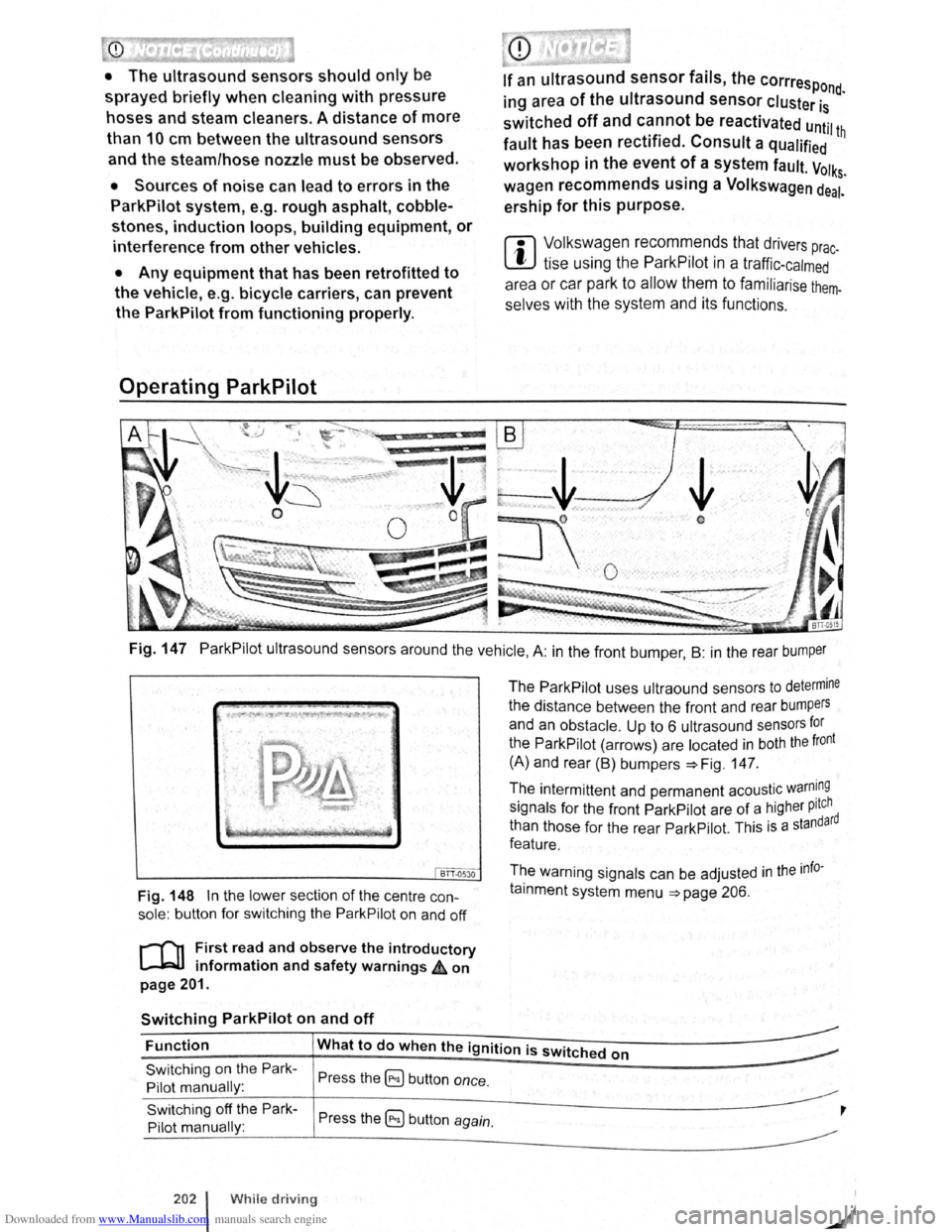
Fig. 147 ParkPilot ultrasound sensors around the vehicle, A: in the front bumper , B : in the rear bumper
BTT.Q530
Fig. 148 In the lower section of the centre con
sole: button for switching the ParkPilot on and off
r-('n First read and observe the introductory
l.-JRlJ information and safety warnings ,£ on
page 201.
Switching ParkPilot on and off
The ParkPilot uses ultraound sensors to determine
the distance between the front and rear bumpers
and an obstacle. Up to 6 ultrasound sensors for
the ParkPilot (arrows) are located in both the front
(A) and rear (B) bumpers :::.Fig. 147.
The intermittent and permanent acoustic
warn~ng
signals for the front ParkPilot are of a higher pitch d
than those for the rear ParkPilot. This
is a standar
feature.
The warning signals can be adjusted
in the info
tainment system menu :::.page 206.
Function What to do when the ignition is switched on
Switching on the Park
Pilot manually :
Switching off the Park
Pilot manually :
202 l While driving
Press the ~ button once.
Press the 5) button again.
,
Page 88 of 138
Downloaded from www.Manualslib.com manuals search engine ~ Functton What t o do wl. tu the IU~tillotllb ~wlh ltd ll m1
s;id1i~ oil tiH 1 PUI k·
Pilot displny nlflnLIH~Iy
(sound oulplll re m ntn s
t•lflf:iH ltlltf .lllllll:lnl1'1t ,litll llll tii 1HI 11111111:1 kl' .I'HY flll ntllnrtJlhlrtrriiJitl sys torn.
a ctive ):
;.;£1 !fH;I rliVHIHfl fjt-t!ll or trHtvu IItH t'llliH I,ItH IH vN r tiJ (Hmll iull R
OR :
clnptuH hnq on I ItA Vti l 1lr .1~1 H r I' IIIJII tn ttl lnvtJI, w ltml llto vnhi1 Jiu r ulls boc-k ·
w rc ls ,
Swit ching o n the PAri<~
Pilot Fluto mflticAIIy:
OR: slowly rlrlvlnu lnwttrdn rm o iJ ,IHt.lli IIH:li i'HIIn tiii'J ftcJIII IMJII u t l11u vu lddu
pn th di Hpli1y -+ lli1UI1 ~()f ttl f1 lj11111ti i11Wiil llltHl 1 0 1!1 kirt/11 (0- U Htph). rt10
oh tn d e iR d fllllC:It HI HI 1 fiUIItlll!.l i nf ttJ11HIJXIIrlt1 11Jiy H!J vffl WlltHr outurnutic ectl~
V A iio n IR wllcltnd o n In llttl lnfol llitllrHlltl ~Jyr. ltHrt. ltriJ ntltrl PurkPIIu t dl oJJioy is
R IIOWil ,
--------------~~1
Switc hing off the P ark
Pilot automatically :
M ove tiH t twltJctor IF~vnr ln 1 H m iiiiJn P,
OR: Acc elorn tn lltA Vl11tlr;tq l o n pr,qd {Ji n ttl(i f tlurtl ttppro xirT1U lu ly 10 - 15 km/ h
(6-9 mph) .
Touct1 tll o 0 ftm .lion IH tllon. Tempora rily muting lh
P ar
kPilo t: OR: lo o U1o o ln clr nnl. pml~lrtO lm ilw . llro !JimltH :Io ' wiiii.Ju dl ·plctyod In g re y
f o r
a Iona n 1110 olm :tronl o pn rkltt' J IHnko I l wll<:lto d rm .
- 111115) l> ttll on wtno.
C han ging from mini
ParkPilo t di sp la y to fullr
screen mode :
OR: oloc l rovnr 10 oonr or ttlov o U10 t~loctor h vur tc1 pu lill un R .
OR : dop ondlrt{l on ltH l vollldu oqt tlpm orrl lovul, w lto n tlt u V()lrlt.:lu rolls bac k·
w ard .
OR :
to uch 1110 m ini PtHkllllol fturclln ti b illi on .
Switching to Rea r Assi t Soloc t n von w gnnr r movo tit tl lrtc:tor lo vor to po r ltlun R.
camera picture as r e -quired : OR: touch tho 8 functio n l)llllon .
The indicator la mp In the butt on -. Fig 1110 ll{l hlf
up while the functio n Is activ e.
Automatic activation
During automatic a ctiv atio n of th Pnrk PIIol, 11 mini
P ar
kPilo tls d is p la ye d on the left- h And id o of tho
sc reen ==>Fig. 150.
Auto m atic activa tion of the ParkPII ot wl 1 n dri ving
slowly to w ards an ob stacle locat e d In front o f til e
ve hicle o nly w ork s whe n tl1e sp od fnll b olo w P·
~roximately 10 -15 km/h (6-9 mpll) fo r tho fir!' I
ltme. If th e P ark Pilo t was swit ch e d off u lng th 8
button , p erfo rming one of the follo win g ctions w ith
t h e
ignitio n swit ch e d on can Automnticfllly r ncll·
Va le the ParkP ilo t:
• If
the vehic le Is acce le ra te d to e s p o d gr Alo r
than 10 - 15 km/h (6 -9 m ph) and t11e n drop s be ·
l
ow tha t spee d aga in .
• OR: if the e lectronic parking brake Is closod
and the n r elease d again.
• OR: 1r Uto 11lu d or lo vu f I nl ove d to p osition P
nnct !Iro n out olllurt po lltlon nuuln .
• OR: If ou tu m ntlc gc tlvutlon i ac tivated a n d de~
nc:liv tlod In lit lnrotulnmunt !:lyt:~tom m enu .
1\utomntl c octlvrrllon wlt11 mini PcrrkPil ot di spl ay ca n
l>o nctlv ntu d and duuc llv1:1lud In the lnfota inrn ent
y~ to m -:. pnuo 200.
Wlt tin outonwtic ac tiv ttlo n Is t.H.:llv ate d, aco ustic
l g n n iA nr o ounrJod rrom a dit ;ta nce o f approxl
rnnto ly 50 e rn fro m th ob loc lo .
Folluro to obsorvo tho lllumlnato d text messag-
o con lood to tho vohlclo b olng damaged .
Drlvo r osslst sys tems 20J
Page 89 of 138
Downloaded from www.Manualslib.com manuals search engine ParkPilot di play
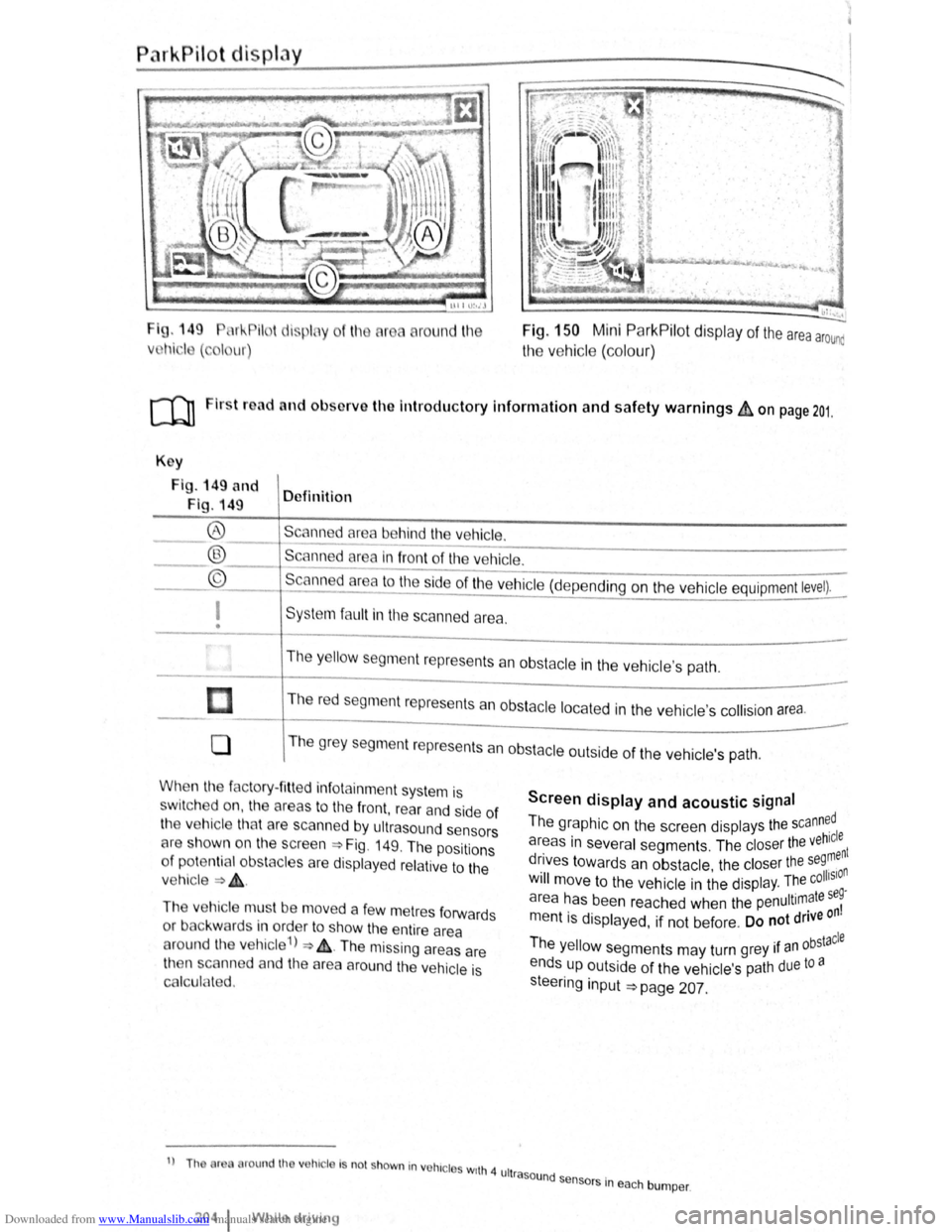
I g. 149 11 !--Pilot lispl y
Vl l~i ·I ( , I ur)
round l11e Fig. 150 Mini ParkPilot display of the area arounc
the vehic le (co lo ur)
ro Firs t road and ol>sorve the Introductory Information and safety warnings&, on page 201.
Key
Fig . 149 and
Fig. 149 Definition
Scann d
area behind the vehicle. ®
® ©
------------------------ -----------Scanned area in front of the ve hicle.
--------------------------------Scanned area to the ~ide of the vehic le (depe nding on the ve hicl e equipment level).
I
• Sys te m fa ult in the scanned area .
The
y ello w segm ent represents an obstacle in the vehic le's path .
Th e r
ed segment represents an obsta cle loca te d in the vehicle's collision a rea.
0 T he grey segment represents a n obstacle outside of the ve hicl e's path.
When the factory- fitt ed inf otainment syste m is
sw it c h ed on , the a reas to the front , rear and side of
the vehicle tha t are scanned by ultrasound sensors
cH e sh own o n the scree n =>Fig. 149. The positions
o f
potentia l obs tacles are displa ye d re lative to the
v e hic le
=> & .
The vehicle mus t be move d a fe w m etres forwards
or back war
ds in order to show the e ntire area
around the vehicle 1
) => & . The missing areas are
t11en scanned and the area around the vehic le is
Cf'llcula ted.
1
) Th or round th v hic le Is no t shown in vohrc l s wrth 4 ult
2o4 1 Whil e driving
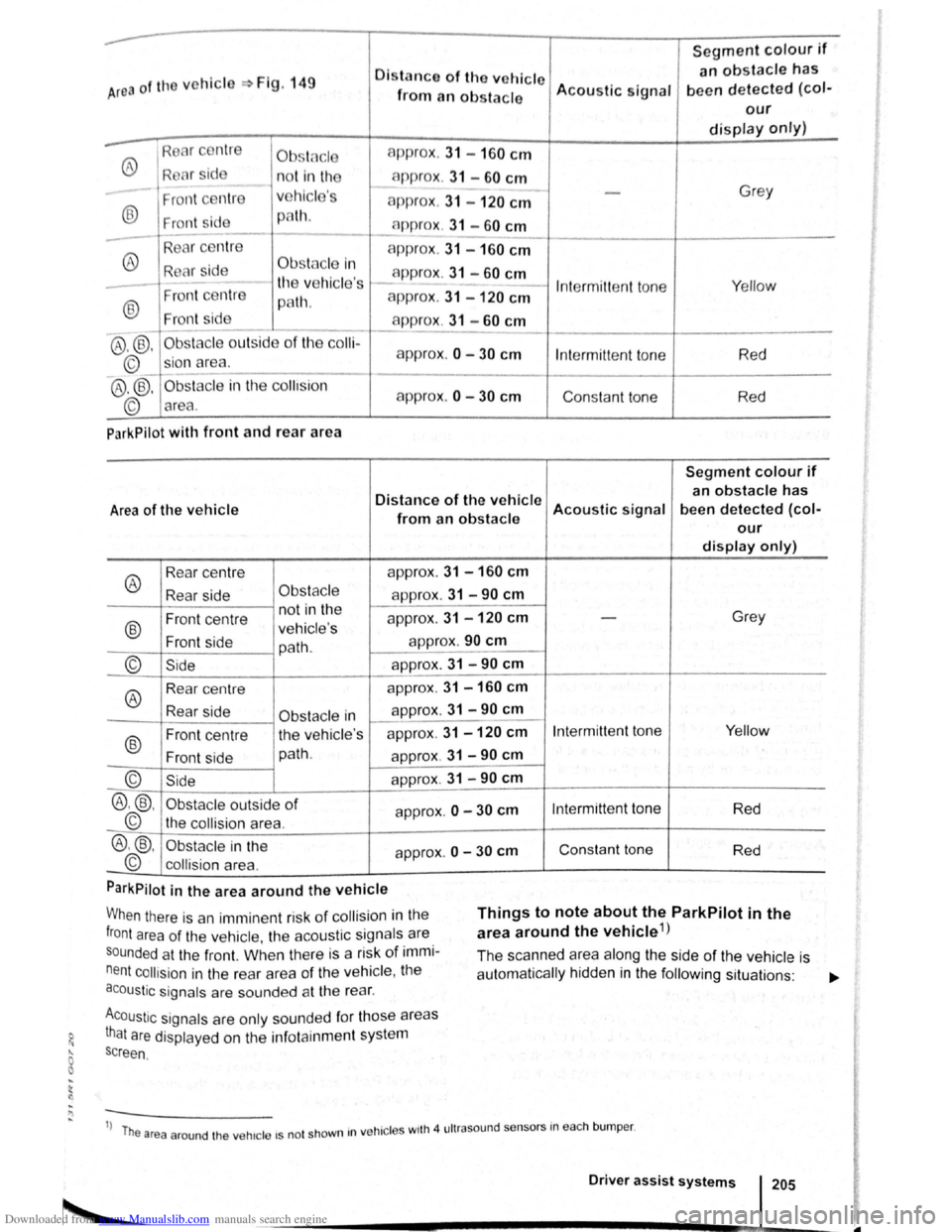
Screen display and acoustic signal
The graphic on the screen displays the scann~dl
areas in several segments . The closer the veh~:nt
drives towards an obstacle the closer the se9, n . • olhSIO Will move to the ve hicle in the displ ay. The c .
a r
ea has been reache d when the penultimate se~
m entis displayed, if not be fore . Do not drive on
Th . bstacle e yello w segments may turn grey 1f an °
ends up outside of the vehi cle's path due to a
s teeri
ng input =>page 207.
rasound se .
n sors m eac h bumper .
Page 90 of 138
Downloaded from www.Manualslib.com manuals search engine ..
Segment colour if
Area of the vchicl Fig. 149 Oistn nco of tho vehicle an obstacle has
from an obs tacle Acou
stic signal been d etected (col-
our
display only)
®
Ob .. t( c l approx
. 31 -160 cm
R l r sid n o t in th c-1p prox . 31 -60 cm
Fr ont c ntr v
hicl 's approx . 31 -120 cm
Grey
® Fr ont sid p lh. n ppr ox. 31 -60 cm ----
-R
®
A ppr ox. 31 -160 cm
R Clr id Obstfl cle In app rox . 31 -60 cm
-th v hicle 's I n te rmitt ent to ne Y
e llow
®
Fron t ce ntr e p8th. approx . 31 -120 cm
Front sid app rox . 31 -60 cm --
@ ,@ , Ob sta cle o utsid e of th e co lli-
approx .
0 -30 cm
©_ sio n area . Int
ermitt ent to ne Red
®
.®. Obsta cle in the co llision
approx.
0 -30 cm Consta nt to ne
© area . R
ed
ParkPilot
with front and rear a rea
Segment colour if
Distance of the v ehicle an obstacle has
Area of the vehicle Acoustic signal been detected (col-from an obstacle our
display only)
®
Rear
centre app
rox. 31 - 160 cm
Rear side Obs tac le approx . 31 -90 cm
Front centre n
ot in th e
approx. 31 -120 cm Grey
®
-ve hi cle's
Front side
path. app
rox .
90 cm
--
© Side app rox. 31 -90 cm
--
®
Rear centre app
rox. 31 -160 cm
Rear side appro
x. 31 -90 cm Obstacle in 1----
®
Front centre th
e vehic le's approx
. 31 -120 cm Intermitt ent ton e Yellow
Fr on t side path
.
approx . 31 -90 cm
© Sid e app rox . 31 -90 cm
®.®. Obst acle outside of app rox . 0 -30 cm Int ermittent tone
Red
© the collision area. -
®.@ , Obs tac le in the
approx. 0 -30 cm Con sta nt to ne
Red
© collision area .
ParkPilot
in the area around the vehicle
When there is an immin ent risk of co llisio n in the
front area of the ve hi cle, th e aco ustic signa ls are
s o
unded a t the front. Wl1en th ere is a risk of immi
nent collision in the rear area of the ve hicl e, t11e
acoustic signals are sounded at th e rea r.
Things to note about the ParkPilot in the
area around the vehicle 1
)
Acoustic signa ls are only so unded fo r tho se areas
that are displaye d on th e inf otain ment system
s c
reen . The
sca
nne d area along the side of the vehicle is
a utomatically hidd en in the following sit uations : ...,.
1
) T he are a ar ound th e ve hicle 15 not shown 1n
ve hi cle s w1th 4 ultr aso und sensors in eac h bump er.
Driver assist systems 205
Page 92 of 138
Downloaded from www.Manualslib.com manuals search engine ...
h parkPil ot is au tomatica lly muted whe n the
!le~tronic parking brake is switc he d on.
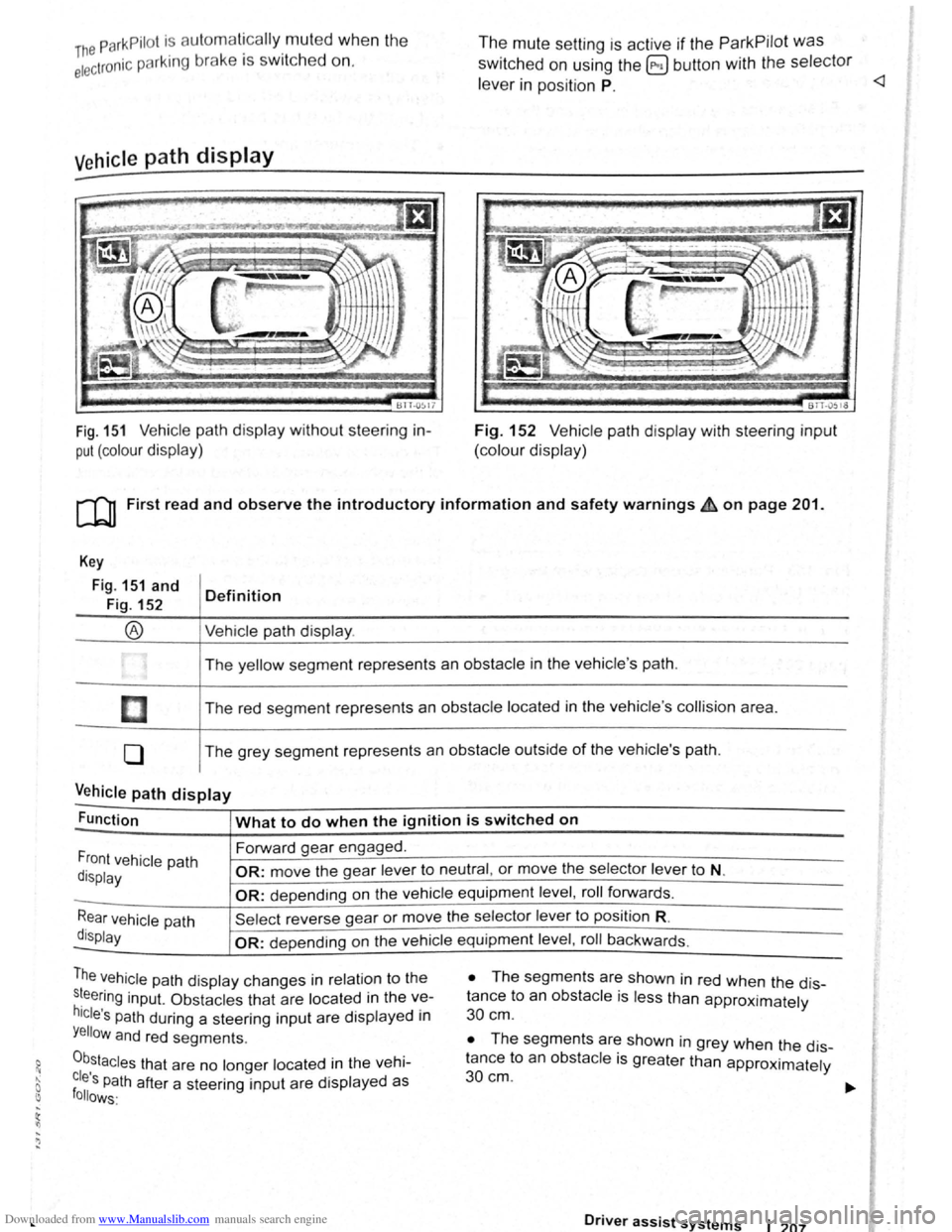
Vehicle path display
611-0~17
Fig. 151 Vehicle path display w ithout steering in
put (colour display)
The mute setting is active if the ParkPilot was
switched on using the @ button with the selector
le ve r in position P.
BTT -051o
Fig. 152 V ehi cle path display with steering input
(colour display)
[Q) First read and observe the introductory information and safety warnings £ on page 201.
Key
Fig. 151 and
Fig. 152
®
I
[]
0
Definition
Vehi cle path display .
The yellow segment represents an obstacle in the vehicle 's path .
The red seg ment represents an
obstacle located in the vehicle 's collision area .
The grey segment represents an
obstacle outside of the vehicle's path.
Vehicle path display -
Function What to do when the ignition is switched on
Forward gear engaged .
Front vehicle path
display OR: move the gear lever to neutral , or move the selector lever to N.
-OR: depending on the vehicle equipment level , roll forwards .
Rear vehicle path
display
Sel ect reverse gea r or move the selector lever to position R.
-OR: depen ding on the vehi cle equipment level , roll ba ckw ards.
The vehicle path dis play changes in relation to the
s~eering inp ut. Ob stacles that are located in the ve
hicle's path during a steering input are disp layed in
Yellow and red segments.
0b,stacles that are no longer located in the vehi
cles Path after a steering input are displayed as follows·
• The segm ents are shown in red when the dis
tance to an
obstacle is less than approximately
30 cm .
• The segments are shown in grey when the dis
tance to an
obsta cle is greater than approximately
30cm.
Driver assist systems 1 207
Page 97 of 138
Downloaded from www.Manualslib.com manuals search engine Parking
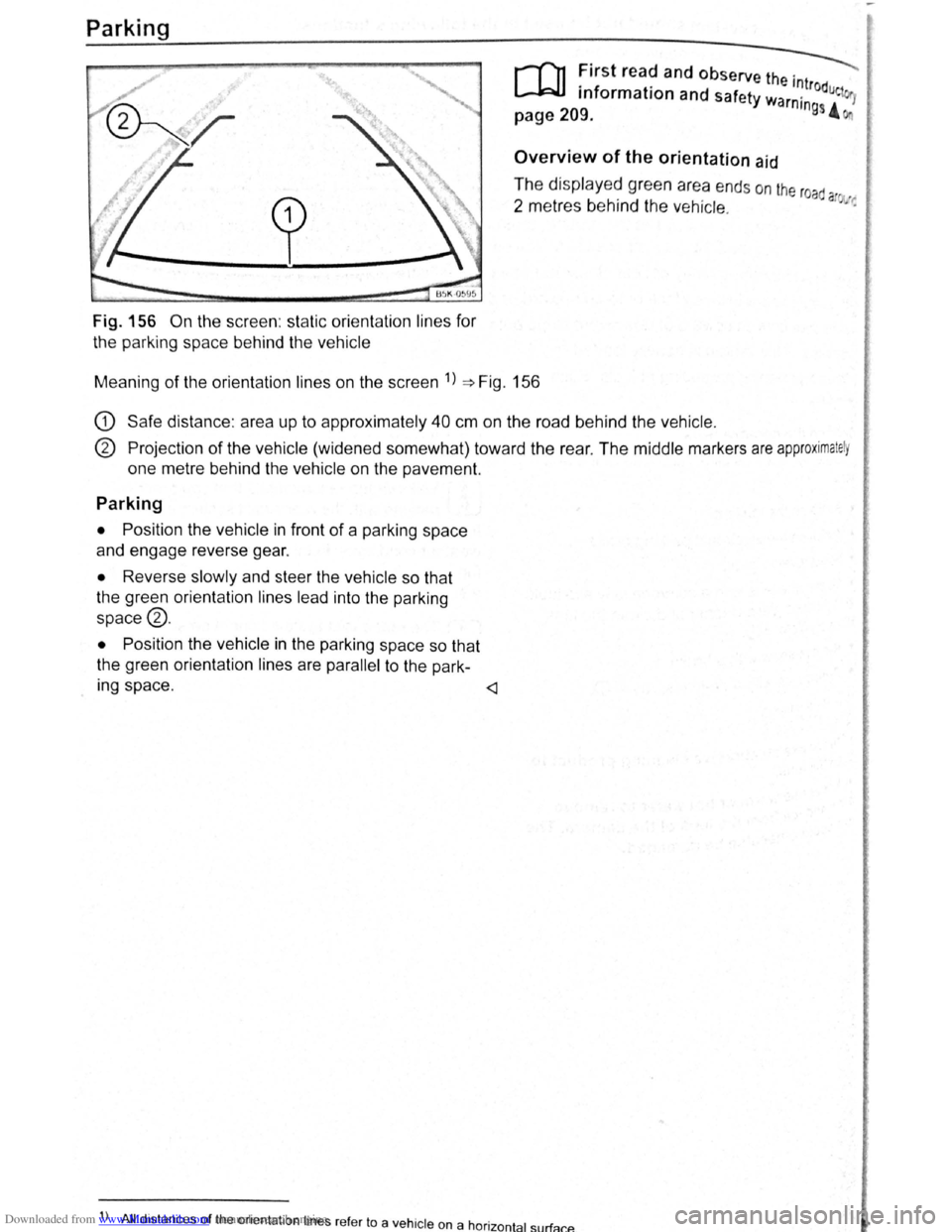
Fig. 156 On the screen : static orientation lines for
the parking space behind the vehicle
r-T'n First read and observe the . ---._
L..-J.=JJ information and safety wa '~trodue 1
page 209. rntngs 4
Overview of the orientation aid
The displayed green area ends on the road
2 metres behind the vehicle. a ~·:
Meaning of the orientation lines on the screen 1
) ~Fig. 156
G) Safe distance : area up to approximately 40 cm on the road behind the vehicle.
® Projection of the vehicle (widened somewhat) toward the rear . The middle markers are approximately
one metre behind the vehicle on the pavement.
Parking
• Position the vehicle in front of a parking space
and engage reverse gear.
• Reverse slowly and steer the vehicle so that
the green orientation lines lead into the parking
space®.
•
Position the vehicle in the parking space so that
the green orientation lines are
parallel to the park-
Ing space .
) All distances of the orient ation lines refer to a vehicle on a hor · t 1 rf 1zon a su a cP..
Page 102 of 138
Downloaded from www.Manualslib.com manuals search engine Cruise control system (CCS)
CQJ Introduction
This chap te r co ntains inf ormation on the follo wing
sub jects :
D is pl ay and indi cator la mp . . . . . . . . . . . . . . . .
2 18
O pe ra tin g the c ruise contr ol sy ste m (CCS ) . . 219
Th e crui se co ntr ol s y ste m (CC S) helps to maint ain
an indiv idu al s e t s pee d wh en the vehic le is trave l
l i
ng forw ards at spee ds of m ore tha n app rox im ate
ly
20 km /h (15 mph)1
).
The CCS only slows the vehicle by easing o ff the
acce lerato r, not by activ ely brakin g
~ ~.
Additional information and warnings:
• Changing gear ~page 169
• Speed limiter ~p age 222
• Adaptive Cruise Control (ACC) ~page 226
• Accessories , modifi cations, re pair s and rene wal
of parts
~page 320
The use of the cruise control system can lead
to accidents and serious injuries if traffic
does not allow you to drive at a safe distance
from the vehicle in front at a constant speed.
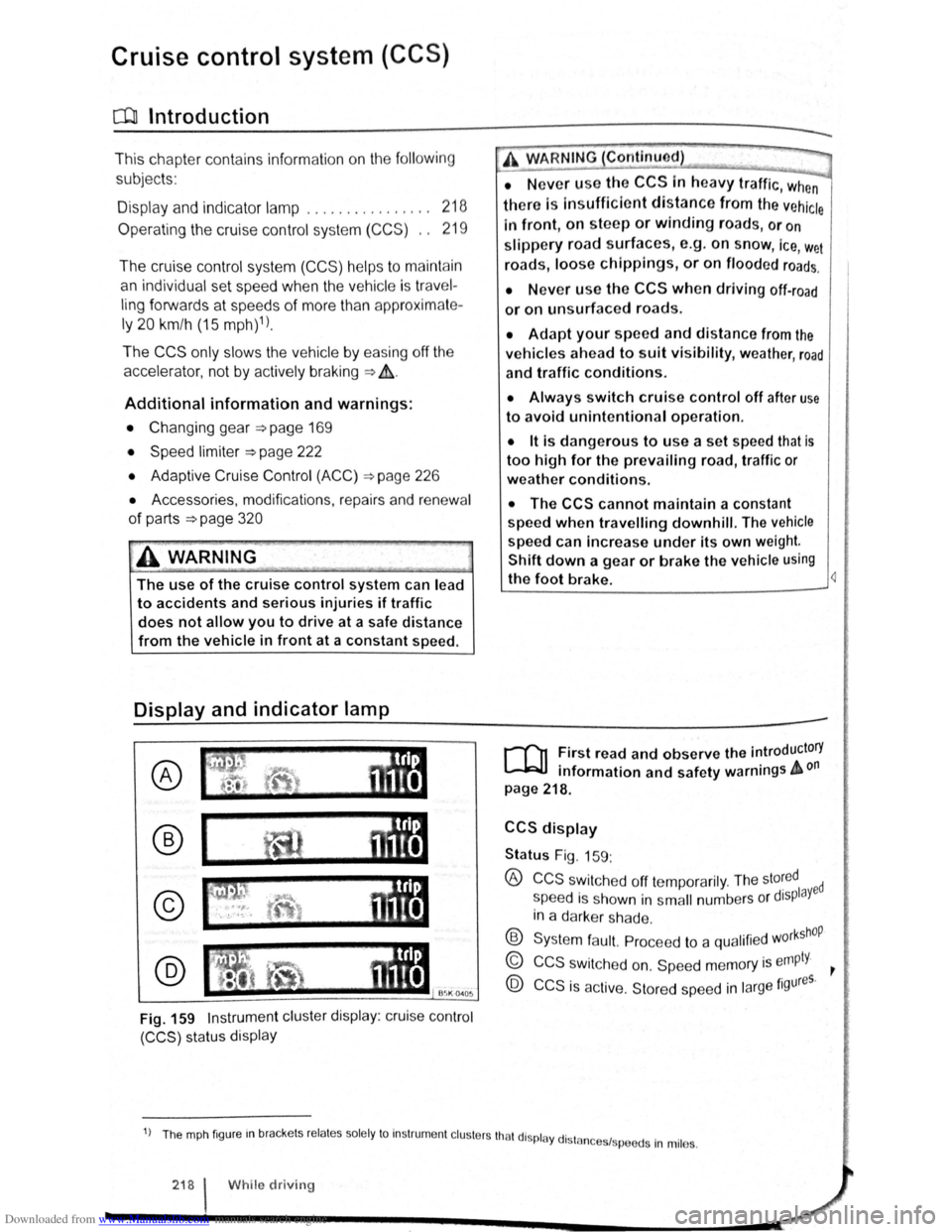
Display and indicator lamp
®
@
Fig. 159 Instrument cluster display: cruise control
(CCS) status display
A WARNING Continued)
• N ever use the CCS In heavy traffic, when
there Is In sufficient distance from the vehicle
In front, on steep or winding roads, or on
slippery road surface s, e.g. on snow, ice, w et
road s, loose chlppings, or on flooded roads.
• N ever use the CCS when driving off-road
or on unsurfaced roads .
• Adapt your speed and distance from the
vehicles ahead to suit visibility, weather, road
and traffic conditions.
• Always switch cruise control off after use
to avoid unintentional operation.
• lt is dangerous to use a set speed that is
too high for the prevailing road, traffic or
weather conditions.
• The CCS cannot maintain a constant
speed
when travelling downhill. The vehicle
speed can Increase under its own weight.
Shift down a gear or brake the vehicle using
the foot brake. 4
r-T'n First read and observe the introductory
L-.bU information and safety warnings & on
page 218.
CCS display
Status Fig. 159:
® CCS swit che d off te mp ora rily . The sto~ed ed
s peed i s s hown in s m all numbers o r displaY
in a darke r sh a de .
® Syste m fa ult. Pro cee d to a qualifi ed w orkshOP
© CCS s wit ch e d on. Sp eed m em ory is empty. ~
@ CCS is ac tive. Stor ed sp ee d in la rge figures.
1) Th e mph fig ur e m brac ke ts re la te s so le ly to In str um ent cl uste rs tha t di spl ay dl stn 1 .
n ces sp ee ds In mil es.
218 I While driv in g
Page 103 of 138
Downloaded from www.Manualslib.com manuals search engine ~ ·, ~ )
' { q
Indicator lamp
Ut up Possible cause
CCS or the speed limiter is controll ing the speed.
several warning and indicato r l amps will light up
briefly as a fun cti o nal check whe n the ig nitio n is
switc h e d on . Th ey will switch off after a few sec
onds.
'
A WARNING .
Failure to observe illuminated warning lamps
and text messages can lead to your vehicle
breaking down in traffic, and can cause acci
dent and serious injury.
• Never ignore any illuminated warning
lamps or text messages.
Failure
to observe illuminated indicator lamps
and text messages can lead to your vehicle be
ing damaged.
m If the CCS, ACC or speed limite r were
W switched on when the ignition was switc h e d
off, the
CCS or ACC will be switched on autom ati
cally the nex t tim e th e ignition is switc hed on. How
ever, no speed is stor ed. The speed limiter's las t
set speed remains stored.
r:i Displays can vary as different ve rsions of th e
W instrument cluster are availab le .
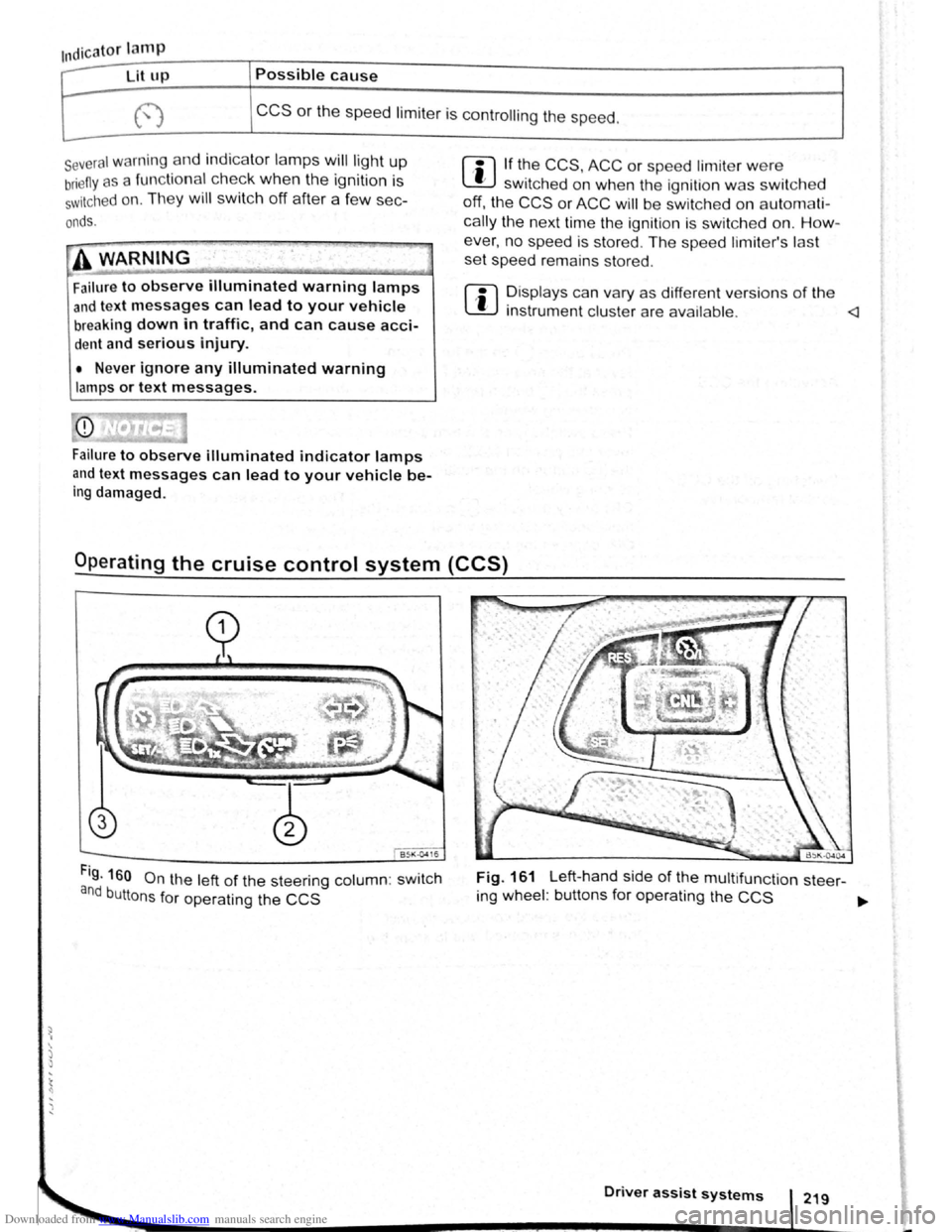
Fig. 160 On the left of the steering column: swit c h
and buttons for operating the CCS
Fig. 161 Left-hand side of the multifunct ion steer-
ing wheel : buttons for operating the
CCS ~
Driver assist systems
Page 104 of 138
Downloaded from www.Manualslib.com manuals search engine th . troductory information and safety warnings & on page 218 First
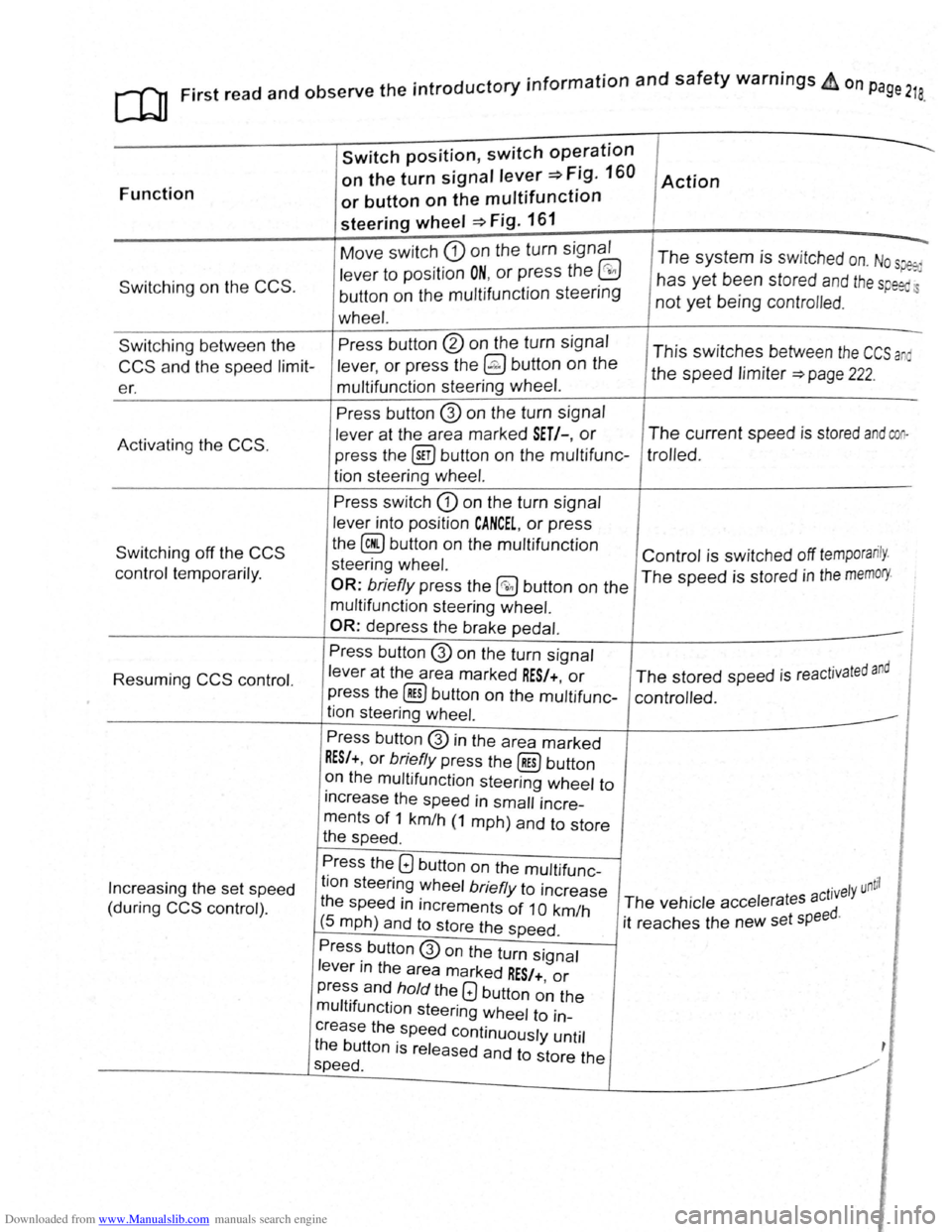
read and observe e m ·
Function
Switching on the CCS .
Switch position, switch op~ration
on the turn signal lever~ Fig. 160
or button on the multifunction
steering wheel ~Fig. 161
Move switch CD on the turn signal
lever to position ON, or press the @
button on the multifunction steering
wheel.
Action
--.
The system is switched on. Nos~
has yet been stored and th e sp eed.
not yet being contro lled .
Switching between the
CCS and the speed limit
er. Press
button
@ on the turn signal
lever,
or press the @ button on the
multifunction steering wheel. This switches between the CCS a
the speed limiter ~page 222.
Activating
the CCS.
Switching off the CCS
control temporarily.
Resuming
CCS control.
Increasing the set speed
(during
CCS control) . Press button
@ on
the turn signal
lever at the area marked
SET/-, or
press the @iJ button on the multifunc
tion steering
wheel.
Press switch CD on the turn signal
lever into position
CANCEL, or press
the
@ button on the multifunction
steering wheel.
OR: briefly press the @0 button on the
multifunction steering wheel.
OR:
depress the brake pedal.
Press button
@ on the turn signal
lever
at the area marked RES/+, or
press the @] button on the multifunc
tion steering wheel.
Press button
@ in the area marked
RES/+, or briefly press the@) button
on the multifunction steering wheel to
increase the speed in
small incre
ments
of 1 km/h (1 mph) and to store
the speed .
The current speed is stored and coo
trolled .
Control is switched off temporarily .
The speed is stored in the memory.
· t d and The stored speed is reactJva e
controlled .
Press the
Q button on the multifunc
tion steering wheel
briefly to increase
the speed
in increments of 1 0 km/h
(5 mph) and to store the speed .
. ntil ct1vely u The vehicle accelerates a
it reaches the new set
speed.
Press button
@on the turn signal
lever in the area marked
RES/+, or
press and hold the Q button on the
multifunction steering wheel to in
crease the speed continuously until
the button is released and to store the
speed .