reset VOLKSWAGEN GOLF 2012 User Guide
[x] Cancel search | Manufacturer: VOLKSWAGEN, Model Year: 2012, Model line: GOLF, Model: VOLKSWAGEN GOLF 2012Pages: 516, PDF Size: 105.12 MB
Page 118 of 516
N
19.
gauge
Reset button fo r t he trip odome te r (trip).
- P
ush th e
eter
saves
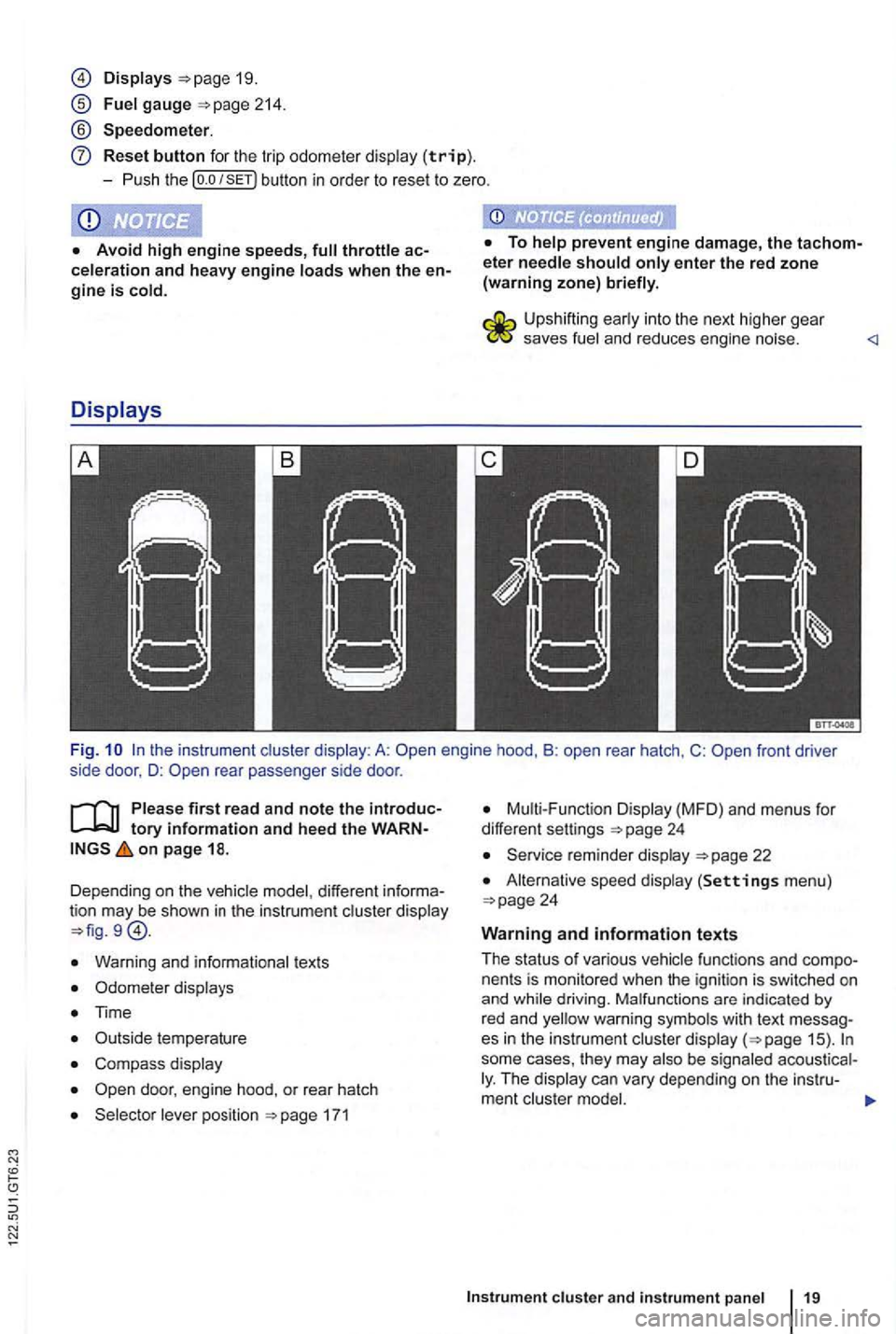
Fi g. rear passenger side door .
first read and note the tory information and heed the on page 18.
Dependi ng o n the vehic le model , different
Warn ing and informationa l tex ts
Odomete r disp lays
Time
C omp ass display
171
Disp lay (MFD ) and menu s for
differe nt settings
22
A lternat ive speed display (Settings men u)
fu nctions and nents is mon itored when the ign ition is switch ed on
and
some cases, they may The
Page 119 of 516
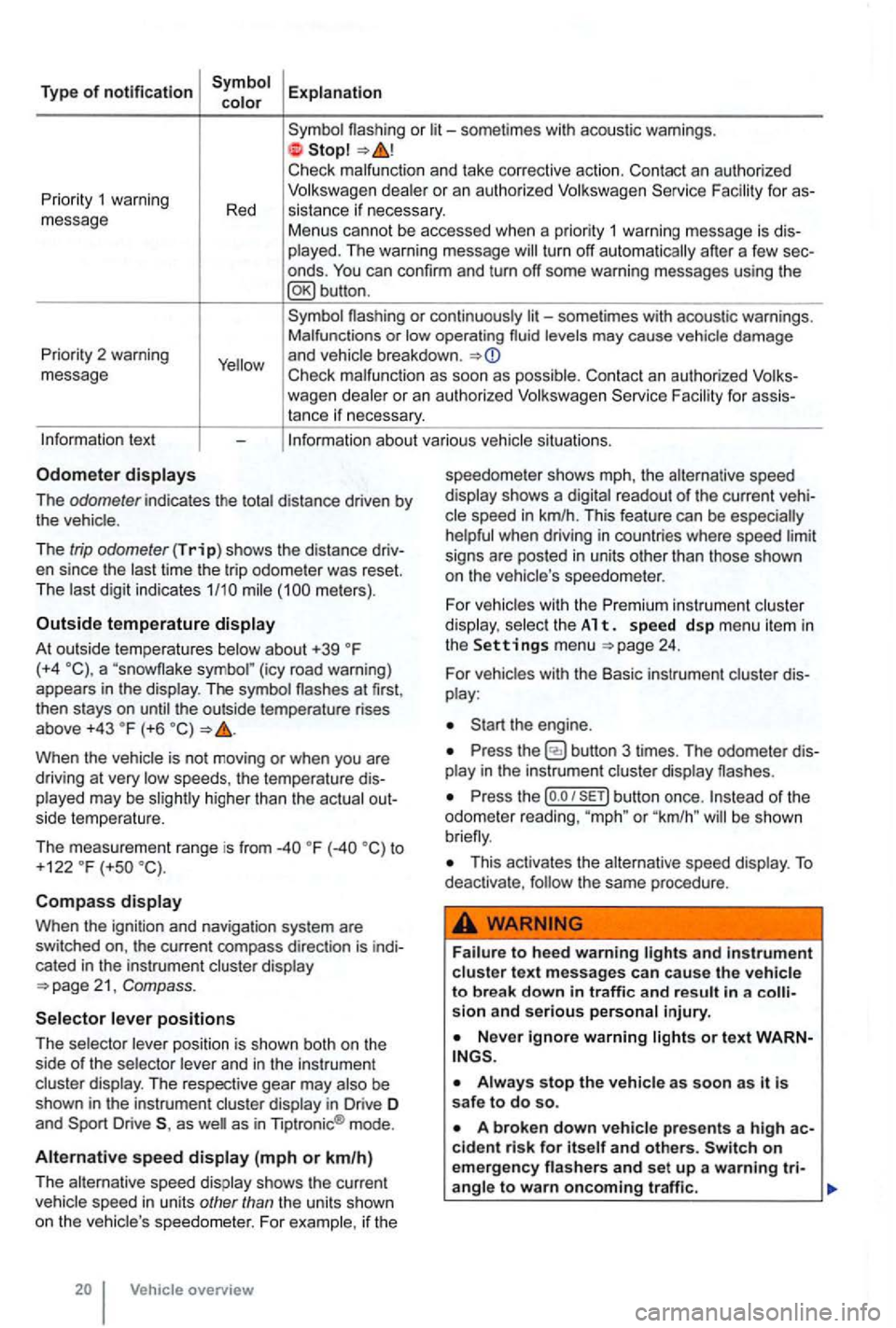
Type of notification
or
deale r o r an autho rized
turn off automatically after a few sec
onds .
Priority 2 warning
message
or continuously levels may cause vehicle damage
and vehicle breakdown .
Check malfunc tion as soon as possib le. Con tact an authorized for assistance if necessary.
tex t
The odometer indicates the distance driven by the vehic le .
The
trip odometer (Trip) shows the distance driv
en since the time the trip odometer was reset.
The meters) .
Outside temperature
At out side temperatures (+4 (icy road warning)
appears in the display . The symbol the outside temperature rises
above +43 (+6
higher than the actual out
side temperature.
The measurement range is from
to
+122 (+so
Compass
Whe n the ignit ion and navigation system are
switched on, the current compass direction is indi
cated
in the instrument cluster display
position is shown both on the
side of the selector and in the instrument
cluster display. The respective gear may
as as in Tiptronic ® mode .
Alternative speed (mph or km/h)
The alternative speed display shows the current
Vehicle overview speedometer
shows mph, the alternative speed
display shows a
readout of the current veh i
signs are posted in units other than those shown
on the vehicle 's speedo meter .
For
vehicles with the Premi um instrument cluster
di splay. select th e A 1 t. s pe ed d sp me nu it em in the Settings menu 24.
For vehicles with the Basic instrument cluster dis
play :
Press the
Press the (o .o button once. or "km /h " be shown
This activates the alternative speed display . To deactivate , the same procedure .
and in strument cluste r text messages can cause the vehicle to break down in traffic and result in a sion and serious personal injury.
on emergency
Page 121 of 516
vehicles with out a factory-installed navigation
system th at have th e instrument the compass is calibrated automatically. or metallic accessories are added to the the compass must be recal ibrated .
Adjusting the compass zone
on the ignition .
and Zone menu items.
rent location =>fig. 11.
Adjust and confirm compass zone (1 -15).
order to cal ib rate the compass, you need a
Serv ice reminder
on page 18 .
The service appointment reminder is shown in the
instrument =>fig . 9
For information on maintenance intervals, Warranty and Maintenance.
For vehicles with time-or distance fixed service intervals a re
displayed .
Service reminder
service is due in the near future, a service
vehicles without text messages (Basic a wrench and a miles (kilometers) indicator are shown in the display . The distance shown in (kilometers) is the maximum distance the
the required service is shown .
vehicles with text messages
and Calibration menu items .
ConfirmtheA complete circle must be driven for calibration message
is complete when
the compass direction is displayed.
When service is due, a warning chime sounds
when the ignition is sw itched on, and a flashing
wrench
- is displayed for
now is indicated in the instrument display.
Viewing service message
The current service message can be accessed
when the ignition is switched on, the engine is
switched off, and the
times -appea rs .
the sub-menu,
since---mi or---days(Service since ---km or ---days) is shown in
the instrument
or an authorized Volkswagen the service reminder can be reset
as
Page 124 of 516
Avg. Consu m.
Route
Avg . speed
Dig it. speed
warning
Back
Compass
Convenience
ATAconfirm
Dooropen
Manual
(All doors , door, Veh . si de,
Automa tic (Auto Lock, Auto Unlock)
Mirror adjust
Factory
Lights & Vision
Background lighting
Footwell ligh ting
L n. Chg.
F actory setting
Ti me
Units
Alternative speed display
Reset
Factory setting
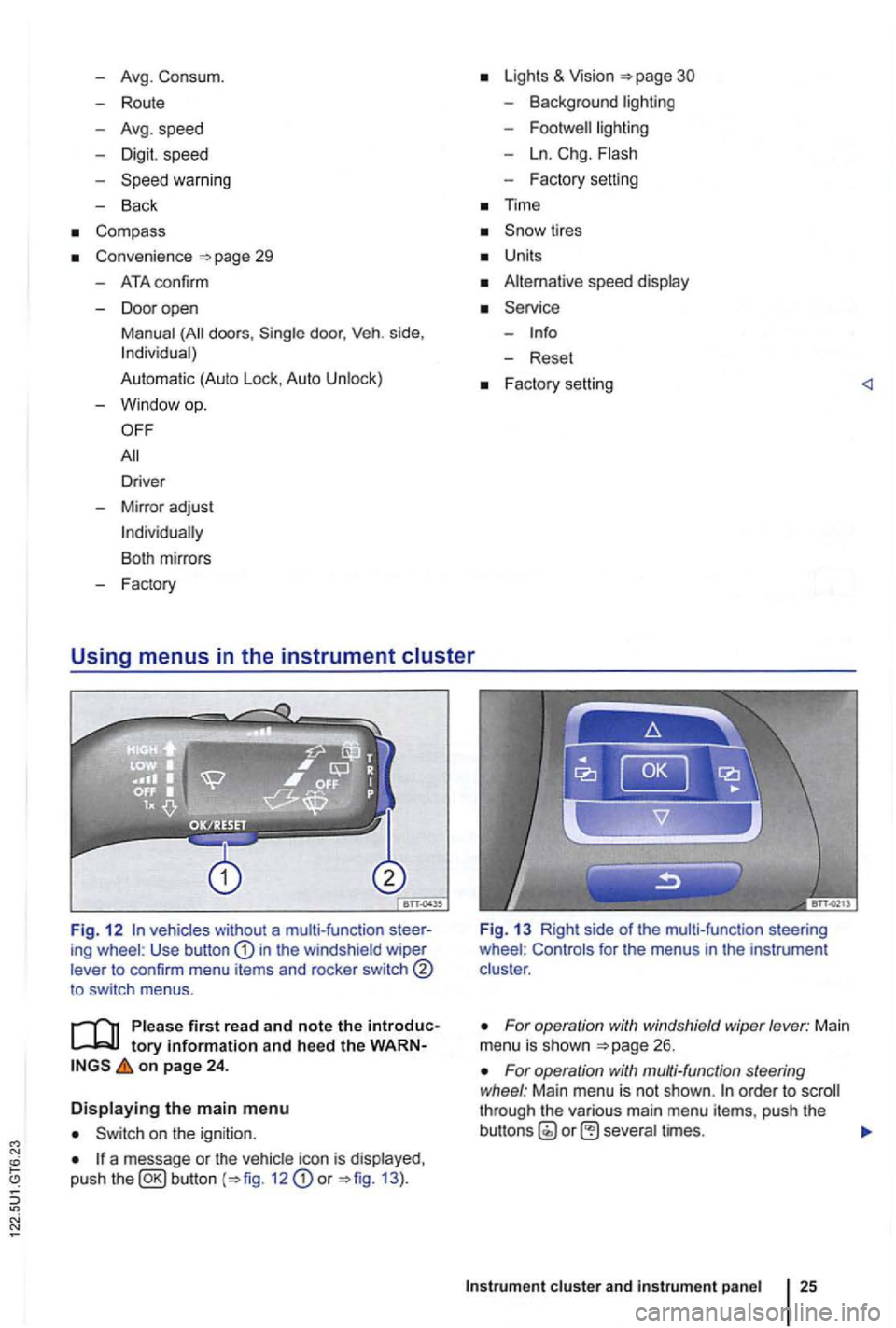
Fig. 1 2 vehicles without a multi-function ing wheel : Use button in the windshield wiper
lever to confirm menu items and rocker switch
to sw itch menus .
tory information and heed the on page 24 .
Displaying the main menu
on the ignition .
a message or the vehi cle icon is displayed ,
push the 12 or 13 ).
Fig. 13 Right side of the mult i-func tion steering
wheel : Controls for the menus in the instrumen t
clus ter .
For operation with windshield wiper lever: Main
menu is shown
For operation with multi-function steering
wheel : Main menu is not shown . order to through the various main menu items, push the
cluster and instr um ent pan el
Page 127 of 516
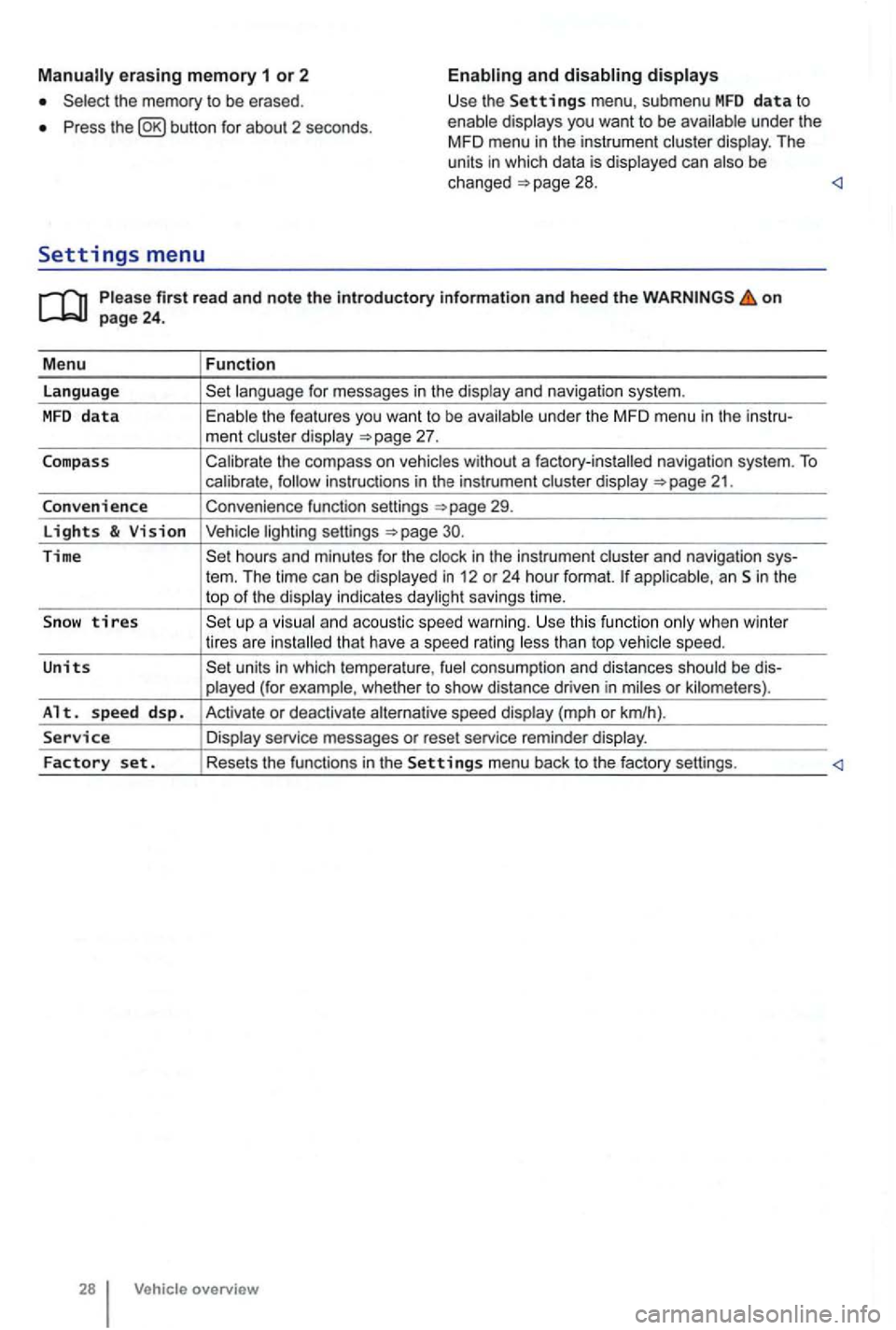
erasing memory 1 or 2
Press button for about 2 seconds.
and
Please firs t r ead and note t he i ntrodu ctory infor ma tion an d heed th e o n page 24 .
M enu
Function
language
unde r the MFD menu in the instru-
ment cluste r display
Calibrate the compass on vehicles without a factory-installed navigation system. To calibrate ,
Convenience function settings
30.
Time hours and minutes for the and navigation sys-
tern. The time can be displayed in 12 or 24 hour format. applicab le, an Sin the
top of the disp lay indicates daylight savings time.
S
now tires t han top vehicle speed.
Units units in which tempera ture , consumption and distances should be dis-
p layed (for example , whet her to show distance driven in miles or kilomete rs).
Alt. s p ee d d sp. Activate or deactiva te speed display (mph or km/h).
Service Display service messages or reset service reminder display.
Factory set . Resets the functions in the Se tting s menu back to the factory settings.
Vehicle overv ie w
Page 129 of 516
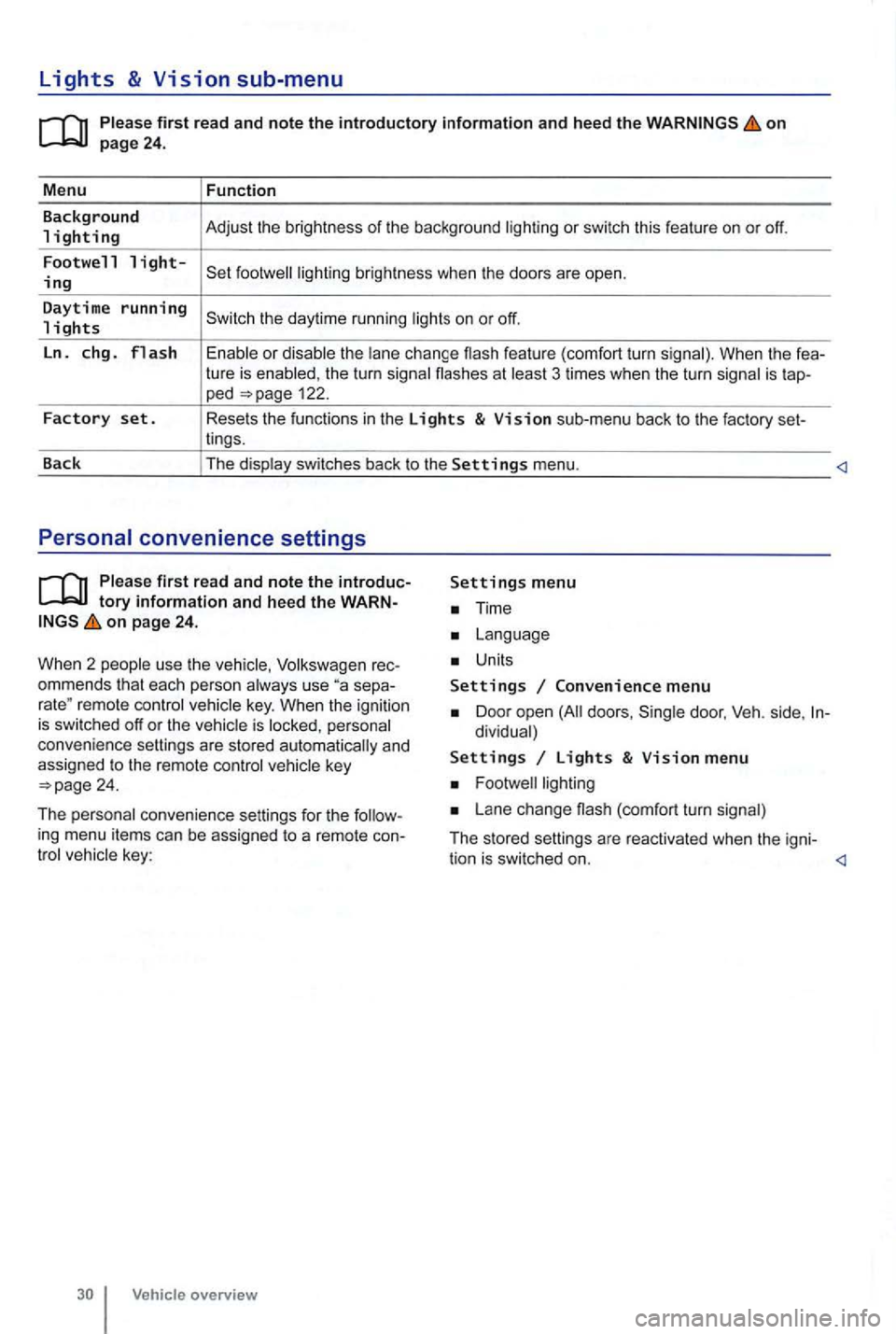
Lights & Vision sub-menu
on
the turn signa l flashes at 3 times when the turn signal is tap-ped 122.
Factory set. Resets the functions in the Lights & Vision sub-menu back to the factory set-
lings.
Back The display switches back to the
Settings menu.
tory information and heed the WARNon page 24.
W hen 2 people use th e
Volksw agen rec
ommends that each person always use separemote control veh icle key. When the ignition is switched off or the vehicle is personal
convenience settings are stored automatically and
assigned
to the remote control
Time
Units
Settings Convenience menu
Door open doors , dividual)
Settings Lights & Vision menu
Lane change (com fort turn signal)
The stored settings are reac tivated when the igni-
tion is switched on.
Page 302 of 516
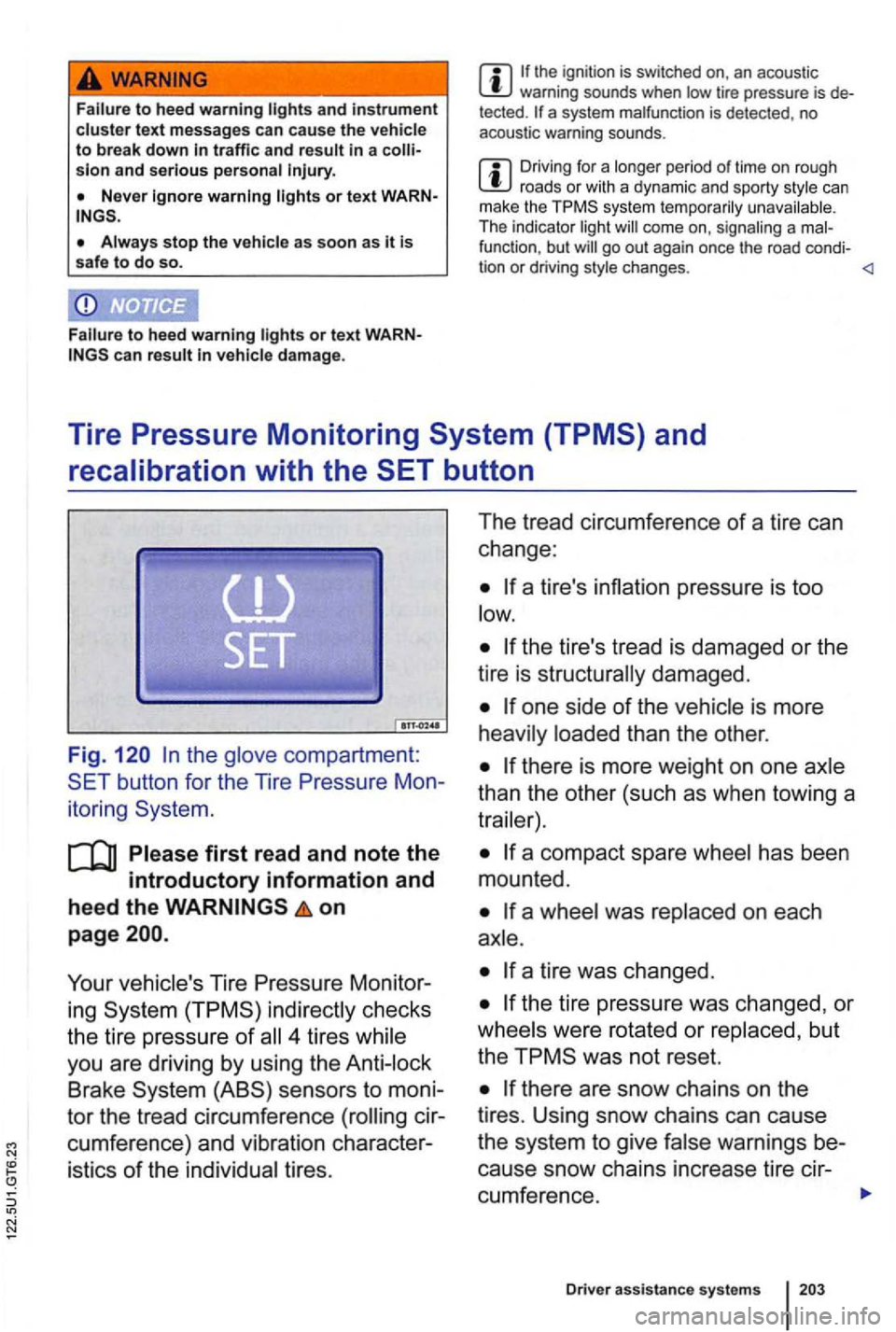
to heed warning and instrument text messages can cause the to break down traffic and sion and serious
or text
stop the as soon as it is
safe to do so.
or text can damage .
the ignition is switched on, an acous tic warning sounds when tir e pressure is tected. a system malfunc tion is detected , no
aco ust ic warn ing sounds .
Driving fo r a lon ge r period of tim e o n roug h roa ds or w ith a dynamic and sporty s tyle can
m ake th e system te mpora rily unavai lable .
Th e in dicato r light
fu nc tio n, b ut
Tire Pressure Monitoring
the
on
page
Your Tire Pressure Monitor
ing
4 tires
Brake
tires . The
tread circumference
of a tire can
change :
one side of the
than the other .
than the other (such as when towing a
has been
mounted .
a
a tire was changed.
the tire pressure was changed , or
were rotated or
was not reset.
warnings be
cause snow chains increase tire cir-
cumference.
Dri ver assistance syste m s
Page 304 of 516
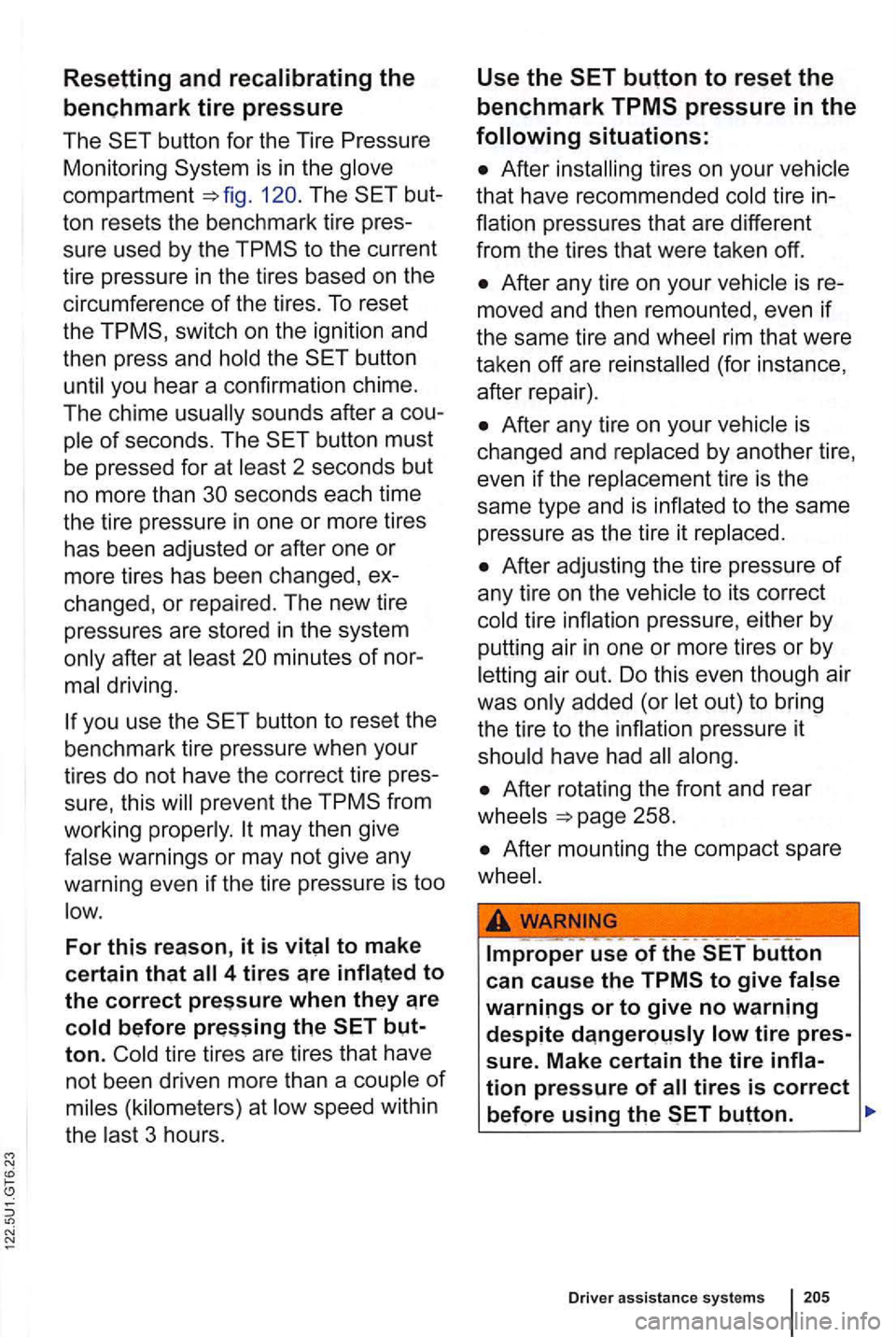
Resetting and
12 0. The but
ton rese ts the benchmark tire pres
sure used by the
switch on the ignition and
then press and
the
you hear a confirmation chime.
The chime
sounds after a cou
of seconds. The
2 seconds but
no more than
after at minutes of nor
you use the
prev ent the
warnings or may not give any
warning even
if the tire pressure is too
For this reason, it is
tire tires are tires that have
not been driven more than a
speed within
the
3 hours .
Use the
tire in
rim that were
taken off are
(for instance,
after repair) .
is
changed and
to its correct
tire
have had
Page 364 of 516
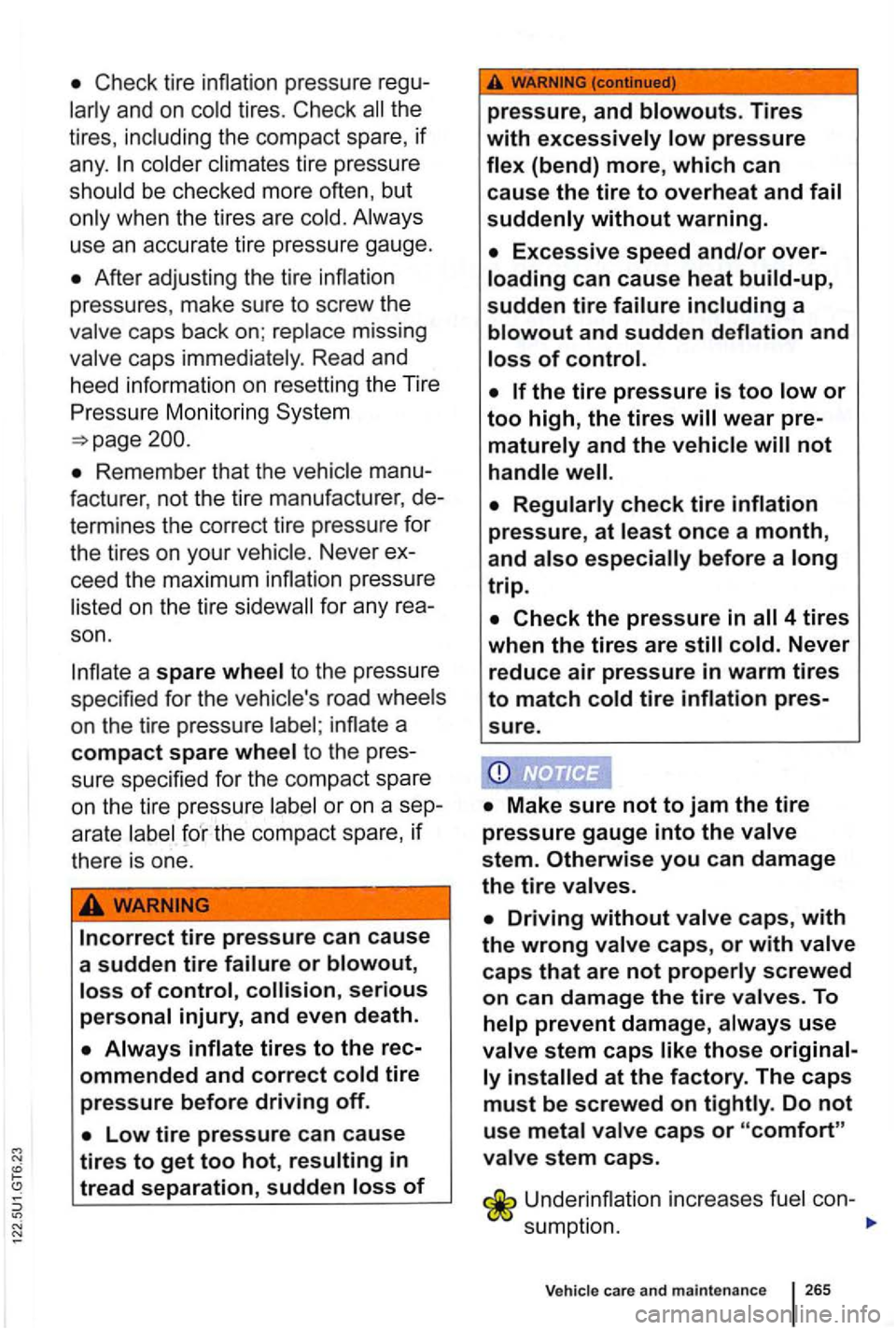
Check tire inflation pressure
and on cold tires. Check all the
tires, including the compact spare,
if
any. colder climates tire pressure
shou ld be checked more often, but
on ly when the tires are co
ld. Always
use
an accurate tire pressure gauge.
After adjusting the tire inflation
pressures , make sure to screw the
valve caps back on; replace missing
valve caps immediately. Read an d
heed information on resetting the Tire
Pr essure Monitoring System
Remember that the vehicle
facture r, n ot the tir e manufacturer,
sure specified for the compact spare
on the
tire pressure labe l or on a
serious
personal injury, and even death.
pressure, and blowouts. Tires
with excessively low pressure
flex (bend) more, which can
cause
the tire to overheat and fail
suddenly without warning.
sure.
at the factory. The caps
must be screwed on tightly. Do not
use metal valve caps or
Underinflation increases fuel con-
s umpti on.
care and maintenance
Page 443 of 516
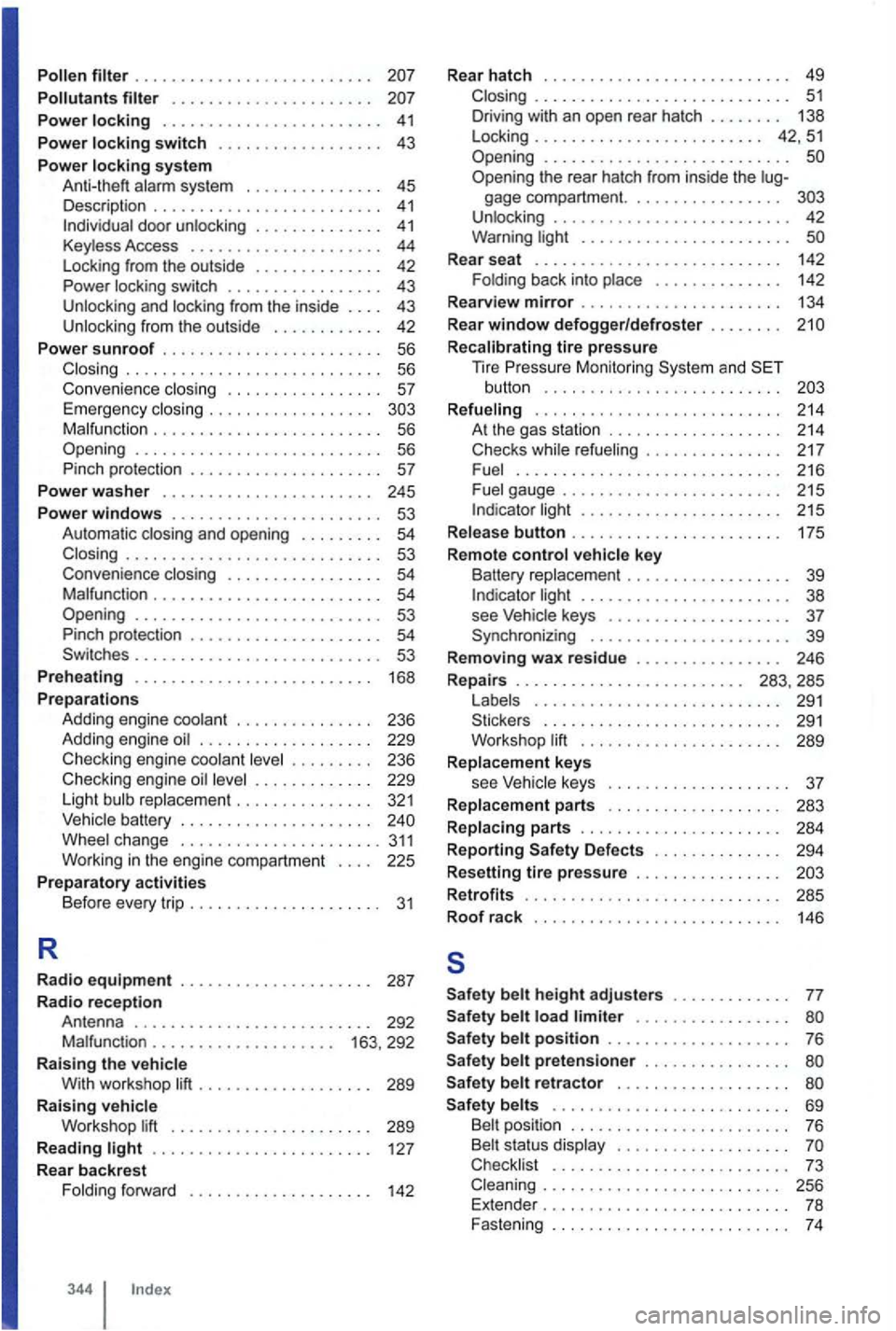
Pollen . . . . . . . . . . . . . . . . . . . . . . . . . .
Pollutants . . . . . . . . . . . . . . . . . . . . . .
Power locking . . . . . . . . . . . . . . . . . . . . . . . . 41
Power locking switch . . . . . . . . . . . . . . . . . . 43
Pow
er locking system A nl i-lheft alarm system . . . . . . . . . . . . . . . 45
Description . . . . . . . . . . . . . . . . . . . . . . . . . 41 doo r unlocking . . . . . . . . . . . . . . 41 Keyless Access . . . . . . . . . . . . . . . . . . . . . 44
L ock ing from the outside . . . . . . . . . . . . . . 42
Power
lock ing switch . . . . . . . . . . . . . . . . . 43
Un locking and locking fr om the inside . . . . 43
Un locking from the outside . . . . . . . . . . . . 42
Power s
unroof . . . . . . . . . . . . . . . . . . . . . . . . 56 ............ ................ 56
Conv enience closing . . . . . . . . . . . . . . . . 57 Emergency closing . . . . . . . . . . . . . . . . . . M alfun ction . . . . . . . . . . . . . . . . . . . . . . . . . 56 Opening ..............•............ 56
Pinch protection . . . . . . . . . . . . . . . . . . . . 57
Pow
er wa sh er . . . . . . . . . . . . . . . . . . . . . . . 245
Power windows . . . . . . . . . . . . . . . . . . . . . . . 53
Automa tic and open ing . . . . . . . . . 54 ............................ 53
Conven ience closing . . . . . . . . . . . . . . . . . 54 Ma lfunction . . . . . . . . . . . . . . . . . . . . . . . . 54 Opening ........................... 53
P inc h protection . . . . . . . . . . . . . . . . . . . . 54 Sw itc hes . . . . . . . . . . . . . . . . . . . . . . . . . . 53
Prehea ting . . . . . . . . . . . . . . . . . . . .
. . . . . 168
Preparations
Addi ng engine coolant . . . . . . . . . . . . . . . 236
Adding engine
. . . . . . . . . . . . . . . . . . . 229
Checki ng engine coolant . . . . . . . . . 236
Checking e ngi ne . . . . . . . . . . . . . 229
Light bulb repla cemen t . . . . . . . . . . . . . . . 321
Vehic le battery . . . . . . . . . . . . . . . . . . . . .
. . . . . . 127
Rear backrest
F oldi ng forward . . . . . . . . . .
. . . . . . . . . 142
344
Rear hatch . . . . . . . . . . . . . . . . . . . . . . . . . . . 49 . . . . . . . . . . . . . . . . . . . . . . . . . . . . 51
D riving with an open rear hatch . . . . . . . . 138
L ock ing . . . . . . . . . . . . . . . . . . . . . . . . . 42, 5 1
Open ing
........................... Opening the rear hatch from inside the gage compartm ent. . . . . . . . . . . . . . . . . U nlock ing . . . . . . . . . . . . . . . . . . . . . . . . . . 42
Warning li ght . . . . . . . . . . . . . . . . . . . . .
Rear seat . . . . . . . . . . . . . . . . . . . 142
F olding back int o place . . . . . . . . . . . . . . 142
Rearv iew
mirror . . . . . . . . . . . . . . . . . . . . . . 134
Rear
window defogger/defroster . . . . . . . .
Recalibrating tire pressure
T ire Mo nito ring System and button . . . . . . . . . . . . . . . . . . . . . . . . . .
Refueling . . . . . . . . . . . . . . . . . . . . . . . . . . . 214 A t the gas station . . . . . . . . . . . . .
light . . . . . . . . . . . . . . . . . . . . . 215
Release
button . . . . . . . . . . . . . . . . . . . . . . . 175
Remote
control vehicle key
Ba ttery replacement . . . . . . . . . . . . . light . . . . . . . . . . . . . . . . . . . . . 38
see Vehicle keys . . . . . . . . . . . . . . . . . . 37
Synchronizing . . . . . . . . . . . . . . . . . . . . . . 39
Remov ing
wax residu e . . . . . . . . . . . . . . . . 246
Repa irs . . . . . . . . . . . . . . . . . . . . . . . . . 283, 285
L abels . . . . . . . . . . . .
. . . . . . . . . . . . . . 291
Sticker s . . . . . . . . . . . . . . . . . . . . . . . 291
Wo rkshop lift . . . . . . . . . . . . . . . . . . . . . 289
Replacement keys
see
keys . . . . . . . . . . . . . . . . 37
Replacement parts . . . . . . . . . . . . . . . . . . . 283
Replacing parts . . . . . . . . . . . . .
. . . . . . . . 284
Reporting Safety Defects . . . . . . . . .
. . . . 294
Resetting
tire pressure . . . . . . . . . . . . . . . .
Retrofit s . . . . . . . . . . . . . . . . . . . . . . . . . . . . 285 Roof rack
146
s
Safety belt height adjusters . . . . . . . . . . . . . 77
Safety belt load limiter . . . . . . . . . . . . . . . . . Safety belt position . . . . . . . . . . . . . . . . . . . . 76
Safety
belt pretensioner . . . . . . . . . . . . . .
S afety belt retractor . . . . . . . . . . . . . . . . . . .
Safety belts . . . . . . . . . . . . . . . . . . . . . . . . . . 69
Belt position . . . . . . . . . . . . . . . . . . . . . . . . 76
Belt status display . . . .
Checklist . . . . . . . . . . . . . . . . . . . . . . . . . . 73 . . . . . . . . . . . . . . . 256
Extender . . . . . . . . . . . . . . . . .