drive VOLKSWAGEN JETTA 2007 Owners Manual
[x] Cancel search | Manufacturer: VOLKSWAGEN, Model Year: 2007, Model line: JETTA, Model: VOLKSWAGEN JETTA 2007Pages: 477, PDF Size: 77.6 MB
Page 413 of 477
Booklet 3.2 Tip s and Ad vice
Alphabetical index
A
ABS 3
Accesso ries
What sh o uld I d o
I w ant to add an acces-
so ry t o m y ve hicl e? 27
A dd ress ofNHT SA 90
A ddress of T ranspo rt Ca nada 90
Af te r ch an gin g a w hee l 74
A lca nta ra
C lea nin g 25
A lloy w hee ls
C lean ing
21
A ll-w hee l drive
W int er t ir es 65
A nt i- fr eeze 43
A nt i- lock brak e sys te m
W ha t d oes it m ean whe n I feel a slig ht vi-
bra tio n on the bra ke ped al? 3
A nti -th eft w hee l bo lts
71
A ut o S afe ty Hotlin e 90
A ut oma tic ca r was hes
17
B
BAS 2
B att ery
C harg ing 50
H ow ofte n sh o uld I rep lace my e ngin e
b att ery ? 50
Imp ort an t in fo rm atio n t o kn ow
disco nnect the ba ttery 49
R ep lac in g 50
What you mu st d o a fte r rec onnec t the
b ane 1y 49
W int er co nd it io ns 49, 50
Batt ery ac id leve l
C hec kin g 50
B o nn et 36
Brak e ass ist sys te m 2
Bra ke boost er 2
92 Alphabetical inde x
Brake fluid
C han gin g 48
H ow
sh ould the bra ke flu id be
c h an ge d? 48
W hat i s th e co rrec t b rak e flui d leve l? . 47
W hat k ind of br ake flui d sh ou ld I use? 48
Bra ke pa ds 8
Bra ke servo 8
Brake system 47
B ra kes 8
H ow does mois tur e o r roa d sa lt a ff ec t th e
b rake s? 8
W hat d oes it mean when I feel a slig ht vi
brat io n on th e bra ke ped al? 3
Bra kin g dis ta n ce 8
Br ea k-in p eriod
E ng in e 7
W hat is th e rig ht way to break-in m y
ve hicl e? 7
Brea king in
B ra ke pad s 7
T ires 7
Br ea kin g in tir es 7
B ulb chan ge
8 1
Bu mp er
Cl ea ning
1 8
C
Ca lifo rn ia Prop ositi on 65 Wa rning 34, 49
Car was hes
17
Ca ta ly ti c co nverte r 10
CB ra d io 29
Ce ll pho ne 29
Ce llul ar p hone 29
Chang in g a bu lb
8 1
Cha ng in g a w hee l 73
C hang in g bra ke pad s 7
C hangin g w indshie ld w iper b la des 46
C hass is 22
Chec kin g e ngin e o il leve l 39
Chec king tir e p ress ure 56
Chro me
Cl ea ni ng
21
Page 414 of 477
Cleani ng
A llo y whee ls
2 1 A ut omati c car was h 17
Bump er
18
chassis 22 C lo th sea t cove rs 23
E n gin e co mpartm ent 22
Ex ter ior 1 7
trim 23
In stru ment panel 23
L ea th er 23 Out side mir rors 19
P las tic 23
bel ls 26
W ashin g the ve hic le 1 7
W ind ows 19
Wind sh ie ld 19 W ind shie ld wip er blad es 20
W ooden trim
23
Cle an ing and pro tec tio n 16
C lot h sea t cove rs
C le an ing
23
Code number
Fo r
whee l bolt s 67
Cold tire inflation pressure 54
Coo la nt 43 Le ve l 44
Loss 44
Cra sh recorder s 6
D
Deter minin g corre ct load limil 59
D iese l e ngine
Ad din g en gi ne oil 41
C hang ing engin e oil 41
En gin e oil 4 1 Engin e oi l 37
Die se l fu el 33 Wi nte r operat io n 33
D iffe re nti al loc k 4
Drive r Stee ring Recomme ndati on 3
Dr iv in g eco nomi cally 14
Driv ing ou1 sid e o f !h e U.S. A. or Canada
P rec au1io ns
9 1
Driv ing wit h respec t for th e en vironme nt 14
Booklet 3.2 Tip s and Advice
ing in sid e 1h e e ng in e c om pa rtm en t 34
Wo rkin g in th e engin e com partmen t 34
Engin e coola nt 43
Add iti ves 43
Can I acid p la in wate r the engi ne
coo lan t?
44 Coola n! losses 45
Eng ine hoo d 36
How do I unlock !he en gin e hoo d? 36
Eng ine oil 37
Add ing 40
Addit ives 40
C he ck in g leve l 39
Consu mplion 38
Die sel e n gine 4 1
Dips!i ck 39 H ow do I kn ow how much oil m y eng in e is
co nsum ing?
38
Oi l cha nge 42
Specifica tions 37 Spec ifi ca tions Diese l eng in e 37 , 4 1
Spec ifica !io ns gaso li n e e ngi ne 37 W hal kind of e n gin e oi l s h o uld I p u ! in my
v eh icl e?
37
W hen sh o ul d I ch eck !he e ngin e oi l
l eve l? 38 W here is th e oil dip stick 3 9
E nvironm en t
Avo iding polluti on 31
C le anin g th e e ngine compa rtment 22 Driving economically 14
V ehi cle care produ cts 16
ES P 5
Eve nt Dat a Reco rde r 6
Ex terna l ae rial 29
Alphabetical index 93
Page 423 of 477
Booklet 3.3 Technical Data
General notes
What you need to know
Abbreviations used in this booklet
Abbreviation Meaning
kW Kilow att (e n gin e pow er)
hp Hor se power ( engin e pow er)
rpm Revolu tion s per minut e (engine sp ee d)
N m Newt on m ete rs ( un it of engin e torque )
lb- ft
Foot pound s (uni t of engin e torq ue)
in . Inch
qt s. Quart s
CID Cub ic in ch di spl ace ment
lb s.
Pound s
k g
Kilogram
Vehicle Identification
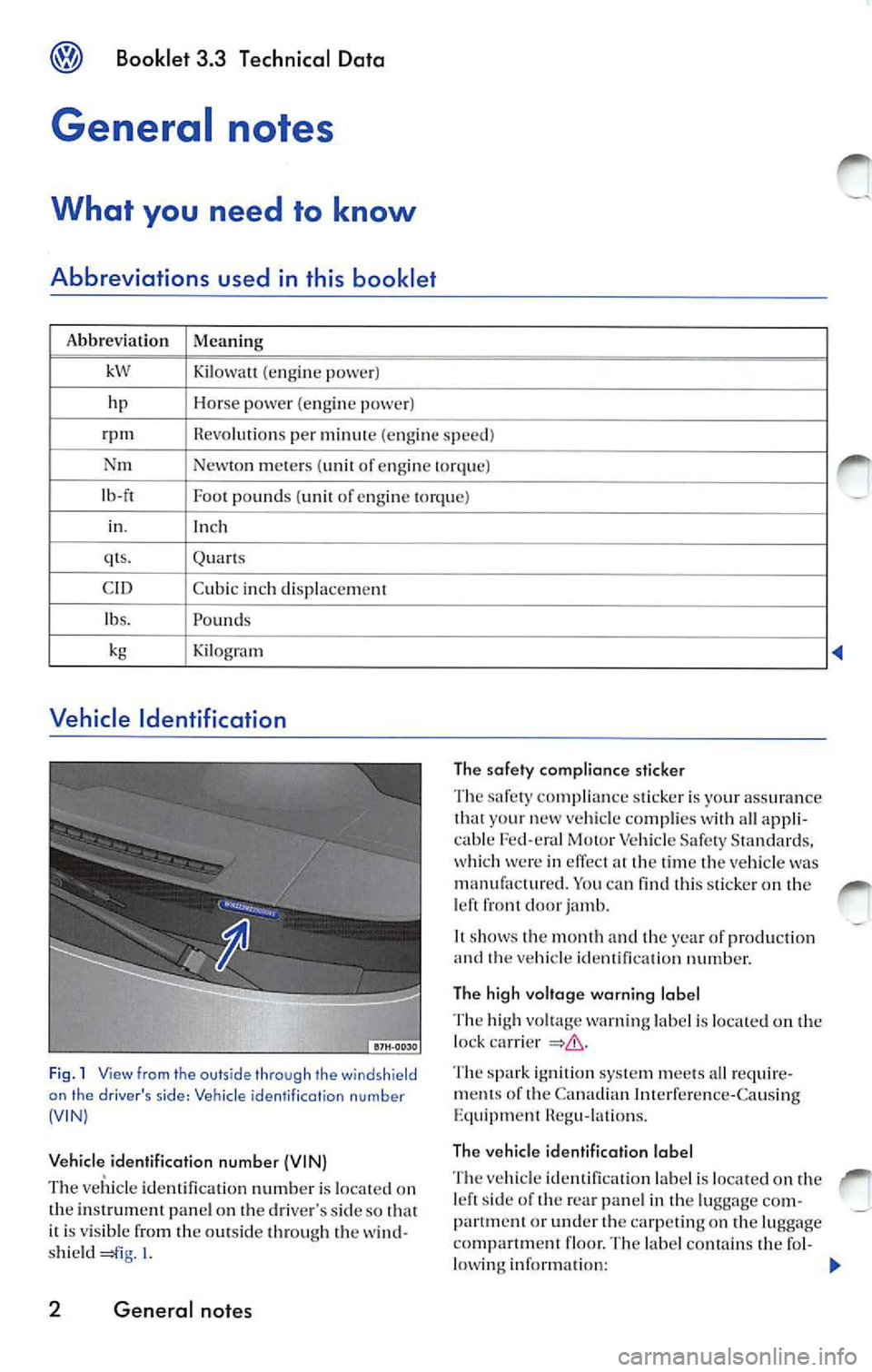
Fig . 1 View from th e outs ide thro ugh the windshi eld
on the driver 's side : Ve hicle identilicotion numb er
(V IN)
Vehicle identification numb er (VIN}
The vehicle ident ifica tion numb er is lo cat ed on
th e in strum en t pa nel o n th e dri ver' s s ide so
it is vis ib le from th e out side through the w ind
s h ie ld l.
2 General notes
Th e safety compliance sticker
Th e sa fe ty comp lian ce s tick e r is yo ur ass ura nce
th at y our new ve hicle comp lies w ith all appli
c ab le Fed -e ral Motor Ve hicle Saf ety S ta nd ard s,
w hich wer e in effec t
lim e the ve hicle wa s
m anufa ctur ed. Yo u can find thi s sticke r on th e
l e ft fro nt door jamb.
It shows t he m ont h and the ye ar of produ cti on
a nd
ve hi cle id entification number.
Th e high voltag e warning label
T he hig h vo ltage warn ing lab el is located on th e
l oc k ca rr ie r
Th e spark i gn ition system meets al l r eq uire
m ent s of th e Canad ian Int erf ere n ce -Ca using
Equ ipm ent Heg u-lati ons.
Th e ve hicl e identification label
ve hicl e id en tifi cat io n lab el i s loca te d on th e sid e of th e rea r pan el in th e lu ggage com
partm en t o r under carp eti n g on th e luggage
compartm en t floor. The labe l co nt ains th e fo l-
l o w ing informa tion:
II>
Page 440 of 477
Booklet 3.4 P remi um Sound System
.0, WARNING (conti nued )
• Us e the Sound System only if road , traffic
an d weath er cond itions permit and you will
not be distracted from your driving.
Important information
Operating the Sound System while driving
D rivi ng on today 's road s demands th e full atten
ti o n of the driver.
The w ide range of sophisti cate d eq uipm ent de
tail s of modern car radio s offer not onl y a vas t
so urce of entertainmen t, but also import ant in
form ation reg arding t raffic updates, road condi
t ions, wea ther repo rts. etc.
Bu t re mem ber, you should onl y operate the
ra di o system wit h its num erous fe atures when
th e traffic situ atio n rea lly
in "Con
tro ls" on page 2.
For examp le, c hangin g CDs o r re ading song t i
tl es on a CD case or in th e rad io display when
drivi ng is o ften the ca use of aut o acc idents .
You s hould also set th e vo lume of your radio
sys tem so that yo u ca n h ear s ig n als from other
dr iv ers at a ny tim e.
Convenience radio coding For tec hn ical reason s. the conve nience radio
c oding is not ava ila bl e for all vehicle models.
In the past, it used to be tha t yo u had to manu
a lly recode t he radio wheneve r th e uni t was re
m oved from the ve hicle (for example, if th e unit
was removed to be repaired). or whenever the
veh icle battery was disco nnected (for examp le,
if yo u brou ght yo ur v ehicl e in to t he deale rship
for service a nd it was necessary to dis con nect
t he bauery). In eith er case , the power sup ply to
th e unit was cut off.
T hat has all ch anged w ith the new conven ie n ce
radio cod ing f un cti on: Once t he co de number
ha s bee n ent ered. it
will th en sy nchro nize itse lf
w ith "its" vehicl e!
.0, WARNING (co ntinu ed)
• Always set volume leve ls so that you can
clearly hear horns , si rens and oth er warning
sounds outside the vehicle .
If the power supp ly has been interrupted , the
radio will automa tically c hec k to see if it i s s till in
vehicle after the ignition has been switched
on . If this hap pen, th e radio will be ready for use
af ter just a few seconds.
It is th erefo re no longer necessary to d isengage
th e e lect ronic lock manuall y!
If t11e rad io ha s been in s ra ile d in anot her ve hicl e,
how ever, the electronic lock ha ve to be dis
engaged manually.
If
SAFE ap pea rs i n the disp lay a fter switchin g the
rad io on , it can then only be operated aga in afte r
entering tJ1e co rrect code
=> pa ge 34.
External CD changer1l
You also have the option of installin g a Ge nuine
Vo lkswagen CD Changer. Ask your authoriz ed
Vo lkswagen dealer about thi s optio n.
The CD change r is in stalle d in the front armres t
co mp artment. It is "re mote controlled" by th e
radio unit.
It allow s you ro load up to 6 CDs. See => page 32 for furt her information.
Vo lkswage n dea ler s have a ll the informa tion
conce rning in stallin g th e CD c hange r.
Tip s
• Please note tha t it em s marked with an as
t e ri sk(*) may be standard on ce rtain m odels , op
tional on otJ1 ers or no t ava ilabl e on yo ur model.
Always ch eck with your authorized Volkswage n
deale r to see if the feat ure or item ap plies to your
mod el.
• The radio code numb er and the radio seria l
numb er ca n be found on th e "Radio Card" at the
beg inning of the
Lit erature . ._
I) Availa ble as a fa cto ry install ed opt ion, or your author ized Volkswagen dealer can install the oplional C D
c h anger for you. A lways chec k with yo ur a utho rize d Vol kswage n deale r if th is op tio n i s ava ilab le fo r yo ur
model.
Quick overview 5
Page 463 of 477
![VOLKSWAGEN JETTA 2007 Owners Manual Booklet 3.4 Premium Sound System
Track search Buttons
"Scroll" through the same track (Fast
Forward /Fast R ev ie w)
- Press and hold the !SEEK/TRACK ] button
page fig . 2 to scro ll](/img/18/55689/w960_55689-462.png "VOLKSWAGEN JETTA 2007 Owners Manual Booklet 3.4 Premium Sound System
Track search Buttons
\"Scroll\" through the same track (Fast
Forward /Fast R ev ie w)
- Press and hold the !SEEK/TRACK ] button
page fig . 2 to scro ll")
Booklet 3.4 Premium Sound System
Track search Buttons
"Scroll" through the same track (Fast
Forward /Fast R ev ie w)
- Press and hold the !SEEK/TRACK ] button
page fig . 2 to scro ll upwards or
downwards
trough the same track.
The track elapsed time appears in the
upper left corne r of the d isp lay.
Information displayed
Fig. 24 SCAN/ TUNE button
MP3 display selection
It is possible to select betwee n a basic MP3 dis
play and a more detailed one. If th e bas ic MP3
display is selec ted the file informat ion (such as
s ong and artist name) w ill not be displayed.
• Press and ho ld down
(SCAN/TUNE) butt on fig. 24 for longer than 2 seconds to ent er
the set up mode. You will hear a sig nal tone.
• Turn the
(SCAN/TUNE) rotary knob, un til SELEC T MP3 DISPLAY appears i n the display.
• In
low er part of the display words BASIC and DETAIL will appear. By usi ng th e s ta
tion pr eset bu tto ns © select eith er the bas ic o r
deta il di splay.
• Press the
SCAN/TUNE buu on again fo r
long er th an 2 second s to confirm the setting
you've just made . Yo u will hear a signa l tone.
28 Radio I CD
-Release t he button to stop skipp ing
through the track.
Text sc roll select ion
You can decide whether the available informa
tion in the MP3 file is scrolled or not in the di s
play.
• Press and hold down the
(SCAN/TUNE) button
for longer than 2 seconds to enter the set u p
mode. You w ill hear a signal tone.
• Turn the
(SCAN/T UNE) rotary knob,
station preset buttons © select eith er ON or OFF.
• Press the (SCAN/TUNE) button again for longer
th an 2 seco nds to confirm the settin g yo u've just
made. You'll hear a signal to ne.
• If yo u decide to scroll the fil e information
follow ing warn ing will appear in the d isplay: CAUTION! THIS MAY CAUSE DRIVER
DISTRACTION.