Fig 16 VOLKSWAGEN JETTA 2007 Service Manual
[x] Cancel search | Manufacturer: VOLKSWAGEN, Model Year: 2007, Model line: JETTA, Model: VOLKSWAGEN JETTA 2007Pages: 477, PDF Size: 77.6 MB
Page 253 of 477
Booklet 3.1 Controls and Equipment
• If 1h e sig nal l eve r is le ft on, a buzzer
so und s when 1 he drive r doo r is op en ed, eve n if
1h e key is lef l in !h e ig ni tio n l ock, and !he r espec-
Interior lights
Inte rio r light in the front
.
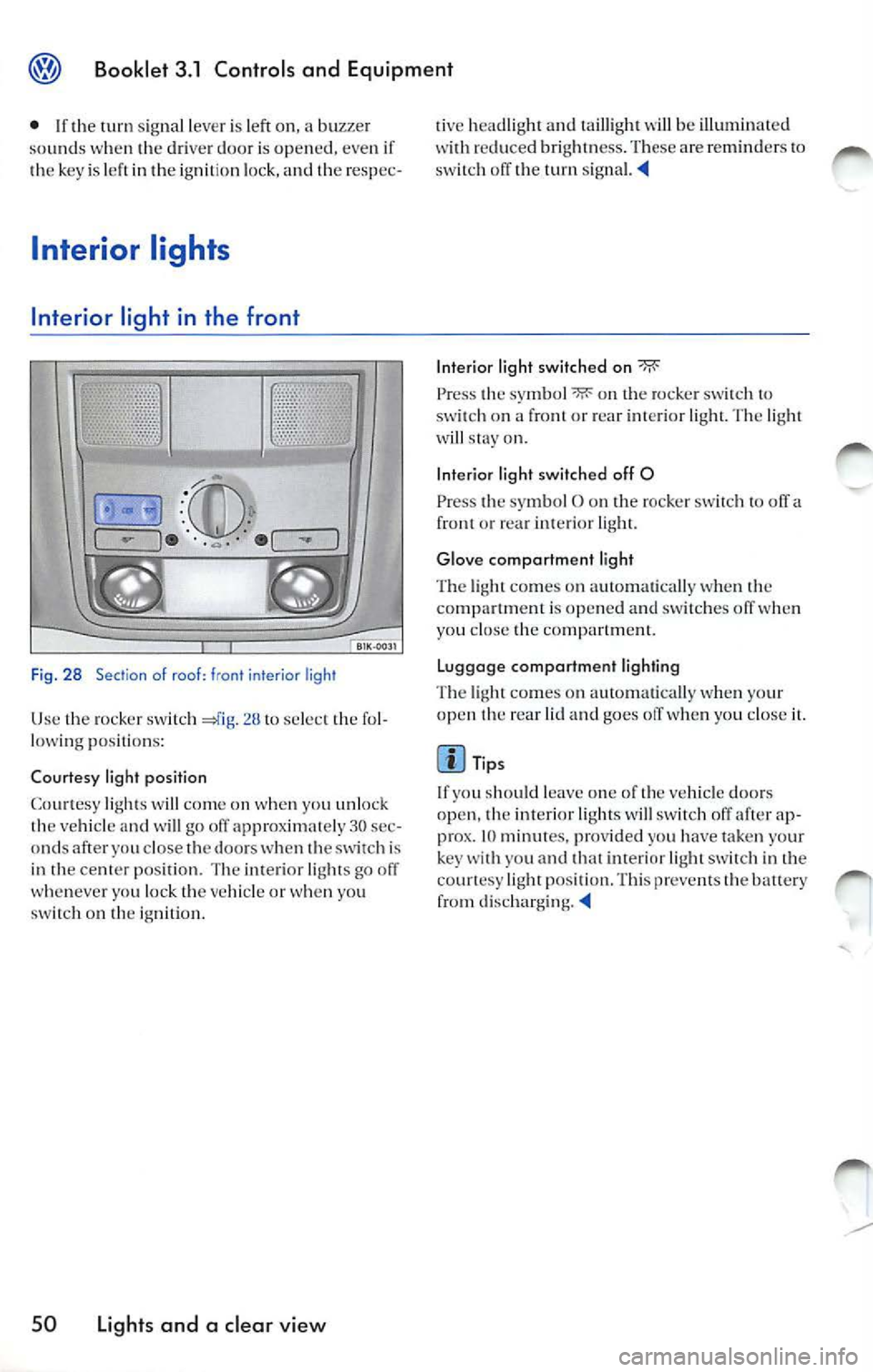
Fig . 28 Section of roof: fr ont inter ior lig ht
U se lhe ro cke r sw itch !h e fo l
l ow ing pos itio ns:
Co urtesy light positi on
C oun esy w ill on w hen yo u u nlock ve hicl e and will go off ap prox ima te ly 30 sec
on ds af ter yo u close 1he doors w hen sw itch i s
in 1h e ce nter posi tion. T he in te ri or go off
w he neve r yo u loc k 1h e ve hicle o r w hen you
on 1h e ig n iti on.
50 Lights and a clear view
li ve head light and 1 aill igh1 w ill be illum in a1e d re du ced bri gh tn ess. These a re re mind ers 10 o ff !h e
Interior light switch ed on
Press 1 he sy mbol "li':' on 1h e roc ker sw itch 1 0 on a fro nl or rea r The w ill on .
Int erio r li ght sw itch ed off 0
Press 1he sy mbol O o n the ro cke r to off a or re ar lig h1.
Glo ve comportm ent li ght
T he co mes o n au 1o m a1ica lly w hen !h e is opened a nd off w hen
yo u cl ose 1he co mpanm en l.
Lu ggage comportmen t lighting
T he co mes on a utoma tica lly w hen yo ur
o pen !h e rea r lid and go es off w hen yo u cl ose
Tips
If yo u sh ould l eave o ne of 1h e ve hicle doors
o pen, 1h e i nteri or l ig h ts w ill swi tc h off ap
prox . 10 mi nut es, prov id ed yo u h ave taken your
key yo u and 1h a1 lig ht in co unesy pos it io n. T hi s preve nts th e balt ery
f ro m
Page 254 of 477
Front reading lights
QfilE
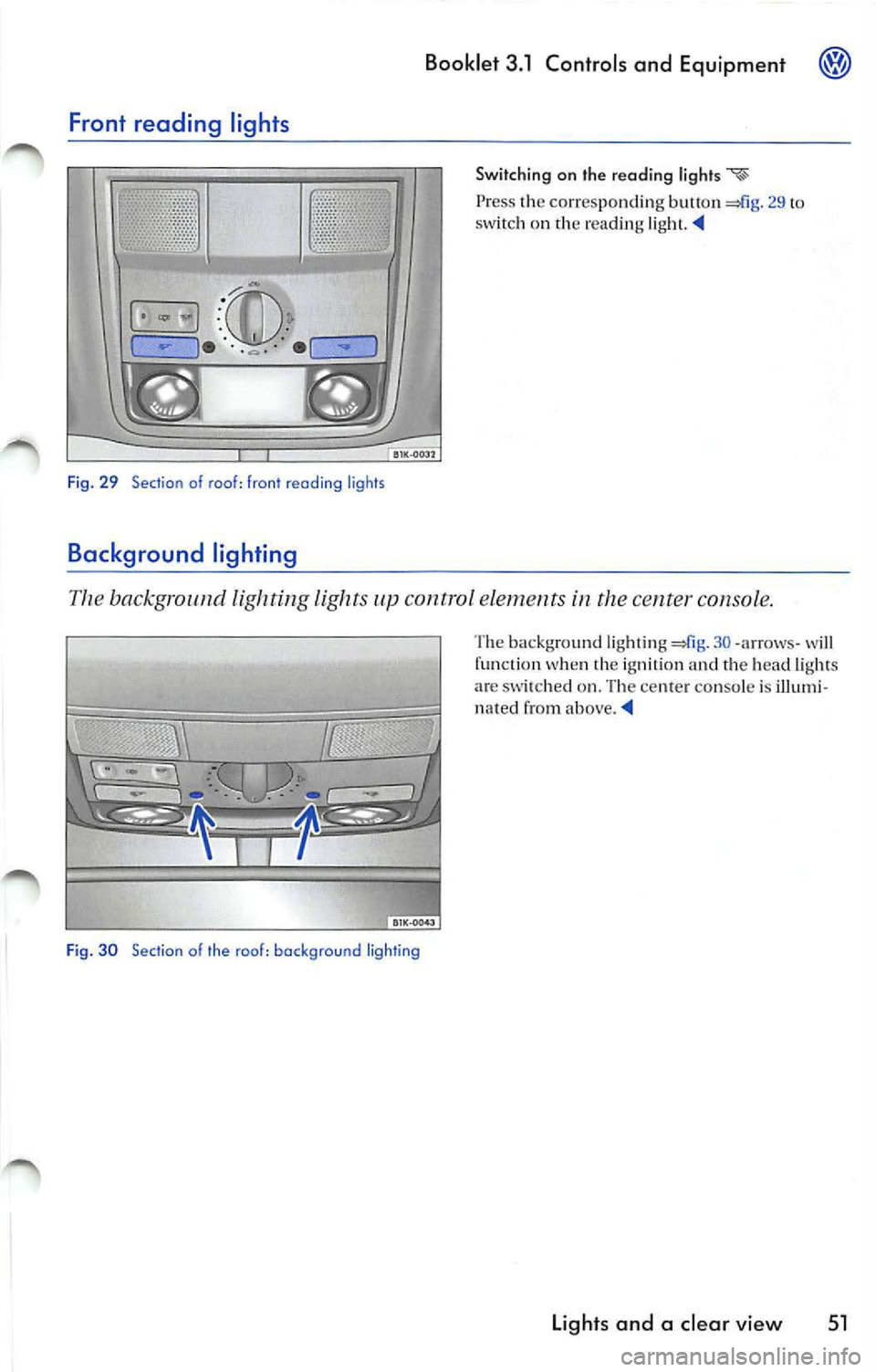
Fig. 29 Section of roof: front reading ligh ts
Background ligh ting
Booklet 3.1 Controls and Equipment
Switching on th e reading
Press th e corres ponding button 29 to sw itch on th e rea din g
The background l ighting lights control elements in the center console.
Fig. 30 Sect io n of the roo f: backg round ligh ting
The background light ing 30-arrow s- wi ll
fu nct ion w hen th e ig ni tion and th e head ligh ts
a re sw itch ed on . Th e ce nter co nso le is illumi
n ated from above.
Lights and a clear view 51
Page 255 of 477
Booklet 3 .1 Control s and Equipment
Rear inter ior light
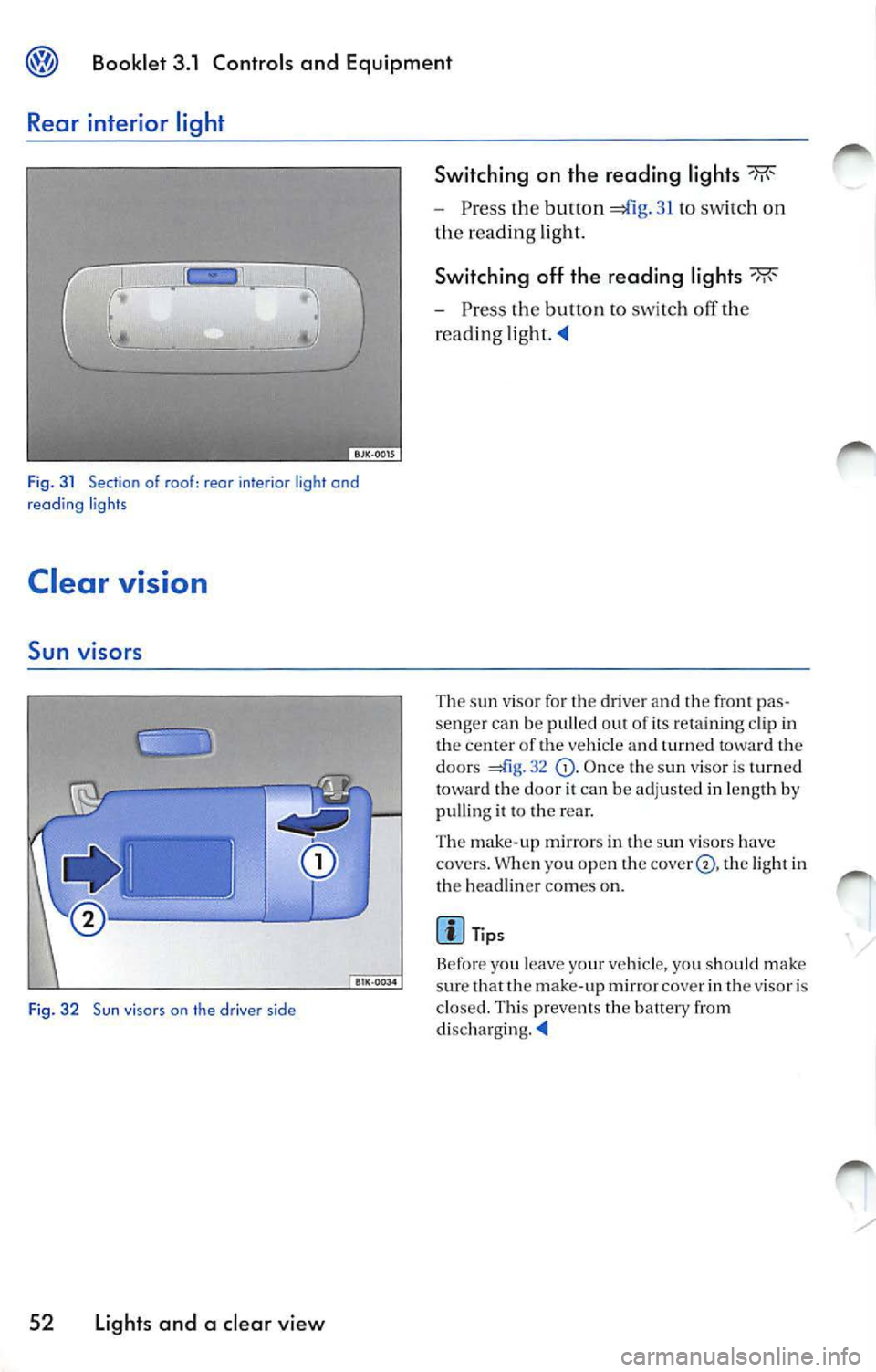
Fig. 3 1 Section of roof: rear interior light and
reading ligh ts
Clear vision
Sun viso rs
Fig. 32 Sun viso rs on the driver side
52 Light s and a cl ear v iew Switching on the reading light
s
Press the button 41g. 31 to sw itch on
th e re adin g light.
Switching off th e reading light s
Press the button to switc h off th e
reading
The sun visor fo r the driver and the fron t pas
senger can be pulled out of its re taini ng cl ip in
the center o f the ve hicle and turn ed towa rd the
doors
32 O nce the sun viso r is turned
to ward th e door it ca n be adj usted in len gth by
pulling it to the rea r.
Th e mak e-up m irr ors in the sun viso rs have
covers. W hen yo u open t he
th e lig ht in
th e headlin er co mes on.
Page 256 of 477
Booklet 3.1 Controls and Equipment @j)
Windshield wipers
Windshield wiper s
s hi eld washin g syste ms.
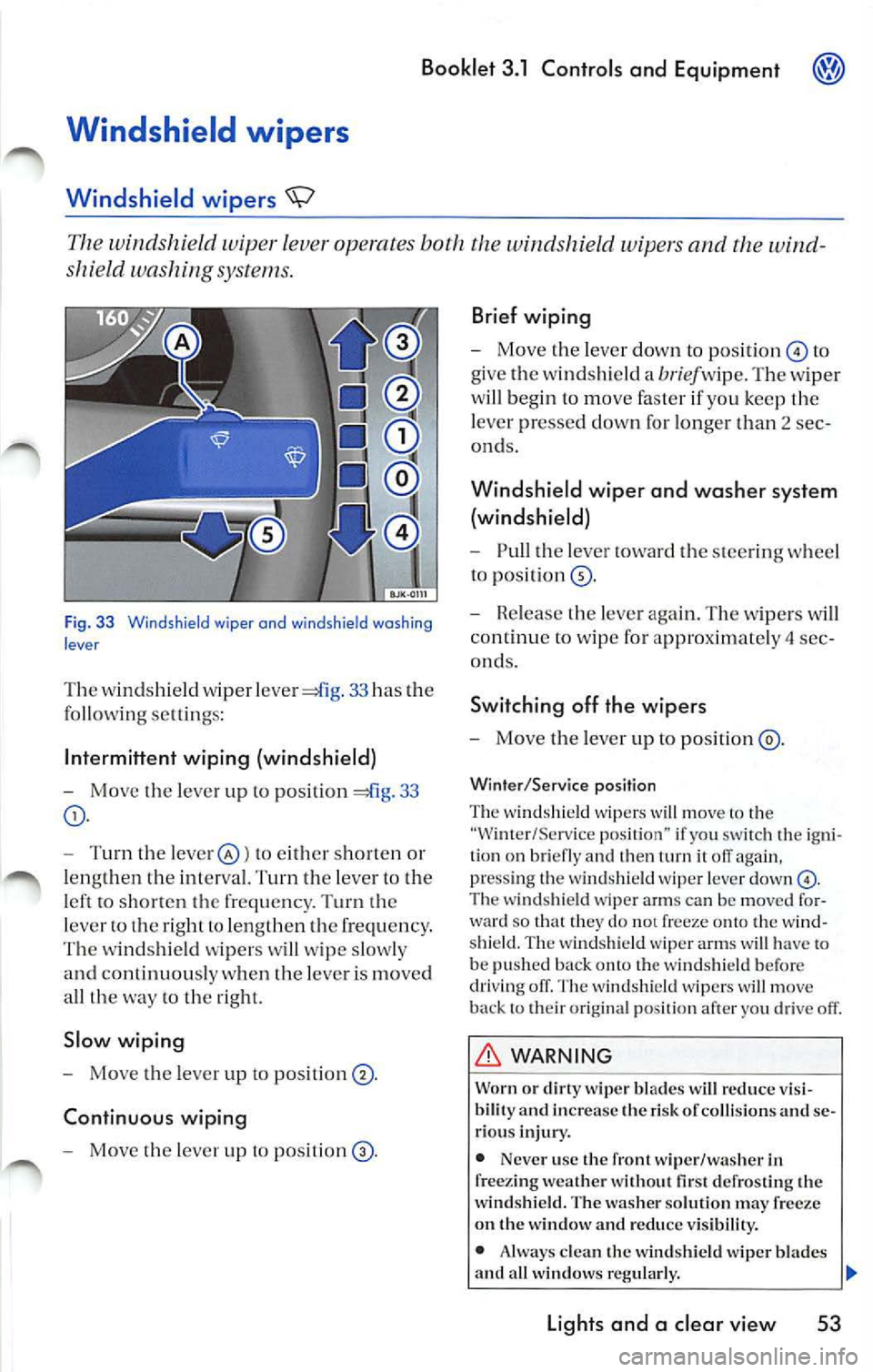
Fig. 33 Windshie ld wiper and wind sh ield washing
lever
T he w in dshield wiper 33 has the
fo llow ing se ltin gs:
Int ermi ttent wiping (windshield)
-Move t he lever up to positi on 33
- Turn th e leve r@ ) to e ither sh or te n or
l e ng th en the int erva l. Turn th e leve r to t he
l e ft t o sh o rt en the freq uen cy . T urn th e
l eve r ro th e right to le n gth en th e frequ en cy .
Th e w inds hield wip er s w ill wip e slo w ly
a nd continuou sly w hen th e leve r is m oved
a ll th e w ay
to th e rig ht.
Slow wiping
- Move the lever up to positi on ® ·
Continuous wiping
- Move the leve r up t o po siti on
Brief wiping
- Move the leve r down to position © to
give t he wind shi eld a
bri ef w ip e. T he w ip er
w ill be gin t o m ove faste r if you ke ep th e
l eve r pr esse d down for lo nge r th an 2 sec
ond s.
Windshield wiper and washer system
(windshield)
- Pull the lever towa rd the steerin g w heel
t o pos ition®·
- Rele ase the leve r ag ain. Th e wipers w ill
co ntinu e to w ipe for approx imate ly 4 sec
ond s.
Switching off the wipers
- Mo ve th e leve r up to po sition ®·
Winter /Service position
Th e wind shi eld wip ers will move to the
"Wi nter/Serv ice pos ition" if yo u sw itch th e ig ni
ti on on br iefly and th en
T he wi ndshi eld wipe r arm s can be moved fo r
w ard so that they do not freeze o nto the w ind
s hi eld. Th e wi nds hie ld wip er arms w ill have to
be pus hed b ack
the w indsh ie ld befo re
dri vin g o ff. T he w in d shi eld w ipe rs w ill m ove
b ack to th eir or ig ina l posit io n af ter yo u drive off.
WARNING
Worn or dirty wip er bl ad es w ill reduc e vis i
bilit y and incre ase the risk or co llis ion s and se
ri ous inju ry.
• Nev er u se the front wip er /wa sher in
fr ee zin g w eather without
defro stin g the
w indshield . The wa sh er solut io n ma y
on t he w indow and reduc e vis ibilit y.
• Alw ays clea n the win dshi eld wip er bl ades
and a ll w in dow s regularly.
Light s and a clear view 53
Page 257 of 477
Bookle t 3 .1 Controls and Equipment
WARN ING (continued)
• Always rep lace w iper b lades that a re worn,
damaged o r do not keep the wind shi eld clear.
th e wind shi eld. T o pr eve nt damag e the wipe r blad es and the wipe r always
l oose n blad es frozen to the windshi eld befor e
operati ng th e w iper s.
Tips
• The w ind shi eld wipers will only funct io n
when the igniti on is sw itch ed on and the en gin e
hood i s clo sed.
App lies lo vehicles: ro in sensor
Rain sensor
• The previou s wiping spe ed will be ca lly se lec ted when the veh icle stops. reg arding
w ipin g spee d 53, fig. 33 or is lected. The s elected speed will be resumed when
th e ve hicle dri ves off aga in.
• The windshi eld will b e wip ed again after
a bout five seconds once the wind shi eld w iper
and washer syste m ha s been operat ed if th e
hicle is in mo tion.
• If th e "inter mittent w iping" function has
b een selec ted, the intervals ar e lin ked to the
s p ee d of th e ve hicle i.e. the int erva ls will be
s horter when th e vehicle is trave lling fas te r.
• The w iper will
wipe away any obstacle s
that are on th e wi nd shi eld. Th e wiper w ill stop
moving if the ob stacl e blocks it s path.
th e ob stacle and switch the wipe r back on
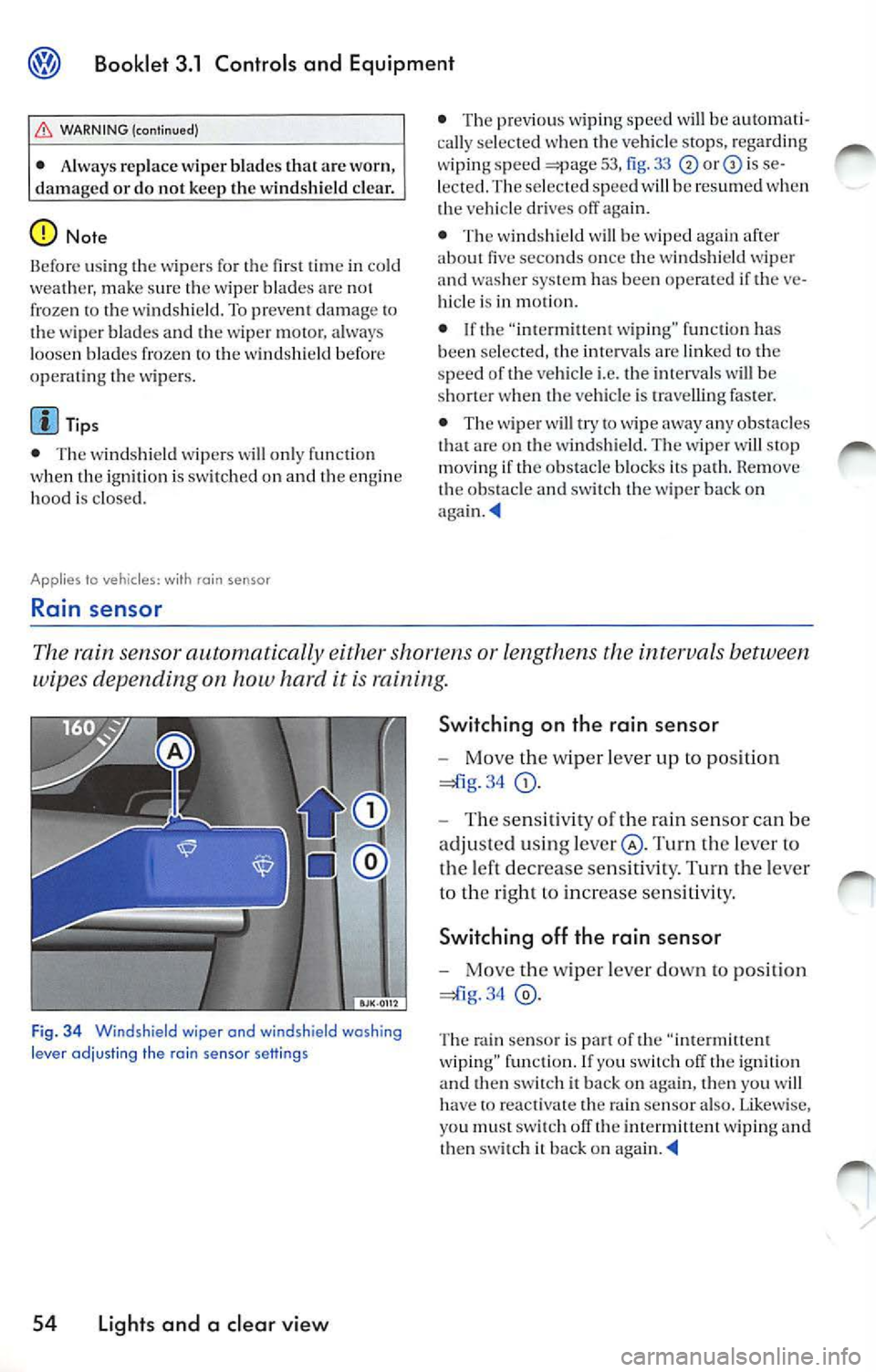
The rain sensor automatically either or lengthens the intervals between
wipes depending on how hard it is raining.
Fig . 3 4 Windshield wiper and windshield washing
l e ve r ad jus ting the rai n se nsor sett in g s
54 Light s and a clear view S
wi tching on th e rain sensor
- Move the wiper lever up to position
34
Turn the leve r to
the left decrease sensit ivity. Turn the lever
to th e right to in crease sensitivit y.
Sw itch ing off th e rain sensor
- Move the wip er lever down to position
34
Th e rain senso r is part of th e "intermitt ent
w iping" function . If yo u sw itc h off the igni tion
an d th en sw itch it ba ck on aga in, then you w ill
h ave
re activate th e rain senso r also . Lik ewis e,
yo u must swit ch off th e int ermittent wiping and
th en sw itch it back on
Page 258 of 477
Booklet 3.1 Controls and Equipment
Appl ies to vehicles: wi th headlight washer sys tem
Headlight washer system
The headlight washer system cleans the headlights.
The head lig h t was he rs are activated automati
cally when th e sw itch for the headlig hts is in an y
o th er posit io n th an O and th e windshie ld wip er
l eve r
53, fig. is pull ed toward the
s tee ring whee l for a t le as t 1. 5 sec onds. H oweve r,
yo u sh ou ld reg ularl y remove any hard or drie d
o n dirt or in sec ts from
hea dli ght s, for ex
ample when ever yo u are refu eling your vehicl e.
Mirrors
Tips
Mak e sure th at t he hea dlight washers wo rk
p ro perl y in wint er, keep the nozz le in th e
bump er fre e of sn ow and re m ove any ice with a
d e- ice r spra y
Self-dimming inside day-night mirror
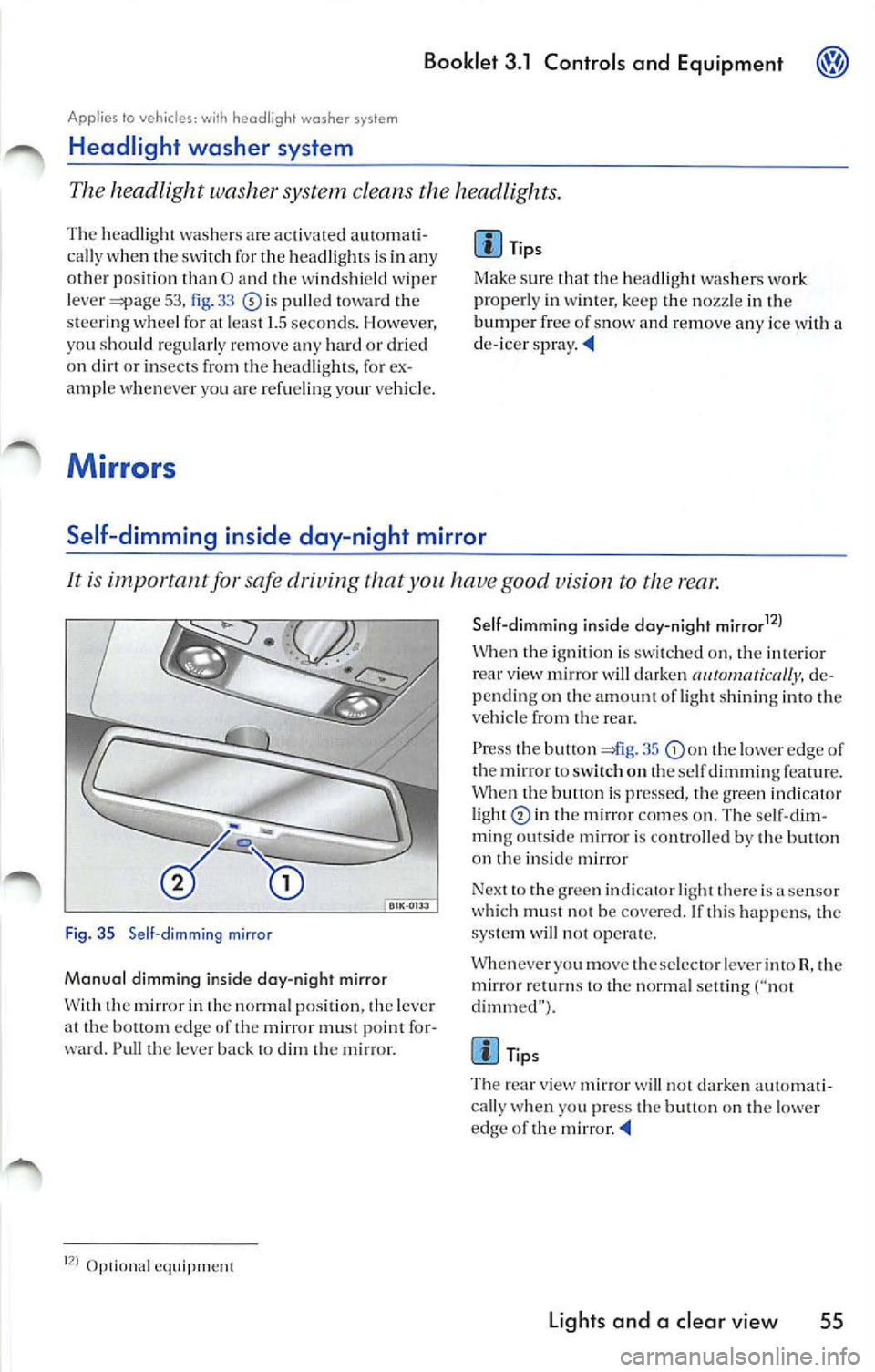
It is important for safe driving that you have good vision to the rear .
Fig. 35 Se ll-dimming mirror
Manual dimming inside day-night mirror
W ith th e mir ror in th e normal p ositi on, the leve r
a t th e bottom edge of th e mirror must point fo r
ward. Pull th e leve r ba ck t o dim
m ir ro r.
Op1ional eq uipment Sell-dimmi
ng inside day-night mirrar
12
)
W hen igni tion is swi tched o n, the int eri or view mirror w ill darken de
pending on amount of light shinin g into veh icle from rear.
P ress the butt on 41g . 35
th e lower edge of
th e mirror to sw itch o n th e se lf dimming featur e.
Whe n the butt on is pr esse d, th e gree n indicat or
li ght
in the m ir ro r co mes on . The se lf-dim
m in g ou ts id e mirror i s conrro lled by th e butl on
on
in side m irror
Nex t to th e g ree n indi cator light there is
sensor
w hi ch mu st not be cove red. If thi s happe ns, the
sys te m will not oper ate.
Whenever you move th e se lec to r le ver into R, th e
mirror
to the normal settin g ("not
dimm ed" ).
Tips
T he rea r view mirror
will not da rken aut oma ti
cally w hen you press the bu tton on t he lowe r
edge of the mirror
Lights and a clear vie w 55
Page 261 of 477
Booklet 3.1 Controls and Equipm ent
Head restraints
Correct adjustment of head restraints
Properly adjusted h ead restraints are an importa 11t part of occupant protection
and can help to reduce the risk of
in accidents.
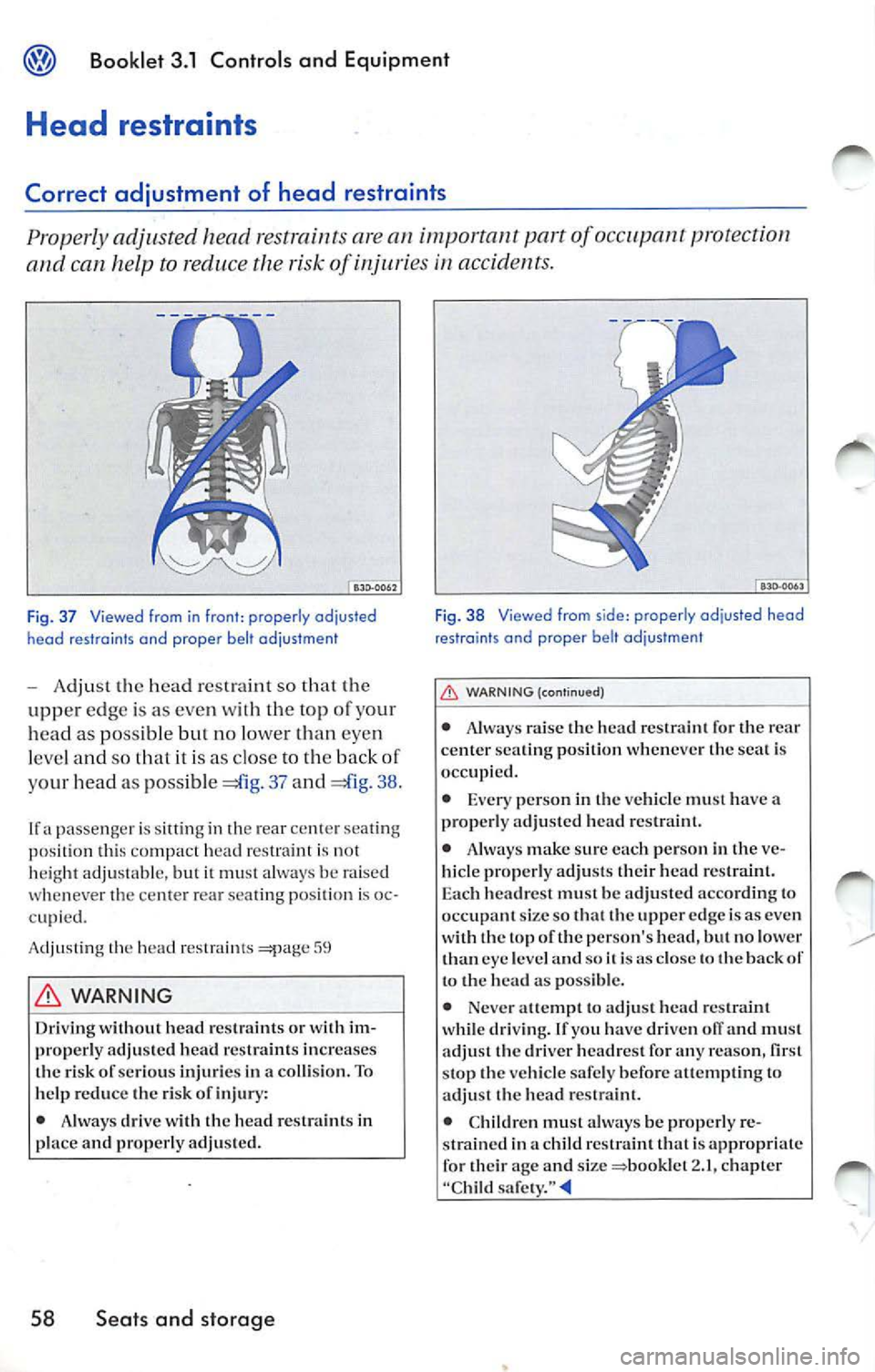
Fig. 3 7 Viewed from in front : properly odjusted
heod restraints end proper belt odjustment
- Adjust the head restraint so that the
uppe r edg e is as eve n wit h th e top o f your
head as possible
no lo wer than eyen
l eve l and so th at it is as close to th e bac k of
y our head a s possi ble
37 and 38.
If a passenger is s itting in th e rear center sea tin g
position thi s co mpact h ead r estraint is no t
h eight adju stabl e, but it must always be raised
whenever the ce nte r rear sea ting posi tion is oc
c upi ed.
A dju sting the head
WARNING
Driving without head rest raints o r wit h im
prop erly adjusted head restraints inc reases
th e risk of serious injurie s in a co llision. To
h elp reduc e th e risk of injury:
• Always drive with th e head restraints in
place a nd properly adjuste d.
58 Seats and storage
F ig . 38 Viewed from s ide: properly adjusted head
restraints and proper belt ad justment
WARNING (contin ued)
• Always raise the head restrai nt for the r ear
center seating position wheneve r the seat is
occupied.
• Ever y perso n in th e ve hicle must have a
properl y adjuste d head r estra int.
• Alway s make sur e eac h person in the ve
hicle properly adju sts their head restraint.
E ac h headres t must be adjusted a ccord ing to
occupant size s o that the upper ed ge is as eve n
wit h the to p of the person's head, but no lower
tha n eye leve l an d soi
is as clo se th e back to the head as pos sibl e.
• Neve r attempt to adj ust head r estraint
wh ile dri vin g. If yo u have driven
and mu st
adjust the driver h eadrest for any reason,
stop the ve hicle safe ly befo re atte mptin g to
ad just the head r estra int.
• Children must always be properly re
s trained in a ch ild restrain t that i s appropr iate
for their age and size
2. 1, ch apter
"Chil d safety. "
Page 262 of 477
Booklet 3.1 Contro ls and Equipment
can adjust the head restraints by mouing them and down.
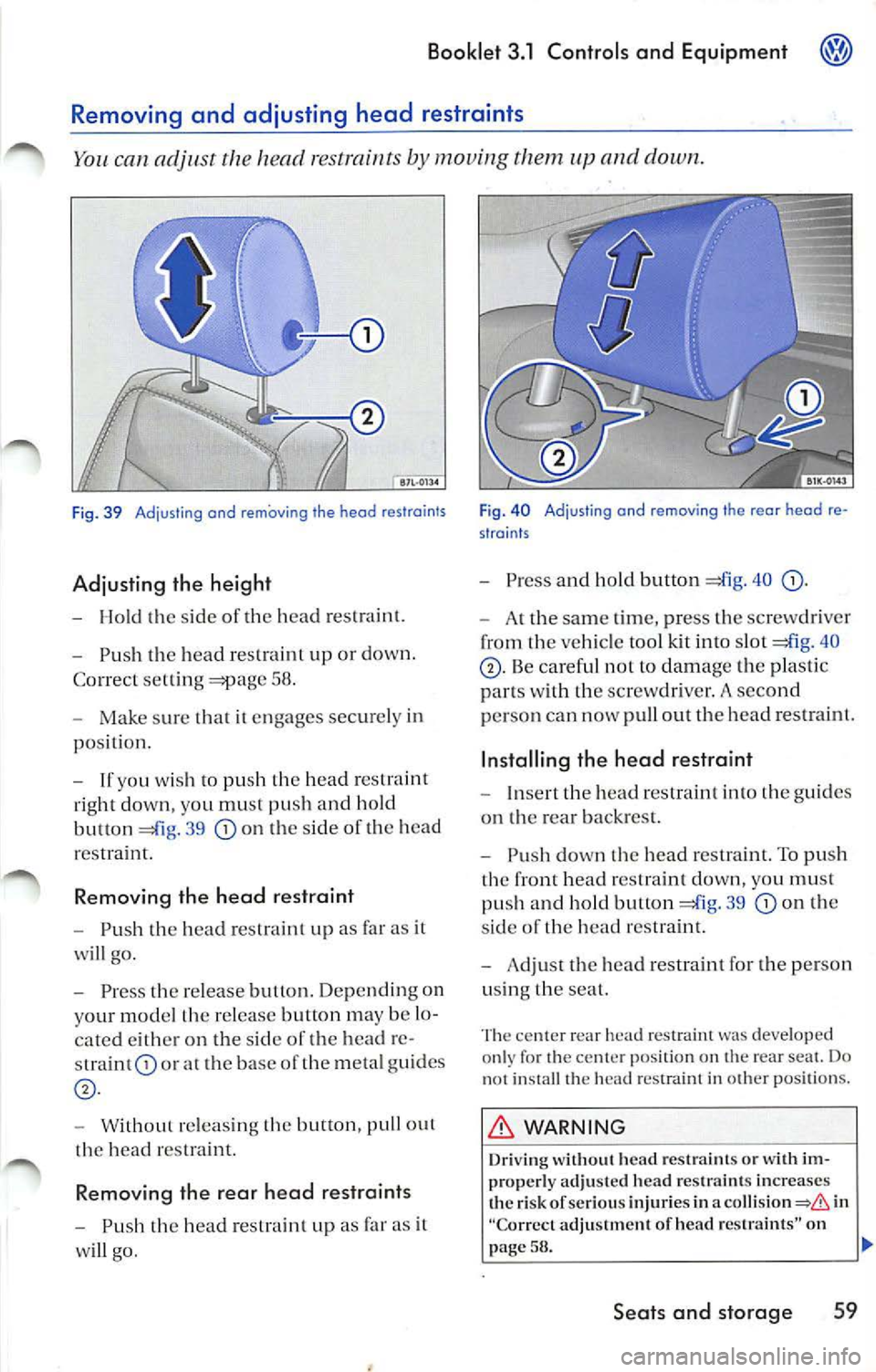
Fig. 39 Adjusting and removing the head restraints
Adjusting the height
- Hold the sid e o f the head restraint.
- Push the head res traint up or down.
C orr ect setting
58 .
- Make sur e that it en gages securely in
position.
- If yo u wish to push the head restraint
r ight down, you must push and hold
button =£lg.
39 on the side of the head
r e straint.
R em oving the head restraint
-Push the head restraint up as far as it
will go.
- Press the re lea se button . Depending o n
yo ur mod el th e re lease button may be lo
cated either on the sid e of the head re
straint
or the base of the meta l gu ides
- With out releasing the button, pull ou t
the head restra int.
Removing the rear head restraints
-Push the head re straint up as far as it
will go .
Fig. 40 Adjusting and removing the rear head re
straints
- Press and hold bu tton =£lg. 40
- A t the sam e time, press the screwdrive r
from the ve hicl e tool kit i nto slot =£l g. 40
pu ll out the head res traint.
Installing th e head re straint
- In se rt the head rest raint into the gu ides
on the rear backr est.
- Push down the hea d restraint. To push
the fro nt head re straint down, you must
pus h and hold butto n
39 on th e
s ide of the head rest raint.
- Ad just the hea d re straint for the person
u sing th e seat.
cen te r r ear h ead restraint was developed
on ly for the center position on the rear seat. Do
n ot install th e hea d res traint in oth er pos ition s.
WARNING
Driving w ithout h ead restraint s or w ith im
properly adjusted head restra int s in crease s
th e risk of serio us injuri es in
a in
"C orr ect adju stm ent of head res trai nts" on
58.
Seats and storage 59
Page 264 of 477
Booklet 3.1 Control s and Equipment
to vehicles: w, th foldoble front seat backrest
Folding the front passenger seat backrest forward
Folding the front passenger seat backrest the way forward
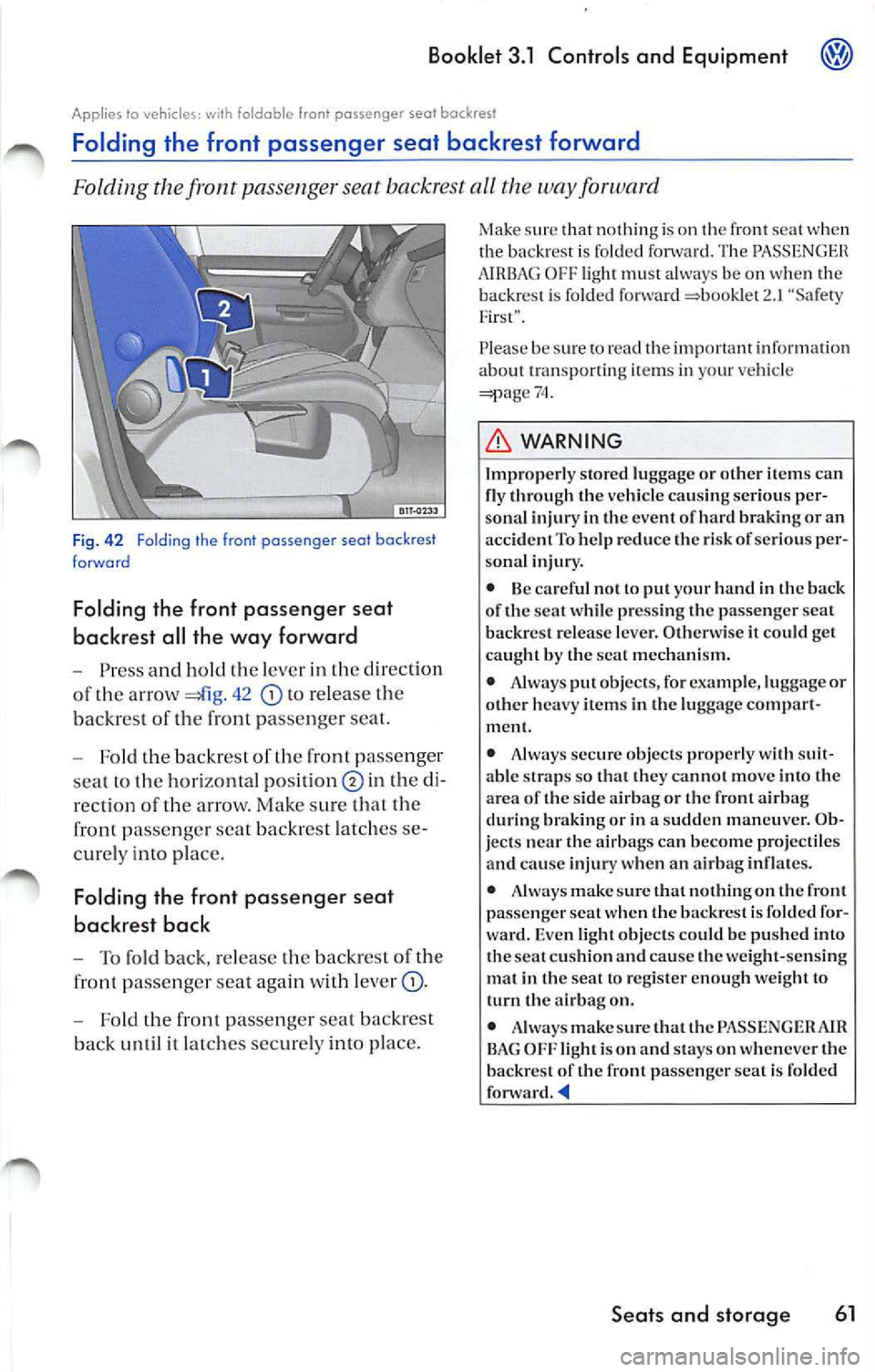
Fig . 4 2 Folding th e front passenger seal backrest
forward
Folding the front pa ssenger seat
backrest all the way for ward
Press and hold th e leve r in the direc tion
of the arrow
42 to re lea se the
backre st of the
pas seng er sea t.
Fold the backre st of th e fro nt pas senger
sea t to the hori zontal
in th e
rection of the arrow. Make sure that the
front pa ssenger seal backrest latches
curely into pla ce.
Folding the fr ont pas senger seat
backrest back
To fold back, release the backr est of the
front passeng er seat again with lever
Fold the front passeng er seat backrest
back until it latch es secure ly into pl ace.
Make sur e that nothin g is on th e front seat when
the back rest is fo lded The AIRBAG OFF light must always be on when the
backrest is folded forward 2.1 "'Safety
F irst".
P lease be s ure
74.
L'.D, WARNING
Im pr operl y store d lu ggage o r o th er it em s ca n
fl y thr ou gh th e vehicle ca using ser io us pe r
so nal i nj ury in th e even t of hard bra kin g or a n
ac cide nt To help red uce the risk of serious per
sona l inju ry.
• Be ca ref ul n ot lo p ut your hand in th e bac k
of the sea t wh ile press ing t he passe nge r scat
backrest re lease le ve r. O thenvise it co uld get
ca ugh t b y th e seal mech ani sm.
• Always put ob jects, for example, luggage or
o th er h eavy items in the luggage compar t
m ent.
• Always sec ure o bjec ts pro per ly wi th suit
a b le straps so th at they ca nno t m ove into the
area of t he s ide air bag or t he fron t a irbag
d u ring bra kin g or in a sud de n m an eu ver. O b
j ec ts nea r the air b ags ca n beco me pro ject iles
and cause injury when an a irbag inflates.
• Always make sure that no thin g on t he fro nt
passe nge r seal w hen th e backres t is fo lded for
war d. Eve n light ob jects co uld be push ed i nto
th e sea l c u shi on an d ca use the we ight- sens ing
mat in the seat to reg is te r en ough we ig ht to
t u rn th e airbag on.
• Always make su re that t he PAS SENG ER AJ R
BAG OFF ligh t is on and stays on whenever t he
b ac krest of the front passe nger sea t is fold ed
fo nva rd .
Page 266 of 477
Booklet 3 .1 Controls a nd Equipment
Applies to vehicles: with electrico lly ad jus table seats
Adjust ing front seat
The switc hes Look Like a seat viewed from side. The seat cus hion and backrest
follow the motions of the res pect ive switches.
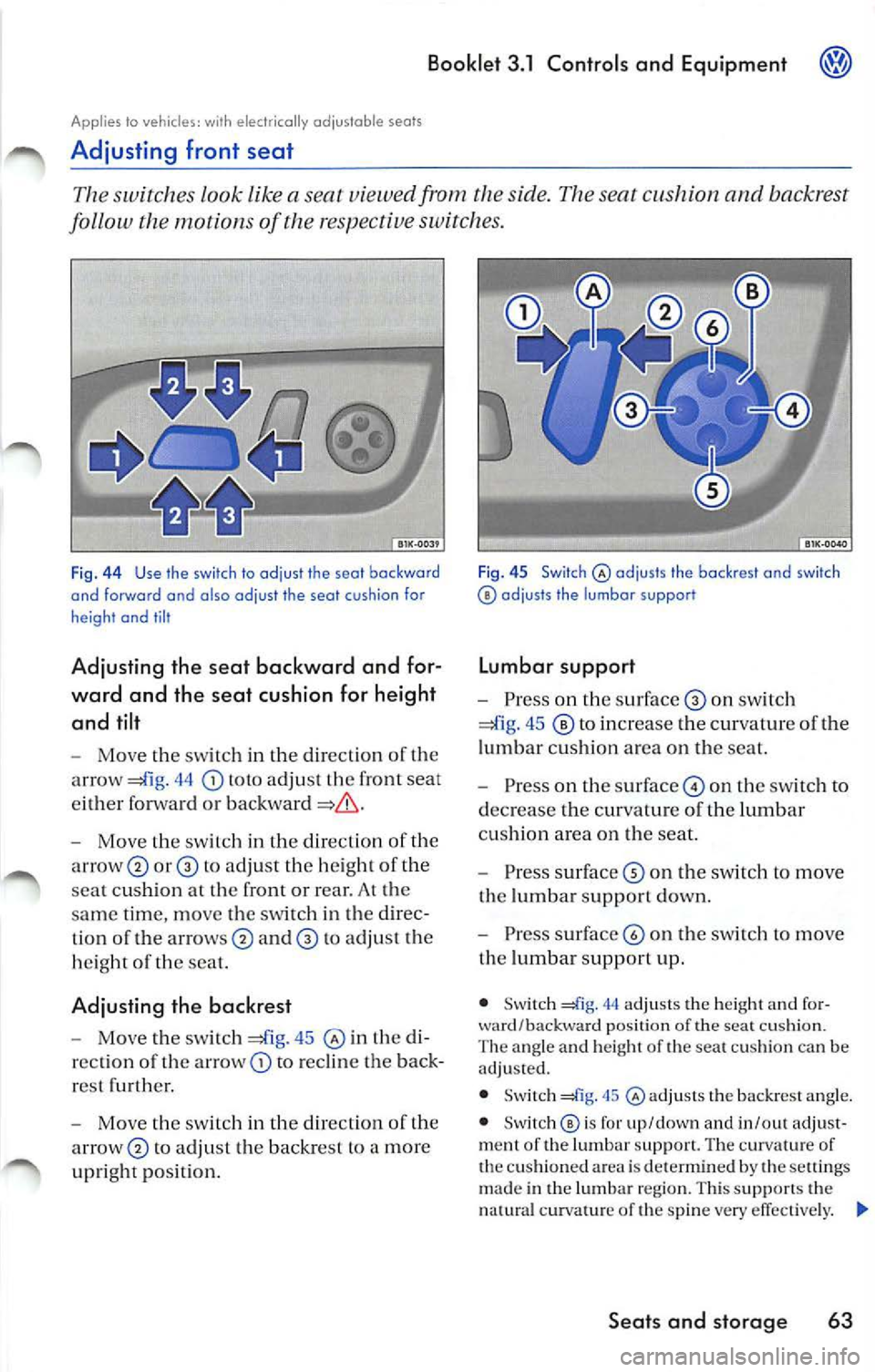
Fig. 44 Use the sw itch to adjus t the sea t ba ckw ar d
and forw ard and also ad jus t the sea t cush io n fo r
height and tilt
Adjusting the seat back ward and for
ward and th e se at cushion for height
and tilt
- Move th e switc h in th e direction of the
arrow
44 toto adj ust th e front seat
e ither forwa rd or
- Move th e sw itch in th e dir ect io n of the
arrow
or to adjus t th e heig ht of th e
sca t cu shi on at the front or rear. At the
sa me time, move the switch in the direc
t io n of the
and to adjust th e
h eig ht of th e sea t.
Adjusting the backrest
-Move the switch 45 in the di
r ec tion of th e arrow
to rec lin e the back
r es t furth er.
- Move the sw itch in t he dir ec tion o f the
to ad ju st t he backre st to a mor e
up right posit ion.
F ig. 45 Switch@ adjus ts th e backres t a nd s witch adjus ts the lu mbar support
Lumbar support
-Pre ss on th e s urfa ce on sw itch
to in crease the curvature of the
lumbar cu sh io n area on the seat.
- Press on th e surfac e© on th e switch to
d ec rease th e curvat ure of the lumb ar
c u sh io n area on the seat.
- Press surface
on th e switc h to move
the lum bar su pport dow n.
- Press surfac e© on the switch to move
t h e lumbar su pport up.
• Switch 44 adj usts th e heigh t and for
ward/backwa rd pos ition of the sea t cu sh io n.
The ang le a nd h eig h t of th e seat c ushi on ca n be
a dju s1e d.
• Switch
45 @ adjusts the backre st ang le .
• Swit c h @ is for up/down and in/out adjus t
m ent of the lum bar su ppo rt. The cur va tur e of
the cu sh ioned area is dete rmin ed by the se ttings
made in the lu mbar r egio n. T his support s the
natural curv atu re of th e sp ine ve ry effec tively.
Seats and storage 63