safe VOLKSWAGEN JETTA 2009 Owners Manual
[x] Cancel search | Manufacturer: VOLKSWAGEN, Model Year: 2009, Model line: JETTA, Model: VOLKSWAGEN JETTA 2009Pages: 477, PDF Size: 77.6 MB
Page 236 of 477
Booklet 3.1 Controls and Equipment
WAR NING (c on tinued)
hicl e th at a re mu ch hi gh er th an th e outsid e
t e mp eratur es, parti cul arl y in summ er. T e m
pe rature s can quickl y reac h leve ls th at ca n
ca use un consci ou sn ess a nd dea th, p articu
l a rl y to
children.
• Neve r remove
key from steer ing loc k
w hil e th e ve hicl e is m ovi ng or w hile it i s ro llin g
t o a s to p. Th e stee rin g w hee l co lumn
will lock
u p a nd yo u will not b e a ble to stee r or contro l
th e ve hicle.
Not e
• Never leave any veh icle keys in sid e th e ve
hi cle. En try by unau tho rized perso ns cou ld
har m th e vehicle or yo ur vehicle could b e stole n.
A lways take th e keys with you wheneve r you
l e a ve yo ur vehicle.
• Unsuitable ba tter ies ca n dama ge the remote
contro l key. Rep lace use d batteries
new
o ne s of the sa me vol tage and same s ize.
Resetting the remote control key
32, fig. 15 (blue
area).
• When yo u unlock your vehicl e with the re
mote control, you have 30 seco nds to open
door or the rear lid. If you do not, t he ve hicle w ill
a u tomatically r elock itse lf. T his safery re lock fea
ture prevent s you from leav ing your veh icl e un
lock ed.
• lfthe remote control doe s not work, it may
have to be synchro niz ed again
33.
• I f you try to u se the remote control severa l
t im es outs id e its effect ive range, the remote con
tro l m ay not work and will h ave to be re se t
33.
• Use t he remo te co ntrol o nly if you in te nd to
u se one o f th e fun ctions . Since terra in and con
dition s may vary, pressing the rem ote ma y un
lock th e ve hicle or set off the panic function even
think your are out of range.
• You can
up to 4 remote controls for
your vehicl e.
The remote key has to be reset if it does not lock or unlock the vehicle .
Switch on the ignition a nd leave the key
i n t he ignition lock.
U nlock the dr iver's door ma nua lly by
in se rting t he mas ter key with remo te co n
tro l in t he dr iver's door lock .
Press t he un loc k k ey 32, fig. 14
in t he remo te co ntrol o nce.
Remove the key from th e ign ition lock .
Close the doo r and check if th e remote
co ntro l is res et.
Tip s
The remote control key will h ave to be reset if
yo u press t he bu tton tim es outs ide effect ive a nd t he vehicle can no longer be
loc ked or unlock ed u sing t he re mote.
Opening and closing Keys 33
Page 238 of 477
Booklet 3.1 Cont rols and Equipment
WARNING (cont inued)
• Never leave children, disabled persons or
anyone who cannot help themselves in the ve
hicle. The doors can be lock ed with the ce ntral
locking button. This could leave peo ple
trapped in the vehicle in an emergency. People
trapped in the vehicle can be exposed lo very
high or low temperat ures.
• Heat build-up in the passenger compart
ment and luggage compartment of a parked
ve hicle can result in temperatures in the ve
hicle that are much higher than the outside
t emperatures, particularly in summer. Tem
perature s can quickly reach leve ls that can
cause unconsciousness and death, particu
l arly lo small children.
Child safety locks
WARN ING (con tinued)
• Never allow passenge rs lo remain in a
lock ed vehicle. Locked doors can delay assis
tance to vehicle occupants and rescue from
the outs ide in the event of an emergency. In an
emergency any person still in sid e th e vehicle
might not be able to get out.
Tips
Wh en you lock your ve hicle with the central
l ocking button:
• The doors and the rear lid cannot be ope ned
from the out sid e ( fo r your safety, for examp le,
when stopped at a traffic light).
• If yo u tr y to lock the vehicle using the central
l ock ing button while the driv er's doo r is still
open, the driv er's door will not lock. This feature
pr eve nts you from locking yourself out of the
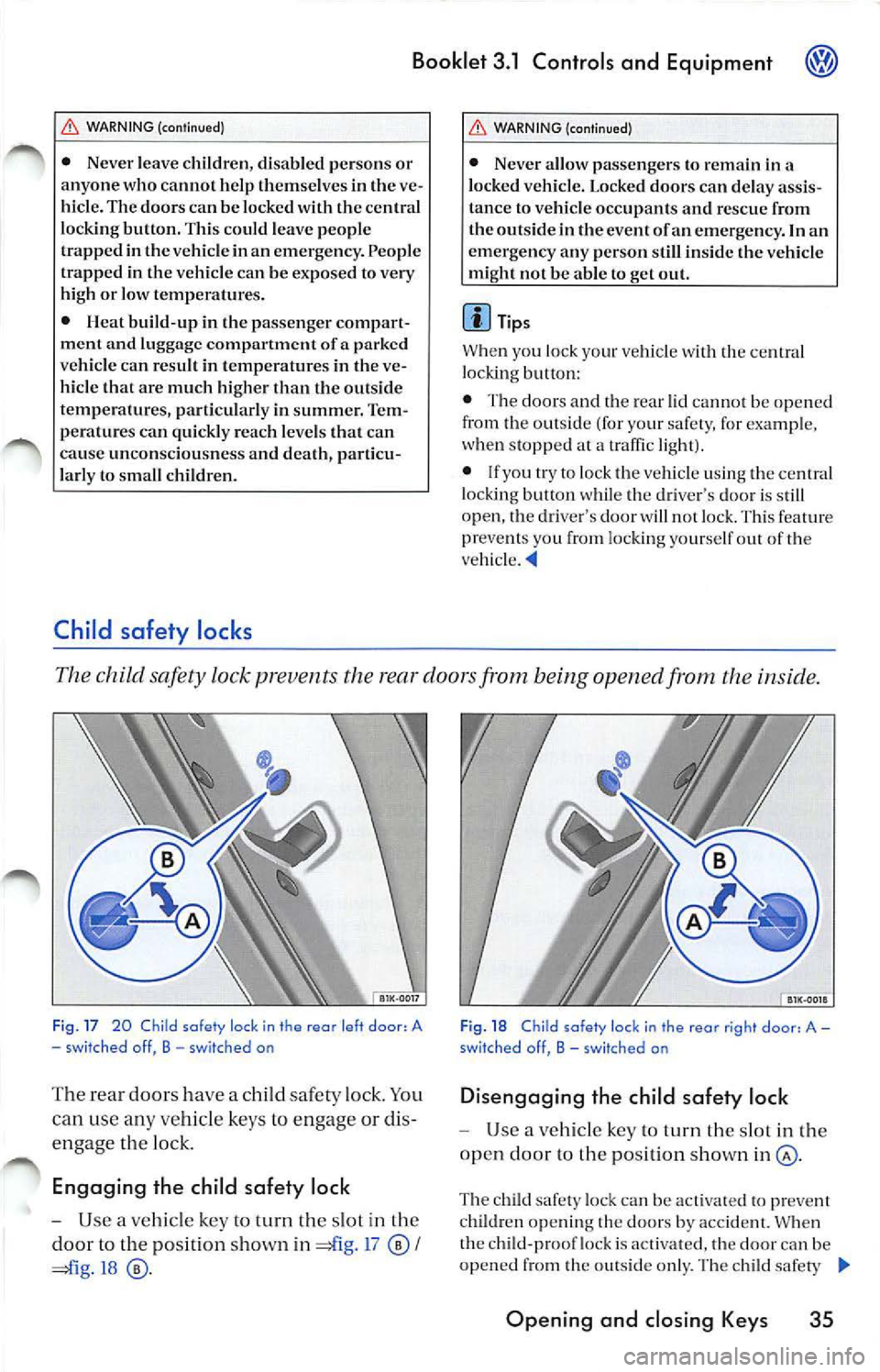
The child safety lock prevents the rear doors from being opened from the inside .
Fig . 17 20 Child safety lock in the rear left door, A
- sw it ched off, B - switched on
The rear doors have a child safety lock . You
can use any vehicle keys to engage or dis
engage the lo ck.
Engaging the child safe ty lock
- Use a vehicle key to turn the slot in the
door to the position sh own in =£l g. 1 7
I
=ii g.18
Fi g. 18 C hild safe ty loc k in the rear r ig ht doo r, A -
swit ched off, B -sw itched on
Di sengaging the child safety lock
Use a vehicle key to turn th e slot in the
open door to the position shown
The child safety loc k can be activat ed to pr eve nt
chi ldren ope ning th e doors by accident. When
the child-pro of lock is act ivated, the doo r can be
opened from the o utside only. The ch ild safe ty
Opening and closing Keys 35
Page 242 of 477
Booklet 3.1 Controls and Equipment
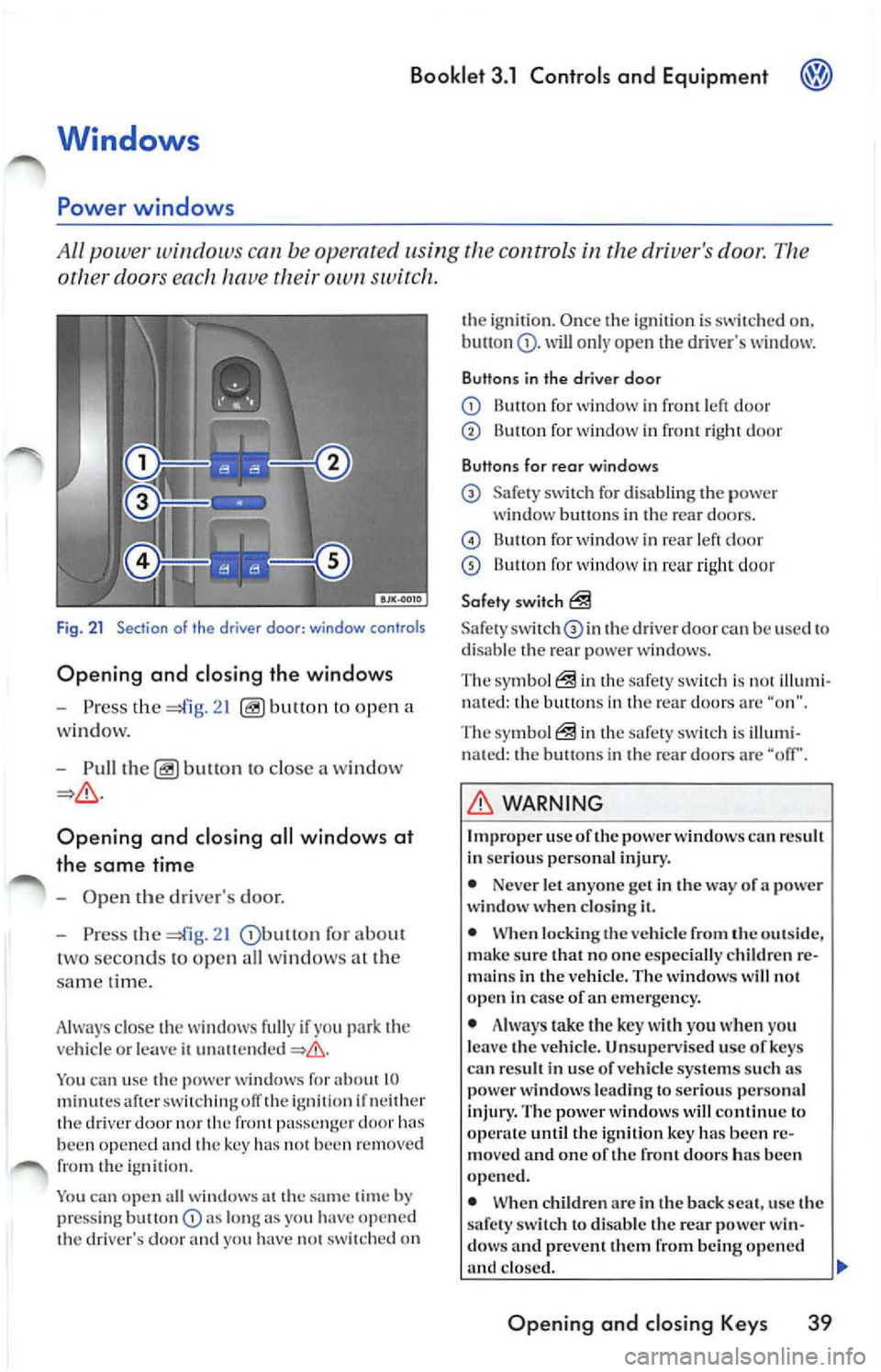
other doors ea ch hav e own switch .
Fig . 21 Section of th e driver door: window controls
Opening and closing the windows
-Press the ope n a
w indow.
- Pull
to close a win dow
Opening and closing all wind ows at
the same time
-Ope n the driver's door.
- Press the
21 for abou t
t wo se conds to op en all wi ndows at the
s am e tim e.
A lwa ys close the w indows fully if yo u
vehicl e or le a ve ii
You ca n u se the power window s for about 10 minut es aft er ofT the ig niti on if n eith er
th e dri ver nor front pa ssenge r doo r been opened and the key has 1101 been re m ove d
from the igniti on.
You can open a ll wi ndow s at the
time by
pr ess ing but ton lo ng as you have o pe n ed
th e dri ver's door yo u ha ve 1101 switched on th
e ignirio n. Once th e ig niti on i s sw itch ed on,
will o nly open dri ver's w indow.
Buttons in the driver door
Button for window in front le ft d oo r
Button for wind ow in front right doo r
Buttons for rear windows
Safe ty sw itch for d isa bling the power
window b uttons in th e re ar door s.
B utt on for wind ow in rear le ft d oor
13u11on for window in rea r ri ght doo r
Safety switch
Safety th e driver doo r can be use d to
di sa ble th e rear p ower w in dows.
The symb ol
in the safe ty sw itch i s illum i
n ate d : the button s in th e rear doo rs a re "o n".
The symbol
in the safety s witch is illumi
n ated: the button s in th e rea r d oo rs are "off'.
WARNING
Imp roper use oft he power windows can result
In se ri ous perso nal inju ry.
• Neve r let anyo ne get in the way of a power
windo w wh en clos ing it.
• When locking the veh icle from the out sid e,
make sure that no on e especia lly c hildren re
m ain s in the vehicl e. T he w indo ws w ill not
open in case of an eme rge ncy .
• Always take the key with you when yo u
l e av e the vehicle . Un supervised u se of ke ys
ca n re sult in u se of ve hicle systems su ch as
pow er windows leading to serious perso nal
injury. The power wind ows will continu e lo
until the i gnition key has been re
mo ved and one of the fron t door s ha s be en
opened.
• When children arc in the back seat, use the
s afet y sw itch
di sa ble the rear power win
dow s and preve nt th em from being opened
clo sed. II>
Opening and closing Key s 39
Page 244 of 477
Booklet 3.1 Controls and Equipment
Pinch protection
The wind ows have a pinch protection feature. This helps re du ce the risk of inju
ries when the windows are closing.
• lfa w indow is obst ructe d w hen closing, the
w ind ow will sto p and open (go down) aga in
If this happe ns, see why the window could
n ot clo se befo re att emp ting to close aga in. If
yo u tr y to close the wind ow again wit hi n 10 sec
o nd s, th e w ind ow's closing force is a utomati
ca lly incr ease d.
• If th e wi ndow is st ill obst ructed, the wi ndow
w ill stop at this po int.
• If th ere is no obvio us reason why the w indow
ca nn ot be closed, try to close it agai n wit hin 5
seconds. T he pin ch protection is now off. The
window clo ses with maximum force.
If you wa it lo n ge r th an the lO or 5 seco nds de
sc ribed above, the w in dow will open f ully whe n
you ope rate o ne of the buttons. One-touch
closi ng is on aga in.
Th e one- tou ch functio n and pinch prot ection do
not wurk if ther e is a m alf un ction in th e power
windows. Contact yo ur authoriz ed Vo lkswage n
deal er co have the m alfunc tion corrected.
Convenience opening and closing
You can ope n or clo se the windo ws from
outside the vehicl e.
Convenience closing
-Hold th e key in th e close pos ition in th e
l oc k of the driver's door, until all windo ws
a re clo sed.
- Turn th e key the other way to interrupt
th e fun ction.
Convenience opening
-Hold th e key in the ope n position in the
l oc k of the driver' s door, until the windows
are ope n.
WARNING
Improper use of the pow er windows can result
in serious personal injury .
• Never let anyone ge t in th e way of a power
window when closing it.
• Always make sure that no one i s in th e w ay
while overriding the pinch protection to close
a w indo w!
• When locking the vehicle from the out side ,
make sur e that no one especially c hildr en re
mains in the vehicle. Th e windows will not
open in case of an emergency.
• Always take the key with you wh en you
leav e the vehicle. Unsupervised use of keys
can result in use of vehicle s ystem s such as
power windows leading to serious personal
inju ry.
• The power windows will continue to op
crntc until the igniti on ke y has bee n re mo ved
and one of the front door s ha s bee n opened.
• When children are in the b ack sea t, use the
safety switch to disable the rear power win
dows and prevent them from b eing opened
and closed.
<4
-Turn the key the oth er way to interrupt
t h e function.
Using set-up in the main menu , you can select if
yo u want the driver 's doo r w in dow. all w indows
o r n o window a t all to open whe n you unlock
your vehicle using the ma ste r key in th e driver's
doo r lock. C hoose the se ttings yo u want in the
CONVENIENCE menu.
WARNING
Improp er use of the power windows can result
in seriou s per sonal injury.
• Neve r let anyon e get in the way of a power
window when clo sing
Opening and closing Keys 41
Page 247 of 477
@ Booklet 3.1 Controls and Equipm ent
Appl ies to vehic les: wi th Homelink Universol Tronsmitter
Homelink ® Universal Transmitter
The Hom eLink ® will le arn the radio frequency codes of to three tran s
mitter s.
BJK-00 11
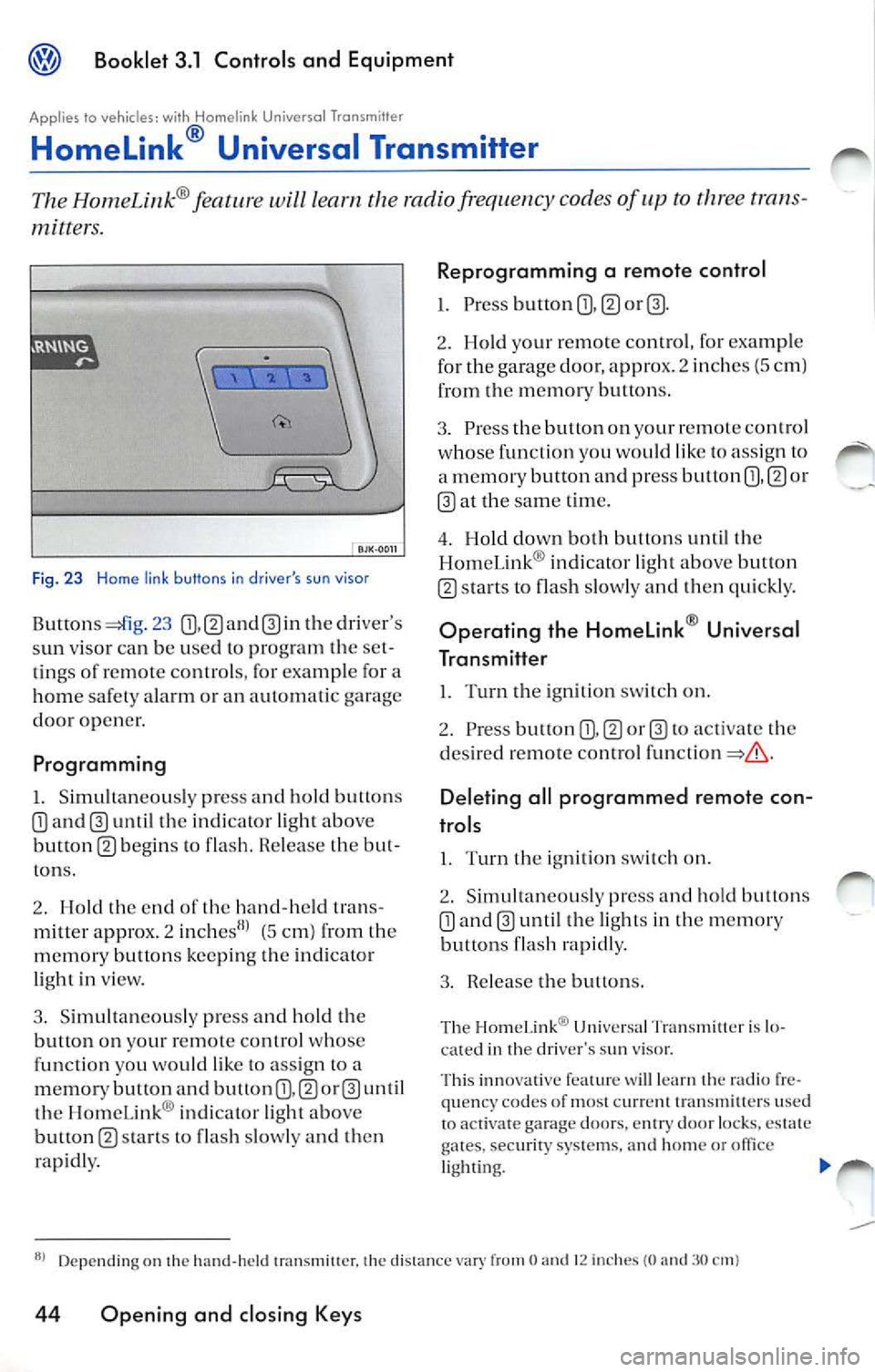
Fig. 23 H ome link buttons in driver 's su n visor
23 th e dr iver 's
s un viso r ca n b e use d to pr ogram th e se t
tin gs of remote co ntrols , for exa mple for a
home safet y ala rm or an automati c garage
door opener.
Programming
I. Simultaneou sly pre ss and hold button s
until the indi cator light above
button m b egins to fla sh. R ele ase the but
ton s.
2. Hold th e end of th e hand-h eld tran s
mitter appro x. 2
(5 cm) from th e
m emo, y butt ons keepi ng th e ind icato r
li gh t in view.
3 . Simult an eously press and hold the
button on your remote control whose
fun ction you wo uld like to ass ign to a
m emor y button and button
th e HomeLink ® indi cator light ab ove
button
s ta rts to flas h slow ly a nd t hen
rap idly.
Reprogramming a remote control
1. Pre ss button m
2. Ho ld your remot e control , fo r exa mple
fo r the garage door, appr ox. 2 inch es (5 c m)
from the m emor y button s.
3. Pre ss the button on yo ur r emot e contro l
w ho se function you would lik e to ass ig n to
a m emory button and press button
or
at the sam e tim e.
4 . Hold down both button s until the
Hom eLin k® indi cator ligh t abo ve but ton
s ta rts to flash slowly and then qui ckly.
Op erating the Homelink ® Universal
Transmitter
l. Turn the ign ition switch on.
2. Press button
to activa te th e
d es ired re mote control
Deleting all programmed remote con
trols
I. Turn th e ig niti on sw itch on.
2 . Sim ultan eo usly pr ess and h old butt ons
until the light s in the m emor y
bu ttons flash rapidly.
3 . Rel ease the butt ons.
Th e Hom eLin k® Uni vers a l Tr an sm ill er is lo
ca ted in th e dri ver's sun viso r.
Thi s inn ova tive fea ture
lea rn radio fr e
qu en cy co des of most c urr clll tran sm itte rs use d
to act iva te g ara ge doors. en try door locks, es tate
gates.
syste ms, and hom e or lighti ng.
Depending on the hand -hel d 1ransmi11cr. the distan ce O 12 in che s (0 3 0
44 Opening and closing Keys
Page 248 of 477
Booklet 3.1 Controls and Equipment
The Homelink ® Universal Tran smill cr is ca
pab le of opera tin g up thr ee se para te ly co n
tro lled dev ices.
Th e HomeLink ® op era tes off
vehicl es bat
t e ry and ch arg ing system and has non volat ile
m em ory . If th e batt ery dies or i s di sco nnecte d ,
l-lom eLink ® will re tain all programmin g.
Trai ning a Garage Door Equipped with Rolling
Cod e
I f a
d oor opene r has bee n progra mmed
b u t doe s not activa te w ith H ome Link®, proc eed
the fo llowin g section: "Training Ga rag e
D oo r Eq uipp ed with Rolling
• and pre ss and r eleas e train ing (o r bu li on on garage door op en er
m otor h ead unit. (Exa ct loca tion and colo r of th e
bu tto n ma y vary by garage door opener bran d.)
I f th ere is difficulty locat ing th e tra in ing bull on,
refe re n ce th e garage doo r opene r O wn er's
manu al o r ca ll toll free:
1-8 00-355-35 15.
• th e veh icle and a nd r elease progra mmed H am el.ink ® ch an nel. Pr ess
a nd release the l-lomeLink ® ch ann el second
t im e comp le te t he prog ram ming pro cess.
(So me ga rage doo r op en ers m ay re quir e you to
d o thi s pro ced ure
third tim e.)
T he garage door ope ner shou ld n ow recog nize
the l-lom eLink ® Univer sal
You may
u se eith er th e ha nd -h eld tran smitt er or the
Homel.ink ® Uni versa l Tran smit te r
to ac tivate ga rag e door.
Acc essor ies
A ccesso ries fo r th e Hom eLi nk ® Un ive rsal Tran s
mill er are ava ilab le thr ough variou s sources.
If yo u wou ld like additi ona l inf orm ati on on
Hom el.ink ®. wh ere to purcha se th e Hom e Lin k®
co mpa tibl e prod ucts, or wo uld like
to p ur cha se
th e 1-lome Link® Hom e Lightin g Packa ge. ple as e
ca ll to ll-free : l-000-355-3515. Certification
Th e re mote contro l d evice complie s w ith
•
model s: Pan 15 of the FCC Rules
• Canad a model s: HS S-2 10 of Indu str y Ca nada.
Opera tion is subj ect
the fo llow ing co nd itions:
• Thi s de vice ma y not ca use an y harm ful int er
f ere nce, and
• Thi s dev ice mu st a ccep t any in te rfe re n ce
tha t ma y be rece ive d includ in g int erfe re n ce
ma y ca use und esire d op erat ion.
• The tra nsmitt er has been tes te d and co m
pli es with FCC and DOC/MDC ru les. C hanges or
m odifi catio ns no t ex pres sly appro ved by th e
res ponsib le for comp lian ce could void the
user 's authori ty to operate the dev ice.
WARNING
Imp roper use of HomeLink ® Univer sal Tr ans
mitter can cause serious person al in jur y.
• Garage doors o perate with enough force to
ca use ser ious perso nal inj ury.
• Neve r le t anyo ne get in th e way of a garage
door when o penin g or closing it.
• Never use th e Ham el.ink® Uni vers al
Tran sm itt er w ith any garage door opener that
do es have not t he sa fety stop and reverse fea
t ure as required by fe d eral safety standards.
T hi s includ es any garage door opener model
manufactur ed befo re Ap ril
I, 1982.
• A garage door o pener wh ic h ca nn ot detec t
a n obj ec t, sig nalin g the door to stop and re
verse docs no t me et c urr ent federa l sa fe ty
standards. Usin g a garage door opener
wit hout the se feat ures inc reases risk of se
rious injury or d ea th.
Tips
F o r m ore informati on, call to ll-free : I (000 ) 355-
35 15 .
Op ening and closing Keys 45
Page 250 of 477
Booklet 3.1 Controls and Equipment @
WARNING
Cras hes a nd oth er acci dcn t s ca n hap pen w hen
yo u cann ot sec the road a head a nd when yo u
ca nn ot b e see n by other m otor is ts.
• Never use day time runn ing ligh ts to sec
w here yo u are goi ng. Th ey a rc no t b right
eno ugh an d w ill n ot let y ou sec fa r eno ugh
a h ea d for safety especia lly a l dusk or w hen it i s
dark. Always sw itch on the low bea m at du sk
or w hen it is dark .
•
t a il li ght s do not ligh t u p w hen da y
tim e runnin g lig ht s arc o n. A ve hicle w ithout
r ear ta il li gh ts turne d on ca nn ot b e see n by
ot hers in b ad wea the r at dusk o r w hen it s d ark .
Applies to ve hicles: with Highline instrument clus ter
WARN ING (continued)
• If aut oma tic head light cont rol is sw itch ed
o n, th e low bea m and w ill n ot be
switc hed on in fog or heavy You have to
sw itc h on t he low bea m using t he light sw itch .
• J\lways tu rn on th e he adli ght s befo re d usk
a n d in ra in or fo g so th at yo u ca n see a head
and so that oth ers can see your vehicl e from
t h e bac k.
Tip s
I f yo u re m ove the key from t he ig n ition lock w ith
t he ligh ls s till on, a b uzze r w iU sou nd when you
o pen
dri ver's door re mi nd yo u turn light s off .
• Always observe loca l o rdin an ces a nd traffi c
regu la tion s w hen using yo ur lights. •
Coming /leaving home function (orientation lighting)
T he comi ng hom e/ leav ing home functio n is ro lled by ligh t sensor.
Coming h om e function
If th e hea dlight s sw itc h
46, is in th e
"Au to ma tic headligh t co ntrol" (AUTO or po
sition whe n the ig n it ion is sw itc hed off an d th e
driver's door is opened and closed,
co ming
h o m e fun ction (sw itc h-off delay) switch es on
th e orientat ion ligh ti n g. The le ngth of
sw itch-o ff delay ca n be adju sted, o r sw itch ed off
co mple te ly, in Lights a nd vis io n 17.
L e a vi ng h om e fu ncl ion
th e ve hicl e is un locked, the leav ing hom e
func tion switch es on orie nt atio n li gh tin g. The lig
htin g is switched off as soo n as t he ign i
t ion is s witched on.
Tips
I f th e co min g home or le aving hom e fu nct ion is
sw itched on, the head ligh ts, s ide mar ke r ligh t,
t ai lli g h t a nd lice nse pla te ligh ts w ill come on.
• If yo u r em ove t he ignitio n key and open t he
dr iver door while the vehicle ligh ts are on , you
w ill not h ear an acoust ic warning if the comi ng
home funct io n is sw itched on.
• You can set th e com ing hom e fu ncti on
s wit ch off delay in th e Lights and vis io n
menu , provid ed yo ur ve hicl e has th is m en u in t he
di spla y.•
Lights and a clear view 47
Page 251 of 477
Booklet 3 .1 Control s and Equipment
Instrument cluster illumination
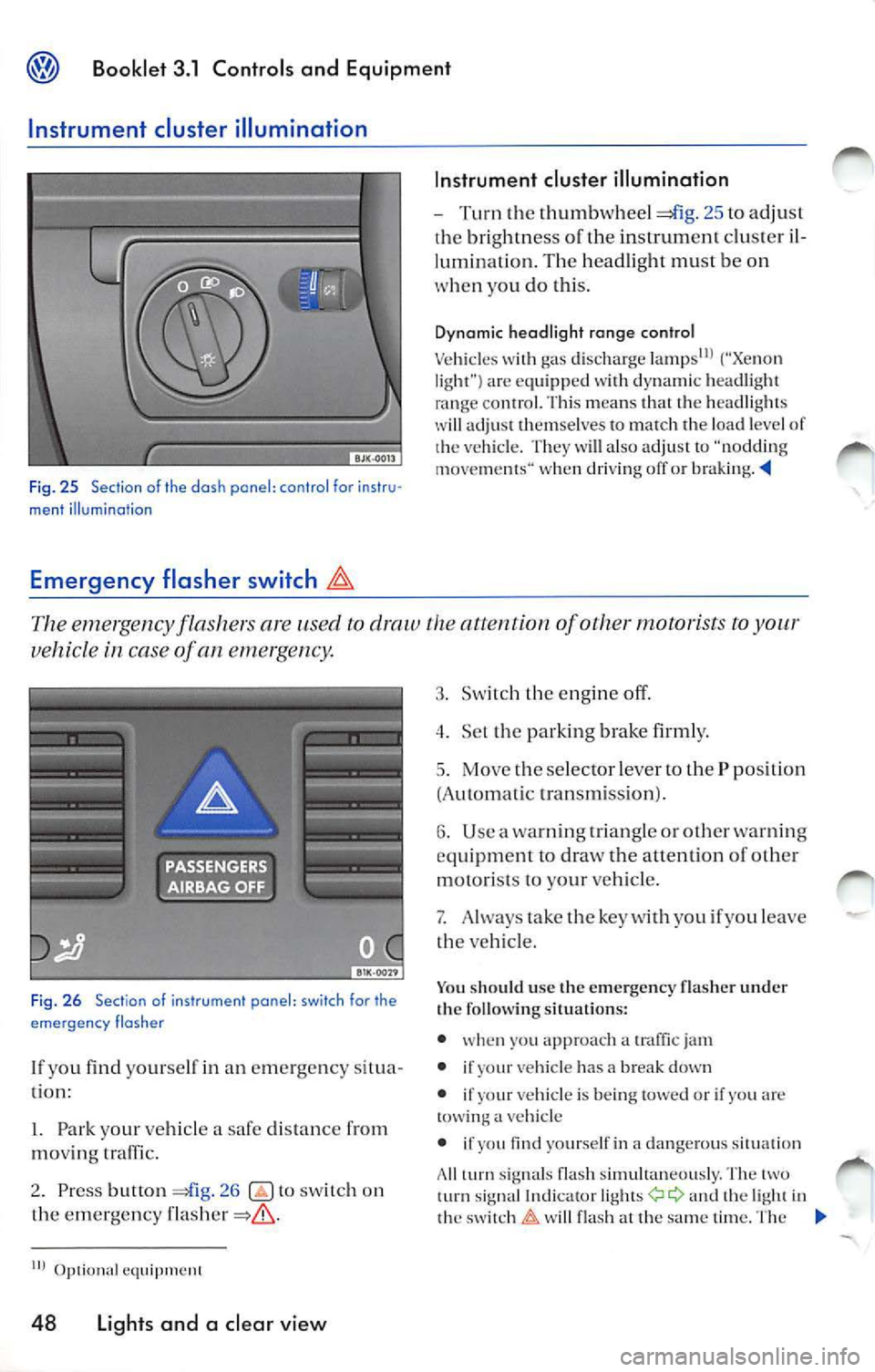
Fig. 25 Section of the dash pane l: co ntr ol fo r instr u·
ment illumination
Emergency flasher switch
In strument cluster illumination
- Turn the thumbwh eel 25 to adju st
bri ghtne ss of the in strum ent clu ste r il
lum inatio n. Th e hea dlig ht mu st be on
w hen yo u do this .
Dyn amic hea dligh t ra nge con tro l
Ve hicl es gas discharge ("Xe non
l ig ht ") are eq uipped wit h dynami c head light
ra nge con trol. Thi s m ea ns th at the head lig ht s
wi ll adju st th em se lves to match th e load leve l of
ve hicl e. T hey will also adju st "noddi ng
m ove ments " when driving off or braking . -'4
The emergency fla sher s are used to draw the attention of other motorists
vehicl e in case of an eme,ge ncy .
Fig . 26 Section of ins trument panel: switch for the
eme rgen cy flasher
lf yo u find yourself in an em erge ncy situ a
tion:
l. Park your ve hicl e a safe distance from
moving traffic.
2. Press button
26 to sw itch on
the emergency
IIJ
48 Light s and a cl ea r vi ew
3. Sw it c h th e eng in e off.
4 . Set th e par king brake firml y.
5. Move t he se lec tor l ever to the P position
(A utomatic transmis sion ).
6. Use a warn ing tr ia ngle or other wa rning
equ ipm en t to draw the allen tion of other
motori sts to y our vehicle.
7. Always take the key with you if you le ave
t h e ve hicle.
Yo u sh oul d use th e em ergency flash er under
the fo llow ing situation s:
• whe n yo u approach a
jam
• if
vehicle has a break down
• if
vehi cle is being tow ed or if yo u arc a vehicle
• if
yourself in a dangero us s itua tion
A ll
sig nal s fla sh simultaneou sly. The turn signal a nd the ligh t in
t h e w ill fla sh at the same time . T he
Page 252 of 477
Booklet 3.1 Controls and Equipment
em erg ency flasher also works when th e ign ition
i s sw itched off .
L'.D, WARNING
A vehicle stalled or stopped on or bes ide a
highway can be st ruck by ot her vehicl es and
increase the risk of se rious per sonal injury.
• Whenever s tall ed or stopp ed fo r repair ,
move th e ve hicl e a safe distan ce off the road,
s top the engine, and turn of the emergency
WARNING (continued)
flash er and use a warning tria ngle or similar
d ev ice to warn approa ching
• Never park the vehicle in areas w here the
h ot cata ly tic con verter and exhaust system
ca n come in contac t w ith dry grass, brush, fu el
s pill or oth er mater ia l that can ca use fire.
Tips
Yo u can disc harge the ve hicle batt ery if yo u le ave
t h e eme rgency flash er on for a Jo ng time
Turn and high beam lever
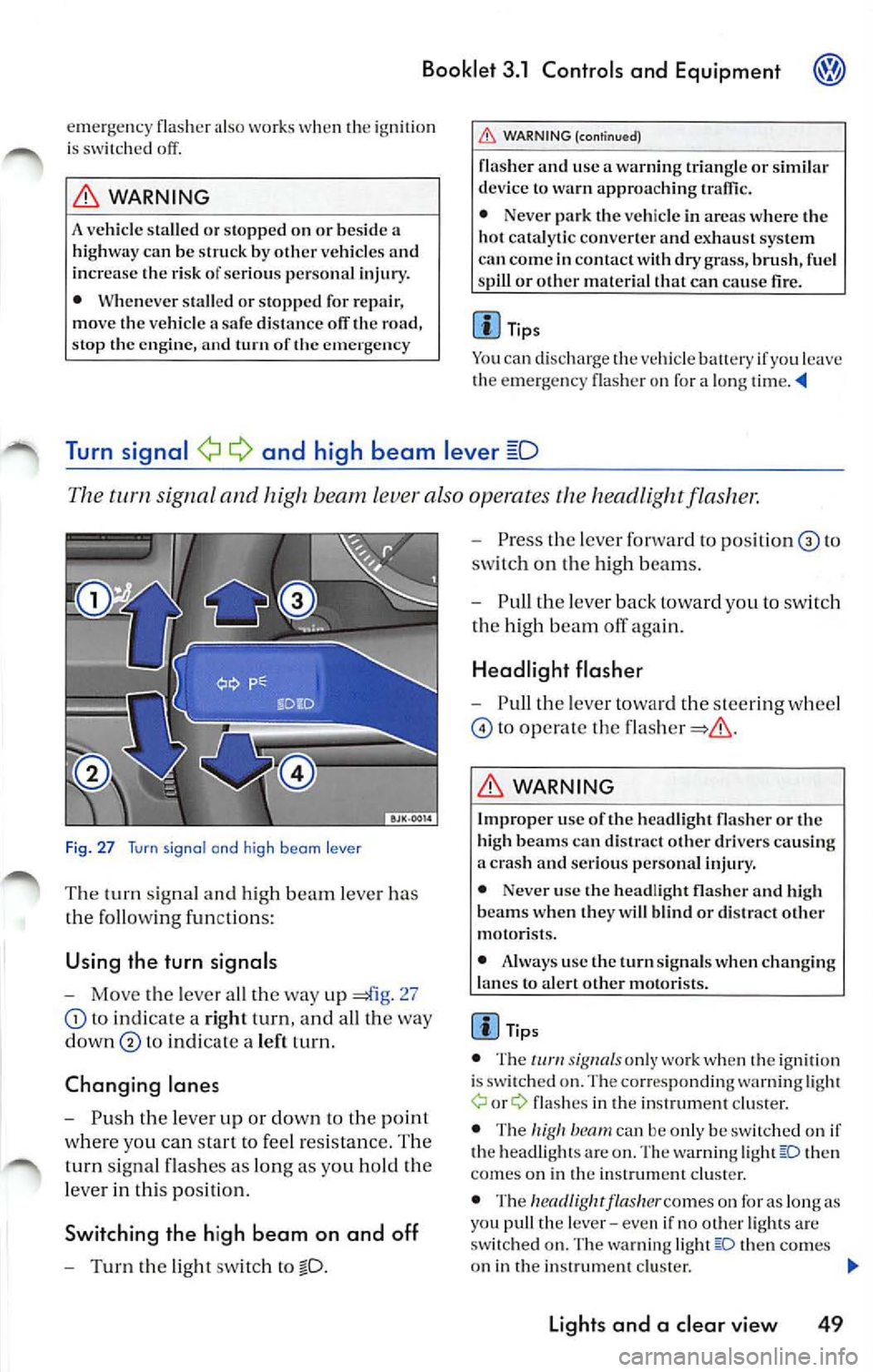
The tum signal and high beam lever also operates the headli ght flashe,:
F ig. 27 Turn signal and high beam lever
The turn sig nal a nd high b eam lever has
rhe follo win g fun ctions:
Using the turn signals
-Mo ve the leve r a ll th e way up 27
to indicate a right turn, and all th e way
down
t o in di cat e a left turn .
Changing lane s
-Push the lever up or down to the point
w here yo u ca n start to feel res is tan ce. The
t u rn sig nal fla sh es as lon g as yo u hold the
l ever in thi s po sit ion.
Switching the h igh beam on and off
- Turn the light sw itch to
- Press th e lever fo rwa rd to po sit io n to
sw itch on the high beam s.
- Pull th e le ver back toward you to swit ch
th e hig h b eam off again.
Headlight flasher
- Pull th e lev er tow ard t he s tee rin g w hee l
to operate the
L'.D, WARNING
I mp roper use of the hea dlight fla sh er or the
hi gh b eams ca n di strac t oth er dri vers ca usin g
a cras h and serio us personal injury.
• Never use the head light flash er and high
bea ms w hen the y w ill bl ind or di stra ct ot her
m otor is ts .
• Always use the turn sig nals when chan gin g
l a n es to al ert ot her motori sts.
Tips
• The signa ls o nl y work w hen the ign ition
i s swi tched on. The co rrespo nding warnin g light
fla sh es in th e in strum ent clust er.
• The
then
co me s on in th e in strum ent clust er.
• The
flasher co mes on for as lon g as
yo u pu ll th e leve r- eve n if no oth er light s are
s w itch ed on. The warning lig ht
th en comes
o n in the instrum ent cluste r.
Light s and a clear view 49
Page 258 of 477
Booklet 3.1 Controls and Equipment
Appl ies to vehicles: wi th headlight washer sys tem
Headlight washer system
The headlight washer system cleans the headlights.
The head lig h t was he rs are activated automati
cally when th e sw itch for the headlig hts is in an y
o th er posit io n th an O and th e windshie ld wip er
l eve r
53, fig. is pull ed toward the
s tee ring whee l for a t le as t 1. 5 sec onds. H oweve r,
yo u sh ou ld reg ularl y remove any hard or drie d
o n dirt or in sec ts from
hea dli ght s, for ex
ample when ever yo u are refu eling your vehicl e.
Mirrors
Tips
Mak e sure th at t he hea dlight washers wo rk
p ro perl y in wint er, keep the nozz le in th e
bump er fre e of sn ow and re m ove any ice with a
d e- ice r spra y
Self-dimming inside day-night mirror
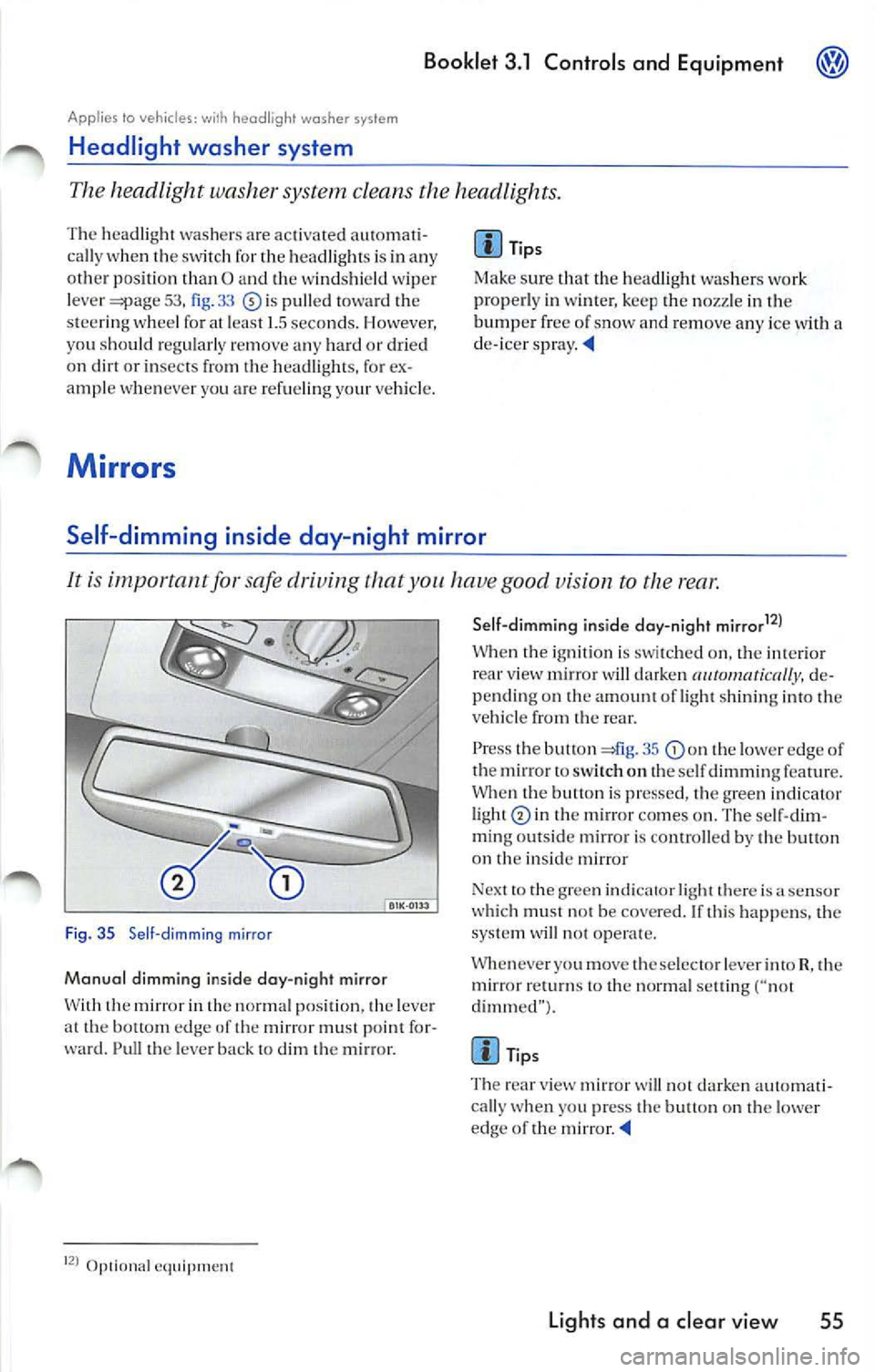
It is important for safe driving that you have good vision to the rear .
Fig. 35 Se ll-dimming mirror
Manual dimming inside day-night mirror
W ith th e mir ror in th e normal p ositi on, the leve r
a t th e bottom edge of th e mirror must point fo r
ward. Pull th e leve r ba ck t o dim
m ir ro r.
Op1ional eq uipment Sell-dimmi
ng inside day-night mirrar
12
)
W hen igni tion is swi tched o n, the int eri or view mirror w ill darken de
pending on amount of light shinin g into veh icle from rear.
P ress the butt on 41g . 35
th e lower edge of
th e mirror to sw itch o n th e se lf dimming featur e.
Whe n the butt on is pr esse d, th e gree n indicat or
li ght
in the m ir ro r co mes on . The se lf-dim
m in g ou ts id e mirror i s conrro lled by th e butl on
on
in side m irror
Nex t to th e g ree n indi cator light there is
sensor
w hi ch mu st not be cove red. If thi s happe ns, the
sys te m will not oper ate.
Whenever you move th e se lec to r le ver into R, th e
mirror
to the normal settin g ("not
dimm ed" ).
Tips
T he rea r view mirror
will not da rken aut oma ti
cally w hen you press the bu tton on t he lowe r
edge of the mirror
Lights and a clear vie w 55